`), so an attacker can't prematurely close the tag or inject fake system instructions through tool output — the boundary is unpredictable per session.
> [!TIP]
> This wrapping mechanism is also available standalone as [Muzzle](https://github.com/RikyZ90/Muzzle), a zero-dependency Python library you can drop into any agent framework (LangChain, LlamaIndex, CrewAI, AutoGen, or a custom loop).
## Memory System
ShibaClaw uses a three-tier memory architecture:
1. **Working memory** (per session) — rolling context with automatic summarization and token-aware truncation
2. **Semantic memory** (cross-session) — FAISS + sentence-transformers vector store with automatic fact extraction and semantic search
3. **Procedural memory** (skills & automations) — learned workflows saved as reusable skills, plus cron-like schedules
Proactive learning extracts and stores useful facts automatically, auto-compaction keeps context from overflowing, and sessions are stored as append-only JSONL for fast, cache-friendly logging.
## MCP & Integrations
ShibaClaw speaks the Model Context Protocol, so it can connect to any MCP-compliant server — Google Drive, Slack, GitHub, PostgreSQL, and more — without changing core code. Configure servers from the Settings panel.
For popular SaaS tools (Gmail, Google Drive, Slack, GitHub, Outlook...), ShibaClaw integrates with [Klavis](https://klavis.ai): one API key gets you one-click OAuth connections instead of manually registering an OAuth app with each provider. Connected apps are auto-registered as MCP servers in the active session.
## Supported Providers
ShibaClaw uses native SDKs — no LiteLLM proxy — and resolves the provider from the selected model or a provider-prefixed model ID. All configured provider catalogs are merged into one searchable list in the WebUI.
**API key**
| Provider | Env variable |
|---|---|
| OpenAI | `OPENAI_API_KEY` |
| Anthropic | `ANTHROPIC_API_KEY` |
| DeepSeek | `DEEPSEEK_API_KEY` |
| Google Gemini | `GEMINI_API_KEY`¹ |
| Groq | `GROQ_API_KEY` |
| Moonshot | `MOONSHOT_API_KEY` |
| MiniMax | `MINIMAX_API_KEY` |
| Zhipu AI | `ZAI_API_KEY` |
| DashScope | `DASHSCOPE_API_KEY` |
¹ Setting `GEMINI_API_KEY` is sufficient — the OpenAI-compatible endpoint is pre-configured.
**Gateway / proxy** — OpenRouter, AiHubMix, SiliconFlow, VolcEngine, BytePlus, auto-detected by key prefix or `api_base`.
**Local** — Ollama, LM Studio, llama.cpp, vLLM, or any OpenAI-compatible endpoint.
> [!NOTE]
> In Docker, `localhost` points inside the container. To reach a local server on the host (LM Studio, Ollama), use `http://host.docker.internal:PORT` on Windows/macOS or `http://172.17.0.1:PORT` on native Linux.
**OAuth**
| Provider | Flow | Setup |
|----------|------|-------|
| OpenRouter | PKCE browser flow, stores returned API key in provider config | WebUI Settings |
| GitHub Copilot | Device flow, auto token refresh | `shibaclaw provider login github-copilot` or WebUI Settings |
| OpenAI Codex | PKCE browser flow | `shibaclaw provider login openai-codex` or WebUI Settings |
| Google Gemini CLI | PKCE browser flow, requires `SHIBACLAW_GEMINI_OAUTH_CLIENT_ID` and `SHIBACLAW_GEMINI_OAUTH_CLIENT_SECRET` env vars. **Note:** Unofficial third-party integration, Google may apply account restrictions. Use a separate account if this is a concern. | WebUI Settings |
For OpenRouter, the callback reuses the current WebUI URL and port by default, so `http://localhost:3000` is not a dedicated OAuth-only port. If you expose the WebUI behind a reverse proxy or need a different public callback origin, set `SHIBACLAW_OPENROUTER_CALLBACK_BASE_URL=https://your-public-webui-host` before starting the server.
### 💡 Pro Tip: Cost-Effective & Premium Models
ShibaClaw performs exceptionally well even without expensive API usage:
- **Free/Open Models:** We highly recommend using **OpenRouter** to access powerful free models like `nvidia/nemotron-3-super-120b-a12b:free` or `gemma-4-31b-it:free`.
- **Unlimited Premium:** If you use the **GitHub Copilot** OAuth integration, you gain access to premium models like `raptor` (`oswe-vscode-prime`) at zero additional cost, effectively giving you unlimited requests.
***
## 📊 How ShibaClaw Compares (Security-First)
> [!NOTE]
> OpenRouter's OAuth callback reuses the current WebUI URL and port. Behind a reverse proxy, set `SHIBACLAW_OPENROUTER_CALLBACK_BASE_URL` before starting the server.
For zero-cost usage, OpenRouter's free tier (e.g. `nvidia/nemotron-3-super-120b-a12b:free`) and the GitHub Copilot OAuth integration (unlimited access to models like `raptor`) both work well without a paid API key.
## Architecture
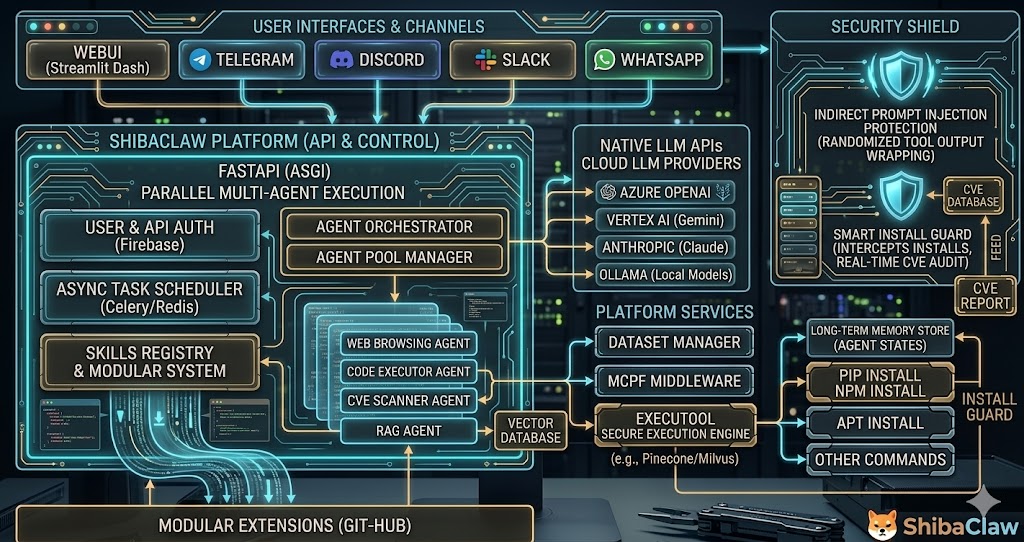
**Docker Compose**
| Service | Role | Default port |
|---|---|---|
| `shibaclaw-gateway` | Core agent loop, message bus, channel integrations | 19999 (HTTP) · 19998 (WS) |
| `shibaclaw-web` | WebUI (Starlette + WebSocket), automations service | 3000 |
Both share the `~/.shibaclaw/` volume (config, workspace, memory, automation jobs, media cache). `shibaclaw web` alone runs agent + WebUI + automations in a single process, no gateway container needed.
**Stack** — Uvicorn/Starlette (ASGI), native WebSocket, vanilla JS + Marked.js + Highlight.js frontend, JSONL append-only sessions.
**Resource usage** — ~120 MB idle / ~350 MB peak per component (gateway, WebUI). Docker Compose caps each container at 512 MB / 256 MB reservation; tool output streams with bounded buffers so long-running commands can't blow up memory.
## CLI Reference
```bash
shibaclaw web # Start WebUI (agent + automations in-process)
shibaclaw gateway # Start gateway only (for Docker split)
shibaclaw onboard # CLI-based first-time setup wizard
shibaclaw agent -m "Hello" # One-shot message via terminal
shibaclaw agent # Interactive REPL with history
shibaclaw status # Provider, workspace, OAuth health check
shibaclaw print-token # Show WebUI auth token
shibaclaw channels status # List enabled channels
shibaclaw provider login # OAuth login (github-copilot, openai-codex)
shibaclaw desktop # Launch Windows desktop app
```
## Channels
| Channel | Type | Notes |
|---|---|---|
| WebUI | Built-in | Primary interface, full feature access |
| Discord | Bot | Rich embeds, slash commands, attachments |
| Telegram | Bot | Inline keyboards, media, reply markup |
| WhatsApp | Plugin | Via WhatsApp Web |
| Slack | Bot | Block kit, threads, app mentions |
| DingTalk | Bot | Enterprise messaging |
| Feishu/Lark | Bot | Rich cards, interactive elements |
| QQ | Bot | Group & private messages |
| WeCom | Bot | Workplace communication |
| Matrix | Bot | Decentralized, E2E encryption |
| MoChat | Bot | WeChat ecosystem |
Each channel is configured independently in WebUI Settings and supports hot-reload on config changes.
## Plugin System
ShibaClaw discovers plugins via Python entry points:
- **Channel plugins** — implement `BaseChannel`, discoverable via `shibaclaw.integrations`
- **TTS plugins** — implement `BaseTTS`, discoverable via `shibaclaw.tts`
Built-in: `shibaclaw-channel-whatsapp` (WhatsApp Web) and `shibaclaw-tts-supertonic` (free, offline ONNX speech synthesis, 31 languages). Install or remove plugins from WebUI Settings > Plugins, with hot-reload and version pinning. See [`docs/PLUGINS_DEVELOPMENT_GUIDE.md`](./docs/PLUGINS_DEVELOPMENT_GUIDE.md) to build your own.
## Text-to-Speech
The built-in Supertonic engine runs offline on ONNX (no PyTorch dependency, CPU-only), supports 31 languages with `F1`/`M1` voice profiles and adjustable speed, and plays back through an in-browser widget. Enable it in WebUI Settings > TTS.
## Automation & Scheduling
Background tasks run on cron-like schedules or event triggers (messages, webhooks, system events), in isolated sessions that don't pollute chat history. Manage, monitor, and view logs from the Automations panel; jobs persist across restarts via JSONL storage.
## Knowledge Base (RAG)
Local, privacy-first retrieval-augmented generation: organize documents into named collections (PDF, CSV, HTML, TXT, Markdown), upload via drag-and-drop, and search with a FAISS index over `all-MiniLM-L6-v2` embeddings. The agent can call `knowledge_search` during conversation, or you can target a specific collection with `@kb:name`. It's an optional dependency — install with `pip install shibaclaw[rag]`.
## Troubleshooting
| Problem | Try |
|---|---|
| General status check | `shibaclaw status` |
| Container logs | `docker logs shibaclaw-gateway` / `docker logs shibaclaw-web` |
| WebUI won't connect | Check token with `shibaclaw print-token`, verify port binding |
| Provider errors | `shibaclaw status` shows API key and OAuth state |
| Login fails after upgrading from v0.9.5 | Run `shibaclaw reset-admin` |
| Security policy | [`SECURITY.md`](./SECURITY.md) |
---
See CONTRIBUTING.md to contribute and CHANGELOG.md for release history.