
### A lean, ROS-free Sim-to-Real framework for training and deploying Vision-Language-Action (VLA) models and Reinforcement Learning (RL) agents.
[](https://robotcontrolstack.org)
[](https://robotcontrolstack.github.io/)
[](https://github.com/RobotControlStack/robot-control-stack/releases)
[](https://github.com/RobotControlStack/robot-control-stack/blob/main/LICENSE)
[](https://github.com/RobotControlStack/robot-control-stack/actions)
---
**Robot Control Stack (RCS)** is a flexible, native [Gymnasium](https://gymnasium.farama.org/) wrapper-based robot control interface designed specifically for modern robot learning and Vision-Language-Action (VLA) models.

It completely unifies **MuJoCo simulation** and real-world physical robot control into a single, seamless API. Currently, RCS natively supports six robots out-of-the-box: **Franka FR3/Panda, xArm7, UR5e, SO101, I2RT YAM, and Flexiv Rizon 4s.**
## 🚀 Why use Robot Control Stack?
Traditional robotics middleware (like ROS/ROS2) and complex motion planning pipelines (like MoveIt or standard `ros2_control`) are built for asynchronous, distributed systems. This often becomes a massive bottleneck when attempting to train modern, synchronous machine learning models.
**RCS is built differently:**
* **Zero ROS Overhead:** No complex message-passing, middleware, or network configuration required. Run natively in Python with a lightweight C++ backend.
* **Frictionless Sim-to-Real:** Train your Reinforcement Learning or VLA policies in our MuJoCo Gymnasium wrapper, and deploy the *exact same code* directly to physical hardware.
* **Synchronous Execution:** Optimized specifically for the highly parallelized, synchronous data collection required by modern ML workflows.
* **Ready-to-Use Apps:** Ships with pre-built applications for data collection via teleoperation and remote model inference via [vlagents](https://github.com/RobotControlStack/vlagents). See the [teleoperation guide](examples/teleop/README.md), and [inference guide](examples/inference/README.md).
## 🧩 Wrapper-Based Architecture
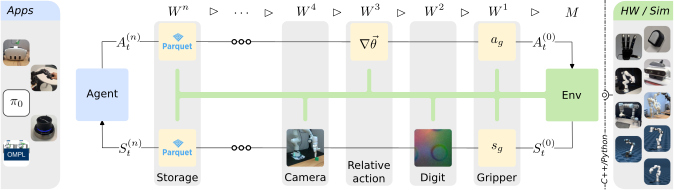
RCS utilizes a highly modular, wrapper-based architecture, allowing you to easily stack capabilities (cameras, grippers, action spaces) as needed.
 ## 💻 Example: Composing your Environment
Flexibly compose your Gymnasium environment to fit your exact training needs. *For common environment compositions, factory functions such as `rcs.envs.creators.SimEnvCreator` are provided.*
```python
from time import sleep
import gymnasium as gym
import numpy as np
from rcs._core.sim import SimConfig
from rcs.camera.sim import SimCameraSet
from rcs.envs.base import (
CameraSetWrapper,
ControlMode,
CoverWrapper,
GripperWrapper,
RelativeActionSpace,
RelativeTo,
RobotWrapper,
SimEnv,
)
from rcs.envs.configs import EmptyWorldFR3
from rcs.envs.sim import GripperWrapperSim, RobotSimWrapper
import rcs
from rcs import sim
if __name__ == "__main__":
# default configs
scene = EmptyWorldFR3()
cfg = scene.prefixed_cfg(scene.config())
fr3 = scene.lead_robot_name(cfg)
robot_cfg = cfg.robot_cfgs[fr3]
gripper_cfg = cfg.gripper_cfgs[fr3] # type: ignore
camera_cfgs = cfg.camera_cfgs
sim_cfg = SimConfig(
realtime=True,
async_control=True,
frequency=1, # in Hz (1 sec delay)
)
mjmodel = scene.create_model(cfg)
kinematic_model_path, attachment_site = scene.kinematics_cfg(cfg)[fr3]
simulation = sim.Sim(mjmodel, sim_cfg)
ik = rcs.common.Pin(
kinematic_model_path,
attachment_site,
joint_limits=robot_cfg.joint_limits,
)
# base env
robot = rcs.sim.SimRobot(simulation, ik, robot_cfg)
env: gym.Env = SimEnv(simulation)
env = RobotWrapper(env, robot, ControlMode.CARTESIAN_TQuat)
# gripper
gripper = sim.SimGripper(simulation, gripper_cfg)
env = GripperWrapper(env, gripper)
env = RobotSimWrapper(env)
env = GripperWrapperSim(env)
# camera
camera_set = SimCameraSet(simulation, camera_cfgs, physical_units=True, render_on_demand=True) # type: ignore
env = CameraSetWrapper(env, camera_set, include_depth=True) # type: ignore
# relative actions bounded by 10cm translation and 10 degree rotation
env = RelativeActionSpace(env, max_mov=(0.1, np.deg2rad(10)), relative_to=RelativeTo.LAST_STEP)
env = CoverWrapper(env)
env.get_wrapper_attr("sim").open_gui()
# wait for gui to open
sleep(1)
env.reset()
# access low level robot api to get current cartesian position
print(env.get_wrapper_attr("robot").get_cartesian_position())
for _ in range(10):
# move 1cm in x direction (forward) and close gripper
act = {"tquat": [0.01, 0, 0, 0, 0, 0, 1], "gripper": [0]}
obs, reward, terminated, truncated, info = env.step(act)
print(obs)
```
> **Note:** This and other examples can be found in the [`examples/`]() folder.
## 🛠️ Installation
* *Platform support: The core package `rcs-core` (MuJoCo simulation + Python API) is supported on **Linux and macOS** (Apple Silicon / arm64). The hardware extensions are **Linux only**.*
* *For Python >3.11: The `rcs_realsense` extension won't work due to the `pyrealsense2` version RCS utilizes.*
* *For Python >3.12: The `ompl` python module is currently not available on PyPI. If OMPL is not used, it is safe to remove this dependency in `pyproject.toml`.*
### Via PyPI/pip
```shell
pip install rcs-core
```
### From Source
Make sure that common build tools (i.e., `build-essential`), python headers and a C++ compiler like `gcc` or `clang` are installed on your system/conda/docker.
*RCS works best in Python 3.11, and all extensions have been tested to work in 3.11.*
```shell
# clone repository
git clone https://github.com/RobotControlStack/robot-control-stack.git
cd robot-control-stack
# setup environment
conda create -n rcs python=3.11
conda activate rcs
conda install -c conda-forge urdfdom urdfdom_headers glfw
# or sudo apt install $(cat debian_deps.txt)
pip install 'pip>=25.1'
pip install --group build_deps
# install rcs
pip install -ve . --no-build-isolation
```
### RCS Asset Cache
RCS resolves its asset directory from the `RCS_PREFIX` environment variable. When it is unset, RCS defaults to `~/.rcs`.
On import, RCS checks whether that path contains the assets of the installed RCS version (recorded in `assets/.version`). If not, it downloads the matching asset archive from GitHub into that location automatically, replacing assets of other versions. An `RCS_PREFIX` with an `assets` directory but without a version file, e.g. a source checkout, is used as it is.
```shell
export RCS_PREFIX=/path/to/rcs-assets
```
## 🦾 Hardware Extensions
RCS supports various hardware extensions to seamlessly connect your policies to the real world (e.g., FR3, xArm7, YAM, RealSense). These are located in the `extensions` directory.
> **Note:** Hardware extensions are supported on **Linux only**. On macOS you can use the core `rcs-core` package for simulation, but the hardware extensions are not supported.
To install a specific robot extension (example for Franka FR3):
```shell
sudo apt install $(cat extensions/rcs_fr3/debian_deps.txt)
pip install rcs-fr3
# or install it locally
pip install -ve extensions/rcs_fr3
```
For a full list of extensions and detailed documentation, visit **[robotcontrolstack.org/extensions](https://robotcontrolstack.org/extensions)**.
## ⚠️ Troubleshooting & FAQ
* **License error or group argument not found during installation?** Make sure you are using a pip version `>=25.1` and setuptools version `>=45`.
* **Dependency error during installation?** Make sure you are using Python 3.11. RCS extensions currently do not support 3.12+ due to OMPL and RealSense dependencies.
* **Simulation is running too slow?** Check that you have enable on-demand rendering: `SimCameraSet(..., render_on_demand=True)` to render camera frames only once per step. Resolution and number of cameras in the scene has a large impact on simulation speed. Make sure to use a decent GPU when rendering is enabled.
## 📚 Documentation
For full documentation, including advanced installation, modular usage, and API references, please visit:
👉 **[robotcontrolstack.org](https://robotcontrolstack.org)**
Useful quick-reference pages:
- **[RCS Conventions](https://robotcontrolstack.org/user_guide/conventions)** for quaternion order, frames, Euler angles, and gripper semantics
- **[Sim Scene Configuration](https://robotcontrolstack.org/user_guide/scene_configuration)** for `SimEnvCreatorConfig`, scene frames, and example setup patterns
- **[Apps](https://robotcontrolstack.org/apps/index)** for the teleoperation and inference example entry points
- **[libfranka Version Info](https://robotcontrolstack.org/extensions/libfranka_versions)** for the currently pinned `rcs_fr3` and `rcs_panda` `libfranka` versions and local-install guidance
## 🤝 Contribution
We welcome contributions from the robotics and ML community! For contribution guidelines, please check out **[robotcontrolstack.org/contributing](https://robotcontrolstack.org/contributing)**.
## 📝 Citation
If you find RCS useful for your academic work please consider citing it:
```bibtex
@inproceedings{juelg2026robotcontrolstack,
title={{Robot Control Stack}: {A} Lean Ecosystem for Robot Learning at Scale},
author={Tobias J{\"u}lg and Pierre Krack and Seongjin Bien and Yannik Blei and Khaled Gamal and Ken Nakahara and Johannes Hechtl and Roberto Calandra and Wolfram Burgard and Florian Walter},
year={2026},
booktitle={Proc.~of the IEEE Int.~Conf.~on Robotics \& Automation (ICRA)},
note={Accepted for publication.}
}
```
For more scientific information and supplementary videos, visit the **[paper website](https://robotcontrolstack.github.io/)**.
## License
The RCS source code is licensed under AGPL-3.0. A small subset of redistributed third-party robot and sensor assets under `assets/` keeps its original upstream license; the applicable notices are collected in [THIRD_PARTY_ASSET_LICENSES.md](THIRD_PARTY_ASSET_LICENSES.md).
## 💻 Example: Composing your Environment
Flexibly compose your Gymnasium environment to fit your exact training needs. *For common environment compositions, factory functions such as `rcs.envs.creators.SimEnvCreator` are provided.*
```python
from time import sleep
import gymnasium as gym
import numpy as np
from rcs._core.sim import SimConfig
from rcs.camera.sim import SimCameraSet
from rcs.envs.base import (
CameraSetWrapper,
ControlMode,
CoverWrapper,
GripperWrapper,
RelativeActionSpace,
RelativeTo,
RobotWrapper,
SimEnv,
)
from rcs.envs.configs import EmptyWorldFR3
from rcs.envs.sim import GripperWrapperSim, RobotSimWrapper
import rcs
from rcs import sim
if __name__ == "__main__":
# default configs
scene = EmptyWorldFR3()
cfg = scene.prefixed_cfg(scene.config())
fr3 = scene.lead_robot_name(cfg)
robot_cfg = cfg.robot_cfgs[fr3]
gripper_cfg = cfg.gripper_cfgs[fr3] # type: ignore
camera_cfgs = cfg.camera_cfgs
sim_cfg = SimConfig(
realtime=True,
async_control=True,
frequency=1, # in Hz (1 sec delay)
)
mjmodel = scene.create_model(cfg)
kinematic_model_path, attachment_site = scene.kinematics_cfg(cfg)[fr3]
simulation = sim.Sim(mjmodel, sim_cfg)
ik = rcs.common.Pin(
kinematic_model_path,
attachment_site,
joint_limits=robot_cfg.joint_limits,
)
# base env
robot = rcs.sim.SimRobot(simulation, ik, robot_cfg)
env: gym.Env = SimEnv(simulation)
env = RobotWrapper(env, robot, ControlMode.CARTESIAN_TQuat)
# gripper
gripper = sim.SimGripper(simulation, gripper_cfg)
env = GripperWrapper(env, gripper)
env = RobotSimWrapper(env)
env = GripperWrapperSim(env)
# camera
camera_set = SimCameraSet(simulation, camera_cfgs, physical_units=True, render_on_demand=True) # type: ignore
env = CameraSetWrapper(env, camera_set, include_depth=True) # type: ignore
# relative actions bounded by 10cm translation and 10 degree rotation
env = RelativeActionSpace(env, max_mov=(0.1, np.deg2rad(10)), relative_to=RelativeTo.LAST_STEP)
env = CoverWrapper(env)
env.get_wrapper_attr("sim").open_gui()
# wait for gui to open
sleep(1)
env.reset()
# access low level robot api to get current cartesian position
print(env.get_wrapper_attr("robot").get_cartesian_position())
for _ in range(10):
# move 1cm in x direction (forward) and close gripper
act = {"tquat": [0.01, 0, 0, 0, 0, 0, 1], "gripper": [0]}
obs, reward, terminated, truncated, info = env.step(act)
print(obs)
```
> **Note:** This and other examples can be found in the [`examples/`]() folder.
## 🛠️ Installation
* *Platform support: The core package `rcs-core` (MuJoCo simulation + Python API) is supported on **Linux and macOS** (Apple Silicon / arm64). The hardware extensions are **Linux only**.*
* *For Python >3.11: The `rcs_realsense` extension won't work due to the `pyrealsense2` version RCS utilizes.*
* *For Python >3.12: The `ompl` python module is currently not available on PyPI. If OMPL is not used, it is safe to remove this dependency in `pyproject.toml`.*
### Via PyPI/pip
```shell
pip install rcs-core
```
### From Source
Make sure that common build tools (i.e., `build-essential`), python headers and a C++ compiler like `gcc` or `clang` are installed on your system/conda/docker.
*RCS works best in Python 3.11, and all extensions have been tested to work in 3.11.*
```shell
# clone repository
git clone https://github.com/RobotControlStack/robot-control-stack.git
cd robot-control-stack
# setup environment
conda create -n rcs python=3.11
conda activate rcs
conda install -c conda-forge urdfdom urdfdom_headers glfw
# or sudo apt install $(cat debian_deps.txt)
pip install 'pip>=25.1'
pip install --group build_deps
# install rcs
pip install -ve . --no-build-isolation
```
### RCS Asset Cache
RCS resolves its asset directory from the `RCS_PREFIX` environment variable. When it is unset, RCS defaults to `~/.rcs`.
On import, RCS checks whether that path contains the assets of the installed RCS version (recorded in `assets/.version`). If not, it downloads the matching asset archive from GitHub into that location automatically, replacing assets of other versions. An `RCS_PREFIX` with an `assets` directory but without a version file, e.g. a source checkout, is used as it is.
```shell
export RCS_PREFIX=/path/to/rcs-assets
```
## 🦾 Hardware Extensions
RCS supports various hardware extensions to seamlessly connect your policies to the real world (e.g., FR3, xArm7, YAM, RealSense). These are located in the `extensions` directory.
> **Note:** Hardware extensions are supported on **Linux only**. On macOS you can use the core `rcs-core` package for simulation, but the hardware extensions are not supported.
To install a specific robot extension (example for Franka FR3):
```shell
sudo apt install $(cat extensions/rcs_fr3/debian_deps.txt)
pip install rcs-fr3
# or install it locally
pip install -ve extensions/rcs_fr3
```
For a full list of extensions and detailed documentation, visit **[robotcontrolstack.org/extensions](https://robotcontrolstack.org/extensions)**.
## ⚠️ Troubleshooting & FAQ
* **License error or group argument not found during installation?** Make sure you are using a pip version `>=25.1` and setuptools version `>=45`.
* **Dependency error during installation?** Make sure you are using Python 3.11. RCS extensions currently do not support 3.12+ due to OMPL and RealSense dependencies.
* **Simulation is running too slow?** Check that you have enable on-demand rendering: `SimCameraSet(..., render_on_demand=True)` to render camera frames only once per step. Resolution and number of cameras in the scene has a large impact on simulation speed. Make sure to use a decent GPU when rendering is enabled.
## 📚 Documentation
For full documentation, including advanced installation, modular usage, and API references, please visit:
👉 **[robotcontrolstack.org](https://robotcontrolstack.org)**
Useful quick-reference pages:
- **[RCS Conventions](https://robotcontrolstack.org/user_guide/conventions)** for quaternion order, frames, Euler angles, and gripper semantics
- **[Sim Scene Configuration](https://robotcontrolstack.org/user_guide/scene_configuration)** for `SimEnvCreatorConfig`, scene frames, and example setup patterns
- **[Apps](https://robotcontrolstack.org/apps/index)** for the teleoperation and inference example entry points
- **[libfranka Version Info](https://robotcontrolstack.org/extensions/libfranka_versions)** for the currently pinned `rcs_fr3` and `rcs_panda` `libfranka` versions and local-install guidance
## 🤝 Contribution
We welcome contributions from the robotics and ML community! For contribution guidelines, please check out **[robotcontrolstack.org/contributing](https://robotcontrolstack.org/contributing)**.
## 📝 Citation
If you find RCS useful for your academic work please consider citing it:
```bibtex
@inproceedings{juelg2026robotcontrolstack,
title={{Robot Control Stack}: {A} Lean Ecosystem for Robot Learning at Scale},
author={Tobias J{\"u}lg and Pierre Krack and Seongjin Bien and Yannik Blei and Khaled Gamal and Ken Nakahara and Johannes Hechtl and Roberto Calandra and Wolfram Burgard and Florian Walter},
year={2026},
booktitle={Proc.~of the IEEE Int.~Conf.~on Robotics \& Automation (ICRA)},
note={Accepted for publication.}
}
```
For more scientific information and supplementary videos, visit the **[paper website](https://robotcontrolstack.github.io/)**.
## License
The RCS source code is licensed under AGPL-3.0. A small subset of redistributed third-party robot and sensor assets under `assets/` keeps its original upstream license; the applicable notices are collected in [THIRD_PARTY_ASSET_LICENSES.md](THIRD_PARTY_ASSET_LICENSES.md).