




This firmware is a fork of all Flipper Zero community projects! We are NOT paywalled. I will keep RM Custom Firmware the most cutting-edge with active development and updates from all projects that can be found to be useful to the community. Although there are features exclusive to this firmware, there are also many updates by the rest of the Flipper Zero community. With the help of the entire community, we get the best firmware! See the RM Games and Plugins for a list of most of those projects.
Discord - Build - Install Instructions - More Links And How To - All Changes from OFW - Support RM Custom Firmware - Patreon | This software is for experimental purposes only and is not meant for any illegal activity/purposes. We do not condone illegal activity and strongly encourage keeping transmissions to legal/valid uses allowed by law. |
|---|
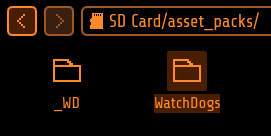 You can easily create your own pack, or find RM Asset Packs HERE, or find some community-made ones on the MNTM website or on Discord. Check here for a tutorial on creating your own. Essentially, each
 Asset Pack can configure its own Anims, Icons & Fonts.
 Once you have some asset packs, upload them to your Flipper in
 SD/asset_packs (if you did this right you should see SD/asset_packs/PackName/Anims and/or SD/asset_packs/PackName/Icons). Alternatively, install directly using the website.
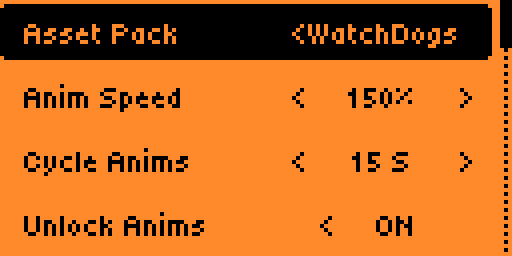
 After installing the packs to Flipper, hit the
 Arrow Up button on the main menu and go to CFW Settings > Interface > Graphics. Here choose which asset pack you want and tweak the other settings how you prefer, then exit the app to reboot and enjoy your fully customized Flipper!
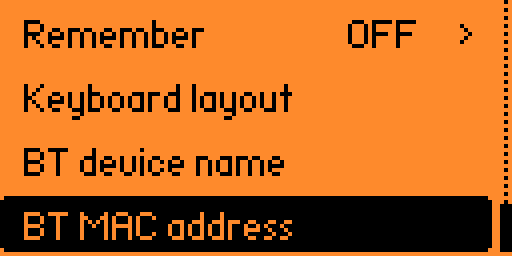 BadUSB is a great app, but it lacks a lot of options. Bad-KB allows you to customize all USB and Bluetooth parameters for your attacks.
In Bluetooth mode it allows you to spoof the display name and MAC address of the device to whatever you want. Showing up as a portable speaker or a wireless keyboard is easily doable, allowing you to get the attention of your target without needing a cable at hand.
In USB mode it also enables additional functionality to spoof the manufacturer and product names, as well as vendor and product IDs (VID/PID).
BadUSB is a great app, but it lacks a lot of options. Bad-KB allows you to customize all USB and Bluetooth parameters for your attacks.
In Bluetooth mode it allows you to spoof the display name and MAC address of the device to whatever you want. Showing up as a portable speaker or a wireless keyboard is easily doable, allowing you to get the attention of your target without needing a cable at hand.
In USB mode it also enables additional functionality to spoof the manufacturer and product names, as well as vendor and product IDs (VID/PID).
Web Updater (Chrome)Connect and select your Flipper from the listChannel you prefer from the dropdownInstall and wait for the update to completeFlipper Lab/App (chrome/mobile)☁️ Flipper Lab/App (chrome/mobile) linkConnect and select your Flipper from the listInstall and wait for the update to completeqFlipper Package (.tgz)WebUpdater and lab.flipper.net are closedInstall from fileZipped Archive (.zip)SD/update and simply move the firmware folder thereArrow Down button, this will get you to the file menu. In there simply search for your updates folderUpdate