# Roomote
**A cloud coding agent you deploy in minutes and actually own.**
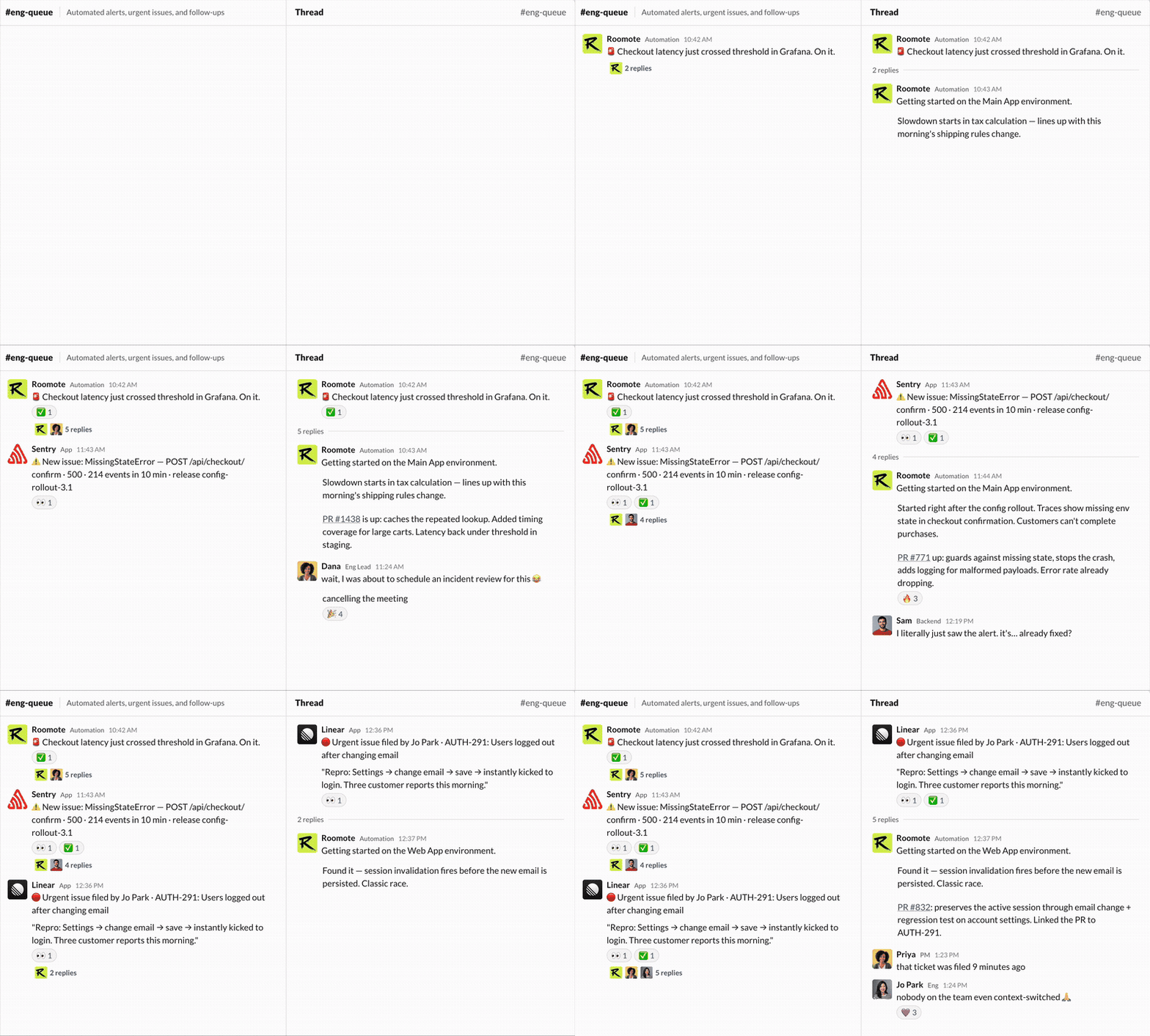
You give it a task in Slack (or Teams, or Telegram, or Discord). It clones your
repo into an isolated sandbox, writes the code, runs the tests, takes a
screenshot, and opens a PR. You review the diff like you would from any teammate.
No IDE plugin. No terminal session. No babysitting. It works while you do
something else, all the way.
```
"Fix the 500 on /api/billing for annual plans"
→ Roomote picks up the task
→ spins up a sandbox with your full repo
→ finds the bug, writes a fix, runs the test suite
→ opens a PR with a screenshot of the working page
→ you review, merge, done
```
Source-available. Self-hostable or our Cloud. Use your ChatGPT subscription or bring your own
API keys.


 ---
## How it works (60-second mental model)
Roomote is a full-stack application, not an extension or a wrapper. It connects
to the tools you already use and runs agents in throwaway sandboxes.
```
┌────────────────────────────────────────────────────────────────────┐
│ You (in Slack / Teams / Telegram / Discord / Web UI) │
│ "Add dark mode to the settings page" │
└───────────────────────────────┬────────────────────────────────────┘
│
▼
┌────────────────────────────────────────────────────────────────────┐
│ Roomote │
│ │
│ ┌─────────────┐ ┌────────────────┐ ┌──────────────────┐ │
│ │ Your models │ │ Your repo │ │ Your tools │ │
│ │ (BYOK) │ │ (GitHub, │ │ (Linear, Sentry, │ │
│ │ OpenRouter, │ │ GitLab, │ │ Notion, Jira, │ │
│ │ Anthropic, │ │ Gitea, │ │ Grafana, │ │
│ │ OpenAI, … │ │ Azure DevOps, │ │ PostHog, Figma, │ │
│ │ │ │ Bitbucket) │ │ etc.) │ │
│ └──────┬──────┘ └────────┬───────┘ └─────────┬────────┘ │
│ │ │ │ │
│ └───────────────────┼─────────────────────┘ │
│ ▼ │
│ ┌─────────────────────────────────────────────────────────┐ │
│ │ Ephemeral sandbox (Modal, E2B, Daytona, Blaxel, Docker) │ │
│ │ │ │
│ │ clone repo → make changes → run tests → screenshot │ │
│ │ → push branch → open PR │ │
│ └─────────────────────────────────────────────────────────┘ │
└────────────────────────────────────────────────────────────────────┘
│
▼
Pull request with diff, screenshots, and a live preview URL
```
Every task gets its own sandbox. Nothing touches your local machine. The agent
cleans up after itself.
### Supported providers
**Inference:** Two ways to connect models.
1. **ChatGPT subscription.** Already paying for ChatGPT Plus or Pro? Connect
your account directly. No API key needed, no separate billing. Roomote uses
the models included in your subscription.
2. **API keys (BYOK).** Paste a key from OpenRouter, Anthropic, OpenAI, xAI,
Google Gemini, Amazon Bedrock, Vercel AI Gateway,
Baseten, Together AI, Moonshot AI (Kimi), Kimi for Coding, MiniMax,
Z.AI (including Coding Plan), OpenCode Zen / Go, or GitHub Copilot.
**Sandbox compute:** Modal, E2B, Daytona, Blaxel, and Local Docker.
**Source control:** GitHub, GitLab, Gitea, Azure DevOps, and Bitbucket Cloud.
---
## Five-minute quickstart
Pick one path. You will have a working Roomote instance at the end.
### Roomote Cloud (fastest, ~2 min)
Don't want to run infrastructure? We'll host your deployment: free 7-day trial, no credit card. Same single-tenant product — your own isolated instance, connect your ChatGPT subscription or bring an API key. Move to self-hosting anytime. [Start free →](https://cloud.roomote.dev/sign-up)
### One-click deploy (Railway)
New to Railway? [Sign up with our referral link](https://railway.com?referralCode=roomote)
to get $20 in credit.
1. [Use the template](https://railway.com/deploy/Rj2cFo?referralCode=roomote)
2. Railway provisions Postgres, Redis, and the app.
3. Open the setup link Railway gives you. Configure your communication, source control and inference providers.
4. Connect your sandbox provider.
5. Open Slack/Telegram/Discord/Teams, send Roomote a message and you're off.
You now have a working cloud coding agent. Total time: ~6 minutes.
### One-click deploy (Render)
1. [Use the template](https://render.com/deploy?repo=https://github.com/RooCodeInc/Roomote)
2. Render provisions Postgres, Redis, and the app.
3. Open the setup link Render gives you. Configure your communication, source control and inference providers.
4. Connect your sandbox provider.
5. Open Slack/Telegram/Discord/Teams, send Roomote a message and you're off.
### Self-host on your own server
SSH into a fresh Ubuntu/Debian machine (4 GB RAM recommended) and run:
```sh
curl -fsSL https://get.roomote.dev | sudo bash
```
The installer handles Docker, secrets, and the Compose stack. It prints a setup
link when it finishes. Follow the on-screen instructions, then send a test
message.
For production, point DNS at your server and pass `--domain roomote.example.com`.
See also: [Coolify](deploy/coolify/README.md) and [Fly.io](deploy/fly/README.md)
for more deployment guides.
---
## What can it do?
Roomote handles the work that pulls you off your main project:
- **Fix bugs.** Paste an error, a Sentry link, or a stack trace. It reads the
code, reproduces the issue in its sandbox, writes a fix, and opens a PR.
- **Answer codebase questions.** "How does auth work?" or "Where is the
billing logic?" It reads the code and gives you a real answer.
- **Handle chores.** Dependency upgrades, linter fixes, config changes,
migration files, boilerplate.
- **Build small features.** "Add a dark mode toggle to settings." It writes the
code, runs the app, takes a screenshot, and opens a PR with a preview link.
- **Start from scratch.** Create an empty GitHub repository from Roomote, then
start a session and let Roomote build the project in an isolated environment.
- **Triage issues.** Connect Linear, Jira, or GitHub Issues. It reads new
tickets, asks clarifying questions, and starts working.
It connects to dozens of tools (Sentry, Grafana, PostHog, Notion, Figma, and
more) so it can read logs, check dashboards, and pull context without you
copy-pasting.
---
## Why self-host a coding agent?
- **Your code stays on your infrastructure.** No repo access leaves your
network.
- **Use what you already pay for.** Connect your ChatGPT subscription directly,
or bring API keys from any supported provider. Switch models per task. No
markup on tokens.
- **Read every line.** The full source is here. Audit it, extend it, fork it.
- **No per-seat SaaS pricing.** Free for up to 10 users. Need more? [Buy a
self-hosted license on Roomote Cloud](https://cloud.roomote.dev/sign-up).
---
## Teams and organizations
Roomote is multiplayer by default. When someone starts a session, the whole
team can follow the conversation, delegated work, and resulting PR.
Features that matter at scale:
- **Parallel agents.** Run multiple tasks at the same time across different
repos.
- **Shared context.** Agents learn your codebase conventions, test patterns,
and deploy process.
- **Audit trail.** Every action is logged: which model was used, what tools
were called, what code was written.
- **Web UI.** Consumer-grade dashboard for following sessions, reviewing task
output, and configuring integrations.
- **Live previews.** Agents spin up a preview URL so reviewers can click
through changes before merging.
### Enterprise
Need SSO, custom SLAs, or dedicated support? Get in touch:
[help@roomote.dev](mailto:help@roomote.dev).
---
## FAQ
**Is Roomote open source?**
It is source-available under the [Fair Core License 1.0](LICENSE) (FCL-1.0-ALv2).
You can read, modify, and self-host the code. Free for up to 10 users. Larger
deployments need a license. Email
[help@roomote.dev](mailto:help@roomote.dev) for teams larger than 100 users, or
[buy a self-hosted license on Roomote Cloud](https://cloud.roomote.dev/sign-up).
After the license period, the code
converts to Apache 2.0.
**How is this different from Cursor / Copilot / Claude Code?**
Those are IDE tools that help you write code faster in your editor. Roomote is a
cloud agent: you start a session, it delegates execution when needed, and you
come back to a PR. It does not require an IDE or terminal session, but you can
also connect Roomote to Claude Code, Codex, or Cursor through its OAuth MCP
server and delegate work from the tools you already use.
**Can I use Roomote from my existing coding agent?**
Yes. Connect any OAuth-capable MCP client to your Roomote deployment to start
and continue sessions or inspect and steer delegated tasks without switching
tools. See the
[Roomote MCP setup guide](https://docs.roomote.dev/integrations/roomote-mcp) for
Claude Code, Codex, and Cursor instructions.
**How is this different from Devin?**
Devin is a closed, hosted product. Roomote is source-available and
self-hostable. You own your data, use your existing ChatGPT subscription or
bring your own API keys, and pick your models. You can read every line of code
it runs.
**What models does it support?**
Two options. Connect your ChatGPT Plus or Pro subscription directly (no API key
needed), or paste an API key from OpenRouter, Anthropic, OpenAI, xAI, Google
Gemini, Amazon Bedrock, Vercel AI Gateway, Baseten,
Together AI, Moonshot AI (Kimi), Kimi for Coding, MiniMax, Z.AI (including
Coding Plan), OpenCode Zen / Go, or GitHub Copilot.
**What sandboxes does it support?**
Modal, E2B, Daytona, Blaxel, and Local Docker.
**What repos can it access?**
GitHub, GitLab, Gitea, Azure DevOps, and Bitbucket Cloud. Connect one or many.
**What does it cost?**
Self-hosting is free for up to 10 registered users. You pay your own model
provider for tokens (or use the models bundled with your ChatGPT subscription).
Cloud starts at $49/mo, depending on total user count.
For 11–100 users, [buy a self-hosted license on Roomote
Cloud](https://cloud.roomote.dev/sign-up). For larger teams, email
[help@roomote.dev](mailto:help@roomote.dev).
**I already pay for ChatGPT Plus. Do I need an API key too?**
No. Connect your ChatGPT account and you can start using Roomote immediately.
API keys are an alternative for people who want to use other providers or
control costs at the token level.
**Can non-engineers use it?**
Yes. PMs, support, ops, and marketers can assign tasks in Slack without touching
code. "Fix the typo on the pricing page" works.
---
## Documentation
- [Public docs](https://docs.roomote.dev): setup, configuration, integrations
- [Roomote MCP](https://docs.roomote.dev/integrations/roomote-mcp): use Roomote
from Claude Code, Codex, Cursor, and other OAuth-capable MCP clients
- [Self-hosting guide](SELF_HOSTING.md): DNS, production config, scaling
- [Local development](LOCAL_DEVELOPMENT.md): contributing to Roomote itself
## Community
- [Discord](https://discord.gg/roomote): questions, showcase, feature requests
- [GitHub Issues](https://github.com/RooCodeInc/Roomote/issues): bug reports
and feature requests
## Contributing
See [CONTRIBUTING.md](CONTRIBUTING.md) and the [CLA](CLA.md).
## Security
Report vulnerabilities privately. See [SECURITY.md](SECURITY.md).
## License
[Fair Core License 1.0 (FCL-1.0-ALv2)](LICENSE). Free for up to 10 users.
Licenses for 11–100 users are available through [Roomote
Cloud](https://cloud.roomote.dev/sign-up); larger teams can email
[help@roomote.dev](mailto:help@roomote.dev). Purchased licenses report their
current user count for subscription billing. Refresh purchased keys annually in
the Roomote Cloud portal, then replace the key in Settings or `R_LICENSE_KEY`.
The license key functionality may not be disabled or circumvented.
[TRADEMARKS.md](TRADEMARKS.md) covers trademark usage.
---
## How it works (60-second mental model)
Roomote is a full-stack application, not an extension or a wrapper. It connects
to the tools you already use and runs agents in throwaway sandboxes.
```
┌────────────────────────────────────────────────────────────────────┐
│ You (in Slack / Teams / Telegram / Discord / Web UI) │
│ "Add dark mode to the settings page" │
└───────────────────────────────┬────────────────────────────────────┘
│
▼
┌────────────────────────────────────────────────────────────────────┐
│ Roomote │
│ │
│ ┌─────────────┐ ┌────────────────┐ ┌──────────────────┐ │
│ │ Your models │ │ Your repo │ │ Your tools │ │
│ │ (BYOK) │ │ (GitHub, │ │ (Linear, Sentry, │ │
│ │ OpenRouter, │ │ GitLab, │ │ Notion, Jira, │ │
│ │ Anthropic, │ │ Gitea, │ │ Grafana, │ │
│ │ OpenAI, … │ │ Azure DevOps, │ │ PostHog, Figma, │ │
│ │ │ │ Bitbucket) │ │ etc.) │ │
│ └──────┬──────┘ └────────┬───────┘ └─────────┬────────┘ │
│ │ │ │ │
│ └───────────────────┼─────────────────────┘ │
│ ▼ │
│ ┌─────────────────────────────────────────────────────────┐ │
│ │ Ephemeral sandbox (Modal, E2B, Daytona, Blaxel, Docker) │ │
│ │ │ │
│ │ clone repo → make changes → run tests → screenshot │ │
│ │ → push branch → open PR │ │
│ └─────────────────────────────────────────────────────────┘ │
└────────────────────────────────────────────────────────────────────┘
│
▼
Pull request with diff, screenshots, and a live preview URL
```
Every task gets its own sandbox. Nothing touches your local machine. The agent
cleans up after itself.
### Supported providers
**Inference:** Two ways to connect models.
1. **ChatGPT subscription.** Already paying for ChatGPT Plus or Pro? Connect
your account directly. No API key needed, no separate billing. Roomote uses
the models included in your subscription.
2. **API keys (BYOK).** Paste a key from OpenRouter, Anthropic, OpenAI, xAI,
Google Gemini, Amazon Bedrock, Vercel AI Gateway,
Baseten, Together AI, Moonshot AI (Kimi), Kimi for Coding, MiniMax,
Z.AI (including Coding Plan), OpenCode Zen / Go, or GitHub Copilot.
**Sandbox compute:** Modal, E2B, Daytona, Blaxel, and Local Docker.
**Source control:** GitHub, GitLab, Gitea, Azure DevOps, and Bitbucket Cloud.
---
## Five-minute quickstart
Pick one path. You will have a working Roomote instance at the end.
### Roomote Cloud (fastest, ~2 min)
Don't want to run infrastructure? We'll host your deployment: free 7-day trial, no credit card. Same single-tenant product — your own isolated instance, connect your ChatGPT subscription or bring an API key. Move to self-hosting anytime. [Start free →](https://cloud.roomote.dev/sign-up)
### One-click deploy (Railway)
New to Railway? [Sign up with our referral link](https://railway.com?referralCode=roomote)
to get $20 in credit.
1. [Use the template](https://railway.com/deploy/Rj2cFo?referralCode=roomote)
2. Railway provisions Postgres, Redis, and the app.
3. Open the setup link Railway gives you. Configure your communication, source control and inference providers.
4. Connect your sandbox provider.
5. Open Slack/Telegram/Discord/Teams, send Roomote a message and you're off.
You now have a working cloud coding agent. Total time: ~6 minutes.
### One-click deploy (Render)
1. [Use the template](https://render.com/deploy?repo=https://github.com/RooCodeInc/Roomote)
2. Render provisions Postgres, Redis, and the app.
3. Open the setup link Render gives you. Configure your communication, source control and inference providers.
4. Connect your sandbox provider.
5. Open Slack/Telegram/Discord/Teams, send Roomote a message and you're off.
### Self-host on your own server
SSH into a fresh Ubuntu/Debian machine (4 GB RAM recommended) and run:
```sh
curl -fsSL https://get.roomote.dev | sudo bash
```
The installer handles Docker, secrets, and the Compose stack. It prints a setup
link when it finishes. Follow the on-screen instructions, then send a test
message.
For production, point DNS at your server and pass `--domain roomote.example.com`.
See also: [Coolify](deploy/coolify/README.md) and [Fly.io](deploy/fly/README.md)
for more deployment guides.
---
## What can it do?
Roomote handles the work that pulls you off your main project:
- **Fix bugs.** Paste an error, a Sentry link, or a stack trace. It reads the
code, reproduces the issue in its sandbox, writes a fix, and opens a PR.
- **Answer codebase questions.** "How does auth work?" or "Where is the
billing logic?" It reads the code and gives you a real answer.
- **Handle chores.** Dependency upgrades, linter fixes, config changes,
migration files, boilerplate.
- **Build small features.** "Add a dark mode toggle to settings." It writes the
code, runs the app, takes a screenshot, and opens a PR with a preview link.
- **Start from scratch.** Create an empty GitHub repository from Roomote, then
start a session and let Roomote build the project in an isolated environment.
- **Triage issues.** Connect Linear, Jira, or GitHub Issues. It reads new
tickets, asks clarifying questions, and starts working.
It connects to dozens of tools (Sentry, Grafana, PostHog, Notion, Figma, and
more) so it can read logs, check dashboards, and pull context without you
copy-pasting.
---
## Why self-host a coding agent?
- **Your code stays on your infrastructure.** No repo access leaves your
network.
- **Use what you already pay for.** Connect your ChatGPT subscription directly,
or bring API keys from any supported provider. Switch models per task. No
markup on tokens.
- **Read every line.** The full source is here. Audit it, extend it, fork it.
- **No per-seat SaaS pricing.** Free for up to 10 users. Need more? [Buy a
self-hosted license on Roomote Cloud](https://cloud.roomote.dev/sign-up).
---
## Teams and organizations
Roomote is multiplayer by default. When someone starts a session, the whole
team can follow the conversation, delegated work, and resulting PR.
Features that matter at scale:
- **Parallel agents.** Run multiple tasks at the same time across different
repos.
- **Shared context.** Agents learn your codebase conventions, test patterns,
and deploy process.
- **Audit trail.** Every action is logged: which model was used, what tools
were called, what code was written.
- **Web UI.** Consumer-grade dashboard for following sessions, reviewing task
output, and configuring integrations.
- **Live previews.** Agents spin up a preview URL so reviewers can click
through changes before merging.
### Enterprise
Need SSO, custom SLAs, or dedicated support? Get in touch:
[help@roomote.dev](mailto:help@roomote.dev).
---
## FAQ
**Is Roomote open source?**
It is source-available under the [Fair Core License 1.0](LICENSE) (FCL-1.0-ALv2).
You can read, modify, and self-host the code. Free for up to 10 users. Larger
deployments need a license. Email
[help@roomote.dev](mailto:help@roomote.dev) for teams larger than 100 users, or
[buy a self-hosted license on Roomote Cloud](https://cloud.roomote.dev/sign-up).
After the license period, the code
converts to Apache 2.0.
**How is this different from Cursor / Copilot / Claude Code?**
Those are IDE tools that help you write code faster in your editor. Roomote is a
cloud agent: you start a session, it delegates execution when needed, and you
come back to a PR. It does not require an IDE or terminal session, but you can
also connect Roomote to Claude Code, Codex, or Cursor through its OAuth MCP
server and delegate work from the tools you already use.
**Can I use Roomote from my existing coding agent?**
Yes. Connect any OAuth-capable MCP client to your Roomote deployment to start
and continue sessions or inspect and steer delegated tasks without switching
tools. See the
[Roomote MCP setup guide](https://docs.roomote.dev/integrations/roomote-mcp) for
Claude Code, Codex, and Cursor instructions.
**How is this different from Devin?**
Devin is a closed, hosted product. Roomote is source-available and
self-hostable. You own your data, use your existing ChatGPT subscription or
bring your own API keys, and pick your models. You can read every line of code
it runs.
**What models does it support?**
Two options. Connect your ChatGPT Plus or Pro subscription directly (no API key
needed), or paste an API key from OpenRouter, Anthropic, OpenAI, xAI, Google
Gemini, Amazon Bedrock, Vercel AI Gateway, Baseten,
Together AI, Moonshot AI (Kimi), Kimi for Coding, MiniMax, Z.AI (including
Coding Plan), OpenCode Zen / Go, or GitHub Copilot.
**What sandboxes does it support?**
Modal, E2B, Daytona, Blaxel, and Local Docker.
**What repos can it access?**
GitHub, GitLab, Gitea, Azure DevOps, and Bitbucket Cloud. Connect one or many.
**What does it cost?**
Self-hosting is free for up to 10 registered users. You pay your own model
provider for tokens (or use the models bundled with your ChatGPT subscription).
Cloud starts at $49/mo, depending on total user count.
For 11–100 users, [buy a self-hosted license on Roomote
Cloud](https://cloud.roomote.dev/sign-up). For larger teams, email
[help@roomote.dev](mailto:help@roomote.dev).
**I already pay for ChatGPT Plus. Do I need an API key too?**
No. Connect your ChatGPT account and you can start using Roomote immediately.
API keys are an alternative for people who want to use other providers or
control costs at the token level.
**Can non-engineers use it?**
Yes. PMs, support, ops, and marketers can assign tasks in Slack without touching
code. "Fix the typo on the pricing page" works.
---
## Documentation
- [Public docs](https://docs.roomote.dev): setup, configuration, integrations
- [Roomote MCP](https://docs.roomote.dev/integrations/roomote-mcp): use Roomote
from Claude Code, Codex, Cursor, and other OAuth-capable MCP clients
- [Self-hosting guide](SELF_HOSTING.md): DNS, production config, scaling
- [Local development](LOCAL_DEVELOPMENT.md): contributing to Roomote itself
## Community
- [Discord](https://discord.gg/roomote): questions, showcase, feature requests
- [GitHub Issues](https://github.com/RooCodeInc/Roomote/issues): bug reports
and feature requests
## Contributing
See [CONTRIBUTING.md](CONTRIBUTING.md) and the [CLA](CLA.md).
## Security
Report vulnerabilities privately. See [SECURITY.md](SECURITY.md).
## License
[Fair Core License 1.0 (FCL-1.0-ALv2)](LICENSE). Free for up to 10 users.
Licenses for 11–100 users are available through [Roomote
Cloud](https://cloud.roomote.dev/sign-up); larger teams can email
[help@roomote.dev](mailto:help@roomote.dev). Purchased licenses report their
current user count for subscription billing. Refresh purchased keys annually in
the Roomote Cloud portal, then replace the key in Settings or `R_LICENSE_KEY`.
The license key functionality may not be disabled or circumvented.
[TRADEMARKS.md](TRADEMARKS.md) covers trademark usage.