{
"cells": [
{
"cell_type": "markdown",
"metadata": {},
"source": [
"\n",
"*This notebook contains material from [PyRosetta](https://RosettaCommons.github.io/PyRosetta.notebooks);\n",
"content is available [on Github](https://github.com/RosettaCommons/PyRosetta.notebooks.git).*"
]
},
{
"cell_type": "markdown",
"metadata": {},
"source": [
"\n",
"< [Part I: Parallelized Global Ligand Docking with `pyrosetta.distributed`](http://nbviewer.jupyter.org/github/RosettaCommons/PyRosetta.notebooks/blob/master/notebooks/16.05-Ligand-Docking-dask.ipynb) | [Contents](toc.ipynb) | [Index](index.ipynb) | [PyRosettaCluster Tutorial 1B. Reproduce simple protocol](http://nbviewer.jupyter.org/github/RosettaCommons/PyRosetta.notebooks/blob/master/notebooks/16.07-PyRosettaCluster-Reproduce-simple-protocol.ipynb) > "
]
},
{
"cell_type": "markdown",
"metadata": {},
"source": [
"# PyRosettaCluster Tutorial 1A. Simple protocol\n",
"\n",
"PyRosettaCluster Tutorial 1A is a Jupyter Lab that generates a decoy using `PyRosettaCluster`. It is the simplest use case, where one protocol takes one input `.pdb` file and returns one output `.pdb` file. \n",
"\n",
"All information needed to reproduce the simulation is included in the output `.pdb` file. After completing PyRosettaCluster Tutorial 1A, see PyRosettaCluster Tutorial 1B to learn how to reproduce simulations from PyRosettaCluster Tutorial 1A."
]
},
{
"cell_type": "markdown",
"metadata": {},
"source": [
"*Warning*: This notebook uses `pyrosetta.distributed.viewer` code, which runs in `jupyter notebook` and might not run if you're using `jupyterlab`."
]
},
{
"cell_type": "markdown",
"metadata": {},
"source": [
"*Note:* This Jupyter notebook uses parallelization and is **not** meant to be executed within a Google Colab environment."
]
},
{
"cell_type": "markdown",
"metadata": {},
"source": [
"*Note:* This Jupyter notebook requires the PyRosetta distributed layer which is obtained by building PyRosetta with the `--serialization` flag or installing PyRosetta from the RosettaCommons conda channel \n",
"\n",
"**Please see Chapter 16.00 for setup instructions**"
]
},
{
"cell_type": "markdown",
"metadata": {},
"source": [
"*Note:* This Jupyter notebook is intended to be run within **Jupyter Lab**, but may still be run as a standalone Jupyter notebook."
]
},
{
"cell_type": "markdown",
"metadata": {},
"source": [
"### 1. Import packages"
]
},
{
"cell_type": "code",
"execution_count": 7,
"metadata": {},
"outputs": [],
"source": [
"import bz2\n",
"import glob\n",
"import logging\n",
"import os\n",
"import pyrosetta\n",
"import pyrosetta.distributed.io as io\n",
"import pyrosetta.distributed.viewer as viewer\n",
"\n",
"from pyrosetta.distributed.cluster import PyRosettaCluster\n",
"\n",
"logging.basicConfig(level=logging.INFO)"
]
},
{
"cell_type": "markdown",
"metadata": {},
"source": [
"### 2. Initialize a compute cluster using `dask`\n",
"\n",
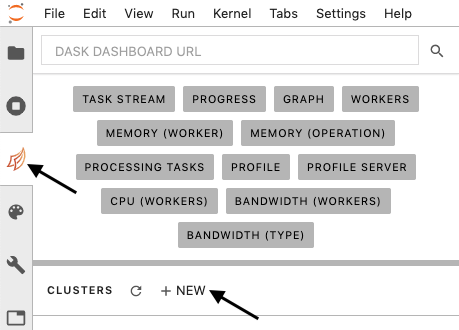
"1. Click the \"Dask\" tab in Jupyter Lab (arrow, left)\n",
"2. Click the \"+ NEW\" button to launch a new compute cluster (arrow, lower)\n",
"\n",
"\n",
"\n",
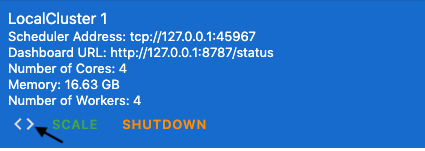
"3. Once the cluster has started, click the brackets to \"inject client code\" for the cluster into your notebook\n",
"\n",
"\n",
"\n",
"Inject client code here, then run the cell:"
]
},
{
"cell_type": "code",
"execution_count": 8,
"metadata": {},
"outputs": [
{
"data": {
"text/html": [
"
"
]
},
{
"cell_type": "markdown",
"metadata": {},
"source": [
"# PyRosettaCluster Tutorial 1A. Simple protocol\n",
"\n",
"PyRosettaCluster Tutorial 1A is a Jupyter Lab that generates a decoy using `PyRosettaCluster`. It is the simplest use case, where one protocol takes one input `.pdb` file and returns one output `.pdb` file. \n",
"\n",
"All information needed to reproduce the simulation is included in the output `.pdb` file. After completing PyRosettaCluster Tutorial 1A, see PyRosettaCluster Tutorial 1B to learn how to reproduce simulations from PyRosettaCluster Tutorial 1A."
]
},
{
"cell_type": "markdown",
"metadata": {},
"source": [
"*Warning*: This notebook uses `pyrosetta.distributed.viewer` code, which runs in `jupyter notebook` and might not run if you're using `jupyterlab`."
]
},
{
"cell_type": "markdown",
"metadata": {},
"source": [
"*Note:* This Jupyter notebook uses parallelization and is **not** meant to be executed within a Google Colab environment."
]
},
{
"cell_type": "markdown",
"metadata": {},
"source": [
"*Note:* This Jupyter notebook requires the PyRosetta distributed layer which is obtained by building PyRosetta with the `--serialization` flag or installing PyRosetta from the RosettaCommons conda channel \n",
"\n",
"**Please see Chapter 16.00 for setup instructions**"
]
},
{
"cell_type": "markdown",
"metadata": {},
"source": [
"*Note:* This Jupyter notebook is intended to be run within **Jupyter Lab**, but may still be run as a standalone Jupyter notebook."
]
},
{
"cell_type": "markdown",
"metadata": {},
"source": [
"### 1. Import packages"
]
},
{
"cell_type": "code",
"execution_count": 7,
"metadata": {},
"outputs": [],
"source": [
"import bz2\n",
"import glob\n",
"import logging\n",
"import os\n",
"import pyrosetta\n",
"import pyrosetta.distributed.io as io\n",
"import pyrosetta.distributed.viewer as viewer\n",
"\n",
"from pyrosetta.distributed.cluster import PyRosettaCluster\n",
"\n",
"logging.basicConfig(level=logging.INFO)"
]
},
{
"cell_type": "markdown",
"metadata": {},
"source": [
"### 2. Initialize a compute cluster using `dask`\n",
"\n",
"1. Click the \"Dask\" tab in Jupyter Lab (arrow, left)\n",
"2. Click the \"+ NEW\" button to launch a new compute cluster (arrow, lower)\n",
"\n",
"\n",
"\n",
"3. Once the cluster has started, click the brackets to \"inject client code\" for the cluster into your notebook\n",
"\n",
"\n",
"\n",
"Inject client code here, then run the cell:"
]
},
{
"cell_type": "code",
"execution_count": 8,
"metadata": {},
"outputs": [
{
"data": {
"text/html": [
"
\n",
"\n",
"\n",
"Client\n",
"\n",
" | \n",
"\n",
"Cluster\n",
"\n",
" - Workers: 4
\n",
" - Cores: 4
\n",
" - Memory: 16.63 GB
\n",
" \n",
" | \n",
"
\n",
"
"
],
"text/plain": [
""
]
},
"execution_count": 8,
"metadata": {},
"output_type": "execute_result"
}
],
"source": [
"# This cell is an example of the injected client code. You should delete this cell and instantiate your own client with scheduler IP/port address.\n",
"if not os.getenv(\"DEBUG\"):\n",
" from dask.distributed import Client\n",
"\n",
" client = Client(\"tcp://127.0.0.1:40329\")\n",
"else:\n",
" client = None\n",
"client"
]
},
{
"cell_type": "markdown",
"metadata": {},
"source": [
"Providing a `client` allows you to monitor parallelization diagnostics from within this Jupyter Lab Notebook. However, providing a `client` is only optional for the `PyRosettaCluster` instance and `reproduce` function. If you do not provide a `client`, then `PyRosettaCluster` will instantiate a `LocalCluster` object using the `dask` module by default, or an `SGECluster` or `SLURMCluster` object using the `dask-jobqueue` module if you provide the `scheduler` argument parameter, e.g.:\n",
"***\n",
"```\n",
"PyRosettaCluster(\n",
" ...\n",
" client=client, # Monitor diagnostics with existing client (see above)\n",
" scheduler=None, # Bypasses making a LocalCluster because client is provided\n",
" ...\n",
")\n",
"```\n",
"***\n",
"```\n",
"PyRosettaCluster(\n",
" ...\n",
" client=None, # Existing client was not input (default)\n",
" scheduler=None, # Runs the simluations on a LocalCluster (default)\n",
" ...\n",
")\n",
"```\n",
"***\n",
"```\n",
"PyRosettaCluster(\n",
" ...\n",
" client=None, # Existing client was not input (default)\n",
" scheduler=\"sge\", # Runs the simluations on the SGE job scheduler\n",
" ...\n",
")\n",
"```\n",
"***\n",
"```\n",
"PyRosettaCluster(\n",
" ...\n",
" client=None, # Existing client was not input (default)\n",
" scheduler=\"slurm\", # Runs the simluations on the SLURM job scheduler\n",
" ...\n",
")\n",
"```"
]
},
{
"cell_type": "markdown",
"metadata": {},
"source": [
"### 3. Define or import the user-provided PyRosetta protocol(s):\n",
"\n",
"Remember, you *must* import `pyrosetta` locally within each user-provided PyRosetta protocol. Other libraries may not need to be locally imported because they are serializable by the `distributed` module. Although, it is a good practice to locally import all of your modules in each user-provided PyRosetta protocol."
]
},
{
"cell_type": "code",
"execution_count": 9,
"metadata": {},
"outputs": [],
"source": [
"if not os.getenv(\"DEBUG\"):\n",
" from additional_scripts.my_protocols import my_protocol"
]
},
{
"cell_type": "code",
"execution_count": 10,
"metadata": {},
"outputs": [],
"source": [
"if not os.getenv(\"DEBUG\"):\n",
" client.upload_file(\"additional_scripts/my_protocols.py\") # This sends a local file up to all worker nodes."
]
},
{
"cell_type": "markdown",
"metadata": {},
"source": [
"#### Let's look at the definition of the user-provided PyRosetta protocol `my_protocol` located in `additional_scripts/my_protocols.py`:"
]
},
{
"cell_type": "markdown",
"metadata": {},
"source": [
"```\n",
"def my_protocol(input_packed_pose=None, **kwargs):\n",
" \"\"\"\n",
" Relax the input `PackedPose` object.\n",
" \n",
" Args:\n",
" input_packed_pose: A `PackedPose` object to be repacked. Optional.\n",
" **kwargs: PyRosettaCluster task keyword arguments.\n",
"\n",
" Returns:\n",
" A `PackedPose` object.\n",
" \"\"\"\n",
" import pyrosetta # Local import\n",
" import pyrosetta.distributed.io as io # Local import\n",
" import pyrosetta.distributed.tasks.rosetta_scripts as rosetta_scripts # Local import\n",
" \n",
" packed_pose = io.pose_from_file(kwargs[\"s\"])\n",
" \n",
" xml = \"\"\"\n",
" \n",
" \n",
" \n",
" \n",
" \n",
" \n",
" \n",
" \n",
" \n",
" \n",
" \n",
" \"\"\"\n",
" \n",
" return rosetta_scripts.SingleoutputRosettaScriptsTask(xml)(packed_pose)\n",
"```"
]
},
{
"cell_type": "markdown",
"metadata": {},
"source": [
"### 4. Define the user-provided keyword argument(s) (i.e. `kwargs`):\n",
"Upon PyRosetta initialization on the remote worker, the \"`options`\" and \"`extra_options`\" `kwargs` get concatenated before initialization. However, specifying the \"`extra_options`\" `kwargs` will override the default `-out:levels all:warning` command line flags, and specifying the \"`options`\" `kwargs` will override the default `-ex1 -ex2aro` command line flags."
]
},
{
"cell_type": "code",
"execution_count": 11,
"metadata": {},
"outputs": [],
"source": [
"def create_kwargs():\n",
" yield {\n",
" \"options\": \"-ex1\",\n",
" \"extra_options\": \"-out:level 300 -multithreading:total_threads 1\", # Used by pyrosetta.init() on disributed workers\n",
" \"set_logging_handler\": \"interactive\", # Used by pyrosetta.init() on disributed workers\n",
" \"s\": os.path.join(os.getcwd(), \"inputs\", \"1QYS.pdb\"),\n",
" }"
]
},
{
"cell_type": "markdown",
"metadata": {},
"source": [
"Ideally, all pose manipulation is accomplished with the user-provided PyRosetta protocols. If you must manipulate a pose prior to instantiating `PyRosettaCluster`, here are some considerations:\n",
"- Avoid passing `Pose` and `PackedPose` objects through `create_kwargs()`. You might notice that the above cell passes the protein structure information to `PyRosettaCluster` as a `str` type locating the `.pdb` file. In this way, the input `PackedPose` object is instantiated from that `str` within `PyRosettaCluster` on the remote workers (using `io.pose_from_file(kwargs[\"s\"])`) using a random seed which is saved by `PyRosettaCluster`. This allows the protocol to be reproduced, and avoids passing redundant large chunks of data over the network.\n",
"- It may be tempting to instantiate your pose before `PyRosettaCluster`, and pass a `Pose` or `PackedPose` object into the `create_kwargs()`. However, in this case PyRosetta will be initialized with a random seed outside `PyRosettaCluster`, and that random seed will not be saved by `PyRosettaCluster`. As a consequence, any action taken on the pose (e.g. filling in missing heavy atoms) will not be reproducible.\n",
"-If you must instantiate your pose before `PyRosettaCluster`, to ensure reproducibility the user must initialize PyRosetta with the constant seed `1111111` within the Jupyter notebook or standalone python script using:\n",
"\n",
"```\n",
"import pyrosetta\n",
"pyrosetta.init(\"-run:constant_seed 1\")\n",
"```\n",
"\n",
"The `-run:constant_seed 1` command line flag defaults to the seed `1111111` ([documentation](https://www.rosettacommons.org/docs/latest/rosetta_basics/options/run-options)). Then, instantiate the pose:\n",
"\n",
"```\n",
"input_packed_pose = pyrosetta.io.pose_from_sequence(\"TEST\")\n",
"...Perform any pose manipulation...\n",
"```\n",
"\n",
"and then instantiate `PyRosettaCluster` with the additional `input_packed_pose` parameter argument, e.g.:\n",
"\n",
"```\n",
"PyRosettaCluster(\n",
" ...\n",
" input_packed_pose=input_packed_pose,\n",
" ...\n",
")\n",
"```\n",
"\n",
"For an initialization example, see Tutorial 4.\n",
"\n",
"In summary, the best practice involves giving `create_kwargs` information which will be used by the distributed protocol to create a pose within `PyRosettaCluster`. In edge cases, the user may provide a `Pose` or `PackedPose` object to the `input_packed_pose` argument of `PyRosettaCluster` and set a constant seed of `1111111` outside of `PyRosettaCluster`."
]
},
{
"cell_type": "markdown",
"metadata": {},
"source": [
"### 5. Launch the original simulation using the `distribute()` method\n",
"\n",
"The protocol produces an output decoy, the exact coordinates of which we will reproduce in Tutorial 1B."
]
},
{
"cell_type": "markdown",
"metadata": {},
"source": [
"If the Jupyter Lab Notebook or standalone PyRosetta script did not yet initialize PyRosetta before instantiating `PyRosettaCluster` (preferred workflow), then `PyRosettaCluster` automatically initializes PyRosetta within the Jupyter Lab Notebook or standalone PyRosetta script with the command line flags `-run:constant_seed 1 -multithreading:total_threads 1 -mute all`. Thus, the master node is initialized with the default constant seed, where the master node acts as the client to the distributed workers. The distributed workers actually run the user-provided PyRosetta protocol(s), and each distributed worker initializes PyRosetta with a random seed, which is the seed saved by PyRosettaCluster for downstream reproducibility. The master node is always initialized with a constant seed as best practices."
]
},
{
"cell_type": "markdown",
"metadata": {},
"source": [
"To monitor parallelization diagnostics in real-time, in the \"Dask\" tab, click the various diagnostic tools _(arrows)_ to open new tabs:"
]
},
{
"cell_type": "markdown",
"metadata": {},
"source": [
""
]
},
{
"cell_type": "markdown",
"metadata": {},
"source": [
"Arrange the diagnostic tool tabs within Jupyter Lab how you best see fit by clicking and dragging them:"
]
},
{
"cell_type": "markdown",
"metadata": {},
"source": [
""
]
},
{
"cell_type": "code",
"execution_count": 12,
"metadata": {},
"outputs": [],
"source": [
"if not os.getenv(\"DEBUG\"):\n",
" output_path = os.path.join(os.getcwd(), \"outputs_1A\")\n",
"\n",
" PyRosettaCluster(\n",
" tasks=create_kwargs,\n",
" client=client,\n",
" scratch_dir=output_path,\n",
" output_path=output_path,\n",
" nstruct=4, # Run the first user-provided PyRosetta protocol four times in parallel\n",
" ).distribute(protocols=[my_protocol])"
]
},
{
"cell_type": "markdown",
"metadata": {},
"source": [
"While jobs are running, you may monitor their progress using the dask dashboard diagnostics within Jupyter Lab!"
]
},
{
"cell_type": "markdown",
"metadata": {},
"source": [
"### 7. Visualize the resultant decoy"
]
},
{
"cell_type": "markdown",
"metadata": {},
"source": [
"Gather the output decoys on disk into poses in memory:"
]
},
{
"cell_type": "code",
"execution_count": 13,
"metadata": {},
"outputs": [],
"source": [
"if not os.getenv(\"DEBUG\"):\n",
" results = glob.glob(os.path.join(output_path, \"decoys\", \"*\", \"*.pdb.bz2\"))\n",
" packed_poses = []\n",
" for bz2file in results:\n",
" with open(bz2file, \"rb\") as f:\n",
" packed_poses.append(io.pose_from_pdbstring(bz2.decompress(f.read()).decode()))"
]
},
{
"cell_type": "markdown",
"metadata": {},
"source": [
"View the poses in memory by clicking and draging to rotate, and zooming in and out with the mouse scroller."
]
},
{
"cell_type": "code",
"execution_count": 14,
"metadata": {},
"outputs": [
{
"data": {
"text/html": [
""
],
"text/plain": [
""
]
},
"metadata": {},
"output_type": "display_data"
},
{
"data": {
"text/html": [
""
],
"text/plain": [
""
]
},
"metadata": {},
"output_type": "display_data"
},
{
"data": {
"text/html": [
""
],
"text/plain": [
""
]
},
"metadata": {},
"output_type": "display_data"
},
{
"data": {
"text/html": [
""
],
"text/plain": [
""
]
},
"metadata": {},
"output_type": "display_data"
},
{
"data": {
"text/html": [
""
],
"text/plain": [
""
]
},
"metadata": {},
"output_type": "display_data"
},
{
"data": {
"text/html": [
""
],
"text/plain": [
""
]
},
"metadata": {},
"output_type": "display_data"
},
{
"data": {
"application/vnd.jupyter.widget-view+json": {
"model_id": "5b71c4df7ea04ee4999578d182de56af",
"version_major": 2,
"version_minor": 0
},
"text/plain": [
"interactive(children=(IntSlider(value=0, continuous_update=False, description='Decoys', max=3), Output()), _do…"
]
},
"metadata": {},
"output_type": "display_data"
},
{
"data": {
"text/plain": [
".view(i=0)>"
]
},
"execution_count": 14,
"metadata": {},
"output_type": "execute_result"
}
],
"source": [
"if not os.getenv(\"DEBUG\"):\n",
" view = viewer.init(packed_poses, window_size=(800, 600))\n",
" view.add(viewer.setStyle())\n",
" view.add(viewer.setStyle(colorscheme=\"whiteCarbon\", radius=0.25))\n",
" view.add(viewer.setHydrogenBonds())\n",
" view.add(viewer.setHydrogens(polar_only=True))\n",
" view.add(viewer.setDisulfides(radius=0.25))\n",
" view()"
]
},
{
"cell_type": "markdown",
"metadata": {},
"source": [
"Using the `pyrosetta.distributed.viewer` macromolecular visualizer, you can visualize your results in real-time as they complete."
]
},
{
"cell_type": "markdown",
"metadata": {},
"source": [
""
]
},
{
"cell_type": "markdown",
"metadata": {},
"source": [
"### Congrats!\n",
"\n",
"You have successfully performed a PyRosetta simulation using `PyRosettaCluster`! In the next tutorial we will reproduce one of the decoys precisely to make our computational science more reproducible."
]
},
{
"cell_type": "markdown",
"metadata": {},
"source": [
"\n",
"< [Part I: Parallelized Global Ligand Docking with `pyrosetta.distributed`](http://nbviewer.jupyter.org/github/RosettaCommons/PyRosetta.notebooks/blob/master/notebooks/16.05-Ligand-Docking-dask.ipynb) | [Contents](toc.ipynb) | [Index](index.ipynb) | [PyRosettaCluster Tutorial 1B. Reproduce simple protocol](http://nbviewer.jupyter.org/github/RosettaCommons/PyRosetta.notebooks/blob/master/notebooks/16.07-PyRosettaCluster-Reproduce-simple-protocol.ipynb) >"
]
}
],
"metadata": {
"kernelspec": {
"display_name": "Python [conda env:PyRosetta.notebooks]",
"language": "python",
"name": "pyrosetta.notebooks"
},
"language_info": {
"codemirror_mode": {
"name": "ipython",
"version": 3
},
"file_extension": ".py",
"mimetype": "text/x-python",
"name": "python",
"nbconvert_exporter": "python",
"pygments_lexer": "ipython3",
"version": "3.7.6"
}
},
"nbformat": 4,
"nbformat_minor": 4
}