
# Tomodachi LTD Recomp
**Current release: experimental static recompilation, not an emulator-free native port.** The game's ARM code is recompiled for x86-64, but the resulting PC executable still relies on **suyu-derived emulation and runtime components** for graphics, audio and Switch system services. Calling it "no emulator" would be misleading.
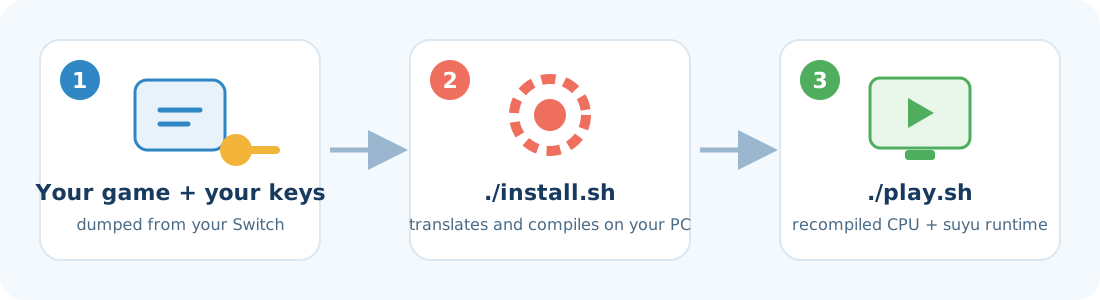
This project **does not contain the game**. You bring **your own copy**, and the installer uses it to build a PC executable on your computer. A more independent native PC port is **in development**, but this release is an intermediate step.
🇧🇷 [Leia em português](README.pt-BR.md)
> [!WARNING]
> **Educational and experimental project.** Use it only with a copy of the game that **you bought** and dumped from **your own Switch**.
> This project is not affiliated with Nintendo, does not distribute any game files, and does not help anyone obtain games or keys any other way.
> Read the [full legal notice](LEGAL.md).
---
## What you need
| | |
|---|---|
| 🖥️ **System** | **Linux**, tested on Arch Linux / EndeavourOS; Fedora reported working. **Windows 10/11**: experimental, see [Windows](#windows-experimental). |
| 🧠 **Memory** | **16 GB of RAM** and at least **8 GB of swap** (virtual memory) |
| 💾 **Free space** | **35 GB** |
| 🎮 **Graphics card** | A GPU with **Vulkan** support; compatibility is not guaranteed on every driver or model |
| 📦 **Your game** | The **`.nsp`** file of Tomodachi Life: Living the Dream, **version 1.0.0, without updates** |
| 🔑 **Your keys** | The **`prod.keys`** file from your console |
> The game and the keys must be dumped from **your own** Switch with the tools made for that. This project does not provide them.
---
> 🪟 **On Windows?** Skip to [Windows (experimental)](#windows-experimental). Steps 1 to 4 below are for Linux.
## Step 1 — Prepare your computer
Open the **Terminal**, paste the command for your Linux and press **Enter**. It will ask for your password.
**Arch Linux, EndeavourOS, Manjaro, CachyOS** (Arch/EndeavourOS maintainer setup; the other variants are not independently verified):
```bash
sudo pacman -S --needed base-devel git cmake ninja clang python python-cryptography qt6-base qt6-svg qt6-5compat qt6-charts quazip-qt6 sdl3 ffmpeg opus zstd lz4 libusb openssl glslang nasm vulkan-icd-loader zenity
```
**Fedora** (reported working by a contributor, not verified by CI; the `ffmpeg` package comes from RPM Fusion):
```bash
sudo dnf install git cmake ninja clang python3 python-cryptography qt6-qtbase qt6-qtsvg qt6-qt5compat qt6-qtcharts quazip-qt6 quazip-qt6-devel SDL3 ffmpeg opus zstd lz4 libusb openssl glslang nasm vulkan-loader zenity @development-tools qt6-qtsvg-devel qt6-qtcharts-devel SDL3-devel ffmpeg-free-devel qt6-qtbase-private-devel
```
If the build stops with `Could NOT find FFmpeg` or `Could NOT find Qt6GuiPrivate`, install `ffmpeg-free-devel` and `qt6-qtbase-private-devel` (reported in issue #7). `autoconf`, `libtoolize`, `libudev` and `systemd-devel` were also used by that reporter, but only install them if an error asks for them.
**Ubuntu 25.04+, Debian 13+** (not tested yet: if something is missing, the installer says what; please tell us in an issue so we can fix this list):
```bash
sudo apt install build-essential git cmake ninja-build clang python3 python3-cryptography qt6-base-dev qt6-base-private-dev qt6-svg-dev libqt6core5compat6-dev qt6-charts-dev libquazip1-qt6-dev libsdl3-dev libavcodec-dev libavfilter-dev libavutil-dev libswscale-dev libopus-dev libzstd-dev liblz4-dev libusb-1.0-0-dev libssl-dev glslang-tools nasm libvulkan-dev zenity
```
**Other distributions:** install the equivalents of the packages above (the development/"-devel"/"-dev" versions of Qt 6 with SVG, Charts and Qt5Compat, QuaZip for Qt 6, SDL3, FFmpeg, Opus, zstd, LZ4, libusb, OpenSSL and Vulkan, plus git, cmake, ninja, clang, Python 3 with `cryptography`, glslang, nasm and zenity). The installer checks for the tools and names any that are missing.
This installs the programs used to build the game. You only need to do it once.
---
## Step 2 — Download this project
In the same Terminal:
```bash
git clone https://github.com/RussoPhone/tomodachi-ltd-recomp.git
cd tomodachi-ltd-recomp
```
> Prefer clicking? Use the green **Code → Download ZIP** button here on GitHub, extract the folder and open a Terminal inside it.
---
## Step 3 — Install
```bash
./install.sh
```
1. A window asks for your **game file (`.nsp`)**. Pick it and click OK.
2. Another window asks for **the folder that contains your `prod.keys`**. Pick it and click OK.
3. The installer does the rest by itself and shows its progress in **10 steps**.
⏱️ **Plan for several hours**; 1 to 4 hours is only a rough estimate from early builds, not a guarantee. Most of that is compiling, and the PC will be busy meanwhile.
💡 **Need to stop?** Close the Terminal or press `Ctrl+C`. Next time you run `./install.sh` it **picks up where it left off**.
During step 7 an emulator window opens and closes by itself. That is normal, don't close it.
At the end it asks whether you want a **shortcut in your applications menu**. Answer `Y`.
---
## Step 4 — Play 🎉
Look for **Tomodachi** in your applications menu, or run:
```bash
./play.sh
```
| To… | Use |
|---|---|
| Play fullscreen | `./play.sh --fullscreen` |
| Get a sharper image | `./play.sh --scale 2` (`1`, `1.5`, `2`, `3` or `4`) |
| Set up controls | Press **F12** in the game |
Once installed, the game **no longer needs the `.nsp` or the keys**. Everything lives inside the project folder.
---
## Windows (experimental)
> [!NOTE]
> The Windows installer is **experimental; a full game install has not been independently verified on Windows**. The Windows workflow runs the no-game path (steps 1, 3, 4 and 5); it does not prove game compatibility. If you try it, please open an [issue](https://github.com/RussoPhone/tomodachi-ltd-recomp/issues) with the result and the log from `local\logs\`. **Never attach your keys or game files.**
1. Click the green **Code → Download ZIP** button here on GitHub.
2. Extract it to a **short folder**, for example `C:\tomodachi`. Long paths can break the Windows build tools.
3. Double-click **`install.bat`**.
- The first time, it installs the build tools with **winget**: Git, CMake, Ninja, Python, LLVM and the **Visual Studio 2022 Build Tools** (several GB). Windows asks for permission once.
- Then it does the same 10 steps as on Linux. A window asks for your **`.nsp`**, another for the **folder with your `prod.keys`**.
- The time required is **not yet established on Windows**. If it stops, double-click `install.bat` again: it resumes completed steps when their inputs are unchanged.
- If it stops with **`Could not find patch executable`**, point it to a `patch.exe` by hand. Git for Windows has one. Open PowerShell in the folder and run:
`powershell -ExecutionPolicy Bypass -File scripts\windows\install.ps1 -PatchExe "C:\Program Files\Git\usr\bin\patch.exe"`
4. To launch, open **Tomodachi Life (experimental recompilation)** from the Start menu, or double-click **`play.bat`**. Options include `play.bat --fullscreen` and `play.bat --scale 2`.
You need the same as on Linux: 16 GB of RAM, about 35 GB of free space (plus ~10 GB for Visual Studio) and a Vulkan graphics card.
---
## FAQ
The game opens a blue window and freezes (no sound, high CPU)
This happened on Linux machines with **no audio device available** (for example, PipeWire not running or no sound card). The silent audio fallback used to discard audio as fast as the game produced it, which starved the game's other threads. Update and reinstall:
```bash
git pull
./install.sh
```
The installer rebuilds the affected steps (this can take a while). If the window still freezes, check that audio works (`pactl info`) and open an [issue](https://github.com/RussoPhone/tomodachi-ltd-recomp/issues) attaching the log from `local/package/tomodachi/user/log/`. **Never attach your keys or game files.**
How do I type text in the game (names, messages)?
When the game asks for text, a small text box opens: type and press OK. On Linux it needs `zenity` (Step 1 installs it) or `kdialog`; on Windows it is built in. If the box opens behind the game window, switch to it with Alt+Tab.
How do I update to a new version?
Run `git pull` in the existing folder and start the installer again. It checks fingerprints of the relevant scripts, patches, adapter and upstream lock, then redoes affected stages and their dependents. **An update may require lengthy rebuilding or re-exporting**, especially on the first run after this change, when older step markers have no fingerprints. The compiled-object cache may reuse unchanged objects; the package assembly retains the `user/` directory containing saves. Back up your saves before updating.
The installation failed. What now?
The installer tells you which step failed and where the full log is (the `local/logs/` folder). The most common causes:
- **"Missing software"**: run the command from Step 1 again. The message lists exactly what is missing.
- **"Different version than the supported one"**: your game has an update or is another version. Only 1.0.0 works for now.
- **Out of memory**: make sure you have the 8 GB of swap. The installer already limits RAM use, but it cannot go below that.
Fixed it? Just run `./install.sh` again.
Where are my saves?
In `local/package/tomodachi/user/nand/user/save/`. Back that folder up now and then.
Can I use my computer while it installs?
Yes, but it will be slow, because compiling uses almost all the memory and CPU. Avoid system updates (`pacman -Syu`, `dnf upgrade`, `apt upgrade`) while installing: if the compiler changes in the middle, everything has to be compiled again.
The compile step is very slow (KDE Plasma)
KDE's file indexer (Baloo) tries to read the gigabytes of generated code and can take several GB of RAM, leaving less memory for compiling. Pause it while installing with `balooctl6 suspend`, and turn it back on afterwards with `balooctl6 resume`.
Does it work on Windows?
Experimentally. See [Windows (experimental)](#windows-experimental). It builds the `.exe` on your own PC, like on Linux, and still needs its first full test with the game.
How do I uninstall it?
Delete the `tomodachi-ltd-recomp` folder and the shortcut at `~/.local/share/applications/tomodachi-native.desktop`.
How does it work under the hood?
Switch games are built for the console's ARM processor. The installer:
1. Reads the ARM machine code from **your** game and statically recompiles it into C using [mk8-recomp](https://github.com/dougchansan/mk8-recomp), which builds on suyu.
2. **Compiles** the generated code for the PC's x86-64 processor. The recompiled game code does not need ARM CPU interpretation or JIT translation while running.
3. **Still uses suyu-derived runtime/emulation components** for graphics, audio and Switch system services, including GPU command-level emulation. This is not a fully independent native port.
The fixes this project needed in suyu are in [`patches/`](patches/), each explained inside the file. The generated C is a machine translation. **It is not the game's original source code.**
---
## Project status
🧪 **Experimental — first public version.**
- ✅ The game's code is **statically recompiled to x86-64**, rather than being run by an ARM CPU interpreter or JIT. A PC executable is built; it does not need the original `.nsp` or keys to launch after installation. Audio, video, the opening and the start of the game have been tested.
- ⚠️ **Emulation remains:** the executable includes suyu-derived runtime components for graphics, audio and Switch system services. GPU commands are still emulated. This release is **not emulator-free** and is **not yet a fully native port**.
- 🔧 A more independent PC port, including work on an NVN → Vulkan renderer, is in development. There is **no promised completion date**.
- 🧪 The maintainer **reports** a complete 10-step installation and launch on an Intel i5-13450HX Linux laptop with 16 GB of RAM, taking approximately 2 hours. This report has **not been reproduced by the no-game automated checks**.
- 🆕 Hardware and distro coverage remains limited, and individual community reports are not a compatibility guarantee. If a step fails for you, please open an [issue](https://github.com/RussoPhone/tomodachi-ltd-recomp/issues) and attach the log file the installer points to (in `local/logs/`). **Never attach your keys or game files.**
- 🐞 There may be bugs in parts of the game nobody has played yet. Report them the same way.
## AI assistance and authorship
This is a **human-directed project with substantial generative-AI assistance**. AI tools have been used extensively to produce and revise code, patches, build and installation scripts, and documentation, as well as to support debugging. Presenting this as an entirely hand-written implementation would be inaccurate.
The maintainer directs the project and is responsible for what is published. AI-generated changes can contain mistakes, and **the code has not been fully independently audited**. Corrections, technical scrutiny and bug reports are welcome.
## Automated checks and limits
The [Linux CI workflow](.github/workflows/linux.yml) checks Python syntax, shell syntax, configuration JSON and synthetic `unittest` cases for installer invalidation, C object-cache headers, packaging and upstream lock validation. These tests run **without game files, keys or firmware**. The [Windows workflow](.github/workflows/windows.yml) separately attempts a no-game backend build.
**Neither workflow demonstrates that the complete game installs or runs correctly.** Gameplay, GPU/driver compatibility, saved-game safety across real updates and a complete Windows installation require separate real-hardware verification.
## Credits and license
- [**mk8-recomp**](https://github.com/dougchansan/mk8-recomp) and its **suyu** fork: the recompiler and runtime. suyu is derived from yuzu.
- This project: integration, installer, patches and support for Tomodachi Life: Living the Dream, developed with substantial AI assistance as disclosed above.
Licensed under **GPL-3.0-or-later** (see [`LICENSE`](LICENSE)), the same as suyu.
*Tomodachi Life and Nintendo Switch are trademarks of Nintendo. This project is not affiliated with or endorsed by Nintendo.*