|  | |
| -------------- | -------------- |
| GitHub Actions |  |
| Frameworks | [](https://github.com/Carthage/Carthage) [](http://cocoapods.org/pods/RxFlow) [](https://github.com/apple/swift-package-manager) |
| Platform | [](http://cocoapods.org/pods/RxFlow) |
| Licence | [](http://cocoapods.org/pods/RxFlow) |
# About
RxFlow is a navigation framework for iOS applications based on a **Reactive Flow Coordinator pattern**.
This README is a short story of the whole conception process that led me to this framework.
You will find a very detail explanation of the whole project on my blog:
- [RxFlow Part 1: In Theory](https://sideeffect.io/posts/2017-11-08-rxflow-part1/)
- [RxFlow Part 2: In Practice](https://sideeffect.io/posts/2017-12-09-rxflow-part2/)
- [RxFlow Part 3: Tips and Tricks](https://sideeffect.io/posts/2017-12-22-rxflow-part3/)
The Jazzy documentation can be seen here as well: [Documentation](http://community.rxswift.org/RxFlow/)
Also here is a [Reactive coordinators tech talk](https://youtu.be/b0aCv7rlKx4) which explain the goals and motivation of that framework.
Available only in Russian. To get English subtitles you should press the *subtitles* button to see original (Russian) subtitles and then select Settings->Subtitles->Translate->*choose_your_language*
# Navigation concerns
Regarding navigation within an iOS application, two choices are available:
- Use the builtin mechanism provided by Apple and Xcode: storyboards and segues
- Implement a custom mechanism directly in the code
The disadvantage of these two solutions:
- Builtin mechanism: navigation is relatively static and the storyboards are massive. The navigation code pollutes the UIViewControllers
- Custom mechanism: code can be difficult to set up and can be complex depending on the chosen design pattern (Router, Coordinator)
# RxFlow aims to
- Promote the cutting of storyboards into atomic units to enable collaboration and reusability of UIViewControllers
- Allow the presentation of a UIViewController in different ways according to the navigation context
- Ease the implementation of dependency injection
- Remove every navigation mechanism from UIViewControllers
- Promote reactive programming
- Express the navigation in a declarative way while addressing the majority of the navigation cases
- Facilitate the cutting of an application into logical blocks of navigation
# Installation
## Carthage
In your Cartfile:
```ruby
github "RxSwiftCommunity/RxFlow"
```
## CocoaPods
In your Podfile:
```ruby
pod 'RxFlow'
```
## Swift Package Manager
In your Package.swift:
```swift
let package = Package(
name: "Example",
dependencies: [
.package(url: "https://github.com/RxSwiftCommunity/RxFlow.git", from: "2.10.0")
],
targets: [
.target(name: "Example", dependencies: ["RxFlow"])
]
)
```
# The key principles
The **Coordinator** pattern is a great way to organize the navigation within your application. It allows to:
- Remove the navigation code from UIViewControllers.
- Reuse UIViewControllers in different navigation contexts.
- Ease the use of dependency injection.
To learn more about it, I suggest you take a look at this article: ([Coordinator Redux](http://khanlou.com/2015/10/coordinators-redux/)).
Nevertheless, the Coordinator pattern can have some drawbacks:
- The coordination mechanism has to be written each time you bootstrap an application.
- Communicating with the Coordinators stack can lead to a lot of boilerplate code.
RxFlow is a reactive implementation of the Coordinator pattern. It has all the great features of this architecture, but brings some improvements:
- It makes the navigation more declarative within **Flows**.
- It provides a built-in **FlowCoordinator** that handles the navigation between **Flows**.
- It uses reactive programming to trigger navigation actions towards the **FlowCoordinators**.
There are 6 terms you have to be familiar with to understand **RxFlow**:
- **Flow**: each **Flow** defines a navigation area in your application. This is the place where you declare the navigation actions (such as presenting a UIViewController or another **Flow**).
- **Step**: a **Step** is a way to express a state that can lead to a navigation. Combinations of **Flows** and **Steps** describe all the possible navigation actions. A **Step** can even embed inner values (such as Ids, URLs, ...) that will be propagated to screens declared in the **Flows**
- **Stepper**: a **Stepper** can be anything that can emit **Steps** inside **Flows**.
- **Presentable**: it is an abstraction of something that can be presented (basically **UIViewController** and **Flow** are **Presentable**).
- **FlowContributor**: it is a simple data structure that tells the **FlowCoordinator** what will be the next things that can emit new **Steps** in a **Flow**.
- **FlowCoordinator**: once the developer has defined the suitable combinations of **Flows** and **Steps** representing the navigation possibilities, the job of the **FlowCoordinator** is to mix these combinations to handle all the navigation of your app. **FlowCoordinators** are provided by **RxFlow**, you don't have to implement them.
# How to use RxFlow
## Code samples
### How to declare **Steps**
**Steps** are little pieces of states eventually expressing the intent to navigate, it is pretty convenient to declare them in a enum:
```swift
enum DemoStep: Step {
// Login
case loginIsRequired
case userIsLoggedIn
// Onboarding
case onboardingIsRequired
case onboardingIsComplete
// Home
case dashboardIsRequired
// Movies
case moviesAreRequired
case movieIsPicked (withId: Int)
case castIsPicked (withId: Int)
// Settings
case settingsAreRequired
case settingsAreComplete
}
```
The idea is to keep the **Steps** `navigation independent` as much as possible. For instance, calling a **Step** `showMovieDetail(withId: Int)` might be a bad idea since it tightly couples the fact of selecting a movie with the consequence of showing the movie detail screen. It is not up to the emitter of the **Step** to decide where to navigate, this decision belongs to the **Flow**.
### How to declare a **Flow**
The following **Flow** is used as a Navigation stack. All you have to do is:
- Declare a root **Presentable** on which your navigation will be based.
- Implement the **navigate(to:)** function to transform a **Step** into a navigation actions.
**Flows** can be used to implement dependency injection when instantiating the ViewControllers.
The **navigate(to:)** function returns a **FlowContributors**. This is how the next navigation actions will be produced.
For instance the value: ```.one(flowContributor: .contribute(withNextPresentable: viewController, withNextStepper: viewController.viewModel)``` means:
- ```viewController``` is a **Presentable** and its lifecycle will affect the way the associated **Stepper** will emit **Steps**. For instance, if a **Stepper** emits a **Step** while its associated **Presentable** is temporarily hidden, this **Step** won't be taken care of.
- ```viewController.viewModel``` is a **Stepper** and will contribute to the navigation in that **Flow** by emitting **Steps**, according to its associated **Presentable** lifecycle.
```swift
class WatchedFlow: Flow {
var root: Presentable {
return self.rootViewController
}
private let rootViewController = UINavigationController()
private let services: AppServices
init(withServices services: AppServices) {
self.services = services
}
func navigate(to step: Step) -> FlowContributors {
guard let step = step as? DemoStep else { return .none }
switch step {
case .moviesAreRequired:
return navigateToMovieListScreen()
case .movieIsPicked(let movieId):
return navigateToMovieDetailScreen(with: movieId)
case .castIsPicked(let castId):
return navigateToCastDetailScreen(with: castId)
default:
return .none
}
}
private func navigateToMovieListScreen() -> FlowContributors {
let viewController = WatchedViewController.instantiate(withViewModel: WatchedViewModel(),
andServices: self.services)
viewController.title = "Watched"
self.rootViewController.pushViewController(viewController, animated: true)
return .one(flowContributor: .contribute(withNextPresentable: viewController, withNextStepper: viewController.viewModel))
}
private func navigateToMovieDetailScreen (with movieId: Int) -> FlowContributors {
let viewController = MovieDetailViewController.instantiate(withViewModel: MovieDetailViewModel(withMovieId: movieId),
andServices: self.services)
viewController.title = viewController.viewModel.title
self.rootViewController.pushViewController(viewController, animated: true)
return .one(flowContributor: .contribute(withNextPresentable: viewController, withNextStepper: viewController.viewModel))
}
private func navigateToCastDetailScreen (with castId: Int) -> FlowContributors {
let viewController = CastDetailViewController.instantiate(withViewModel: CastDetailViewModel(withCastId: castId),
andServices: self.services)
viewController.title = viewController.viewModel.name
self.rootViewController.pushViewController(viewController, animated: true)
return .none
}
}
```
### How to handle deep links
From the AppDelegate you can reach the FlowCoordinator and call the `navigate(to:)` function when receiving a notification for instance.
The step passed to the function will then be passed to all the existing Flows so you can adapt the navigation.
```swift
func userNotificationCenter(_ center: UNUserNotificationCenter,
didReceive response: UNNotificationResponse,
withCompletionHandler completionHandler: @escaping () -> Void) {
// example of how DeepLink can be handled
self.coordinator.navigate(to: DemoStep.movieIsPicked(withId: 23452))
}
```
### How to adapt a Step before it triggers a navigation ?
A Flow has a `adapt(step:) -> Single` function that by default returns the step it has been given
as a parameter.
This function is called by the FlowCoordinator before the `navigate(to:)` function. This is a perfect place
to implement some logic that could for instance forbid a step to trigger a navigation. A common use case would be to handle the navigation permissions within an application.
Let's say we have a PermissionManager:
```swift
func adapt(step: Step) -> Single {
switch step {
case DemoStep.aboutIsRequired:
return PermissionManager.isAuthorized() ? .just(step) : .just(DemoStep.unauthorized)
default:
return .just(step)
}
}
...
later in the navigate(to:) function, the .unauthorized step could trigger an AlertViewController
```
Why return a Single and not directly a Step ? Because some filtering processes could be asynchronous and need a user action to be performed (for instance a filtering based on the authentication layer of the device with TouchID or FaceID)
In order to improve the separation of concerns, a Flow could be injected with a delegate which purpose would be to handle the adaptions in the `adapt(step:)` function. The delegate could eventually be reused across multiple flows to ensure a consistency in the adaptations.
### How to declare a **Stepper**
In theory a **Stepper**, as it is a protocol, can be anything (a UIViewController for instance) but a good practice is to isolate that behavior in a ViewModel or something similar.
RxFlow comes with a predefined **OneStepper** class. For instance, it can be used when creating a new Flow to express the first **Step** that will drive the navigation.
The following **Stepper** will emit a **DemoStep.moviePicked(withMovieId:)** each time the function **pick(movieId:)** is called. The WatchedFlow will then call the function **navigateToMovieDetailScreen (with movieId: Int)**.
```swift
class WatchedViewModel: Stepper {
let movies: [MovieViewModel]
let steps = PublishRelay()
init(with service: MoviesService) {
// we can do some data refactoring in order to display things exactly the way we want (this is the aim of a ViewModel)
self.movies = service.watchedMovies().map({ (movie) -> MovieViewModel in
return MovieViewModel(id: movie.id, title: movie.title, image: movie.image)
})
}
// when a movie is picked, a new Step is emitted.
// That will trigger a navigation action within the WatchedFlow
public func pick (movieId: Int) {
self.steps.accept(DemoStep.movieIsPicked(withId: movieId))
}
}
```
### Is it possible to coordinate multiple Flows ?
Of course, it is the aim of a Coordinator. Inside a Flow we can present UIViewControllers and also new Flows. The function **Flows.whenReady()** allows to be triggered when the new **Flow** is ready to be displayed and gives us back its root **Presentable**.
For instance, from the WishlistFlow, we launch the SettingsFlow in a popup.
```swift
private func navigateToSettings() -> FlowContributors {
let settingsStepper = SettingsStepper()
let settingsFlow = SettingsFlow(withServices: self.services, andStepper: settingsStepper)
Flows.use(settingsFlow, when: .ready) { [unowned self] root in
self.rootViewController.present(root, animated: true)
}
return .one(flowContributor: .contribute(withNextPresentable: settingsFlow, withNextStepper: settingsStepper))
}
```
The `Flows.use(when:)` takes an `ExecuteStrategy` as a second parameter. It has two possible values:
- .created: The completion block will be executed instantly
- .ready: The completion block will be executed once the sub flows (SettingsFlow in the example) have emitted a first step
For more complex cases, see the **DashboardFlow.swift** and the **SettingsFlow.swift** files in which we handle a UITabBarController and a UISplitViewController.
### How to bootstrap the RxFlow process
The coordination process is pretty straightforward and happens in the AppDelegate.
```swift
class AppDelegate: UIResponder, UIApplicationDelegate {
let disposeBag = DisposeBag()
var window: UIWindow?
var coordinator = FlowCoordinator()
let appServices = AppServices()
func application(_ application: UIApplication,
didFinishLaunchingWithOptions launchOptions: [UIApplicationLaunchOptionsKey: Any]?) -> Bool {
guard let window = self.window else { return false }
// listening for the coordination mechanism is not mandatory, but can be useful
coordinator.rx.didNavigate.subscribe(onNext: { (flow, step) in
print ("did navigate to flow=\(flow) and step=\(step)")
}).disposed(by: self.disposeBag)
let appFlow = AppFlow(withWindow: window, andServices: self.appServices)
self.coordinator.coordinate(flow: self.appFlow, with: AppStepper(withServices: self.appServices))
return true
}
}
```
As a bonus, **FlowCoordinator** offers a Rx extension that allows you to track the navigation actions (**FlowCoordinator.rx.willNavigate** and **FlowCoordinator.rx.didNavigate**).
## Demo Application
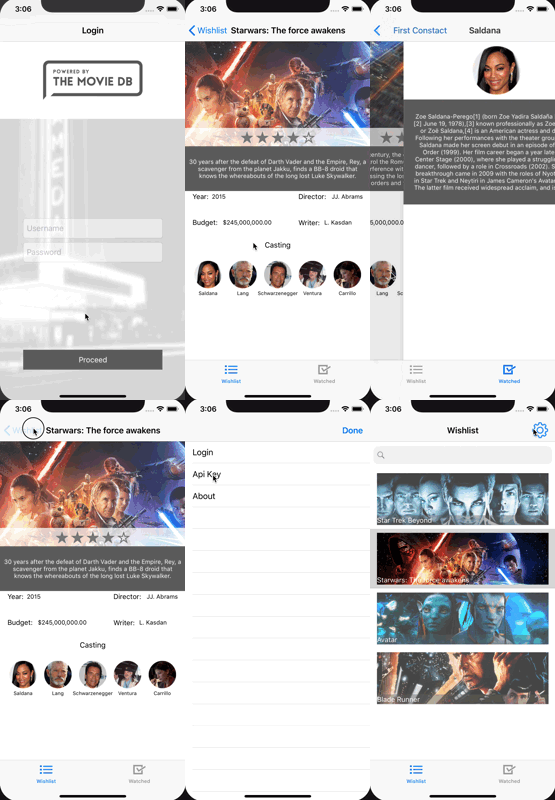
A demo application is provided to illustrate the core mechanisms. Pretty much every kind of navigation is addressed. The app consists of:
- An AppFlow that represents the main navigation. This Flow will handle the OnboardingFlow and the DashboardFlow depending on the "onboarding state" of the user.
- An OnBoardingFlow that represents a 2 steps onboarding wizard in a UINavigationController. It will only be displayed the first time the app is used.
- A DashboardFlow that handles the Tabbar for the WishlistFlow and the WatchedFlow.
- A WishlistFlow that represents a navigation stack of movies that you want to watch.
- A WatchedFlow that represents a navigation stack of movies that you've already seen.
- A SettingsFlow that represents the user's preferences in a master/detail presentation.
| |
| -------------- | -------------- |
| GitHub Actions |  |
| Frameworks | [](https://github.com/Carthage/Carthage) [](http://cocoapods.org/pods/RxFlow) [](https://github.com/apple/swift-package-manager) |
| Platform | [](http://cocoapods.org/pods/RxFlow) |
| Licence | [](http://cocoapods.org/pods/RxFlow) |
# About
RxFlow is a navigation framework for iOS applications based on a **Reactive Flow Coordinator pattern**.
This README is a short story of the whole conception process that led me to this framework.
You will find a very detail explanation of the whole project on my blog:
- [RxFlow Part 1: In Theory](https://sideeffect.io/posts/2017-11-08-rxflow-part1/)
- [RxFlow Part 2: In Practice](https://sideeffect.io/posts/2017-12-09-rxflow-part2/)
- [RxFlow Part 3: Tips and Tricks](https://sideeffect.io/posts/2017-12-22-rxflow-part3/)
The Jazzy documentation can be seen here as well: [Documentation](http://community.rxswift.org/RxFlow/)
Also here is a [Reactive coordinators tech talk](https://youtu.be/b0aCv7rlKx4) which explain the goals and motivation of that framework.
Available only in Russian. To get English subtitles you should press the *subtitles* button to see original (Russian) subtitles and then select Settings->Subtitles->Translate->*choose_your_language*
# Navigation concerns
Regarding navigation within an iOS application, two choices are available:
- Use the builtin mechanism provided by Apple and Xcode: storyboards and segues
- Implement a custom mechanism directly in the code
The disadvantage of these two solutions:
- Builtin mechanism: navigation is relatively static and the storyboards are massive. The navigation code pollutes the UIViewControllers
- Custom mechanism: code can be difficult to set up and can be complex depending on the chosen design pattern (Router, Coordinator)
# RxFlow aims to
- Promote the cutting of storyboards into atomic units to enable collaboration and reusability of UIViewControllers
- Allow the presentation of a UIViewController in different ways according to the navigation context
- Ease the implementation of dependency injection
- Remove every navigation mechanism from UIViewControllers
- Promote reactive programming
- Express the navigation in a declarative way while addressing the majority of the navigation cases
- Facilitate the cutting of an application into logical blocks of navigation
# Installation
## Carthage
In your Cartfile:
```ruby
github "RxSwiftCommunity/RxFlow"
```
## CocoaPods
In your Podfile:
```ruby
pod 'RxFlow'
```
## Swift Package Manager
In your Package.swift:
```swift
let package = Package(
name: "Example",
dependencies: [
.package(url: "https://github.com/RxSwiftCommunity/RxFlow.git", from: "2.10.0")
],
targets: [
.target(name: "Example", dependencies: ["RxFlow"])
]
)
```
# The key principles
The **Coordinator** pattern is a great way to organize the navigation within your application. It allows to:
- Remove the navigation code from UIViewControllers.
- Reuse UIViewControllers in different navigation contexts.
- Ease the use of dependency injection.
To learn more about it, I suggest you take a look at this article: ([Coordinator Redux](http://khanlou.com/2015/10/coordinators-redux/)).
Nevertheless, the Coordinator pattern can have some drawbacks:
- The coordination mechanism has to be written each time you bootstrap an application.
- Communicating with the Coordinators stack can lead to a lot of boilerplate code.
RxFlow is a reactive implementation of the Coordinator pattern. It has all the great features of this architecture, but brings some improvements:
- It makes the navigation more declarative within **Flows**.
- It provides a built-in **FlowCoordinator** that handles the navigation between **Flows**.
- It uses reactive programming to trigger navigation actions towards the **FlowCoordinators**.
There are 6 terms you have to be familiar with to understand **RxFlow**:
- **Flow**: each **Flow** defines a navigation area in your application. This is the place where you declare the navigation actions (such as presenting a UIViewController or another **Flow**).
- **Step**: a **Step** is a way to express a state that can lead to a navigation. Combinations of **Flows** and **Steps** describe all the possible navigation actions. A **Step** can even embed inner values (such as Ids, URLs, ...) that will be propagated to screens declared in the **Flows**
- **Stepper**: a **Stepper** can be anything that can emit **Steps** inside **Flows**.
- **Presentable**: it is an abstraction of something that can be presented (basically **UIViewController** and **Flow** are **Presentable**).
- **FlowContributor**: it is a simple data structure that tells the **FlowCoordinator** what will be the next things that can emit new **Steps** in a **Flow**.
- **FlowCoordinator**: once the developer has defined the suitable combinations of **Flows** and **Steps** representing the navigation possibilities, the job of the **FlowCoordinator** is to mix these combinations to handle all the navigation of your app. **FlowCoordinators** are provided by **RxFlow**, you don't have to implement them.
# How to use RxFlow
## Code samples
### How to declare **Steps**
**Steps** are little pieces of states eventually expressing the intent to navigate, it is pretty convenient to declare them in a enum:
```swift
enum DemoStep: Step {
// Login
case loginIsRequired
case userIsLoggedIn
// Onboarding
case onboardingIsRequired
case onboardingIsComplete
// Home
case dashboardIsRequired
// Movies
case moviesAreRequired
case movieIsPicked (withId: Int)
case castIsPicked (withId: Int)
// Settings
case settingsAreRequired
case settingsAreComplete
}
```
The idea is to keep the **Steps** `navigation independent` as much as possible. For instance, calling a **Step** `showMovieDetail(withId: Int)` might be a bad idea since it tightly couples the fact of selecting a movie with the consequence of showing the movie detail screen. It is not up to the emitter of the **Step** to decide where to navigate, this decision belongs to the **Flow**.
### How to declare a **Flow**
The following **Flow** is used as a Navigation stack. All you have to do is:
- Declare a root **Presentable** on which your navigation will be based.
- Implement the **navigate(to:)** function to transform a **Step** into a navigation actions.
**Flows** can be used to implement dependency injection when instantiating the ViewControllers.
The **navigate(to:)** function returns a **FlowContributors**. This is how the next navigation actions will be produced.
For instance the value: ```.one(flowContributor: .contribute(withNextPresentable: viewController, withNextStepper: viewController.viewModel)``` means:
- ```viewController``` is a **Presentable** and its lifecycle will affect the way the associated **Stepper** will emit **Steps**. For instance, if a **Stepper** emits a **Step** while its associated **Presentable** is temporarily hidden, this **Step** won't be taken care of.
- ```viewController.viewModel``` is a **Stepper** and will contribute to the navigation in that **Flow** by emitting **Steps**, according to its associated **Presentable** lifecycle.
```swift
class WatchedFlow: Flow {
var root: Presentable {
return self.rootViewController
}
private let rootViewController = UINavigationController()
private let services: AppServices
init(withServices services: AppServices) {
self.services = services
}
func navigate(to step: Step) -> FlowContributors {
guard let step = step as? DemoStep else { return .none }
switch step {
case .moviesAreRequired:
return navigateToMovieListScreen()
case .movieIsPicked(let movieId):
return navigateToMovieDetailScreen(with: movieId)
case .castIsPicked(let castId):
return navigateToCastDetailScreen(with: castId)
default:
return .none
}
}
private func navigateToMovieListScreen() -> FlowContributors {
let viewController = WatchedViewController.instantiate(withViewModel: WatchedViewModel(),
andServices: self.services)
viewController.title = "Watched"
self.rootViewController.pushViewController(viewController, animated: true)
return .one(flowContributor: .contribute(withNextPresentable: viewController, withNextStepper: viewController.viewModel))
}
private func navigateToMovieDetailScreen (with movieId: Int) -> FlowContributors {
let viewController = MovieDetailViewController.instantiate(withViewModel: MovieDetailViewModel(withMovieId: movieId),
andServices: self.services)
viewController.title = viewController.viewModel.title
self.rootViewController.pushViewController(viewController, animated: true)
return .one(flowContributor: .contribute(withNextPresentable: viewController, withNextStepper: viewController.viewModel))
}
private func navigateToCastDetailScreen (with castId: Int) -> FlowContributors {
let viewController = CastDetailViewController.instantiate(withViewModel: CastDetailViewModel(withCastId: castId),
andServices: self.services)
viewController.title = viewController.viewModel.name
self.rootViewController.pushViewController(viewController, animated: true)
return .none
}
}
```
### How to handle deep links
From the AppDelegate you can reach the FlowCoordinator and call the `navigate(to:)` function when receiving a notification for instance.
The step passed to the function will then be passed to all the existing Flows so you can adapt the navigation.
```swift
func userNotificationCenter(_ center: UNUserNotificationCenter,
didReceive response: UNNotificationResponse,
withCompletionHandler completionHandler: @escaping () -> Void) {
// example of how DeepLink can be handled
self.coordinator.navigate(to: DemoStep.movieIsPicked(withId: 23452))
}
```
### How to adapt a Step before it triggers a navigation ?
A Flow has a `adapt(step:) -> Single` function that by default returns the step it has been given
as a parameter.
This function is called by the FlowCoordinator before the `navigate(to:)` function. This is a perfect place
to implement some logic that could for instance forbid a step to trigger a navigation. A common use case would be to handle the navigation permissions within an application.
Let's say we have a PermissionManager:
```swift
func adapt(step: Step) -> Single {
switch step {
case DemoStep.aboutIsRequired:
return PermissionManager.isAuthorized() ? .just(step) : .just(DemoStep.unauthorized)
default:
return .just(step)
}
}
...
later in the navigate(to:) function, the .unauthorized step could trigger an AlertViewController
```
Why return a Single and not directly a Step ? Because some filtering processes could be asynchronous and need a user action to be performed (for instance a filtering based on the authentication layer of the device with TouchID or FaceID)
In order to improve the separation of concerns, a Flow could be injected with a delegate which purpose would be to handle the adaptions in the `adapt(step:)` function. The delegate could eventually be reused across multiple flows to ensure a consistency in the adaptations.
### How to declare a **Stepper**
In theory a **Stepper**, as it is a protocol, can be anything (a UIViewController for instance) but a good practice is to isolate that behavior in a ViewModel or something similar.
RxFlow comes with a predefined **OneStepper** class. For instance, it can be used when creating a new Flow to express the first **Step** that will drive the navigation.
The following **Stepper** will emit a **DemoStep.moviePicked(withMovieId:)** each time the function **pick(movieId:)** is called. The WatchedFlow will then call the function **navigateToMovieDetailScreen (with movieId: Int)**.
```swift
class WatchedViewModel: Stepper {
let movies: [MovieViewModel]
let steps = PublishRelay()
init(with service: MoviesService) {
// we can do some data refactoring in order to display things exactly the way we want (this is the aim of a ViewModel)
self.movies = service.watchedMovies().map({ (movie) -> MovieViewModel in
return MovieViewModel(id: movie.id, title: movie.title, image: movie.image)
})
}
// when a movie is picked, a new Step is emitted.
// That will trigger a navigation action within the WatchedFlow
public func pick (movieId: Int) {
self.steps.accept(DemoStep.movieIsPicked(withId: movieId))
}
}
```
### Is it possible to coordinate multiple Flows ?
Of course, it is the aim of a Coordinator. Inside a Flow we can present UIViewControllers and also new Flows. The function **Flows.whenReady()** allows to be triggered when the new **Flow** is ready to be displayed and gives us back its root **Presentable**.
For instance, from the WishlistFlow, we launch the SettingsFlow in a popup.
```swift
private func navigateToSettings() -> FlowContributors {
let settingsStepper = SettingsStepper()
let settingsFlow = SettingsFlow(withServices: self.services, andStepper: settingsStepper)
Flows.use(settingsFlow, when: .ready) { [unowned self] root in
self.rootViewController.present(root, animated: true)
}
return .one(flowContributor: .contribute(withNextPresentable: settingsFlow, withNextStepper: settingsStepper))
}
```
The `Flows.use(when:)` takes an `ExecuteStrategy` as a second parameter. It has two possible values:
- .created: The completion block will be executed instantly
- .ready: The completion block will be executed once the sub flows (SettingsFlow in the example) have emitted a first step
For more complex cases, see the **DashboardFlow.swift** and the **SettingsFlow.swift** files in which we handle a UITabBarController and a UISplitViewController.
### How to bootstrap the RxFlow process
The coordination process is pretty straightforward and happens in the AppDelegate.
```swift
class AppDelegate: UIResponder, UIApplicationDelegate {
let disposeBag = DisposeBag()
var window: UIWindow?
var coordinator = FlowCoordinator()
let appServices = AppServices()
func application(_ application: UIApplication,
didFinishLaunchingWithOptions launchOptions: [UIApplicationLaunchOptionsKey: Any]?) -> Bool {
guard let window = self.window else { return false }
// listening for the coordination mechanism is not mandatory, but can be useful
coordinator.rx.didNavigate.subscribe(onNext: { (flow, step) in
print ("did navigate to flow=\(flow) and step=\(step)")
}).disposed(by: self.disposeBag)
let appFlow = AppFlow(withWindow: window, andServices: self.appServices)
self.coordinator.coordinate(flow: self.appFlow, with: AppStepper(withServices: self.appServices))
return true
}
}
```
As a bonus, **FlowCoordinator** offers a Rx extension that allows you to track the navigation actions (**FlowCoordinator.rx.willNavigate** and **FlowCoordinator.rx.didNavigate**).
## Demo Application
A demo application is provided to illustrate the core mechanisms. Pretty much every kind of navigation is addressed. The app consists of:
- An AppFlow that represents the main navigation. This Flow will handle the OnboardingFlow and the DashboardFlow depending on the "onboarding state" of the user.
- An OnBoardingFlow that represents a 2 steps onboarding wizard in a UINavigationController. It will only be displayed the first time the app is used.
- A DashboardFlow that handles the Tabbar for the WishlistFlow and the WatchedFlow.
- A WishlistFlow that represents a navigation stack of movies that you want to watch.
- A WatchedFlow that represents a navigation stack of movies that you've already seen.
- A SettingsFlow that represents the user's preferences in a master/detail presentation.
 # Tools and dependencies
RxFlow relies on:
- SwiftLint for static code analysis ([Github SwiftLint](https://github.com/realm/SwiftLint))
- RxSwift to expose Steps as Observables the Coordinator can react to ([Github RxSwift](https://github.com/ReactiveX/RxSwift))
- Reusable in the Demo App to ease the storyboard cutting into atomic ViewControllers ([Github Reusable](https://github.com/AliSoftware/Reusable))
# Tools and dependencies
RxFlow relies on:
- SwiftLint for static code analysis ([Github SwiftLint](https://github.com/realm/SwiftLint))
- RxSwift to expose Steps as Observables the Coordinator can react to ([Github RxSwift](https://github.com/ReactiveX/RxSwift))
- Reusable in the Demo App to ease the storyboard cutting into atomic ViewControllers ([Github Reusable](https://github.com/AliSoftware/Reusable))