# dsh-notice-center 🔔🐋
[中文](./README.md) | **English**
[](https://github.com/SCP-QQ/dsh-notice-center/actions/workflows/test.yml)
[](https://www.npmjs.com/package/dsh-notice-center)
A **notification center** for DeepSeek Harness: it turns the tab's whale icon into a status light and gets your attention while you are looking elsewhere — a session finished, or something is waiting for your decision.
Package `dsh-notice-center`, plugin instance id `notice-center`, settings namespace `notice-center`.
## Screenshots
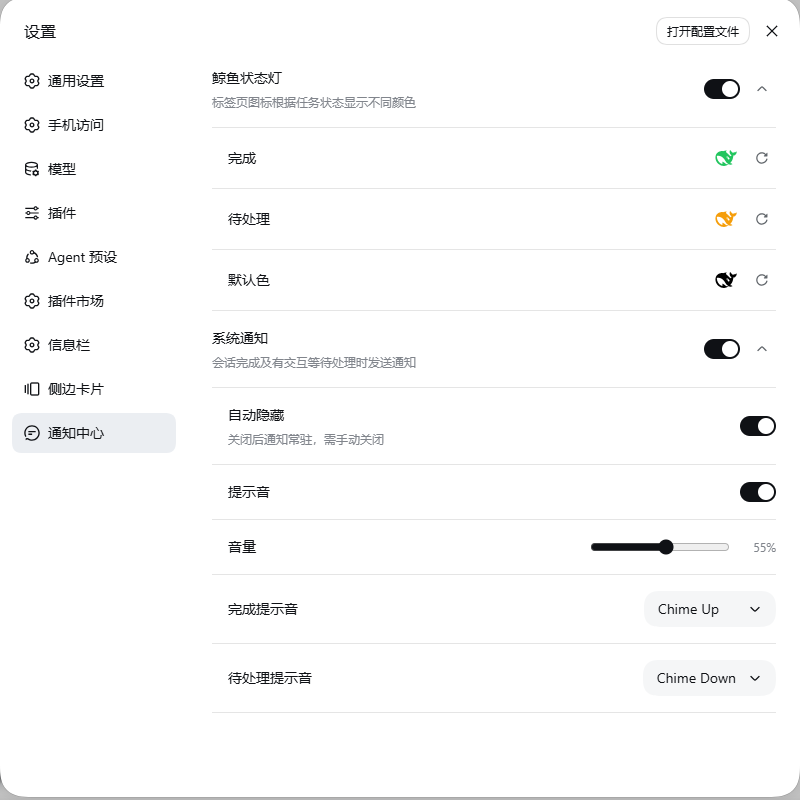
Settings → **Notification center** (a sidebar entry):
 ## Features
### 1. Whale status light (favicon state machine)
| Whale colour | Meaning | When it clears |
|---|---|---|
| 🟢 Green | A session **finished** while you were not watching it | Clears once you open that session; back to the default state once you have opened them all |
| 🟠 Amber | A session **awaits you**: question / approval / plan review | Clears once handled |
| ⚫ Black | All clear (the stock icon) | Default state |
In the tab (green = a session finished):

The colours come from **the same official signal** as the sidebar's green and amber dots, so they never drift apart. Only main sessions count; subagents do not affect it. When both apply, **amber wins** — a pending interaction is the primary status, so a session waiting on you is never masked by another session that just finished.
All three colours are configurable, including the default colour — leave it unset to keep the stock icon.
### 2. System notifications
- **Completion** — fires when a session finishes (the official `completed` goes false → true; the session you have open never flips it, so its run state going true → false counts instead)
- **Pending** — fires when a new interaction starts waiting for you
- **Text** — the title is the session name (with `+N` when several merge), the body is the kind of notification (finished → Session finished; pending is **refined per interaction**: approval → *Approval · Bash* (plain *Approval needed* when no tool name is available, truncated past 32 characters), a question → *Choose an option* / *Choose options* / *Type an answer*, or *2 questions* for a batch, plan review → *Plan review*; unknown kinds fall back to a generic line); a **single** finished notification also carries how long the turn took (*Session finished · turn took 2m13s*), formatted like the official in-conversation "turn time" readout and dropped when several merge. The start is observed from `running`, so a turn already in flight when the page reloads has no start and shows no figure
- **Quiet by default while you are looking** — *in the foreground* means the tab is visible **and** the window has focus; switching tabs, minimising, or leaving the browser behind another app all notify you. To be notified in the foreground too (still sitting in a session but away from the screen), turn on *Notify in the foreground* under *More notification options*
- **Batching and de-duplication** — events within a 300ms window are merged; the same session and kind only fires once; several sessions merge into *title +N*
- **Clicking the notification** focuses the window and opens that session
- **Sound** — finished and pending each have their own picker (**hover to preview**) and a shared volume (adjusting the volume replays the current finished sound at the new level); turning sound on silences the system notification sound and uses the plugin's own
- **Optional persistence** — turn *Auto hide* off and the notification stays on screen until you dismiss it (auto hide is on by default, so the OS collects it)
- The notification icon follows your configured status-light colour
| Finished (green) | Pending (amber) |
|---|---|
| 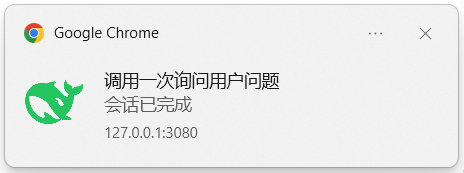 | 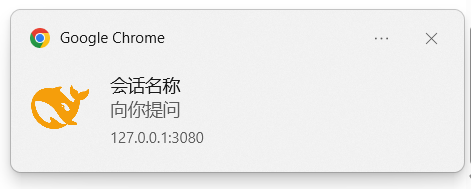 |
> Notifications are raised by the browser (Chrome here), so the card shows the browser and the origin `127.0.0.1:3080`.
### 3. Sound library
Finished and pending each have a picker with **47 entries**: 45 taken from opencode's built-in sound library (the same `Alert` / `Bip-bop` / `Staplebops` / `Nope` / `Yup` set, with the same numbering as opencode's settings) plus two tones the plugin synthesises itself.
| Pack | Entries |
|---|---|
| Built-in (synthesised) | Chime Up (default for finished, a rising two-tone), Chime Down (default for pending, a falling two-tone) |
| Alert | Alert 01–10 |
| Bip-bop | Bip-bop 01–10 |
| Staplebops | Staplebops 01–07 |
| Nope | Nope 01–12 |
| Yup | Yup 01–06 |
- **Hover to preview** — moving over an entry plays it (120ms debounce, so sweeping the list does not machine-gun)
- **Click to apply** — the chosen sound is what that kind of notification plays; the current one is ticked `✓`
- **Styled like the official control** — the trigger is the official language selector's `.selector` (36px tall, 18px pill radius); the panel is the official `Menu` (`bg-layer-3`, 0.5px hairline, 6px radius), and entries highlight with the official hover fill
- The host half serves the files at `/notice-center-sounds/.mp3`; if that route is unavailable it **falls back to the built-in synthesised tone**, so you are never left silent
- No migration needed: without a stored choice it still uses Chime Up / Chime Down
## Usage
1. **Open the settings page** — Settings → **Notification center**
2. **Turn system notifications on** — flip the master switch; the browser asks for permission, choose Allow (if it was denied, the page says so and you have to re-allow it in the browser's site settings)
3. **Volume, sounds and foreground alerts** — expand *More notification options*: drag the volume slider (**releasing it replays the finished sound at the new level**); in the finished / pending pickers **hovering an entry previews it**, clicking selects it; turn on *Notify in the foreground* to be alerted while the page is in front
4. **Colours (optional)** — expand *Tab whale light*: click the swatch or type a `#RRGGBB`, and ↺ at the end of the row restores the default
5. **That is it** — from then on, sessions finishing or waiting for you notify you while you are away; clicking the notification jumps back to that session
## Installation
`dsh plugin` is a **thin forwarder to pnpm** (it runs pnpm in the profile directory, then adds the new bundle to `dsh.profile.bundles`), so a registry name, a git repository, a tarball or a local path all work.
### 1. From npm (recommended)
```sh
dsh plugin --profile web add dsh-notice-center
```
Package page: (`latest` is the stable line; pre-releases live on the `next` tag)
### 2. Straight from GitHub (no publish needed)
```sh
dsh plugin --profile web add github:SCP-QQ/dsh-notice-center
# or over SSH (when a proxy interferes with HTTPS on your machine)
dsh plugin --profile web add git+ssh://git@github.com/SCP-QQ/dsh-notice-center.git
```
### 3. From a tarball (offline / internal distribution)
```sh
npm pack # produces dsh-notice-center-.tgz
dsh plugin --profile web add ./dsh-notice-center-.tgz
```
### 4. Local link (while editing the code)
Add `"dsh-notice-center": "link:/dsh-notice-center"` to the profile's `dependencies`, and `"dsh-notice-center"` to `dsh.profile.bundles`.
> The first three need a **Harness restart** afterwards. The host half's only runtime dependency is `@deepseek-ai/schemastery` (which exists on npm), so the profile does not have to provide any `@deepseek-ai/*` package.
**Restart rules differ per half**: editing the browser half `lib/client.cjs` needs no restart (HMR stat-polls the bundle and tells the browser to reload it; refreshing the page forces a clean reload); **editing the host half `lib/index.mjs` requires a Harness restart** (host-half hot reload depends on `cordis-plugin-hmr`, which needs the loader to run with `--expose-internals` — measured, it does not take effect). A first install, or any rename, also requires a restart.
### 5. A local `.npmrc` for manual publishing (optional)
CI publishes over OIDC and needs **no token at all**. Only if you want to run `npm publish` from this machine, drop a `.npmrc` into the project root:
```sh
//registry.npmjs.org/:_authToken=
```
It is already listed in `.gitignore` — **never commit it** (especially not when it holds a real token).
## Requirements
- A stock DeepSeek Harness (measured here on Harness 0.1.5-rc.1 + client packages 0.1.5-rc.2; supported from 0.1.2-rc.1)
- System notifications need a **secure context**: `http://127.0.0.1:3080` and `localhost` work; over a **LAN IP** the browser's Notification API is unavailable
## Uninstall
```sh
dsh plugin --profile web remove dsh-notice-center
```
Removing the dependency and the `dsh.profile.bundles` entry leaves nothing behind after a restart.
## Known limitations
- **No notifications once the tab is closed** (Web Push needs a server plus HTTPS, which a local plugin cannot reasonably provide; covering that would need a host-side toast)
- The Notification API is unavailable in a non-secure context (LAN IP)
- The green light is lost on page reload: that is the memory-only semantics of the official finished signal, not a bug
- System-wide do-not-disturb (Windows Focus Assist and friends) swallows notifications and the plugin cannot tell
## Development
```sh
npm test # host-half + client-half smoke tests
npm run test:host # host half only
npm run test:client # client half only
```
CI runs the same suite on push and pull requests (`.github/workflows/test.yml`).
## Releasing
Releases are driven by **tags** through [`.github/workflows/publish.yml`](.github/workflows/publish.yml) — everyday commits and pushes **never publish**:
| Intent | Command | Result |
|---|---|---|
| Commit only (feature not verified yet) | `git commit` + `git push` | `test.yml` runs; npm is untouched |
| Pre-release (for testers) | set the version to `1.3.0-rc.1` → commit → `git tag v1.3.0-rc.1 && git push origin v1.3.0-rc.1` | published to the **`next`** tag (`npm i dsh-notice-center@next`); `latest` stays put |
| Real release | set the version to `1.3.0` → commit → `git tag v1.3.0 && git push origin v1.3.0` | published to **`latest`**, with provenance attached |
| Validate the pipeline only | Actions → publish → Run workflow | install + tests + `npm pack --dry-run`, **no publish** |
Three gates are built into the workflow: **the tag must equal the `package.json` version**, **the tagged commit must already be on `main`**, and **the tests must pass**. Any of them failing stops the publish.
### One-time setup: npm Trusted Publishing (OIDC)
Publishing needs no npm token at all, so there is nothing to leak or rotate.
Open the package management page → **Publishing Access** → *Trusted publishers* → **Add a trusted publisher** → **GitHub Actions**:
| Field | Value |
|---|---|
| Organization or user | `SCP-QQ` |
| Repository | `dsh-notice-center` |
| Workflow filename | `publish.yml` (the **filename only**, no path; renaming the file means updating this, or publishes get a 403) |
| Environment name | `npm` (must match the `environment:` in the workflow) |
| **Allowed actions → Allow npm publish** | ✅ **must be checked** |
> ⚠️ That checkbox is new npm behaviour: a trusted publisher may only `npm stage publish` unless *Allow npm publish* is ticked, and this workflow's `npm publish` would be rejected.
> If you would rather have it stage-only and publish by hand in the browser, leave it unchecked and change the workflow's last step to `npm stage publish`.
- Publishing over OIDC makes npm attach **provenance automatically** (no `--provenance` flag), and the package page shows it
- To require a human click even after a tag is pushed, add **Required reviewers** to the `npm` environment under the repository's Settings → Environments; publishing works without it too
- Manual local publishing can still fall back to a granular token (see the `.npmrc` usage in Installation, step 5)
## Layout
```
package.json package metadata (dsh-notice-center)
cordis.patch.yml bundle patch layer (insert id: notice-center)
lib/index.mjs host half: settings schema + the /notice-center-sounds route
lib/client.cjs browser half: favicon state machine + notifications + sounds + settings UI
assets/audio/*.mp3 45 opencode sound clips (MIT; see assets/audio/README.md)
docs/images/*.png screenshots used by the READMEs
test/host-half.smoke.mjs host-half smoke test
test/client-half.smoke.mjs client-half smoke test (npm test runs both)
.github/workflows/test.yml CI: pnpm test on push / PR
```
## License
MIT; the full text is in [`LICENSE`](./LICENSE).
The sound clips (`assets/audio/*.mp3`, 45 files) come from [anomalyco/opencode](https://github.com/anomalyco/opencode),
specifically `packages/ui/src/assets/audio/`. Upstream ships them under the MIT licence, and the same licence and attribution are kept here; if upstream changes its licensing, replace or drop this directory (see [`assets/audio/README.md`](./assets/audio/README.md)).
## Features
### 1. Whale status light (favicon state machine)
| Whale colour | Meaning | When it clears |
|---|---|---|
| 🟢 Green | A session **finished** while you were not watching it | Clears once you open that session; back to the default state once you have opened them all |
| 🟠 Amber | A session **awaits you**: question / approval / plan review | Clears once handled |
| ⚫ Black | All clear (the stock icon) | Default state |
In the tab (green = a session finished):

The colours come from **the same official signal** as the sidebar's green and amber dots, so they never drift apart. Only main sessions count; subagents do not affect it. When both apply, **amber wins** — a pending interaction is the primary status, so a session waiting on you is never masked by another session that just finished.
All three colours are configurable, including the default colour — leave it unset to keep the stock icon.
### 2. System notifications
- **Completion** — fires when a session finishes (the official `completed` goes false → true; the session you have open never flips it, so its run state going true → false counts instead)
- **Pending** — fires when a new interaction starts waiting for you
- **Text** — the title is the session name (with `+N` when several merge), the body is the kind of notification (finished → Session finished; pending is **refined per interaction**: approval → *Approval · Bash* (plain *Approval needed* when no tool name is available, truncated past 32 characters), a question → *Choose an option* / *Choose options* / *Type an answer*, or *2 questions* for a batch, plan review → *Plan review*; unknown kinds fall back to a generic line); a **single** finished notification also carries how long the turn took (*Session finished · turn took 2m13s*), formatted like the official in-conversation "turn time" readout and dropped when several merge. The start is observed from `running`, so a turn already in flight when the page reloads has no start and shows no figure
- **Quiet by default while you are looking** — *in the foreground* means the tab is visible **and** the window has focus; switching tabs, minimising, or leaving the browser behind another app all notify you. To be notified in the foreground too (still sitting in a session but away from the screen), turn on *Notify in the foreground* under *More notification options*
- **Batching and de-duplication** — events within a 300ms window are merged; the same session and kind only fires once; several sessions merge into *title +N*
- **Clicking the notification** focuses the window and opens that session
- **Sound** — finished and pending each have their own picker (**hover to preview**) and a shared volume (adjusting the volume replays the current finished sound at the new level); turning sound on silences the system notification sound and uses the plugin's own
- **Optional persistence** — turn *Auto hide* off and the notification stays on screen until you dismiss it (auto hide is on by default, so the OS collects it)
- The notification icon follows your configured status-light colour
| Finished (green) | Pending (amber) |
|---|---|
|  |  |
> Notifications are raised by the browser (Chrome here), so the card shows the browser and the origin `127.0.0.1:3080`.
### 3. Sound library
Finished and pending each have a picker with **47 entries**: 45 taken from opencode's built-in sound library (the same `Alert` / `Bip-bop` / `Staplebops` / `Nope` / `Yup` set, with the same numbering as opencode's settings) plus two tones the plugin synthesises itself.
| Pack | Entries |
|---|---|
| Built-in (synthesised) | Chime Up (default for finished, a rising two-tone), Chime Down (default for pending, a falling two-tone) |
| Alert | Alert 01–10 |
| Bip-bop | Bip-bop 01–10 |
| Staplebops | Staplebops 01–07 |
| Nope | Nope 01–12 |
| Yup | Yup 01–06 |
- **Hover to preview** — moving over an entry plays it (120ms debounce, so sweeping the list does not machine-gun)
- **Click to apply** — the chosen sound is what that kind of notification plays; the current one is ticked `✓`
- **Styled like the official control** — the trigger is the official language selector's `.selector` (36px tall, 18px pill radius); the panel is the official `Menu` (`bg-layer-3`, 0.5px hairline, 6px radius), and entries highlight with the official hover fill
- The host half serves the files at `/notice-center-sounds/.mp3`; if that route is unavailable it **falls back to the built-in synthesised tone**, so you are never left silent
- No migration needed: without a stored choice it still uses Chime Up / Chime Down
## Usage
1. **Open the settings page** — Settings → **Notification center**
2. **Turn system notifications on** — flip the master switch; the browser asks for permission, choose Allow (if it was denied, the page says so and you have to re-allow it in the browser's site settings)
3. **Volume, sounds and foreground alerts** — expand *More notification options*: drag the volume slider (**releasing it replays the finished sound at the new level**); in the finished / pending pickers **hovering an entry previews it**, clicking selects it; turn on *Notify in the foreground* to be alerted while the page is in front
4. **Colours (optional)** — expand *Tab whale light*: click the swatch or type a `#RRGGBB`, and ↺ at the end of the row restores the default
5. **That is it** — from then on, sessions finishing or waiting for you notify you while you are away; clicking the notification jumps back to that session
## Installation
`dsh plugin` is a **thin forwarder to pnpm** (it runs pnpm in the profile directory, then adds the new bundle to `dsh.profile.bundles`), so a registry name, a git repository, a tarball or a local path all work.
### 1. From npm (recommended)
```sh
dsh plugin --profile web add dsh-notice-center
```
Package page: (`latest` is the stable line; pre-releases live on the `next` tag)
### 2. Straight from GitHub (no publish needed)
```sh
dsh plugin --profile web add github:SCP-QQ/dsh-notice-center
# or over SSH (when a proxy interferes with HTTPS on your machine)
dsh plugin --profile web add git+ssh://git@github.com/SCP-QQ/dsh-notice-center.git
```
### 3. From a tarball (offline / internal distribution)
```sh
npm pack # produces dsh-notice-center-.tgz
dsh plugin --profile web add ./dsh-notice-center-.tgz
```
### 4. Local link (while editing the code)
Add `"dsh-notice-center": "link:/dsh-notice-center"` to the profile's `dependencies`, and `"dsh-notice-center"` to `dsh.profile.bundles`.
> The first three need a **Harness restart** afterwards. The host half's only runtime dependency is `@deepseek-ai/schemastery` (which exists on npm), so the profile does not have to provide any `@deepseek-ai/*` package.
**Restart rules differ per half**: editing the browser half `lib/client.cjs` needs no restart (HMR stat-polls the bundle and tells the browser to reload it; refreshing the page forces a clean reload); **editing the host half `lib/index.mjs` requires a Harness restart** (host-half hot reload depends on `cordis-plugin-hmr`, which needs the loader to run with `--expose-internals` — measured, it does not take effect). A first install, or any rename, also requires a restart.
### 5. A local `.npmrc` for manual publishing (optional)
CI publishes over OIDC and needs **no token at all**. Only if you want to run `npm publish` from this machine, drop a `.npmrc` into the project root:
```sh
//registry.npmjs.org/:_authToken=
```
It is already listed in `.gitignore` — **never commit it** (especially not when it holds a real token).
## Requirements
- A stock DeepSeek Harness (measured here on Harness 0.1.5-rc.1 + client packages 0.1.5-rc.2; supported from 0.1.2-rc.1)
- System notifications need a **secure context**: `http://127.0.0.1:3080` and `localhost` work; over a **LAN IP** the browser's Notification API is unavailable
## Uninstall
```sh
dsh plugin --profile web remove dsh-notice-center
```
Removing the dependency and the `dsh.profile.bundles` entry leaves nothing behind after a restart.
## Known limitations
- **No notifications once the tab is closed** (Web Push needs a server plus HTTPS, which a local plugin cannot reasonably provide; covering that would need a host-side toast)
- The Notification API is unavailable in a non-secure context (LAN IP)
- The green light is lost on page reload: that is the memory-only semantics of the official finished signal, not a bug
- System-wide do-not-disturb (Windows Focus Assist and friends) swallows notifications and the plugin cannot tell
## Development
```sh
npm test # host-half + client-half smoke tests
npm run test:host # host half only
npm run test:client # client half only
```
CI runs the same suite on push and pull requests (`.github/workflows/test.yml`).
## Releasing
Releases are driven by **tags** through [`.github/workflows/publish.yml`](.github/workflows/publish.yml) — everyday commits and pushes **never publish**:
| Intent | Command | Result |
|---|---|---|
| Commit only (feature not verified yet) | `git commit` + `git push` | `test.yml` runs; npm is untouched |
| Pre-release (for testers) | set the version to `1.3.0-rc.1` → commit → `git tag v1.3.0-rc.1 && git push origin v1.3.0-rc.1` | published to the **`next`** tag (`npm i dsh-notice-center@next`); `latest` stays put |
| Real release | set the version to `1.3.0` → commit → `git tag v1.3.0 && git push origin v1.3.0` | published to **`latest`**, with provenance attached |
| Validate the pipeline only | Actions → publish → Run workflow | install + tests + `npm pack --dry-run`, **no publish** |
Three gates are built into the workflow: **the tag must equal the `package.json` version**, **the tagged commit must already be on `main`**, and **the tests must pass**. Any of them failing stops the publish.
### One-time setup: npm Trusted Publishing (OIDC)
Publishing needs no npm token at all, so there is nothing to leak or rotate.
Open the package management page → **Publishing Access** → *Trusted publishers* → **Add a trusted publisher** → **GitHub Actions**:
| Field | Value |
|---|---|
| Organization or user | `SCP-QQ` |
| Repository | `dsh-notice-center` |
| Workflow filename | `publish.yml` (the **filename only**, no path; renaming the file means updating this, or publishes get a 403) |
| Environment name | `npm` (must match the `environment:` in the workflow) |
| **Allowed actions → Allow npm publish** | ✅ **must be checked** |
> ⚠️ That checkbox is new npm behaviour: a trusted publisher may only `npm stage publish` unless *Allow npm publish* is ticked, and this workflow's `npm publish` would be rejected.
> If you would rather have it stage-only and publish by hand in the browser, leave it unchecked and change the workflow's last step to `npm stage publish`.
- Publishing over OIDC makes npm attach **provenance automatically** (no `--provenance` flag), and the package page shows it
- To require a human click even after a tag is pushed, add **Required reviewers** to the `npm` environment under the repository's Settings → Environments; publishing works without it too
- Manual local publishing can still fall back to a granular token (see the `.npmrc` usage in Installation, step 5)
## Layout
```
package.json package metadata (dsh-notice-center)
cordis.patch.yml bundle patch layer (insert id: notice-center)
lib/index.mjs host half: settings schema + the /notice-center-sounds route
lib/client.cjs browser half: favicon state machine + notifications + sounds + settings UI
assets/audio/*.mp3 45 opencode sound clips (MIT; see assets/audio/README.md)
docs/images/*.png screenshots used by the READMEs
test/host-half.smoke.mjs host-half smoke test
test/client-half.smoke.mjs client-half smoke test (npm test runs both)
.github/workflows/test.yml CI: pnpm test on push / PR
```
## License
MIT; the full text is in [`LICENSE`](./LICENSE).
The sound clips (`assets/audio/*.mp3`, 45 files) come from [anomalyco/opencode](https://github.com/anomalyco/opencode),
specifically `packages/ui/src/assets/audio/`. Upstream ships them under the MIT licence, and the same licence and attribution are kept here; if upstream changes its licensing, replace or drop this directory (see [`assets/audio/README.md`](./assets/audio/README.md)).