
Analysarr
The health dashboard for your media stack.
Emby or Jellyfin · Sonarr · Radarr · qBittorrent, Deluge or Transmission · Seer · cross-seed





Lire en français
---
Analysarr shows, for every movie and series, its state across your whole stack — and lets you act on it in a few clicks instead of juggling four web interfaces.
- Is this movie **still seeding**, and is the torrent **protected by a hardlink** to the library?
- Which files are **duplicates** left behind by a Sonarr/Radarr upgrade?
- Which torrents are **orphans** (old quality, nothing links to them anymore)?
- Who **watched** it, who **requested** it, and how much space would deleting it **really** free?
> **Like Analysarr?** Give it a ⭐ on [GitHub](https://github.com/SEC844/Analysarr): it helps other people find the project and keeps it moving.
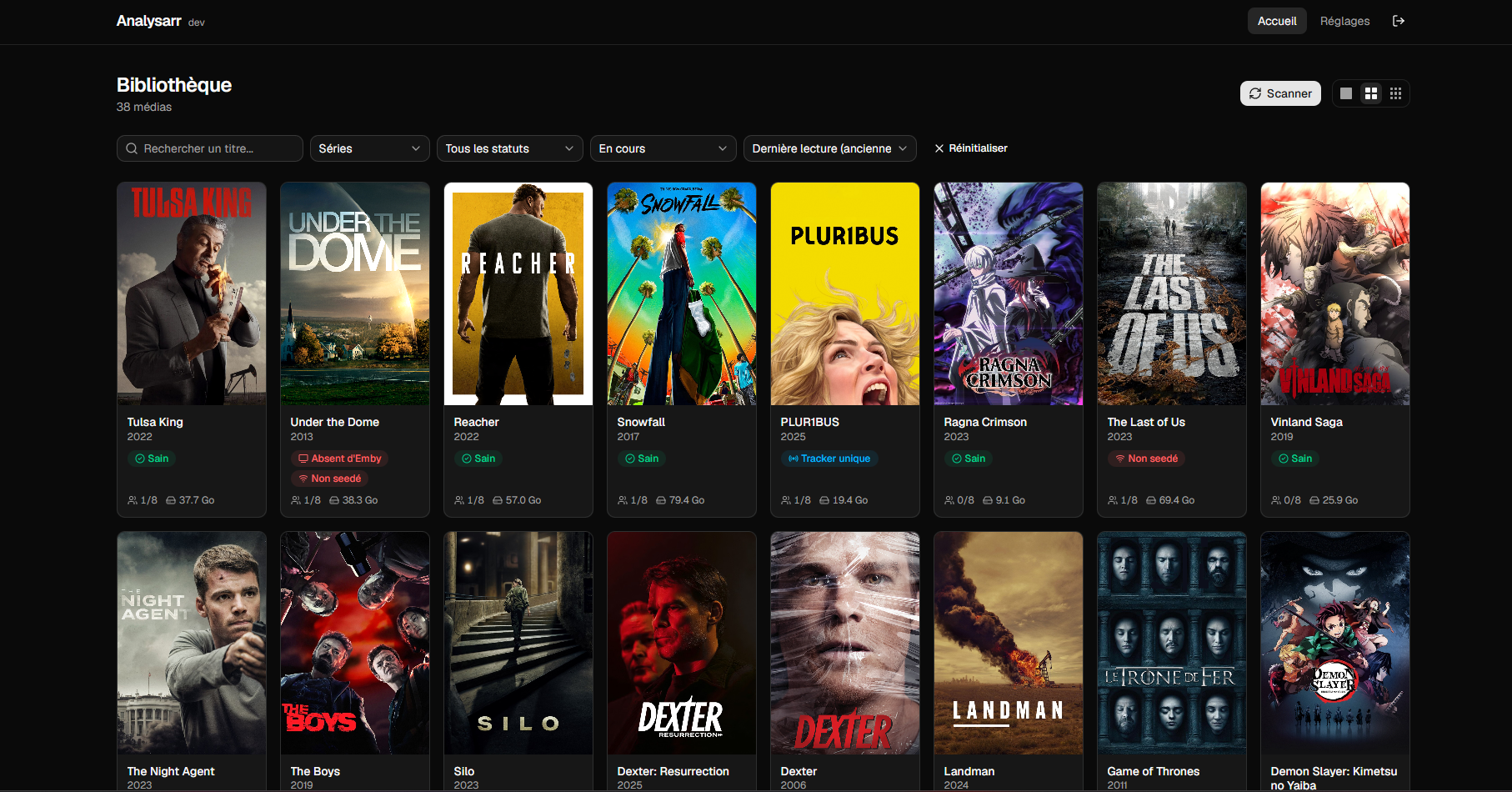
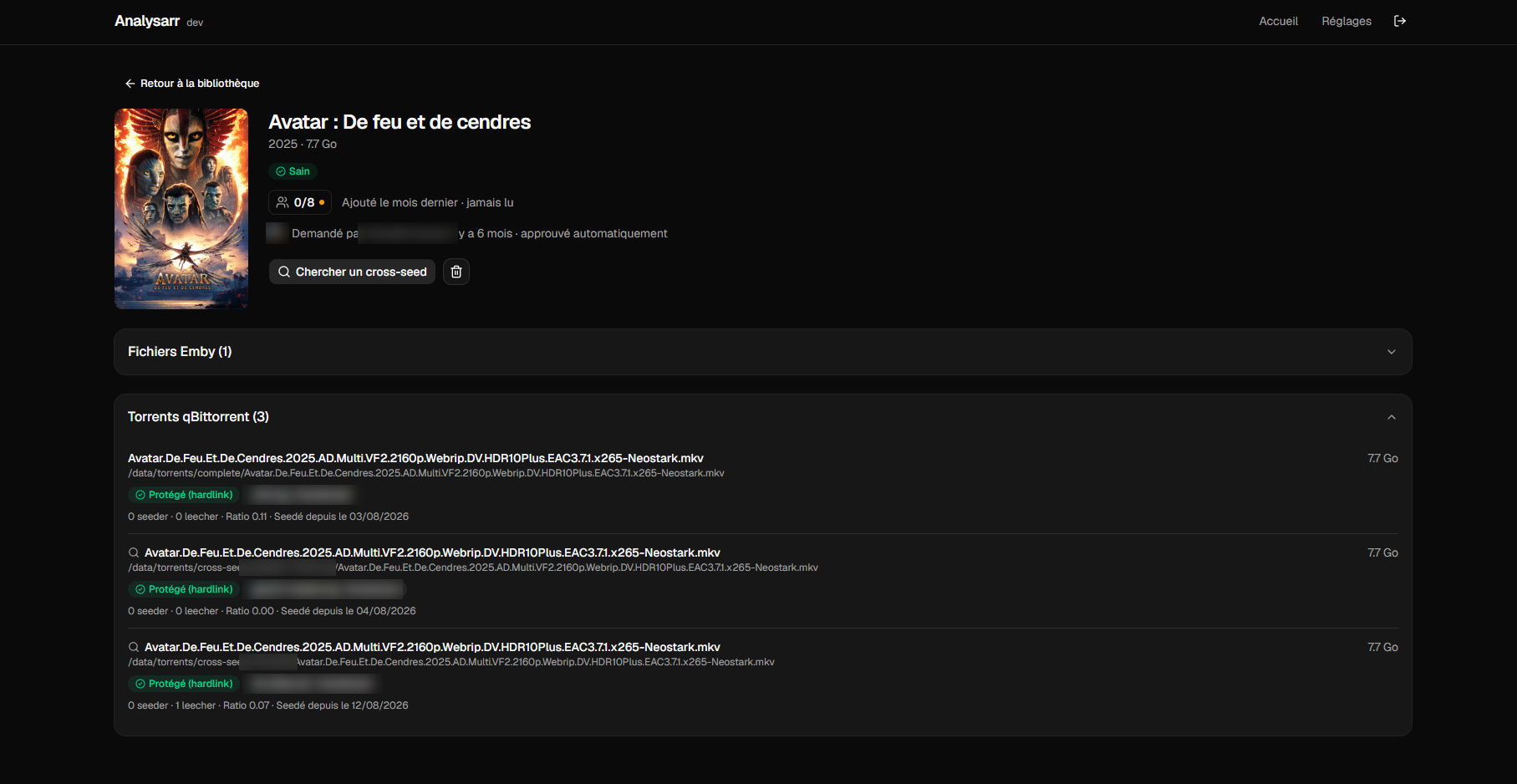
## Features
**Detection**
- Duplicates, orphan torrents, missing hardlinks, content seeded on a single tracker, media missing from the media server or not seeded at all.
- Torrent ↔ media matching by inode first (works for cross-seed copies living outside Sonarr/Radarr folders), then Sonarr/Radarr history, then title similarity.
- Trackers per torrent, with passkeys hidden.
**Actions — always with a preview and an explicit confirmation**
- Cascade cleanup of duplicates and orphans.
- Selective deletion (torrents, episodes, seasons, whole series or movie) with the **real** disk space freed, hardlinks accounted for.
- Optional removal from Sonarr/Radarr and Seer (never added to exclusion lists).
- One-click hardlink repair, with a symbolic link fallback across filesystems.
- Targeted cross-seed search per episode, season or whole series.
**Decision support**
- Watch activity per user (`3/10` watched it, progress on hover), last played date, date added.
- Seer requests: who asked, when, who approved.
- "Cleanup candidates" sort: big files nobody watched for a long time.
**Everyday comfort**
- Scheduled scans, scan history, path diagnostics that pinpoint a missing Docker mount.
- qBittorrent, Deluge or Transmission: the torrent client is a setting, everything else works the same way.
- Several Sonarr and Radarr instances (e.g. a dedicated 4K Radarr): each media stays linked to the instance tracking it, and a version tracked by another instance is never treated as a duplicate.
- Library files are matched to Sonarr/Radarr even when containers mount the library at different paths.
- Connection status of every service in the settings, with an alert in the header as soon as one becomes unreachable.
- Read-only dashboard widget (`/api/status`) for Homepage, Homarr or any JSON-capable tool.
- Rich notifications on Discord, ntfy or Gotify (poster, space freed, result of every step). Several channels, each with its own events: scan finished, scan failed, orphans detected, deletion, cleanup, hardlink repair, cross-seed search, automation.
- Optional automations: on orphans, duplicates or non-hardlinked torrents, clean up, repair, search a cross-seed or just notify — with conditions (seed time, ratio, media type, reclaimable space), a simulation mode and a cap per run.
- Action history: every deletion, cleanup, repair and cross-seed search, with its detailed result.
- English and French interface, dark/light theme, display preferences.
- Update notification when a new version is released.
## Compatibility
| Service | Supported | Required |
|---|---|---|
| Emby | 4.x | One of Emby or Jellyfin |
| Jellyfin | 10.9 or newer | One of Emby or Jellyfin |
| Sonarr | v3, v4 | Yes |
| Radarr | v3 or newer | Yes |
| qBittorrent | 4.1 or newer (WebUI API v2) | One torrent client |
| Deluge | 2.x (web interface) | One torrent client |
| Transmission | 3.0 or newer (RPC) | One torrent client |
| Seer (Overseerr, Jellyseerr, Seerr) | Current versions | Optional |
| cross-seed | Daemon mode | Optional |
## Quick start
### Docker Compose
```yaml
services:
analysarr:
image: ghcr.io/sec844/analysarr:latest
container_name: analysarr
restart: unless-stopped
ports:
- "1818:1818"
environment:
DATABASE_PATH: /config/analysarr.db
volumes:
- ./analysarr:/config
# Same host path AND same container path as in your media server,
# qBittorrent, Sonarr and Radarr (see "Paths and hardlinks").
- /mnt/data:/data
```
### Unraid
Search for **Analysarr** in the **Apps** tab (Community Applications).
Without Community Applications: Docker → **Add Container** → paste this template URL:
```
https://raw.githubusercontent.com/SEC844/unraid-templates/main/templates/analysarr.xml
```
### First launch
Open `http://:1818`, create the administrator account, then follow the setup wizard: media server, Sonarr, Radarr, torrent client, folder paths, then cross-seed and Seer if you use them (both optional). A final summary shows what is ready and what is still missing.
There is no configuration file to edit: everything is configured from the interface, with a **Test connection** button for every service and a **Browse** button for every path. Once the wizard is done, run a first scan from the library.
## Paths and hardlinks
This is the one thing to get right. Analysarr compares the files seen by your media server and by your torrent client **from inside its own container**. It must therefore see **exactly the same paths** as those containers:
| Container | Host path | Container path |
|---|---|---|
| Emby / Jellyfin | `/mnt/data` | `/data` |
| qBittorrent / Deluge / Transmission | `/mnt/data` | `/data` |
| Sonarr / Radarr | `/mnt/data` | `/data` |
| **Analysarr** | `/mnt/data` | `/data` |
This is the layout recommended by the [TRaSH Guides](https://trash-guides.info/File-and-Folder-Structure/). If your containers use other paths, mirror them in Analysarr. **Settings → Paths → Path diagnostics** tells you immediately if a mount is missing, and which folder.
Write access to the data share is only used when you delete media or repair hardlinks, always after a confirmation.
## Dashboard widget
Generate a key in **Settings → Configuration → Widget**, then query `http://:1818/api/status` with the `X-Api-Key` header (or `Authorization: Bearer`). The response only contains counters: media total, movies, series, healthy media, media per status, reclaimable space, last scan and service status. Example for [Homepage](https://gethomepage.dev/widgets/services/customapi/):
```yaml
- Analysarr:
href: http://analysarr:1818
widget:
type: customapi
url: http://analysarr:1818/api/status
headers:
X-Api-Key: YOUR_KEY
mappings:
- field: { media: total }
label: Media
- field: { statuses: doublon }
label: Duplicates
- field: reclaimable_bytes
label: Reclaimable
format: bytes
```
## Updating
Pull the new image and recreate the container. Your settings and cache live in `/config` and are kept. The interface shows a notification when a new version is available (**Settings → Application**, can be disabled).
**Upgrading from a version older than 0.19.0?** The default port changed from 8000 to **1818**. Update your port mapping (`1818:1818`, or the container port on Unraid), or set the `PORT=8000` environment variable to keep the previous port.
## Security
- A single administrator account; passwords hashed with bcrypt; login locked for 15 minutes after 5 failed attempts.
- Optional two-factor authentication (TOTP authenticator app) with single-use recovery codes.
- Automations never run unless you create a rule: new rules start in simulation, every run is capped, and they reuse the manual actions — a protected or repairable torrent is never deleted.
- The widget endpoint requires its own key (stored hashed, accepted in a header only), exposes counters only (no titles, paths or service addresses) and never triggers requests to your services.
- Sessions stored server-side, sent as an `httpOnly` cookie.
- API keys and passwords of your services stay on the server: they are never sent back to the browser.
- The only outbound connections are the services you configure (notification channels included), plus an optional update check against the GitHub API (sends only the Analysarr version).
- Notification webhooks and tokens are write-only too; only official Discord webhook URLs are accepted, and test notifications only go to saved channels.
- Analysarr can delete files: do not expose it directly to the internet. Put it behind a reverse proxy with HTTPS, or keep it on your local network / VPN.
Found a vulnerability? Please report it privately, see [SECURITY.md](SECURITY.md).
## FAQ
**Will Analysarr delete something on its own?**
No. Scans are read-only. Every deletion or repair shows a preview first and waits for your confirmation.
**Torrents show as "not evaluated" or paths are unreachable.**
A mount is missing or differs from your other containers. Run **Settings → Paths → Path diagnostics**: it shows the folder that is not visible from Analysarr.
**The connection test says "the server at this address is Jellyfin, not Emby".**
Choose the right media server at the top of the media server card in Settings.
**Do I need Seer or cross-seed?**
No. Both are optional and fully hidden until you enable them.
## Contributing
Contributions are welcome — read [CONTRIBUTING.md](CONTRIBUTING.md) first.
## License
[GNU AGPL-3.0](LICENSE). You may use, modify and share Analysarr; any modified version you distribute or run as a service must stay open source under the same license.