
MemoSync
Co-manage memory with your coding agent across sessions.






English · 简体中文 · Website
https://github.com/user-attachments/assets/488a1e41-5a01-4c01-ac76-5c37b8e764f0
---
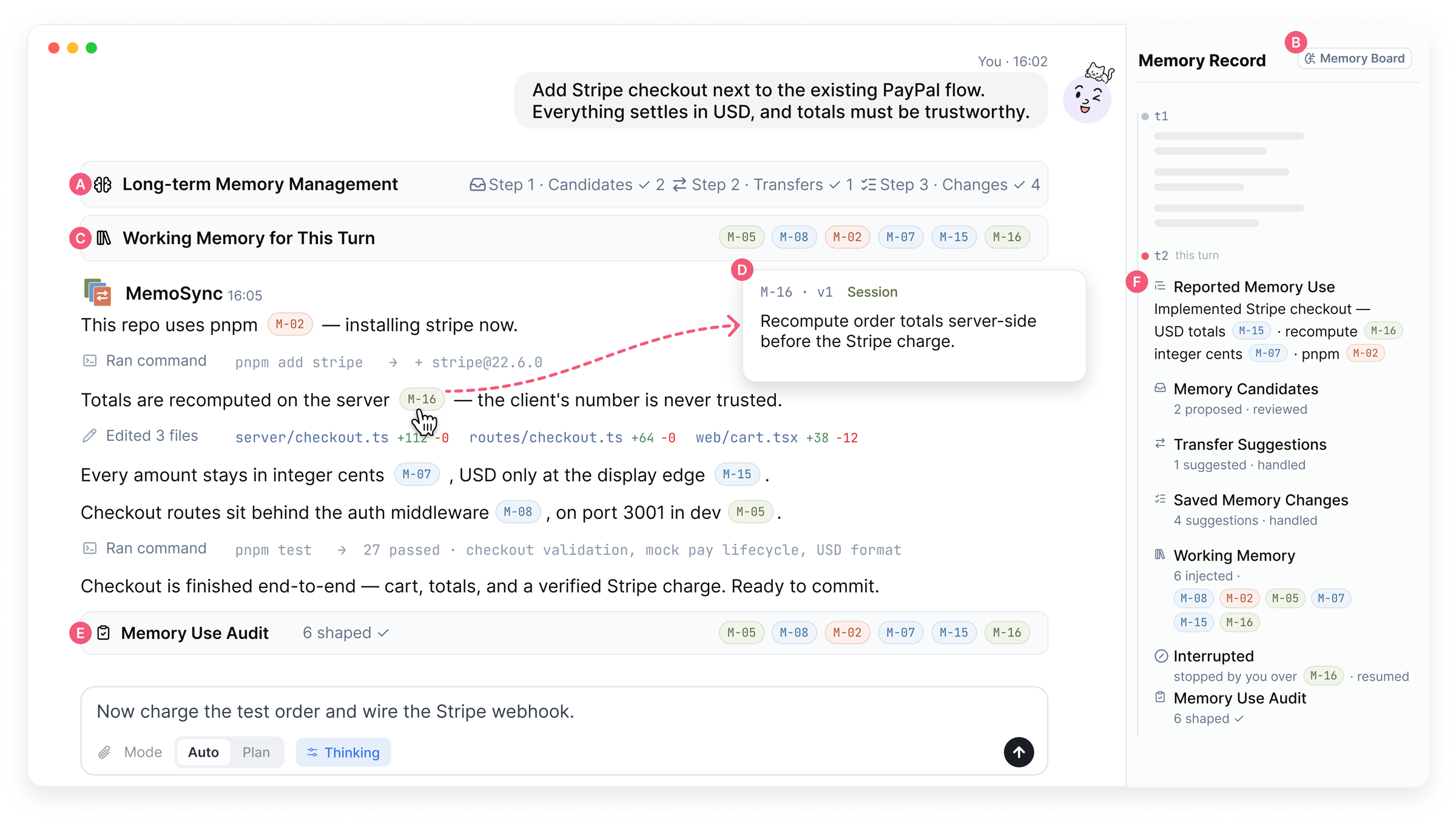
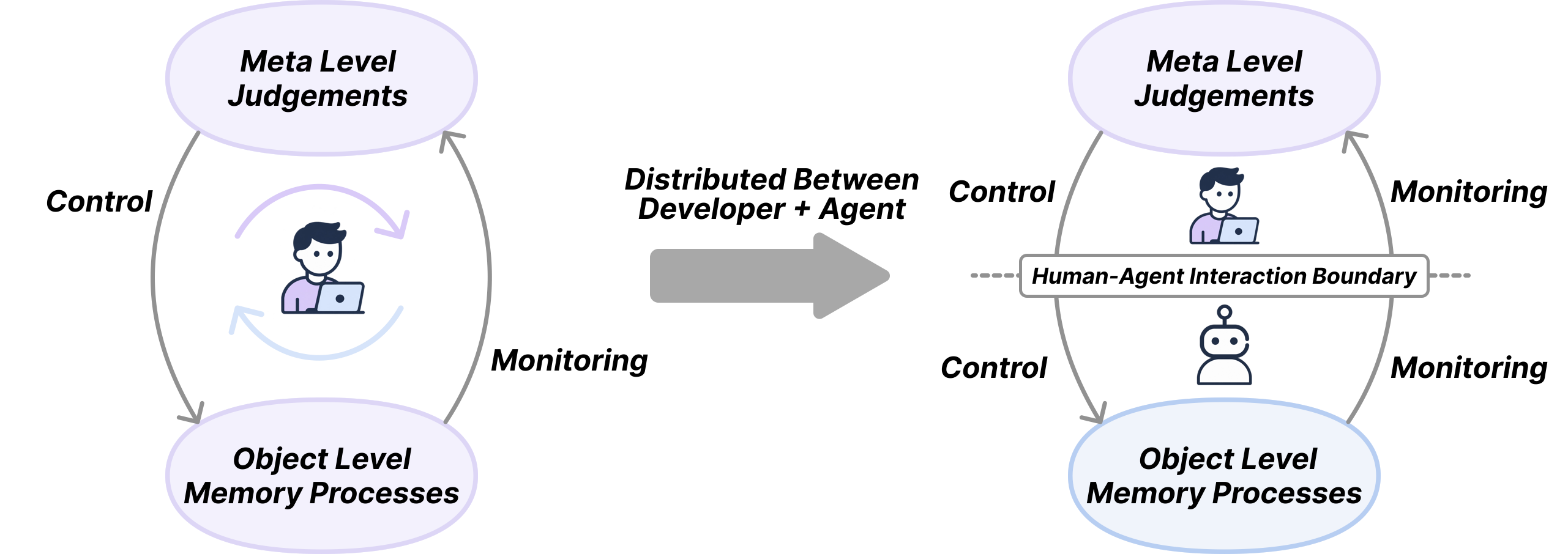
Coding agents keep memory: `CLAUDE.md` files, notes they extract, lessons from earlier sessions. You rarely see what is in it, what the agent took into this task, or whether it followed it. MemoSync is a local workbench for Claude Code, Codex, Pi and OpenCode that puts that memory on screen.
- Every change to memory waits for your review.
- Before each turn, you confirm what goes in.
- While the agent works, its replies cite the memories they use.
- After the turn, a separate check reports what was followed and what was ignored.
When a turn doesn't need that much attention, switch to [Automatic](#automatic) and the agent handles memory on its own.
## A turn with memory
Memory is a set of short items. Each has a scope (**personal**, **project** or **session**), a version and a history. The same item shows up in four places during a turn.
### 1. Review what the agent learned
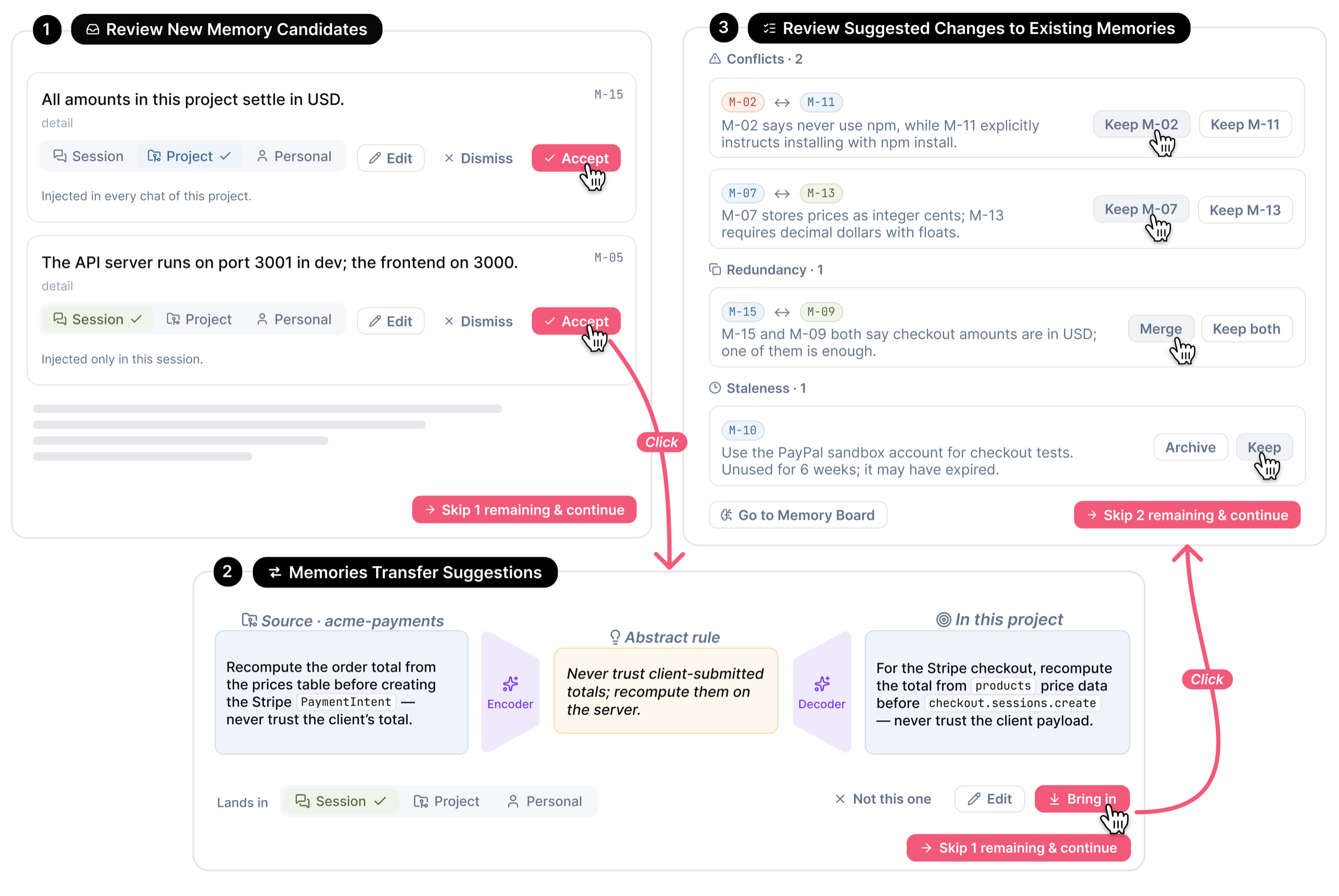
Before a turn starts, MemoSync shows the memory changes it proposes, in three groups. Accept, edit, rescope or dismiss each one. Nothing reaches the store until you do.
- **New candidates:** taken from your last exchange and from what the agent actually did (files, commands, errors).
- **Transfers from other projects:** a rule from another project is first rewritten in general terms, then adapted to this project. You see all three versions side by side.
- **Fixes to existing items:** conflicts, duplicates to merge, and rules that have gone stale or keep being broken.
### 2. Choose the working memory
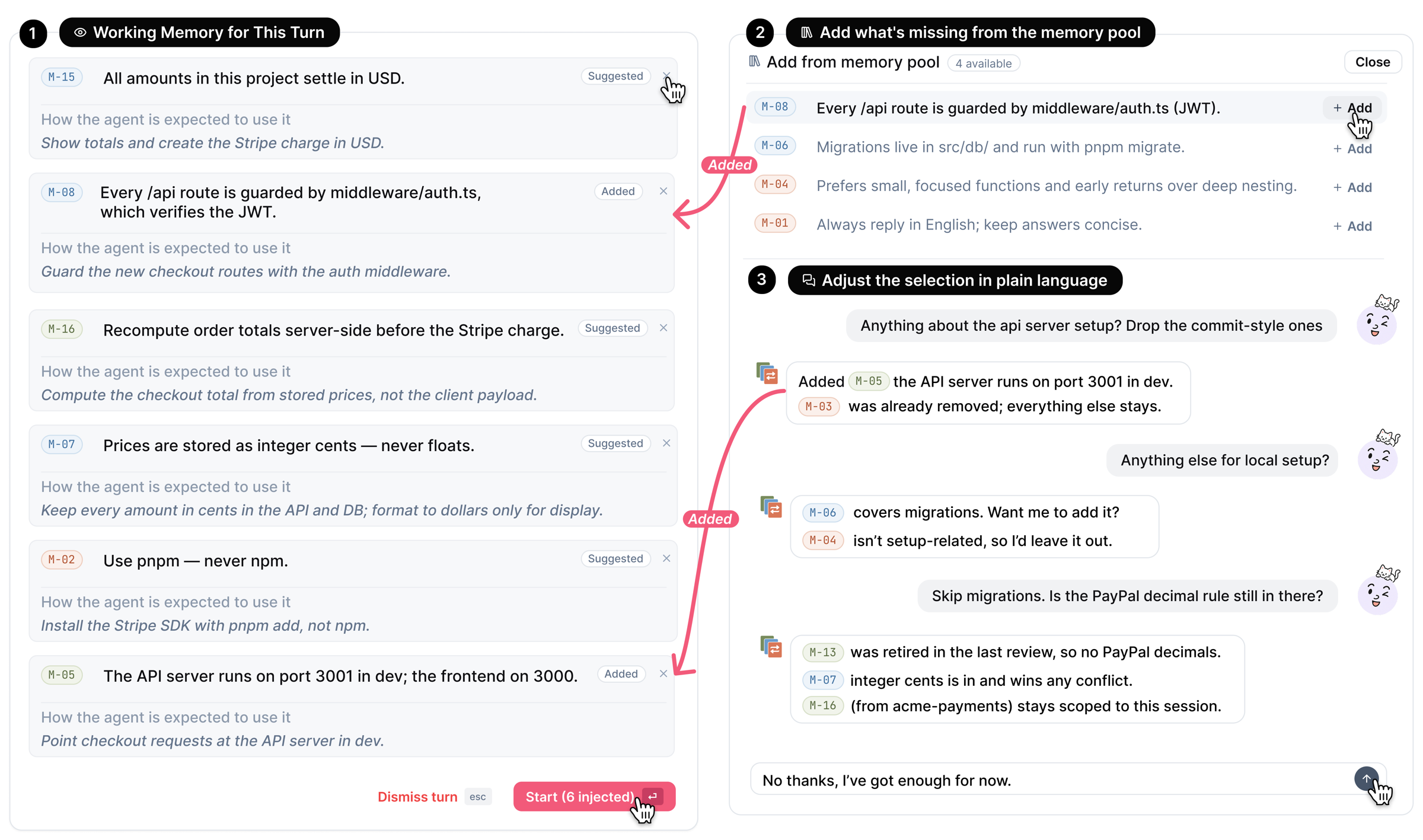
**Working Memory for This Turn** lists the items the agent intends to use, each with one line saying how. Remove rows or add others from your library. You can also ask in plain words, for example "drop the commit-style ones". The agent starts only after you confirm, and the audit later checks it against exactly this list.
### 3. Follow it while it works
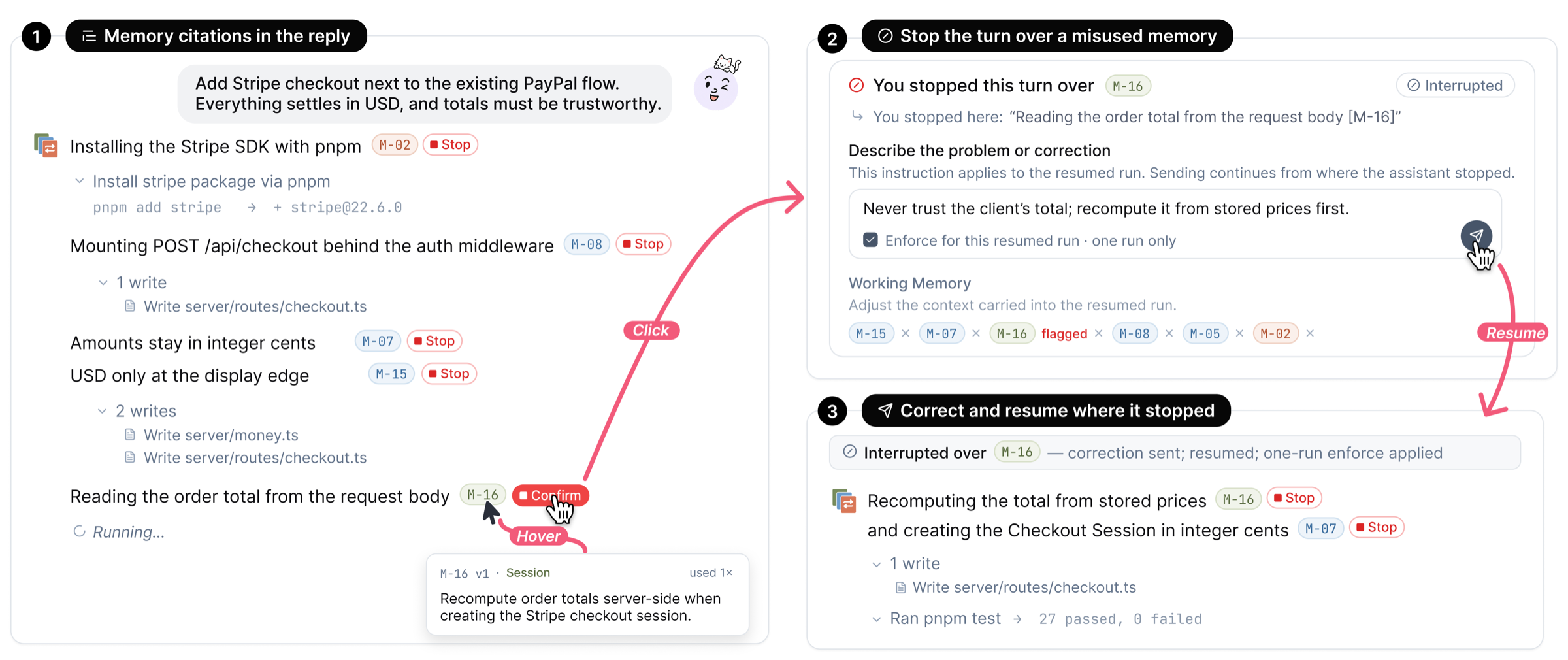
Replies cite the memories they apply (`M-07`). Hover a citation to see the item.
Tool calls fold into one line, like *Read 3 files, ran 2 commands*, with the running step beside it. Open the line to see each step and what came back.
If the agent is doing the opposite of a memory:
1. Press **Stop** on that citation.
2. Write what should have happened.
3. Optionally enforce the item for the rest of the run.
The agent resumes from the sentence where you stopped it, and your correction is saved to the item.
Citations are what the agent says it used, not proof that it did. That is why step 4 exists.
### 4. Check the result
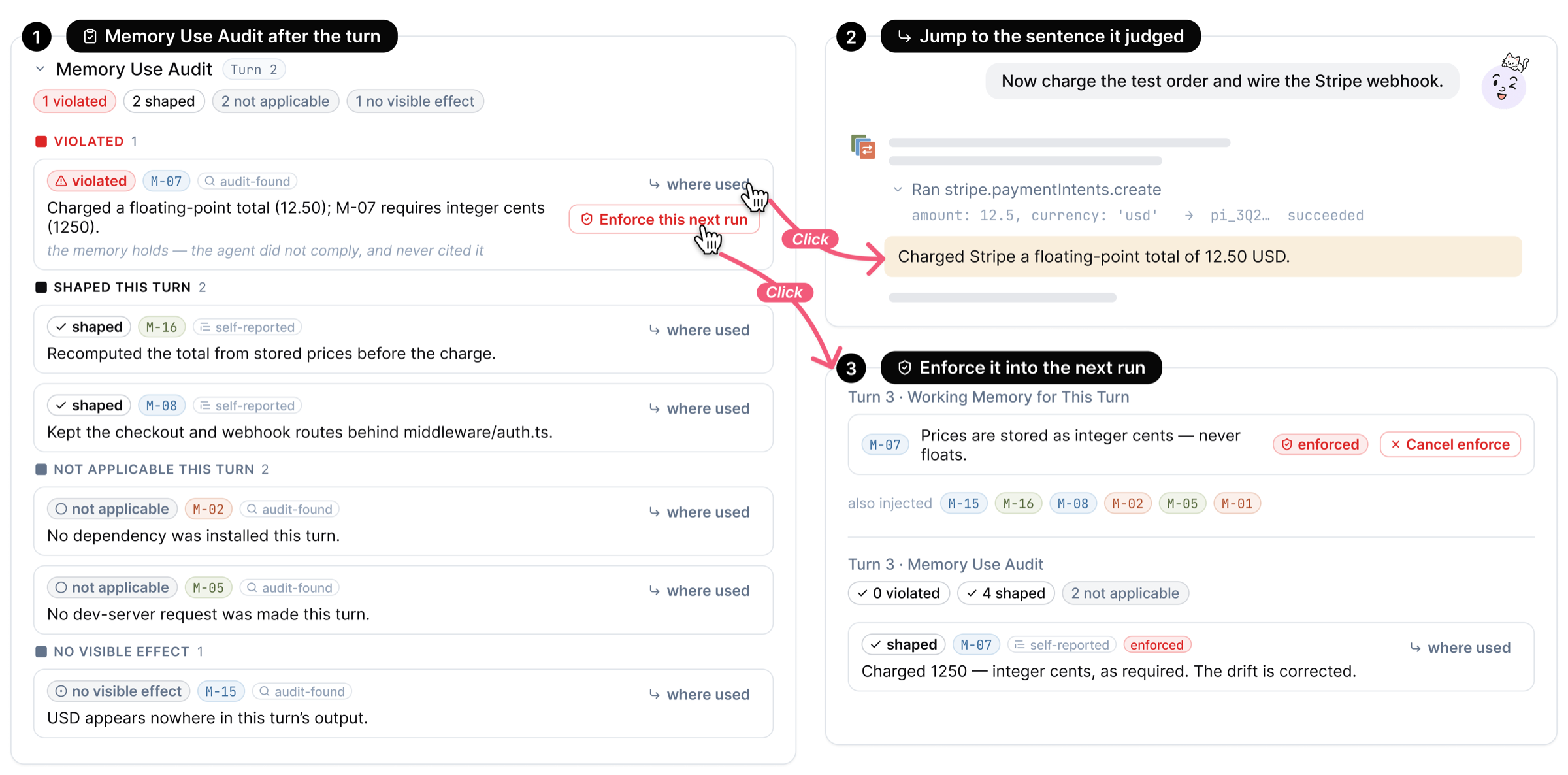
When the turn ends, a separate pass reads the whole exchange and rates every selected item: **violated**, **shaped** the turn, **not applicable**, or **no visible effect**. Each verdict says whether the audit found it or the agent reported it, so a violation the agent never cited still shows up.
For a violated item:
- **Where used** jumps to the sentence and tool call behind the verdict.
- **Enforce this next run** makes the item a required row in the next turn. Only you can remove it.
Verdicts also come back to the trace: a memory shows on the tool call that used it, and a violated one is marked in red.
The audit is a model judgment and can be wrong.
### Between turns
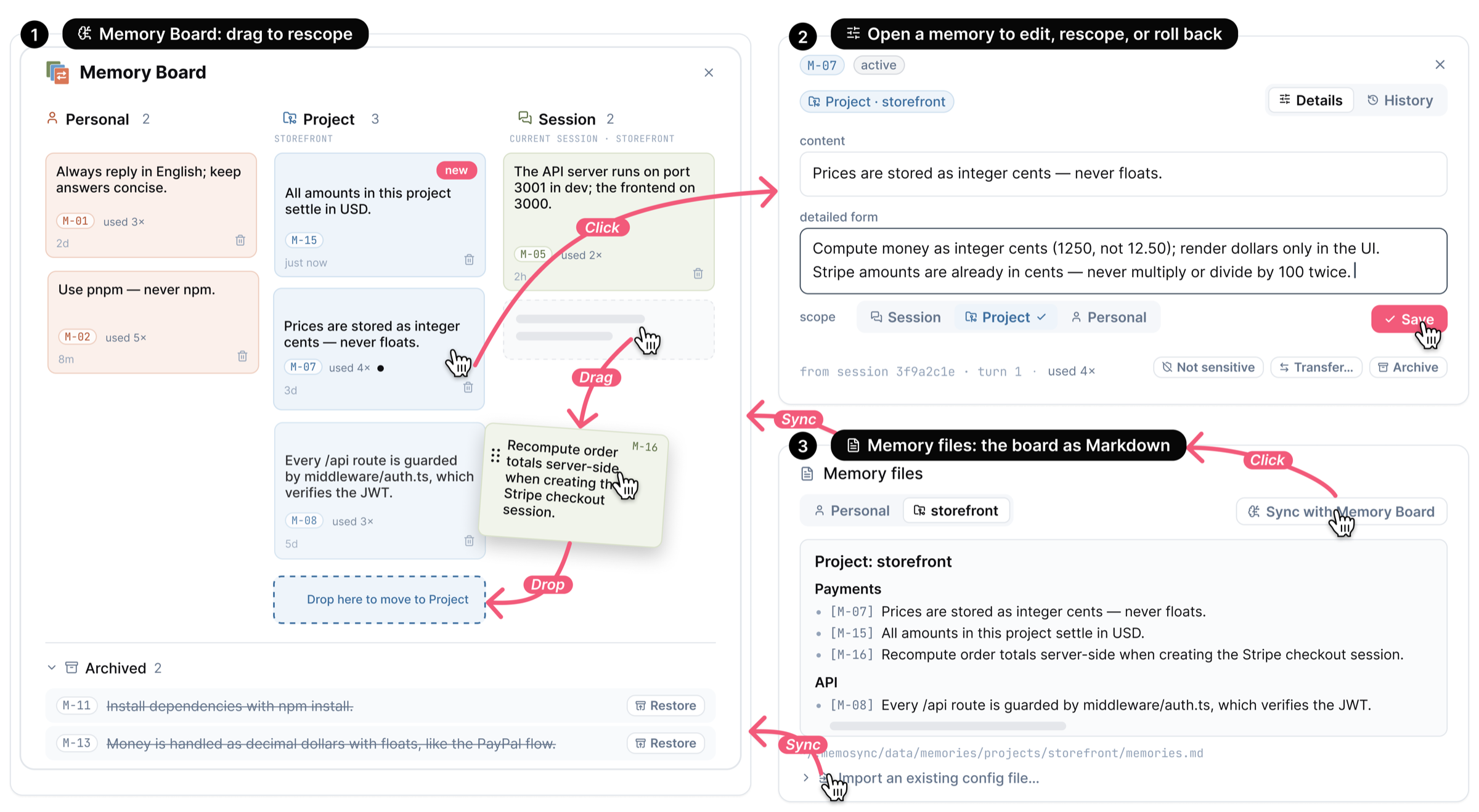
**The Memory Board** is the whole library. The rail on the left lists every scope, project and session, along with items waiting for review, archived items and memory files. See the library as a **graph** of where each memory lives, or as a **board** with one column per scope.
- On the board, drag an item to change its scope.
- Open an item to edit it, read its history, or archive it.
- **Memory files** keeps a Markdown copy for other tools, and imports an existing `CLAUDE.md` as candidates for review.
**Import memory**, at the top of the board, brings in what Claude Code and Codex already remember. A model you pick splits their notes into short items, sorted into personal preferences and project memory. Nothing is saved until you review it. Later imports propose only what changed, and anything you remove stays under **Removed**, where you can bring it back.
**The Memory Record**, on the right of every chat, logs each turn: what was proposed, selected, cited, stopped and audited. It survives context compaction, so you and the agent can still refer back to it.
### Automatic
Reviewing every turn pays off when memory matters, and is too much for a quick question. Set **Settings → Memory → Control** to **Automatic**:
- No cards before the turn. The agent reads the memory index and loads the items it needs.
- After the turn it learns in the background. Safe changes apply on their own, each with Revert; sensitive ones wait on the Memory Board, which shows a count in the sidebar.
- The audit still runs, but speaks up in the chat only when a memory was violated. Every verdict stays in the Memory Record.
## Quick start
### Mac app
Download the DMG from [Releases](https://github.com/SLEEPYBQ/MemoSync/releases/latest) and drag MemoSync to Applications. The app runs on Apple silicon Macs; on an Intel Mac, run it [from source](#from-source).
The app isn't notarized yet, so macOS blocks it the first time. Try to open it, then go to **System Settings → Privacy & Security** and choose **Open Anyway**.
The app doesn't include any agents, so install Claude Code or Codex first. To use Pi, install `@earendil-works/pi-coding-agent` 1.3.0 or newer. The app shares `~/.memosync/data` with a source install, and only one of them can run at a time.
### From source
You need [Bun](https://bun.sh) 1.3.5 or newer, plus one of:
- Claude Code or Codex already signed in, or
- an API key from any provider.
```bash
git clone https://github.com/SLEEPYBQ/MemoSync.git
cd MemoSync
bun install
bun run build
bun run start
```
MemoSync opens at .
### First steps
1. Open **Settings → Models**, pick an engine and give it access (see the next section).
2. Click **+** in the sidebar, then **Add project** to open a folder.
3. Send a task. Your library starts empty, so the first turns are mostly proposals. Review them, and the memory builds up as you work.
## Connect a model
An **engine** is the agent that does the work. **Access** is how it reaches a model. Both are set in **Settings → Models**.
| Engine | What it runs | Access |
| --- | --- | --- |
| **Claude Code** | Your installed `claude`; from source, the copy bundled with the Agent SDK if you have none | Your sign-in, or an API connection that speaks the Anthropic API or OpenAI Chat |
| **Codex** | Your installed `codex` (required) | Your sign-in, or an API connection that speaks the OpenAI Responses API or OpenAI Chat |
| **Pi** | Built into MemoSync; the Mac app uses your installed `pi` | An API connection that speaks OpenAI Chat or Responses |
| **OpenCode** | Your installed `opencode`, 1.17.4 or newer | Your OpenCode sign-in, or an API connection that speaks the Anthropic API, OpenAI Responses or OpenAI Chat |
When a connection speaks only OpenAI Chat, MemoSync translates for Claude Code and Codex through a local gateway on `127.0.0.1`; the engine card says **via translation**. The engine never sees your key.
**Your sign-in.** The engine uses the login and settings you already have, and MemoSync adds nothing to them. If the engine shows **Not signed in**, sign in from your terminal, then press **Detect again**.
**API connection.**
1. Click **Add connection**.
2. Either pick a provider or choose **Custom endpoint**:
- **A provider** from the built-in list: more than seventy vendors, relays and local servers, with endpoints filled in and, for most, their models. Paste your key, and add a model ID if the list is empty.
- **Custom endpoint:** enter a base URL, its protocol, a key and model IDs.
3. Press **Test** to send one small request and confirm the endpoint answers.
4. Back on the engine, choose the connection and a default model.
Engines on an API connection run in a separate profile under `~/.memosync/data/cli-profiles`, so your own `~/.claude` and `~/.codex` are never read or changed. Keys are stored in `~/.memosync/data/credentials.json`, readable only by you, and are never sent back to the browser.
MemoSync finds `claude` and `codex` on your `PATH` and in the usual install folders. To point an engine at a specific executable, set its path on the engine's card. When a version is too old and MemoSync recognises how it was installed, the engine card shows an **Upgrade** button.
## Everyday controls
**In the composer**, under the message box:
- the project;
- **+** to attach files, or drag them in;
- the **Memory** menu: **Off** applies to this chat, while **Ask** and **Auto** set the control mode below;
- the engine and the model;
- reasoning effort, plus **Ultracode** on Claude models that support it;
- the **Mode** menu: how much the agent may do without asking, and Plan Mode, where it proposes a plan and waits for you before it acts.
Type `/` in the message box for the engine's own commands and skills. Both work before the first message.
**In Settings → Memory:**
| Setting | What it does |
| --- | --- |
| **Use Memory** | Turn memory off everywhere. Your library stays on the Memory Board. |
| **Learn From Chats** | Keep using memory, but stop proposing new items. |
| **Control** | **Review each turn** runs the four steps above. **Automatic** works without asking; see [Automatic](#automatic). |
| **Memory Changes** | **Ask First** holds every proposal for review. **Apply Automatically** applies non-sensitive ones right away, each with a one-click Revert. Sensitive proposals always ask. |
| **Memory Preview** | Show the working memory card before each turn, or skip it when nothing applies. |
Memory Changes and Memory Preview apply under Review each turn.
**Elsewhere in Settings:**
- **Appearance:** language (English or 简体中文) and theme.
- **Notifications:** sounds and system notifications when a chat needs you.
- **Keybindings:** all shortcuts.
- **Skills:** globally installed agent skills.
## Run it elsewhere
```bash
bun run start --port 4000 # another port
bun run start --no-open # don't open a browser
bun run start --remote # listen on 0.0.0.0 (LAN, Tailscale)
bun run start --password # ask for a password before the app loads
bun run start --share # temporary public URL with a QR code
```
`bun run start --help` lists every option.
## Data and privacy
Everything MemoSync stores lives under `~/.memosync/data/` on your machine:
- memories (SQLite, plus the Markdown copy);
- chats and settings;
- API connections;
- a local usage log of how the memory features are used.
Nothing is uploaded by MemoSync. Your model provider does receive the conversation, the selected memories and the project context the agent reads.
Importing reads the memory folders of Claude Code and Codex without changing them. Refining sends the selected memory to the model you pick, in a one-off session with no tools that leaves nothing in the engine's own history.
The agent and its terminals run as your user, with access to your files. Profile isolation separates configuration, not the filesystem.
To stop the usage log, set `MEMOSYNC_USAGE_LOG=0`. To bundle your data into an archive:
```bash
bun run export-data # usage log, memories and settings
bun run export-data --full # also chat transcripts
```
Exports never include API connections or keys.
[docs/DATA_AND_TELEMETRY.md](docs/DATA_AND_TELEMETRY.md) describes each file and event.
## Development
```bash
bun run dev # client :5174 + server :5175, hot reload
bun test src/ # unit and integration tests, no network
bun run check # typecheck + client builds
```
The server code is in `src/server/`:
- `agent.ts` coordinates a turn;
- `memory/` holds the memory engine: capture, checkup, selection, audit and transfer;
- `model-access/` resolves engines and connections.
The client is a React app in `src/client/`. Development data goes to `~/.memosync-dev/`.
The Mac app bundles its runtime and uses your locally installed agents. It is developed and packaged on macOS, for that machine's architecture only:
```bash
bun run desktop:install # once
bun run desktop:dev
bun run desktop:package:mac # DMG and ZIP in desktop/release/
```
## Acknowledgements
MemoSync started as a fork of [Kanna](https://github.com/jakemor/kanna). It runs:
- [Claude Code](https://github.com/anthropics/claude-agent-sdk-typescript) through the Agent SDK;
- [Codex](https://developers.openai.com/codex/app-server/) through `codex app-server`;
- [Pi](https://github.com/badlogic/pi-mono);
- [OpenCode](https://github.com/anomalyco/opencode) through `opencode serve`.
Provider presets and engine discovery are adapted from [Magpie](https://github.com/yetone/magpie). Provider marks come from [Lobe Icons](https://github.com/lobehub/lobe-icons). Licenses are in [THIRD_PARTY_NOTICES.md](THIRD_PARTY_NOTICES.md).
## License
[MIT](LICENSE)