
Copyright 2023 STMicroelectronics
The STM32CubeMP13 Firmware package comes with a rich set of examples running on STMicroelectronics boards, organized by board and provided with preconfigured projects for the main supported toolchains.
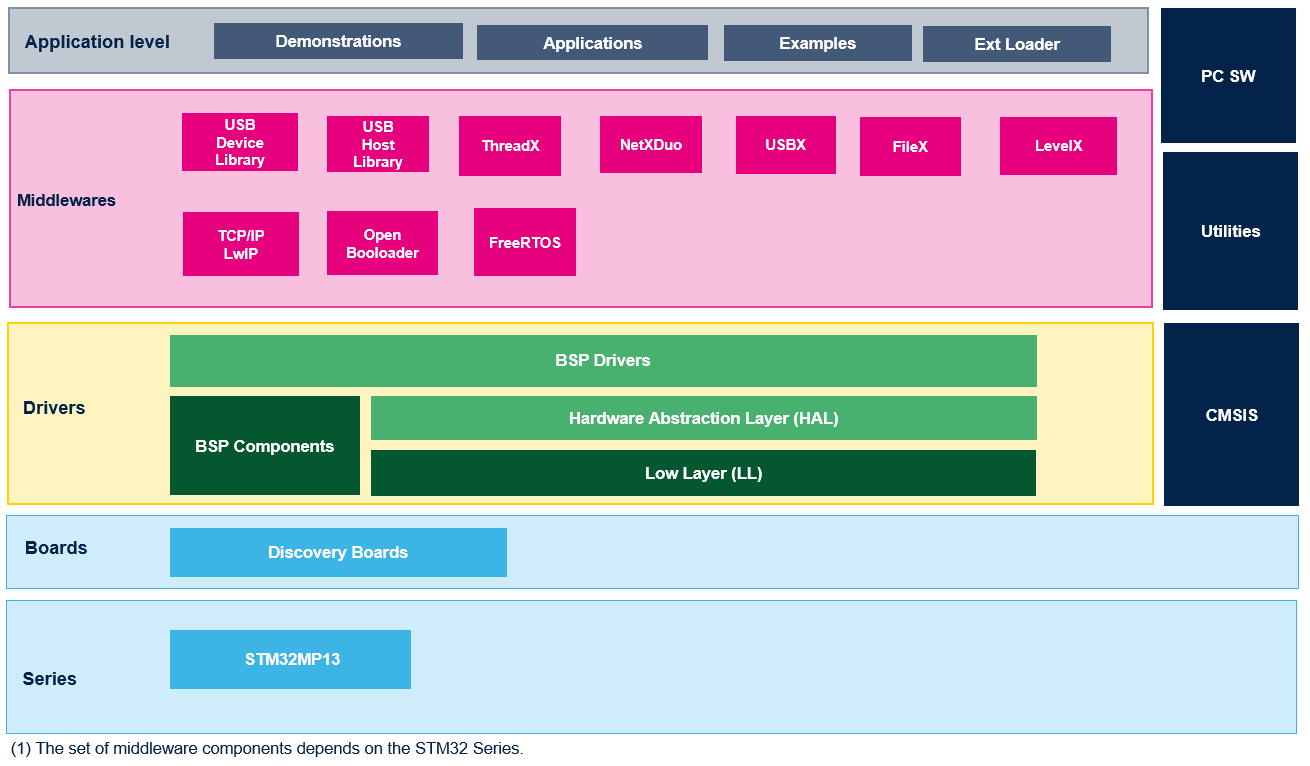
The examples are classified depending on the STM32Cube level they apply to, and are named as follows:
The examples are located under STM32Cube_FW_MP13_VX.Y.Z\Projects\, and all of them have the same structure:
To run the example, you have to do the following:
The provided examples can be tailored to run on any compatible hardware; user simply need to update the BSP drivers for his board, if it has the same hardware functions (LED, LCD display, pushbuttons...etc.). The BSP is based on a modular architecture that allows it to be ported easily to any hardware by just implementing the low level routines.
Execution information :
| Level | Module Name | Project Name | Description | STM32MP135C-DK | STM32MP13XX_ CUSTOM_HW |
|
BSP_BasicTemplates_900MHz |
- |
- |
This project provides a reference template that can be used to build any firmware application. | X | |
| Total number of bsp_basictemplates_900mhz: 1 | 1 | ||||
|
BSP_BasicTemplates |
- |
- |
This project provides a reference template that can be used to build any firmware application. | X | X |
| Total number of bsp_basictemplates: 2 | 1 | 1 | |||
|
Examples |
ADC |
ADC_MultiChannelSingleConversion |
How to use an ADC peripheral to convert several channels. ADC conversions are performed successively in a scan sequence. | X | |
|
ADC_SingleConversion_TriggerTimer_DMA |
Use ADC to convert a single channel at each trig from timer, conversion data are transferred by DMA into an array, indefinitely (circular mode). | X | |||
|
ADC_SingleConversion_TriggerTimer_DMA_Secure |
Use ADC to convert a single channel at each trig from timer, conversion data are transferred by secure DMA into an array, indefinitely (circular mode). | X | |||
|
BSP |
BSP_TS_A7 |
How to configure the LCD BSP driver on disco board. The DDR memory need to be initialized with DDR_Init project. At the beginning of the main program the HAL_Init() function is called to reset all the peripherals, initialize the systick. The SystemClock_Config() function is used to configure the system clock for STM32MP13xx Devices : LCD is initialized in LCD_Config api. | X | ||
|
CRC |
CRC_UserDefinedPolynomial |
How to configure the CRC using the HAL API. The CRC (cyclic redundancy check) calculation unit computes the 8-bit CRC code for a given buffer of 32-bit data words, based on a user-defined generating polynomial. | X | ||
|
CRYP/SAES |
CRYP_SAES_WrapKey |
Use the Secure AES co-processor (SAES) peripheral to wrap application keys using hardware secret key DHUK then use it to encrypt in polling mode. | X | ||
| CRYP_SAES_SharedKey | The Secure AES instance is configured in shared mode and hardware secret key DHUK is selected. The goal here to share application key with CRYP peripheral without being exposed in clear-text. | X | |||
| CRYP_SAES_MDMA_ECB_CBC | How to use the SecureAES co-processor (SAES) peripheral
to encrypt and decrypt data using AES ECB and CBC Algorithms with MDMA |
X | |||
|
CRYP_AES_MDMA |
This example provides a short
description of how to
use the CRYPTO peripheral to encrypt and decrypt data using AES-128
Algorithm with ECB chaining mode. For this example, MDMA is used to transfer data from memory to the CRYPTO processor IN FIFO and also to transfer data from CRYPTO processor OUT FIFO to memory. |
X | |||
|
CRYP_TDESModes |
How to use the CRYPTO peripheral to encrypt/decrypt data(Plaintext/Ciphertext) using TDES ECB and CBC algorithm. | X | |||
|
DCMIPP |
DCMIPP_CaptureMode_A7 |
The goal of this example is to explain how to capture frames continuously. | X | ||
|
DCMIPP_SnapshotMode_A7 |
The goal of this example is to explain how to capture single frame. | X | |||
|
DDR |
DDR_Init |
This example provides a reference to initialize the DDR on STM32MP13XX-DK (DDR3). | X | X | |
|
DMA |
DMA_FIFOMode |
This example provides a description of how to use a DMA to transfer a word data buffer from Flash memory to embedded SYSRAM configured non-secure with FIFO mode enabled through the HAL API. | X | ||
|
DMA_FIFOMode_Secure |
This example provides a description of how to use a DMA to transfer a word data buffer from Flash memory to embedded SYSRAM configured secure with FIFO mode enabled through the HAL API. | X | |||
|
DTS |
DTS_GetTemperature |
How to configure and use the DTS to get the temperature of the die. | X | ||
| ETZPC | ETZPC_NonSecure_Access | This example describes non-secure accesses of memory using DMA. | X | ||
|
FDCAN |
FDCAN_Loopback |
How to configure the FDCAN to operate in loopback mode. | X | ||
|
GPIO |
GPIO_EXTI |
How to configure external interrupt lines. | X | ||
|
HASH |
HASH_SHA3384SHA3512_MDMA |
This example provides a short description of how to use the HASH peripheral to hash data using SHA3-384 and SHA3-512 Algorithms. | X | ||
|
I2C |
I2C_TwoBoards_ComIT |
How to handle I2C data buffer transmission/reception between two boards, using an interrupt. | X | ||
|
IWDG |
IWDG_WindowMode |
How to periodically update the IWDG reload counter and simulate a software fault that generates an MCU IWDG reset after a preset laps of time. | X | ||
|
LPTIM |
LPTIM_PulseCounter |
This example describes how to configure and use LPTIM to count pulses through the LPTIM HAL API. | X | ||
|
LTDC |
LTDC_Display_2Layers |
How to configure the LTDC peripheral to display two layers at the same time. | X | ||
| MDMA | MDMA_Mem2MemTransfer | This example provides a description of how to use a MDMA (configured non-secure) to transfer a data buffer from SYSRAM to SRAM3 through the HAL API. | X | ||
| MDMA_Mem2MemTransfer_Secure | This example provides a description of how to use a MDMA (configured secure) to transfer a data buffer from SYSRAM to SRAM3 through the HAL API. | X | |||
| PKA | PKA_ECCDoubleBaseLadder | How to use the PKA to run ECC Double Base Ladder operation | X | ||
| PKA_ECDSA_Sign | How to compute a signed message regarding the Elliptic curve digital signature algorithm (ECDSA). | X | |||
|
PWR |
PWR_STANDBY |
This example show how to enter the Standby mode and wake up from this mode by using an external reset or the WKUP pin. | X | ||
|
PWR_STANDBY_RTC |
How to enter the Standby mode and wake-up from this mode by using an external reset or the RTC wakeup timer. | X | |||
|
PWR_STOP_RTC |
How to enter the Stop mode and wake up from this mode by using the RTC wakeup timer event connected to an interrupt. | X | |||
|
RNG |
RNG_MultiRNG |
Configuration of the RNG using the HAL API. This example uses the RNG to generate 32-bit long random numbers. | X | ||
|
RTC |
RTC_Alarm |
How to configure and generate an RTC alarm using the RTC HAL API. | X | ||
|
RTC_Tamper |
How to configure RTC to write/read data to/from RTC Backup registers and to demonstrate the tamper detection feature. | X | |||
|
RTC_TimeStamp |
Configuration of the RTC HAL API to demonstrate the timestamp feature. | X | |||
|
SD |
SD_ReadWrite_DMALinkedList |
This example performs some write and read transfers to SD Card with SDMMC IP internal DMA mode based on Linked list feature. | X | ||
|
SPI |
SPI_FullDuplex_ComDMA_Master |
Data buffer transmission/reception between two boards via SPI using Interrupt mode. | X | ||
|
SPI_FullDuplex_ComDMA_Slave |
Data buffer transmission/reception between two boards via SPI using Interrupt mode. | X | |||
|
SPI_FullDuplex_ComIT_Master |
Data buffer transmission/reception between two boards via SPI using Interrupt mode. | X | |||
|
SPI_FullDuplex_ComIT_Slave |
Data buffer transmission/reception between two boards via SPI using Interrupt mode. | X | |||
|
TIM |
TIM_DMABurst |
This example shows how to update the TIMER TIM4_CH1 period and the duty cycle using the TIMER DMA burst feature. | X | ||
|
UART |
UART_Receive_Transmit_Console |
UART transmission (printf/getchar) via console with user interaction. | X | ||
|
UART_TwoBoards_ComDMA |
UART transmission (transmit/receive) in DMA mode between two boards. | X | |||
|
UART_TwoBoards_ComIT |
UART transmission (transmit/receive) in Interrupt mode between two boards. | X | |||
|
USART |
USART_SlaveMode_DMA |
This example describes an USART-SPI communication
(transmit/receive) with DMA between two boards where the USART is configured as a slave. |
X | ||
| Total number of examples: 46 | 45 | 1 | |||
|
Applications |
FileX | Fx_emmc_File_Edit | This application provides an example of Azure RTOS FileX stack usage on STM32MP13XX_CUSTOM_HW board, it shows how to develop a basic eMMC file operations application. The application is designed to handle eMMC card insertion/removal events, and depending on that state, it starts and stops file operations from and into the eMMC card. | X | Fx_MultiAccess | This application provides an example of Azure RTOS FileX stack usage on STM32MP135F-DK board, it demonstrates the FileX’s concurrent file access capabilities. The application is designed to execute file operations on the SD card device, the code provides all required software code for handling SD card I/O operations. | X |
| Fx_Nand_Write_Read_File | This application provides an
example of Azure RTOS FileX and LevelX stacks usage on
STM32MP13XX_CUSTOM_HW board(doesn't run on STM32MP135F_DK board). It demonstrates how to create a Fat File system on the NAND flash using FileX alongside LevelX (without ECC). The application is designed to execute file operations on the Micron MT29F8G08ABACAH4 NAND flash device, the code provides all required software code for properly managing it. | X | |||
| Fx_Nand_Write_Read_File_Sequencer | This application provides an example of Azure RTOS FileX and LevelX stacks usage on custom
board STM32MP13XX_VALID1 (doesn't run on STM32MP135F-DK board unless a custom board is added). It used the hardware NAND sequencer instead of direct CPU accesses. It demonstrates how to create a Fat File system on the NAND flash using FileX alongside LevelX. The application is designed to execute file operations on the Micron MT29F8G08ABACAH4 NAND flash device, the code provides all required software code for properly managing it. | X | |||
| Fx_SRAM_File_Edit_Standalone | This application provides an example of FileX stack usage on
STM32MP135F-DK board, running in standalone mode (without ThreadX). It
demonstrates how to create a Fat File system on the internal SRAM
memory using FileX API. The application is designed to execute file operations on the SRAM-Disk device, it provides all required software code for properly managing it. |
X | |||
| Fx_uSD_File_Edit | This application provides an example of Azure RTOS FileX stack usage on STM32MP135F-DK board, it shows how to develop a basic SD card file operations application. The application is designed to handle SD card insertion/removal events, and depending on that state, it starts and stops file operations from and into the SD card. | X | X | ||
| FreeRTOS | FreeRTOS_Semaphore | This application creates two threads that toggle LEDs through a shared semaphore. as following: The first thread which have the higher priority obtains the semaphore and toggle the LED7 each 200 ms. After 5 seconds it releases the semaphore and suspends itself. | X | ||
| FreeRTOS_TaskCreation | This application creates two threads with the same priority, which execute in a periodic cycle of 15 seconds. | X | |||
| FSBLA | FSBLA_Sdmmc1 | This application describes how to load and execute a cubeExample binary from SDCARD into DDR on STM32MP135F-DK (DDR3). | X | ||
| FSBLA_eMMC | This application describes how to load a cubeExample binary from eMMC into DDR, and execute it on STM32MP13XX_CUSTOM_HW Board. | X | |||
| FSBLA_SNOR | This application describes how to load a cubeExample binary from XSPI-NOR into DDR, and execute it on STM32MP13XX_CUSTOM_HW Board. | X | |||
| Debug PROGRAMMER | XSPI_NOR_Programmer | This application shows how to load a signed binary to an XSPI-NOR (MX25L51245G). | X | ||
| Low_power_LPLV_Stop2 | Low_power_LPLV_Stop2 | This application shows a LPLV-Stop2 entry with DDR in self refresh to keep its content. | X | ||
| Low_power_Standby | Low_power_Standby | This application shows a Standby entry with DDR in self refresh to keep its content. | X | ||
| LwIP | LwIP_TCP_Echo_Client | This application guides STM32Cube HAL API users to run TCP Echo Client application based on Raw API of LwIP TCP/IP stack | X | ||
| LwIP_TCP_Echo_Server | This application guides STM32Cube HAL API users to run TCP Echo Server application based on Raw API of LwIP TCP/IP stack | X | |||
| LwIP_UDP_Echo_Client | This application guides STM32Cube HAL API users to run a UDP Echo Client application based on Raw API of LwIP TCP/IP stack | X | |||
| LwIP_UDP_Echo_Server | This application guides STM32Cube HAL API users to run UDP Echo Server application based on Raw API of LwIP TCP/IP stack | X | |||
| LwIP_UDPTCP_Echo_Server_Netconn_RTOS | This application guides STM32Cube HAL API users to run a UDP/TCP Echo Server application based on Netconn API of LwIP TCP/IP stack. | X | |||
| NetXDuo | Nx_Iperf | This application provides an example of Azure RTOS NetXDuo stack
usage . It shows performance when using different modes : TCP_server, UDP_server, TCP_client and UDP_client. |
X | ||
| Nx_MQTT_Client | This application provides an example of Azure RTOS NetX/NetXDuo stack usage. It shows how to exchange data between client and server using MQTT protocol in an encrypted mode supporting TLS v1.2. |
X | |||
| Nx_TCP_Echo_Client | This application provides an example of Azure RTOS NetX/NetXDuo stack usage.
It shows how to develop a NetX TCP client to communicate with a remote sever using the NetX TCP socket API. |
X | |||
| Nx_TCP_Echo_Server | This application provides an example of Azure RTOS NetX/NetXDuo stack usage.
It shows how to develop a NetX TCP server to communicate with a remote client using the NetX TCP socket API. |
X | |||
| Nx_UDP_Echo_Client | This application provides an example of Azure RTOS NetX/NetXDuo stack usage .
It shows how to develop a NetX udp client to communicate with a remote sever using the NetX UDP socket API. |
X | |||
| Nx_UDP_Echo_Server | This application provides an example of Azure RTOS NetX/NetXDuo stack usage .
It shows how to develop a NetX UDP server to communicate with a remote client using the NetX UDP socket API. |
X | |||
| Nx_WebServer | This application provides an example of Azure RTOS NetX Duo stack usage on
STM32MP135F-DK board, it shows how to develop Web HTTP server based
application. The application is designed to load files and dyncamic web pages stored in SD card using a Web HTTP server, the code provides all required features to build a compliant Web HTTP Server. |
X | |||
| ThreadX | Tx_MPU | This application provides an example of **Azure RTOS ThreadX** stack usage, it shows how to develop an application using the **ThreadX Module** feature. It demonstrates how to load, start and unload modules. In addition, it shows how to use ThreadX memory protection with modules using the Cortex-A7 **MMU**. This example has originally been designed for microcontrollers with an MPU (Memory Protection Unit) instead of a more advanced MMU (Memory Protection Unit). So the term MPU and MMU are used interchangeably. | X | ||
| Tx_Thread_Creation | This
application provides an example of Azure RTOS ThreadX stack usage, it
shows how to develop an application using the ThreadX thread management
APIs. It demonstrates how to create and destroy multiple threads using Azure RTOS ThreadX APIs. In addition, it shows how to use preemption threshold between threads and change priorities on-fly. | X | |||
| Tx_Thread_MsgQueue | This
application provides an example of Azure RTOS ThreadX stack usage, it
shows how to develop an application using the ThreadX message queue
APIs. It demonstrates how to send and receive messages between threads using ThreadX message queue APIs. In addition, it shows how to use the event chaining feature. |
X | |||
| Tx_Thread_Sync | This application provides an example of Azure RTOS ThreadX stack usage, it shows how to develop an application using the ThreadX synchronization APIs. | X | |||
|
USB_Device |
CDC_Standalone |
This application describes how to use USB device application based on the Device Communication Class (CDC) following the PSTN sub-protocol on the STM32MP13xx devices. | X | ||
|
USB_Host |
CDC_Standalone |
This is a typical application on how to use the STM32MP135xx USB OTG Host peripheral where the STM32 MPU behaves as a USB-to-UART bridge following the Virtual COM Port (VCP) implementation. - The STM32 exchanges data with a CDC device through USB interface in Host mode. | X | ||
| USBX | Ux_Device_CDC_ACM | This
application provides an example of Azure RTOS USBX stack usage on
STM32MP135F-DK board, it shows how to develop USB Device communication
Class "CDC_ACM" based application. The application is designed to emulate an USB-to-UART bridge following the Virtual COM Port (VCP) implementation, the code provides all required device descriptors framework and associated Class descriptor report to build a compliant USB CDC_ACM device. | X | ||
| Ux_Device_HID | This application provides an example of Azure RTOS USBX stack usage on STM32MP135F-DK board, it shows how to develop USB Device Human Interface "HID" mouse based application. The application is designed to emulate an USB HID mouse device, the code provides all required device descriptors framework and associated Class descriptor report to build a compliant USB HID mouse device. | X | |||
| Ux_Host_HID_CDC_ACM | This application provides an example of Azure RTOS USBX stack usage on STM32MP135C-DK. It shows how to develop a composite "USB HID CDC_ACM Host" that is able to enumerate and communicate with: - Composite USB HID CDC_ACM device - Simple HID/CDC_ACM device, |
X | |||
| Ux_Host_MSC | This application provides an example of Azure RTOS USBX stack usage. It shows how to develop USB Host Mass Storage "MSC" able to enumerate and communicates with a removable usb flash disk. | X | |||
| Total number of applications: 37 | 30 | 7 | |||
|
External_Loader |
- | External_Mem_Loader | This application provides an example of loading a prebuild and signed user application on STM32MP13XX boards on external memory. User has to build its production application, sign it and replace its name in tsv file and finally use this tsv to load app using cube programmer tool.this is openbl application which is responsible to initialize programming with serial boot interface - uart and usb.it is responsible to load fsbl-extfl - EMMC_Ext_Loader, SD_Ext_Loader, or SNOR_Ext_Loader. | X | X |
| EMMC_Ext_Loader | This application provides an example of loading a prebuild and signed user application on STM32MP13XX_CUSTOM_HW board from eMMC. User has to build its production application, sign it and replace its name in tsv file and finally use this tsv to load app using cube programmer tool. cube programmer will connect to board via uart/usb, then it will first copy fsbl-openbl to sysram, fsbl-openbl in turn call fsbl-extfl which will initialize eMMC and ddr and copy FSBLA_Sdmmc2_A7_Signed.bin and user app to eMMC and execute from ddr. next time when device boot in eMMC boot mode, it will load user application automatically. | X | |||
| SD_Ext_Loader | This application provides an example of loading a prebuild and signed user application on STM32MP135F-DK board from SD Card. User has to build its production application, sign it and replace its name in tsv file and finally use this tsv to load app using cube programmer tool. cube programmer will connect to board via uart/usb, then it will first copy fsbl-openbl to sysram, fsbl-openbl in turn call fsbl-extfl which will initialize sd card and ddr and copy FSBLA_Sdmmc1_A7_Signed.bin and user app to SD Card and execute from ddr. next time when device boot in sd boot mode, it will load user application automatically | X | |||
| SNOR_Ext_Loader | This application provides an example of loading a prebuild and signed user application on STM32MP13XX_CUSTOM_HW board from XSPI NOR. User has to build its production application, sign it and replace its name in tsv file and finally use this tsv to load app using cube programmer tool. cube programmer will connect to board via uart/usb, then it will first copy fsbl-openbl to sysram, fsbl-openbl in turn call fsbl-extfl which will initialize XSPI NOR and ddr and copy FSBLA_SNOR_A7_Signed.bin and user app to XSPI NOR and execute from ddr. next time when device boot in NOR boot mode, it will load user application automatically. | X | |||
| Total number of External Loader applications: 5 | 2 | 3 | |||
| Total number of projects: 91 | 79 | 12 | |||