LinguaSync: Real-Time Voice Translator

Real-Time Voice Translator is a machine learning project that aims to provide a seamless and natural experience of cross-lingual communication. It uses deep neural networks to translate voice from one language to another in real time while preserving the tone and emotion of the speaker. It is a desktop application that supports Windows, Linux, and Mac operating systems.
The application is easy to use: simply select the languages you want to translate between and start speaking. The application will listen to your voice and provide instant translations in real-time. You can also use the application to translate conversations between two or more people.
### Dependencies
<=Python3.11, gTTS, pyaudio, playsound==1.2.2, deep-translator, SpeechRecognition, google-transliteration-api, cx-Freeze
### Getting started
1. Clone this project and create virtualenv (recommended) and activate virtualenv.
```
# Create virtualenv
python -m venv env
# Linux/MacOS
source env/bin/activate
# Windows
env\Scripts\activate
```
2. Install require dependencies.
```
pip install --upgrade wheel
pip install -r requirements.txt
```
3. Run code and speech (have fun).
```
python main.py
```
### Program Flow:
 ### Install Windows/Linux/Mac Application
  I am using cx_Freeze to build executable file of this app. The build settings can be changed by modifying the setup.py file.
##### Build installer containing all the files:
- Windows: ```python setup.py bdist_msi```
- Linux: ```python setup.py bdist_rpm```
- Mac: ```python setup.py bdist_mac```
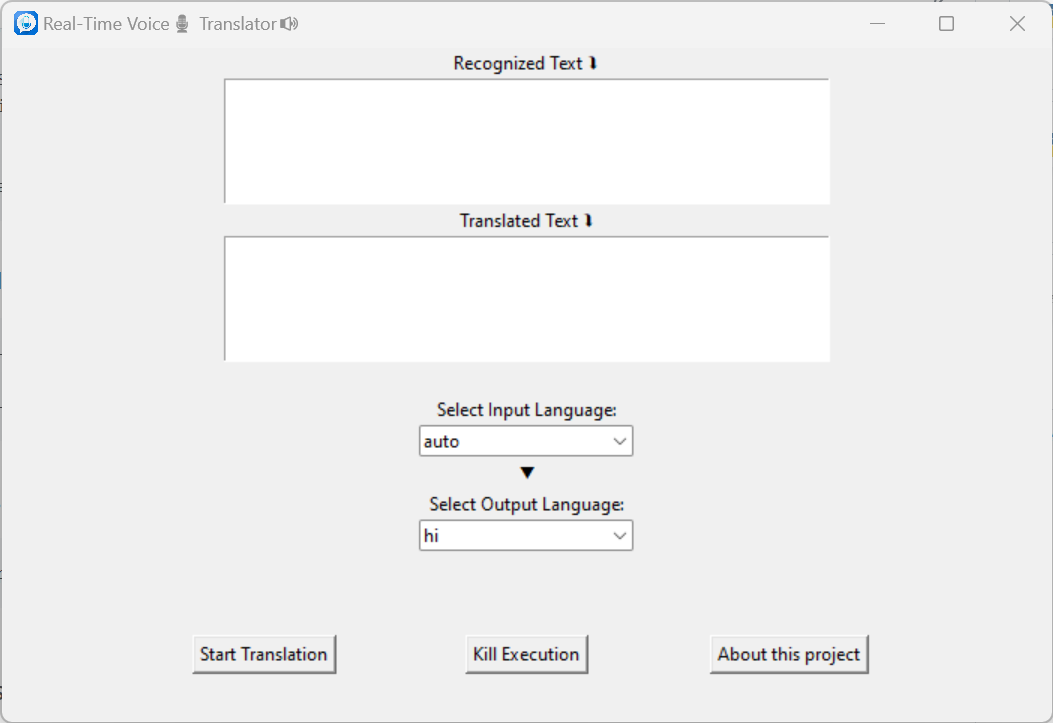
### GUI
I am using cx_Freeze to build executable file of this app. The build settings can be changed by modifying the setup.py file.
##### Build installer containing all the files:
- Windows: ```python setup.py bdist_msi```
- Linux: ```python setup.py bdist_rpm```
- Mac: ```python setup.py bdist_mac```
### GUI