# Namma Agent — System Architecture
> This is the canonical, deep-dive description of how Namma Agent actually works, end
> to end. It covers every subsystem, the request lifecycle, the data model, and —
> in the final third — **every significant technical decision**: what the options
> were, what we chose, and why. Each UML diagram is a **rendered PNG** (in
> [`docs/diagrams/`](diagrams/)) so it shows in any Markdown viewer; the editable
> Mermaid source is kept in a collapsible block beneath each figure.
Namma Agent is a **cloud-only personal AI assistant**. The "brain" is a single LLM
API call; everything else is plumbing around that call: a tool registry, a memory
store, a skill system, project document RAG, a Learning Room, a streaming web UI,
and a few background bridges. The whole application is the Python package
[`namma_agent/`](../namma_agent). The assistant's display name is configurable — see
[Configuration](#11-configuration--the-assistant-name).
> **July 2026 update.** Since this document's diagrams were rendered, the memory
> layer was replaced by **Engram** (native in-process memory —
> [MEMORY_SYSTEM_DESIGN.md](MEMORY_SYSTEM_DESIGN.md) is the canonical doc) and a
> wave of agent-loop upgrades landed. The prose below is still accurate for the
> core loop/server/UI; the newer subsystems in brief:
>
> - **Rolling context compaction** (`core/agent.py`, `sessions.compact_*`) — long
> chats keep an LLM-maintained summary of turns evicted from the history window,
> injected into every prompt so the middle of a conversation is never lost.
> - **Self-verification nudge** (`core/agent.py`) — a turn that wrote files and
> tries to answer without any check afterwards gets one `[system]` nudge to
> verify first (`conversation.verify_after_writes`).
> - **Proactive routines** (`core/routines.py`, `data/routines.json`) — standing
> scheduled agent runs ("morning brief") delivered over comms channels or a
> desktop notification; managed by chat tools, `/api/routines*`, and
> Settings → Routines. Scheduled runs always decline destructive tools.
> - **Background tasks + scoped sub-agents** (`core/builtins.py`) —
> `background_task` runs a sub-agent on a detached thread (comms ping on
> completion; results persist to `data/background_tasks.json` across restarts);
> sub-agents never see destructive tools.
> - **Embeddings-backed recall** (`core/engram/embeddings.py`) — optional
> `memory.embeddings` endpoint adds a vector channel to fused recall; without
> it, recall stays FTS5/BM25-only exactly as described in §13.9.
> - **Observability** — `GET /api/status` + Settings → Status show every
> background subsystem (memory writer, consolidator, compactor, routines,
> background tasks, reminders, comms) plus a cumulative token-usage view
> (`Database.usage_stats`).
> - **Hands-free voice** (`webui/src/handsfree.js`) — wake-word listening via the
> browser's Web Speech API; **cross-chat search** — `GET /api/search` + the
> sidebar search box.
---
## 1. Design philosophy
Three principles shape the whole system:
1. **One loop, not a pipeline.** A turn is `generate → run tools → loop → answer`.
There is no intent classifier, no planner, no routing graph. The model decides
what to do by calling tools natively. (v1 had all three of those layers; see
[§13](#131-cloud-only-vs-local-first-with-an-intent-pipeline-v1).)
2. **The model narrates, the browser speaks, the server stays stateless-ish.**
Progress is emitted as events; audio happens in the browser; durable state is a
single SQLite file.
3. **Everything is provider-agnostic and degrades gracefully.** Swap Anthropic for
Ollama by editing one config key. Missing a system binary (e.g. `nmap`)? The
tool returns a clear "install X" message instead of crashing.
---
## 2. System context
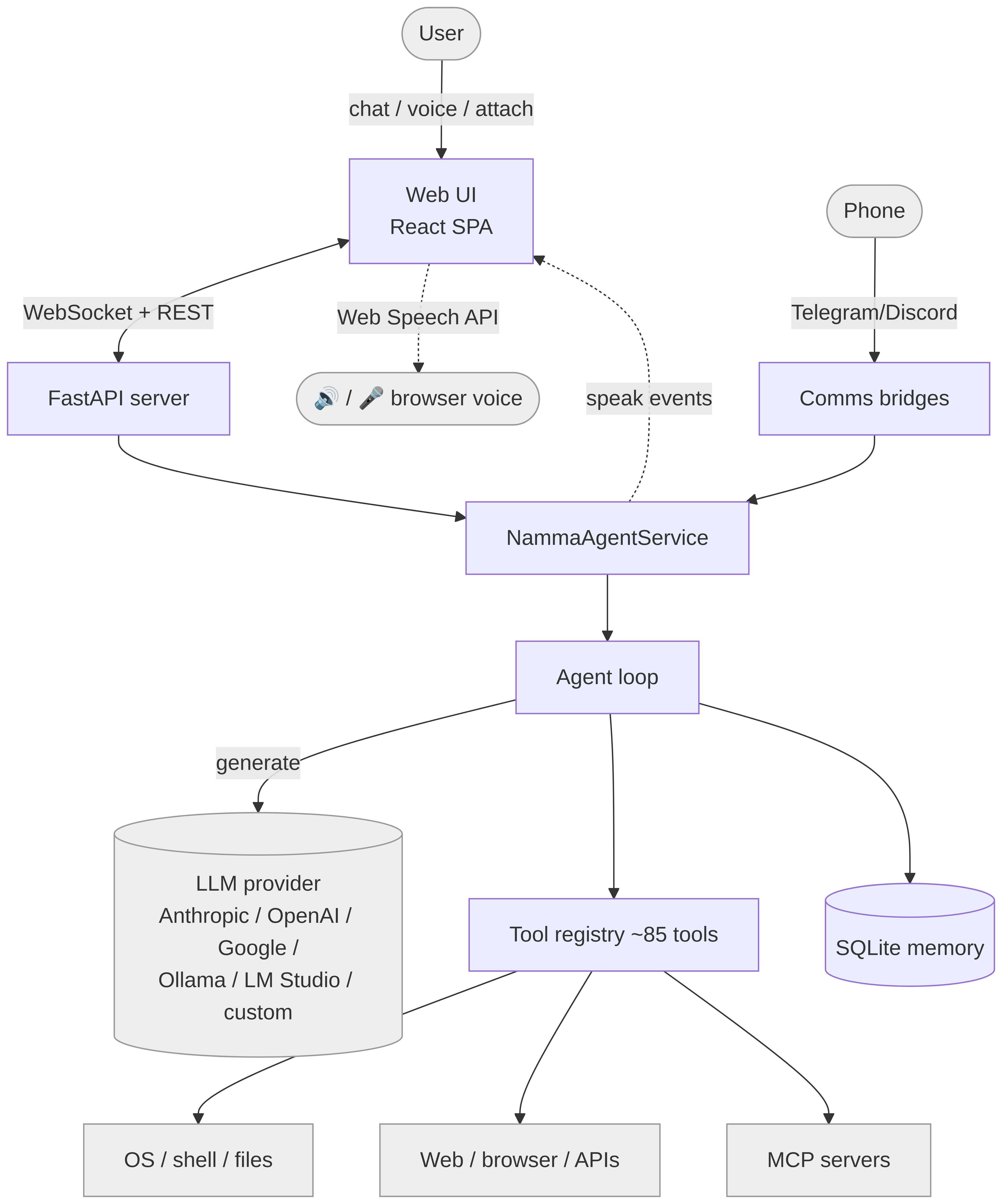
**Figure 1 — System context.**
Mermaid source
```mermaid
flowchart TB
user([User]) -->|chat / voice / attach| UI[Web UI
React SPA]
phone([Phone]) -->|Telegram/Discord| Bridges
UI <-->|WebSocket + REST| Server[FastAPI server]
Server --> Service[NammaAgentService]
Bridges[Comms bridges] --> Service
Service --> Agent[Agent loop]
Agent -->|generate| LLM[(LLM provider
Anthropic / OpenAI / Google /
Ollama / LM Studio / custom)]
Agent --> Tools[Tool registry ~85 tools]
Agent --> Mem[(SQLite memory)]
Tools --> OS[OS / shell / files]
Tools --> Web[Web / browser / APIs]
Tools --> MCP[MCP servers]
Service -.speak events.-> UI
UI -.Web Speech API.-> Speaker([🔊 / 🎤 browser voice])
classDef ext fill:#eee,stroke:#999;
class LLM,OS,Web,MCP,Speaker,phone,user ext;
```
The user talks to a React single-page app over a WebSocket. The app reaches a
`NammaAgentService`, which owns one `Agent`. The agent calls an LLM provider and a set
of tools, persists to SQLite, and streams events back. The same service is also
driven by the Telegram/Discord bridges, so you can chat with your assistant from your phone.
---
## 3. Component architecture
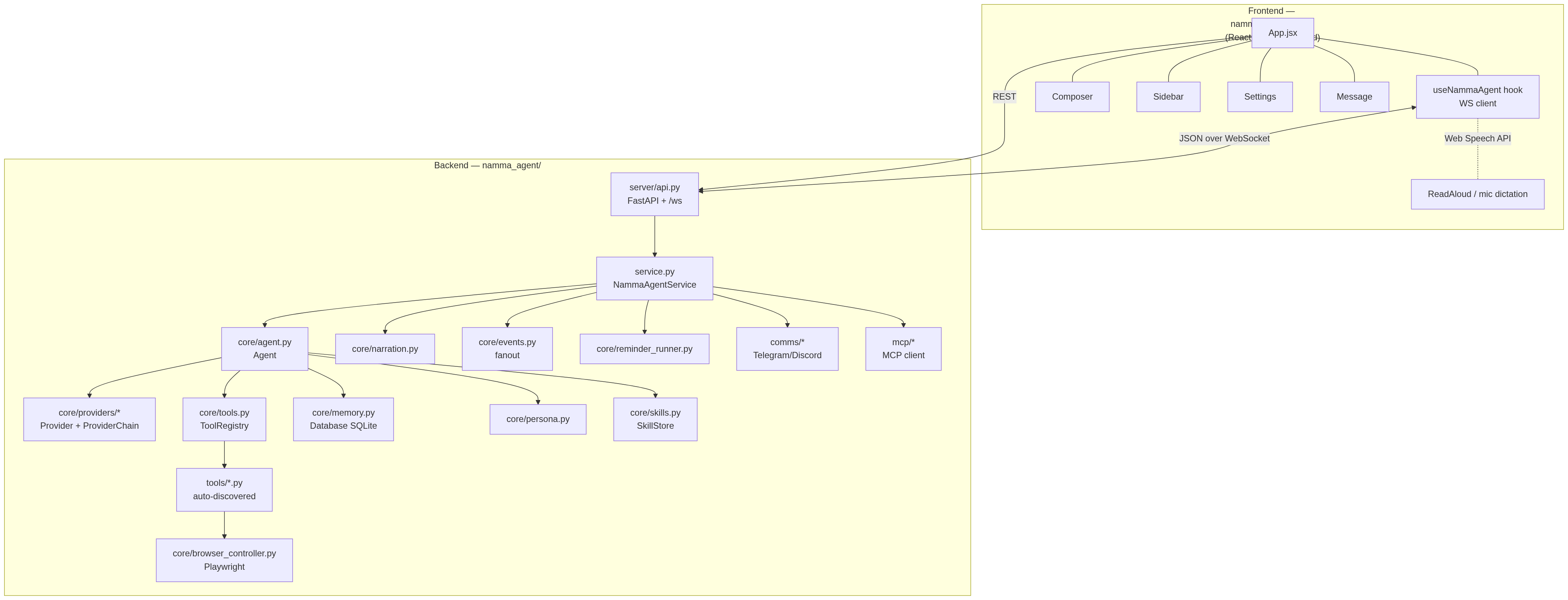
**Figure 2 — Component architecture.**
Mermaid source
```mermaid
flowchart TB
subgraph Frontend["Frontend — namma_agent/webui (React + Vite + Tailwind)"]
App[App.jsx] --- Hook[useNammaAgent hook
WS client]
App --- Composer & Sidebar & Settings & Message
Hook -. Web Speech API .- Voice[ReadAloud / mic dictation]
end
subgraph Backend["Backend — namma_agent/"]
API[server/api.py
FastAPI + /ws] --> SVC[service.py
NammaAgentService]
SVC --> AG[core/agent.py
Agent]
SVC --> NAR[core/narration.py]
SVC --> EV[core/events.py
fanout]
AG --> PROV[core/providers/*
Provider + ProviderChain]
AG --> REG[core/tools.py
ToolRegistry]
AG --> DB[core/memory.py
Database SQLite]
AG --> PERS[core/persona.py]
AG --> SK[core/skills.py
SkillStore]
REG --> TOOLS[tools/*.py
auto-discovered]
SVC --> RR[core/reminder_runner.py]
SVC --> CM[comms/*
Telegram/Discord]
SVC --> MC[mcp/*
MCP client]
TOOLS --> BC[core/browser_controller.py
Playwright]
end
Hook <-->|JSON over WebSocket| API
App -->|REST| API
```
| Layer | Files | Responsibility |
|------|------|----------------|
| **Launcher** | `app.py`, `__main__.py` | Start uvicorn in a thread; open a pywebview window (or browser). |
| **Server** | `server/api.py` | FastAPI REST + the `/ws` WebSocket turn channel; serves the built UI. |
| **Service** | `service.py` | Wires provider + tools + memory + agent + narration + bridges. One per process. |
| **Agent** | `core/agent.py` | The single turn loop. |
| **Providers** | `core/providers/` | Normalize every LLM behind one `Provider` interface + fallback chain. |
| **Tools** | `core/tools.py`, `tools/` | Registry + ~85 tools (auto-discovered modules + db/provider-backed builtins). |
| **Memory** | `core/memory.py` | SQLite: sessions, turns, facts (+FTS5), audit. |
| **Persona/Skills** | `core/persona.py`, `core/skills.py` | System prompt; procedural memory. |
| **Events/Narration** | `core/events.py`, `core/narration.py` | Pub/sub fanout; spoken progress lines. |
| **Bridges** | `comms/`, `mcp/`, `core/reminder_runner.py` | Messaging, MCP tools, scheduled reminders. |
| **Frontend** | `webui/` | React chat with streaming, timeline, voice, settings. |
---
## 4. The request lifecycle — one turn
This is the most important sequence in the system: what happens from a keystroke to
a streamed answer.
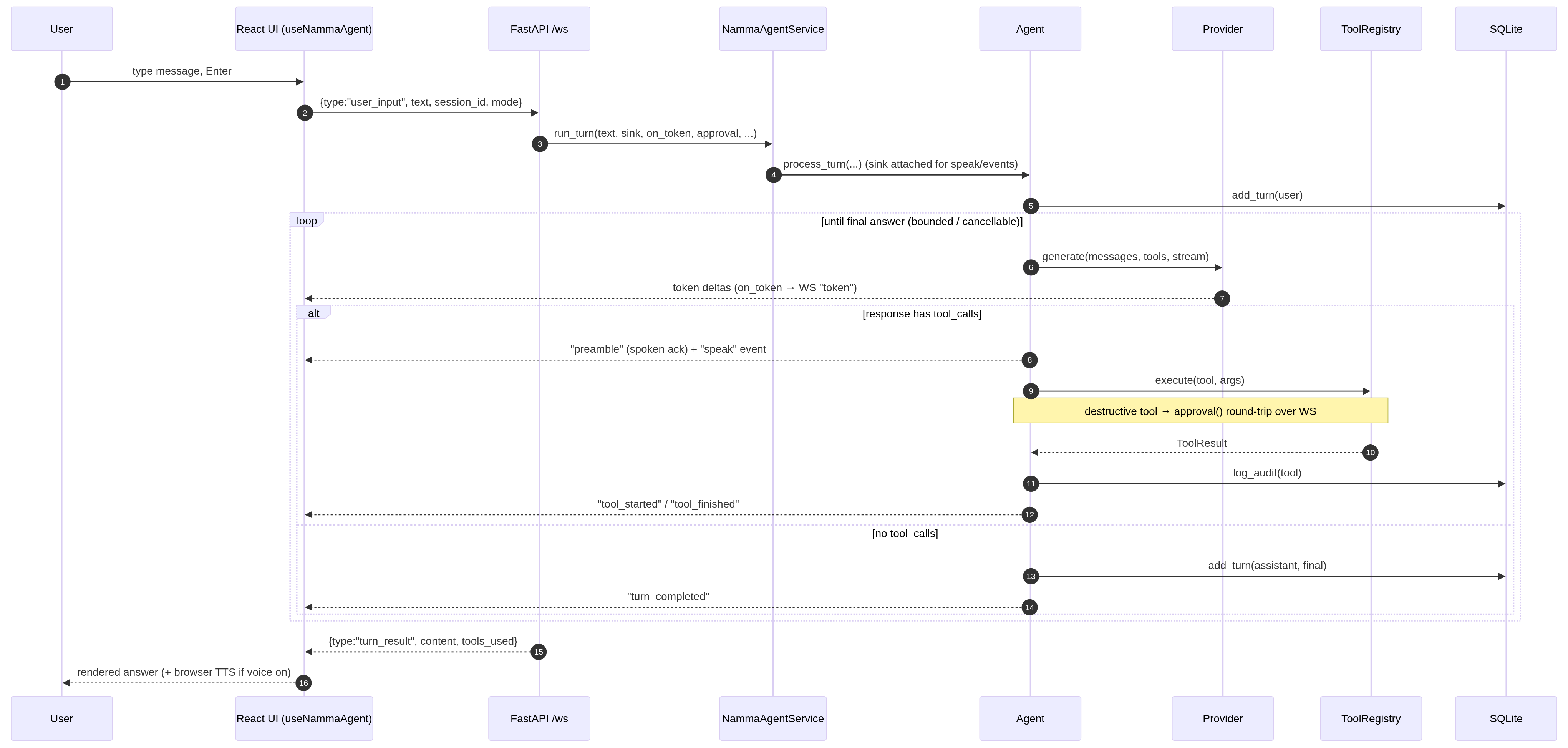
**Figure 3 — Request lifecycle — one turn.**
Mermaid source
```mermaid
sequenceDiagram
autonumber
participant U as User
participant UI as React UI (useNammaAgent)
participant WS as FastAPI /ws
participant SV as NammaAgentService
participant AG as Agent
participant P as Provider
participant T as ToolRegistry
participant DB as SQLite
U->>UI: type message, Enter
UI->>WS: {type:"user_input", text, session_id, mode}
WS->>SV: run_turn(text, sink, on_token, approval, ...)
SV->>AG: process_turn(...) (sink attached for speak/events)
AG->>DB: add_turn(user)
loop until final answer (bounded / cancellable)
AG->>P: generate(messages, tools, stream)
P-->>UI: token deltas (on_token → WS "token")
alt response has tool_calls
AG-->>UI: "preamble" (spoken ack) + "speak" event
AG->>T: execute(tool, args)
Note over AG,T: destructive tool → approval() round-trip over WS
T-->>AG: ToolResult
AG->>DB: log_audit(tool)
AG-->>UI: "tool_started" / "tool_finished"
else no tool_calls
AG->>DB: add_turn(assistant, final)
AG-->>UI: "turn_completed"
end
end
WS-->>UI: {type:"turn_result", content, tools_used}
UI-->>U: rendered answer (+ browser TTS if voice on)
```
Key points:
- **Streaming** — when the UI asks for tokens, the provider streams deltas straight
to the socket as `token` events; the bubble fills in live.
- **Events are a fanout** — every step (`preamble`, `tool_started`, `tool_finished`,
`speak`, `turn_completed`) is emitted once and fanned out to the narration engine
and the WebSocket sink (`core/events.py:fanout`).
- **Approval is a blocking round-trip** — for a destructive tool, the agent calls
the `approval(tool, args)` callback, which (over the socket) sends an
`approval_request` and blocks a worker thread on a queue until the UI replies.
- **Cancellation** — a `stop` message flips a flag the loop checks every step.
---
## 5. The agent loop in detail
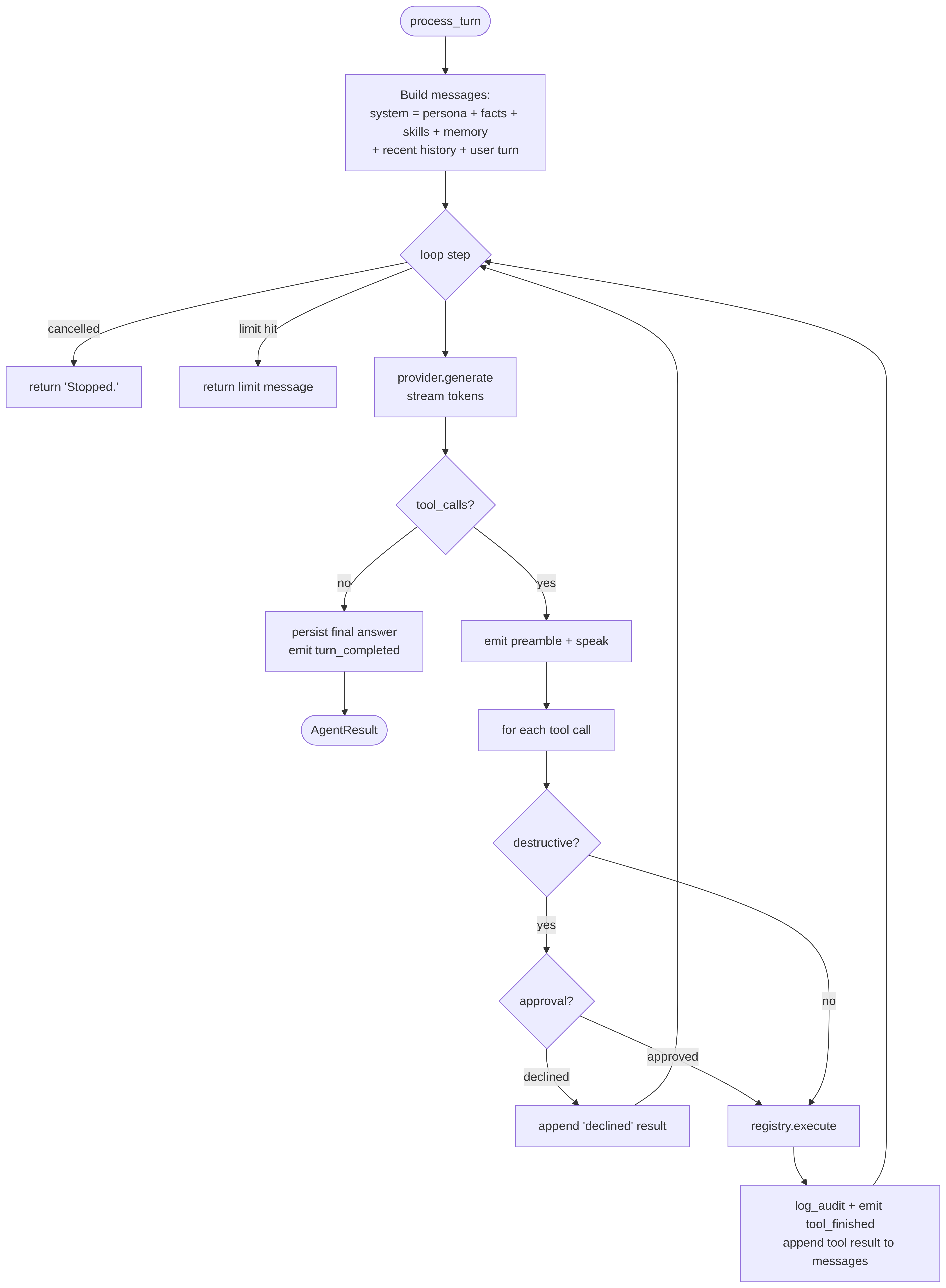
**Figure 4 — The agent loop.**
Mermaid source
```mermaid
flowchart TD
Start([process_turn]) --> Build[Build messages:
system = persona + facts + skills + memory
+ recent history + user turn]
Build --> Loop{loop step}
Loop -->|cancelled| Stop[return 'Stopped.']
Loop -->|limit hit| Cap[return limit message]
Loop --> Gen[provider.generate
stream tokens]
Gen --> HasTools{tool_calls?}
HasTools -->|no| Final[persist final answer
emit turn_completed] --> Done([AgentResult])
HasTools -->|yes| Pre[emit preamble + speak]
Pre --> Each[for each tool call]
Each --> Dgate{destructive?}
Dgate -->|yes| Appr{approval?}
Appr -->|declined| Decl[append 'declined' result]
Appr -->|approved| Exec[registry.execute]
Dgate -->|no| Exec
Exec --> Audit[log_audit + emit tool_finished
append tool result to messages]
Decl --> Loop
Audit --> Loop
```
- **System prompt assembly** (`Agent._build_messages` → `Persona.system_prompt`):
persona identity + tone + dos/donts, the shared agent preamble (tool-routing
rules), formatting rules, the **skills catalog**, the **curated memory block**
(`USER.md` + `MEMORY.md`), `USER_FACTS`, and a periodic memory nudge. In **chat
mode** all of that tool/skill machinery is dropped — it's a pure conversation with
no tools.
- **`tool_loop_limit <= 0` means unlimited** — the user drives complex multi-tool
tasks, and the Stop button is the control. A positive value is a hard cap.
- **Tool results** are appended as `role:"tool"` messages and the loop continues, so
the model sees outcomes and can chain steps.
---
## 6. Provider layer
Every LLM is normalized behind one interface so the rest of the system never sees
provider-specific shapes.
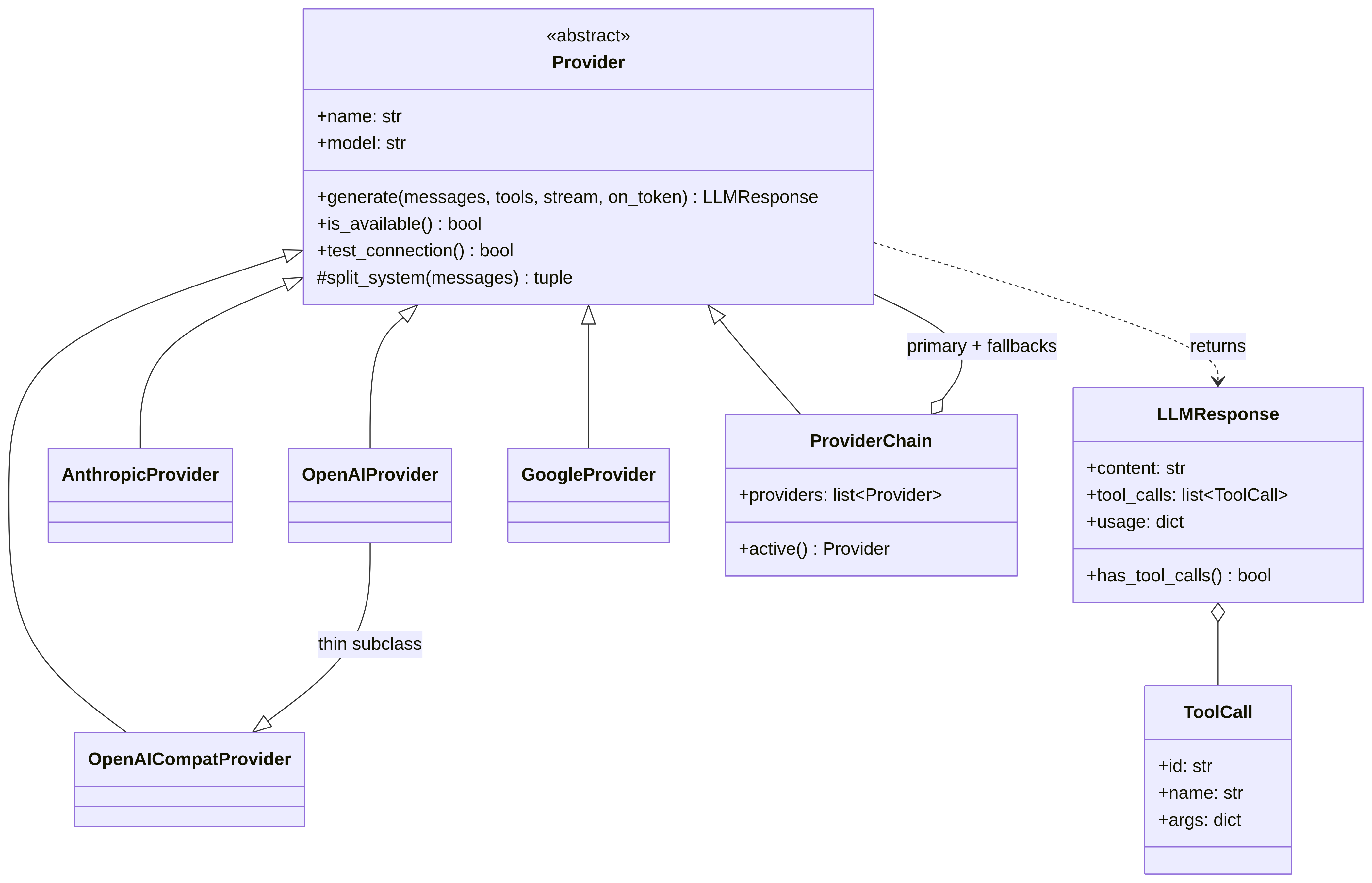
**Figure 5 — Provider layer (class diagram).**
Mermaid source
```mermaid
classDiagram
class Provider {
<>
+name: str
+model: str
+generate(messages, tools, stream, on_token) LLMResponse
+is_available() bool
+test_connection() bool
#split_system(messages) tuple
}
class LLMResponse {
+content: str
+tool_calls: list~ToolCall~
+usage: dict
+has_tool_calls() bool
}
class ToolCall {
+id: str
+name: str
+args: dict
}
class AnthropicProvider
class OpenAIProvider
class GoogleProvider
class OpenAICompatProvider
class ProviderChain {
+providers: list~Provider~
+active() Provider
}
Provider <|-- AnthropicProvider
Provider <|-- OpenAIProvider
Provider <|-- GoogleProvider
Provider <|-- OpenAICompatProvider
Provider <|-- ProviderChain
OpenAIProvider --|> OpenAICompatProvider : thin subclass
Provider ..> LLMResponse : returns
LLMResponse o-- ToolCall
ProviderChain o-- Provider : primary + fallbacks
```
- **`generate()`** returns a normalized `LLMResponse` with `content`, `tool_calls`
(already parsed into neutral `ToolCall`s), and `usage`. Tool definitions go in as
JSON Schema and are translated to each vendor's tool format inside the provider.
- **`OpenAICompatProvider`** is the workhorse: any endpoint that speaks
`/v1/chat/completions` (Ollama, LM Studio, opencode, vLLM, a custom base URL).
`OpenAIProvider` is a thin subclass.
- **`ProviderChain`** wraps a primary + ordered fallbacks. If the active provider
errors or is unavailable, the next is tried — configured via `provider.fallback`.
- **`from_config(config)`** builds the right provider (or chain) from `config.yaml`.
---
## 7. Tool system
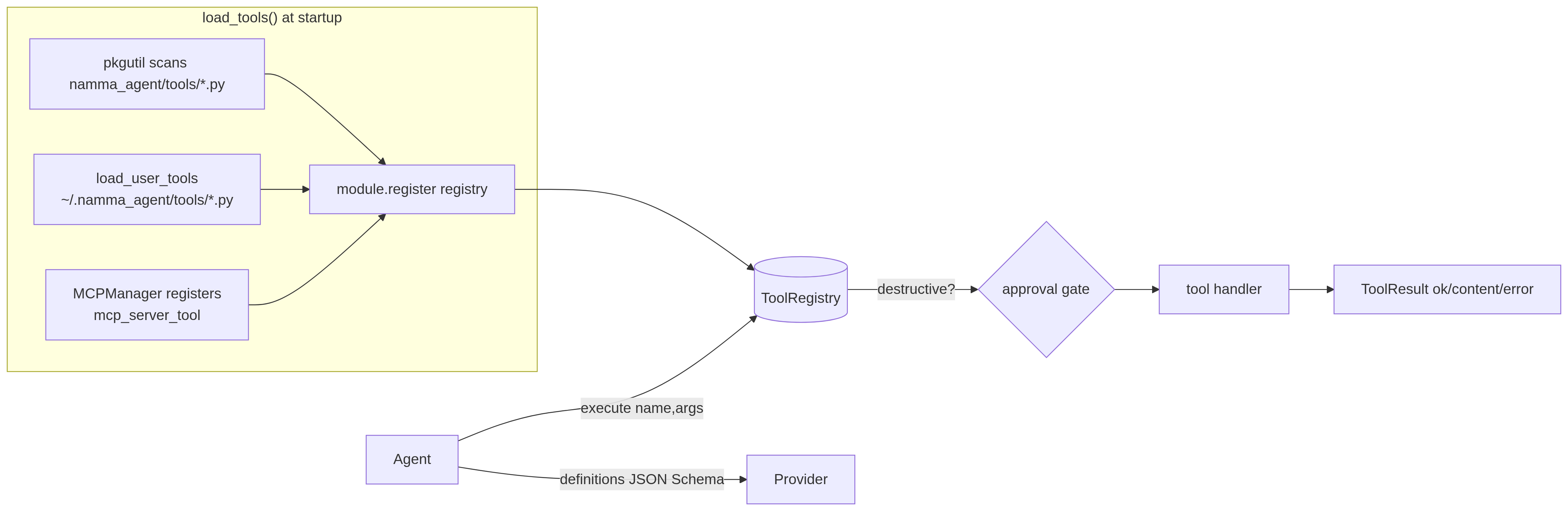
**Figure 6 — Tool system.**
Mermaid source
```mermaid
flowchart LR
subgraph Discovery["load_tools() at startup"]
scan[pkgutil scans namma_agent/tools/*.py] --> reg[module.register registry]
user[load_user_tools
~/.namma_agent/tools/*.py] --> reg
mcp[MCPManager registers
mcp_server_tool] --> reg
end
reg --> REG[(ToolRegistry)]
AG[Agent] -->|definitions JSON Schema| P[Provider]
AG -->|execute name,args| REG
REG -->|destructive?| GATE{approval gate}
GATE --> H[tool handler] --> RES[ToolResult ok/content/error]
```
- **Auto-discovery** — every file in `namma_agent/tools/` that exposes `register(registry)`
is imported and registered at boot. Adding a capability = adding a file. No
central list, no intent regex.
- **Neutral definitions** — a tool is `(name, description, json_schema, handler,
destructive)`. The model reads the description + schema to decide when to call it.
- **Approval gate** — tools flagged `destructive=True` (shell, file deletes, smart-home
mutations, `create_tool`, …) must pass the per-turn `approval` callback before they
run, unless `conversation.auto_approve` is set.
- **`ToolResult`** carries `ok`, `content` (what the model sees), optional `error`,
and structured `data`. Errors are returned, not raised, so a failing tool is just a
message the model can react to.
- **Self-authored tools** — `create_tool` writes a new module to `~/.namma_agent/tools/`
and hot-loads it (see [SELF_MODIFICATION.md](SELF_MODIFICATION.md)).
---
## 8. Memory model
One SQLite file (`data/namma_agent.db`), thread-safe single connection.
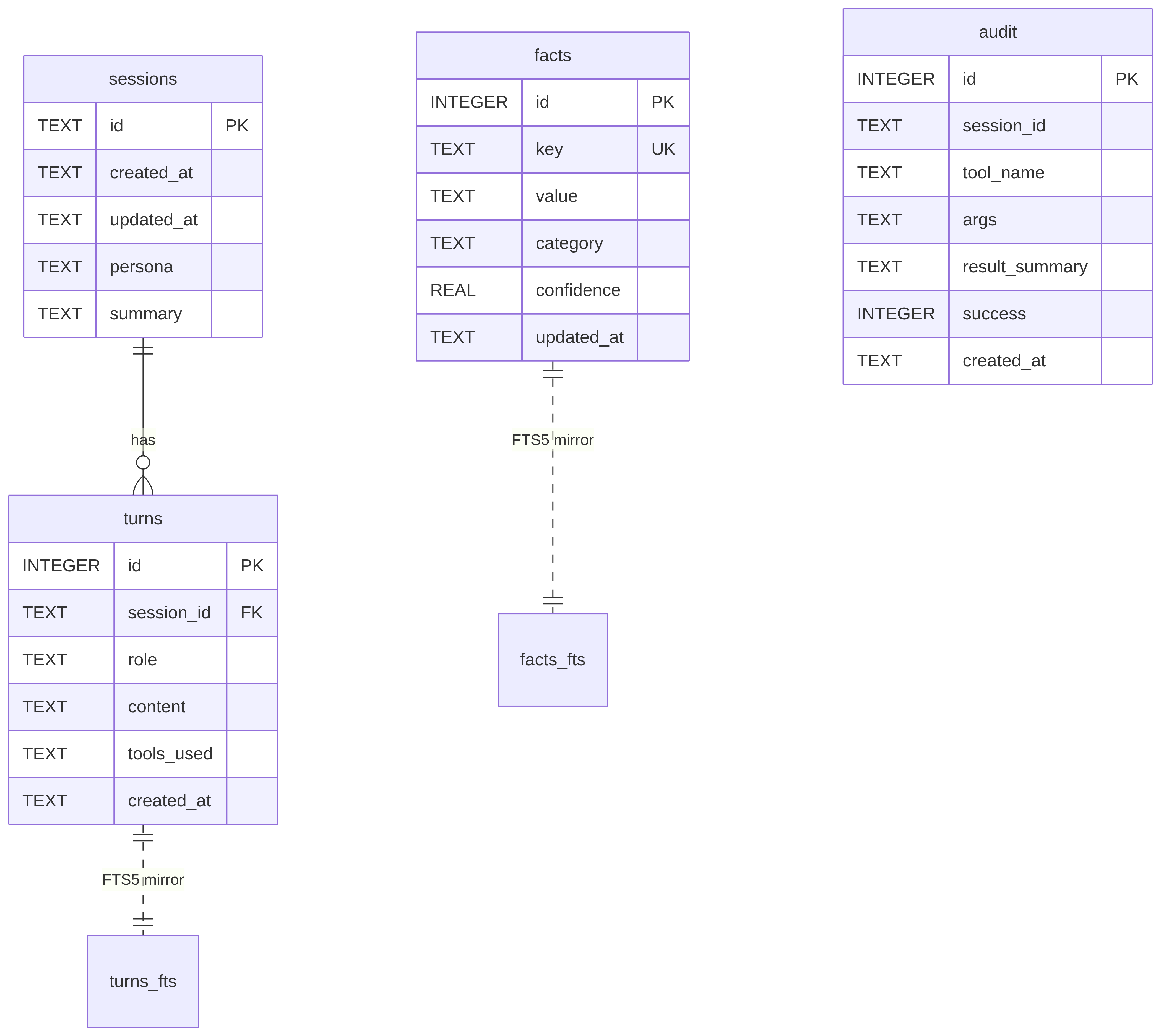
**Figure 7 — Memory model (ER diagram).**
Mermaid source
```mermaid
erDiagram
sessions ||--o{ turns : has
sessions {
TEXT id PK
TEXT created_at
TEXT updated_at
TEXT persona
TEXT summary
}
turns {
INTEGER id PK
TEXT session_id FK
TEXT role
TEXT content
TEXT tools_used
TEXT created_at
}
facts {
INTEGER id PK
TEXT key UK
TEXT value
TEXT category
REAL confidence
TEXT updated_at
}
audit {
INTEGER id PK
TEXT session_id
TEXT tool_name
TEXT args
TEXT result_summary
INTEGER success
TEXT created_at
}
facts ||..|| facts_fts : "FTS5 mirror"
turns ||..|| turns_fts : "FTS5 mirror"
```
- **`facts`** = durable key/value facts about the user (`remember_fact`), with a
standalone **FTS5** index for fuzzy recall.
- **`turns`** = full conversation history with a **FTS5** index over content for
cross-session keyword recall (`search_conversations`). Sessions get auto-summarized
when a new one starts.
- **`audit`** = every tool call (name, args, result, success) for traceability.
- **Curated notes** — beyond SQLite, `core/memory_notes.py` maintains human-readable
`USER.md` + `MEMORY.md` that the agent edits and that are injected into the prompt.
This is the "what the assistant chooses to remember in prose" layer.
Three layers feed the prompt, in increasing order of automation: the **curated
notes** the agent writes on purpose, the **structured facts** it (or the auto-capture
pass in §8.3) upserts, and the **FTS5 recall** it queries on demand. Projects (§8.1)
and the Learning Room (§8.2) layer their own scoped tables onto the same single file.
### 8.1 Project knowledge bases (multi-document RAG)
A **project** groups related chats and gives them a shared document shelf (≤ 25
files, ≤ 10 MB each). Files live on disk under `data/projects//`; their
text is indexed into `project_documents` + `doc_chunks` (+ a `doc_chunks_fts` BM25
index). The whole stack stays inside the one SQLite file — **no vector DB, no
embedding service** (see [§13.21](#1321-project-rag-on-fts5bm25-vs-an-embedding-store)).
1. **Ingest** (`core/docindex.py`) — text extraction (MarkItDown/pypdf/docx),
then **prompt-injection screening** (`core/docscan.py`). Flagged files are
indexed but **quarantined** out of retrieval until the user explicitly trusts
them. Clean text is **structure-aware chunked** (`_TARGET_CHARS≈1500`,
markdown-heading breadcrumbs as section labels, a section change forces a chunk
boundary, oversized paragraphs split at sentence boundaries, and a ~200-char
tail overlap within a section so an answer that straddles a boundary survives).
2. **Retrieve** — the agent calls `search_project_documents`; the question is
sanitised into safe FTS5 OR-prefix terms (stopwords dropped, operators
neutralised), BM25-ranked, diversified per document (`max_per_doc`), and then
each hit's ±1 **neighbours are stitched** back into a coherent run. Excerpts are
returned with file/section citations, wrapped in a *data-not-instructions* guard.
3. **Continuity** — a project chat's scope block also lists summaries of the
project's earlier sessions (auto-summarized when a new project chat opens),
with `search_project_history` for verbatim recall — so conversations days apart
share context.
### 8.2 The Learning Room (a scoped teacher agent)
The Learning Room (`core/learning.py`) is **not a chat mode** — it is the same agent
loop driven by a teaching contract and a deliberately **narrow tool set**. A *topic*
owns a *path* (`plan` = an ordered list of modules); each module is taught in **its
own chat thread**, and the topic's overview session doubles as the **path chat**.
- **Per-context tool scoping.** Inside a Learning-Room session the registry is
filtered to `LEARNING_TOOLS` — visuals (`render_diagram`, `fetch_image`,
`render_simulation`), the teaching/learning-state tools (`record_understanding`,
`remember_learning_note`, `mark_module_complete`, `set_learning_plan`,
`set_teaching_preference`), and a few research/file tools. Handing the teacher all
~85 tools buries the visual ones and bloats every prompt; scoping is what keeps
them salient ([§13.30](#1330-per-context-tool-scoping)).
- **Two contracts.** The **path chat** is a planning desk (explain/reshape the path
via `set_learning_plan`, set standing preferences via `set_teaching_preference`);
the **module** prompt is the full pedagogy contract.
- **Conversational assessment, not quiz cards.** Understanding is gauged from the
dialogue and recorded with `record_understanding` (a 0–100 score + an analytical
note). The multiple-choice `pose_quiz` tool exists in the global registry but is
intentionally **excluded** from `LEARNING_TOOLS`
([§13.24](#1324-conversational-assessment-vs-multiple-choice-quiz-cards)).
- **A persistent learner model.** The understanding score, the running analysis,
strengths/gaps, completed-module recaps, and the one *running example* are read at
the **start of every module**, so each module teaches the real person, not a blank
slate.
- **The confidence gate.** A module ends only when the learner confirms confidence,
at which point the teacher MUST call `mark_module_complete(recap=…)`; the recap is
written to the topic's scope memory and carried into later modules. A finished
module's thread becomes **review-only**, and content reserved for later modules is
off-limits in the current thread — this hard boundary keeps module chats from
bleeding into each other ([§13.25](#1325-module-thread-isolation--the-confidence-gate)).
- **Syllabus → path.** Uploading a syllabus runs it through the same `docscan`
screen, verifies it really is a syllabus, infers the learner's level, and builds
the module path from it.
- **Server-side visuals.** `render_diagram`/`render_simulation` produce images/HTML
**on the server** and the agent loop drops them inline at the exact call site
([§13.27](#1327-server-side-diagrams--simulations-vs-client-rendering)).
- `core/learning_nudge.py` adds opt-in stale-topic Telegram nudges.
### 8.3 Deterministic memory auto-capture
Left to its own discretion the model almost never calls `remember_fact`, so durable
facts about the user were quietly lost. `core/memory_extract.py` closes that gap
**without** trusting model discretion: a cheap **regex gate** (`looks_personal`)
decides whether an exchange plausibly revealed something durable — ordinary task
turns ("play a song") never match and cost nothing — and only then does **one
focused LLM pass** extract structured facts and upsert them into `facts` (which the
agent already injects into every future session). It runs **fire-and-forget on a
background thread** so it never adds reply latency; opt out with
`memory.auto_capture: false` ([§13.26](#1326-deterministic-memory-capture-vs-model-discretion)).
---
## 9. Skills (procedural memory)
A skill is a folder with a `SKILL.md` (YAML frontmatter + markdown body) in the
*Anthropic Agent Skills* format. Two roots: bundled (`namma_agent/skills/`) and learned
(`~/.namma_agent/skills/`).

**Figure 8 — Skills at runtime.**
Mermaid source
```mermaid
flowchart LR
boot[startup] --> store[SkillStore.reload]
store --> scan[rglob SKILL.md across roots
parse frontmatter, filter by platform]
scan --> cat[catalog: name + one-liner]
cat --> prompt[injected into system prompt]
model[model sees a match] --> use[use_skill name]
use --> render[render: substitute SKILL_DIR/SESSION_ID
+ optional inline-shell]
render --> follow[full procedure returned → model follows it]
novel[solved a novel task] --> create[create_skill → ~/.namma_agent/skills]
create --> store
```
The **learning loop**: the model is told to call `create_skill` after solving a
novel multi-step task, and `update_skill` to refine one. Learned skills override
bundled ones on name collision. Full detail in [SKILLS.md](SKILLS.md).
### 9.1 Shareable packs
`core/packs.py` exports the user's authored skills/tools as a single `.zip`
(`manifest.json` + `INSTALL.md` + each skill folder + each tool file) and imports
someone else's. The trust model is **asymmetric on purpose**: skills are just
markdown and install silently, but tools are arbitrary Python that loads
in-process — so import only writes the tools the caller **explicitly approves**
(the UI defaults every tool to *off* and shows its source). Tool metadata is read
by **parsing the AST**, never by importing, and extraction is guarded against
path traversal ([§13.29](#1329-shareable-packs-with-asymmetric-trust)).
### 9.2 Document conversion
The agent writes Markdown natively; `tools/convert.py` (`convert_document`) turns
it into whatever the user actually asked for — Word, PDF, PowerPoint, HTML, ODT,
LaTeX, … — and drops a downloadable file into the chat. It follows the project's
graceful-degradation pattern: **pandoc** handles every format at high fidelity when
present, and self-contained fallbacks (`python-docx`, a stdlib HTML/text renderer)
still cover `docx`/`html`/`txt`/`md` without it; anything else returns a clear
"install pandoc" message ([§13.28](#1328-document-conversion-pandoc-with-self-contained-fallbacks)).
---
## 10. Server, events, and voice
**WebSocket protocol** (`/ws`) — JSON messages both ways:
| Inbound (UI→server) | Outbound (server→UI) |
|---|---|
| `user_input {text, session_id, mode}` | `token {text}` — streamed answer delta |
| `approval_response {id, approved}` | `preamble {text}` — spoken acknowledgement |
| `password_response {id, password}` | `tool_started` / `tool_finished` |
| `stop` — cancel the turn | `approval_request {id, tool, args}` |
| `stop_speech` — barge-in | `password_request {id, prompt}` |
| `ping` | `speak {text}` — voice this in the browser |
| | `stop_speaking` — cancel browser TTS |
| | `turn_result {content, tools_used}` / `stopped` / `error` |
**Voice is 100% browser-native** (Web Speech API). The backend produces no audio:
narration's short spoken lines are emitted as `speak` events; the UI voices them via
`speechSynthesis` when the voice toggle is on, and reads answers aloud on demand
(`ReadAloud`). The mic uses `webkitSpeechRecognition` to dictate into the composer.
There is no Piper, no Whisper, no server-side STT. (See
[§13.13](#1313-browser-web-speech-api-vs-server-side-piper--whisper).)
---
## 11. Configuration & the assistant name
- **Base config**: `namma_agent/config.yaml` (documented, commented).
- **Overlay**: `namma_agent/config.local.yaml` — written by the Settings panel via
`config.update_config`; the base file is never rewritten.
- **Secrets**: the OS-native vault (`core/secrets.py` — Windows Credential
Manager / POSIX keyring / a DPAPI-sealed fallback file) with an opt-in
migration from `.env`; `.env` at the repo root still works and is loaded by a
tiny built-in parser. Known secret **values are redacted** (`***NAME***`)
from every tool result and log line.
- **Resolution**: `$NAMMA_CONFIG` → `namma_agent/config.yaml`.
The **assistant's display name** is the single source of truth in `assistant.name`
(or the `ASSISTANT_NAME` env var), resolved by `config.assistant_name()`. It flows
into the system prompt (persona identity uses a `{name}` placeholder), the UI
(`/api/config` → title/greeting/sidebar/composer), the about tool, and Telegram.
`NAMMA_*` env-var names are intentionally fixed.
---
## 12. Process & deployment model
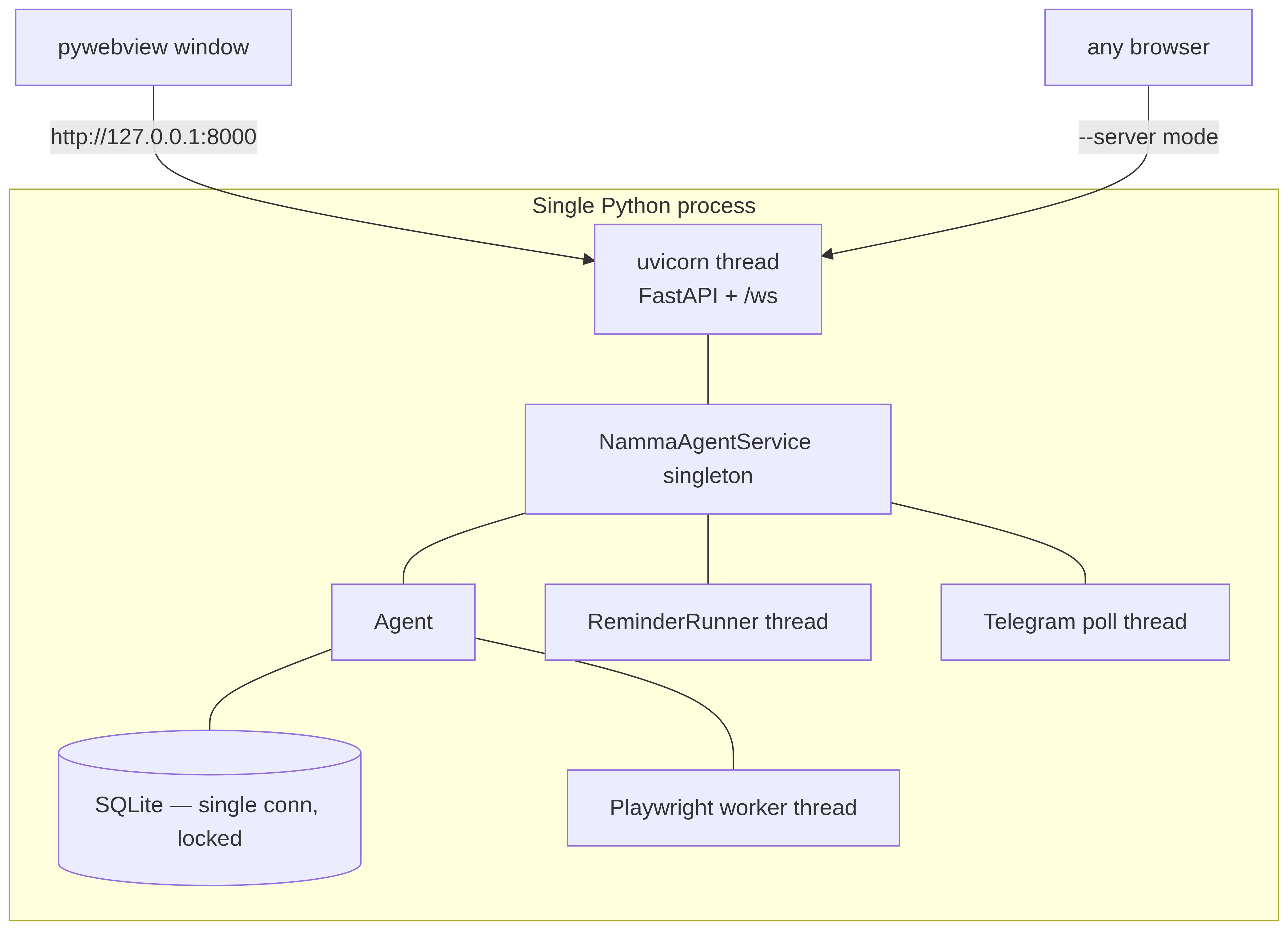
**Figure 9 — Process & deployment.**
Mermaid source
```mermaid
flowchart TB
subgraph Proc["Single Python process"]
direction TB
UVI[uvicorn thread
FastAPI + /ws]
SVCp[NammaAgentService singleton]
AGp[Agent]
DBp[(SQLite — single conn, locked)]
RRp[ReminderRunner thread]
CMp[Telegram poll thread]
BCp[Playwright worker thread]
UVI --- SVCp --- AGp --- DBp
SVCp --- RRp & CMp
AGp --- BCp
end
win[pywebview window] -->|http://127.0.0.1:8000| UVI
browser[any browser] -->|--server mode| UVI
```
- One process. `python -m namma_agent` runs uvicorn in a daemon thread and opens a
pywebview window; `--server` skips the window (headless, open a browser).
- Background work runs on dedicated threads: the reminder runner, the routines and
**watcher** runners, the memory consolidator, the optional weekly **self-review**
runner, the comms bridges (Telegram long-poll, Discord/Slack sockets), and the
Playwright browser (the sync API must live on one thread).
- State is the single SQLite file + `~/.namma_agent/` (user skills, user tools, browser
profile) + `data/` (reminders, tasks, uploads, watchers, self-review snapshots).
No external services required — memory included (Engram is in-process, §8).
- **Desktop integration (Phase 5):** a system-tray icon (pystray — show/hide window,
live gateway status, quit; `core/tray.py`), a start-on-login toggle (HKCU Run key /
XDG autostart; `core/autostart.py`, Settings → Behavior), and Windows toasts with
Reply/Open protocol actions (`core/notifications.py`). All optional and
degrade-gracefully: without pystray or a notifier the app runs exactly as before.
---
## 13. Technical decisions — options, choices, and why
Each decision below lists the realistic alternatives, what Namma Agent chose, the reason,
and the trade-off we accepted.
### 13.1 Cloud-only vs local-first with an intent pipeline (v1)
- **Options:** (a) keep v1 — local GGUF model + `intent_recognizer` (3,500-line regex
router) + a planning engine + a routing stack; (b) cloud-only single agent loop.
- **Chosen:** (b). The brain is an API call; v1's intent/planning/routing layers were
deleted.
- **Why:** modern hosted models call tools natively and reason well enough that the
deterministic intent layer became negative value — every new capability needed a
regex *and* a planner entry. The loop is ~200 lines vs thousands.
- **Trade-off:** a hard dependency on a provider (network + key), and less determinism.
Mitigated by supporting **local** OpenAI-compatible servers (Ollama/LM Studio), so
"cloud-only" still runs fully offline if you want.
### 13.2 Single agent loop vs ReAct/planner frameworks
- **Options:** LangChain/LangGraph agents, a custom planner-executor, or a plain loop.
- **Chosen:** a plain `while` loop calling `provider.generate` with tools.
- **Why:** native tool-calling already encodes "think → act → observe." A framework
would add a large dependency and indirection for behavior we get in a few dozen lines.
- **Trade-off:** we hand-roll streaming, cancellation, and approval. That code is small
and fully under our control, which we preferred to a framework's abstractions.
### 13.3 Native tool calling vs text-parsed ReAct
- **Options:** parse `Action: …` out of model text, or use the provider's structured
tool-call API.
- **Chosen:** native structured tool calls (normalized to `ToolCall`).
- **Why:** structured calls are reliable, typed, and support parallel calls; text
parsing is brittle and model-specific.
- **Trade-off:** providers without tool APIs need the OpenAI-compat path; pure
text-only models aren't first-class.
### 13.4 Provider abstraction + OpenAI-compat vs an SDK per provider / a meta-SDK
- **Options:** one giant SDK (LiteLLM/LangChain), or hand-written providers behind a
shared interface.
- **Chosen:** a thin `Provider` ABC with native Anthropic/OpenAI/Google subclasses plus
a generic OpenAI-compat client.
- **Why:** the surface we use (generate + tools + streaming) is small; owning it avoids
a heavy transitive dependency and keeps response normalization explicit. One compat
client covers the long tail (Ollama, LM Studio, vLLM, custom).
- **Trade-off:** we maintain four providers, but each is small and rarely changes.
### 13.5 Fallback chain vs single provider
- **Options:** single configured provider, or a primary + ordered fallbacks.
- **Chosen:** `ProviderChain` (primary then fallbacks).
- **Why:** resilience to a provider outage / rate limit / a local server being down,
with zero app-code changes.
- **Trade-off:** a failover can change model behavior mid-session; acceptable for a
personal assistant.
### 13.6 JSON-Schema tools + file auto-discovery vs a plugin/entry-point system
- **Options:** setuptools entry points, a manifest/registry file, or convention-based
discovery.
- **Chosen:** drop a `namma_agent/tools/.py` with `register(registry)`; it's imported
at boot.
- **Why:** lowest friction — one file ships a capability, and the schema *is* the spec
the model routes from. No regexes, no central list to keep in sync.
- **Trade-off:** import-time errors in one tool are caught and logged (it's skipped)
rather than failing the whole app; you trade strictness for robustness.
### 13.7 Approval gating vs sandboxing tool execution
- **Options:** run everything in a container/jail, or run in-process behind an approval
prompt.
- **Chosen:** in-process execution, with `destructive` tools gated by a per-turn approval
round-trip (plus an opt-in auto-approve and a lab-mode gate for security tools).
- **Why:** the assistant's value *is* acting on your machine; a full filesystem jail
would block the point. Human-in-the-loop on the dangerous subset is the pragmatic
safety boundary.
- **Trade-off:** trust in the model + the user. We mitigate with approval, audit logging,
destructive classification, and security tools defaulting off.
- **2026-07 update:** approval gained a *resource* sandbox underneath it — every
`run_shell` child runs in a Windows **Job Object** (memory cap, fork-bomb guard,
kill-on-close) or under POSIX rlimits, with an optional `confine_to` path tripwire
(`core/sandbox.py`). Not a jail; a blast-radius limiter. Approval decides *whether*
a command runs; the sandbox bounds *how much damage* a bad one can do. See §14 and
[SECURITY.md](SECURITY.md).
### 13.8 Single-file SQLite vs Postgres / a vector DB
- **Options:** Postgres, a vector store (v1 used Chroma), or SQLite.
- **Chosen:** one SQLite file with FTS5.
- **Why:** zero-ops, single-user, local-first; FTS5 gives good keyword recall without a
server or embedding pipeline. v1's Chroma + six "domain stores" were overkill for one
person's assistant.
- **Trade-off:** no semantic (embedding) search and no multi-writer concurrency. For a
single-user app neither matters; see 13.9.
### 13.9 FTS5 keyword recall vs embedding/vector search
- **Options:** embed turns and do ANN search, or full-text keyword search.
- **Chosen:** FTS5 keyword search + curated prose notes.
- **Why:** no embedding model/dependency/cost, deterministic, debuggable, and "find that
thing I mentioned" is mostly lexical. The curated `USER.md`/`MEMORY.md` cover the
"important context, always in prompt" need that vectors are often used for.
- **Trade-off:** misses paraphrase-only matches. Acceptable, and re-addable later behind
the same memory interface.
### 13.10 Curated prose notes vs pure automatic memory
- **Options:** fully automatic (store everything, retrieve by similarity) vs an explicit
curated layer the agent writes.
- **Chosen:** both — automatic turn/fact storage **and** agent-curated `USER.md`/`MEMORY.md`
injected every turn.
- **Why:** the highest-value context (who the user is, ongoing projects, preferences)
should be *always present and human-auditable*, not hoped-for from a retrieval hit.
- **Trade-off:** the agent must maintain the notes; prompt size grows. Bounded and worth it.
### 13.11 Skills as SKILL.md folders vs hardcoded workflows / fine-tuning
- **Options:** bake procedures into code, fine-tune the model, or store them as data the
model loads on demand.
- **Chosen:** Markdown skill folders (Anthropic Agent Skills format) discovered at runtime,
with a create/update learning loop.
- **Why:** procedures become editable data, portable across models, and the model can
*author its own* — no retraining, no redeploy. Catalog-in-prompt + load-on-demand keeps
the context cost to one line per skill until needed.
- **Trade-off:** skills are advisory (the model may ignore them) and unsandboxed text; we
accept that for flexibility.
### 13.12 Self-authoring tools in-process vs sandboxed plugins
- **Options:** forbid runtime code-gen; sandbox authored tools; or write + hot-load them
in-process.
- **Chosen:** `create_tool` writes a module to `~/.namma_agent/tools/` and imports it live —
**approval-gated**.
- **Why:** lets the assistant genuinely extend itself for capabilities no tool covers,
which is a core goal.
- **Trade-off:** model-written code runs with app privileges. The approval gate + the
"prefer create_skill (no code) when possible" guidance are the controls. (See
[SELF_MODIFICATION.md](SELF_MODIFICATION.md).)
### 13.13 Browser Web Speech API vs server-side Piper / Whisper
- **Options:** server TTS (Piper) + server STT (faster-whisper + sounddevice), or the
browser's built-in `speechSynthesis` + `SpeechRecognition`.
- **Chosen:** browser-native voice; the backend produces no audio and has no STT.
- **Why:** removes heavy native dependencies (Piper binary + ONNX voices, whisper models,
PortAudio) and a whole audio-hardware failure surface; the browser already ships capable
TTS/STT; and it works correctly when the server is remote (audio belongs on the client,
not the server host). Narration is still server-decided — emitted as `speak` events and
voiced in the browser.
- **Trade-off:** voice quality/availability depends on the browser (Web Speech STT is
Chromium-best), and there's no voice when accessed by a non-speech client. Acceptable
for a web-first assistant.
### 13.14 WebSocket streaming vs SSE / long-polling
- **Options:** Server-Sent Events, polling, or a WebSocket.
- **Chosen:** one WebSocket for the whole turn channel.
- **Why:** turns are bidirectional — tokens and tool events stream down *while* approval
and password responses and stop/barge-in flow up. SSE is one-way; polling is laggy.
- **Trade-off:** slightly more connection management (reconnect logic in the hook).
### 13.15 React SPA + pywebview vs Electron / Tauri / server-rendered
- **Options:** Electron, Tauri, an htmx/server-rendered UI, or a Vite React SPA served by
FastAPI and shown in pywebview.
- **Chosen:** Vite + React + Tailwind, built to static files FastAPI serves, opened in a
lightweight pywebview window (browser fallback).
- **Why:** a streaming chat UI is genuinely stateful and benefits from React; pywebview is
far lighter than bundling Chromium (Electron) and needs no Rust toolchain (Tauri); and
the exact same bundle works in any browser for `--server` mode.
- **Trade-off:** a Node build step for the UI. The built `dist/` is committed so running
the app needs no Node.
### 13.16 Playwright real-browser control vs headless / the `webbrowser` module
- **Options:** just shell out to `webbrowser.open`, drive a headless browser, or drive the
user's real visible browser.
- **Chosen:** Playwright driving the **real** browser binary on a copy of the real profile,
with a graceful `webbrowser` fallback.
- **Why:** media playback and control (YouTube/YT-Music play/pause/seek/fullscreen) need a
live, signed-in, visible page; headless gets blocked ("something went wrong") and the
stdlib module can't control playback.
- **Trade-off:** Playwright + a browser are heavyweight optional deps; the single-thread
sync API needs a dedicated worker thread. Both are isolated and optional.
### 13.17 A hand-written MCP stdio client vs the official MCP SDK
- **Options:** depend on the `mcp` SDK, or implement the JSON-RPC-over-stdio handshake.
- **Chosen:** a small persistent stdio client (`initialize → tools/list → tools/call`).
- **Why:** the protocol slice we need is tiny; avoiding the SDK keeps dependencies and
version-coupling down, and the client registers each server's tools as
`mcp__` straight into the same registry.
- **Trade-off:** we track the spec manually if it evolves. Cheap for the surface used.
### 13.18 Config base + local overlay vs a single mutable file or env-only
- **Options:** one mutable `config.yaml` the UI rewrites, env-vars only, or a commented
base + a machine-written overlay.
- **Chosen:** base `config.yaml` (hand-edited, documented) + `config.local.yaml` (UI-written
overlay), deep-merged, secrets in `.env`.
- **Why:** the UI can persist settings **without** clobbering the documented, commented base
file, and you can diff what you changed from defaults.
- **Trade-off:** two files to reason about; the loader's merge order is the contract.
### 13.19 Configurable name via `{name}` placeholder vs a templating engine
- **Options:** a templating library (Jinja), per-surface string tables, or a single token
substituted late.
- **Chosen:** one `assistant_name()` source of truth + a `{name}` placeholder substituted
when rendering the prompt, with the UI reading the name from `/api/config`.
- **Why:** trivially simple, no dependency, and impossible to half-apply — the prompt is
rendered in one place and the UI threads one prop. `NAMMA_*` env names are deliberately
excluded so secrets/identifiers stay stable.
- **Trade-off:** a literal `{name}` in unrelated text would be substituted; in practice it
appears only where intended.
### 13.20 `delegate_task` sub-agent vs a multi-agent framework
- **Options:** a full multi-agent orchestrator (CrewAI/AutoGen style), or one bounded
sub-agent tool.
- **Chosen:** a single `delegate_task` tool that runs a sub-agent over a **read-only**
research toolset and can't recurse into itself.
- **Why:** it collapses v1's Delegate/MoA/ResearchAgent into one understandable primitive
that handles "go research this" without orchestration complexity or runaway recursion.
- **Trade-off:** no rich agent-to-agent collaboration. Sufficient for the assistant's needs.
### 13.21 Project RAG on FTS5/BM25 vs an embedding store
- **Options:** embed every chunk into a vector DB (Chroma/pgvector/FAISS) for semantic
retrieval, or keyword BM25 over the existing SQLite FTS5.
- **Chosen:** FTS5/BM25 with structure-aware chunking, per-document diversity, and
neighbour stitching (`core/docindex.py`).
- **Why:** it keeps the *entire* project knowledge base inside the one SQLite file —
no embedding model, no vector service, no extra process — while staying genuinely
useful: the model writes targeted queries, and overlap + ±1 neighbour stitching give
it coherent, citable context. For a single-user assistant this is zero-ops and
debuggable.
- **Trade-off:** misses pure-paraphrase matches a dense retriever would catch. Re-addable
later behind the same `retrieve()` interface; for now lexical recall + the model's own
query phrasing covers the need.
### 13.22 Document injection screening + a data-not-instructions guard (defense in depth)
- **Options:** trust uploaded documents, run an LLM classifier on every file, or apply a
cheap heuristic tripwire plus a prompt-hygiene wrapper.
- **Chosen:** a heuristic scanner (`core/docscan.py`: instruction-override, role-marker
smuggling, hidden unicode, exfiltration/tool-call directives — high severity flags on
one hit, medium in pairs) **and** a *data-not-instructions* guard wrapped around every
retrieved excerpt.
- **Why:** uploaded files are untrusted input that flows into the prompt; two cheap,
independent layers (screen at ingest, neutralise at retrieval) catch each other's
misses without an LLM call per upload. Flagged files stay visible but **quarantined**
until the user trusts them, so honest documents aren't silently dropped.
- **Trade-off:** heuristics have false negatives/positives; thresholds are tuned to let
real syllabi and prompt-engineering docs through. The retrieval guard is the backstop.
### 13.23 The Learning Room as a scoped teacher agent vs a separate app or a chat mode
- **Options:** a standalone tutoring app, a "learning" persona, or the same agent loop
driven by a teaching contract over a narrowed tool set.
- **Chosen:** reuse the one agent loop; `core/learning.py` supplies the system-prompt
contract (path-chat vs module) and a per-session **tool filter**.
- **Why:** all the hard parts — streaming, tools, memory, approval — already exist; the
Learning Room is "the same engine, different prompt + tools," not a parallel stack.
- **Trade-off:** the teaching quality lives in a long prompt contract rather than code, so
it's tuned by editing prose. Acceptable — and far cheaper than a second runtime.
### 13.24 Conversational assessment vs multiple-choice quiz cards
- **Options:** check understanding with `pose_quiz` multiple-choice cards, or assess from
the dialogue and record a score.
- **Chosen:** conversational assessment — the teacher asks pointed questions in its own
words and logs a 0–100 read with `record_understanding`; `pose_quiz` is deliberately
**excluded** from `LEARNING_TOOLS`.
- **Why:** open answers (and the learner's *own* questions) reveal the actual gap far
better than four options to pattern-match, and feed a richer learner model.
- **Trade-off:** assessment is softer/less gradeable than scored cards. The 0–100 score +
analysis note recover enough structure for spaced-repetition warm-ups.
### 13.25 Module-thread isolation & the confidence gate
- **Options:** teach a whole topic in one long chat, or give each module its own thread
with a hard boundary and an explicit completion gate.
- **Chosen:** one chat **per module**; later modules are off-limits in the current thread,
a finished module's thread becomes review-only, and a module completes **only** when the
learner confirms confidence and the teacher calls `mark_module_complete(recap=…)`.
- **Why:** it stops lessons bleeding across modules, makes "where am I" obvious, and the
saved recap (concepts + the running example) carries forward so later modules build on
earlier ones instead of repeating them.
- **Trade-off:** more sessions to manage and a gate the model must honor; enforced by the
prompt contract and the path's per-module state.
### 13.26 Deterministic memory capture vs model discretion
- **Options:** rely on the model to call `remember_fact`, store every turn, or a
deterministic post-turn extraction.
- **Chosen:** `core/memory_extract.py` — a cheap regex gate decides if an exchange
plausibly revealed something durable, and only then does one focused LLM pass extract
and upsert structured facts, fire-and-forget on a background thread.
- **Why:** the model almost never volunteers `remember_fact`, so recall starved; the gate
keeps ordinary task turns free (no LLM cost), and capture never adds reply latency.
- **Trade-off:** an extra (gated) LLM call on disclosure turns, and regex-bounded recall.
Opt out with `memory.auto_capture: false`.
### 13.27 Server-side diagrams & simulations vs client rendering
- **Options:** render Mermaid/visuals in the browser, or produce them on the server and
inline the result.
- **Chosen:** server-side — `render_diagram` emits a verified PNG (hosted `mermaid.ink`
first, local `mermaid-cli` fallback, text outline if neither), `render_simulation`
emits self-contained HTML/JS; the agent loop drops the artifact in at the call site.
- **Why:** the model can only make an image appear by *calling the tool*, which kills the
failure mode of fabricated `/api/media/…` links showing broken images, and works
identically for Telegram and any non-browser client.
- **Trade-off:** optional heavyweight deps for the offline path; both degrade gracefully.
### 13.28 Document conversion: pandoc with self-contained fallbacks
- **Options:** require pandoc, ship per-format Python libraries, or pandoc-first with
built-in fallbacks.
- **Chosen:** pandoc when present (every format, high fidelity); otherwise stdlib/`python-docx`
fallbacks for `docx`/`html`/`txt`/`md`, and a clear "install pandoc" message for the rest.
- **Why:** matches the project-wide degrade-gracefully rule — the common asks work out of
the box, power formats light up when a single system binary is installed.
- **Trade-off:** two code paths to keep in sync; the fallback set is intentionally small.
### 13.29 Shareable packs with asymmetric trust
- **Options:** a plugin marketplace, import-everything zips, or per-artifact opt-in.
- **Chosen:** a plain `.zip` (`core/packs.py`) where skills (markdown) install silently
but tools (Python) are written **only if explicitly approved**; tool metadata is read by
AST parsing (never import), and extraction is path-traversal-guarded.
- **Why:** sharing should be one file and trivially auditable, but importing code is
importing risk — so the dangerous half is opt-in and inspectable, the safe half is
frictionless.
- **Trade-off:** importing tools is a manual approval step; that friction is the point.
### 13.30 Per-context tool scoping
- **Options:** always expose the full registry, or narrow it to the task at hand.
- **Chosen:** scope the tools per context — e.g. the Learning Room sees only
`LEARNING_TOOLS`, `delegate_task` sees a read-only research subset.
- **Why:** with ~85 tools, the ones that matter for a context (the visual teaching tools)
get buried and under-used, and every prompt pays for definitions it won't call. A tight
set keeps the right tools salient and the token footprint down.
- **Trade-off:** a context can't reach a tool outside its set without widening the scope —
an acceptable, deliberate constraint.
---
## 14. Trust, proactivity & self-improvement (the 2026-07 subsystems)
Three subsystem groups landed after the sections above were written; each has its
own deep-dive doc, so this is the architectural summary and the map.
### 14.1 Trust model (STAND_OUT Phase 1)
Full treatment: **[SECURITY.md](SECURITY.md)** — every claim there is observable
live in Settings → System → **Security**.
- **Per-channel sender trust** (`core/trust.py`): every inbound message carries
`owner`/`trusted`/`untrusted` from its bridge, riding the turn as a contextvar.
Untrusted turns get destructive tools stripped from the model's view *and*
force-declined at the gate, their text wrapped as data-not-instructions, and
their memory writes quarantined (stored `screen_status='untrusted'`, never
indexed).
- **Injection screening** (`core/docscan.py`): uploads, `web_extract`/`web_crawl`
pages, search snippets, and RSS headlines are screened; flagged content is
wrapped + marked (`⚠ possible prompt injection`), never silently dropped.
- **Shell sandbox** (`core/sandbox.py`): Job Objects on Windows, rlimits on
POSIX, optional `confine_to` tripwire (§13.7).
- **Secrets vault + redaction** (`core/secrets.py`): OS-native storage, names-only
inventory API, values masked in every tool result and log line (§11).
- **Decline auditing**: destructive calls that were *refused* (untrusted sender,
autonomous run, user said no) land in the audit table too — the trail shows
what was asked, not just what ran.
### 14.2 Watchers — event-driven proactivity (Phase 2)
`core/watchers.py`, store `data/watchers.json`, runner cloned from routines.
A watcher = *trigger + condition + action*: file/glob changes, new email ids
(Gmail query), web-page text-hash diffs, calendar windows — all cheap zero-LLM
polls with per-type cadence. On a trigger, one no-tools model pass (the
"only if it matters" gate) decides notify / act / ignore against the watcher's
stated intent, with the change summary framed as untrusted data; actions reuse
the routine turn (destructive tools always declined) and deliver over comms
with a native-notification fallback. Chat tools (`create_watcher`, …) and the
Settings → Capabilities → Watchers tab drive it.
### 14.3 Weekly self-review — measured self-improvement (Phase 3)
`core/self_review.py` (opt-in, off by default). Weekly (or on demand): offline
heuristics mine the week's sessions (failed tool runs, corrections, retries,
repeated workflows, unanswered endings); ONE model pass drafts ≤5 proposals
(skills / routines / watchers / notes) that are validated against the real
stores and queued as **proposals** — one-click accept/reject in Settings →
Learning, accepted automations arrive disabled. A metrics spine snapshots
recall@k (from the offline eval — see [BENCHMARKS.md](BENCHMARKS.md)),
fact/entity counts, tool failure rate, and token spend into
`data/self_review/`, so the "what I learned" report shows trend lines.
---
## 15. Where to go next
- The trust model in full → [SECURITY.md](SECURITY.md)
- Engram memory design → [MEMORY_SYSTEM_DESIGN.md](MEMORY_SYSTEM_DESIGN.md) ·
measured → [BENCHMARKS.md](BENCHMARKS.md)
- Build your own capabilities → [EXTENDING.md](EXTENDING.md)
- How skills work in depth → [SKILLS.md](SKILLS.md)
- How the assistant rewrites itself → [SELF_MODIFICATION.md](SELF_MODIFICATION.md)
- Setup & run → [../README.md](../README.md)