
Kooha
Elegantly record your screen




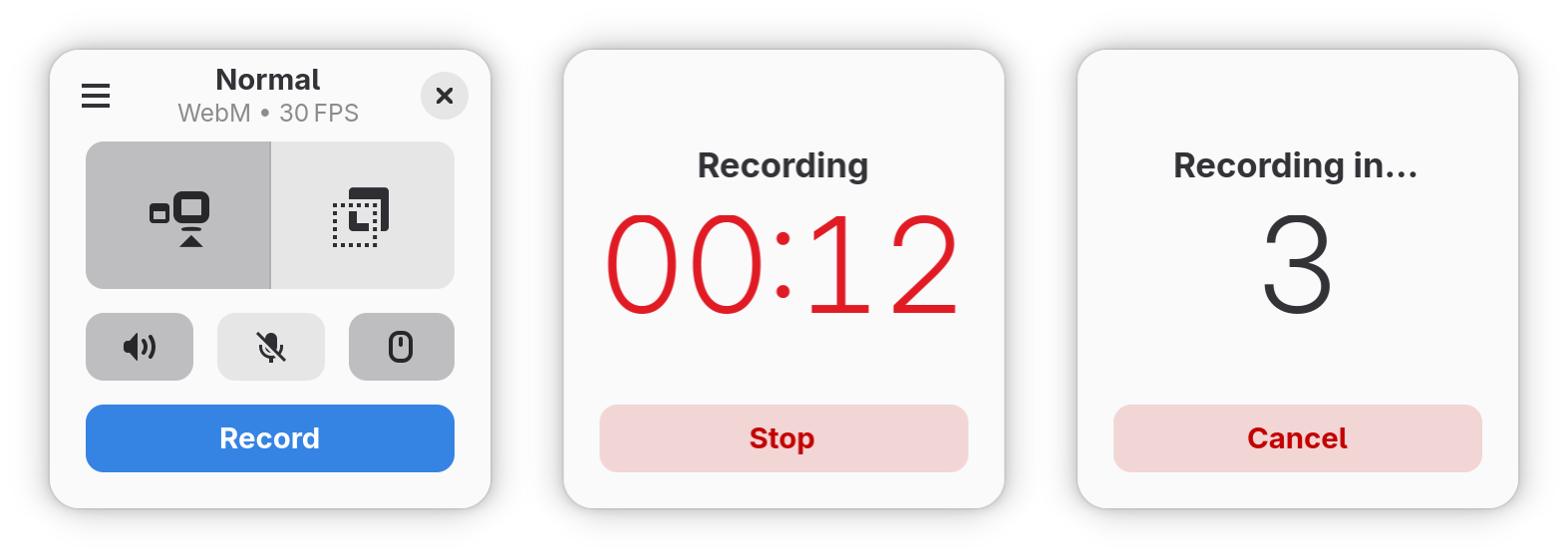
Capture your screen in an intuitive and straightforward way without distractions.
Kooha is a simple screen recorder with a minimal interface. You can simply click
the record button without having to configure a bunch of settings.
The main features of Kooha include the following:
* 🎙️ Record microphone, desktop audio, or both at the same time
* 📼 Support for WebM, MP4, GIF, and Matroska formats
* 🖥️ Select a monitor or a portion of the screen to record
* 🛠️ Configurable saving location, pointer visibility, frame rate, and delay
* 🚀 Experimental hardware-accelerated encoding
## 😕 It Doesn't Work
There are many possibilities on why it may not be working. You may not have
the runtime requirements mentioned below installed, or your distro doesn't
support it. For troubleshooting purposes, the [screencast compatibility page](https://github.com/emersion/xdg-desktop-portal-wlr/wiki/Screencast-Compatibility)
of `xdg-desktop-portal-wlr` wiki may help determine if your distro
has support for it out of the box. If it does, but it still doesn't work, you
can also check for the [troubleshooting checklist](https://github.com/emersion/xdg-desktop-portal-wlr/wiki/%22It-doesn't-work%22-Troubleshooting-Checklist).
## ⚙️ Experimental Features
These features are disabled by default due to stability issues and possible
performance degradation. However, they can be enabled manually by running Kooha
with `KOOHA_EXPERIMENTAL` env var set to `all` (e.g., `KOOHA_EXPERIMENTAL=all flatpak run io.github.seadve.Kooha`), or individually, by setting
`KOOHA_EXPERIMENTAL` to the following keys (e.g., `KOOHA_EXPERIMENTAL=experimental-formats,window-recording`):
| Feature | Description | Issues |
| ------------------------ | ----------------------------------------------------------------------- | ------------------------- |
| `all` | Enables all experimental features | - |
| `experimental-formats` | Enables other codecs (e.g., hardware-accelerate encoders, VP9, and AV1) | Stability |
| `multiple-video-sources` | Enables recording multiple monitor or windows | Stability and performance |
| `window-recording` | Enables recording a specific window | Flickering |
## 📋 Runtime Requirements
* pipewire
* gstreamer-plugin-pipewire
* xdg-desktop-portal
* xdg-desktop-portal-(e.g., gtk, kde, wlr)
## 🏗️ Building from source
### GNOME Builder
GNOME Builder is the environment used for developing this application.
It can use Flatpak manifests to create a consistent building and running
environment cross-distro. Thus, it is highly recommended you use it.
1. Download [GNOME Builder](https://flathub.org/apps/details/org.gnome.Builder).
2. In Builder, click the "Clone Repository" button at the bottom, using `https://github.com/SeaDve/Kooha.git` as the URL.
3. Click the build button at the top once the project is loaded.
### Meson
#### Prerequisites
The following packages are required to build Kooha:
* meson
* ninja
* appstreamcli (for checks)
* cargo
* x264 (for MP4)
* gstreamer
* gstreamer-plugins-base
* gstreamer-plugins-ugly (for MP4)
* gstreamer-plugins-bad (for VA encoders)
* glib2
* gtk4
* libadwaita
#### Build Instruction
```shell
git clone https://github.com/SeaDve/Kooha.git
cd Kooha
meson _build --prefix=/usr/local
ninja -C _build install
```
## 📦 Third-Party Packages
Unlike Flatpak, take note that these packages are not officially supported by the developer.
### Repology
You can also check out other third-party packages on [Repology](https://repology.org/project/kooha/versions).
## 🙌 Help translate Kooha
You can help Kooha translate into your native language. If you find any typos
or think you can improve a translation, you can use the [Weblate](https://hosted.weblate.org/engage/seadve/) platform.
## ☕ Support me and the project
Kooha is free and will always be for everyone to use. If you like the project and
would like to support it, you may donate [here](https://seadve.github.io/donate/).
## 💝 Acknowledgment
I would like to express my gratitude to the [contributors](https://github.com/SeaDve/Kooha/graphs/contributors)
and [translators](https://hosted.weblate.org/engage/seadve/) of the project.
I would also like to thank the open-source software projects, libraries, and APIs that were
used in developing this app, such as GStreamer, GTK, LibAdwaita, and many others, for making Kooha possible.
I would also like to acknowledge [RecApp](https://github.com/amikha1lov/RecApp), which greatly inspired the creation of Kooha,
as well as [GNOME Screenshot](https://gitlab.gnome.org/GNOME/gnome-screenshot), which served as a reference for Kooha's icon
design.