---
name: Grove - OLED Display 0.96" (SSD1315)
category:
bzurl:
oldwikiname:
prodimagename:
surveyurl:
sku: 104020208
---

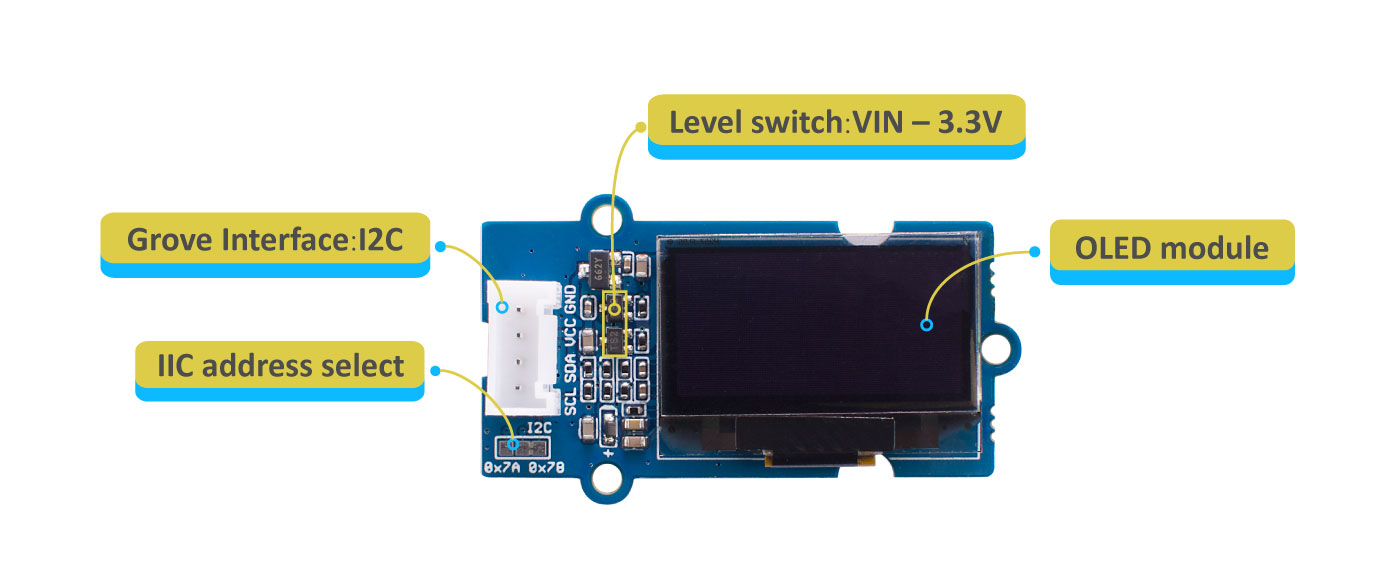
The Grove - OLED Display 0.96" (SSD1315) is a monochrome(white) 128×64 pixels passive display matrix module with Grove I2C Interface.
Thanks to the new SSD1315 chip, it can work with 3.3V, so that we removed the expensive DC-DC boost circuit. And with the onboard level shift circuit, the new Grove - OLED Display 0.96" can work with 3.3V and 5V platform. That is to say, you can use it easily as an Arduino OLED display, Raspberry Pi OLED display, etc.
## Platforms Supported
| Arduino | Raspberry Pi | BeagleBone | Wio | LinkIt ONE |
|-----------------------------------------------------------------------------------------------------|----------------------------------------------------------------------------------------------------------|-------------------------------------------------------------------------------------------------|---------------------------------------------------------------------------------------------------|----------------------------------------------------------------------------------------------------|
|  |  |  |  |  |
## Getting Started
### Play With Arduino
**Materials required**
| Seeeduino V4.2 | Base Shield | Grove - OLED Display 0.96"|
|--------------|-------------|-----------------|
|||
|[Get ONE Now](http://www.seeedstudio.com/Seeeduino-V4.2-p-2517.html)|[Get ONE Now](https://www.seeedstudio.com/Base-Shield-V2-p-1378.html)|[Get ONE Now](https://www.seeedstudio.com/Grove-OLED-Display-0-96-SSD1315-p-4294.html)|
>In addition, you can consider our new [Seeeduino Lotus M0+](https://www.seeedstudio.com/Seeeduino-Lotus-Cortex-M0-p-2896.html), which is equivalent to the combination of Seeeduino V4.2 and Baseshield.
#### Hardware Connection
- **Step 1.** Plug Grove - TDS Sensor to **I2C** port of Grove - Base Shield.
- **Step 2.** Plug Grove - Base Shield into Seeeduino.
- **Step 3.** Connect Seeeduino to a PC via a USB cable.

#### Software
!!!Attention
If this is the first time you work with Arduino, we strongly recommend you to see [Getting Started with Arduino](http://wiki.seeedstudio.com/Getting_Started_with_Arduino/) before the start.
- **Step 1.** Navigate to **Sketch** -> **Include Library** -> **Manage Libraries...** and Search and Install **`U8g2`** library in the **Library Manager**.
- **Step 2.** Open the Arduino IDE and create a new file, then copy the following code into the new file.
```C++
#include
#include
#ifdef U8X8_HAVE_HW_SPI
#include
#endif
#ifdef U8X8_HAVE_HW_I2C
#include
#endif
U8G2_SSD1306_128X64_NONAME_F_HW_I2C u8g2(U8G2_R0, /* reset=*/ U8X8_PIN_NONE);
void setup(void) {
u8g2.begin();
}
void loop(void) {
u8g2.clearBuffer(); // clear the internal memory
u8g2.setFont(u8g2_font_ncenB08_tr); // choose a suitable font
u8g2.drawStr(0,10,"Hello World!"); // write something to the internal memory
u8g2.sendBuffer(); // transfer internal memory to the display
delay(1000);
}
```
- **Step 3.** Upload the demo. If you do not know how to upload the code, please check [How to upload code](http://wiki.seeedstudio.com/Upload_Code/).
- **Step 4.** The OLED Display should look like this:
## U8g2 Library Introduction
U8g2 is a monochrome graphics library for embedded devices. U8g2 supports monochrome OLEDs and LCDs, which include our chip SSD1315.
The Arduino library U8g2 can be installed from the library manager of the Arduino IDE. U8g2 also includes U8x8 library:
**U8g2**
- Includes all graphics procedures (line/box/circle draw).
- Supports many fonts. (Almost) no restriction on the font height.
- Requires some memory in the microcontroller to render the display.
**U8x8**
- Text output only (character) device.
- Only fonts allowed with fit into a 8x8 pixel grid.
- Writes directly to the display. No buffer in the microcontroller required.
Here provides the [**U8g2 Library wiki**](https://github.com/olikraus/u8g2/wiki) as well as the [U8g2 API Reference](https://github.com/olikraus/u8g2/wiki/u8g2reference) page.
## FAQ
**Q1#** Example not working with other boards?
**A1:** The U8g2 has different modes while initialising, instead of hardware I2C, it could also use software I2C. If not working, please try to use Software I2C. For more information please visit [u8g2](https://github.com/olikraus/U8g2_Arduino). Some examples and brief introductions are also provided [here](https://github.com/Seeed-Studio/Seeed_Learning_Space/tree/master/Grove%20-%20OLED%20Display%200.96''(SSD1315)V1.0).
## Schematic Online Viewer
## Resources
- **[ZIP]** [Grove - OLED Display 0.96" Schematic file](https://github.com/SeeedDocument/Grove-OLED-Display-0.96-SSD1315-/raw/master/res/Grove%20-%20OLED%20Display%200.96%20(SSD1315)_v1.0.zip)
- **[PDF]** [OLED Module Datasheet](https://github.com/SeeedDocument/Grove-OLED-Display-0.96-SSD1315-/raw/master/res/OEL%20Display%20Module.pdf)
## Tech Support
Please submit any technical issue into our [forum](http://forum.seeedstudio.com/)