---
slug: create-webservice-from-scratch
title: Creating a WebService from scratch
---
## Step 1: Create an application
ServiceStack can be hosted in a few ways: console application, windows service, ASP.NET Web Form or MVC in IIS, etc.
For this tutorial, an empty ASP.NET Web Application (non MVC) is assumed.
## Step 2: Install ServiceStack
To install ServiceStack into your application, you have two options to get the binaries:
:::copy
``
:::
::: info Tip
You can find an explanation about all NuGet packages which ServiceStack offers [here](/nuget). The package above only adds the binaries, but there also exist some packages which add the required configurations etc
:::
### Register ServiceStack Handler
After you've added the binaries, you need to register ServiceStack in `web.config`:
If you want to host ServiceStack at root path (`/`), you should use this configuration:
```xml
```
::: info Tip
If you want to host your webservice on a custom path to avoid conflicts with another web framework (eg ASP.Net MVC), see [Run ServiceStack side-by-side with another web framework](/servicestack-side-by-side-with-another-web-framework)
:::
::: warning
Due to limitations in IIS 6 - host [ServiceStack at a /custompath](/mvc-integration#enabling-servicestack-in-webconfig) which must end with `.ashx`, e.g: `path="api.ashx"`
:::
## Step 3: Create your first webservice
If `Global.asax.cs` doesn't already exist you have to add it manually. To do this **Right-click** on your project and go
**Add -> New Item**, then select the **Global Application** class.
Each service in ServiceStack consists of three parts:
- Request DTO
- Service implementation
- Response DTO
That's the core philosophy in ServiceStack. Each service has a strongly-typed, code-first (normal POCOs) Request DTO and response DTO. You can read a detailed explanation what advantages exist if you're using DTOs in the [ReadMe](https://github.com/ServiceStack/ServiceStack/blob/master/README.md) or in [Why should I use ServiceStack?] (/why-servicestack).
1) Create the name of your Web Service (i.e. the Request DTO)
```csharp
[Route("/hello")]
[Route("/hello/{Name}")]
public class Hello
{
public string Name { get; set; }
}
```
2) Define what your Web Service will return (i.e. Response DTO)
```csharp
public class HelloResponse
{
public string Result { get; set; }
}
```
3) Create your Web Service implementation
```csharp
public class HelloService : Service
{
public object Any(Hello request)
{
return new HelloResponse { Result = "Hello, " + request.Name };
}
}
```
## Step 4: Registering your web services and starting your application
The final step is to configure setup to tell ServiceStack where to find your web services. To do that, add this code to your `Global.asax.cs`:
```csharp
public class Global : System.Web.HttpApplication
{
public class AppHost : AppHostBase
{
//Tell ServiceStack the name of your application and where to find your services
public AppHost() : base("Hello Web Services", typeof(HelloService).Assembly) { }
public override void Configure(Funq.Container container)
{
//register any dependencies your services use, e.g:
//container.Register(new MemoryCacheClient());
}
}
//Initialize your application singleton
protected void Application_Start(object sender, EventArgs e)
{
new AppHost().Init();
}
}
```
Done! You now have a working application :)
As you can see, you have created an `AppHost`. Mainly all configuration related to ServiceStack is made in the `AppHost`. It's the starting point in your application.
#### Disable WebApi from the default MVC4 VS.NET template
If you are using MVC4 then you need to comment line in global.asax.cs to disable WebApi
```cs
//WebApiConfig.Register(GlobalConfiguration.Configuration);
```
## ServiceStack is now Ready!
Now that you have a working Web Service lets see what ServiceStack does for you out of the box:
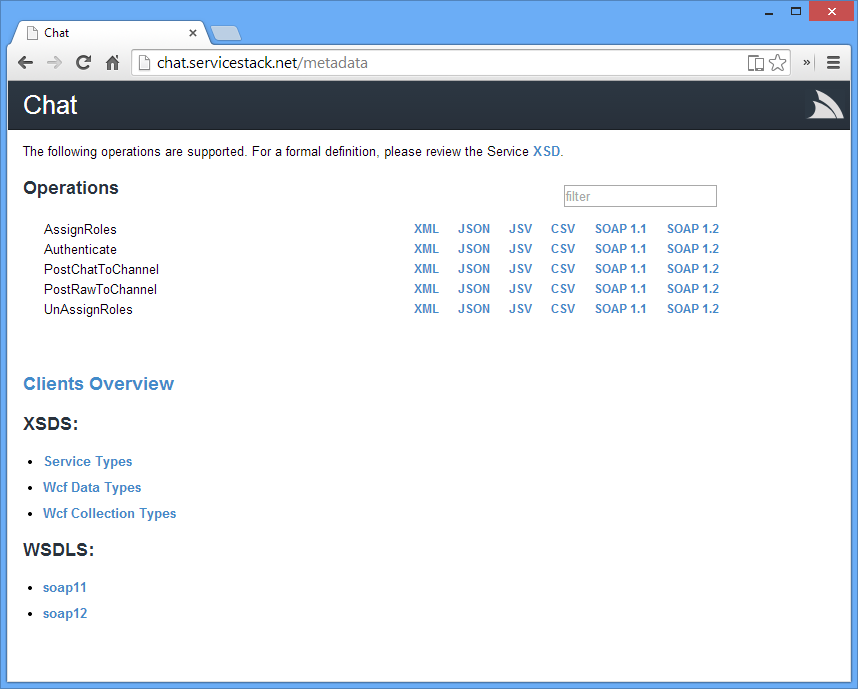
If everything is configured correctly you can go to `http:///metadata` to see a list of your web services and the various end points its available on.
::: info Tip
In the screenshot the root path is `http://localhost/ServiceStack.Hello/servicestack`. On your development box the root path might be something like `http://localhost:60335` (ie the URL on which your webservice is hosted).
:::
Let's access the HelloWorld service you created in your browser, so write the following URL in your address bar:
```
GET http:///hello/YourName
```
> E.g. http://example.org/hello/Max
As you can see after clicking on this link, ServiceStack also contains a HTML response format, which makes the XML/Json (...) output human-readable. To change the return format to Json, simply add `?format=json` to the end of the URL. You'll learn more about formats, endpoints (URLs, etc) when you continue reading the documentation.
## Troubleshooting
If you happen to generate requests from the wsdls with a tool like soapUI you may end up with an incorrectly generated request like this:
```xml
```
You can resolve this issue by adding the following line to your AssemblyInfo file
```csharp
[assembly: ContractNamespace("http://schemas.servicestack.net/types",
ClrNamespace = "")]
```
Rebuild and regenerate the request from the updated wsdl. You should get a correct request this time.
```xml
?
```
## Explore ServiceStack Documented Demo
The [EmailContacts solution](https://github.com/ServiceStackApps/EmailContacts/) is a new guidance available that walks through the recommended setup and physical layout structure of typical medium-sized ServiceStack projects, including complete documentation of how to create the solution from scratch, whilst explaining all the ServiceStack features it makes use of along the way.
# Community Resources
- [Creating A Simple Service Using ServiceStack](http://shashijeevan.net/2015/09/20/creating-a-simple-service-using-servicestack/) by [Shashi Jeevan](http://shashijeevan.net/author/shashijeevan/)
- [Introducing ServiceStack](http://www.dotnetcurry.com/showarticle.aspx?ID=1056) by [@dotnetcurry](https://twitter.com/DotNetCurry)
- [Create web services in .NET in a snap with ServiceStack](http://www.techrepublic.com/article/create-web-services-in-net-in-a-snap-with-servicestack/) by [@techrepublic](https://twitter.com/techrepublic)
- [How to build web services in MS.Net using ServiceStack](http://kborra.wordpress.com/2014/07/29/how-to-build-web-services-in-ms-net-using-service-stack/) by [@kishoreborra](http://kborra.wordpress.com/about/)
- [Getting started with ServiceStack – Creating a service](http://dilanperera.wordpress.com/2014/02/22/getting-started-with-servicestack-creating-a-service/)
- [Fantastic Step-by-step walk-thru into ServiceStack with Screenshots!](http://nilsnaegele.com/codeedge/servicestack.html) by [@nilsnagele](https://twitter.com/nilsnagele)
- [Your first REST service with ServiceStack](http://tech.pro/tutorial/1148/your-first-rest-service-with-servicestack) by [@cyberzeddk](https://twitter.com/cyberzeddk)
- [New course: Using ServiceStack to Build APIs](http://blog.pluralsight.com/2012/11/29/new-course-using-servicestack-to-build-apis/) by [@pluralsight](http://twitter.com/pluralsight)
- [ServiceStack the way I like it](http://tonyonsoftware.blogspot.co.uk/2012/09/lessons-learned-whilst-using.html) by [@tonydenyer](https://twitter.com/tonydenyer)
- [Generating a RESTful Api and UI from a database with LLBLGen](http://www.mattjcowan.com/funcoding/2013/03/10/rest-api-with-llblgen-and-servicestack/) by [@mattjcowan](https://twitter.com/mattjcowan)
- [ServiceStack: Reusing DTOs](http://korneliuk.blogspot.com/2012/08/servicestack-reusing-dtos.html) by [@korneliuk](https://twitter.com/korneliuk)
- [ServiceStack, Rest Service and EasyHttp](http://blogs.lessthandot.com/index.php/WebDev/ServerProgramming/servicestack-restservice-and-easyhttp) by [@chrissie1](https://twitter.com/chrissie1)
- [Building a Web API in SharePoint 2010 with ServiceStack](http://www.mattjcowan.com/funcoding/2012/05/04/building-a-web-api-in-sharepoint-2010-with-servicestack)
- [JQueryMobile and ServiceStack: EventsManager tutorial part #3](http://paymentnetworks.wordpress.com/2012/04/24/jquerymobile-and-service-stack-eventsmanager-tutorial-post-3/) by Kyle Hodgson
- [REST Raiding. ServiceStack](http://dgondotnet.blogspot.de/2012/04/rest-raiding-servicestack.html) by [Daniel Gonzalez](http://www.blogger.com/profile/13468563783321963413)
- [JQueryMobile and ServiceStack: EventsManager tutorial](http://kylehodgson.com/2012/04/21/jquerymobile-and-service-stack-eventsmanager-tutorial-post-2/) / [Part 3](http://kylehodgson.com/2012/04/23/jquerymobile-and-service-stack-eventsmanager-tutorial-post-3/) by Kyle Hodgson
- [Like WCF: Only cleaner!](http://kylehodgson.com/2012/04/18/like-wcf-only-cleaner-9/) by Kyle Hodgson
- [ServiceStack vs WCF Data Services](http://codealoc.wordpress.com/2012/03/24/service-stack-vs-wcf-data-services/)
- [Building a Tridion WebService with jQuery and ServiceStack](http://www.curlette.com/?p=161) by [@robrtc](https://twitter.com/robrtc)
- [Anonymous type + Dynamic + ServiceStack == Consuming cloud has never been easier](http://www.ienablemuch.com/2012/05/anonymous-type-dynamic-servicestack.html) by [@ienablemuch](https://twitter.com/ienablemuch)
- [Handful of examples of using ServiceStack based on the ServiceStack.Hello Tutorial](https://github.com/jfoshee/TryServiceStack) by [@82unpluggd](https://twitter.com/82unpluggd)