---
slug: csharp-add-servicestack-reference
title: C# Add ServiceStack Reference
---
[](https://github.com/ServiceStackApps/HelloMobile)
The primary and most popular [Add ServiceStack Reference](/add-servicestack-reference) language supported is C#, providing a flexible alternative than sharing your DTO assembly with clients, now clients can easily add a reference to a remote ServiceStack instance and update DTO's directly from within VS.NET. This also lays the groundwork and signals our approach on adding support for typed API's in other languages in future. Add a [feature request for your favorite language](https://servicestack.net/ideas) to prioritize support for it sooner!
Our goal with Native Types is to provide an alternative for sharing DTO dlls, that can enable a better dev workflow for external clients who are now able to generate (and update) Typed APIs for your Services from a remote url - reducing the burden and effort required to consume ServiceStack Services whilst benefiting from clients native language strong-typing feedback.
C# Xamarin.Android Example in VS.NET
## Add ServiceStack Reference
The easiest way to [Add a ServiceStack reference](/add-servicestack-reference) to your project is to right-click on your project to bring up [ServiceStackVS's](/templates/install-servicestackvs) `Add ServiceStack Reference` context-menu item. This opens a dialog where you can add the url of the ServiceStack instance you want to typed DTO's for, as well as the name of the DTO source file that's added to your project.
[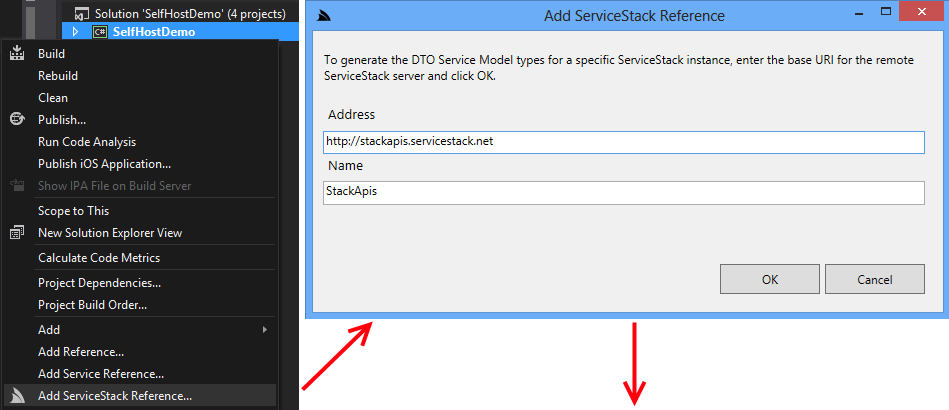](https://raw.githubusercontent.com/ServiceStack/Assets/master/img/apps/StackApis/add-service-ref-flow.png)
After clicking OK, the servers DTOs and [ServiceStack.Client](https://www.nuget.org/packages/ServiceStack.Client) NuGet package are added to the project, providing an instant typed API:
[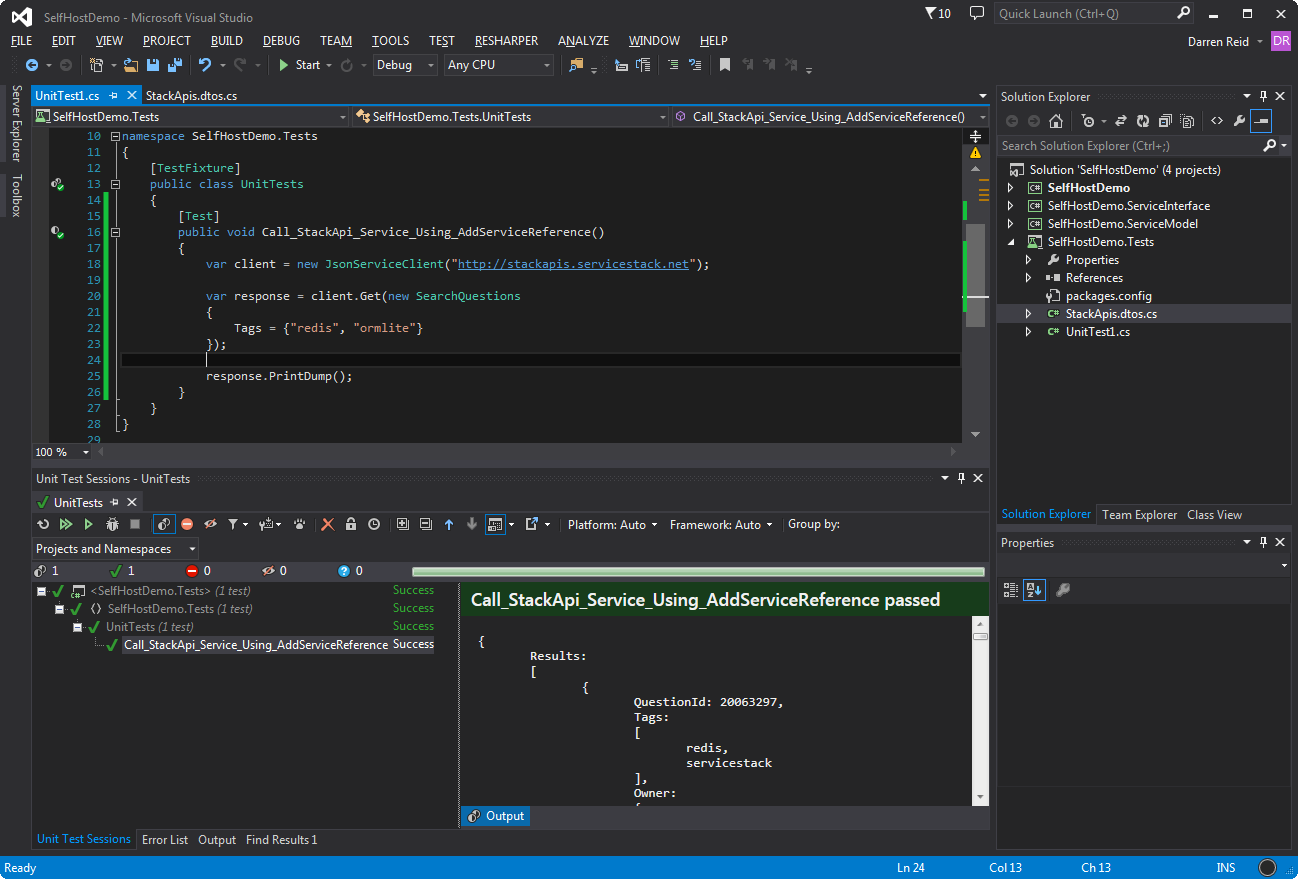](https://raw.githubusercontent.com/ServiceStack/Assets/master/img/apps/StackApis/call-service.png)
With the C# code generated on the Server, the role of [ServiceStackVS's](/create-your-first-webservice) **Add ServiceStack Reference** is then just to integrate the remote C# DTOs into the clients VS.NET project. This is just getting the generated DTOs from the server with default options set by the server and adding them locally to your project within Visual Studio.

## Update ServiceStack Reference
If your server has been updated and you want to update to client DTOs, simply right-click on the DTO file within VS.NET and select `Update ServiceStack Reference`.

## Consuming Services from Mobile Clients
Thanks to [ServiceStack.Client](https://www.nuget.org/packages/ServiceStack.Client) PCL Support, it can also be used from within supported client platforms. Here's a quick Android demo of adding a ServiceStack reference to [blazor-vue.web-templates.io](https://blazor-vue.web-templates.io) and consuming one of StackApi's Services:
[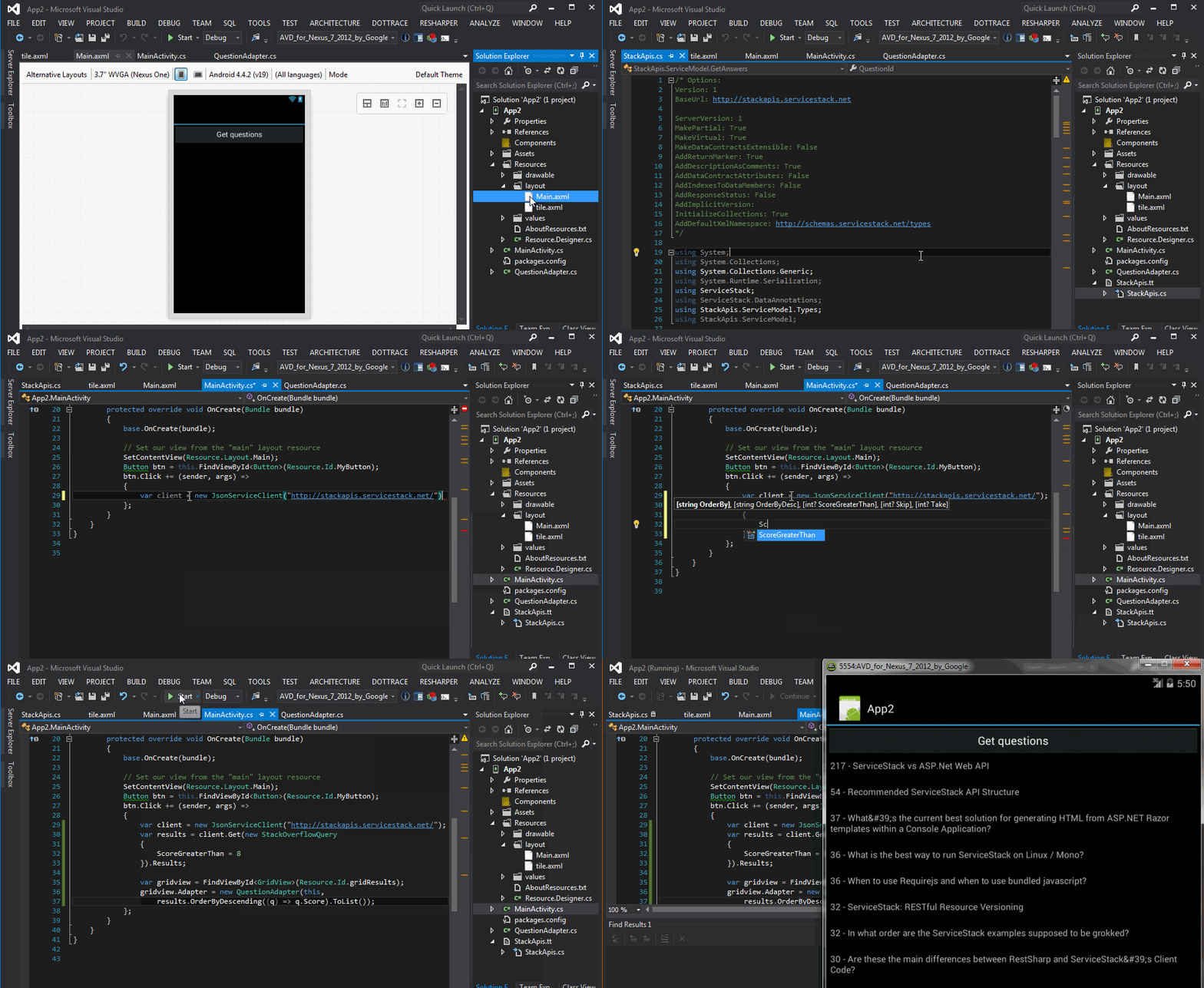](https://raw.githubusercontent.com/ServiceStack/ServiceStackVS/master/Images/android-add-ref-demo.gif)
## DTO Customization Options
The header comments in the generated DTOs allows for further customization of how they're generated where ServiceStackVS automatically watches for any file changes and updates the generated DTOs with any custom Options provided. Options that are preceded by a C# single line comment `//` are defaults from the server that can be overridden, e.g:
```csharp
/* Options:
Date: 2025-06-04 09:45:54
Version: 8.80
Tip: To override a DTO option, remove "//" prefix before updating
BaseUrl: https://blazor-vue.web-templates.io
//GlobalNamespace:
//MakePartial: True
//MakeVirtual: True
//MakeInternal: False
//MakeDataContractsExtensible: False
//AddNullableAnnotations: False
//AddReturnMarker: True
//AddDescriptionAsComments: True
//AddDataContractAttributes: False
//AddIndexesToDataMembers: False
//AddGeneratedCodeAttributes: False
//AddResponseStatus: False
//AddImplicitVersion:
//InitializeCollections: False
//ExportValueTypes: False
//IncludeTypes:
//ExcludeTypes:
//AddNamespaces:
//AddDefaultXmlNamespace: http://schemas.servicestack.net/types
*/
```
To override these options on the client, the `//` has to be removed. For example, if we did not want our classes to be partial by default for the C# client, our options would look like below:
```csharp
/* Options:
Date: 2025-06-04 09:46:15
Version: 8.80
Tip: To override a DTO option, remove "//" prefix before updating
BaseUrl: https://blazor-vue.web-templates.io
//GlobalNamespace:
MakePartial: False
//MakeVirtual: True
//MakeInternal: False
//MakeDataContractsExtensible: False
//AddNullableAnnotations: False
//AddReturnMarker: True
//AddDescriptionAsComments: True
//AddDataContractAttributes: False
//AddIndexesToDataMembers: False
//AddGeneratedCodeAttributes: False
//AddResponseStatus: False
//AddImplicitVersion:
//InitializeCollections: False
//ExportValueTypes: False
//IncludeTypes:
//ExcludeTypes:
//AddNamespaces:
//AddDefaultXmlNamespace: http://schemas.servicestack.net/types
*/
```
Options that do not start with a `//` are sent to the server to override any defaults set by the server.
### Change Default Server Configuration
The above defaults are also overridable on the ServiceStack Server by modifying the default config on the `NativeTypesFeature` Plugin, e.g:
```csharp
var nativeTypes = this.GetPlugin();
nativeTypes.MetadataTypesConfig.MakeVirtual = false;
...
```
### Customize DTO Type generation
Additional C# specific customization can be statically configured like `PreTypeFilter`, `InnerTypeFilter` & `PostTypeFilter` (available in all languages) can be used to inject custom code
in the generated DTOs output.
Use the `PreTypeFilter` to generate source code before and after a Type definition, e.g. this will append the `[Validate]` attribute on non enum & interface types:
```csharp
CSharpGenerator.PreTypeFilter = (sb, type) => {
if (!type.IsEnum.GetValueOrDefault() && !type.IsInterface.GetValueOrDefault())
{
sb.AppendLine("[Validate]");
}
};
```
The `InnerTypeFilter` gets invoked just after the Type Definition which can be used to generate common members for all Types and interfaces, e.g:
```csharp
CSharpGenerator.InnerTypeFilter = (sb, type) => {
sb.AppendLine("public string Id { get; } = Guid.NewGuid().ToString();");
};
```
There's also `PrePropertyFilter` & `PostPropertyFilter` for generating source before and after properties, e.g:
```csharp
CSharpGenerator.PrePropertyFilter = (sb , prop, type) => {
if (prop.Name == "Id")
{
sb.AppendLine("[PrimaryKey]");
}
};
```
### Emit custom code
To enable greater flexibility when generating complex Typed DTOs, you can use `[Emit{Language}]` attributes to generate code before each type or property.
These attributes can be used to generate different attributes or annotations to enable client validation for different validation libraries in different languages, e.g:
```csharp
[EmitCSharp("[Validate]")]
[EmitCode(Lang.CSharp | Lang.Swift | Lang.Dart, "// App User")]
public class User : IReturn
{
[EmitCSharp("[IsNotEmpty]","[IsEmail]")]
[EmitCode(Lang.Swift | Lang.Dart, new[]{ "@isNotEmpty()", "@isEmail()" })]
public string Email { get; set; }
}
```
Which will generate `[EmitCsharp]` code in C# DTOs:
```csharp
[Validate]
// App User
public partial class User
: IReturn
{
[IsNotEmpty]
[IsEmail]
public virtual string Email { get; set; }
}
```
Whilst the generic `[EmitCode]` attribute lets you emit the same code in multiple languages with the same syntax.
We'll go through and cover each of the above options to see how they affect the generated DTOs:
### GlobalNamespace
Specify which namespace the generated C# DTOs should use:
```csharp
namespace Acme
{
//...
}
```
### MakePartial
Adds the `partial` modifier to all types, letting you extend generated DTOs with your own class separate from the generated types:
```csharp
public partial class GetAnswers { ... }
```
### MakeVirtual
Adds the `virtual` modifier to all properties:
```csharp
public partial class GetAnswers {
...
public virtual int QuestionId { get; set; }
}
```
### MakeDataContractsExtensible
Add .NET's DataContract's [ExtensionDataObject](http://msdn.microsoft.com/en-us/library/system.runtime.serialization.extensiondataobject(v=vs.110).aspx) to all DTO's:
```csharp
public partial class GetAnswers
: IReturn, IExtensibleDataObject
{
...
public virtual ExtensionDataObject ExtensionData { get; set; }
}
```
### AddNullableAnnotations
Generate DTOs with nullable reference types, e.g:
```csharp
public class Data
{
public int Value { get; set; }
public int? OptionalValue { get; set; }
public string Text { get; set; }
public string? OptionalText { get; set; }
public List Texts { get; set; }
public List? OptionalTexts { get; set; }
}
```
Will generate DTOs, preserving properties with nullable reference type annotations:
```csharp
public class Data
{
public virtual int Value { get; set; }
public virtual int? OptionalValue { get; set; }
public virtual string Text { get; set; }
public virtual string? OptionalText { get; set; }
public virtual List Texts { get; set; } = [];
public virtual List? OptionalTexts { get; set; }
}
```
Optionally if your DTOs do not have nullable reference annotations enabled but you would still like to generate DTOs with them included, you can mark properties as required with the `[Required]` attribute, e.g:
```csharp
public class Data
{
[Required]
public string? Text { get; set; }
[Required]
public List? Texts { get; set; }
}
```
Where it will generate otherwise optional properties as non-nullable reference types:
```csharp
public class Data
{
[Required]
public virtual string Text { get; set; }
[Required]
public virtual List Texts { get; set; } = [];
}
```
### AddReturnMarker
When true, annotates Request DTOs with an `IReturn` marker referencing the Response type ServiceStack infers your Service to return:
```csharp
public class GetAnswers
: IReturn { ... }
```
> Original DTO doesn't require a return marker as response type can be inferred from Services return type or when using the `%Response` DTO Naming convention
### AddDescriptionAsComments
Converts any textual Description in `[Description]` attributes as C# Doc comments which allows your API to add intellisense in client projects:
```csharp
///
///Get a list of Answers for a Question
///
public class GetAnswers { ... }
```
### AddDataContractAttributes
Decorates all DTO types with `[DataContract]` and properties with `[DataMember]` as well as adding default XML namespaces for all C# namespaces used:
```csharp
[assembly: ContractNamespace("http://schemas.servicestack.net/types",
ClrNamespace="StackApis.ServiceModel.Types")]
[assembly: ContractNamespace("http://schemas.servicestack.net/types",
ClrNamespace="StackApis.ServiceModel")]
...
[DataContract]
public partial class GetAnswers
{
[DataMember]
public virtual int QuestionId { get; set; }
}
```
### AddIndexesToDataMembers
Populates a `DataMember` Order index for all properties:
```csharp
[DataContract]
public partial class GetAnswers
{
[DataMember(Order=1)]
public virtual int QuestionId { get; set; }
}
```
> Requires AddDataContractAttributes=true
### AddGeneratedCodeAttributes
Emit `[GeneratedCode]` attribute on all generated Types:
```csharp
[GeneratedCode]
public partial class GetAnswers { ... }
```
### AddResponseStatus
Automatically add a `ResponseStatus` property on all Response DTOs, regardless if it wasn't already defined:
```csharp
public class GetAnswersResponse
{
...
public ResponseStatus ResponseStatus { get; set; }
}
```
### AddImplicitVersion
Usage:
```
/* Options:
AddImplicitVersion: 1
```
Lets you specify the Version number to be automatically populated in all Request DTOs sent from the client:
```csharp
public partial class GetAnswers
: IReturn
{
public virtual int Version { get; set; }
public GetAnswers()
{
Version = 1;
}
...
}
```
This lets you know what Version of the Service Contract that existing clients are using making it easy to implement ServiceStack's [recommended versioning strategy](http://stackoverflow.com/a/12413091/85785).
### InitializeCollections
Usage:
```
/* Options:
InitializeCollections: True
```
Lets you automatically initialize collections in Request DTOs:
```csharp
public class SearchQuestions
{
public SearchQuestions()
{
Tags = new List{};
}
public List Tags { get; set; }
...
}
```
Initialized collections lets you take advantage of C#'s collection initializers for a nicer client API:
```csharp
var response = client.Get(new SearchQuestions {
Tags = { "redis", "ormlite" }
});
```
### IncludeTypes
Is used as a Whitelist to specify only the types you would like to have code-generated:
```
/* Options:
IncludeTypes: GetTechnology,GetTechnologyResponse
```
Will only generate `GetTechnology` and `GetTechnologyResponse` DTO's:
```csharp
public class GetTechnology { ... }
public class GetTechnologyResponse { ... }
```
#### Include Generic Types
Use .NET's Type Name to include Generic Types, i.e. the Type name separated by the backtick followed by the number of generic arguments, e.g:
```
IncludeTypes: IReturn`1,MyPair`2
```
#### Include Request DTO and its dependent types
You can include a Request DTO and all its dependent types with a `.*` suffix on the Request DTO, e.g:
```
/* Options:
IncludeTypes: GetTechnology.*
```
Which will include the `GetTechnology` Request DTO, the `GetTechnologyResponse` Response DTO and all Types that they both reference.
#### Include All Types within a C# namespace
If your DTOs are grouped into different namespaces they can be all included using the `/*` suffix, e.g:
```
/* Options:
IncludeTypes: MyApp.ServiceModel.Admin/*
```
This will include all DTOs within the `MyApp.ServiceModel.Admin` C# namespace.
#### Include All Services in a Tag Group
Services [grouped by Tag](/api-design#group-services-by-tag) can be used in the `IncludeTypes` where tags can be specified using braces in the format `{tag}` or `{tag1,tag2,tag3}`, e.g:
```
/* Options:
IncludeTypes: {web,mobile}
```
Or individually:
```
/* Options:
IncludeTypes: {web},{mobile}
```
### ExcludeTypes
Is used as a Blacklist to specify which types you would like excluded from being generated:
```
/* Options:
ExcludeTypes: GetTechnology,GetTechnologyResponse
```
Will exclude `GetTechnology` and `GetTechnologyResponse` DTOs from being generated.
### AddNamespaces
Include additional C# namespaces, e.g:
```
/* Options:
AddNamespaces: System.Drawing,MyApp
```
Where it will generate the specified namespaces in the generated Types:
```csharp
using System.Drawing;
using MyApp;
```
### AddDefaultXmlNamespace
This lets you change the default DataContract XML namespace used for all C# namespaces:
```csharp
[assembly: ContractNamespace("http://my.types.net",
ClrNamespace="StackApis.ServiceModel.Types")]
[assembly: ContractNamespace("http://my.types.net",
ClrNamespace="StackApis.ServiceModel")]
```
> Requires AddDataContractAttributes=true