---
slug: csharp-server-events-client
title: C# Server Events Client
---
Like ServiceStack's other [C# Service Clients](/csharp-client), the new `ServerEventsClient` is a [portable library](https://github.com/ServiceStackApps/HelloMobile) contained in the `ServiceStack.Client` NuGet package:
:::copy
``
:::
And like the Service Clients it requires the `BaseUri` of your ServiceStack instance as well as an optional `channel` for the client to subscribe to:
```csharp
var client = new ServerEventsClient(
"http://chat.netcore.io", channels:"home");
```
### Managed Connection
The **C# ServerEvent Client** is a managed .NET client with feature parity with the [ServiceStack's JavaScript client](https://github.com/ServiceStackApps/Chat#client-bindings---ss-utilsjs) that **auto-reconnects** when a connection is lost, **sends periodic heartbeats** to maintain an active subscription as well as **auto-unregistering** once the client stops listening for messages, or gets disposed.
### Handling Server Events
Unlike other C# clients, the ServerEvents Client is mainly reactive in that it's primarily waiting for Server Events to be initiated from a remote server instead of the typical scenario in which requests are initiated by clients. To maximize utility, there are a number of different API's to receive and process messages:
### Assigning Callback Handlers
One way to receive messages (useful in long-running clients) is to assign handlers for each of the different events that are fired. This example shows how to capture all the different events a Client can receive:
```csharp
ServerEventConnect connectMsg = null;
var msgs = new List();
var commands = new List();
var errors = new List();
var client = new ServerEventsClient(baseUri) {
OnConnect = e => connectMsg = e,
OnCommand = commands.Add,
OnMessage = msgs.Add,
OnException = errors.Add,
}.Start();
```
Once the Client is configured, calling `Start()` will start listening for messages and calling `Stop()` or `Dispose()` will cancel the background HTTP connection and stop it listening for server events.
### Customizing Metadata sent to clients
As ServerEvents have deep integration with the rest of ServiceStack we're able to offer [Typed Messages](https://github.com/ServiceStack/ServiceStack/blob/71b51d231d1ddb2ba7da39613e216ab75fd181c0/src/ServiceStack.Client/ServerEventsClient.cs#L14-L44) containing the users `UserAuthId`, `DisplayName` and `ProfileUrl` of the users avatar when it's available. The typed messages also offer an extensible `Dictionary Meta` collection for maintaining custom metadata that can be sent to clients by appending to them in the ServerEventsFeature hooks, which can be defined when registering `ServerEventsFeature`:
```csharp
Plugins.Add(new ServerEventsFeature {
// private Connect args
OnConnect = (subscription,httpReq) => AppendTo(subscription.Meta),
// public Join/Leave args
OnCreated = (subscription,httpReq) => AppendTo(subscription.Meta),
})
```
Whilst distinct `OnJoin`, `OnLeave` `OnUpdate` and `OnReconnect` callbacks can be used to handle a specific event, e.g:
```csharp
var client = new ServerEventsClient(baseUrl, channel) {
OnJoin = msg => ...,
OnLeave = msg => ...,
OnUpdate = msg => ...,
OnReconnect = () => ...
};
```
### Using C# Async/Await friendly API's
Depending on your use-case, if you only want to use the ServerEvent Client for a short-time to listen for predictable responses (i.e. waiting for a Server callback on a pending request) you can alternatively use the Task-based API's letting you to participate in C# async/await workflows:
```csharp
var client = new ServerEventsClient(baseUri, channel="Home");
// Wait to receive onConnect event
ServerEventConnect connectMsg = await client.Connect();
// Wait to receive onJoin command event
ServerEventCommand joinMsg = await client.WaitForNextCommand();
// Hold a future task to get notified once a msg has been received
Task msgTask = client1.WaitForNextMessage();
// Send a Web Service Request using the built-in JsonServiceClient
client.ServiceClient.Post(new PostChatToChannel {
Channel = client.Channel, // The channel we're listening on
From = client.SubscriptionId, // Populated after Connect()
Message = "Hello, World!",
});
// Wait till we receive the chat Msg event we sent earlier
ServerEventMessage msg = await msgTask;
```
The above example showcases the **3 Task-based API's** available:
1. `Connect()` wait till receiving confirmation of a successful event subscription
2. `WaitForNextCommand()` wait for the next `onJoin` or `onLeave` subscription events
3. `WaitForNextMessage()` wait for the next message published to the channel
The `ServiceClient` property lets you access a `JsonServiceClient` that's pre-configured with the clients `BaseUri` so that is primed for Sending Web Service Requests with.
After the ServerEvent Client has connected, the `ConnectionInfo` property is populated with the typed `ServerEventConnect` response.
### Message Event Handlers
The above examples show generic API's for receiving any type of message, but just like in the JavaScript client, more fine-grained API's are available for handling specific message types.
The `Handlers` dictionary is akin to the JavaScript Client's [Global Event Handlers](https://github.com/ServiceStackApps/Chat#global-event-handlers) which specify lambda's to be executed when messages are sent with the `cmd.*` selector:
```csharp
client.Handlers["chat"] = (client, msg) => {
//Deserialize JSON string to typed DTO
var chatMsg = msg.Json.FromJson();
"Received '{0}' from '{1}'".Print(chatMsg.Message, chatMsg.FromName);
};
```
Roughly translates to the equivalent JavaScript below:
```javascript
$(source).handleServerEvents({
handlers: {
chat: function (msg, event) {
console.log("Received " + msg.message + " from " + msg.fromName);
}
}
});
```
Where both methods handle the `ChatMessage` sent with the `cmd.chat` selector.
### Named Receivers
Whilst handlers provide a light way to handle loose-typed messages, there's a more structured and typed option that works similar to ServiceStack's `IService` classes but are used to instead handle typed Server Event Messages.
To be able to handle messages with your own classes, get them to implement the `IReceiver` empty marker interface:
```csharp
public interface IReceiver
{
void NoSuchMethod(string selector, object message);
}
```
Whilst primarily a marker interface, `IReceiver` does include a `NoSuchMethod` API to be able to handle messages sent with a unknown selector **target** that doesn't match any defined method or property.
**Named Receivers** are equivalent to [Receivers](https://github.com/ServiceStackApps/Chat#receivers) in the JavaScript client which can be assigned to handle all messages sent to a receiver with the selector format:
```
{receiver}.{target}
```
A Named Receiver can be registered with the API below:
```csharp
client.RegisterNamedReceiver("test");
```
Which will forward all messages with a `test.*` selector to an instance of the `TestNamedReceiver` Type
```csharp
public class TestNamedReceiver : ServerEventReceiver
{
public void FooMethod(CustomType request) {} // void return type
public CustomType BarMethod(CustomType request)
{
return request; // works with any return type, which are ignored
}
public CustomType BazSetter { get; set; } // Auto populate properties
public override void NoSuchMethod(string selector, object message)
{
var msg = (ServerEventMessage)message;
var nonExistentMethodType = msg.Json.FromJson();
}
}
```
This is roughly equivalent to the following JavaScript code:
```javascript
$(source).handleServerEvents({
receivers: {
test: {
FooMethod: function (msg, event) { ... },
BarMethod: function (msg, event) { ... },
BazSetter: null,
}
}
});
```
> The [ServerEventReceiver](https://github.com/ServiceStack/ServiceStack/blob/68c7159037e7cf2a519d482b7dae524ca073da20/src/ServiceStack.Client/ServerEventsClient.Receiver.cs#L16-L28) is a convenient base class that in addition to implementing `IReceiver` interface, gets injected with the `Client` as well as additional context about the raw message available in `base.Request`.
#### Unknown Message Handling
One difference in the JavaScript client is that messages with **unknown** targets are assigned as properties on the `test` receiver, e.g `test.QuxTarget = {..}`.
### Sending messages to Named Receivers
Once registered, an instance of `TestNamedReceiver` will process messages sent with a `test.*` selector. The example below shows how to send a DTO to each of `TestNamedReceiver` defined methods and properties:
```csharp
public class MyEventServices : Service
{
public IServerEvents ServerEvents { get; set; }
public void Any(CustomType request)
{
ServerEvents.NotifyChannel("home", "test.FooMethod", request);
ServerEvents.NotifyChannel("home", "test.BarMethod", request);
ServerEvents.NotifyChannel("home", "test.BazSetter", request);
ServerEvents.NotifyChannel("home", "test.QuxTarget", request);
}
}
```
### Life-cycle of Receivers
Similar to **Services** in ServiceStack, each message is processed with an instance of the Receiver that's resolved from `ServerEventsClient.Resolver` which by default uses the [NewInstanceResolver](https://github.com/ServiceStack/ServiceStack/blob/ec0226b97227048c3bd7c24667a71e7af7e1ff31/src/ServiceStack.Client/ServerEventsClient.Receiver.cs#L30-L36) to execute messages using a new instance of the Receiver Type:
```csharp
public class NewInstanceResolver : IResolver
{
public T TryResolve()
{
return typeof(T).CreateInstance();
}
}
```
This can be changed to re-use the same instance by assigning a [SingletonInstanceResolver](https://github.com/ServiceStack/ServiceStack/blob/ec0226b97227048c3bd7c24667a71e7af7e1ff31/src/ServiceStack.Client/ServerEventsClient.Receiver.cs#L38-L46) instead:
```csharp
public class SingletonInstanceResolver : IResolver
{
ConcurrentDictionary Cache =
new ConcurrentDictionary();
public T TryResolve()
{
return (T)Cache.GetOrAdd(typeof(T),
type => type.CreateInstance());
}
}
client.Resolver = new SingletonInstanceResolver();
```
We can also have it resolve instances from your preferred IOC. Here's an example showing how to register all Receiver Types, auto-wire them with any custom dependencies, and instruct the client to resolve instances from our IOC:
```csharp
// Register all Receivers:
client.RegisterNamedReceiver("test");
...
// Register all dependencies used in a new Funq.Container:
var container = new Container();
container.RegisterAs();
// Go through an auto-wire all Registered Receiver Types with Funq:
container.RegisterAutoWiredTypes(client.ReceiverTypes);
// Change the client to resolve receivers from the new Funq Container:
client.Resolver = container;
```
We can assign `Funq.Container` directly as it already implements the [IResolver](https://github.com/ServiceStack/ServiceStack/blob/master/src/ServiceStack.Interfaces/Configuration/IResolver.cs) interface, whilst you can re-use the existing IOC **Container Adapters** to [enable support for other IOCs](/ioc#use-another-ioc-container).
### The Global Receiver
Whilst Named Receivers are used to handle messages sent to a specific namespaced selector, the client also supports registering a **Global Receiver** for handling messages sent with the special `cmd.*` selector.
#### Handling Messages with the Default Selector
All `IServerEvents` Notify API's inlcudes [overloads for sending messages without a selector](https://github.com/ServiceStack/ServiceStack/blob/master/src/ServiceStack/ServerEventsFeature.cs#L743-L771) that by convention will take the format `cmd.{TypeName}`.
These events can be handled with a Global Receiver **based on Message type**, e.g:
```csharp
public class GlobalReceiver : ServerEventReceiver
{
public SetterType AnyNamedProperty { get; set; }
public void AnyNamedMethod(CustomType request)
{
...
}
}
client.RegisterReceiver();
```
Which will be called when messages are sent without a selector, e.g:
```csharp
public class MyServices : Service
{
public IServerEvents ServerEvents { get; set; }
public void Any(Request request)
{
ServerEvents.NotifyChannel("home", new CustomType { ... });
ServerEvents.NotifyChannel("home", new SetterType { ... });
}
}
```
As Global Receivers handle other messages sent with the `cmd.*` selector and can be re-used as a named receiver, we can define a single class to handle all the different custom messages sent in [chat.netcore.io](http://chat.netcore.io) App, E.g:
```
cmd.chat Hi
cmd.announce This is your captain speaking...
cmd.toggle#channels
css.background-image url(https://servicestack.net/img/bg.jpg)
...
```
The above messages can all be handled with the Receiver below:
```csharp
public class JavaScriptReceiver : ServerEventReceiver
{
public void Chat(ChatMessage message) { ... }
public void Announce(string message) { ... }
public void Toggle(string message) { ... }
public void BackgroundImage(string cssRule) { ... }
}
client.RegisterReceiver();
client.RegisterNamedReceiver("css");
```
As seen above the **target** names are **case-insensitive** and `-` are collapsed to cater for JavaScript/CSS naming conventions.
## Event Triggers
Triggers enable a pub/sub event model where multiple listeners can subscribe and be notified of an event.
Registering an event handler can be done at anytime using the `addListener()` API, e.g:
```csharp
Action handler = msg => {
Console.WriteLine($"received event ${msg.Target} with arg: ${msg.Json}");
};
var client = new ServerEventsClient("/", channels)
.AddListener("customEvent", handler)
.Start();
//Register another listener to 'customEvent' event
client.AddListener("customEvent", msg => { ... });
```
The selector to trigger this custom event is:
```
trigger.customEvent arg
trigger.customEvent {json}
```
Which can be sent in ServiceStack with a simple or complex type argument, e.g:
```csharp
ServerEvents.NotifyChannel(channel, "trigger.customEvent", "arg");
ServerEvents.NotifyChannel(channel, "trigger.customEvent", new ChatMessage { ... });
```
#### Removing Listeners
Use `RemoveListener()` to stop listening for an event, e.g:
```csharp
//Remove first event listener
client.RemoveListener("customEvent", handler);
```
## Channel Subscriber APIs
The sync/async APIs below built into the C# `ServerEventsClient` will let you modify an active Server Events
subscription to join new or leave existing channels:
```csharp
client.UpdateSubscriber(new UpdateEventSubscriber {
SubscribeChannels = new[]{ "chan1", "chan2" },
UnsubscribeChannels = new[]{ "chan3", "chan4" },
});
client.SubscribeToChannels("chan1", "chan2");
client.UnsubscribeFromChannels("chan3", "chan4");
await client.SubscribeToChannelsAsync("chan1", "chan2");
await client.UnsubscribeFromChannelsAsync("chan3", "chan4");
```
### onUpdate Notification
As this modifies the active subscription it also publishes a new **onUpdate** notification to all channel
subscribers so they're able to maintain up-to-date info on each subscriber.
This can be handled together with **onJoin** and **onLeave** events using `OnCommand`:
```csharp
client.OnCommand = msg => ...; //= ServerEventJoin, ServerEventLeave or ServerEventUpdate
```
## Add Authentication support to .NET ServerEvents Client
The explicit `Authenticate` and `AuthenticateAsync` API's can be used to authenticate the ServerEvents ServiceClient which **shares cookies** with the WebRequest that connects to the `/event-stream` so authenticating with the Server Events ServiceClient will also authenticate the `/event-stream` HTTP Connection:
```csharp
client.Authenticate(new Authenticate {
provider = CredentialsAuthProvider.Name,
UserName = "user",
Password = "pass",
RememberMe = true,
});
client.Start();
```
This is equivalent to:
```csharp
client.ServiceClient.Post(new Authenticate {
provider = CredentialsAuthProvider.Name,
UserName = "user",
Password = "pass",
RememberMe = true,
});
```
## Custom Authentication
When using a [JWT](/auth/jwt-authprovider) or [API Key](/auth/api-key-authprovider) AuthProvider you can [send it inside a Cookie](/auth/jwt-authprovider#sending-jwt-using-cookies) so it gets sent with client Web Requests. Otherwise you can add the JWT Token or API Key using the `EventStreamRequestFilter` which gets executed before establishing the Server Events connection, e.g:
```csharp
new ServerEventsClient(...) {
EventStreamRequestFilter = req => req.AddBearerToken(jwt)
}
```
Alternatively you can use `ResolveStreamUrl` which will let you modify the URL used to establish the Server Events connection which will also allow you to add the JWT Token to the QueryString as, e.g:
```csharp
var sseClient = new ServerEventsClient(baseUrl, channels)
{
ResolveStreamUrl = url => url.AddQueryParam("ss-tok", JWT),
OnConnect = e => {
$"{e.IsAuthenticated}, {e.UserId}, {e.DisplayName}".Print();
}
}.Start();
```
This requires that your JWT AuthProvider to accept JWT Tokens via the QueryString which you can enable in ServiceStack's JWT AuthProvider with:
```csharp
new JwtAuthProvider {
AllowInQueryString = true
}
```
To configure API Key AuthProvider to accept API Key in Request Params like QueryString or FormData:
```csharp
new ApiKeyAuthProvider {
AllowInHttpParams = true
}
```
## Troubleshooting
The Server Events Client uses .NET's `HttpWebRequest` internally for its long-running SSE connection and periodic heartbeats where if you're also using
other .NET ServiceClients to make API requests back to the same server you'll quickly hit its default limit (2) on number of requests allowed for a single domain
which can be increased by changing [ServicePointManager.DefaultConnectionLimit](https://msdn.microsoft.com/en-us/library/system.net.servicepointmanager.defaultconnectionlimit(v=vs.110).aspx), e.g:
```csharp
ServicePointManager.DefaultConnectionLimit = maxNumOfConcurrentConnections;
```
# ServerEvent .NET Examples
## [Xamarin.Android Chat](https://github.com/ServiceStackApps/AndroidXamarinChat)
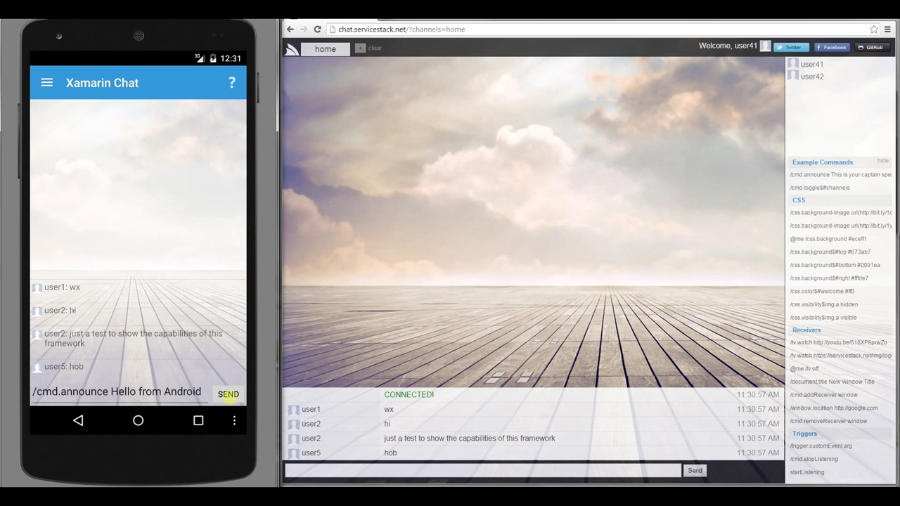
Xamarin.Android Chat utilizes the
[.NET PCL Server Events Client](/csharp-server-events-client)
to create an Android Chat App connecting to the existing
[chat.netcore.io](http://chat.netcore.io/) Server Events back-end where it's able to communicate
with existing Ajax clients and other connected Android Chat Apps.
[](https://www.youtube.com/watch?v=tImAm2LURu0)
> [YouTube Video](https://www.youtube.com/watch?v=tImAm2LURu0) and [AndroidXamarinChat Repo](https://github.com/ServiceStackApps/AndroidXamarinChat)