---
title: Kotlin Add ServiceStack Reference
---

## [Kotlin](https://kotlinlang.org/) - a better language for Android and the JVM
Whilst Java is the flagship language for the JVM, it's slow evolution, lack of modern features and distasteful
language additions have grown it into an cumbersome language to develop with, as illustrated in the
[C# 101 LINQ Examples in Java](https://github.com/mythz/java-linq-examples) where it's by far the worst of all
modern languages compared, making it a poor choice for a functional-style of programming that's especially painful
for Android development which is stuck on Java 7.
By contrast [Kotlin](https://kotlinlang.org/) ended up being one of the
[best modern languages for functional programming](https://github.com/mythz/kotlin-linq-examples) that's
vastly more expressive, readable, maintainable and safer than Java. As Kotlin is being developed by JetBrains
it also has great tooling support in **Android Studio**, **IntelliJ** and **Eclipse** and seamlessly integrates
with existing Java code where projects can mix-and-match Java and Kotlin code together within the same application -
making Kotlin a very attractive and easy choice for Android Development.
As we expect more Android and Java projects to be written in Kotlin in future we've added first-class
[Add ServiceStack Reference](/add-servicestack-reference)
support for Kotlin with IDE integration in
[Android Studio](http://developer.android.com/tools/studio/index.html) and
[IntelliJ IDEA](https://www.jetbrains.com/idea/) where App Devlopers can create and update an end-to-end typed
API with just a Menu Item click - enabling a highly-productive workflow for consuming ServiceStack Services.
## Kotlin Android Example using Android Studio
### Kotlin Android Resources
To help getting started with Kotlin, we'll maintain links to useful resources helping to develop Android Apps
with Kotlin below:
- [Getting started with Android and Kotlin](https://kotlinlang.org/docs/tutorials/kotlin-android.html) _(kotlinlang.org)_
- [Kotlin for Android Developers](http://www.javaadvent.com/2015/12/kotlin-android.html) _(javaadvent.com)_
- [Android Development with Kotlin - Jake Wharton](https://www.youtube.com/watch?v=A2LukgT2mKc&feature=youtu.be) _(youtube.com)_
## Installing Kotlin
Kotlin support is enabled in Android Studio by installing the JetBrain's Kotlin plugin in project settings:
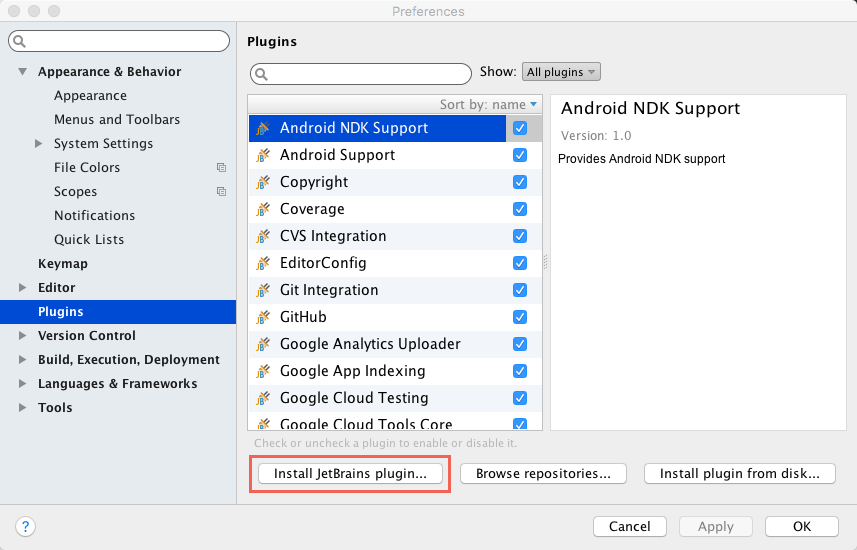
Then find and select the **Kotlin** plugin from the list and click **Install Plugin** button:
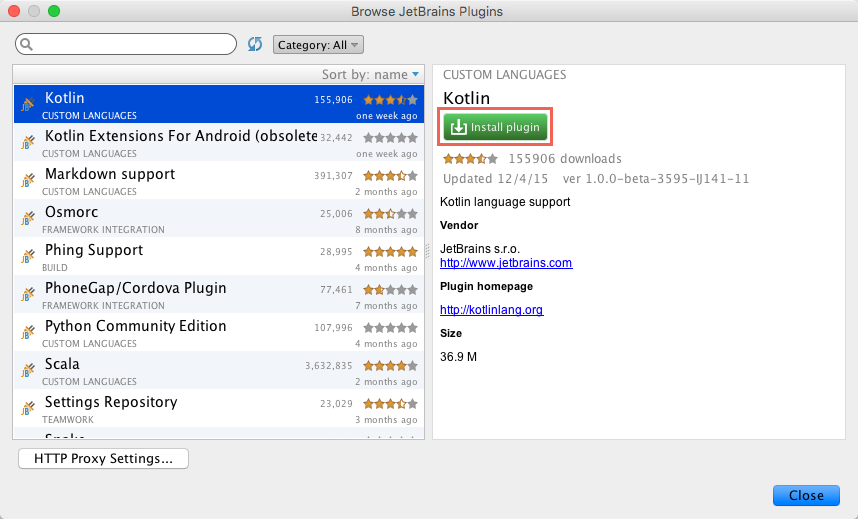
Subsequent Restarts of Android Studio will now load with the **Kotlin** plugin enabled.
### Configure Project to use Kotlin
After Kotlin is enabled in Android Studio you can configure which projects you want to have Kotlin support
by going to either `Tools -> Kotlin -> Configure Kotlin in Project` on the File Menu:
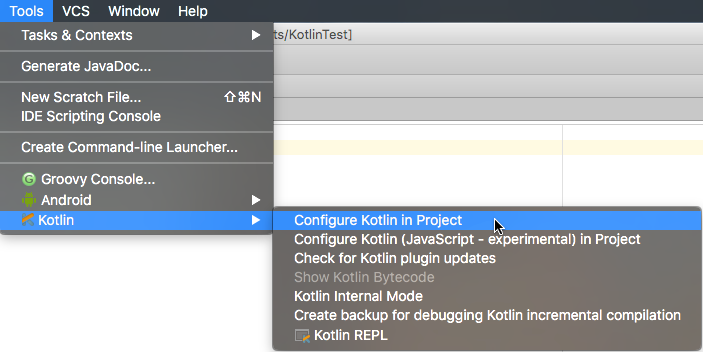
Or [alternatively you can launch it](https://kotlinlang.org/docs/tutorials/kotlin-android.html#configuring-kotlin-in-the-project)
using Android Studio's Quick **Find Action** with `Ctrl + Shift + A` and typing in `Configure K` to filter it
from the list.
Configuring a project to support Kotlin just modifies that projects
[build.gradle](https://github.com/mythz/kotlin-linq-examples/blob/master/src/app/build.gradle), applying the
necessary Android Kotlin plugin and build scripts needed to compile Kotlin files with your project. Once Kotlin
is configured with your project you'll get first-class IDE support for Kotlin `.kt` source files including
intell-sense, integrated compiler analysis and feedback, refactoring and debugging support, etc.
One convenient feature that's invaluable for porting Java code and learning Kotlin is the
[Converting Java to Kotlin](https://kotlinlang.org/docs/tutorials/kotlin-android.html#converting-java-code-to-kotlin)
Feature which can be triggered by selecting a `.java` class and clicking `Ctrl + Alt + Shift + K` keyboard short-cut
(or using [Find Action](https://kotlinlang.org/docs/tutorials/kotlin-android.html#converting-java-code-to-kotlin)).
## [ServiceStack IDEA Android Studio Plugin](https://plugins.jetbrains.com/plugin/7749?pr=androidstudio)
With Kotlin enabled on your project you can install **ServiceStack IDEA** plugin to provide
Add ServiceStack Reference functionality directly from within [Android Studio](https://developer.android.com/sdk/index.html).
#### Install ServiceStack IDEA from the Plugin repository
The ServiceStack IDEA is now available to install directly from within IntelliJ or Android Studio IDE Plugins Repository, to Install Go to:
1. `File -> Settings...` Main Menu Item
2. Select **Plugins** on left menu then click **Browse repositories...** at bottom
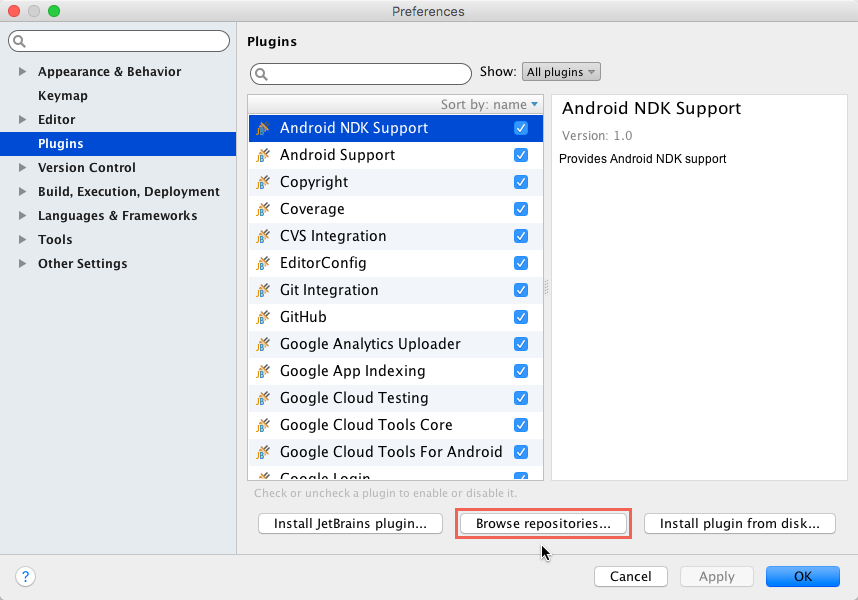
Search for **ServiceStack** and click **Install plugin**
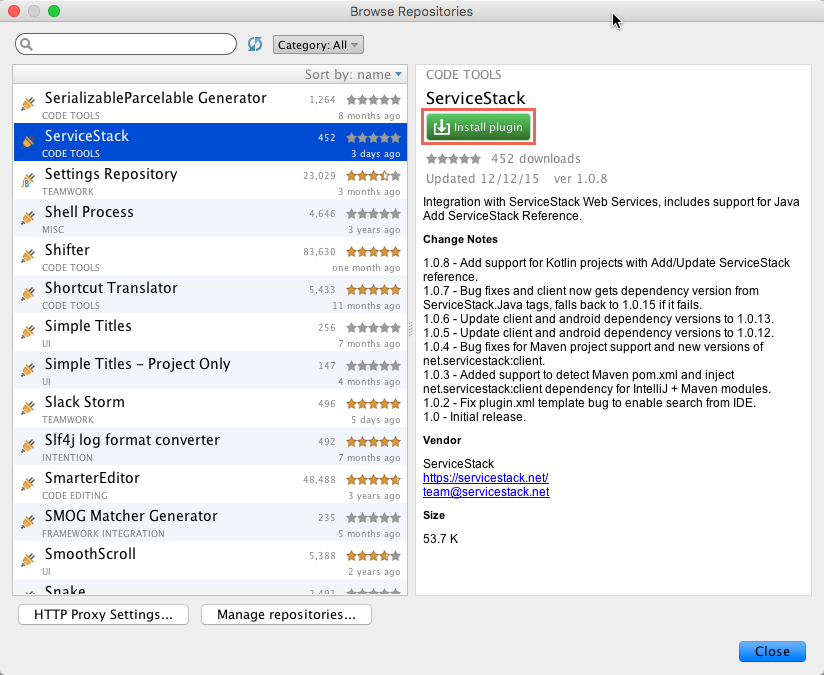
Restart to load the installed ServiceStack IDEA plugin
### [Download and Install ServiceStack IDEA Manually](/java-add-servicestack-reference#download-and-install-servicestack-idea-manually)
See docs on [Java Add ServiceStack Reference](/java-add-servicestack-reference#download-and-install-servicestack-idea-manually)
for instructions on other ways to install the ServiceStack IDEA plugin in Android Studio or IntelliJ.
### Manually adding client dependency to your Project
When using **Add ServiceStack Reference** feature the ServiceStack IDEA Plugin automatically adds a reference to
the **net.servicestack:android** dependency in your projects **build.gradle**, this can also manually add the
reference by adding the dependency below:
```
dependencies {
implementation fileTree(dir: 'libs', include: ['*.jar'])
implementation 'net.servicestack:android:1.1.0'
}
```
This also lets you to change which ServiceStack Client library version you want to use, the example above uses
**1.1.0**. The **net.servicestack:android** dependency contains the `AndroidServiceClient` and
`JavaServiceClient` that your projects use to call remote ServiceStack Services using the typed Kotlin DTO's
added to your project by the **Add ServiceStack Reference** feature.
### [Add ServiceStack Reference](/add-servicestack-reference)
If you've previously used
[Add ServiceStack Reference](/add-servicestack-reference)
in any of the supported IDE's before, you'll be instantly familiar with Add ServiceStack Reference in
Android Studio. The only additional field is **Package**, required in order to comply with Kotlin's class
definition rules.
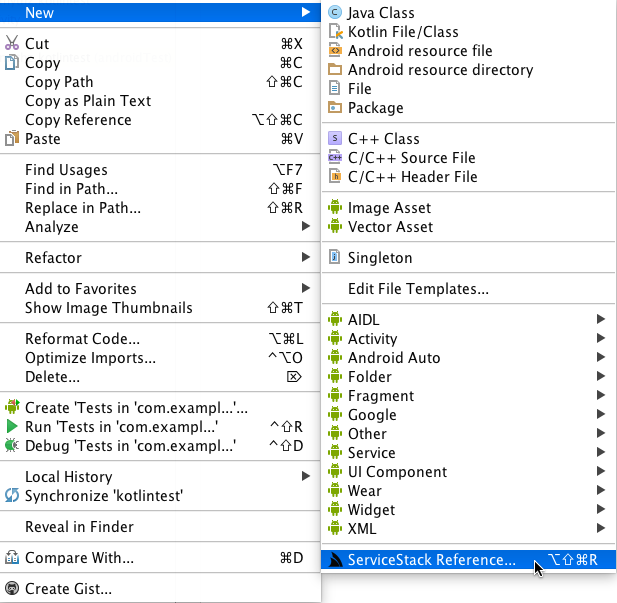
To add a ServiceStack Reference, right-click (or press `Ctrl+Alt+Shift+R`) on the **Package folder** in your
Java sources where you want to add the POJO DTO's. This will bring up the **New >** Items Context Menu where
you can click on the **ServiceStack Reference...** Menu Item to open the **Add ServiceStack Reference** Dialog:
The **Add ServiceStack Reference** Dialog will be partially populated with the selected **Package** with the
package where the Dialog was launched from and the **File Name** defaulting to `dtos.kt` where the generated
Kotlin DTO's will be added to. All that's missing is the url of the remote ServiceStack instance you wish to
generate the DTO's for, e.g: `https://techstacks.io`:
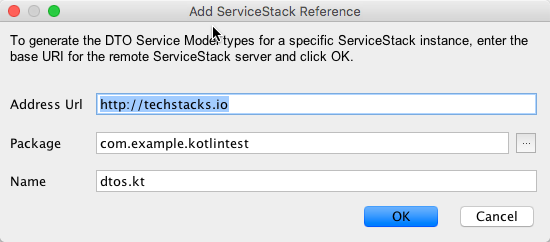
Clicking **OK** will add the `dtos.kt` file to your project and modifies the current Project's **build.gradle**
file dependencies list with the new **net.servicestack:android** dependency containing the JSON
ServiceClients which is used together with the remote Servers DTO's to enable its typed Web Services API. If
for some reason you wish to instead add Java DTO's to your project instead of Kotlin, just rename the `dtos.kt`
file extension to `dtos.java` and it will import Java classes instead.
::: info
As the Module's **build.gradle** file was modified you'll need to click on the **Sync Now** link in the top yellow banner to sync the **build.gradle** changes which will install or remove any modified dependencies
:::
### Update ServiceStack Reference
Like other Native Type languages, the generated DTO's can be further customized by modifying any of the options available in the header comments:
```
/* Options:
Date: 2025-06-04 09:53:03
Version: 8.80
Tip: To override a DTO option, remove "//" prefix before updating
BaseUrl: https://blazor-vue.web-templates.io
//Package:
//AddServiceStackTypes: True
//AddResponseStatus: False
//AddImplicitVersion:
//AddDescriptionAsComments: True
//IncludeTypes:
//ExcludeTypes:
//InitializeCollections: False
//TreatTypesAsStrings:
//DefaultImports: java.math.*,java.util.*,java.io.InputStream,net.servicestack.client.*,com.google.gson.annotations.*,com.google.gson.reflect.*
*/
...
```
For example the package name can be changed by uncommenting the **Package:** option with the new package name, then either right-click on the file to bring up the file context menu or use Android Studio's **Alt+Enter** keyboard shortcut then click on **Update ServiceStack Reference** to update the DTO's with any modified options:
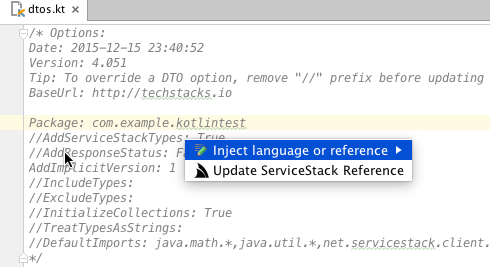
### Java Server Events Client
In addition to enabling end-to-end Typed APIs, Kotlin can also be used to handle real-time notifications
with the [Java Server Events Client](/java-server-events-client).
### JsonServiceClient API
The goal of Native Types is to provide a productive end-to-end typed API to facilitate consuming remote services
with minimal effort, friction and cognitive overhead. One way we achieve this is by promoting a consistent,
forwards and backwards-compatible message-based API that's works conceptually similar on every platform where
each language consumes remote services by sending **Typed DTO's** using a reusable **Generic Service Client**
and a consistent client library API. Thanks to its seamless integration with Java, Kotlin is able to re-use the
same Java Client Library used by
[Java Add ServiceStack Reference](/java-add-servicestack-reference).
To maximize knowledge sharing between different platforms, the Java ServiceClient API is modelled after the
[.NET Service Clients API](/csharp-client) closely, as allowed
within Java's language and idiomatic-style constraints.
Thanks to C#/.NET being heavily inspired by Java, the resulting Java `JsonServiceClient` ends up bearing a close
resemblance with .NET's Service Clients. The primary differences being due to language limitations like Java's
generic type erasure and lack of language features like property initializers making Java slightly more verbose
to work with, however as **Add ServiceStack Reference** is able to take advantage of code-gen we're able to
mitigate most of these limitations to retain a familiar developer UX.
The [ServiceClient.java](https://github.com/ServiceStack/ServiceStack.Java/blob/master/src/AndroidClient/client/src/main/java/net/servicestack/client/ServiceClient.java) interface provides a good overview on the API available on the concrete [JsonServiceClient](https://github.com/ServiceStack/ServiceStack.Java/blob/master/src/AndroidClient/client/src/main/java/net/servicestack/client/JsonServiceClient.java) class:
```java
public interface ServiceClient {
boolean getAlwaysSendBasicAuthHeaders();
void setBearerToken(String value);
String getBearerToken();
void setTokenCookie(String value);
void setRefreshToken(String bearerToken);
String getRefreshToken();
void setRefreshTokenCookie(String value);
void setAlwaysSendBasicAuthHeaders(boolean value);
void setCredentials(String userName, String password);
TResponse send(IReturn request);
void send(IReturnVoid request);
TResponse get(IReturn request);
void get(IReturnVoid request);
TResponse get(IReturn request, Map queryParams);
TResponse get(String path, Class responseType);
TResponse get(String path, Type responseType);
HttpURLConnection get(String path);
TResponse post(IReturn request);
void post(IReturnVoid request);
TResponse post(String path, Object request, Class responseType);
TResponse post(String path, Object request, Type responseType);
TResponse post(String path, byte[] requestBody, String contentType, Class responseType);
TResponse post(String path, byte[] requestBody, String contentType, Type responseType);
HttpURLConnection post(String path, byte[] requestBody, String contentType);
TResponse put(IReturn request);
void put(IReturnVoid request);
TResponse put(String path, Object request, Class responseType);
TResponse put(String path, Object request, Type responseType);
TResponse put(String path, byte[] requestBody, String contentType, Class responseType);
TResponse put(String path, byte[] requestBody, String contentType, Type responseType);
HttpURLConnection put(String path, byte[] requestBody, String contentType);
TResponse delete(IReturn request);
void delete(IReturnVoid request);
TResponse delete(IReturn request, Map queryParams);
TResponse delete(String path, Class responseType);
TResponse delete(String path, Type responseType);
HttpURLConnection delete(String path);
void setCookie(String name, String value);
void setCookie(String name, String value, Long expiresInSecs);
void clearCookies();
String getCookieValue(String name);
String getTokenCookie();
String getRefreshTokenCookie();
TResponse postFileWithRequest(IReturn request, UploadFile file);
TResponse postFileWithRequest(Object request, UploadFile file, Object responseType);
TResponse postFileWithRequest(String path, Object request, UploadFile file, Object responseType);
TResponse postFilesWithRequest(IReturn request, UploadFile[] files);
TResponse postFilesWithRequest(Object request, UploadFile[] files, Object responseType);
TResponse postFilesWithRequest(String path, Object request, UploadFile[] files, Object responseType);
}
```
The primary concession is due to JVM's generic type erasure which forces the addition overloads that include a
`Class` parameter for specifying the response type to deserialize into as well as a `Type` parameter overload
which does the same for generic types. These overloads aren't required for API's that accept a Request DTO
annotated with `IReturn` interface marker as we're able to encode the Response Type in code-generated
Request DTO classes.
### JsonServiceClient Usage
To get started you'll just need an instance of `JsonServiceClient` initialized with the **BaseUrl** of the
remote ServiceStack instance you want to access, e.g:
```kotlin
val client = JsonServiceClient("https://techstacks.io")
```
::: info
The JsonServiceClient is made available after the `net.servicestack:android` package is automatically added to your **build.gradle** when adding a ServiceStack reference
:::
Typical usage of the Service Client is the same in .NET where you just need to send a populated Request DTO
and the Service Client will return a populated Response DTO, e.g:
```kotlin
val response: AppOverviewResponse? = client.get(AppOverview())
val allTiers: ArrayList