Tube Scholar: paste a YouTube link, get a study guide you can learn from without watching the video
[![CI](https://img.shields.io/github/actions/workflow/status/Shalaby-VBS/tube-scholar/ci.yml?branch=main&style=flat-square&label=tests)](https://github.com/Shalaby-VBS/tube-scholar/actions/workflows/ci.yml) [![Release](https://img.shields.io/github/v/release/Shalaby-VBS/tube-scholar?style=flat-square&color=3DC1AF)](https://github.com/Shalaby-VBS/tube-scholar/releases) [![Claude Code plugin](https://img.shields.io/badge/Claude_Code-plugin-D97757?style=flat-square)](#install) [![License: MIT](https://img.shields.io/badge/license-MIT-3DC1AF?style=flat-square)](LICENSE) [![Python 3.9+](https://img.shields.io/badge/python-3.9%2B-3776AB?style=flat-square&logo=python&logoColor=white)](#requirements) [![yt-dlp](https://img.shields.io/badge/powered_by-yt--dlp-E0201B?style=flat-square&logo=youtube&logoColor=white)](https://github.com/yt-dlp/yt-dlp) [![Languages](https://img.shields.io/badge/guides-Arabic_%2B_English-13202A?style=flat-square)](#what-you-get) [![Sites](https://img.shields.io/badge/sources-YouTube_·_Udemy_·_Coursera_·_TED_·_Vimeo-13202A?style=flat-square)](#video-sites) Try the live demo **[What you get](#what-you-get)** · **[Tour](#a-tour-of-a-guide)** · **[Install](#install)** · **[How it works](#how-it-works)** · **[Accuracy](#how-it-stays-accurate)** · **[Concept visuals](#concept-visuals)** · **[Reference](#reference)** · **[FAQ](#faq)**

--- Tube Scholar is a [Claude Code](https://claude.com/claude-code) skill that turns a YouTube video, a whole playlist, or a lecture on Udemy, Coursera, TED, Vimeo or LinkedIn Learning into a complete, interactive study guide. It reads the entire transcript, writes an academic explanation of everything the speaker teaches in **Arabic and English**, has an independent agent fact-check every number and claim against the transcript, and publishes the result as a single page you can share. A 38-minute lecture becomes a 5-minute summary. A 3-hour course becomes nineteen sections you can skim, search, quiz yourself on and jump back into the video from, at the exact minute. A playlist becomes one long course page with every video's full guide. **[Open the live demo](https://shalaby-vbs.github.io/tube-scholar/demo/)**: the full guide for a 3-hour freeCodeCamp system-design course, built by this skill. Switch languages, search for "sharding", take the quiz, flip the flashcards.
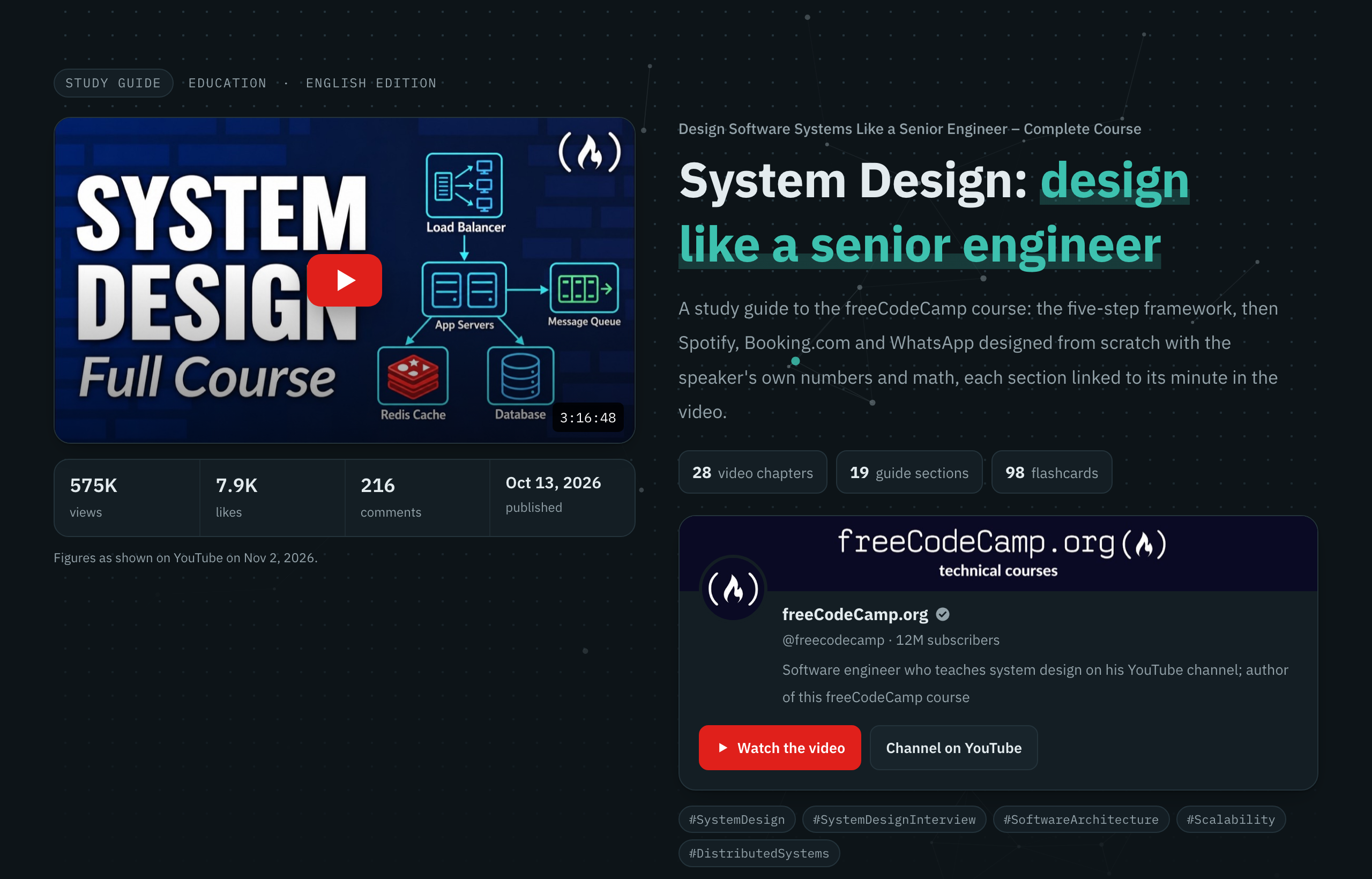
The top of a generated study guide: video, stats, channel card and title
## What you get
### ⚡ A fast path - A **5-minute summary**: 8 to 10 points, each linked to its section - A **decision table**: "in this situation, use what?" - **Quick mode** collapses every section to its key takeaways ### 📖 The full explanation - Section by section, faithful to the transcript - **Key takeaways** and **common mistakes** boxes in every section - Anything the guide adds is labelled as an **explainer's note** ### ⏱️ Timestamps you can trust - Every heading links to the minute the speaker starts that topic - Resolved from word-level caption timings, never typed by hand - Description chapters re-anchored when their times drift ### 🎯 Practice - **Scenario questions** with a live score, ordered easy to hard - Open questions with answers behind a button - **Flashcards with spaced repetition**: due cards first, remembered in your browser ### 🧭 Navigation - **Search** across headings, text and the glossary - **Glossary tooltips** on the first use of every term - Side menu grouped by level, with **per-section progress** ### 📦 Take-aways - **Arabic (RTL) and English (LTR)** editions on one page - **Anki decks** and an **A4 cheat-sheet PDF** per language - A **course page** for a whole playlist: every video's full guide on one page - Or a **hub page** linking one page per video, with progress across them
## A tour of a guide
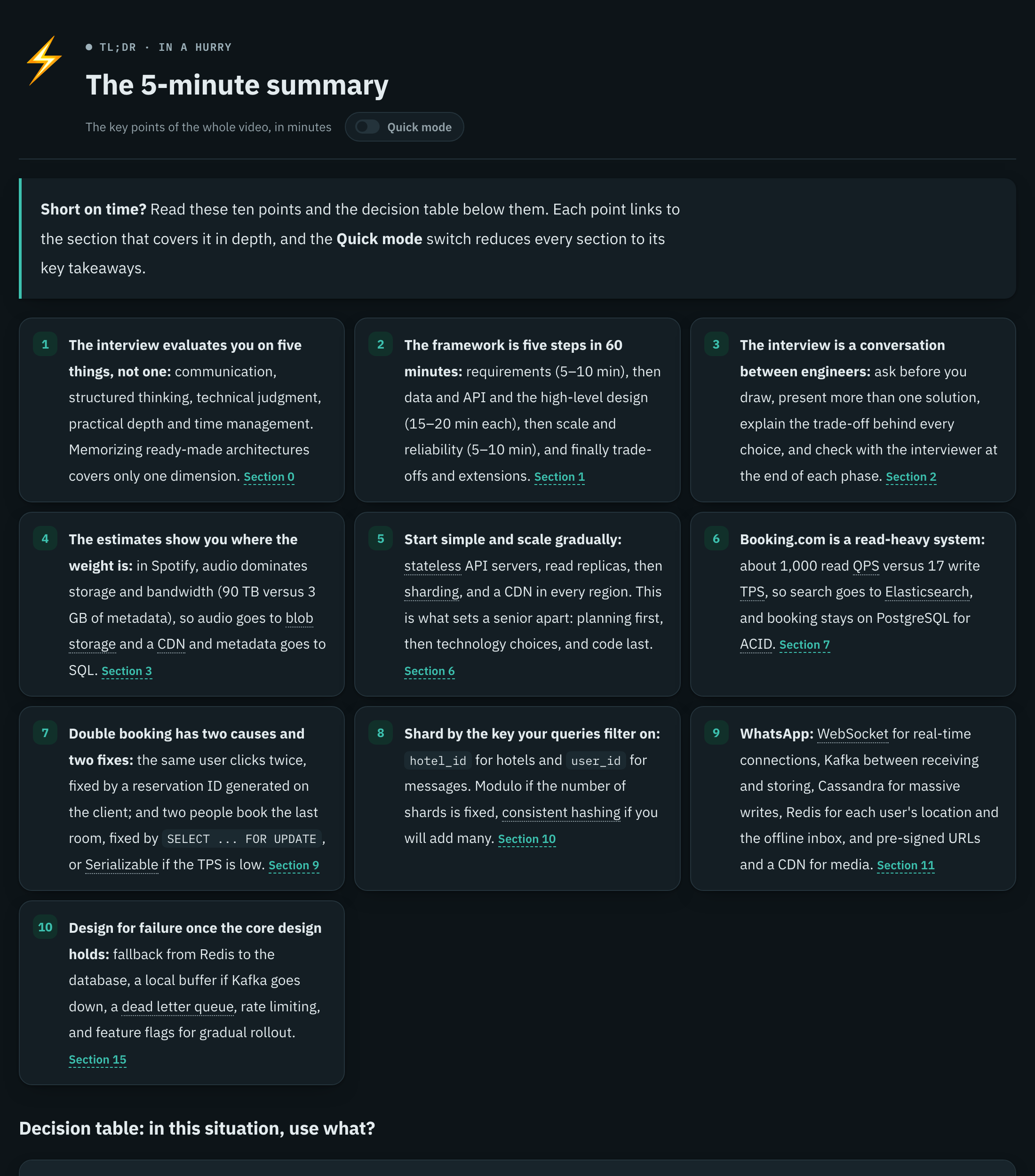
The 5-minute summary
The 5-minute summary. Ten linked points, glossary terms underlined, and the quick-mode switch.
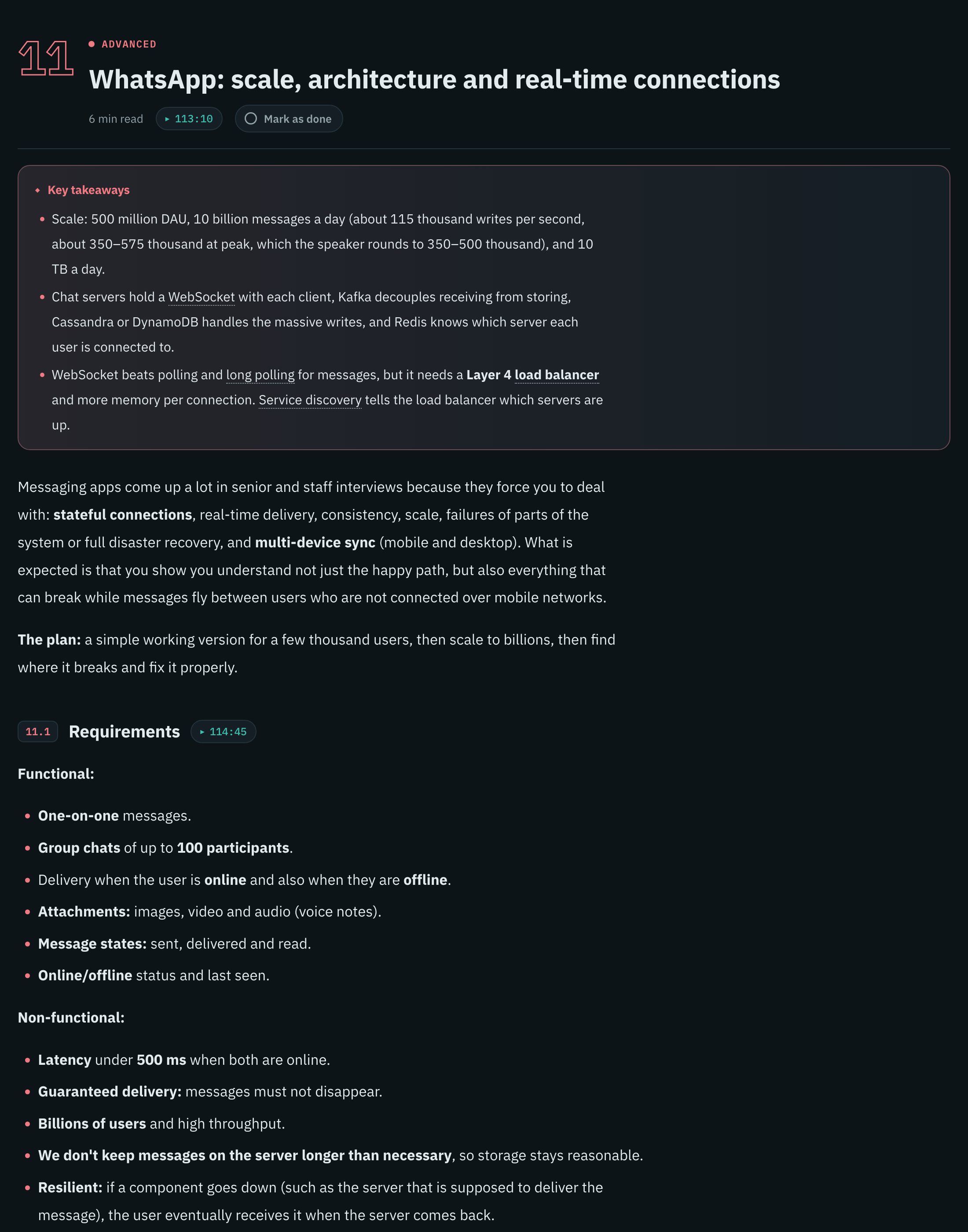
A guide section
A section. Level colour, reading time, a link to the minute in the video, and the key takeaways first.
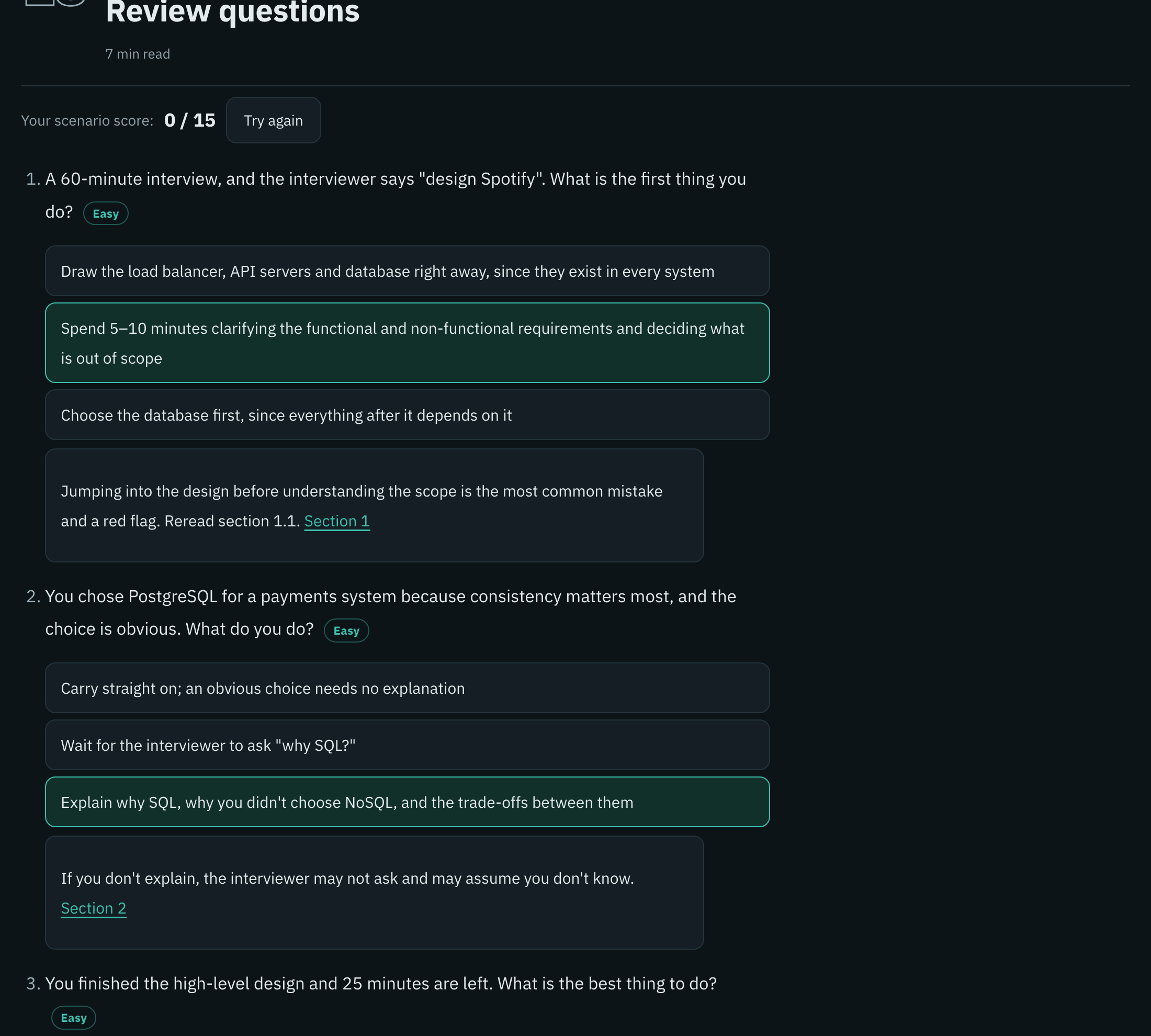
Scenario questions
Scenario questions. Pick an answer to see why, with a running score and difficulty levels.
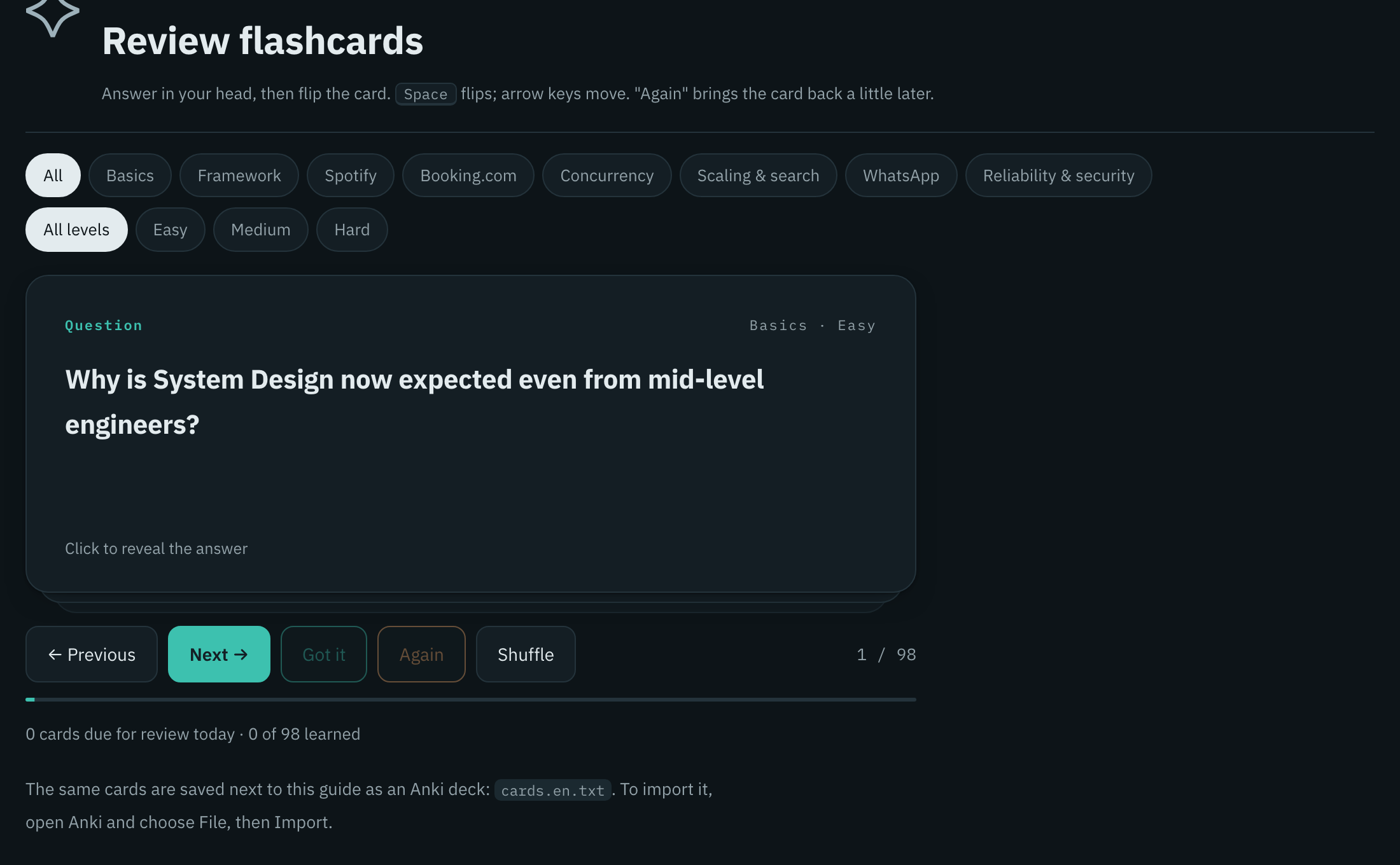
Flashcards
Flashcards. Filter by topic and level; "Got it" and "Again" drive the spaced-repetition schedule.
## Install **As a Claude Code plugin** (recommended, updates with `/plugin`): ```text /plugin marketplace add Shalaby-VBS/tube-scholar /plugin install tube-scholar@tube-scholar ``` **Or as a plain skill:** ```bash git clone https://github.com/Shalaby-VBS/tube-scholar.git cp -R tube-scholar/skills/tube-scholar ~/.claude/skills/ ``` Then install the one hard dependency: ```bash brew install yt-dlp # or: pipx install yt-dlp ``` ## Quick start Give Claude Code a link: ```text /tube-scholar https://www.youtube.com/watch?v=VIDEO_ID ``` That's it. Claude reads the video, writes both editions, fact-checks them, previews the page and publishes it, then replies with the link and a short report of what it added or corrected. A whole playlist, or a lecture on another site, works the same way: ```text /tube-scholar https://www.youtube.com/playlist?list=PLAYLIST_ID /tube-scholar https://www.udemy.com/course/COURSE/learn/lecture/LECTURE_ID /tube-scholar https://www.coursera.org/learn/COURSE/lecture/ID/TITLE ``` > [!TIP] > A bare video link always builds the full guide. Ask for "subtitles", "audio" or "download the video" when you want just the files. ## How it works ```mermaid flowchart LR A([Video or playlist link]) --> B[Subtitles and
clean transcript] B --> C[Metadata, thumbnail,
channel art, related videos] C --> D[Arabic guide written
from the transcript] D --> E[English translation,
line by line] E --> F[Timestamps resolved
from spoken words] F --> G[Independent
fact-check and fixes] G --> H[Build the page] H --> I{Preview
checks pass?} I -- no --> H I -- yes --> J([Publish + cheat-sheet PDF]) ``` | Mode | Triggered by | Output | |---|---|---| | **Study guide** *(default)* | a single video link, "explain", "study guide" | the interactive page, Anki decks, cheat-sheet PDFs, fact-check report | | **Subtitles** | "subtitles", "transcript", or a channel link | `.vtt` captions plus a clean `.txt` transcript | | **Audio** | "audio", "mp3" | MP3 at the best available quality | | **Video** | "download the video" | MP4 up to 1080p | | **Course page** | a playlist link, "course" | every video's full guide on one long page, with a course index | | **Course hub** | a playlist plus "a page per video" | one guide per video and a hub page linking them all | ### Video sites | Site | How the captions arrive | Minute links | |---|---|---| | YouTube | yt-dlp | jump to the minute | | Vimeo | yt-dlp, with `--cookies-from-browser` for most videos | jump to the minute | | TED, Khan Academy | yt-dlp | open the talk page | | Udemy, LinkedIn Learning, Pluralsight | yt-dlp with `--cookies-from-browser chrome` (you must be enrolled and signed in) | open the lecture page | | Coursera, DRM-protected Udemy courses | read from your signed-in Chrome by Claude, then `lecture_meta.py` | open the lecture page | Only the captions are used. Tube Scholar never downloads or unlocks DRM-protected video or audio. ## How it stays accurate A study guide is only useful if you can trust it. Every guide goes through four gates before it is published: | Gate | What it does | What it catches | |---|---|---| | **1. Transcript first** | The guide is planned around what the speaker actually teaches, with the description's chapters as the skeleton | Generic filler, topics the video never covers | | **2. Spoken-word timestamps** | Each heading carries a few words copied from the transcript; `resolve_ts.py` finds them in the word-timed captions | Links to the wrong minute, sections the speaker never said | | **3. Independent fact-check** | A separate agent audits every number, quoted claim, explainer's note, quiz answer and a sample of flashcards, then writes `audit.md` | Wrong arithmetic, misquotes, dropped caveats, unlabelled additions | | **4. Pre-publish preview** | Headless Chrome screenshots desktop, phone and every visual, checks for horizontal scroll and parses every Mermaid diagram | Broken layouts, clipped text, diagrams that would render empty | > [!NOTE] > On a 3-hour system-design course, the fact-check caught a wrong peak-load calculation, a link 2 minutes late and two claims the speaker never made. All of them were fixed before publishing. ## Concept visuals Ideas that have a shape get an animated, theme-aware component instead of a plain table. Each one is a fenced block in the guide's Markdown.
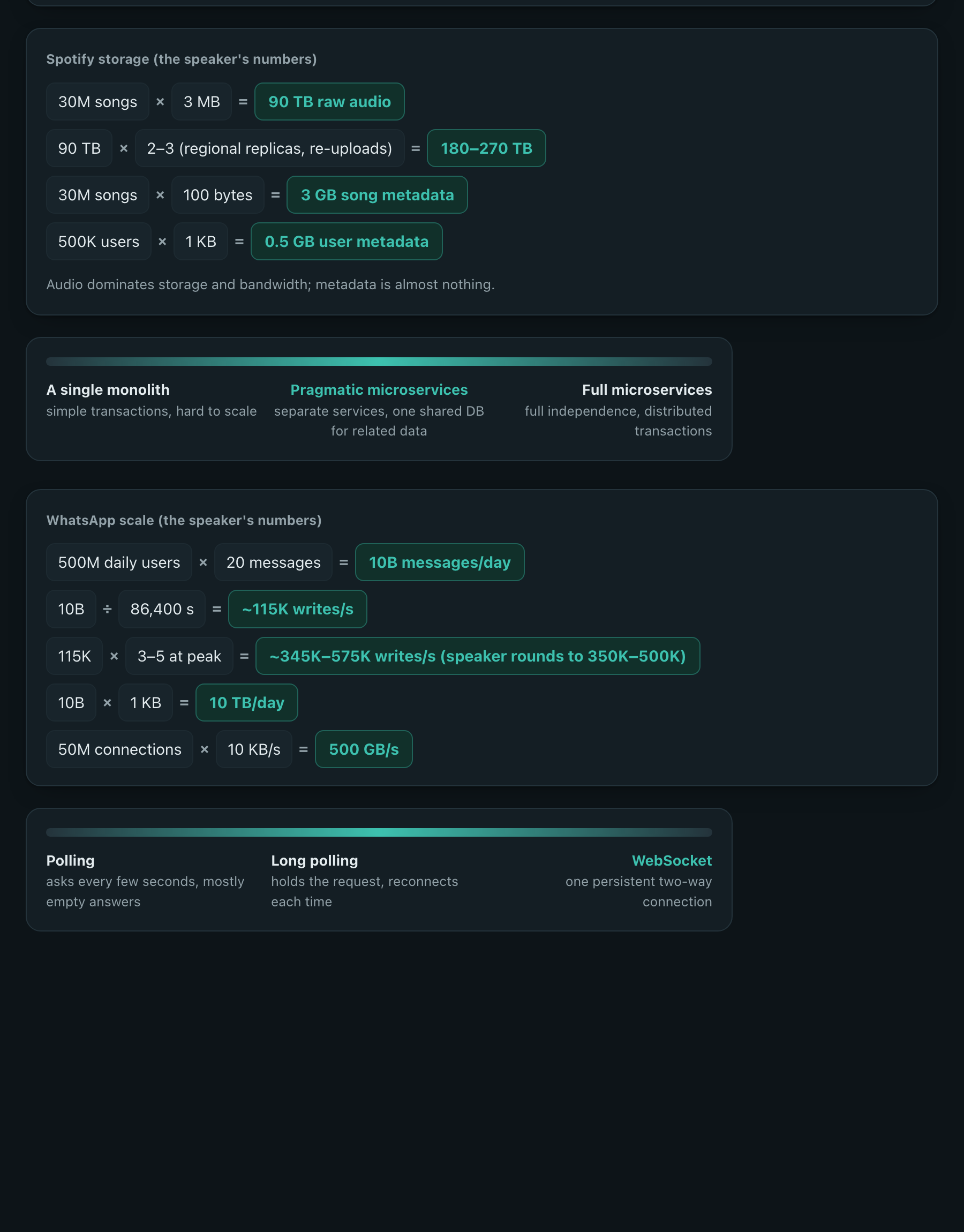
Timeline, calc and spectrum components
ComponentUse it forSyntax
loopcycles: an agent loop, a feedback loop, retries. A dot travels the cycle and lights each stage. ```text center: ReAct - Reason: think - Act: do - Observe: check exit: Final Answer: the answer ```
matrix2×2 trade-offs, with one cell highlighted ```text x: Low precision | High precision y: High complexity | Low complexity - *Smart start: example - Very hard: example - — - — ```
spectruma range of options, with the recommended one marked ```text - Polling: asks every few seconds - Long polling: holds the request - *WebSocket: one open connection ```
timelinesteps with a time budget, drawn to scale ```text total: 60 unit: min - Requirements: 5–10 - High-level design: 15 - Trade-offs: the rest ```
calcback-of-the-envelope maths, results highlighted ```text - 30M songs × 3 MB = 90 TB - 90 TB × 2–3 = 180–270 TB ```
Every component follows light and dark themes, flips correctly in right-to-left layouts, rises in on scroll and stands still when the reader prefers reduced motion. ## Reference ### Requirements | Tool | Needed for | Install | |---|---|---| | [Claude Code](https://claude.com/claude-code) | running the skill and publishing the page | [docs](https://docs.claude.com/en/docs/claude-code) | | [yt-dlp](https://github.com/yt-dlp/yt-dlp) | subtitles, metadata, thumbnails | `brew install yt-dlp` | | Python 3.9+ | every script | preinstalled on macOS | | [`markdown`](https://pypi.org/project/Markdown/) | the page builder | installed automatically into `~/.cache/tube-scholar/venv` | | Google Chrome | previews, the Mermaid check, cheat-sheet PDFs | [google.com/chrome](https://www.google.com/chrome/) | | ffmpeg | audio and video downloads only | `brew install ffmpeg` | ### Output Every video gets its own folder under `~/Downloads/tube-scholar/`: ```text