# 🏗️ CodeGraphContext (CGC)
**Turn code repositories into a queryable graph for AI agents.**
🌐 **Languages:**
- 🇬🇧 [English](README.md)
- 🇨🇳 [中文](README.zh-CN.md)
- 🇰🇷 [한국어](README.kor.md)
- 🇺🇦 [Українська](README.uk.md)
- 🇷🇺 [Русский](README.ru-RU.md)
- 🇯🇵 日本語 (Soon)
- 🇪🇸 Español (Soon)
🌍 **Help translate CodeGraphContext to your language by raising an issue & PR on https://github.com/Shashankss1205/CodeGraphContext/issues!**
Bridge the gap between deep code graphs and AI context.













A powerful **MCP server** and **CLI toolkit** that indexes local code into a graph database to provide context to AI assistants and developers. Use it as a standalone CLI for comprehensive code analysis or connect it to your favorite AI IDE via MCP for AI-powered code understanding.
---
## 📍 Quick Navigation
* [🚀 Quick Start](#quick-start)
* [🌐 Supported Programming Languages](#supported-programming-languages)
* [🛠️ CLI Toolkit](#for-cli-toolkit-mode)
* [🤖 MCP Server](#-for-mcp-server-mode)
* [🗄️ Database Options](#database-options)
---
## ✨ Experience CGC
### 👨🏻💻 Installation and CLI
> Install in seconds with pip and unlock a powerful CLI for code graph analysis.

### 🛠️ Indexing in Seconds
> The CLI intelligently parses your tree-sitter nodes to build the graph.

### 🤖 Powering your AI Assistant
> Use natural language to query complex call-chains via MCP.

---
## Project Details
- **Version:** 0.4.0
- **Authors:** Shashank Shekhar Singh
- **License:** MIT License (See [LICENSE](LICENSE) for details)
- **Website:** [CodeGraphContext](http://codegraphcontext.vercel.app/)
---
## 👨💻 Maintainer
**CodeGraphContext** is created and actively maintained by:
**Shashank Shekhar Singh**
- 📧 Email: [shashankshekharsingh1205@gmail.com](mailto:shashankshekharsingh1205@gmail.com)
- 🐙 GitHub: [@Shashankss1205](https://github.com/Shashankss1205)
- 🔗 LinkedIn: [Shashank Shekhar Singh](https://www.linkedin.com/in/shashank-shekhar-singh-a67282228/)
- 🌐 Website: [codegraphcontext.vercel.app](http://codegraphcontext.vercel.app/)
*Contributions and feedback are always welcome! Feel free to reach out for questions, suggestions, or collaboration opportunities.*
---
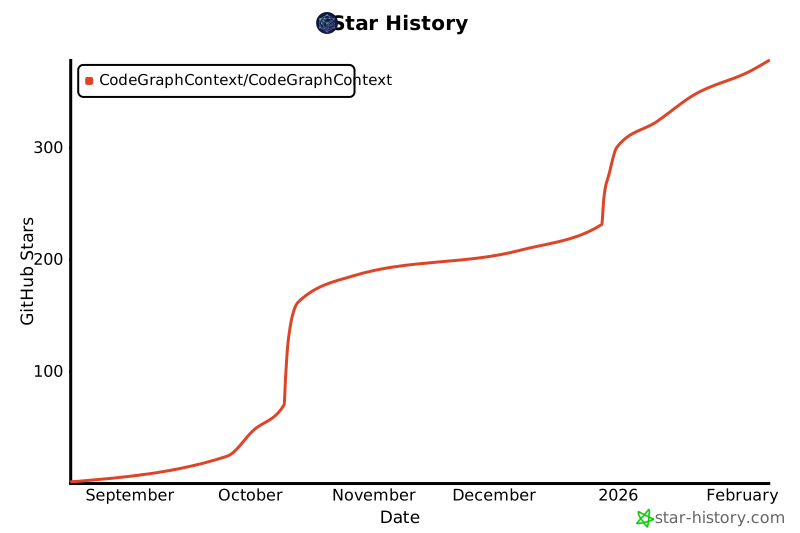
## Star History
[](https://www.star-history.com/#CodeGraphContext/CodeGraphContext&Date)
---
## Features
- **Code Indexing:** Analyzes code and builds a knowledge graph of its components.
- **Relationship Analysis:** Query for callers, callees, class hierarchies, call chains and more.
- **Pre-indexed Bundles:** Load famous repositories instantly with `.cgc` bundles - no indexing required! ([Learn more](docs/BUNDLES.md))
- **Live File Watching:** Watch directories for changes and automatically update the graph in real-time (`cgc watch`).
- **Interactive Setup:** A user-friendly command-line wizard for easy setup.
- **Dual Mode:** Works as a standalone **CLI toolkit** for developers and as an **MCP server** for AI agents.
- **Multi-Language Support:** Full support for 14 programming languages.
- **Flexible Database Backend:** KùzuDB (default on Windows), FalkorDB Lite (typical embedded default on Unix when installed), FalkorDB Remote, or Neo4j (all platforms via Docker/native).
---
## Supported Programming Languages
CodeGraphContext provides comprehensive parsing and analysis for the following languages:
| | Language | | Language | | Language |
| :--- | :--- | :--- | :--- | :--- | :--- |
| 🐍 | **Python** | 📜 | **JavaScript** | 🔷 | **TypeScript** |
| ☕ | **Java** | 🏗️ | **C / C++** | #️⃣ | **C#** |
| 🐹 | **Go** | 🦀 | **Rust** | 💎 | **Ruby** |
| 🐘 | **PHP** | 🍎 | **Swift** | 🎨 | **Kotlin** |
| 🎯 | **Dart** | 🐪 | **Perl** | | |
Each language parser extracts functions, classes, methods, parameters, inheritance relationships, function calls, and imports to build a comprehensive code graph.
---
## Database Options
CodeGraphContext supports multiple graph database backends to suit your environment:
| Feature | KùzuDB | FalkorDB Lite | Neo4j |
| :--- | :--- | :--- | :--- |
| **Typical default** | **Windows** (embedded, when `kuzu` is installed) | **Unix** (Python 3.12+, when `falkordblite` works) | When explicitly configured |
| **Setup** | Zero-config / Embedded | Zero-config / In-process | Docker / External |
| **Platform** | **All (Windows Native, macOS, Linux)** | Unix-only (Linux/macOS/WSL) | All Platforms |
| **Use Case** | Desktop, IDE, Local development | Specialized Unix development | Enterprise, Massive graphs |
| **Requirement**| `pip install kuzu` | `pip install falkordblite` | Neo4j Server / Docker |
| **Speed** | ⚡ Extremely Fast | ⚡ Fast | 🚀 Scalable |
| **Persistence**| Yes (to disk) | Yes (to disk) | Yes (to disk) |
---
## Used By
CodeGraphContext is already being explored by developers and projects for:
- **Static code analysis in AI assistants**
- **Graph-based visualization of projects**
- **Dead code and complexity detection**
_If you’re using CodeGraphContext in your project, feel free to open a PR and add it here! 🚀_
---
## Dependencies
- `neo4j>=5.15.0`
- `watchdog>=3.0.0`
- `stdlibs>=2023.11.18`
- `typer[all]>=0.9.0`
- `rich>=13.7.0`
- `inquirerpy>=0.3.7`
- `python-dotenv>=1.0.0`
- `tree-sitter>=0.21.0`
- `tree-sitter-language-pack>=0.6.0`
- `pyyaml`
- `pytest`
- `nbformat`
- `nbconvert>=7.16.6`
- `pathspec>=0.12.1`
**Note:** Python 3.10-3.14 is supported.
---
## Quick Start
### Install the core toolkit
```
pip install codegraphcontext
```
### If 'cgc' command isn't found, run our one-line fix:
```
curl -sSL https://raw.githubusercontent.com/CodeGraphContext/CodeGraphContext/main/scripts/post_install_fix.sh | bash
```
---
## Getting Started
### 📋 Understanding CodeGraphContext Modes
CodeGraphContext operates in **two modes**, and you can use either or both:
#### 🛠️ Mode 1: CLI Toolkit (Standalone)
Use CodeGraphContext as a **powerful command-line toolkit** for code analysis:
- Index and analyze codebases directly from your terminal
- Query code relationships, find dead code, analyze complexity
- Visualize code graphs and dependencies
- Perfect for developers who want direct control via CLI commands
#### 🤖 Mode 2: MCP Server (AI-Powered)
Use CodeGraphContext as an **MCP server** for AI assistants:
- Connect to AI IDEs (VS Code, Cursor, Windsurf, Claude, Kiro, etc.)
- Let AI agents query your codebase using natural language
- Automatic code understanding and relationship analysis
- Perfect for AI-assisted development workflows
**You can use both modes!** Install once, then use CLI commands directly OR connect to your AI assistant.
### Installation (Both Modes)
1. **Install:** `pip install codegraphcontext`
⚙️ Troubleshooting: In case, command cgc not found
If you encounter "cgc: command not found" after installation, run the PATH fix script:
**Linux/Mac:**
```bash
# Download the fix script
curl -O https://raw.githubusercontent.com/CodeGraphContext/CodeGraphContext/main/scripts/post_install_fix.sh
# Make it executable
chmod +x post_install_fix.sh
# Run the script
./post_install_fix.sh
# Restart your terminal or reload shell config
source ~/.bashrc # or ~/.zshrc for zsh users
```
**Windows (PowerShell):**
```powershell
# Download the fix script
curl -O https://raw.githubusercontent.com/CodeGraphContext/CodeGraphContext/main/scripts/post_install_fix.sh
# Run with bash (requires Git Bash or WSL)
bash post_install_fix.sh
# Restart PowerShell or reload profile
. $PROFILE
```
2. **Database Setup (Automatic)**
- **KùzuDB (default on Windows):** Runs natively on Windows, macOS, and Linux. On Windows it is the usual embedded choice; `pip install kuzu` if needed.
- **FalkorDB Lite (typical default on Unix):** When Python 3.12+ and `falkordblite` are available on Unix/macOS/WSL, the embedded backend prefers FalkorDB Lite; otherwise KùzuDB is used.
- **Neo4j (Alternative):** To use Neo4j instead, or if you prefer a server-based approach, run: `cgc neo4j setup`
---
### For CLI Toolkit Mode
**Start using immediately with CLI commands:**
```bash
# Index your current directory
cgc index .
# List all indexed repositories
cgc list
# Analyze who calls a function
cgc analyze callers my_function
# Find complex code
cgc analyze complexity --threshold 10
# Find dead code
cgc analyze dead-code
# Watch for live changes (optional)
cgc watch .
# See all commands
cgc help
```
**See the full [CLI Commands Guide](docs/CLI_COMPLETE_REFERENCE.md) for all available commands and usage scenarios.**
### 🎨 Premium Interactive Visualization
CodeGraphContext can generate stunning, interactive knowledge graphs of your code. Unlike static diagrams, these are premium web-based explorers:
- **Premium Aesthetics**: Dark mode, glassmorphism, and modern typography (Outfit/JetBrains Mono).
- **Interactive Inspection**: Click any node to open a detailed side panel with symbol information, file paths, and context.
- **Quick Search**: Live-search through the graph to find specific symbols instantly.
- **Intelligent Layouts**: Force-directed and hierarchical layouts that make complex relationships readable.
- **Zero-Dependency Viewing**: Standalone HTML files that work in any modern browser.
```bash
# Visualize function calls
cgc analyze calls my_function --viz
# Explore class hierarchies
cgc analyze tree MyClass --viz
# Visualize search results
cgc find pattern "Auth" --viz
```
---
### 🤖 For MCP Server Mode
**Configure your AI assistant to use CodeGraphContext:**
1. **Setup:** Run the MCP setup wizard to configure your IDE/AI assistant:
```bash
cgc mcp setup
```
The wizard can automatically detect and configure:
* VS Code
* Cursor
* Windsurf
* Claude
* Gemini CLI
* ChatGPT Codex
* Cline
* RooCode
* Amazon Q Developer
* Kiro
Upon successful configuration, `cgc mcp setup` will generate and place the necessary configuration files:
* It creates an `mcp.json` file in your current directory for reference.
* It stores your database credentials securely in `~/.codegraphcontext/.env`.
* It updates the settings file of your chosen IDE/CLI (e.g., `.claude.json` or VS Code's `settings.json`).
2. **Start:** Launch the MCP server:
```bash
cgc mcp start
```
3. **Use:** Now interact with your codebase through your AI assistant using natural language! See examples below.
---
## Ignoring Files (`.cgcignore`)
You can tell CodeGraphContext to ignore specific files and directories by creating a `.cgcignore` file in the root of your project. This file uses the same syntax as `.gitignore`.
**Example `.cgcignore` file:**
```
# Ignore build artifacts
/build/
/dist/
# Ignore dependencies
/node_modules/
/vendor/
# Ignore logs
*.log
```
---
## MCP Client Configuration
The `cgc mcp setup` command attempts to automatically configure your IDE/CLI. If you choose not to use the automatic setup, or if your tool is not supported, you can configure it manually.
Add the following server configuration to your client's settings file (e.g., VS Code's `settings.json` or `.claude.json`):
```json
{
"mcpServers": {
"CodeGraphContext": {
"command": "cgc",
"args": [
"mcp",
"start"
],
"env": {
"NEO4J_URI": "YOUR_NEO4J_URI",
"NEO4J_USERNAME": "YOUR_NEO4J_USERNAME",
"NEO4J_PASSWORD": "YOUR_NEO4J_PASSWORD"
},
"disabled": false,
"alwaysAllow": []
}
}
}
```
---
## Natural Language Interaction Examples
Once the server is running, you can interact with it through your AI assistant using plain English. Here are some examples of what you can say:
### Indexing and Watching Files
- **To index a new project:**
- "Please index the code in the `/path/to/my-project` directory."
OR
- "Add the project at `~/dev/my-other-project` to the code graph."
- **To start watching a directory for live changes:**
- "Watch the `/path/to/my-active-project` directory for changes."
OR
- "Keep the code graph updated for the project I'm working on at `~/dev/main-app`."
When you ask to watch a directory, the system performs two actions at once:
1. It kicks off a full scan to index all the code in that directory. This process runs in the background, and you'll receive a `job_id` to track its progress.
2. It begins watching the directory for any file changes to keep the graph updated in real-time.
This means you can start by simply telling the system to watch a directory, and it will handle both the initial indexing and the continuous updates automatically.
### Querying and Understanding Code
- **Finding where code is defined:**
- "Where is the `process_payment` function?"
- "Find the `User` class for me."
- "Show me any code related to 'database connection'."
- **Analyzing relationships and impact:**
- "What other functions call the `get_user_by_id` function?"
- "If I change the `calculate_tax` function, what other parts of the code will be affected?"
- "Show me the inheritance hierarchy for the `BaseController` class."
- "What methods does the `Order` class have?"
- **Exploring dependencies:**
- "Which files import the `requests` library?"
- "Find all implementations of the `render` method."
- **Advanced Call Chain and Dependency Tracking (Spanning Hundreds of Files):**
The CodeGraphContext excels at tracing complex execution flows and dependencies across vast codebases. Leveraging the power of graph databases, it can identify direct and indirect callers and callees, even when a function is called through multiple layers of abstraction or across numerous files. This is invaluable for:
- **Impact Analysis:** Understand the full ripple effect of a change to a core function.
- **Debugging:** Trace the path of execution from an entry point to a specific bug.
- **Code Comprehension:** Grasp how different parts of a large system interact.
- "Show me the full call chain from the `main` function to `process_data`."
- "Find all functions that directly or indirectly call `validate_input`."
- "What are all the functions that `initialize_system` eventually calls?"
- "Trace the dependencies of the `DatabaseManager` module."
- **Code Quality and Maintenance:**
- "Is there any dead or unused code in this project?"
- "Calculate the cyclomatic complexity of the `process_data` function in `src/utils.py`."
- "Find the 5 most complex functions in the codebase."
- **Repository Management:**
- "List all currently indexed repositories."
- "Delete the indexed repository at `/path/to/old-project`."
---
## Contributing
Contributions are welcome! 🎉
Please see our [CONTRIBUTING.md](CONTRIBUTING.md) for detailed guidelines.
If you have ideas for new features, integrations, or improvements, open an [issue](https://github.com/CodeGraphContext/CodeGraphContext/issues) or submit a Pull Request.
Join discussions and help shape the future of CodeGraphContext.