# Shuffle API
Documentation for the Shuffle API. Change https://shuffler.io with your local domain/IP for on-premises usage.
- UK (London - default): https://uk.shuffler.io
- Germany (Frankfurt): https://frankfurt.shuffler.io
- US (California): https://california.shuffler.io
- Canada (Montréal): https://ca.shuffler.io
- Australia (Sydney) - **TEST REGION**: https://au.shuffler.io
- Likely regions in 2026-2027: Japan (Tokyo, asia-northeast1), India (Mumbai, asia-south1), Brazil (São Paulo, southamerica-east1). New Regions can be deployed quickly - if you need a specific region, [please check if Google Cloud Platform (GCP) supports it and contact us](https://cloud.google.com/about/locations#americas).
Check your current location on the [/admin page](https://shuffler.io). Use the dropdown menu to change regions.
 ## Table of contents
* [Introduction](#introduction)
* [Authentication](#authentication)
* [Responses](#responses)
* [Agents](#agent-api)
* [Workflows](#workflow-api)
* [Stats & Timelines](#stats-and-timelines)
* [Health & Ops](#health)
* [Triggers](#triggers)
* [Apps](#app-api)
* [App Authentication](#app-authentication)
* [Users](#user-api)
* [Files](#file-api)
* [Tenants](#tenants)
* [Datastore](#datastore-api)
* [Notifications](#notifications)
* [Environments](#environments)
* [Vulnerabilities](#vulnerabilities)
* [Detection](#detection-api)
* [Singul](#singul)
## Introduction
Shuffle is a platform to build and execute automation [workflows](/docs/workflows). It's built API-first, and everything available on the frontend has an API endpoint. The listed API's are built and generated with our own [OpenAPI creator](/docs/apps#app-creator-in-the-shuffle-ui). All API's listed are for both versions of Shuffle (cloud/onprem), unless otherwise specified. Our OpenAPI specification can be [downloaded here](https://shuffler.io/apps/edaa73d40238ee60874a853dc3ccaa6f). Below are the base URL's for the API.
**Cloud:** https://shuffler.io/api/v1
**Onprem:** https://:/api/v1
## Authentication
Shuffle uses [Bearer auth](https://swagger.io/docs/specification/authentication/bearer-authentication/) for authentication. This means that every request you send to the API, you need to send it with the header "Authorization: Bearer ". If Shuffle is multi-tenancy configured, you may have multiple tenants. If you want to specify the tenant to use, you may add the header "Org-Id: ". It will otherwise use the current active tenant.
While logged in, you can go to https://shuffler.io/settings or /settings in your local instance to get your APIkey. Keep this safe.
**Get all apps example**
```bash
curl https://shuffler.io/api/v1/apps -H "Authorization: Bearer APIKEY"
```
**Authentication failure**
Status code: 401
```json
{"success": false}
```
## Responses
Shuffle responses follow the response codes listed below. The data you can expect is mostly in the following json form, whether success or failure.
```json
{
"success": ,
"reason": "You failed to do something"
}
```
| Code | Description |
| ------ | ------------- |
| 200 | Successful request. Usually contains information about the success. |
| 401 | Not authorized, or an error occurred. Usually contains a reason for the error. |
| 405 | Method not allowed. We use GET/POST/PUT/DELETE |
| 500 | A backend error occurred. |
## Agent API
The Agent API enables agentic capabilities in Shuffle, supporting both autonomous agent execution and the standardized Model Context Protocol (MCP) for interoperability with external platforms. Shuffle supports short- and long-running agent tasks (hours to days), configurable reasoning effort, and self-hosted or cloud LLM models.
Shuffle version required: `>=2.2.1`. All Agent and MCP actions can be monitored [in the Runtime Debugger](/workflows/debug). The [frontend library Shuffle MCPs](https://security.shuffler.io/shuffle-mcp-demo) allows embedding Shuffle's tools directly into your own platform.
## Table of contents
* [Introduction](#introduction)
* [Authentication](#authentication)
* [Responses](#responses)
* [Agents](#agent-api)
* [Workflows](#workflow-api)
* [Stats & Timelines](#stats-and-timelines)
* [Health & Ops](#health)
* [Triggers](#triggers)
* [Apps](#app-api)
* [App Authentication](#app-authentication)
* [Users](#user-api)
* [Files](#file-api)
* [Tenants](#tenants)
* [Datastore](#datastore-api)
* [Notifications](#notifications)
* [Environments](#environments)
* [Vulnerabilities](#vulnerabilities)
* [Detection](#detection-api)
* [Singul](#singul)
## Introduction
Shuffle is a platform to build and execute automation [workflows](/docs/workflows). It's built API-first, and everything available on the frontend has an API endpoint. The listed API's are built and generated with our own [OpenAPI creator](/docs/apps#app-creator-in-the-shuffle-ui). All API's listed are for both versions of Shuffle (cloud/onprem), unless otherwise specified. Our OpenAPI specification can be [downloaded here](https://shuffler.io/apps/edaa73d40238ee60874a853dc3ccaa6f). Below are the base URL's for the API.
**Cloud:** https://shuffler.io/api/v1
**Onprem:** https://:/api/v1
## Authentication
Shuffle uses [Bearer auth](https://swagger.io/docs/specification/authentication/bearer-authentication/) for authentication. This means that every request you send to the API, you need to send it with the header "Authorization: Bearer ". If Shuffle is multi-tenancy configured, you may have multiple tenants. If you want to specify the tenant to use, you may add the header "Org-Id: ". It will otherwise use the current active tenant.
While logged in, you can go to https://shuffler.io/settings or /settings in your local instance to get your APIkey. Keep this safe.
**Get all apps example**
```bash
curl https://shuffler.io/api/v1/apps -H "Authorization: Bearer APIKEY"
```
**Authentication failure**
Status code: 401
```json
{"success": false}
```
## Responses
Shuffle responses follow the response codes listed below. The data you can expect is mostly in the following json form, whether success or failure.
```json
{
"success": ,
"reason": "You failed to do something"
}
```
| Code | Description |
| ------ | ------------- |
| 200 | Successful request. Usually contains information about the success. |
| 401 | Not authorized, or an error occurred. Usually contains a reason for the error. |
| 405 | Method not allowed. We use GET/POST/PUT/DELETE |
| 500 | A backend error occurred. |
## Agent API
The Agent API enables agentic capabilities in Shuffle, supporting both autonomous agent execution and the standardized Model Context Protocol (MCP) for interoperability with external platforms. Shuffle supports short- and long-running agent tasks (hours to days), configurable reasoning effort, and self-hosted or cloud LLM models.
Shuffle version required: `>=2.2.1`. All Agent and MCP actions can be monitored [in the Runtime Debugger](/workflows/debug). The [frontend library Shuffle MCPs](https://security.shuffler.io/shuffle-mcp-demo) allows embedding Shuffle's tools directly into your own platform.
 ### Run an agent action
Running an agent action executes the task asynchronously. The API responds immediately with the execution ID and authorization key instead of waiting for the full execution to complete. Call `POST /api/v1/streams {"execution_id": "id", "authorization": "auth"}` to poll for progress or stream results. You can also target a specific skill or template via `/api/v1/agent/{id}`.
Supported body parameters:
- `params.tool_name = ` - Name of the tool or app to run (e.g. `outlook`).
- `params.tool_id = ` - Specific app ID.
- `params.input.text = ` - The instruction or prompt for the agent.
- `params.reasoning = minimal/low/medium/high` - Reasoning effort level for the model.
- `params.environment = ` - Target [runtime location](/admin?tab=runtime_locations).
- `params.enable_questions = true` - Allows the agent to ask clarifying questions.
- `params.authentication_id = ` - Authentication ID to use for the app(s).
Method: POST
```bash
curl https://shuffler.io/api/v1/agent -H "Authorization: Bearer APIKEY" -d '{"method": "tools/call", "params": {"tool_name": "outlook", "input": {"text": "send me an email with the subject 'hello'"}, "reasoning": "minimal"}}'
```
**Success response**
```json
{
"success": true,
"execution_id": "49d01bec-b10b-49ae-a639-d5e79f21652f",
"authorization": "28bb827f-4a9c-4d7b-8ed5-f9a0ff994a9c"
}
```
### Run an MCP action
Runs a task synchronously using chosen tools and waits for the execution to complete. In the output, `result.message` is the raw output from the agent/server. If the execution does not return within 1 minute, use the returned execution_id and authorization to poll for completion.
Method: POST
```bash
curl https://shuffler.io/api/v1/mcp -H "Authorization: Bearer APIKEY" -d '{"method": "tools/call", "params": {"tool_name": "outlook", "input": {"text": "send me an email with the subject 'hello'"}, "reasoning": "minimal"}}'
```
**Success response**
```json
{
"jsonrpc": "2.0",
"result": {
"allowed_actions": [
""
],
"authorization": "28bb827f-4a9c-4d7b-8ed5-f9a0ff994a9c",
"completed_at": 1777973989995,
"completion_tokens": 219,
"execution_id": "49d01bec-b10b-49ae-a639-d5e79f21652f",
"llm_call_count": 1,
"message": "An email has been sent. Look into the execution if you need further details.",
"notifications": 0,
"original_input": "send me an email with the subject 'hello'",
"prompt_tokens": 1293,
"started_at": 1777973989995,
"status": "FINISHED",
"total_tokens": 1512
}
}
```
### Single app MCP
Exposes actions for a specific app directly as an MCP endpoint. Useful for scoping agent interactions to a single tool integration.
Methods: GET, POST
```bash
curl https://shuffler.io/api/v1/apps/{app_id}/mcp -H "Authorization: Bearer APIKEY" -d '{"method": "tools/list"}'
```
**Success response**
```json
{
"jsonrpc": "2.0",
"result": {
"protocolVersion": "2024-11-05",
"serverInfo": {
"name": "shuffle",
"version": "1.0.0"
},
"tools": []
}
}
```
### Ping
Validates if the Shuffle Agent & MCP system is available.
Method: POST
```bash
curl https://shuffler.io/api/v1/mcp -H "Authorization: Bearer APIKEY" -d '{"id": 1337, "method": "ping"}'
```
**Success response**
```json
{"jsonrpc":"2.0","id":1337,"result":{"timestamp":"2026-05-05T09:21:03Z","uptime":3600}}
```
### Listing available tools
Lists available actions within an app using the MCP `tools/list` method.
If you want a specific app ID, use `tool_id`:
- `params.tool_id = `
Method: POST
```bash
curl https://shuffler.io/api/v1/mcp -H "Authorization: Bearer APIKEY" -d '{"id": 1337, "method": "tools/list", "params": {"tool_name": "outlook"}}'
```
**Success response**
```json
{"jsonrpc":"2.0","id":1337,"result":{"protocolVersion":"2024-11-05","capabilities":{"tools":{"list":false,"call":false}},"serverInfo":{"name":"shuffle","version":"0.0.1"},"tools":[{"name":"post_move_message","description":"Move a message to another folder within the specified user's mailbox.\n\nhttps://graph.microsoft.com/v1.0/me/messages/{id}/move","inputSchema":{"type":"object","properties":{"body":{"type":"string"},"headers":{"type":"string","description":"Add or edit headers"},"id":{"type":"string"},"queries":{"type":"string","description":"Add or edit queries"},"ssl_verify":{"type":"string","description":"Check if you want to verify request"},"to_file":{"type":"string","description":"Choose if we should write the result straight to a file or not"}},"required":["id","headers","queries","ssl_verify","to_file","body"]}},{"name":"get_raw_email_as_file","description":"\n\nhttps://graph.microsoft.com/v1.0/me/messages/{message_id}/$value","inputSchema":{"type":"object","properties":{"headers":{"type":"string","description":"Add or edit headers"},"message_id":{"type":"string"},"queries":{"type":"string","description":"Add or edit queries"},"ssl_verify":{"type":"string","description":"Check if you want to verify request"},"to_file":{"type":"string","description":"Choose if we should write the result straight to a file or not"}},"required":["message_id","headers","queries","ssl_verify","to_file"]}}]}}
```
### Initialize MCP connection
Initializes the MCP session according to the Model Context Protocol specification.
Method: POST
```bash
curl https://shuffler.io/api/v1/mcp -H "Authorization: Bearer APIKEY" -d '{"jsonrpc": "2.0", "id": 1, "method": "initialize", "params": {}}'
```
**Success response**
```json
{
"jsonrpc": "2.0",
"id": 1,
"result": {
"protocolVersion": "2024-11-05",
"capabilities": {
"tools": {
"list": true,
"call": true
}
},
"serverInfo": {
"name": "shuffle",
"version": "1.0.0"
}
}
}
```
### Chat completions
Chat completions endpoint for querying models connected to Shuffle.
On Shuffle Cloud, requests are dynamically routed to Google Cloud Platform (Google Vertex AI / Gemini) endpoints within your deployment's geographic region based on `SHUFFLE_GCE_LOCATION` (ensuring data residency and compliance within regional borders such as EU or US data boundaries). The endpoint uses built-in Shuffle AI credits and provides a standard chat completions interface compatible with existing LLM tooling, as well as supporting self-hosted model overrides.
Method: POST
```bash
curl https://shuffler.io/api/v1/chat/completions \
-H "Authorization: Bearer APIKEY" \
-H "Content-Type: application/json" \
-d '{
"model": "default",
"messages": [
{"role": "user", "content": "How do I create a workflow in Shuffle?"}
]
}'
```
**Success response**
```json
{
"id": "chatcmpl-49d01bec",
"object": "chat.completion",
"created": 1777973989,
"model": "default",
"choices": [
{
"index": 0,
"message": {
"role": "assistant",
"content": "To create a workflow in Shuffle, navigate to the Workflows dashboard and click New Workflow."
},
"finish_reason": "stop"
}
],
"usage": {
"prompt_tokens": 16,
"completion_tokens": 20,
"total_tokens": 36
}
}
```
## Workflow API
Workflows are used to execute your automations, and has endpoints related to creation, triggers, saving and deleting, aborting and listing.
### List all workflows
Return a list of all existing workflows.
Disable truncating (since 2.0.2)**: Add the `truncate=false` header, and we will directly return the list without modifications IF it is less than 32Mb in size.
We may otherwise truncate the data, and add the `X-SHUFFLE_TRUNCATED=true` response header if the data is sufficiently large.
Method: GET
```bash
curl https://shuffler.io/api/v1/workflows -H "Authorization: Bearer APIKEY"
```
### List workflow runs
Returns a list of executions for a given workflow. Use "top=10" to get 10 last results. Use "cursor=" to get next page.
Method: GET
```bash
curl https://shuffler.io/api/v1/workflows/{workflow_id}/executions -H "Authorization: Bearer APIKEY"
```
**Success response**
```json
{
"success": true,
"executions": [],
"cursor": "cursor"
}
```
### List workflow executions v2
Returns executions and timeline analytics for a given workflow.
Method: GET
```bash
curl https://shuffler.io/api/v2/workflows/{workflow_id}/executions -H "Authorization: Bearer APIKEY"
```
**Success response**
```json
{
"id": "7b8ffd74-5e67-4700-bf79-751d1ac7e5e4",
"executions": [
{
"execution_id": "49d01bec-b10b-49ae-a639-d5e79f21652f",
"status": "FINISHED",
"started_at": 1777973989,
"completed_at": 1777973995,
"workflow_id": "7b8ffd74-5e67-4700-bf79-751d1ac7e5e4"
}
],
"timeline": [
{
"bucket": 1777970000,
"count": 14
}
]
}
```
### Search workflow executions
Search workflow execution runs across single workflows, all workflows, or sub-tenants.
Supported body parameters:
- `workflow_id`: Workflow ID to filter by (optional; omit or leave empty to search all workflows).
- `status`: Execution status (e.g. `FINISHED`, `FAILED`, `ABORTED`, `EXECUTING`, `WAITING`).
- `start_time`: Unix epoch timestamp to filter runs started after this time.
- `end_time`: Unix epoch timestamp to filter runs completed before this time.
- `limit`: Maximum number of execution records to return.
- `cursor`: Pagination cursor for fetching subsequent pages.
- `suborg_runs`: Set to `true` to search executions across sub-tenants in multi-tenant environments.
- `ignore_org`: Set to `true` to bypass tenant restriction if authorized.
Method: POST
```bash
curl -XPOST https://shuffler.io/api/v1/workflows/search \
-H "Authorization: Bearer APIKEY" \
-H "Content-Type: application/json" \
-d '{
"workflow_id": "7b8ffd74-5e67-4700-bf79-751d1ac7e5e4",
"status": "FINISHED",
"limit": 10,
"suborg_runs": false
}'
```
**Success response**
```json
{
"success": true,
"runs": [
{
"execution_id": "49d01bec-b10b-49ae-a639-d5e79f21652f",
"workflow_id": "7b8ffd74-5e67-4700-bf79-751d1ac7e5e4",
"status": "FINISHED",
"started_at": 1777973989,
"completed_at": 1777973995
}
]
}
```
### Get execution search debug log
Retrieves execution debug logs and diagnostic details for a specific workflow execution.
Method: GET
```bash
curl https://shuffler.io/api/v1/workflows/search/{execution_id} -H "Authorization: Bearer APIKEY"
```
**Success response**
```json
{
"success": true,
"execution_id": "49d01bec-b10b-49ae-a639-d5e79f21652f",
"log": "Workflow execution completed successfully"
}
```
### List workflow executions (old)
Returns a list of executions for a given workflow
Method: GET
```bash
curl https://shuffler.io/api/v1/workflows/{workflow_id}/executions -H "Authorization: Bearer APIKEY"
```
**Success response**
```json
[]
```
### Get a workflow
Returns a given workflow. This is the same as exporting the workflow.
Method: GET
```bash
curl https://shuffler.io/api/v1/workflows/{workflow_id} -H "Authorization: Bearer APIKEY"
```
### Upload a Workflow
**Method:** `POST`
To download a single workflow, provide the full repository path to the specific workflow file.
To download all workflows from a repository, provide the repository base URL.
The `Org-Id` header is optional. If specified, the workflow(s) will be downloaded and imported into the given tenant. If Org-Id not provided then they will be imported into the user’s currently active tenant.
If the Git provider is already configured at the tenant, `username` and `password` is optional in the body. In such cases, the Shuffle will use the credentials configured for that tenant.
Currently, the following Git providers are supported:
- GitHub
- GitLab
- Bitbucket
- Azure DevOps
```bash
curl -X POST "{BASE_URL}/api/v1/workflows/download_remote" \
-H "Authorization: Bearer " \
-H "Org-Id: " \
-d '{
"url": "https://example.com/repo/path/workflow.json",
"branch": "main",
"username": "git-user",
"password": "PAT"
}'
```
### Create new workflow
Creates a basic workflow with a given name and description. Returns a startpoint for a workflow.
Method: POST
```bash
curl -XPOST https://shuffler.io/api/v1/workflows -H "Authorization: Bearer APIKEY" -d '{"name": "Example API workflow", "description": "Description for the workflow"}'
```
**Success response**
```json
{"actions":[],"branches":[],"triggers":[],"schedules":null,"id":"25cb3cc6-f343-4511-827f-b60557043327","is_valid":true,"name":"Example API workflow","description":"Description for the workflow","start":"","owner":"4669463f-f98e-4d86-891d-76edac4356c6","sharing":"private","execution_org":{"name":"","org":"","users":null,"id":""},"workflow_variables":null}
```
### Save a workflow
Saves a workflow with a given WORKFLOW_ID. Requires WORKFLOW_ID from [Create new workflow](#create-new-workflow) to match in the parameter and the data sent.
**PS: This function is destructive and does not check everything, but will return if there are missing apps or similar**
Method: PUT
```bash
curl -XPUT https://shuffler.io/api/v1/workflows/WORKFLOW_ID -H "Authorization: Bearer APIKEY" --data '{"actions":[],"branches":[],"triggers":[],"schedules":null,"id":"WORKFLOW_ID","is_valid":true,"name":"Example workflow","description":"Description for the workflow","start":"","owner":"4669463f-f98e-4d86-891d-76edac4356c6","sharing":"private","execution_org":{"name":"","org":"","users":null,"id":""},"workflow_variables":null}'
```
**Success response**
```json
{"success": true}
```
### Delete a workflow
Deletes a workflow with a given ID.
Method: DELETE
```bash
curl -XDELETE https://shuffler.io/api/v1/workflows/apcb3cc6-f343-4511-827f-b60557043327 -H "Authorization: Bearer APIKEY"
```
**Success response**
```json
{"success": true}
```
### Get workflow revisions
Returns version history and saved revisions for a workflow.
Available queries:
- `count`: Number of revisions to return (e.g. `?count=5`).
Method: GET
```bash
curl https://shuffler.io/api/v1/workflows/{workflow_id}/revisions?count=5 -H "Authorization: Bearer APIKEY"
```
**Success response**
```json
[
{
"id": "7b8ffd74-5e67-4700-bf79-751d1ac7e5e4",
"name": "Production Alert Handler",
"created_at": 1777973989,
"version": "1.0.1",
"description": "Updated error handling logic"
}
]
```
### Get child workflows
Returns all child workflows distributed to or created in sub-tenants from a parent workflow in multi-tenancy setups, including configuration differences (diffs).
Method: GET
```bash
curl https://shuffler.io/api/v1/workflows/{workflow_id}/child_workflows -H "Authorization: Bearer APIKEY" -H "Org-Id: YOUR_ORG_ID"
```
**Success response**
```json
[
{
"id": "c3d9a112-9214-41b2-bf39-82390ff12345",
"name": "Child Workflow - Tenant A",
"org_id": "suborg-12345",
"parent_workflow": "7b8ffd74-5e67-4700-bf79-751d1ac7e5e4",
"diff": {}
}
]
```
### Execute workflow
Executes a given workflow with optional arguments "execution_argument" and "start". Start is an optional node to start from. [See Additional Optional Arguments](https://github.com/Shuffle/shuffle-shared/blob/57b211816d87b47acde1481084b187fda13d05ba/structs.go#L126).
Methods: POST, GET
```bash
curl -XPOST https://shuffler.io/api/v1/workflows/{workflow_id}/execute -H "Authorization: Bearer APIKEY" -d '{
"execution_argument": "DATA TO EXECUTE WITH",
"start": ""
}'
```
Additional info:
- If you don't send JSON to the API, but a random string, we will take the entire string as the execution argument.
- You can add dynamic app authentication when starting a workflow by using the following header: 'appauth'. Example: 'appauth: jira=auth for jira;elasticsearch=elasticsearch auth'. This works both with the name of the auth, and the ID.
- If you want to run the workflow with a different environment, use the "environment" header with the name. Example: 'environment: cloud'. The environment needs to be the name of an existing environment.
**Success response**
```json
{"success": true, "execution_id": "6e58639e-a24f-4af8-b62b-d6fcc2bc10f4", "authorization": "26fb304f-92c9-4ca5-9735-9173ce80569e"}
```
### Get execution results
Gets an execution based on results from [Execute workflow](#execute-workflow). Requires execution_id and authorization parameters. You can only use the authorization key in the data itself to get the ID, not in the header. To track progress, call this every few seconds and look for updates to "results" (json["results"]).
Methods: POST
```bash
curl -XPOST https://shuffler.io/api/v1/streams/results -d '{
"execution_id": "ad9baac7-dc30-42da-bb1f-18b84309cfb7",
"authorization": "62b3de56-9de0-4983-ad72-e63c42d123f8"
}'
```
**Success response**
```json
{"type":"workflow","status":"ABORTED","start":"","execution_argument":"DATA TO EXECUTE WITH","execution_id":"ad9baac7-dc30-42da-bb1f-18b84309cfb7","workflow_id":"8f3c6a10-f5ca-432c-aef9-c5e038166c45","last_node":"","authorization":"62b3de56-9de0-4983-ad72-e63c42d123f8","result":"","started_at":1591074812,"completed_at":1591074857,"project_id":"shuffle","locations":["europe-west2"],"workflow":{"actions":[{"app_name":"testing","app_version":"1.0.0","app_id":"c567fc10-9c15-403e-b72c-6550e9e76bc8","errors":null,"id":"de10798e-2c66-4e0c-bfdd-8b645a8e3748","is_valid":true,"isStartNode":true,"sharing":true,"private_id":"","label":"testing_1","small_image":"","large_image":"","environment":"Shuffle","name":"repeat_back_to_me","parameters":[{"description":"message to repeat","id":"","name":"call","example":"","value":"232.21.10.12","multiline":true,"action_field":"","variant":"STATIC_VALUE","required":true,"schema":{"type":"string"}}],"position":{"x":-326.750381666118,"y":52.50022245682308},"priority":0},{"app_name":"Virustotal","app_version":"1.0.0","app_id":"e5d625cee91f5f8328f2f4ef09ef313e","errors":null,"id":"bdec0a1c-381c-4e90-ba04-db40db98406c","is_valid":true,"isStartNode":false,"sharing":false,"private_id":"e5d625cee91f5f8328f2f4ef09ef313e","label":"Virustotal_1","small_image":"","large_image":"","environment":"Shuffle","name":"get_ip_report","parameters":[{"description":"The apikey to use","id":"","name":"apikey","example":"","value":"","multiline":false,"action_field":"VT APIKEY","variant":"WORKFLOW_VARIABLE","required":true,"schema":{"type":"string"}},{"description":"Generated by shuffler.io OpenAPI","id":"","name":"ip","example":"","value":"128.0.0.11","multiline":false,"action_field":"","variant":"STATIC_VALUE","required":true,"schema":{"type":"string"}}],"position":{"x":-657.9998647811465,"y":52.000953074820615},"priority":0}],"branches":[{"destination_id":"bdec0a1c-381c-4e90-ba04-db40db98406c","id":"7ad84769-3e7f-48af-af73-802bc93b5c2c","source_id":"de10798e-2c66-4e0c-bfdd-8b645a8e3748","label":"","has_errors":false,"conditions":null}],"triggers":null,"schedules":null,"id":"8f3c6a10-f5ca-432c-aef9-c5e038166c45","is_valid":true,"name":"VT testing","description":"Helo","start":"de10798e-2c66-4e0c-bfdd-8b645a8e3748","owner":"4669463f-f98e-4d86-891d-76edac4356c6","sharing":"private","execution_org":{"name":"","org":"","users":null,"id":""},"workflow_variables":[{"description":"","id":"ec16e9a6-5d13-46ba-8613-ebf301569f44","name":"VT APIKEY","value":""}]},"results":null}
```
### Abort workflow
Aborts an execution based on a WORKFLOW_ID and EXECUTION_ID. Can only be done while the status is "EXECUTING".
Methods: GET
```bash
curl https://shuffler.io/api/v1/workflows/{workflow_id}/executions/{execution_id}/abort -H "Authorization: Bearer APIKEY"
```
**Success response**
```json
{"success": true}
```
## Datastore API
Datastore (previously called `Org Cache` or `cache`) is Shuffle's persistent key-value and structured data storage mechanism. Workflows use the Datastore to share data across executions, persist state, and store entities like incidents, software inventories, and custom collections. Below are the endpoints related to datastore creation, querying, deletion, dynamic categories, and correlations. This API is available to Python apps by using self.set_cache("key", "value", category="category") and self.get_cache("key", category="category").
### Datastore Web Console
In addition to REST API calls, you can view, search, and manage datastore records directly in the web UI:
- **Shuffle Security**: Navigate to [`/admin/datastore`](/admin/datastore) (or with a category filter, e.g. [`/admin/datastore?category=shuffle-security_incidents`](/admin/datastore?category=shuffle-security_incidents)). Uses the local datastore if available, and automatically redirects to Shuffle Core if the local datastore is not configured.
- **Shuffle Core / Shuffler.io**: Navigate to [Admin Datastore](https://shuffler.io/admin?tab=datastore) (`/admin?tab=datastore&category=`).
### Set a key
Add a key to the Shuffle Datastore (previously called `cache`). To add a key to a specific category, add `"category": "name"` to the JSON body. The `value` field can be anything, but preferrably JSON. You can add Enrichments using the `enrichments` field with the format `[{"type": "ip", "value": 1.2.3.4"}]` which is used heavily in Shuffle Security. `ignore_security_rules` is only relevant IF you have enabled security rules for the category you are in, which restricts who and what can write to a key.
Methods: POST, PUT
```bash
curl https://shuffler.io/api/v1/orgs/{org_id}/set_cache -H "Authorization: Bearer APIKEY" -d '{"key":"hi", "value":"1234", "category": "category", "ignore_security_rules": false}'
```
**Success response**
```json
{"success": true, "keys_existed": [{"key": "hi", "existed": true }]}
```
### Set multiple keys
Accepts a list in the same format as [Set a key](#set-a-key), and is very efficient at bulk updates. Returns which keys are new and which were updated. To add a key to a specific category, add `"category": "name"` to the JSON body. **PS:** Only keys of the first discovered category will be added.
Methods: POST, PUT
```bash
curl https://shuffler.io/api/v2/datastore?bulk=true -H "Authorization: Bearer APIKEY" -d '[{"key":"testKey1", "value":"1234", "category": "category"}, {"key":"testKey2", "value":"1234", "category": "category"}]'
```
**Success response**
```json
{"success": true, "keys_existed": [{"key": "testKey1", "existed": true }, { "key": "testKey2", "existed": false}]}
```
### Get a key
Search for a cache key. For keys set in a workflow, it may unavailable with the normal API, and require execution_id & authorization in the JSON body.
To get a key from a specific category, add `"category": "name"` to the JSON body.
Methods: POST
```bash
curl https://shuffler.io/api/v1/orgs/{org_id}/get_cache -H "Authorization: Bearer APIKEY" -d '{"org_id": "ORG_ID", "key": "hi"}'
```
**Success response**
```json
{
"success": true, "workflow_id": "99951014-f0b1-473d-a474-4dc9afedkb81", "execution_id": "f0b2b4e9-90ca-4835-bdd4-2889ef5ls2u5", "key": "hi", "value": "1234", "category": "category", "created": 1761114186, "edited": 1761114186, "changed": true, "encrypted": false, "public_authorization":"efbd9m2sy-f07c-4167-aa32-642b1429814d", "suborg_distribution": null, "revision_id": ""
}
```
### List all keys
List existing datastore (cache) keys. By default, this will include the 50 last modified keys from any category.
To list keys from a specific category, ?category= to the URL.
Available queries:
- top: default 50. How many keys to return.
- cursor: to get the next page
- category: the category to get
Methods: GET
```bash
curl https://shuffler.io/api/v1/orgs/{org_id}/list_cache -H "Authorization: Bearer APIKEY"
```
**Success response**
```json
{"success":true,"keys":[{"success":false,"workflow_id":"99951014-f0b1-473d-a474-4dc9afecaa75","execution_id":"f0b2b4e9-90ca-4835-bdd4-2889ef5f926f","org_id":"2e7b6a08-b63b-4fc2-bd70-718091509db1","key":"hi","value":"1234"}]}
```
### Delete a key
Deletes a key, completely removing all references to it.
To delete a key from a specific category, add `"category": "name"` to the JSON body.
Methods: POST
```bash
curl -XPOST https://shuffler.io/api/v1/orgs/{org_id}/delete_cache -H "Authorization: Bearer APIKEY" -d '{"org_id": "ORG_ID", "key": "hi", "category": ""}'
```
**Success response**
```json
{"success": true}
```
### Dynamic Category - List records
Dynamic endpoint that digs into the Datastore to return all records for a given category. Commonly used for collections like Incidents (`/api/v2/incidents`), Software (`/api/v2/software`), Assets, and custom categories.
Method: GET
```bash
curl https://shuffler.io/api/v2/{category} -H "Authorization: Bearer APIKEY"
```
**Success response**
```json
{
"success": true,
"data": [
{
"key": "INC-1001",
"value": {
"title": "Suspicious login detected",
"severity": "HIGH"
}
}
]
}
```
### Dynamic Category - Get record
Retrieves a specific record from a Datastore category using the dynamic category path.
Method: GET
```bash
curl https://shuffler.io/api/v2/{category}/{key} -H "Authorization: Bearer APIKEY"
```
**Success response**
```json
{
"success": true,
"key": "INC-1001",
"value": {
"title": "Suspicious login detected",
"severity": "HIGH",
"status": "INVESTIGATING"
}
}
```
### Dynamic Category - Set record
Creates or updates a specific record in a Datastore category using the dynamic category path.
Method: POST
```bash
curl -XPOST https://shuffler.io/api/v2/{category}/{key} \
-H "Authorization: Bearer APIKEY" \
-H "Content-Type: application/json" \
-d '{
"title": "Suspicious login detected",
"severity": "HIGH",
"status": "INVESTIGATING"
}'
```
**Success response**
```json
{
"success": true
}
```
### Dynamic Category - Get record revisions
Returns version history and immutable revision snapshots for a specific key within any Datastore category. All updates, script writes, and automated workflow runs append a new revision rather than destructively overwriting data. This ensures accidental deletions or invalid payloads can be rolled back immediately while maintaining an audit log of who made which change.
Method: GET
```bash
curl https://shuffler.io/api/v2/datastore/category/{category}/{key}/revisions -H "Authorization: Bearer APIKEY"
```
**Success response**
```json
{
"success": true,
"data": [
{
"revision_id": "rev_01j7abc890def",
"key": "INC-1001",
"edited": 1773291600,
"user_id": "usr_9981",
"workflow_id": "",
"execution_id": "",
"value": {
"title": "Suspicious login detected",
"severity": "HIGH",
"status": "IN_PROGRESS"
}
},
{
"revision_id": "rev_01j7abc123xyz",
"key": "INC-1001",
"created": 1773291000,
"user_id": "",
"workflow_id": "wf_ingest_alerts",
"execution_id": "exec_5521",
"value": {
"title": "Suspicious login detected",
"severity": "HIGH",
"status": "NEW"
}
}
]
}
```
### Correlations
Correlates and cross-references records stored within Shuffle's Datastore to discover relationships between entities such as indicators, alerts, assets, and incidents.
Method: POST
```bash
curl -XPOST https://shuffler.io/api/v2/correlations \
-H "Authorization: Bearer APIKEY" \
-H "Content-Type: application/json" \
-d '{
"category": "incidents",
"key": "INC-1001"
}'
```
**Success response**
```json
{
"success": true,
"correlations": []
}
```
## App API
Apps are the building blocks used in [workflows](/docs/workflows), as they contain the actions to be executed. First of all, there are two types of apps:
* Generated from OpenAPI
* Self-made with Python
Here's how to distinguish them for now:
* OpenAPI: app.activated & app.generated = true, and app.private_id length > 0
* Normal: Opposite of OpenAPI
### Get apps
Returns a list of existing apps that you have access to, including private ones.
Methods: GET
```bash
curl https://shuffler.io/api/v1/apps -H "Authorization: Bearer APIKEY"
```
### Delete an app
Deletes an app if you have access to delete it.
Methods: DELETE
```bash
curl -XDELETE https://shuffler.io/api/v1/apps/{app_id} -H "Authorization: Bearer APIKEY"
```
### Upload a python app
Uploads a python app. You should upload a zip file with the following like file structure. This has to be done for each individual version of the app. The app uploaded is available to everyone in the tenant.
If you need help with this section, [look into the Shuffle CLI utility as well](https://github.com/Shuffle/shufflecli).
To zip an app, go to the appfolder, e.g. shuffle-tools, then type in the following to zip the version you want to upload (\*nix):
```
zip app.zip -r version/*
```
This will give you the following structure.
```
app.zip
├── src
│ ├── app.py
├── api.yaml
├── Dockerfile
├── requirements.txt
```
Methods: POST
```bash
curl https://shuffler.io/api/v1/apps/upload -H "Authorization: Bearer APIKEY" -F 'shuffle_file=@./your_file/file_path/app.zip'
```
**Success response**
```json
{"success": true, "id": "798f1234c4fb8b4a6300da3c546af45a"}
```
The ID returned is based on these fields being unique:
- Organization
- App Name
- App ID
After an app is uploaded, the App cache for your tenant is cleared, meaning your apps will be loaded from the database directly.
If you want to see whether your app was uploaded or not, you can always check the app directly here (swap appid): https://shuffler.io/apps/{appid}
## Stats and Timelines
Stats and Timelines are a system built to help track changes to something over time. This is used both by internal systems in Shuffle, and is an option for you to use in Workflows or elsewhere to make timelines. Adding statistics was added in versions >1.4.3, and graphing of ANY value will be available soon. Graphs for default tracked information like App and Workflow utilisation is on the [statistics admin page for your tenant](https://shuffler.io/admin?admin_tab=billing).
The [new dashboard page allows for customisation of a bar graph](/new-dashboard). You may view your custom stats here. We will introduce custom dashboard controls in future versions of Shuffle.
### Run an agent action
Running an agent action executes the task asynchronously. The API responds immediately with the execution ID and authorization key instead of waiting for the full execution to complete. Call `POST /api/v1/streams {"execution_id": "id", "authorization": "auth"}` to poll for progress or stream results. You can also target a specific skill or template via `/api/v1/agent/{id}`.
Supported body parameters:
- `params.tool_name = ` - Name of the tool or app to run (e.g. `outlook`).
- `params.tool_id = ` - Specific app ID.
- `params.input.text = ` - The instruction or prompt for the agent.
- `params.reasoning = minimal/low/medium/high` - Reasoning effort level for the model.
- `params.environment = ` - Target [runtime location](/admin?tab=runtime_locations).
- `params.enable_questions = true` - Allows the agent to ask clarifying questions.
- `params.authentication_id = ` - Authentication ID to use for the app(s).
Method: POST
```bash
curl https://shuffler.io/api/v1/agent -H "Authorization: Bearer APIKEY" -d '{"method": "tools/call", "params": {"tool_name": "outlook", "input": {"text": "send me an email with the subject 'hello'"}, "reasoning": "minimal"}}'
```
**Success response**
```json
{
"success": true,
"execution_id": "49d01bec-b10b-49ae-a639-d5e79f21652f",
"authorization": "28bb827f-4a9c-4d7b-8ed5-f9a0ff994a9c"
}
```
### Run an MCP action
Runs a task synchronously using chosen tools and waits for the execution to complete. In the output, `result.message` is the raw output from the agent/server. If the execution does not return within 1 minute, use the returned execution_id and authorization to poll for completion.
Method: POST
```bash
curl https://shuffler.io/api/v1/mcp -H "Authorization: Bearer APIKEY" -d '{"method": "tools/call", "params": {"tool_name": "outlook", "input": {"text": "send me an email with the subject 'hello'"}, "reasoning": "minimal"}}'
```
**Success response**
```json
{
"jsonrpc": "2.0",
"result": {
"allowed_actions": [
""
],
"authorization": "28bb827f-4a9c-4d7b-8ed5-f9a0ff994a9c",
"completed_at": 1777973989995,
"completion_tokens": 219,
"execution_id": "49d01bec-b10b-49ae-a639-d5e79f21652f",
"llm_call_count": 1,
"message": "An email has been sent. Look into the execution if you need further details.",
"notifications": 0,
"original_input": "send me an email with the subject 'hello'",
"prompt_tokens": 1293,
"started_at": 1777973989995,
"status": "FINISHED",
"total_tokens": 1512
}
}
```
### Single app MCP
Exposes actions for a specific app directly as an MCP endpoint. Useful for scoping agent interactions to a single tool integration.
Methods: GET, POST
```bash
curl https://shuffler.io/api/v1/apps/{app_id}/mcp -H "Authorization: Bearer APIKEY" -d '{"method": "tools/list"}'
```
**Success response**
```json
{
"jsonrpc": "2.0",
"result": {
"protocolVersion": "2024-11-05",
"serverInfo": {
"name": "shuffle",
"version": "1.0.0"
},
"tools": []
}
}
```
### Ping
Validates if the Shuffle Agent & MCP system is available.
Method: POST
```bash
curl https://shuffler.io/api/v1/mcp -H "Authorization: Bearer APIKEY" -d '{"id": 1337, "method": "ping"}'
```
**Success response**
```json
{"jsonrpc":"2.0","id":1337,"result":{"timestamp":"2026-05-05T09:21:03Z","uptime":3600}}
```
### Listing available tools
Lists available actions within an app using the MCP `tools/list` method.
If you want a specific app ID, use `tool_id`:
- `params.tool_id = `
Method: POST
```bash
curl https://shuffler.io/api/v1/mcp -H "Authorization: Bearer APIKEY" -d '{"id": 1337, "method": "tools/list", "params": {"tool_name": "outlook"}}'
```
**Success response**
```json
{"jsonrpc":"2.0","id":1337,"result":{"protocolVersion":"2024-11-05","capabilities":{"tools":{"list":false,"call":false}},"serverInfo":{"name":"shuffle","version":"0.0.1"},"tools":[{"name":"post_move_message","description":"Move a message to another folder within the specified user's mailbox.\n\nhttps://graph.microsoft.com/v1.0/me/messages/{id}/move","inputSchema":{"type":"object","properties":{"body":{"type":"string"},"headers":{"type":"string","description":"Add or edit headers"},"id":{"type":"string"},"queries":{"type":"string","description":"Add or edit queries"},"ssl_verify":{"type":"string","description":"Check if you want to verify request"},"to_file":{"type":"string","description":"Choose if we should write the result straight to a file or not"}},"required":["id","headers","queries","ssl_verify","to_file","body"]}},{"name":"get_raw_email_as_file","description":"\n\nhttps://graph.microsoft.com/v1.0/me/messages/{message_id}/$value","inputSchema":{"type":"object","properties":{"headers":{"type":"string","description":"Add or edit headers"},"message_id":{"type":"string"},"queries":{"type":"string","description":"Add or edit queries"},"ssl_verify":{"type":"string","description":"Check if you want to verify request"},"to_file":{"type":"string","description":"Choose if we should write the result straight to a file or not"}},"required":["message_id","headers","queries","ssl_verify","to_file"]}}]}}
```
### Initialize MCP connection
Initializes the MCP session according to the Model Context Protocol specification.
Method: POST
```bash
curl https://shuffler.io/api/v1/mcp -H "Authorization: Bearer APIKEY" -d '{"jsonrpc": "2.0", "id": 1, "method": "initialize", "params": {}}'
```
**Success response**
```json
{
"jsonrpc": "2.0",
"id": 1,
"result": {
"protocolVersion": "2024-11-05",
"capabilities": {
"tools": {
"list": true,
"call": true
}
},
"serverInfo": {
"name": "shuffle",
"version": "1.0.0"
}
}
}
```
### Chat completions
Chat completions endpoint for querying models connected to Shuffle.
On Shuffle Cloud, requests are dynamically routed to Google Cloud Platform (Google Vertex AI / Gemini) endpoints within your deployment's geographic region based on `SHUFFLE_GCE_LOCATION` (ensuring data residency and compliance within regional borders such as EU or US data boundaries). The endpoint uses built-in Shuffle AI credits and provides a standard chat completions interface compatible with existing LLM tooling, as well as supporting self-hosted model overrides.
Method: POST
```bash
curl https://shuffler.io/api/v1/chat/completions \
-H "Authorization: Bearer APIKEY" \
-H "Content-Type: application/json" \
-d '{
"model": "default",
"messages": [
{"role": "user", "content": "How do I create a workflow in Shuffle?"}
]
}'
```
**Success response**
```json
{
"id": "chatcmpl-49d01bec",
"object": "chat.completion",
"created": 1777973989,
"model": "default",
"choices": [
{
"index": 0,
"message": {
"role": "assistant",
"content": "To create a workflow in Shuffle, navigate to the Workflows dashboard and click New Workflow."
},
"finish_reason": "stop"
}
],
"usage": {
"prompt_tokens": 16,
"completion_tokens": 20,
"total_tokens": 36
}
}
```
## Workflow API
Workflows are used to execute your automations, and has endpoints related to creation, triggers, saving and deleting, aborting and listing.
### List all workflows
Return a list of all existing workflows.
Disable truncating (since 2.0.2)**: Add the `truncate=false` header, and we will directly return the list without modifications IF it is less than 32Mb in size.
We may otherwise truncate the data, and add the `X-SHUFFLE_TRUNCATED=true` response header if the data is sufficiently large.
Method: GET
```bash
curl https://shuffler.io/api/v1/workflows -H "Authorization: Bearer APIKEY"
```
### List workflow runs
Returns a list of executions for a given workflow. Use "top=10" to get 10 last results. Use "cursor=" to get next page.
Method: GET
```bash
curl https://shuffler.io/api/v1/workflows/{workflow_id}/executions -H "Authorization: Bearer APIKEY"
```
**Success response**
```json
{
"success": true,
"executions": [],
"cursor": "cursor"
}
```
### List workflow executions v2
Returns executions and timeline analytics for a given workflow.
Method: GET
```bash
curl https://shuffler.io/api/v2/workflows/{workflow_id}/executions -H "Authorization: Bearer APIKEY"
```
**Success response**
```json
{
"id": "7b8ffd74-5e67-4700-bf79-751d1ac7e5e4",
"executions": [
{
"execution_id": "49d01bec-b10b-49ae-a639-d5e79f21652f",
"status": "FINISHED",
"started_at": 1777973989,
"completed_at": 1777973995,
"workflow_id": "7b8ffd74-5e67-4700-bf79-751d1ac7e5e4"
}
],
"timeline": [
{
"bucket": 1777970000,
"count": 14
}
]
}
```
### Search workflow executions
Search workflow execution runs across single workflows, all workflows, or sub-tenants.
Supported body parameters:
- `workflow_id`: Workflow ID to filter by (optional; omit or leave empty to search all workflows).
- `status`: Execution status (e.g. `FINISHED`, `FAILED`, `ABORTED`, `EXECUTING`, `WAITING`).
- `start_time`: Unix epoch timestamp to filter runs started after this time.
- `end_time`: Unix epoch timestamp to filter runs completed before this time.
- `limit`: Maximum number of execution records to return.
- `cursor`: Pagination cursor for fetching subsequent pages.
- `suborg_runs`: Set to `true` to search executions across sub-tenants in multi-tenant environments.
- `ignore_org`: Set to `true` to bypass tenant restriction if authorized.
Method: POST
```bash
curl -XPOST https://shuffler.io/api/v1/workflows/search \
-H "Authorization: Bearer APIKEY" \
-H "Content-Type: application/json" \
-d '{
"workflow_id": "7b8ffd74-5e67-4700-bf79-751d1ac7e5e4",
"status": "FINISHED",
"limit": 10,
"suborg_runs": false
}'
```
**Success response**
```json
{
"success": true,
"runs": [
{
"execution_id": "49d01bec-b10b-49ae-a639-d5e79f21652f",
"workflow_id": "7b8ffd74-5e67-4700-bf79-751d1ac7e5e4",
"status": "FINISHED",
"started_at": 1777973989,
"completed_at": 1777973995
}
]
}
```
### Get execution search debug log
Retrieves execution debug logs and diagnostic details for a specific workflow execution.
Method: GET
```bash
curl https://shuffler.io/api/v1/workflows/search/{execution_id} -H "Authorization: Bearer APIKEY"
```
**Success response**
```json
{
"success": true,
"execution_id": "49d01bec-b10b-49ae-a639-d5e79f21652f",
"log": "Workflow execution completed successfully"
}
```
### List workflow executions (old)
Returns a list of executions for a given workflow
Method: GET
```bash
curl https://shuffler.io/api/v1/workflows/{workflow_id}/executions -H "Authorization: Bearer APIKEY"
```
**Success response**
```json
[]
```
### Get a workflow
Returns a given workflow. This is the same as exporting the workflow.
Method: GET
```bash
curl https://shuffler.io/api/v1/workflows/{workflow_id} -H "Authorization: Bearer APIKEY"
```
### Upload a Workflow
**Method:** `POST`
To download a single workflow, provide the full repository path to the specific workflow file.
To download all workflows from a repository, provide the repository base URL.
The `Org-Id` header is optional. If specified, the workflow(s) will be downloaded and imported into the given tenant. If Org-Id not provided then they will be imported into the user’s currently active tenant.
If the Git provider is already configured at the tenant, `username` and `password` is optional in the body. In such cases, the Shuffle will use the credentials configured for that tenant.
Currently, the following Git providers are supported:
- GitHub
- GitLab
- Bitbucket
- Azure DevOps
```bash
curl -X POST "{BASE_URL}/api/v1/workflows/download_remote" \
-H "Authorization: Bearer " \
-H "Org-Id: " \
-d '{
"url": "https://example.com/repo/path/workflow.json",
"branch": "main",
"username": "git-user",
"password": "PAT"
}'
```
### Create new workflow
Creates a basic workflow with a given name and description. Returns a startpoint for a workflow.
Method: POST
```bash
curl -XPOST https://shuffler.io/api/v1/workflows -H "Authorization: Bearer APIKEY" -d '{"name": "Example API workflow", "description": "Description for the workflow"}'
```
**Success response**
```json
{"actions":[],"branches":[],"triggers":[],"schedules":null,"id":"25cb3cc6-f343-4511-827f-b60557043327","is_valid":true,"name":"Example API workflow","description":"Description for the workflow","start":"","owner":"4669463f-f98e-4d86-891d-76edac4356c6","sharing":"private","execution_org":{"name":"","org":"","users":null,"id":""},"workflow_variables":null}
```
### Save a workflow
Saves a workflow with a given WORKFLOW_ID. Requires WORKFLOW_ID from [Create new workflow](#create-new-workflow) to match in the parameter and the data sent.
**PS: This function is destructive and does not check everything, but will return if there are missing apps or similar**
Method: PUT
```bash
curl -XPUT https://shuffler.io/api/v1/workflows/WORKFLOW_ID -H "Authorization: Bearer APIKEY" --data '{"actions":[],"branches":[],"triggers":[],"schedules":null,"id":"WORKFLOW_ID","is_valid":true,"name":"Example workflow","description":"Description for the workflow","start":"","owner":"4669463f-f98e-4d86-891d-76edac4356c6","sharing":"private","execution_org":{"name":"","org":"","users":null,"id":""},"workflow_variables":null}'
```
**Success response**
```json
{"success": true}
```
### Delete a workflow
Deletes a workflow with a given ID.
Method: DELETE
```bash
curl -XDELETE https://shuffler.io/api/v1/workflows/apcb3cc6-f343-4511-827f-b60557043327 -H "Authorization: Bearer APIKEY"
```
**Success response**
```json
{"success": true}
```
### Get workflow revisions
Returns version history and saved revisions for a workflow.
Available queries:
- `count`: Number of revisions to return (e.g. `?count=5`).
Method: GET
```bash
curl https://shuffler.io/api/v1/workflows/{workflow_id}/revisions?count=5 -H "Authorization: Bearer APIKEY"
```
**Success response**
```json
[
{
"id": "7b8ffd74-5e67-4700-bf79-751d1ac7e5e4",
"name": "Production Alert Handler",
"created_at": 1777973989,
"version": "1.0.1",
"description": "Updated error handling logic"
}
]
```
### Get child workflows
Returns all child workflows distributed to or created in sub-tenants from a parent workflow in multi-tenancy setups, including configuration differences (diffs).
Method: GET
```bash
curl https://shuffler.io/api/v1/workflows/{workflow_id}/child_workflows -H "Authorization: Bearer APIKEY" -H "Org-Id: YOUR_ORG_ID"
```
**Success response**
```json
[
{
"id": "c3d9a112-9214-41b2-bf39-82390ff12345",
"name": "Child Workflow - Tenant A",
"org_id": "suborg-12345",
"parent_workflow": "7b8ffd74-5e67-4700-bf79-751d1ac7e5e4",
"diff": {}
}
]
```
### Execute workflow
Executes a given workflow with optional arguments "execution_argument" and "start". Start is an optional node to start from. [See Additional Optional Arguments](https://github.com/Shuffle/shuffle-shared/blob/57b211816d87b47acde1481084b187fda13d05ba/structs.go#L126).
Methods: POST, GET
```bash
curl -XPOST https://shuffler.io/api/v1/workflows/{workflow_id}/execute -H "Authorization: Bearer APIKEY" -d '{
"execution_argument": "DATA TO EXECUTE WITH",
"start": ""
}'
```
Additional info:
- If you don't send JSON to the API, but a random string, we will take the entire string as the execution argument.
- You can add dynamic app authentication when starting a workflow by using the following header: 'appauth'. Example: 'appauth: jira=auth for jira;elasticsearch=elasticsearch auth'. This works both with the name of the auth, and the ID.
- If you want to run the workflow with a different environment, use the "environment" header with the name. Example: 'environment: cloud'. The environment needs to be the name of an existing environment.
**Success response**
```json
{"success": true, "execution_id": "6e58639e-a24f-4af8-b62b-d6fcc2bc10f4", "authorization": "26fb304f-92c9-4ca5-9735-9173ce80569e"}
```
### Get execution results
Gets an execution based on results from [Execute workflow](#execute-workflow). Requires execution_id and authorization parameters. You can only use the authorization key in the data itself to get the ID, not in the header. To track progress, call this every few seconds and look for updates to "results" (json["results"]).
Methods: POST
```bash
curl -XPOST https://shuffler.io/api/v1/streams/results -d '{
"execution_id": "ad9baac7-dc30-42da-bb1f-18b84309cfb7",
"authorization": "62b3de56-9de0-4983-ad72-e63c42d123f8"
}'
```
**Success response**
```json
{"type":"workflow","status":"ABORTED","start":"","execution_argument":"DATA TO EXECUTE WITH","execution_id":"ad9baac7-dc30-42da-bb1f-18b84309cfb7","workflow_id":"8f3c6a10-f5ca-432c-aef9-c5e038166c45","last_node":"","authorization":"62b3de56-9de0-4983-ad72-e63c42d123f8","result":"","started_at":1591074812,"completed_at":1591074857,"project_id":"shuffle","locations":["europe-west2"],"workflow":{"actions":[{"app_name":"testing","app_version":"1.0.0","app_id":"c567fc10-9c15-403e-b72c-6550e9e76bc8","errors":null,"id":"de10798e-2c66-4e0c-bfdd-8b645a8e3748","is_valid":true,"isStartNode":true,"sharing":true,"private_id":"","label":"testing_1","small_image":"","large_image":"","environment":"Shuffle","name":"repeat_back_to_me","parameters":[{"description":"message to repeat","id":"","name":"call","example":"","value":"232.21.10.12","multiline":true,"action_field":"","variant":"STATIC_VALUE","required":true,"schema":{"type":"string"}}],"position":{"x":-326.750381666118,"y":52.50022245682308},"priority":0},{"app_name":"Virustotal","app_version":"1.0.0","app_id":"e5d625cee91f5f8328f2f4ef09ef313e","errors":null,"id":"bdec0a1c-381c-4e90-ba04-db40db98406c","is_valid":true,"isStartNode":false,"sharing":false,"private_id":"e5d625cee91f5f8328f2f4ef09ef313e","label":"Virustotal_1","small_image":"","large_image":"","environment":"Shuffle","name":"get_ip_report","parameters":[{"description":"The apikey to use","id":"","name":"apikey","example":"","value":"","multiline":false,"action_field":"VT APIKEY","variant":"WORKFLOW_VARIABLE","required":true,"schema":{"type":"string"}},{"description":"Generated by shuffler.io OpenAPI","id":"","name":"ip","example":"","value":"128.0.0.11","multiline":false,"action_field":"","variant":"STATIC_VALUE","required":true,"schema":{"type":"string"}}],"position":{"x":-657.9998647811465,"y":52.000953074820615},"priority":0}],"branches":[{"destination_id":"bdec0a1c-381c-4e90-ba04-db40db98406c","id":"7ad84769-3e7f-48af-af73-802bc93b5c2c","source_id":"de10798e-2c66-4e0c-bfdd-8b645a8e3748","label":"","has_errors":false,"conditions":null}],"triggers":null,"schedules":null,"id":"8f3c6a10-f5ca-432c-aef9-c5e038166c45","is_valid":true,"name":"VT testing","description":"Helo","start":"de10798e-2c66-4e0c-bfdd-8b645a8e3748","owner":"4669463f-f98e-4d86-891d-76edac4356c6","sharing":"private","execution_org":{"name":"","org":"","users":null,"id":""},"workflow_variables":[{"description":"","id":"ec16e9a6-5d13-46ba-8613-ebf301569f44","name":"VT APIKEY","value":""}]},"results":null}
```
### Abort workflow
Aborts an execution based on a WORKFLOW_ID and EXECUTION_ID. Can only be done while the status is "EXECUTING".
Methods: GET
```bash
curl https://shuffler.io/api/v1/workflows/{workflow_id}/executions/{execution_id}/abort -H "Authorization: Bearer APIKEY"
```
**Success response**
```json
{"success": true}
```
## Datastore API
Datastore (previously called `Org Cache` or `cache`) is Shuffle's persistent key-value and structured data storage mechanism. Workflows use the Datastore to share data across executions, persist state, and store entities like incidents, software inventories, and custom collections. Below are the endpoints related to datastore creation, querying, deletion, dynamic categories, and correlations. This API is available to Python apps by using self.set_cache("key", "value", category="category") and self.get_cache("key", category="category").
### Datastore Web Console
In addition to REST API calls, you can view, search, and manage datastore records directly in the web UI:
- **Shuffle Security**: Navigate to [`/admin/datastore`](/admin/datastore) (or with a category filter, e.g. [`/admin/datastore?category=shuffle-security_incidents`](/admin/datastore?category=shuffle-security_incidents)). Uses the local datastore if available, and automatically redirects to Shuffle Core if the local datastore is not configured.
- **Shuffle Core / Shuffler.io**: Navigate to [Admin Datastore](https://shuffler.io/admin?tab=datastore) (`/admin?tab=datastore&category=`).
### Set a key
Add a key to the Shuffle Datastore (previously called `cache`). To add a key to a specific category, add `"category": "name"` to the JSON body. The `value` field can be anything, but preferrably JSON. You can add Enrichments using the `enrichments` field with the format `[{"type": "ip", "value": 1.2.3.4"}]` which is used heavily in Shuffle Security. `ignore_security_rules` is only relevant IF you have enabled security rules for the category you are in, which restricts who and what can write to a key.
Methods: POST, PUT
```bash
curl https://shuffler.io/api/v1/orgs/{org_id}/set_cache -H "Authorization: Bearer APIKEY" -d '{"key":"hi", "value":"1234", "category": "category", "ignore_security_rules": false}'
```
**Success response**
```json
{"success": true, "keys_existed": [{"key": "hi", "existed": true }]}
```
### Set multiple keys
Accepts a list in the same format as [Set a key](#set-a-key), and is very efficient at bulk updates. Returns which keys are new and which were updated. To add a key to a specific category, add `"category": "name"` to the JSON body. **PS:** Only keys of the first discovered category will be added.
Methods: POST, PUT
```bash
curl https://shuffler.io/api/v2/datastore?bulk=true -H "Authorization: Bearer APIKEY" -d '[{"key":"testKey1", "value":"1234", "category": "category"}, {"key":"testKey2", "value":"1234", "category": "category"}]'
```
**Success response**
```json
{"success": true, "keys_existed": [{"key": "testKey1", "existed": true }, { "key": "testKey2", "existed": false}]}
```
### Get a key
Search for a cache key. For keys set in a workflow, it may unavailable with the normal API, and require execution_id & authorization in the JSON body.
To get a key from a specific category, add `"category": "name"` to the JSON body.
Methods: POST
```bash
curl https://shuffler.io/api/v1/orgs/{org_id}/get_cache -H "Authorization: Bearer APIKEY" -d '{"org_id": "ORG_ID", "key": "hi"}'
```
**Success response**
```json
{
"success": true, "workflow_id": "99951014-f0b1-473d-a474-4dc9afedkb81", "execution_id": "f0b2b4e9-90ca-4835-bdd4-2889ef5ls2u5", "key": "hi", "value": "1234", "category": "category", "created": 1761114186, "edited": 1761114186, "changed": true, "encrypted": false, "public_authorization":"efbd9m2sy-f07c-4167-aa32-642b1429814d", "suborg_distribution": null, "revision_id": ""
}
```
### List all keys
List existing datastore (cache) keys. By default, this will include the 50 last modified keys from any category.
To list keys from a specific category, ?category= to the URL.
Available queries:
- top: default 50. How many keys to return.
- cursor: to get the next page
- category: the category to get
Methods: GET
```bash
curl https://shuffler.io/api/v1/orgs/{org_id}/list_cache -H "Authorization: Bearer APIKEY"
```
**Success response**
```json
{"success":true,"keys":[{"success":false,"workflow_id":"99951014-f0b1-473d-a474-4dc9afecaa75","execution_id":"f0b2b4e9-90ca-4835-bdd4-2889ef5f926f","org_id":"2e7b6a08-b63b-4fc2-bd70-718091509db1","key":"hi","value":"1234"}]}
```
### Delete a key
Deletes a key, completely removing all references to it.
To delete a key from a specific category, add `"category": "name"` to the JSON body.
Methods: POST
```bash
curl -XPOST https://shuffler.io/api/v1/orgs/{org_id}/delete_cache -H "Authorization: Bearer APIKEY" -d '{"org_id": "ORG_ID", "key": "hi", "category": ""}'
```
**Success response**
```json
{"success": true}
```
### Dynamic Category - List records
Dynamic endpoint that digs into the Datastore to return all records for a given category. Commonly used for collections like Incidents (`/api/v2/incidents`), Software (`/api/v2/software`), Assets, and custom categories.
Method: GET
```bash
curl https://shuffler.io/api/v2/{category} -H "Authorization: Bearer APIKEY"
```
**Success response**
```json
{
"success": true,
"data": [
{
"key": "INC-1001",
"value": {
"title": "Suspicious login detected",
"severity": "HIGH"
}
}
]
}
```
### Dynamic Category - Get record
Retrieves a specific record from a Datastore category using the dynamic category path.
Method: GET
```bash
curl https://shuffler.io/api/v2/{category}/{key} -H "Authorization: Bearer APIKEY"
```
**Success response**
```json
{
"success": true,
"key": "INC-1001",
"value": {
"title": "Suspicious login detected",
"severity": "HIGH",
"status": "INVESTIGATING"
}
}
```
### Dynamic Category - Set record
Creates or updates a specific record in a Datastore category using the dynamic category path.
Method: POST
```bash
curl -XPOST https://shuffler.io/api/v2/{category}/{key} \
-H "Authorization: Bearer APIKEY" \
-H "Content-Type: application/json" \
-d '{
"title": "Suspicious login detected",
"severity": "HIGH",
"status": "INVESTIGATING"
}'
```
**Success response**
```json
{
"success": true
}
```
### Dynamic Category - Get record revisions
Returns version history and immutable revision snapshots for a specific key within any Datastore category. All updates, script writes, and automated workflow runs append a new revision rather than destructively overwriting data. This ensures accidental deletions or invalid payloads can be rolled back immediately while maintaining an audit log of who made which change.
Method: GET
```bash
curl https://shuffler.io/api/v2/datastore/category/{category}/{key}/revisions -H "Authorization: Bearer APIKEY"
```
**Success response**
```json
{
"success": true,
"data": [
{
"revision_id": "rev_01j7abc890def",
"key": "INC-1001",
"edited": 1773291600,
"user_id": "usr_9981",
"workflow_id": "",
"execution_id": "",
"value": {
"title": "Suspicious login detected",
"severity": "HIGH",
"status": "IN_PROGRESS"
}
},
{
"revision_id": "rev_01j7abc123xyz",
"key": "INC-1001",
"created": 1773291000,
"user_id": "",
"workflow_id": "wf_ingest_alerts",
"execution_id": "exec_5521",
"value": {
"title": "Suspicious login detected",
"severity": "HIGH",
"status": "NEW"
}
}
]
}
```
### Correlations
Correlates and cross-references records stored within Shuffle's Datastore to discover relationships between entities such as indicators, alerts, assets, and incidents.
Method: POST
```bash
curl -XPOST https://shuffler.io/api/v2/correlations \
-H "Authorization: Bearer APIKEY" \
-H "Content-Type: application/json" \
-d '{
"category": "incidents",
"key": "INC-1001"
}'
```
**Success response**
```json
{
"success": true,
"correlations": []
}
```
## App API
Apps are the building blocks used in [workflows](/docs/workflows), as they contain the actions to be executed. First of all, there are two types of apps:
* Generated from OpenAPI
* Self-made with Python
Here's how to distinguish them for now:
* OpenAPI: app.activated & app.generated = true, and app.private_id length > 0
* Normal: Opposite of OpenAPI
### Get apps
Returns a list of existing apps that you have access to, including private ones.
Methods: GET
```bash
curl https://shuffler.io/api/v1/apps -H "Authorization: Bearer APIKEY"
```
### Delete an app
Deletes an app if you have access to delete it.
Methods: DELETE
```bash
curl -XDELETE https://shuffler.io/api/v1/apps/{app_id} -H "Authorization: Bearer APIKEY"
```
### Upload a python app
Uploads a python app. You should upload a zip file with the following like file structure. This has to be done for each individual version of the app. The app uploaded is available to everyone in the tenant.
If you need help with this section, [look into the Shuffle CLI utility as well](https://github.com/Shuffle/shufflecli).
To zip an app, go to the appfolder, e.g. shuffle-tools, then type in the following to zip the version you want to upload (\*nix):
```
zip app.zip -r version/*
```
This will give you the following structure.
```
app.zip
├── src
│ ├── app.py
├── api.yaml
├── Dockerfile
├── requirements.txt
```
Methods: POST
```bash
curl https://shuffler.io/api/v1/apps/upload -H "Authorization: Bearer APIKEY" -F 'shuffle_file=@./your_file/file_path/app.zip'
```
**Success response**
```json
{"success": true, "id": "798f1234c4fb8b4a6300da3c546af45a"}
```
The ID returned is based on these fields being unique:
- Organization
- App Name
- App ID
After an app is uploaded, the App cache for your tenant is cleared, meaning your apps will be loaded from the database directly.
If you want to see whether your app was uploaded or not, you can always check the app directly here (swap appid): https://shuffler.io/apps/{appid}
## Stats and Timelines
Stats and Timelines are a system built to help track changes to something over time. This is used both by internal systems in Shuffle, and is an option for you to use in Workflows or elsewhere to make timelines. Adding statistics was added in versions >1.4.3, and graphing of ANY value will be available soon. Graphs for default tracked information like App and Workflow utilisation is on the [statistics admin page for your tenant](https://shuffler.io/admin?admin_tab=billing).
The [new dashboard page allows for customisation of a bar graph](/new-dashboard). You may view your custom stats here. We will introduce custom dashboard controls in future versions of Shuffle.
 ### Get Stats
Returns the statistics for an tenant
Method: GET
```bash
curl https://shuffler.io/api/v1/orgs/{ORG_ID}/stats -H "Authorization: Bearer APIKEY"
```
**Success response**
```
{
"org_id": "orgid",
"org_name": "orgname",
"last_cleared": 1722463229,
"daily_statistics": [
{
"date": "2024-06-27T10:38:56.488732Z",
"app_executions": 32,
"app_executions_failed": 0,
"subflow_executions": 10,
"workflow_executions": 10,
"workflow_executions_finished": 20,
"workflow_executions_failed": 0,
"org_sync_actions": 0,
"cloud_executions": 20,
"onprem_executions": 0,
"ai_executions": 0,
"api_usage": 0,
"app_usage": null,
"additions": [
{
"key": "app_executions_Cloud",
"value": 42
},
{
"key": "custom_sample_key",
"value": 10
}
]
}
],
"additions": [
{
"key": "app_executions_Cloud",
"value": 42
},
{
"key": "custom_sample_key",
"value": 123,
"daily_value": 113
}
]
}
```
### Count Stats for Custom key
Add a statistic to be added, e.g. for number of tickets found over time. Custom statistics are tracked under the key "custom_X", where "custom_" is appended unless supplied, and "X" is the key you supply. They can be found in the "additions" section of the Get Stats API response.
Use the "Count Stats" action in Shuffle tools to do this in a Workflow
Method: POST
```bash
curl https://shuffler.io/api/v1/orgs/{ORG_ID}/stats -H "Authorization: Bearer APIKEY" -d '{"key": "tickets", "value": 6}'
```
**Success response**
```json
{"success": true, "reason": "Cache incremented by 6"}
```
## Health
Health, ops and monitoring APIs in Shuffle allow checking system readiness, tracking operational metrics, and monitoring live execution throughput.
### Health check
Health check endpoint to verify system availability and operational readiness.
Method: GET
```bash
curl https://shuffler.io/api/v1/health
```
**Success response**
```json
{
"success": true,
"status": "UP"
}
```
### Health and ops stats
Returns operational metrics and execution health statistics over a specified timeframe.
Available queries:
- `after`: Unix epoch timestamp start of range.
- `before`: Unix epoch timestamp end of range.
- `onprem`: Set to `true` when querying an on-premises instance.
Method: GET
```bash
curl "https://shuffler.io/api/v1/health/stats?after=1767225600&before=1775000000" -H "Authorization: Bearer APIKEY"
```
**Success response**
```json
[
{
"updated": 1767225600,
"total_executions": 1542,
"failed_executions": 3
}
]
```
### Live execution stats
Returns real-time execution statistics broken down by status over a specified time window.
Available queries:
- `mode`: Time range window (`1h`, `24h`, `7d`, `30d`). Default is `1h`.
Method: GET
```bash
curl "https://shuffler.io/api/v1/health/executions/live?mode=1h" -H "Authorization: Bearer APIKEY"
```
**Success response**
```json
[
{
"created_at": 1777973900,
"executing": 4,
"finished": 85,
"aborted": 1
}
]
```
## App Authentication
App Authentication is a way to store authentication keys encrypted and safe, available through using their ID. You can interact with it through a workflow, an app or the admin panel at /admin?tab=app_auth. To use an authentication after it's made, it has to be mapped to an action in a workflow by it's ID.
Here is a brief video that you can watch to learn more about it:
[](https://www.youtube.com/watch?v=LoDaAmHDhFg)
### List App Authentication
Get a list of all app authentication. These are all the authentication currently available to YOUR tenant. These can be distributed from Parent tenant to Child tenant.
Methods: GET
```bash
curl https://shuffler.io/api/v1/apps/authentication -H "Authorization: Bearer APIKEY"
```
**Success response**
```json
{"success": true, "data": []}
```
### Set Authentication Everywhere
When you have an authentication available, it is possible to set it everywhere using an API. This will update all your current workflows that uses that app to use the specified authentication. This can also be done while creating an app authentication by setting the field `"auto_distribute": true` in the json
Methods: POST
```bash
curl -XPOST https://shuffler.io/api/v1/apps/authentication/{authentication_id}/config -H "Authorization: Bearer APIKEY" -d '{"action"
: "assign_everywhere", "id": "authentication_id"}'
```
**Success response**
```json
{"success": true}
```
### Allow subtenant to use auth
Parent tenants have the option to allow child tenants to use the same auth. The subtenants can not modify the auth they get access to. Intended for use where you e.g. have one ticketing system as an MSSP which you want to create tickets in from your child tenants (customers).
Methods: POST
```bash
curl -XPOST https://shuffler.io/api/v1/apps/authentication/{authentication_id}/config -H "Authorization: Bearer APIKEY" -d '{"action"
: "suborg_distribute", "id": "authentication_id"}'
```
**Success response**
```json
{"success": true}
```
### Delete App Authentication
Delete an authentication. PS: This does NOT change the ID of every workflow that utilizes the app.
Methods: DELETE
```bash
curl https://shuffler.io/api/v1/apps/authentication/{authentication_id} -H "Authorization: Bearer APIKEY"
```
**Success response**
```json
{"success": true}
```
### Add App Authentication
Add authentication to an app, available through e.g. the Workflow editor, or authentication explorer. When adding this, make sure the app has an ID (uuid) and name attached to it, and that the fields are matching the apps' description.
You can find the fields following these steps:
1. Get the app you want to use (e.g. Jira)
2. Find a sample Action (doesn't matter which)
3. Loop through the Action's parameter's and find fields tagged with `"configuration": true`
**If you want it auto distributed to all existing workflows in your tenant, add `"auto_distribute": true` to the JSON body**
Method: PUT
```bash
curl -XPUT https://shuffler.io/api/v1/apps/authentication -H "Authorization: Bearer APIKEY" '{
"label":"Auth for Jira",
"app": {
"name":"Jira",
"id":"1836c9786bb54748bd8913c0617d50fd",
"app_version":"1.0.0"
}, "fields":[
{"key":"username_basic","value":"asd"},
{"key":"password_basic","value":"qwe"},
{"key":"url","value":"https://api-url"}
],
"active":true
}'
```
**Success response**
```json
{"success": true, "id": "app_id"}
```
### Search existing apps
Returns a list of apps that are hidden in the backend, e.g. OpenAPI apps loaded from [Security API's](https://github.com/frikky/OpenAPI-security-definitions). Requires the search parameter.
Example: {"search": "secure"} will match both "secureworks" and "Cisco openVuln", because Secureworks has "secure" in its name and Cisco uses "secure" in its description.
Methods: POST
```bash
curl https://shuffler.io/api/v1/apps/search -H "Authorization: Bearer APIKEY" -d '{"search": "APPNAME"}'
```
**Success response**
```json
{"success": true, "reason": [{apps here}]}
```
### Download REMOTE apps
Describes how to download remote apps from a Github repository, including private ones.
## User API
Below are the endpoints related to user creation, editing, listing, apikey generation and more.
### List users
Lists all available users. Requires admin rights.
Methods: GET
```bash
curl https://shuffler.io/api/v1/users/getusers -H "Authorization: Bearer APIKEY"
```
**Success response**
List of users
### Register a new user
Registers a user based on the username and password provided. If it's the first user, it can be done by anyone, otherwise only admins.
Methods: POST
```bash
curl https://shuffler.io/api/v1/users/register -H "Authorization: Bearer APIKEY" -d '{"username": "username", "password": "P@ssw0rd"}'
```
**Success response**
```json
{"success": true}
```
### Update a user
Updates a user. Requires admin rights.
Supported fields:
* username
* role (admin/user)
Methods: PUT
```bash
curl -X PUT https://shuffler.io/api/v1/users/updateuser -H "Authorization: Bearer APIKEY" -d '{"user_id": "USERID", "role": "user"}'
```
**Success response**
```json
{"success": true}
```
### Deactivates a user
Deactivates a user. This exists instead of a deletion method. Requires admin rights.
Method: DELETE
```bash
curl -X DELETE https://shuffler.io/api/v1/users/{userid} -H "Authorization: Bearer APIKEY"
```
**Success response**
```json
{"success": true}
```
### Get new apikey
Re-generates a new apikey. Requires admin for POST. GET changes YOUR apikey. The API-key will always be 36 in length ([uuid](https://en.wikipedia.org/wiki/Universally_unique_identifier))
Methods: GET, POST (admin)
```bash
curl https://shuffler.io/api/v1/users/generateapikey -H "Authorization: Bearer APIKEY" -d '{"user_id": "id"}'
```
**Success response**
```json
{"success": true, "username": "username", "verified": false, "apikey": "new apikey"}
```
## File API
Below are the endpoints related to file creation, uploading, downloading, listing and more. This API is available to Python apps by using self.set_files(files) and self.get_file(file_id)
### Create a file
Creating a file is necessary before uploading one. This is to prepare the file location which is always per-tenant only. Use "global" for the workflow_id if it's not associated with one.
Methods: POST
```bash
curl https://shuffler.io/api/v1/files/create -H "Authorization: Bearer APIKEY" -d '{"filename": "file.txt", "org_id": "your_organization", "workflow_id": "workflow_id", "namespace": "category", "labels": ["label1", "label2"]}'
```
**Success response**
```json
{"success": true, "id": "e19cffe4-e2da-47e9-809e-904f5cb03687"}
```
### Upload a file
Uploads a file to an ID created with the "Create a file" API function. This is only possible once and can't be overwritten.
Methods: POST
```bash
curl https://shuffler.io/api/v1/files/{file}/upload -H "Authorization: Bearer APIKEY" -F 'shuffle_file=@./your_file/file_path/with_a_file.txt'
```
**Success response**
```json
{"success": true, "id": "e19cffe4-e2da-47e9-809e-904f5cb03687"}
```
### List files
Gets the meta for all files (up to 1000)
Methods: GET
```bash
curl https://shuffler.io/api/v1/files -H "Authorization: Bearer APIKEY"
```
**Success response**
```
[{"id":"e19cffe4-e2da-47e9-809e-904f5cb03687","type":"","created_at":1614015359,"updated_at":1614015521,"meta_access_at":0,"last_downloaded":0,"description":"","expires_at":"","status":"active","filename":"file.txt","url":"","org_id":"b199646b-16d2-456d-9fd6-b9972e929466","workflow_id":"global","workflows":null,"download_path":"shuffle-files/b199646b-16d2-456d-9fd6-b9972e929466/global/e19cffe4-e2da-47e9-809e-904f5cb03687","md5_sum":"3917d8dbd72e73a2db92ad5bb6544940","sha256_sum":"3f25c3613d658ecdd7ee9b7777193ffb084ebe43e641f6daa3c3181f0b631c08","filesize":1061,"duplicate":false,"subflows":null}, {"id":"e19cffe4-e2da-47e9-809e-904f5cb03687","type":"","created_at":1614015359,"updated_at":1614015521,"meta_access_at":0,"last_downloaded":0,"description":"","expires_at":"","status":"active","filename":"file.txt","url":"","org_id":"b199646b-16d2-456d-9fd6-b9972e929466","workflow_id":"global","workflows":null,"download_path":"shuffle-files/b199646b-16d2-456d-9fd6-b9972e929466/global/e19cffe4-e2da-47e9-809e-904f5cb03687","md5_sum":"3917d8dbd72e73a2db92ad5bb6544940","sha256_sum":"3f25c3613d658ecdd7ee9b7777193ffb084ebe43e641f6daa3c3181f0b631c08","filesize":1061,"duplicate":false,"subflows":null}]
```
### Download a file
Gets the file CONTENT of a file
Methods: GET
```bash
curl https://shuffler.io/api/v1/files/{id}/content -H "Authorization: Bearer APIKEY"
```
**Success response**
```
THIS IS SOME TEXT INSIDE A TEXTFILE HELLO :)
```
### Get file meta data
Gets metadata for a file, as well as some security relevant info like MD5 and Sha256 sum.
Methods: POST
```bash
curl https://shuffler.io/api/v1/files/{id} -H "Authorization: Bearer APIKEY"
```
**Success response**
```
{"id":"e19cffe4-e2da-47e9-809e-904f5cb03687","type":"","created_at":1614015359,"updated_at":1614015521,"meta_access_at":0,"last_downloaded":0,"description":"","expires_at":"","status":"active","filename":"file.txt","url":"","org_id":"b199646b-16d2-456d-9fd6-b9972e929466","workflow_id":"global","workflows":null,"download_path":"shuffle-files/b199646b-16d2-456d-9fd6-b9972e929466/global/e19cffe4-e2da-47e9-809e-904f5cb03687","md5_sum":"3917d8dbd72e73a2db92ad5bb6544940","sha256_sum":"3f25c3613d658ecdd7ee9b7777193ffb084ebe43e641f6daa3c3181f0b631c08","filesize":1061,"duplicate":false,"subflows":null}
```
### Delete a file
Deletes a file. The file meta is left intact, but the file itself is removed from existence. Status is changed to "deleted".
**PS: To REMOVE the data entirely, add `?remove_metadata=true` to the url**
Methods: DELETE
```bash
curl -XDELETE https://shuffler.io/api/v1/files/{id} -H "Authorization: Bearer APIKEY"
```
**Success response**
```json
{"success": true}
```
### Edit an existing file
Edit an active file with existing content (/upload) for first uploads. The file meta is left intact, except for the hash sums, sizing and timestamps. This function is meant to be used together with [file categories](#get-file-category) to e.g. handle Detection rules.
Methods: PUT
```bash
curl -XPUT https://shuffler.io/api/v1/files/{id}/edit -H "Authorization: Bearer APIKEY" -d 'this is the new content of the file'
```
**Success response**
```json
{"success": true}
```
### Get file category
Gets all files in a namespace zipped. The point of this function is to be able to load in multiple files at once in order to e.g. run detections. By adding the query ids=true, it will instead give you a list of all the files. When receiveing file it will automatically deduplicate files with the same Sha256 hash.
Methods: GET
```bash
curl https://shuffler.io/api/v1/files/namespaces/{category} -H "Authorization: Bearer APIKEY"
```
**?id=true**
```json
{"success": True, "list": [{
"name": "Filename",
"id": "file_uuid",
},
{
"name": "Filename2",
"id": "file_uuid2",
}]}
```
**Success response**
```
```
## Triggers
Triggers in Shuffle have their own custom usage and APIs.
### Get all schedules
Get all schedules
Methods: GET
```bash
curl https://shuffler.io/api/v1/workflows/schedules -H "Authorization: Bearer APIKEY"
```
**Success response**
```json
[{"id":"cabaaffc-db53-4e19-ad8b-4f5fc0dc49c9","start_node":"","seconds":0,"workflow_id":"7b8ffd74-5e67-4700-bf79-751d1ac7e5e4","argument":"{\"start\":\"\",\"execution_source\":\"schedule\",\"execution_argument\":\"{\\\"example\\\": {\\\"json\\\": \\\"is cool\\\"}}\"}","wrapped_argument":"{\"start\":\"\",\"execution_source\":\"schedule\",\"execution_argument\":\"{\\\"example\\\": {\\\"json\\\": \\\"is cool\\\"}}\"}","appinfo":{"sourceapp":{"foldername":"","name":"","id":"","description":"","action":""},"destinationapp":{"foldername":"","name":"","id":"","description":"","action":""}},"finished":false,"base_app_location":"","org":"37217426-f794-429c-a0f9-548f7055af45","createdby":"","availability":"","creationtime":1641573762,"lastmodificationtime":1641573762,"lastruntime":1641573762,"frequency":"*/15 * * * *","environment":""}]
```
### Schedule a workflow
Schedule a workflow to run at certain intervals. The node in the workflow must exist, and that the **execution argument MUST be a string**. May not update the ID within a workflow.
Methods: POST
```bash
curl -XPOST https://shuffler.io/api/v1/workflows/{workflow_id}/schedule -H "Authorization: Bearer APIKEY" -d '{
"name":"Schedule",
"frequency":"*/25 * * * *",
"execution_argument": "{\"example\": {\"json\": \"is cool\"}}",
"environment":"cloud",
"id":"cabaaffc-db53-4e19-ad8b-4f5fc0dc49c9"
}'
```
**Success response**
```json
{"success":true}
```
### Stop a workflow schedule
Stop a schedule from running
Methods: DELETE
```bash
curl -XDELETE https://shuffler.io/api/v1/workflows/{workflow_id}/schedule/{schedule_id} -H "Authorization: Bearer APIKEY"
```
**Success response**
```json
{"success":true}
```
### Create and start webhook
Start a new webhook
Methods: POST
```bash
curl -XPOST https://shuffler.io/api/v1/hooks -H "Authorization: Bearer APIKEY" -d '{"name":"Webhook_1","type":"webhook","id":"db434f8c-a9cb-47ec-abf8-ad8fb10e5809","workflow":"7b8ffd74-5e67-4700-bf79-751d1ac7e5e4","start":"6601f07f-92f2-45d3-88bf-328db7bfdfa0","environment":"cloud","auth":""}'
```
**Additional info when RUNNING a webhook:**
- You can add dynamic app authentication when running a webhook by using the following header: `appauth`. Example: `appauth: jira=auth for jira;elasticsearch=elasticsearch auth`. This works both with the name of the auth, and the ID.
**Success response**
```json
{"success":true}
```
### Delete and stop webhook
Stop a running webhook from being available
Methods: DELETE
```bash
curl -XDELETE https://shuffler.io/api/v1/hooks/{webhook_id} -H "Authorization: Bearer APIKEY"
```
**Success response**
```json
{"success":true, "reason": "Stopped webhook"}
```
## Notifications
Below are the API's associated with Notifications in Shuffle. These can be listed, marked as read, and cleared.
### Create a notification
Notifications can be manually created, and will show up on the /admin?tab=priorities tab. This API is automatically utilized if you are running onprem with the Worker. This WILL trigger the notification workflow if it has been set up, and they will be grouped according to normal Notification control rules.
Methods: POST
```bash
curl -XPOST https://shuffler.io/api/v1/notifications -H "Authorization: Bearer APIKEY" -d '{
"org_id": "YOUR ORGID",
"title": "The title",
"description": "The description of the notification",
"reference_url": "URL for where to go when the user clicks explore"
}'
```
**Success response**
```json
{"success":true}
```
### Get all notifications
Get all notifications assigned to your user from your tenants.
Methods: GET
Available queries:
- status: open => only returns open
- type: agent_question => only returns notifications of type 'agent_question'
- severity: MEDIUM => only returns "MEDIUM" severity
Queries can be mixed for better filtering.
```bash
curl https://shuffler.io/api/v1/notifications?status=open -H "Authorization: Bearer APIKEY"
```
**Success response**
```json
{"success":true,"notifications":[{"image":"","created_at":1638898114,"updated_at":1638898114,"title":"Error in Workflow \"Shuffle Workflow helloooo\"","description":"Node shuffle_tools_1 in Workflow Shuffle Workflow Winner announcement was found to have an error. Click to investigate","org_id":"","user_id":"","tags":null,"amount":1,"id":"057bf2b5-d29d-4bb4-bf2f-d8a6ee882dfe","reference_url":"/workflows/1693bf4a-b0f4-46dd-8257-448cbc6b0e9b?execution_id=74adf061-f949-4392-9e2d-1fd5e3381037\u0026view=executions\u0026node=ef683a39-4c2b-4c83-ad2d-d28a922e44b4","org_notification_id":"60a22356-1028-4226-b755-51804e3a25a2","dismissable":true,"personal":true,"read":false}]}
```
### Mark all notifications as read
Clears all notifications
Methods: GET
```bash
curl https://shuffler.io/api/v1/notifications/clear -H "Authorization: Bearer APIKEY"
```
**Success response**
```json
{"success":true}
```
### Mark notification as read
Marks a single notification as read
Methods: GET
```bash
curl https://shuffler.io/api/v1/notifications/{notificationId}/markasread -H "Authorization: Bearer APIKEY"
```
**Success response**
```json
{"success":true}
```
## Environments
Below are the endpoints related to **Runtime Locations** (previously environments)
### Get environments
Get user's active tenant's environments.
Methods: GET
```bash
curl https://shuffler.io/api/v1/getenvironments -H "Authorization: Bearer APIKEY"
```
Ps: If you want to get the environments of another tenant, Please add in the Org-Id: {Org-Id} header.
It would return something like this:
```bash
[{
"Name": "example",
"Type": "onprem",
"Registered": false,
"default": false,
"archived": true,
"id": "{ID}",
"org_id": "{ID}",
"created": 1710253304,
"edited": 1750766926,
"checkin": 1716270170,
"running_ip": "",
"auth": "{AUTH}",
"queue": 1,
"orborus_uuid": "",
"licensed": false,
"run_type": "docker",
"data_lake": {
"enabled": false,
"pipelines": null
},
"suborg_distribution": null
}]
```
## Tenants
Below are the endpoints related to organization/tenant creation, editing, listing and more.
### Get an Organization
Get an Organization by its ID
Methods: GET
```bash
curl https://shuffler.io/api/v1/orgs/{org_id} -H "Authorization: Bearer APIKEY"
```
**Success response**
```json
{"name":"Testing","description":"Description","company_type":"","image": "base64 image", "id":"583816e5-40ab-4212-8c7a-e54c8edd6b51","org":"new suborg","users":[],"role":"","roles":["admin","user"],"active_apps":["eb6b633ebbb77575ad17789eecf36cdf"],"cloud_sync":false,"cloud_sync_active":true,"sync_config":{"interval":0,"api_key":"","source":""},"sync_features": {}, "invites":null,"child_orgs":[],"manager_orgs":null,"creator_org":"PARENT_ORG_ID","disabled":false,"partner_info":{"reseller":false,"reseller_level":""},"sso_config":{"sso_entrypoint":"","sso_certificate":"","client_id":"","client_secret":"","openid_authorization":"","openid_token":""},"main_priority":"","region":"","region_url":"","tutorials":[], "org_auth": {"org_token": "", "expires": ""}}
```
### Create a Suborg
Creates an organization that will be the child of your current organization. Can not be done from a existing Child org. Required fields: org_id and name. OrgId needs to match your CURRENT organization.
Methods: POST
```bash
curl -XPOST https://shuffler.io/api/v1/orgs/{org_id}/create_sub_org -H "Authorization: Bearer APIKEY" -d '{"org_id": "org_id", "name": "Child Org Name"}'
```
**Success response**
```json
{"success": true, "id": "", "reason": "Successfully created new sub-org"}
```
### Change current Organization
Shuffle is based on your CURRENT organization. This means you have to swap between your Organizations to get the the relevant information. If you want access to force the usage of another organization than your currently active one, use "Org-Id=" as a Header. This is a further outlined in the Authentication section.
Methods: POST
```bash
curl -XPOST https://shuffler.io/api/v1/orgs/{CURRENT_ORG_ID}/change -H "Authorization: Bearer APIKEY" -d '{"org_id": "ORG TO CHANGE TO"}'
```
**Success response**
```json
{"success": true, "reason": "Changed Organization", "region_url": "New API endpoint IF applicable"}
```
### Generate SSO login link
Generate an SSO provision URL for user provisioning in partner organizations (For now. Please contact support@shuffler.io if you would like to use this API). This endpoint allows admin users in partner organizations to provision new users or generate login URLs for existing users.
**Requirements:**
- Admin role required in the target organization (or its parent organization for child orgs)
- Organization (or its parent) must be a partner (DistributionPartner, IntegrationPartner, ServicePartner, TechPartner, or ChannelPartner)
- Auto provision must be enabled
- SSO must be configured (OpenIdClientId and OpenIdToken required)
Methods: POST
```bash
curl -XPOST https://shuffler.io/api/v1/orgs/sso/link \
-H "Authorization: Bearer APIKEY" \
-H "Org-Id: target_org_id" \
-d '{
"email": "user@example.com"
}'
```
**Headers:**
- `Authorization: Bearer APIKEY` (required) - Your API key for authentication
- `Org-Id: target_org_id` (optional) - Specify the organization to provision in. If not provided, uses your current active organization.
**Request Body:**
```json
{
"email": "user@example.com"
}
```
**Success response for new user:**
```json
{
"success": true,
"sso_url": "https://auth.example.com/sso?state=...",
"user_id": "uuid-of-created-user"
}
```
**Success response for existing user:**
```json
{
"success": true,
"sso_url": "https://auth.example.com/sso?state=...",
"existing_user": true,
"sso_configured": true
}
```
**Error responses:**
Authentication required:
```json
{"success": false, "reason": "Authentication required"}
```
Admin access required:
```json
{"success": false, "reason": "Admin access required in the relevant org"}
```
Not a partner organization:
```json
{"success": false, "reason": "Provisioning not allowed. We need a partner org for this."}
```
Auto provision disabled:
```json
{"success": false, "reason": "Provisioning not allowed. Auto provision is disabled."}
```
SSO not configured:
```json
{"success": false, "reason": "SSO not configured for this organization"}
```
Invalid email:
```json
{"success": false, "reason": "Invalid email address"}
```
Restricted email domain:
```json
{"success": false, "reason": "Cannot provision @shuffler.io email addresses"}
```
User already exists (not provisioned by this org):
```json
{"success": false, "reason": "User already exists"}
```
**What happens:**
1. **For new users**: Creates a new user account, adds them to the organization, and returns an SSO setup URL
2. **For existing users provisioned by this org**:
- If SSO is already configured: Returns a login URL
- If SSO is not configured: Returns a setup URL to complete SSO configuration
### Edit Organization
Edit an Organization. Each field is individually managed, except org_id which is required.
Methods: POST
```bash
curl -XPOST https://shuffler.io/api/v1/orgs/{org_id} -H "Authorization: Bearer APIKEY" -d '{"org_id": "current org id", "name": "New Organization Name", "image": "Base64 image", "description": "New Description"}'
```
**Success response**
```json
{"success": true, "reason": "Changed Organization", "region_url": "New API endpoint IF applicable"}
```
### List Organizations
Lists the available organizations to your account
Methods: GET
```bash
curl https://shuffler.io/api/v1/orgs -H "Authorization: Bearer APIKEY"
```
**Success response**
```
[{"name":"Testing","description":"Description","company_type":"","image": "base64 image", "id":"583816e5-40ab-4212-8c7a-e54c8edd6b51","org":"new suborg","users":[],"role":"","roles":["admin","user"],"active_apps":["eb6b633ebbb77575ad17789eecf36cdf"],"cloud_sync":false,"cloud_sync_active":true,"sync_config":{"interval":0,"api_key":"","source":""},"sync_features": {}, "invites":null,"child_orgs":[],"manager_orgs":null,"creator_org":"PARENT_ORG_ID","disabled":false,"partner_info":{"reseller":false,"reseller_level":""},"sso_config":{"sso_entrypoint":"","sso_certificate":"","client_id":"","client_secret":"","openid_authorization":"","openid_token":""},"main_priority":"","region":"","region_url":"","tutorials":[]}]
```
### List Child Organizations
Lists the child organizations of a parent organization
Methods: GET
```bash
curl https://shuffler.io/api/v1/orgs/{parentOrgId}/suborgs?cursor= -H "Authorization: Bearer APIKEY"
```
**Success response**
```
{"cursor": "cursor", "parentOrg": {"name": "Parentorg_name", "id": "parentorg_id"}, "subOrgs": [{"name":"Testing","description":"Description","company_type":"","image": "base64 image", "id":"583816e5-40ab-4212-8c7a-e54c8edd6b51","org":"new suborg","users":[],"role":"","roles":["admin","user"],"active_apps":["eb6b633ebbb77575ad17789eecf36cdf"],"cloud_sync":false,"cloud_sync_active":true,"sync_config":{"interval":0,"api_key":"","source":""},"sync_features": {}, "invites":null,"child_orgs":[],"manager_orgs":null,"creator_org":"PARENT_ORG_ID","disabled":false,"partner_info":{"reseller":false,"reseller_level":""},"sso_config":{"sso_entrypoint":"","sso_certificate":"","client_id":"","client_secret":"","openid_authorization":"","openid_token":""},"main_priority":"","region":"","region_url":"","tutorials":[]}]}
```
### Delete Organizations
Deletes an organization. Only possible for sub-organizations.
**This requires you to have already removed all workflows, and will NOT clean up all the data in the database until it expires (3 months~)**
**Only **admins of the parent organization** can delete a sub-organization.**
Methods: DELETE
```bash
curl -XDELETE https://shuffler.io/api/v1/orgs/{org_id} -H "Authorization: Bearer APIKEY"
```
**Success response**
```json
{"success": true}
```
### Invite user to organization
Invites a user to join your organization. If the user doesn't exist, they will be created with a temporary password and invited via email. Only organization admins can invite users.
Methods: POST
```bash
curl -XPOST https://shuffler.io/api/v1/register_org -H "Authorization: Bearer APIKEY" -d '{
"username": "user@example.com"
}'
```
Alternative endpoint:
```bash
curl -XPOST https://shuffler.io/api/v1/users/register_org -H "Authorization: Bearer APIKEY" -d '{
"username": "user@example.com"
}'
```
**Requirements:**
- You must be an admin of the organization to invite users
- The username must be a valid email address
**What happens:**
1. If the user doesn't exist in Shuffle:
- A new user account is created
- An invitation email is sent to the user with a link to join the organization
2. If the user already exists in Shuffle but not in your org:
- The organization is added to the user's list of organizations
- An invitation email is sent to the user with a link to join the organization
3. If the user already exists in your organization:
- The user is already a member - no action is taken
**Success response**
```json
{"success": true}
```
**Error responses**
Admin permission required:
```json
{"success": false, "reason": "You don't have access to invite users to this organization"}
```
User already exists in organization:
```json
{"success": false, "reason": "User already exist in this organization"}
```
Invalid email:
```json
{"success": false, "reason": "Email is invalid"}
```
**Important notes:**
- The invite link format is: `https://shuffler.io/invite?invite_id={userId}_{inviteId}&org_id={orgId}`
- If the organization has SSO enabled, `&sso=enabled` is added to the invite link
- For new users, the region is automatically set to the organization's region.
## Vulnerabilities
The Vulnerabilities API manages vulnerability data and provides CVE intelligence across Shuffle. It enables listing known vulnerabilities, creating or ingesting vulnerability records, and performing global searches by CVE identifier.
### List vulnerabilities
Returns a list of tracked vulnerabilities.
Method: GET
```bash
curl https://shuffler.io/api/v1/vulnerabilities -H "Authorization: Bearer APIKEY"
```
**Success response**
```json
{
"success": true,
"vulnerabilities": [
{
"id": "CVE-2024-3094",
"title": "XZ Utils Backdoor",
"severity": "CRITICAL",
"score": 10.0
}
]
}
```
### Get vulnerability by CVE
Searches for a specific vulnerability by its CVE identifier. This is a global search for the vulnerability in general across the database, rather than being strictly tenant-specific.
Method: GET
```bash
curl https://shuffler.io/api/v1/vulnerabilities/CVE-2024-3094 -H "Authorization: Bearer APIKEY"
```
**Success response**
```json
{
"success": true,
"id": "CVE-2024-3094",
"title": "XZ Utils Backdoor",
"description": "Malicious code discovered in upstream tarballs of xz.",
"severity": "CRITICAL",
"cvss_score": 10.0
}
```
### Create vulnerability
Creates or ingests a new vulnerability record.
Method: POST
```bash
curl -XPOST https://shuffler.io/api/v1/vulnerabilities \
-H "Authorization: Bearer APIKEY" \
-H "Content-Type: application/json" \
-d '{
"id": "CVE-2024-3094",
"title": "XZ Utils Backdoor",
"severity": "CRITICAL",
"description": "Malicious code discovered in upstream tarballs of xz."
}'
```
**Success response**
```json
{
"success": true
}
```
## Detection API
Below are the endpoints related to manage detections in the Shuffle platform. The Detection APIs are based on the [File API in Shuffle](#file-api), but has some custom management interfaces to make it easier to use. The primary area this is currently used heavily is in [Shuffle Security](https://security.shuffler.io/detection).
The detection system is both used for internal Detection, as well as for distributed third party detection management in multiple environments simultaneously.
If you want to know more about these endpoints, reach out to [support@shuffler.io](mailto:support@shuffler.io).
## Singul
The Integration Layer of Shuffle, [also named Singul](https://singul.io), is a way to interact with apps a new way. It utilizes Apps and MCPs that are auto-generated, auto-Categorized and auto-Labeled, and gives access to API's for specific actions for each of those labels. The integration layer is based on [Shuffle's Schemaless translation technology](https://github.com/frikky/schemaless), with the goal of making Shuffle able to act as a Large **Action** Model (LAM).
[A frontend library is also available to handle integrations in your own platform. Learn more here.](https://security.shuffler.io/shuffle-mcp-demo)
### Get Stats
Returns the statistics for an tenant
Method: GET
```bash
curl https://shuffler.io/api/v1/orgs/{ORG_ID}/stats -H "Authorization: Bearer APIKEY"
```
**Success response**
```
{
"org_id": "orgid",
"org_name": "orgname",
"last_cleared": 1722463229,
"daily_statistics": [
{
"date": "2024-06-27T10:38:56.488732Z",
"app_executions": 32,
"app_executions_failed": 0,
"subflow_executions": 10,
"workflow_executions": 10,
"workflow_executions_finished": 20,
"workflow_executions_failed": 0,
"org_sync_actions": 0,
"cloud_executions": 20,
"onprem_executions": 0,
"ai_executions": 0,
"api_usage": 0,
"app_usage": null,
"additions": [
{
"key": "app_executions_Cloud",
"value": 42
},
{
"key": "custom_sample_key",
"value": 10
}
]
}
],
"additions": [
{
"key": "app_executions_Cloud",
"value": 42
},
{
"key": "custom_sample_key",
"value": 123,
"daily_value": 113
}
]
}
```
### Count Stats for Custom key
Add a statistic to be added, e.g. for number of tickets found over time. Custom statistics are tracked under the key "custom_X", where "custom_" is appended unless supplied, and "X" is the key you supply. They can be found in the "additions" section of the Get Stats API response.
Use the "Count Stats" action in Shuffle tools to do this in a Workflow
Method: POST
```bash
curl https://shuffler.io/api/v1/orgs/{ORG_ID}/stats -H "Authorization: Bearer APIKEY" -d '{"key": "tickets", "value": 6}'
```
**Success response**
```json
{"success": true, "reason": "Cache incremented by 6"}
```
## Health
Health, ops and monitoring APIs in Shuffle allow checking system readiness, tracking operational metrics, and monitoring live execution throughput.
### Health check
Health check endpoint to verify system availability and operational readiness.
Method: GET
```bash
curl https://shuffler.io/api/v1/health
```
**Success response**
```json
{
"success": true,
"status": "UP"
}
```
### Health and ops stats
Returns operational metrics and execution health statistics over a specified timeframe.
Available queries:
- `after`: Unix epoch timestamp start of range.
- `before`: Unix epoch timestamp end of range.
- `onprem`: Set to `true` when querying an on-premises instance.
Method: GET
```bash
curl "https://shuffler.io/api/v1/health/stats?after=1767225600&before=1775000000" -H "Authorization: Bearer APIKEY"
```
**Success response**
```json
[
{
"updated": 1767225600,
"total_executions": 1542,
"failed_executions": 3
}
]
```
### Live execution stats
Returns real-time execution statistics broken down by status over a specified time window.
Available queries:
- `mode`: Time range window (`1h`, `24h`, `7d`, `30d`). Default is `1h`.
Method: GET
```bash
curl "https://shuffler.io/api/v1/health/executions/live?mode=1h" -H "Authorization: Bearer APIKEY"
```
**Success response**
```json
[
{
"created_at": 1777973900,
"executing": 4,
"finished": 85,
"aborted": 1
}
]
```
## App Authentication
App Authentication is a way to store authentication keys encrypted and safe, available through using their ID. You can interact with it through a workflow, an app or the admin panel at /admin?tab=app_auth. To use an authentication after it's made, it has to be mapped to an action in a workflow by it's ID.
Here is a brief video that you can watch to learn more about it:
[](https://www.youtube.com/watch?v=LoDaAmHDhFg)
### List App Authentication
Get a list of all app authentication. These are all the authentication currently available to YOUR tenant. These can be distributed from Parent tenant to Child tenant.
Methods: GET
```bash
curl https://shuffler.io/api/v1/apps/authentication -H "Authorization: Bearer APIKEY"
```
**Success response**
```json
{"success": true, "data": []}
```
### Set Authentication Everywhere
When you have an authentication available, it is possible to set it everywhere using an API. This will update all your current workflows that uses that app to use the specified authentication. This can also be done while creating an app authentication by setting the field `"auto_distribute": true` in the json
Methods: POST
```bash
curl -XPOST https://shuffler.io/api/v1/apps/authentication/{authentication_id}/config -H "Authorization: Bearer APIKEY" -d '{"action"
: "assign_everywhere", "id": "authentication_id"}'
```
**Success response**
```json
{"success": true}
```
### Allow subtenant to use auth
Parent tenants have the option to allow child tenants to use the same auth. The subtenants can not modify the auth they get access to. Intended for use where you e.g. have one ticketing system as an MSSP which you want to create tickets in from your child tenants (customers).
Methods: POST
```bash
curl -XPOST https://shuffler.io/api/v1/apps/authentication/{authentication_id}/config -H "Authorization: Bearer APIKEY" -d '{"action"
: "suborg_distribute", "id": "authentication_id"}'
```
**Success response**
```json
{"success": true}
```
### Delete App Authentication
Delete an authentication. PS: This does NOT change the ID of every workflow that utilizes the app.
Methods: DELETE
```bash
curl https://shuffler.io/api/v1/apps/authentication/{authentication_id} -H "Authorization: Bearer APIKEY"
```
**Success response**
```json
{"success": true}
```
### Add App Authentication
Add authentication to an app, available through e.g. the Workflow editor, or authentication explorer. When adding this, make sure the app has an ID (uuid) and name attached to it, and that the fields are matching the apps' description.
You can find the fields following these steps:
1. Get the app you want to use (e.g. Jira)
2. Find a sample Action (doesn't matter which)
3. Loop through the Action's parameter's and find fields tagged with `"configuration": true`
**If you want it auto distributed to all existing workflows in your tenant, add `"auto_distribute": true` to the JSON body**
Method: PUT
```bash
curl -XPUT https://shuffler.io/api/v1/apps/authentication -H "Authorization: Bearer APIKEY" '{
"label":"Auth for Jira",
"app": {
"name":"Jira",
"id":"1836c9786bb54748bd8913c0617d50fd",
"app_version":"1.0.0"
}, "fields":[
{"key":"username_basic","value":"asd"},
{"key":"password_basic","value":"qwe"},
{"key":"url","value":"https://api-url"}
],
"active":true
}'
```
**Success response**
```json
{"success": true, "id": "app_id"}
```
### Search existing apps
Returns a list of apps that are hidden in the backend, e.g. OpenAPI apps loaded from [Security API's](https://github.com/frikky/OpenAPI-security-definitions). Requires the search parameter.
Example: {"search": "secure"} will match both "secureworks" and "Cisco openVuln", because Secureworks has "secure" in its name and Cisco uses "secure" in its description.
Methods: POST
```bash
curl https://shuffler.io/api/v1/apps/search -H "Authorization: Bearer APIKEY" -d '{"search": "APPNAME"}'
```
**Success response**
```json
{"success": true, "reason": [{apps here}]}
```
### Download REMOTE apps
Describes how to download remote apps from a Github repository, including private ones.
## User API
Below are the endpoints related to user creation, editing, listing, apikey generation and more.
### List users
Lists all available users. Requires admin rights.
Methods: GET
```bash
curl https://shuffler.io/api/v1/users/getusers -H "Authorization: Bearer APIKEY"
```
**Success response**
List of users
### Register a new user
Registers a user based on the username and password provided. If it's the first user, it can be done by anyone, otherwise only admins.
Methods: POST
```bash
curl https://shuffler.io/api/v1/users/register -H "Authorization: Bearer APIKEY" -d '{"username": "username", "password": "P@ssw0rd"}'
```
**Success response**
```json
{"success": true}
```
### Update a user
Updates a user. Requires admin rights.
Supported fields:
* username
* role (admin/user)
Methods: PUT
```bash
curl -X PUT https://shuffler.io/api/v1/users/updateuser -H "Authorization: Bearer APIKEY" -d '{"user_id": "USERID", "role": "user"}'
```
**Success response**
```json
{"success": true}
```
### Deactivates a user
Deactivates a user. This exists instead of a deletion method. Requires admin rights.
Method: DELETE
```bash
curl -X DELETE https://shuffler.io/api/v1/users/{userid} -H "Authorization: Bearer APIKEY"
```
**Success response**
```json
{"success": true}
```
### Get new apikey
Re-generates a new apikey. Requires admin for POST. GET changes YOUR apikey. The API-key will always be 36 in length ([uuid](https://en.wikipedia.org/wiki/Universally_unique_identifier))
Methods: GET, POST (admin)
```bash
curl https://shuffler.io/api/v1/users/generateapikey -H "Authorization: Bearer APIKEY" -d '{"user_id": "id"}'
```
**Success response**
```json
{"success": true, "username": "username", "verified": false, "apikey": "new apikey"}
```
## File API
Below are the endpoints related to file creation, uploading, downloading, listing and more. This API is available to Python apps by using self.set_files(files) and self.get_file(file_id)
### Create a file
Creating a file is necessary before uploading one. This is to prepare the file location which is always per-tenant only. Use "global" for the workflow_id if it's not associated with one.
Methods: POST
```bash
curl https://shuffler.io/api/v1/files/create -H "Authorization: Bearer APIKEY" -d '{"filename": "file.txt", "org_id": "your_organization", "workflow_id": "workflow_id", "namespace": "category", "labels": ["label1", "label2"]}'
```
**Success response**
```json
{"success": true, "id": "e19cffe4-e2da-47e9-809e-904f5cb03687"}
```
### Upload a file
Uploads a file to an ID created with the "Create a file" API function. This is only possible once and can't be overwritten.
Methods: POST
```bash
curl https://shuffler.io/api/v1/files/{file}/upload -H "Authorization: Bearer APIKEY" -F 'shuffle_file=@./your_file/file_path/with_a_file.txt'
```
**Success response**
```json
{"success": true, "id": "e19cffe4-e2da-47e9-809e-904f5cb03687"}
```
### List files
Gets the meta for all files (up to 1000)
Methods: GET
```bash
curl https://shuffler.io/api/v1/files -H "Authorization: Bearer APIKEY"
```
**Success response**
```
[{"id":"e19cffe4-e2da-47e9-809e-904f5cb03687","type":"","created_at":1614015359,"updated_at":1614015521,"meta_access_at":0,"last_downloaded":0,"description":"","expires_at":"","status":"active","filename":"file.txt","url":"","org_id":"b199646b-16d2-456d-9fd6-b9972e929466","workflow_id":"global","workflows":null,"download_path":"shuffle-files/b199646b-16d2-456d-9fd6-b9972e929466/global/e19cffe4-e2da-47e9-809e-904f5cb03687","md5_sum":"3917d8dbd72e73a2db92ad5bb6544940","sha256_sum":"3f25c3613d658ecdd7ee9b7777193ffb084ebe43e641f6daa3c3181f0b631c08","filesize":1061,"duplicate":false,"subflows":null}, {"id":"e19cffe4-e2da-47e9-809e-904f5cb03687","type":"","created_at":1614015359,"updated_at":1614015521,"meta_access_at":0,"last_downloaded":0,"description":"","expires_at":"","status":"active","filename":"file.txt","url":"","org_id":"b199646b-16d2-456d-9fd6-b9972e929466","workflow_id":"global","workflows":null,"download_path":"shuffle-files/b199646b-16d2-456d-9fd6-b9972e929466/global/e19cffe4-e2da-47e9-809e-904f5cb03687","md5_sum":"3917d8dbd72e73a2db92ad5bb6544940","sha256_sum":"3f25c3613d658ecdd7ee9b7777193ffb084ebe43e641f6daa3c3181f0b631c08","filesize":1061,"duplicate":false,"subflows":null}]
```
### Download a file
Gets the file CONTENT of a file
Methods: GET
```bash
curl https://shuffler.io/api/v1/files/{id}/content -H "Authorization: Bearer APIKEY"
```
**Success response**
```
THIS IS SOME TEXT INSIDE A TEXTFILE HELLO :)
```
### Get file meta data
Gets metadata for a file, as well as some security relevant info like MD5 and Sha256 sum.
Methods: POST
```bash
curl https://shuffler.io/api/v1/files/{id} -H "Authorization: Bearer APIKEY"
```
**Success response**
```
{"id":"e19cffe4-e2da-47e9-809e-904f5cb03687","type":"","created_at":1614015359,"updated_at":1614015521,"meta_access_at":0,"last_downloaded":0,"description":"","expires_at":"","status":"active","filename":"file.txt","url":"","org_id":"b199646b-16d2-456d-9fd6-b9972e929466","workflow_id":"global","workflows":null,"download_path":"shuffle-files/b199646b-16d2-456d-9fd6-b9972e929466/global/e19cffe4-e2da-47e9-809e-904f5cb03687","md5_sum":"3917d8dbd72e73a2db92ad5bb6544940","sha256_sum":"3f25c3613d658ecdd7ee9b7777193ffb084ebe43e641f6daa3c3181f0b631c08","filesize":1061,"duplicate":false,"subflows":null}
```
### Delete a file
Deletes a file. The file meta is left intact, but the file itself is removed from existence. Status is changed to "deleted".
**PS: To REMOVE the data entirely, add `?remove_metadata=true` to the url**
Methods: DELETE
```bash
curl -XDELETE https://shuffler.io/api/v1/files/{id} -H "Authorization: Bearer APIKEY"
```
**Success response**
```json
{"success": true}
```
### Edit an existing file
Edit an active file with existing content (/upload) for first uploads. The file meta is left intact, except for the hash sums, sizing and timestamps. This function is meant to be used together with [file categories](#get-file-category) to e.g. handle Detection rules.
Methods: PUT
```bash
curl -XPUT https://shuffler.io/api/v1/files/{id}/edit -H "Authorization: Bearer APIKEY" -d 'this is the new content of the file'
```
**Success response**
```json
{"success": true}
```
### Get file category
Gets all files in a namespace zipped. The point of this function is to be able to load in multiple files at once in order to e.g. run detections. By adding the query ids=true, it will instead give you a list of all the files. When receiveing file it will automatically deduplicate files with the same Sha256 hash.
Methods: GET
```bash
curl https://shuffler.io/api/v1/files/namespaces/{category} -H "Authorization: Bearer APIKEY"
```
**?id=true**
```json
{"success": True, "list": [{
"name": "Filename",
"id": "file_uuid",
},
{
"name": "Filename2",
"id": "file_uuid2",
}]}
```
**Success response**
```
```
## Triggers
Triggers in Shuffle have their own custom usage and APIs.
### Get all schedules
Get all schedules
Methods: GET
```bash
curl https://shuffler.io/api/v1/workflows/schedules -H "Authorization: Bearer APIKEY"
```
**Success response**
```json
[{"id":"cabaaffc-db53-4e19-ad8b-4f5fc0dc49c9","start_node":"","seconds":0,"workflow_id":"7b8ffd74-5e67-4700-bf79-751d1ac7e5e4","argument":"{\"start\":\"\",\"execution_source\":\"schedule\",\"execution_argument\":\"{\\\"example\\\": {\\\"json\\\": \\\"is cool\\\"}}\"}","wrapped_argument":"{\"start\":\"\",\"execution_source\":\"schedule\",\"execution_argument\":\"{\\\"example\\\": {\\\"json\\\": \\\"is cool\\\"}}\"}","appinfo":{"sourceapp":{"foldername":"","name":"","id":"","description":"","action":""},"destinationapp":{"foldername":"","name":"","id":"","description":"","action":""}},"finished":false,"base_app_location":"","org":"37217426-f794-429c-a0f9-548f7055af45","createdby":"","availability":"","creationtime":1641573762,"lastmodificationtime":1641573762,"lastruntime":1641573762,"frequency":"*/15 * * * *","environment":""}]
```
### Schedule a workflow
Schedule a workflow to run at certain intervals. The node in the workflow must exist, and that the **execution argument MUST be a string**. May not update the ID within a workflow.
Methods: POST
```bash
curl -XPOST https://shuffler.io/api/v1/workflows/{workflow_id}/schedule -H "Authorization: Bearer APIKEY" -d '{
"name":"Schedule",
"frequency":"*/25 * * * *",
"execution_argument": "{\"example\": {\"json\": \"is cool\"}}",
"environment":"cloud",
"id":"cabaaffc-db53-4e19-ad8b-4f5fc0dc49c9"
}'
```
**Success response**
```json
{"success":true}
```
### Stop a workflow schedule
Stop a schedule from running
Methods: DELETE
```bash
curl -XDELETE https://shuffler.io/api/v1/workflows/{workflow_id}/schedule/{schedule_id} -H "Authorization: Bearer APIKEY"
```
**Success response**
```json
{"success":true}
```
### Create and start webhook
Start a new webhook
Methods: POST
```bash
curl -XPOST https://shuffler.io/api/v1/hooks -H "Authorization: Bearer APIKEY" -d '{"name":"Webhook_1","type":"webhook","id":"db434f8c-a9cb-47ec-abf8-ad8fb10e5809","workflow":"7b8ffd74-5e67-4700-bf79-751d1ac7e5e4","start":"6601f07f-92f2-45d3-88bf-328db7bfdfa0","environment":"cloud","auth":""}'
```
**Additional info when RUNNING a webhook:**
- You can add dynamic app authentication when running a webhook by using the following header: `appauth`. Example: `appauth: jira=auth for jira;elasticsearch=elasticsearch auth`. This works both with the name of the auth, and the ID.
**Success response**
```json
{"success":true}
```
### Delete and stop webhook
Stop a running webhook from being available
Methods: DELETE
```bash
curl -XDELETE https://shuffler.io/api/v1/hooks/{webhook_id} -H "Authorization: Bearer APIKEY"
```
**Success response**
```json
{"success":true, "reason": "Stopped webhook"}
```
## Notifications
Below are the API's associated with Notifications in Shuffle. These can be listed, marked as read, and cleared.
### Create a notification
Notifications can be manually created, and will show up on the /admin?tab=priorities tab. This API is automatically utilized if you are running onprem with the Worker. This WILL trigger the notification workflow if it has been set up, and they will be grouped according to normal Notification control rules.
Methods: POST
```bash
curl -XPOST https://shuffler.io/api/v1/notifications -H "Authorization: Bearer APIKEY" -d '{
"org_id": "YOUR ORGID",
"title": "The title",
"description": "The description of the notification",
"reference_url": "URL for where to go when the user clicks explore"
}'
```
**Success response**
```json
{"success":true}
```
### Get all notifications
Get all notifications assigned to your user from your tenants.
Methods: GET
Available queries:
- status: open => only returns open
- type: agent_question => only returns notifications of type 'agent_question'
- severity: MEDIUM => only returns "MEDIUM" severity
Queries can be mixed for better filtering.
```bash
curl https://shuffler.io/api/v1/notifications?status=open -H "Authorization: Bearer APIKEY"
```
**Success response**
```json
{"success":true,"notifications":[{"image":"","created_at":1638898114,"updated_at":1638898114,"title":"Error in Workflow \"Shuffle Workflow helloooo\"","description":"Node shuffle_tools_1 in Workflow Shuffle Workflow Winner announcement was found to have an error. Click to investigate","org_id":"","user_id":"","tags":null,"amount":1,"id":"057bf2b5-d29d-4bb4-bf2f-d8a6ee882dfe","reference_url":"/workflows/1693bf4a-b0f4-46dd-8257-448cbc6b0e9b?execution_id=74adf061-f949-4392-9e2d-1fd5e3381037\u0026view=executions\u0026node=ef683a39-4c2b-4c83-ad2d-d28a922e44b4","org_notification_id":"60a22356-1028-4226-b755-51804e3a25a2","dismissable":true,"personal":true,"read":false}]}
```
### Mark all notifications as read
Clears all notifications
Methods: GET
```bash
curl https://shuffler.io/api/v1/notifications/clear -H "Authorization: Bearer APIKEY"
```
**Success response**
```json
{"success":true}
```
### Mark notification as read
Marks a single notification as read
Methods: GET
```bash
curl https://shuffler.io/api/v1/notifications/{notificationId}/markasread -H "Authorization: Bearer APIKEY"
```
**Success response**
```json
{"success":true}
```
## Environments
Below are the endpoints related to **Runtime Locations** (previously environments)
### Get environments
Get user's active tenant's environments.
Methods: GET
```bash
curl https://shuffler.io/api/v1/getenvironments -H "Authorization: Bearer APIKEY"
```
Ps: If you want to get the environments of another tenant, Please add in the Org-Id: {Org-Id} header.
It would return something like this:
```bash
[{
"Name": "example",
"Type": "onprem",
"Registered": false,
"default": false,
"archived": true,
"id": "{ID}",
"org_id": "{ID}",
"created": 1710253304,
"edited": 1750766926,
"checkin": 1716270170,
"running_ip": "",
"auth": "{AUTH}",
"queue": 1,
"orborus_uuid": "",
"licensed": false,
"run_type": "docker",
"data_lake": {
"enabled": false,
"pipelines": null
},
"suborg_distribution": null
}]
```
## Tenants
Below are the endpoints related to organization/tenant creation, editing, listing and more.
### Get an Organization
Get an Organization by its ID
Methods: GET
```bash
curl https://shuffler.io/api/v1/orgs/{org_id} -H "Authorization: Bearer APIKEY"
```
**Success response**
```json
{"name":"Testing","description":"Description","company_type":"","image": "base64 image", "id":"583816e5-40ab-4212-8c7a-e54c8edd6b51","org":"new suborg","users":[],"role":"","roles":["admin","user"],"active_apps":["eb6b633ebbb77575ad17789eecf36cdf"],"cloud_sync":false,"cloud_sync_active":true,"sync_config":{"interval":0,"api_key":"","source":""},"sync_features": {}, "invites":null,"child_orgs":[],"manager_orgs":null,"creator_org":"PARENT_ORG_ID","disabled":false,"partner_info":{"reseller":false,"reseller_level":""},"sso_config":{"sso_entrypoint":"","sso_certificate":"","client_id":"","client_secret":"","openid_authorization":"","openid_token":""},"main_priority":"","region":"","region_url":"","tutorials":[], "org_auth": {"org_token": "", "expires": ""}}
```
### Create a Suborg
Creates an organization that will be the child of your current organization. Can not be done from a existing Child org. Required fields: org_id and name. OrgId needs to match your CURRENT organization.
Methods: POST
```bash
curl -XPOST https://shuffler.io/api/v1/orgs/{org_id}/create_sub_org -H "Authorization: Bearer APIKEY" -d '{"org_id": "org_id", "name": "Child Org Name"}'
```
**Success response**
```json
{"success": true, "id": "", "reason": "Successfully created new sub-org"}
```
### Change current Organization
Shuffle is based on your CURRENT organization. This means you have to swap between your Organizations to get the the relevant information. If you want access to force the usage of another organization than your currently active one, use "Org-Id=" as a Header. This is a further outlined in the Authentication section.
Methods: POST
```bash
curl -XPOST https://shuffler.io/api/v1/orgs/{CURRENT_ORG_ID}/change -H "Authorization: Bearer APIKEY" -d '{"org_id": "ORG TO CHANGE TO"}'
```
**Success response**
```json
{"success": true, "reason": "Changed Organization", "region_url": "New API endpoint IF applicable"}
```
### Generate SSO login link
Generate an SSO provision URL for user provisioning in partner organizations (For now. Please contact support@shuffler.io if you would like to use this API). This endpoint allows admin users in partner organizations to provision new users or generate login URLs for existing users.
**Requirements:**
- Admin role required in the target organization (or its parent organization for child orgs)
- Organization (or its parent) must be a partner (DistributionPartner, IntegrationPartner, ServicePartner, TechPartner, or ChannelPartner)
- Auto provision must be enabled
- SSO must be configured (OpenIdClientId and OpenIdToken required)
Methods: POST
```bash
curl -XPOST https://shuffler.io/api/v1/orgs/sso/link \
-H "Authorization: Bearer APIKEY" \
-H "Org-Id: target_org_id" \
-d '{
"email": "user@example.com"
}'
```
**Headers:**
- `Authorization: Bearer APIKEY` (required) - Your API key for authentication
- `Org-Id: target_org_id` (optional) - Specify the organization to provision in. If not provided, uses your current active organization.
**Request Body:**
```json
{
"email": "user@example.com"
}
```
**Success response for new user:**
```json
{
"success": true,
"sso_url": "https://auth.example.com/sso?state=...",
"user_id": "uuid-of-created-user"
}
```
**Success response for existing user:**
```json
{
"success": true,
"sso_url": "https://auth.example.com/sso?state=...",
"existing_user": true,
"sso_configured": true
}
```
**Error responses:**
Authentication required:
```json
{"success": false, "reason": "Authentication required"}
```
Admin access required:
```json
{"success": false, "reason": "Admin access required in the relevant org"}
```
Not a partner organization:
```json
{"success": false, "reason": "Provisioning not allowed. We need a partner org for this."}
```
Auto provision disabled:
```json
{"success": false, "reason": "Provisioning not allowed. Auto provision is disabled."}
```
SSO not configured:
```json
{"success": false, "reason": "SSO not configured for this organization"}
```
Invalid email:
```json
{"success": false, "reason": "Invalid email address"}
```
Restricted email domain:
```json
{"success": false, "reason": "Cannot provision @shuffler.io email addresses"}
```
User already exists (not provisioned by this org):
```json
{"success": false, "reason": "User already exists"}
```
**What happens:**
1. **For new users**: Creates a new user account, adds them to the organization, and returns an SSO setup URL
2. **For existing users provisioned by this org**:
- If SSO is already configured: Returns a login URL
- If SSO is not configured: Returns a setup URL to complete SSO configuration
### Edit Organization
Edit an Organization. Each field is individually managed, except org_id which is required.
Methods: POST
```bash
curl -XPOST https://shuffler.io/api/v1/orgs/{org_id} -H "Authorization: Bearer APIKEY" -d '{"org_id": "current org id", "name": "New Organization Name", "image": "Base64 image", "description": "New Description"}'
```
**Success response**
```json
{"success": true, "reason": "Changed Organization", "region_url": "New API endpoint IF applicable"}
```
### List Organizations
Lists the available organizations to your account
Methods: GET
```bash
curl https://shuffler.io/api/v1/orgs -H "Authorization: Bearer APIKEY"
```
**Success response**
```
[{"name":"Testing","description":"Description","company_type":"","image": "base64 image", "id":"583816e5-40ab-4212-8c7a-e54c8edd6b51","org":"new suborg","users":[],"role":"","roles":["admin","user"],"active_apps":["eb6b633ebbb77575ad17789eecf36cdf"],"cloud_sync":false,"cloud_sync_active":true,"sync_config":{"interval":0,"api_key":"","source":""},"sync_features": {}, "invites":null,"child_orgs":[],"manager_orgs":null,"creator_org":"PARENT_ORG_ID","disabled":false,"partner_info":{"reseller":false,"reseller_level":""},"sso_config":{"sso_entrypoint":"","sso_certificate":"","client_id":"","client_secret":"","openid_authorization":"","openid_token":""},"main_priority":"","region":"","region_url":"","tutorials":[]}]
```
### List Child Organizations
Lists the child organizations of a parent organization
Methods: GET
```bash
curl https://shuffler.io/api/v1/orgs/{parentOrgId}/suborgs?cursor= -H "Authorization: Bearer APIKEY"
```
**Success response**
```
{"cursor": "cursor", "parentOrg": {"name": "Parentorg_name", "id": "parentorg_id"}, "subOrgs": [{"name":"Testing","description":"Description","company_type":"","image": "base64 image", "id":"583816e5-40ab-4212-8c7a-e54c8edd6b51","org":"new suborg","users":[],"role":"","roles":["admin","user"],"active_apps":["eb6b633ebbb77575ad17789eecf36cdf"],"cloud_sync":false,"cloud_sync_active":true,"sync_config":{"interval":0,"api_key":"","source":""},"sync_features": {}, "invites":null,"child_orgs":[],"manager_orgs":null,"creator_org":"PARENT_ORG_ID","disabled":false,"partner_info":{"reseller":false,"reseller_level":""},"sso_config":{"sso_entrypoint":"","sso_certificate":"","client_id":"","client_secret":"","openid_authorization":"","openid_token":""},"main_priority":"","region":"","region_url":"","tutorials":[]}]}
```
### Delete Organizations
Deletes an organization. Only possible for sub-organizations.
**This requires you to have already removed all workflows, and will NOT clean up all the data in the database until it expires (3 months~)**
**Only **admins of the parent organization** can delete a sub-organization.**
Methods: DELETE
```bash
curl -XDELETE https://shuffler.io/api/v1/orgs/{org_id} -H "Authorization: Bearer APIKEY"
```
**Success response**
```json
{"success": true}
```
### Invite user to organization
Invites a user to join your organization. If the user doesn't exist, they will be created with a temporary password and invited via email. Only organization admins can invite users.
Methods: POST
```bash
curl -XPOST https://shuffler.io/api/v1/register_org -H "Authorization: Bearer APIKEY" -d '{
"username": "user@example.com"
}'
```
Alternative endpoint:
```bash
curl -XPOST https://shuffler.io/api/v1/users/register_org -H "Authorization: Bearer APIKEY" -d '{
"username": "user@example.com"
}'
```
**Requirements:**
- You must be an admin of the organization to invite users
- The username must be a valid email address
**What happens:**
1. If the user doesn't exist in Shuffle:
- A new user account is created
- An invitation email is sent to the user with a link to join the organization
2. If the user already exists in Shuffle but not in your org:
- The organization is added to the user's list of organizations
- An invitation email is sent to the user with a link to join the organization
3. If the user already exists in your organization:
- The user is already a member - no action is taken
**Success response**
```json
{"success": true}
```
**Error responses**
Admin permission required:
```json
{"success": false, "reason": "You don't have access to invite users to this organization"}
```
User already exists in organization:
```json
{"success": false, "reason": "User already exist in this organization"}
```
Invalid email:
```json
{"success": false, "reason": "Email is invalid"}
```
**Important notes:**
- The invite link format is: `https://shuffler.io/invite?invite_id={userId}_{inviteId}&org_id={orgId}`
- If the organization has SSO enabled, `&sso=enabled` is added to the invite link
- For new users, the region is automatically set to the organization's region.
## Vulnerabilities
The Vulnerabilities API manages vulnerability data and provides CVE intelligence across Shuffle. It enables listing known vulnerabilities, creating or ingesting vulnerability records, and performing global searches by CVE identifier.
### List vulnerabilities
Returns a list of tracked vulnerabilities.
Method: GET
```bash
curl https://shuffler.io/api/v1/vulnerabilities -H "Authorization: Bearer APIKEY"
```
**Success response**
```json
{
"success": true,
"vulnerabilities": [
{
"id": "CVE-2024-3094",
"title": "XZ Utils Backdoor",
"severity": "CRITICAL",
"score": 10.0
}
]
}
```
### Get vulnerability by CVE
Searches for a specific vulnerability by its CVE identifier. This is a global search for the vulnerability in general across the database, rather than being strictly tenant-specific.
Method: GET
```bash
curl https://shuffler.io/api/v1/vulnerabilities/CVE-2024-3094 -H "Authorization: Bearer APIKEY"
```
**Success response**
```json
{
"success": true,
"id": "CVE-2024-3094",
"title": "XZ Utils Backdoor",
"description": "Malicious code discovered in upstream tarballs of xz.",
"severity": "CRITICAL",
"cvss_score": 10.0
}
```
### Create vulnerability
Creates or ingests a new vulnerability record.
Method: POST
```bash
curl -XPOST https://shuffler.io/api/v1/vulnerabilities \
-H "Authorization: Bearer APIKEY" \
-H "Content-Type: application/json" \
-d '{
"id": "CVE-2024-3094",
"title": "XZ Utils Backdoor",
"severity": "CRITICAL",
"description": "Malicious code discovered in upstream tarballs of xz."
}'
```
**Success response**
```json
{
"success": true
}
```
## Detection API
Below are the endpoints related to manage detections in the Shuffle platform. The Detection APIs are based on the [File API in Shuffle](#file-api), but has some custom management interfaces to make it easier to use. The primary area this is currently used heavily is in [Shuffle Security](https://security.shuffler.io/detection).
The detection system is both used for internal Detection, as well as for distributed third party detection management in multiple environments simultaneously.
If you want to know more about these endpoints, reach out to [support@shuffler.io](mailto:support@shuffler.io).
## Singul
The Integration Layer of Shuffle, [also named Singul](https://singul.io), is a way to interact with apps a new way. It utilizes Apps and MCPs that are auto-generated, auto-Categorized and auto-Labeled, and gives access to API's for specific actions for each of those labels. The integration layer is based on [Shuffle's Schemaless translation technology](https://github.com/frikky/schemaless), with the goal of making Shuffle able to act as a Large **Action** Model (LAM).
[A frontend library is also available to handle integrations in your own platform. Learn more here.](https://security.shuffler.io/shuffle-mcp-demo)
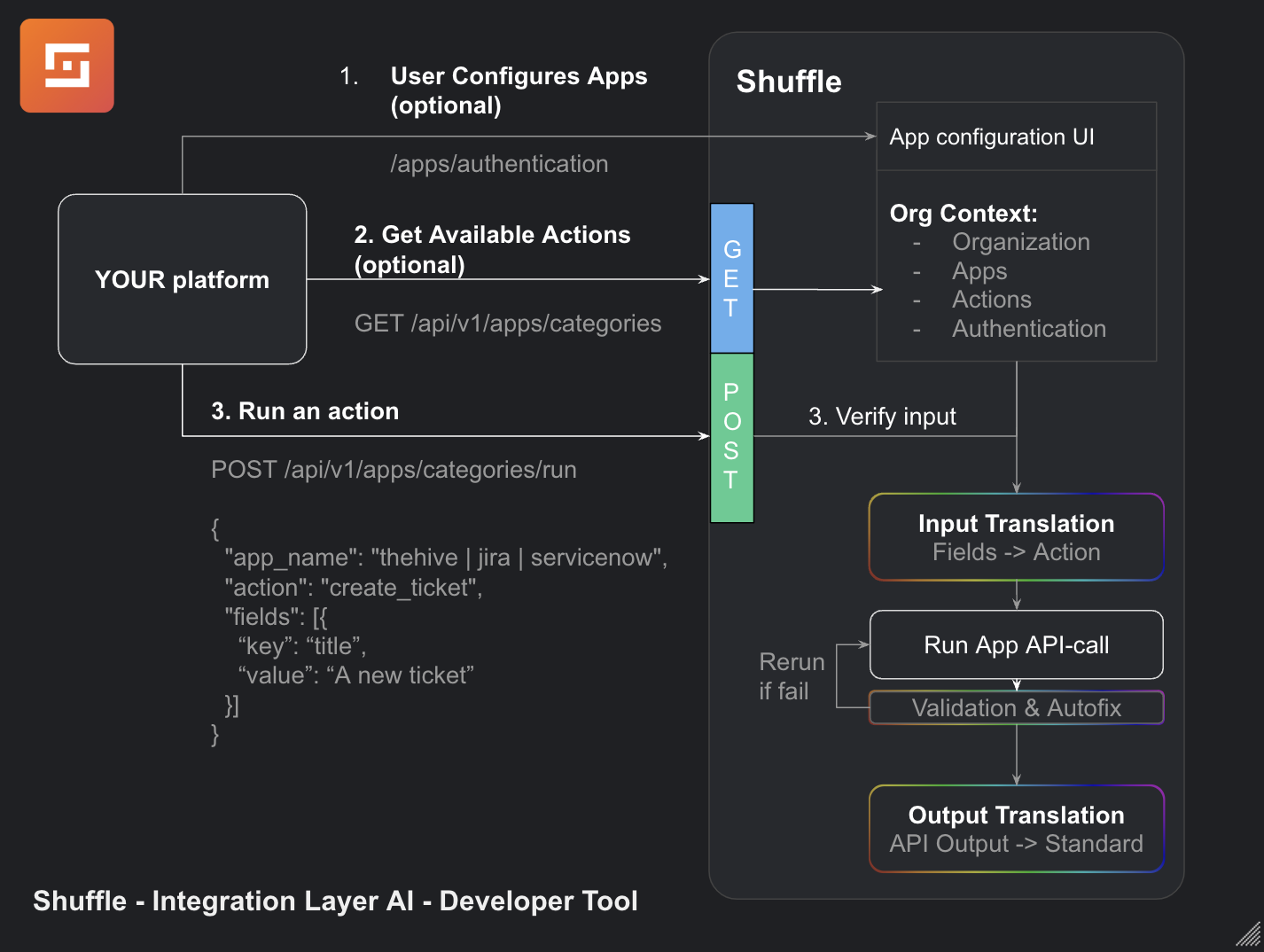 ### Shufflepy
The easiest way to try it out for developer is to [use the Shufflepy library](https://github.com/frikky/schemaless).
```python
from shufflepy import Shuffle
## If the url is not specified, the library will use `https://shuffler.io` as the default URL. You must specify an apikey.
shuffle = Singul("APIKEY")
resp = shuffle.list_tickets("jira")
```
### Run a Category Action
Runs the category action in a standardized format.
Methods: POST
```bash
curl -XPOST https://shuffler.io/api/v1/apps/categories/run -H "Authorization: Bearer APIKEY" -d '{
"app_name": "PagerDuty",
"category": "cases",
"label": "create_ticket",
"fields": [{
"key": "title",
"value": "This is the title"
}, {
"key": "description",
"value": "This is the description"
}, {
"key": "source",
"value": "Shuffle"
}],
"skip_workflow": true
}'
```
**Success response**
**200** means the app ran and performed both input and output translation properly
```json
Default Label Output
```
**202** means the app ran, but the output translation failed. This will return the DEFAULT output of the action that ran.
**Other status codes**: They are based on the API from the app itself, and indicates something went wrong.
### Get Active Categories
To find what categories with what apps you have that are active, run this API. It will return with what categories and actions for those categories you have available. This is based on the current organization.
Methods: GET
```bash
curl https://shuffler.io/api/v1/apps/categories -H "Authorization: Bearer APIKEY"
```
**Success response**
```json
[{
"name":"Cases",
"color":"",
"icon":"cases",
"action_labels":["Create ticket"],
"app_labels": [{
"app_name":"PagerDuty",
"large_image":"",
"id":"50af6d9f18134b90aabca9180b37ea01",
"labels": [{
"category":"Cases",
"label":"Create ticket"
}]
}]
}]
```
### How to debug Singul executions
- Go to https://shuffler.io/workflows/debug
- You should see something like this:
### Shufflepy
The easiest way to try it out for developer is to [use the Shufflepy library](https://github.com/frikky/schemaless).
```python
from shufflepy import Shuffle
## If the url is not specified, the library will use `https://shuffler.io` as the default URL. You must specify an apikey.
shuffle = Singul("APIKEY")
resp = shuffle.list_tickets("jira")
```
### Run a Category Action
Runs the category action in a standardized format.
Methods: POST
```bash
curl -XPOST https://shuffler.io/api/v1/apps/categories/run -H "Authorization: Bearer APIKEY" -d '{
"app_name": "PagerDuty",
"category": "cases",
"label": "create_ticket",
"fields": [{
"key": "title",
"value": "This is the title"
}, {
"key": "description",
"value": "This is the description"
}, {
"key": "source",
"value": "Shuffle"
}],
"skip_workflow": true
}'
```
**Success response**
**200** means the app ran and performed both input and output translation properly
```json
Default Label Output
```
**202** means the app ran, but the output translation failed. This will return the DEFAULT output of the action that ran.
**Other status codes**: They are based on the API from the app itself, and indicates something went wrong.
### Get Active Categories
To find what categories with what apps you have that are active, run this API. It will return with what categories and actions for those categories you have available. This is based on the current organization.
Methods: GET
```bash
curl https://shuffler.io/api/v1/apps/categories -H "Authorization: Bearer APIKEY"
```
**Success response**
```json
[{
"name":"Cases",
"color":"",
"icon":"cases",
"action_labels":["Create ticket"],
"app_labels": [{
"app_name":"PagerDuty",
"large_image":"",
"id":"50af6d9f18134b90aabca9180b37ea01",
"labels": [{
"category":"Cases",
"label":"Create ticket"
}]
}]
}]
```
### How to debug Singul executions
- Go to https://shuffler.io/workflows/debug
- You should see something like this:
 As you can see, I triggered this Singul execution through the Singul app (not the SDK). However, even if you were using the SDK, you would find such executions.
- Click on the button below "Explore":
As you can see, I triggered this Singul execution through the Singul app (not the SDK). However, even if you were using the SDK, you would find such executions.
- Click on the button below "Explore":
 - You will see the full result of the execution. Click on the arrow
 - To see the body that Singul translated to, scroll and find the "Body"
 Based on the output, and the input mentioned in "Body", you should be able to figure out what is going on here.