Your private Chess.com. Self-hosted, AI-coached, family-friendly.
Stockfish + your own LLM (Ollama or vLLM), in one Docker container.
Game Review — every move classified, top engine lines, and What's the threat? answering in plain words. Demo accounts, Morphy's Opera Game.
## Why Patzer
- **Your games stay home.** Single Docker container on a Pi / NAS / old laptop. No cloud, no telemetry, no upsell.
- **Bring your own LLM.** The AI coach runs against your own [Ollama](https://ollama.com) or [vLLM](https://docs.vllm.ai) host. The coach teaches, but never analyses: Stockfish, chess.js and your own game history work out the facts server-side, so a small local model can't hallucinate moves or pieces.
- **Made for a household, not a stadium.** Multi-user with admin console, per-profile language, kid-mode blunder warnings, "horsey" piece names for the youngest profiles.
## What it is
Patzer is a tiny, self-hosted take on the Chess.com / Lichess workflow you actually use:
- **Game Review** — pull your public Chess.com or Lichess games (or paste a PGN; Chess.com games can sync on their own), analyze with bundled Stockfish, get chess.com-style classifications (Brilliant / Great / Best / Excellent / Good / Book / Inaccuracy / Mistake / Miss / Blunder), accuracy %, estimated Elo, eval graph, key moments, top engine lines, a "What's the threat?" probe, and master-game statistics for the position.
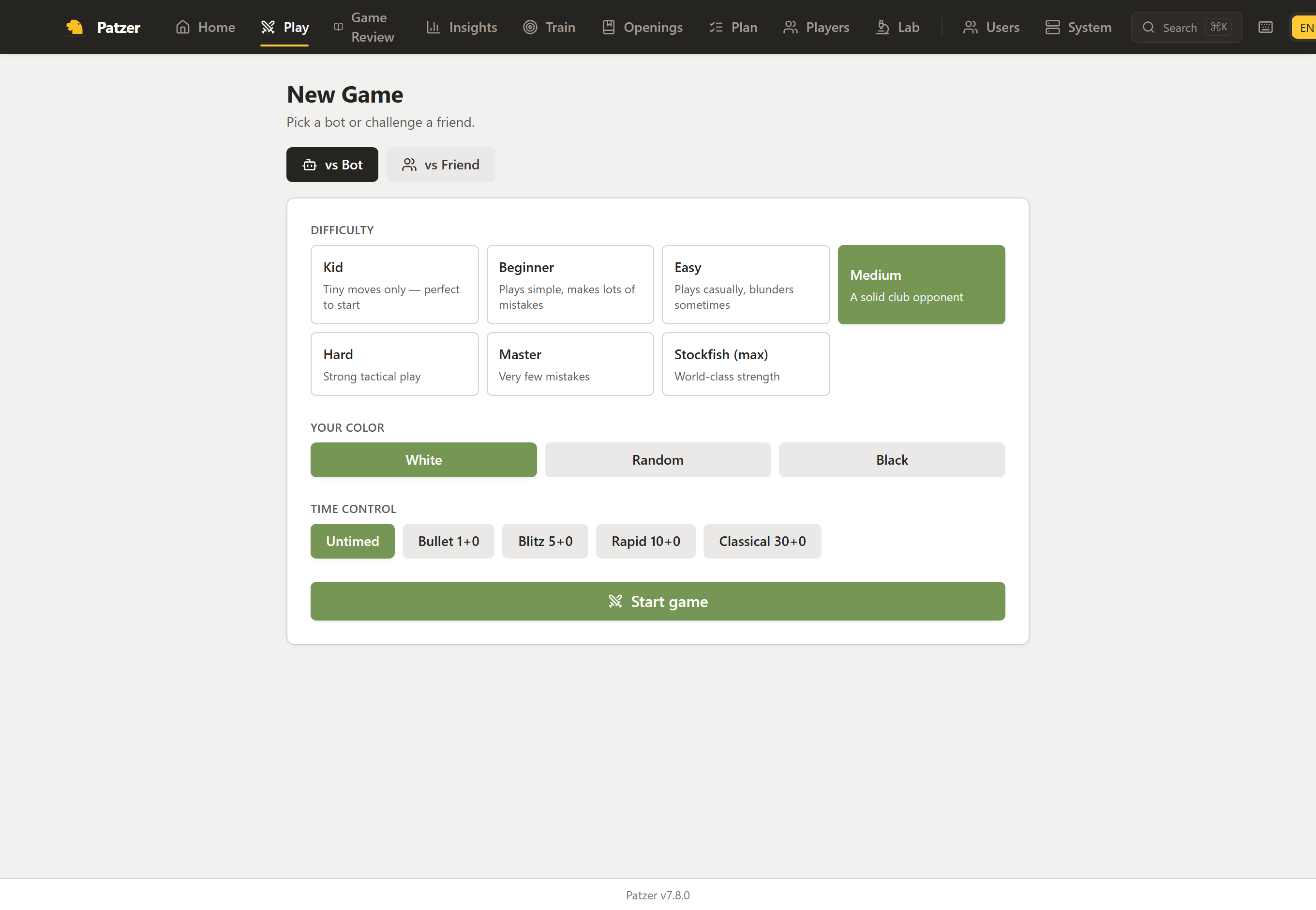
- **Play vs Bot** — full games against Stockfish at seven named tiers (Kid → Stockfish max), all standard time controls, a queue of up to six premoves shown on the board, kid-mode blunder warnings.
- **Play vs Friend** — real-time PvP between profiles on the same server over WebSocket, with draw offers, takebacks and one-click rematch. Playing across the internet is a tunnel away — see the [FAQ](docs/FAQ.md#can-i-play-a-friend-who-lives-somewhere-else).
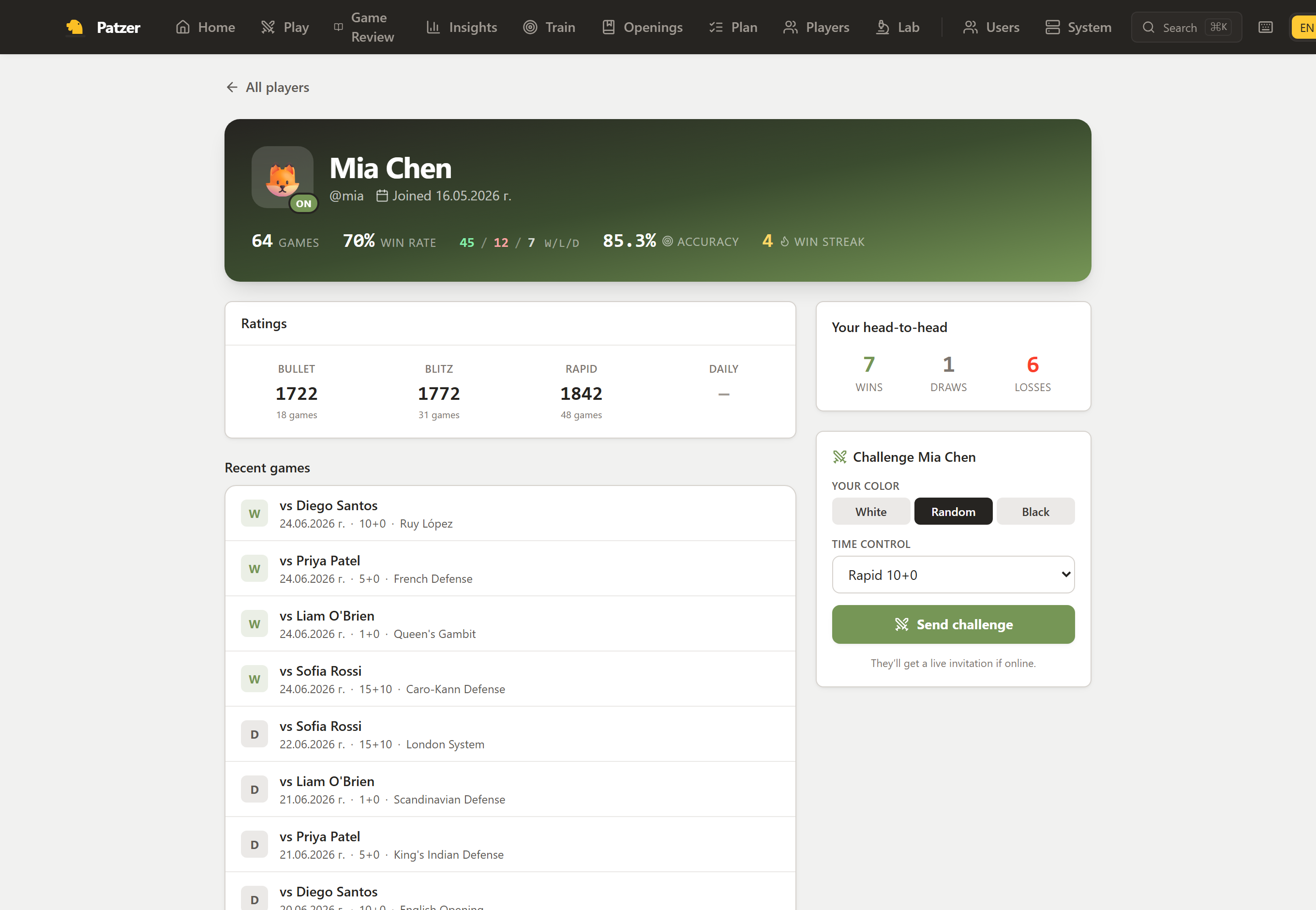
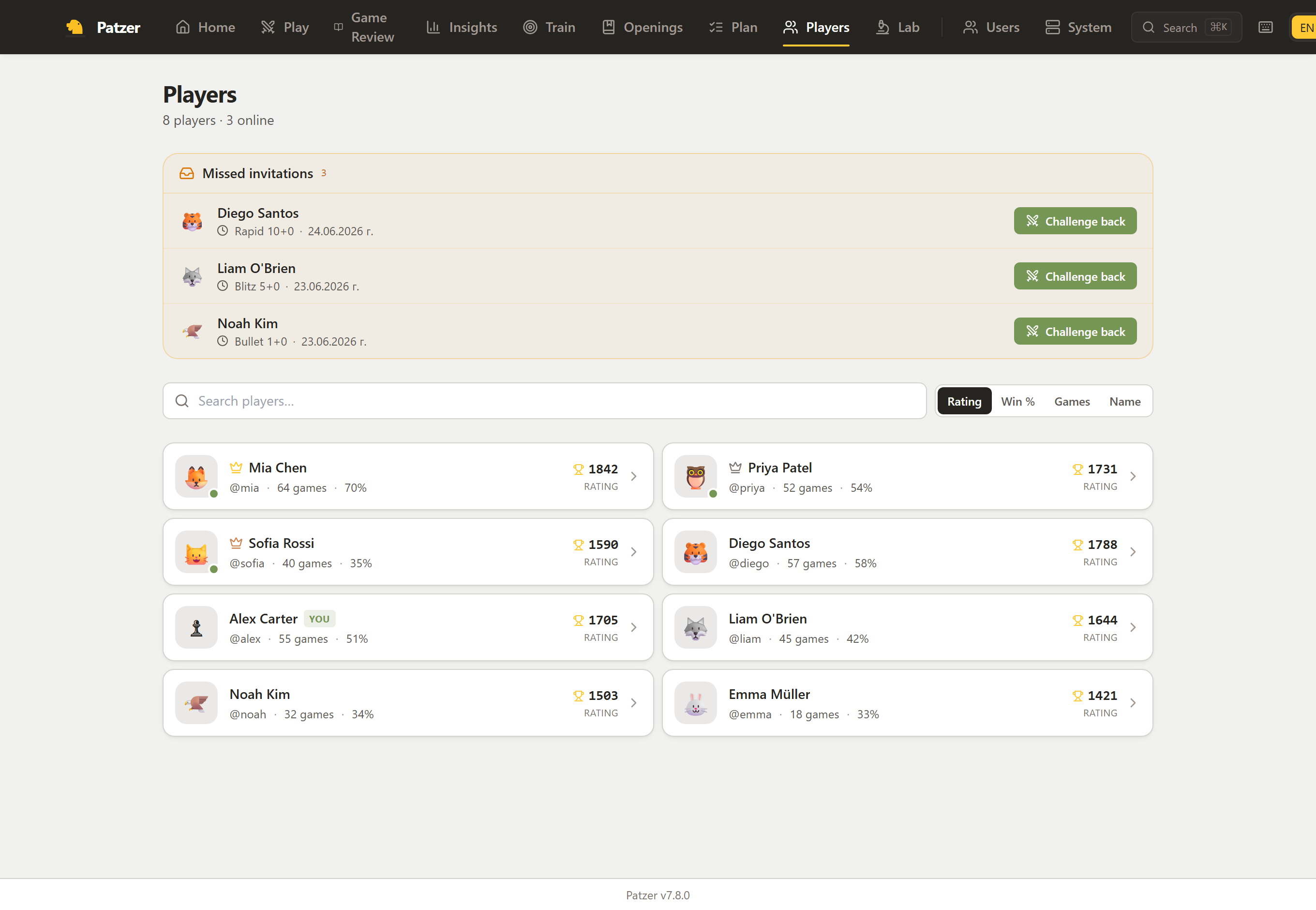
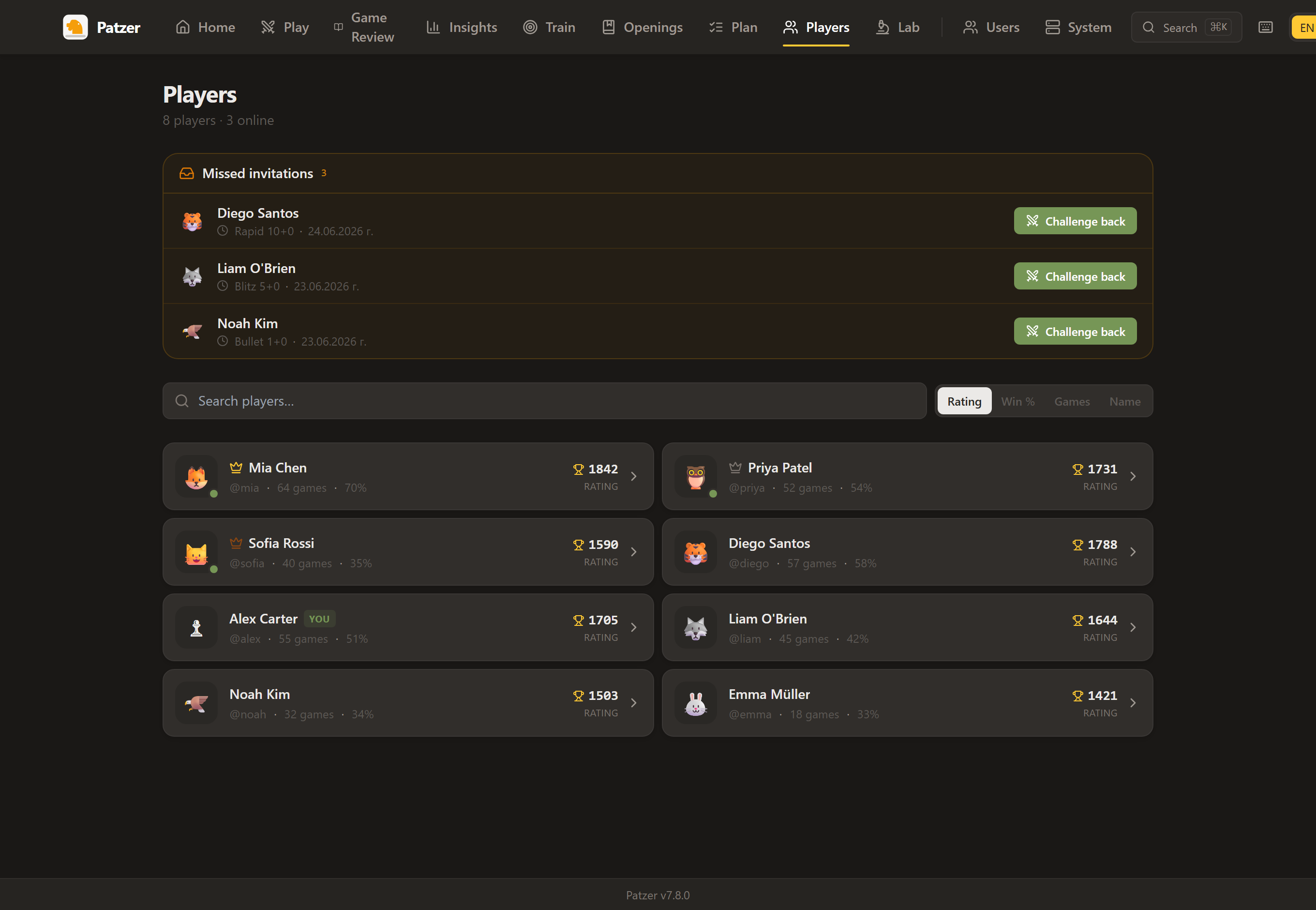
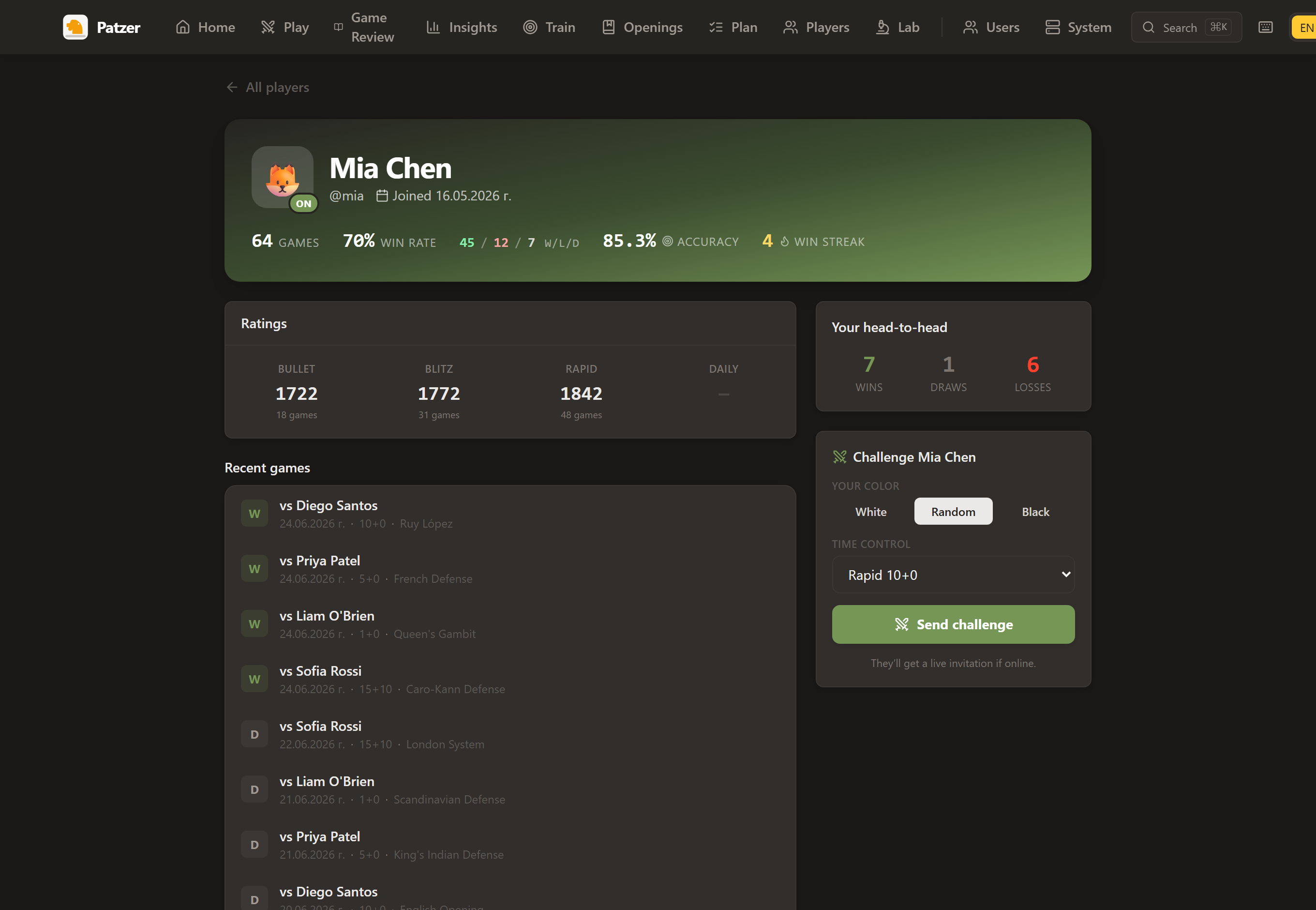
- **Players & profiles** — a directory of everyone on your server with a rating leaderboard, live presence and public profiles (record, per-time-class ratings, your head-to-head), challenge-from-profile, and a "missed invitations" rail.
- **AI Coach (your LLM)** — point at any [Ollama](https://ollama.com) or [vLLM](https://docs.vllm.ai) host (or, if you have no GPU to spare, the hosted DeepSeek API). A coach, not a commentator: it explains *why* a move works or fails (what it allows, hangs or wins, and the opponent's best answer), shows the better move and other good ones with what they achieve, connects the mistake to your own recent games ("4 of your last 10 games: leaving a piece unprotected", your weakest phase, positions you missed in the opening trainer) and links a matching Learn lesson. Hints point you at what matters without giving the move away. It never contradicts the engine: an answer that praises a mistake is caught before you see it. Audience-tuned for Kid / Beginner / Intermediate / Advanced.
- **Family-ready** — multi-user with admin console, open / invite-only / closed sign-up, per-profile language, kid-mode blunder warnings, "horsey" piece names for the youngest profiles.
- **Single sign-on (optional)** — sign in with Authentik, Keycloak or any other OpenID Connect provider: SSO next to passwords or SSO only, admins chosen by a provider group, automatic accounts, and a logout that ends the provider session too. See [docs/OIDC.md](docs/OIDC.md).
- **Learn (beta)** — 69 interactive lessons in four levels, from how the pieces move to tactics, mating patterns and endgames. Stars and progress per profile; kid mode tells the same lessons in simpler words.
- **Opening trainer (beta)** — drill 16 built-in main lines or any line from your own repertoire; the moves you miss come back in a daily review queue.
- **Multilingual** — English, Bulgarian, Spanish, German and Russian out of the box, UI *and* coach prompts. Adding a language is one table entry per file — see CONTRIBUTING.
- **Self-hosted, single container** — runs on a Pi, a NAS, an old laptop. Your games never leave home.
- **Phone-friendly** — full-width board, sticky action bar and a swipe-up move list on small screens.
- **Tells you when it's stale** — a self-hosted app can't update itself, but Patzer checks GitHub every six hours and shows a one-line notice when a newer release is out, so you know to pull. Sends nothing about you; switch it off in *Admin → System*.
## Screenshots
Player profile — lifetime record, per-time-class ratings, your head-to-head, and a one-click challenge.
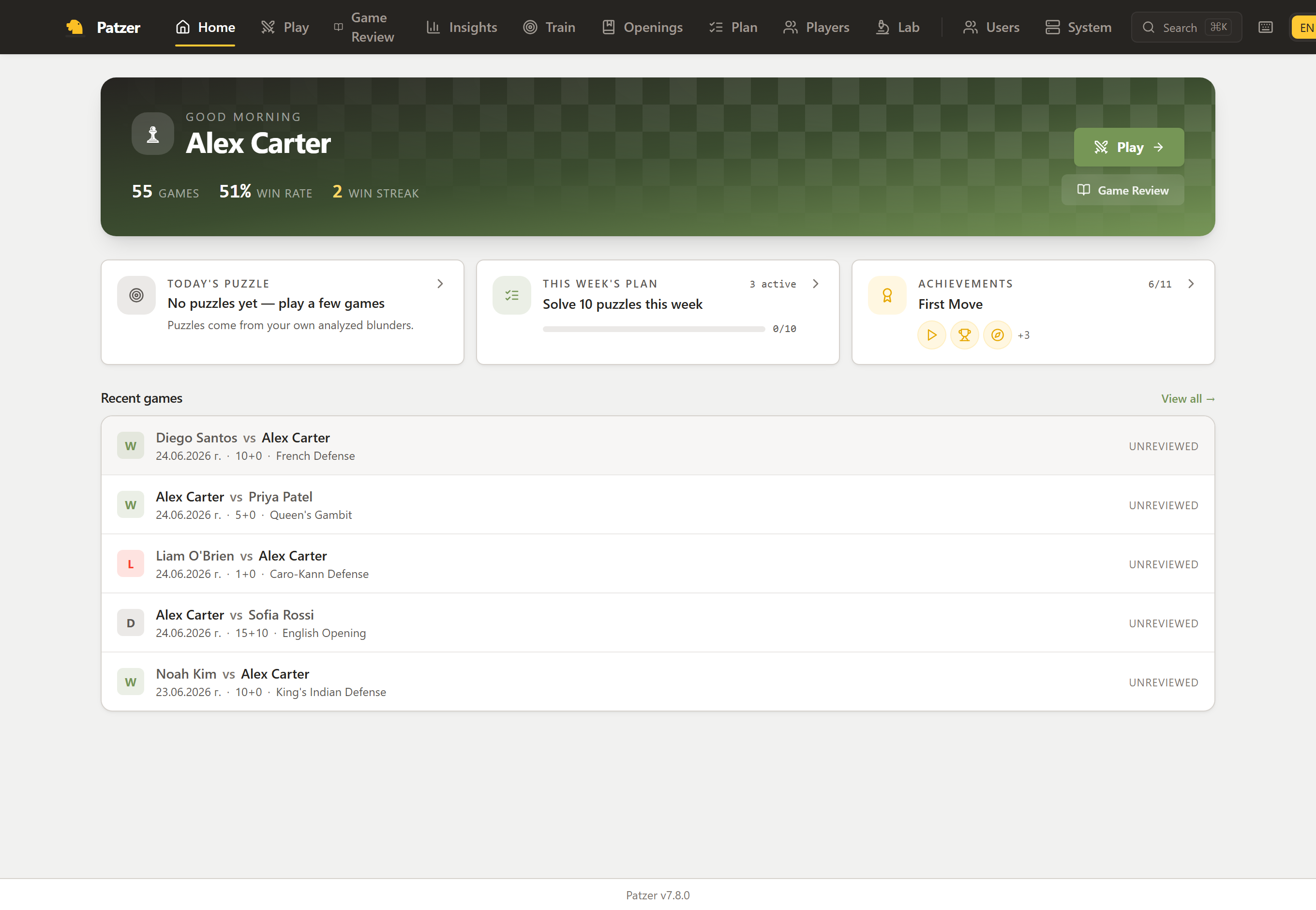
Home — your stats, today's puzzle, this week's plan, achievements and recent games.
Players — everyone on your server, sorted by rating, with live presence and missed invitations.
Play — seven Stockfish tiers, all time controls, or a live challenge to a friend.
Dark mode is built in (auto / light / dark, per profile):
All screenshots use anonymized demo data — no real accounts or hostnames.
## First run in five minutes
Pick **one** of these. The Docker options open ; the Codespaces option opens in your browser. Either way, the first visit walks you through a setup wizard.
**Try it in your browser**
[](https://codespaces.new/SikamikanikoBG/patzer?quickstart=1)
Spins up a temporary Codespace with Patzer + Stockfish pre-installed. Wait ~60 seconds for `npm install` + dev server to start, then click the forwarded port labelled *"Patzer (Vite dev — open this)"*. You get the full app **except** the AI Coach narration (which needs an Ollama host on your network — see below).
**`docker run`**
```bash
docker run -d \
-p 8800:8800 \
-v patzer-data:/app/data \
--name patzer \
ghcr.io/SikamikanikoBG/patzer:latest
```
**`docker compose`**
```yaml
services:
patzer:
image: ghcr.io/SikamikanikoBG/patzer:latest
container_name: patzer
restart: unless-stopped
ports:
- "8800:8800"
volumes:
- patzer-data:/app/data
volumes:
patzer-data:
```
> **What works without any extras:** play vs Stockfish, play vs friend on the same server,
> move classification, accuracy %, eval graph, opening detection. The setup wizard takes you
> straight to a working board.
>
> **What needs an LLM:** the AI Coach commentary voice. Until you point Patzer at an Ollama or
> vLLM host, the *Coach* panel just shows the engine facts in plain text.
>
> **What needs a Chess.com or Lichess username:** importing your public games for review. Without it
> you can still load PGNs by paste or play live and review from the move list.
You'll want, optionally:
- **For the AI Coach:** an [Ollama](https://ollama.com) or [vLLM](https://docs.vllm.ai) server reachable from the Patzer container (pick the provider in *Admin → System*). The wizard validates the URL and lists available models for you. Patzer accepts loopback / RFC1918 / `*.local` / `host.docker.internal` Ollama hosts only — public-Internet model proxies aren't supported here. The one hosted exception is DeepSeek, which you opt into with an API key in *Admin → System*.
- **For Game Review on your own games:** a Chess.com and/or Lichess username (entered later in *Settings*).
To use a different host port, run with `-p 9000:8800` (or set `HOST_PORT=9000` if you're using `docker compose`).
If you're terminating TLS at a reverse proxy, set `COOKIE_SECURE=true` in the container's environment so session cookies aren't shipped over plaintext HTTP.
To sign in through Authentik, Keycloak or another OpenID Connect provider instead of (or next to) Patzer passwords, see [Single sign-on](docs/OIDC.md). With `OIDC_ONLY=true` a fresh install skips the setup wizard below: the first SSO login creates the admin.
## Compared to alternatives
| | Patzer | Lichess Studio | Chess.com Review | Aimchess |
| ---------------------- | :----: | :------------: | :--------------: | :------: |
| Self-hosted | ✅ | ❌ | ❌ | ❌ |
| LLM coach (BYO model) | ✅ | ❌ | ❌ | ❌ |
| Imports Chess.com | ✅ | ❌ | ✅ | ✅ |
| Imports Lichess | ✅ | ✅ | ❌ | ✅ |
| Multi-user / family | ✅ | ❌ | ❌ | ❌ |
| Multilingual coach | ✅ | partial UI | ❌ | ❌ |
| Free | ✅ | ✅ | 💳 | 💳 |
## How it's built
The coach teaches from facts it is handed and never analyses on its own: the server works out what a move allows, hangs, wins or stops (chess.js, [server/src/coach/tactics.ts](server/src/coach/tactics.ts)), the opponent's best answer and the alternatives (Stockfish), and the player's recurring mistakes ([server/src/coach/memory.ts](server/src/coach/memory.ts)), and the LLM turns that into coaching ([server/src/coach/coaching.ts](server/src/coach/coaching.ts)). Every answer is checked against the engine's verdict before it is shown. Because the model only explains what it is handed, a small local model is enough for a useful coach.
## Local development
Requirements: Node.js ≥ 20.11.
```bash
git clone https://github.com/SikamikanikoBG/patzer.git
cd patzer
npm install
npm run setup # downloads Stockfish 17 into ./bin/ (Windows, Linux, macOS)
npm run dev
```
- Server:
- Vite dev server (HMR): — proxies `/api` and `/ws` to the server.
`npm run setup` dispatches to `setup.ps1` (Windows) or `setup.sh` (Linux/macOS) and picks the official
build for your CPU; on an older x86 CPU without AVX2 run `STOCKFISH_ASSET=stockfish-ubuntu-x86-64-sse41-popcnt npm run setup`.
A package-manager Stockfish (`apt install stockfish` / `brew install stockfish`) works too — the server
also looks in `/usr/bin`, `/usr/local/bin`, `/opt/homebrew/bin` and `/usr/games`.
Useful scripts:
```bash
npm run typecheck # tsc -b across server + web + tests (no emit)
npm test # vitest — classifier, Glicko, PGN round-trip, explorer, PvP helpers
npm run test:e2e # boots a real server on a scratch DB and plays a PvP game over two sockets
npm run build # production build of both workspaces
```
## Deploying to a home server
The published image plus the `docker compose` snippet above is all most people need — add the
[Watchtower](https://containrrr.dev/watchtower/) label and your box tracks releases by itself.
If you'd rather build from source on the target, two equivalent scripts are bundled — `deploy.ps1` for Windows hosts,
`deploy.sh` for Linux / macOS hosts. Both tar the source, scp it to the
target, then run `docker compose build && up -d` over SSH.
Create `.env.deploy` (gitignored) on the workstation you're deploying *from*:
```
HOST=user@192.168.x.x
REMOTE_DIR=/home/user/patzer
SUDO_PASS=... # only if your user is not in the docker group on the target
HOST_PORT=8800
```
Then:
```powershell
# Windows
.\deploy.ps1 # tar source → ssh, build & start
.\deploy.ps1 -NoBuild # restart without rebuilding
.\deploy.ps1 -Logs # tail logs after deploy
```
```bash
# Linux / macOS
./deploy.sh # tar source → ssh, build & start
./deploy.sh --no-build # restart without rebuilding
./deploy.sh --logs # tail logs after deploy
```
## Configuration
All user-facing configuration is done **through the UI** and persisted in SQLite. The only environment variables are operational:
| Var | Default | What it does |
|---|---|---|
| `PORT` | `8800` | HTTP listen port |
| `HOST` | `0.0.0.0` | Bind address |
| `DB_PATH` | `./data/chess.db` | SQLite database file |
| `STOCKFISH_PATH` | (auto) | Override Stockfish binary path |
| `LICHESS_EXPLORER_URL` | `https://explorer.lichess.ovh` | Opening-explorer upstream for the *Master games* panel (a self-hosted `lila-openingexplorer` works) |
| `UPDATE_CHECK` | `1` | Set to `0` to disable the six-hourly "a newer release exists" check for the whole deployment (there's also a toggle in *Admin → System*) |
| `SESSION_SECRET` | (auto-generated) | Cookie signing secret. Persisted on first run. |
| `COOKIE_SECURE` | `false` | Set to `true` when terminating TLS at a reverse proxy so session cookies are flagged `Secure`. |
| `ENGINE_BACKEND` | `local` | `chessapi` sends Game Review positions to the hosted chess-api.com engine instead of the bundled Stockfish (opt-in — for a Pi or a public demo instance) |
| `CHESSCOM_SYNC_MINUTES` | `15` | How often linked Chess.com accounts are synced, analyzed and reviewed in the background; `0` turns the timer off |
| `DEEPSEEK_API_KEY` | (none) | DeepSeek key for the coach; wins over the key saved in *Admin → System* (handy with Docker secrets) |
| `PUBLIC_BASE_URL` | (request origin) | Public address of the app, e.g. `https://chess.example.com`. Used for links in emails and the SSO callback; set it behind a reverse proxy. *Admin → System → Public base URL* wins when set |
**Single sign-on** ([full guide](docs/OIDC.md)) is off until `OIDC_ISSUER` and `OIDC_CLIENT_ID` are set:
| Var | Default | What it does |
|---|---|---|
| `OIDC_ISSUER` | (none) | Provider issuer URL, exactly as the provider shows it (keep the trailing `/`) |
| `OIDC_CLIENT_ID` | (none) | Client ID |
| `OIDC_CLIENT_SECRET` | (empty) | Client secret; empty for a public client |
| `OIDC_BUTTON_TEXT` | "Sign in with SSO" | Label of the SSO button on the login page |
| `OIDC_ONLY` | `false` | `true` removes password login, sign-up and password reset, and on a fresh install replaces the setup wizard (the first SSO login is the admin); ignored if SSO isn't configured |
| `OIDC_ADMIN_GROUP` | (none) | Provider group whose members are admins; checked at every SSO login, and until an admin exists only its members can sign in |
| `OIDC_AUTO_PROVISION` | `false` | Create an account for someone the provider lets in who has none yet |
| `OIDC_MATCH_BY` | `none` | Link a first SSO login to an existing account by `username` (case-insensitive) or verified `email`, or `none` |
System settings (coach provider and model, Stockfish path override, who can sign up) live in *Admin → System*; invites in *Admin → Users*.
Per-profile settings (language, audience, coach behavior, TTS voice, sound sets, Chess.com / Lichess usernames) live in *Settings*.
## How move classification works
Each played move is compared against the engine's best move at the same position. We compute the **win-percentage drop** using the Lichess sigmoid (`50 + 50 · (2 / (1 + exp(-0.00368208 · cp)) − 1)`) and combine it with real centipawn loss as a guard against lopsided positions:
| Classification | Rule |
| --- | --- |
| Best ★ | the engine's #1 move |
| Excellent ✓ | win-% drop < 2 **and** cp loss < 50 |
| Good · | win-% drop < 5 **and** cp loss < 100 |
| Inaccuracy ?! | win-% drop < 10 |
| Mistake ? | win-% drop < 20 |
| Blunder ?? | win-% drop ≥ 20 |
On top of that ladder: **Forced** (only one legal move) and **Book** (the position is in the bundled ECO table) replace the label; **Brilliant** `!!` is the engine's #1 move that leaves ≥ a minor piece en prise — measured with a static exchange evaluation, net of what the move captured — in a position that isn't already crushing, where the engine line doesn't just win the material back; **Great** `!` is the engine's #1 when the second-best move is ≥ 200 cp worse, or a move that lifts a lost position back to equal; **Miss** flags a mistake-or-worse that threw away a clearly winning eval or a forced mate. Same-sign mate transitions (+M3 → +M2) cost nothing. Per-game accuracy is the Lichess formula `103.1668 · exp(-0.04354 · Δwin%) − 3.1669`, clamped to `[0, 100]`, excluding book and forced moves.
Estimated Elo comes from average centipawn loss on a piecewise curve calibrated against chess.com Game Review (ACPL 8 → 2700, 18 → 2200, 25 → 1900, 35 → 1600, 50 → 1400, 70 → 1200, 100 → 900, 150 → 600), with accuracy nudging it ±20 Elo at most. The per-game *performance rating* additionally blends in the opponent's rating, weighted by how settled that rating is. All of this is unit-tested — see `server/test/classifier.test.ts`.
## Tech
- **Server:** Node 20 · TypeScript · [Hono](https://hono.dev) · [better-sqlite3](https://github.com/WiseLibs/better-sqlite3) · [chess.js](https://github.com/jhlywa/chess.js) · `ws` · native [Stockfish](https://stockfishchess.org/)
- **Web:** React 18 · Vite · Tailwind CSS · [chessground](https://github.com/lichess-org/chessground) · framer-motion · react-i18next · TanStack Query
- **Coach:** [Ollama](https://ollama.com) or [vLLM](https://docs.vllm.ai) (default model: `gemma3:1b`; something like `qwen2.5:7b` gives a nicer voice)
- **Tests:** [vitest](https://vitest.dev) unit suites + an end-to-end PvP run against a real server
- **TTS:** browser Web Speech API (uses installed OS voices)
- **Persistence:** single SQLite file in `./data/`
## Troubleshooting
- **"Stockfish binary not found"** — Patzer no longer falls back to a bare `stockfish` PATH lookup (defense-in-depth: a malicious binary earlier in `$PATH` would otherwise run as the server user). Either install Stockfish into `/usr/games/stockfish`, `/usr/local/bin/stockfish`, `/opt/homebrew/bin/stockfish`, or `bin/stockfish` in the project, or set `STOCKFISH_PATH` (env) / *Admin → System → Stockfish path*.
- **"Ollama unreachable" / "fetch failed"** — inside Docker, `localhost` is the Patzer container itself, not your computer. Two things have to line up:
1. **Ollama listens on the network.** By default it only answers on its own machine's loopback. Set `OLLAMA_HOST=0.0.0.0` (Windows: a user environment variable, then quit and restart Ollama from the tray; Linux: `sudo systemctl edit ollama` → `Environment="OLLAMA_HOST=0.0.0.0"`, then restart the service).
2. **Patzer uses an address that reaches it.** Same machine: `http://host.docker.internal:11434` — built into Docker Desktop on Windows/Mac; on Linux uncomment the `extra_hosts` lines in `docker-compose.yml`, or add `--add-host=host.docker.internal:host-gateway` to `docker run`. Another machine: its LAN IP, e.g. `http://192.168.1.20:11434`.
The setup wizard and *Admin → System* show this hint when the test fails. The setup-time test only allows loopback / RFC1918 / `*.local` / `host.docker.internal` URLs. After setup, change it any time in *Admin → System*.
- **Port 8800 already in use** — `-p 9000:8800` (docker run) or `HOST_PORT=9000 docker compose up -d`.
- **Lost your admin password** — there is no in-app reset yet. Until one ships, edit `chess.db` directly: open `data/chess.db` with `sqlite3` and replace the row's `password_hash` with a `bcryptjs` hash (cost ≥ 12).
- **Cookies dropped behind a reverse proxy** — see `COOKIE_SECURE=true` above. The cookie also requires the same hostname for both the page and the API.
- **Locked out with `OIDC_ONLY=true`** (provider down or misconfigured) — remove `OIDC_ONLY` and restart: password login comes back for accounts that have a password. Accounts created through SSO don't; [docs/OIDC.md](docs/OIDC.md#getting-back-in) shows how to get an admin back in either way. The login page names the reason for a failed SSO sign-in, and [the troubleshooting table](docs/OIDC.md#troubleshooting) explains each one.
## More
- **[Single sign-on](docs/OIDC.md)** — Authentik / Keycloak / OpenID Connect setup, SSO-only installs, admins from a provider group, account matching, logout, troubleshooting.
- **[FAQ](docs/FAQ.md)** — what Patzer is and isn't, Chess.com API legality, playing a friend across the internet, NAT/proxy notes, backup, "I lost my admin password", language additions.
- **[Roadmap](ROADMAP.md)** — what's queued and what's deliberately out of scope.
- **[Changelog](CHANGELOG.md)** — every release, with why-not-just-what entries.
## Contributing
PRs welcome — please read [CONTRIBUTING.md](CONTRIBUTING.md) first. Translations especially encouraged.
Patzer is better for the people who have already sent code — thank you to everyone in [CONTRIBUTORS.md](CONTRIBUTORS.md).
## Security
See [SECURITY.md](SECURITY.md). For vulnerabilities, **don't** open a public issue — use [GitHub's private vulnerability reporting](https://github.com/SikamikanikoBG/patzer/security/advisories/new).
## License
MIT — see [LICENSE](./LICENSE). Note the GPL-3.0 components (chessground, Stockfish) — see [THIRD_PARTY_NOTICES.md](THIRD_PARTY_NOTICES.md).