[](https://melpa.org/#/docker)
[](https://stable.melpa.org/#/docker)

# docker.el
Emacs integration for [Docker](https://www.docker.com)!
Supports docker containers, images, volumes, networks, contexts and docker-compose.
## Screenshots
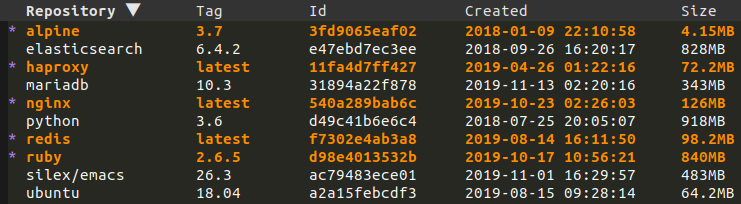
### List images
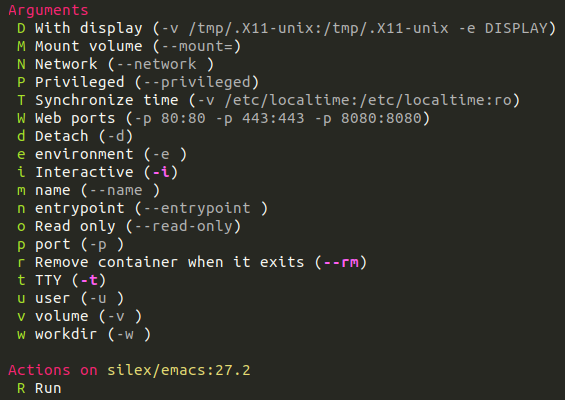
### Image run
## Installation
The recommended way to install docker.el is through [MELPA](https://melpa.org).
Here is a example [use-package](https://github.com/jwiegley/use-package) configuration:
```elisp
(use-package docker
:ensure t
:bind ("C-c d" . docker))
```
## Quickstart
Use M-x docker, select a resource then mark or unmark items using the following keybindings (for more
marking possibilities, check out https://github.com/emacsorphanage/tablist):
| Binding | Description |
| ------------------ | -------------------- |
| ? | List actions |
| l | Configure listing |
| m | Mark item |
| u | Unmark item |
| t | Toggle marks |
| U | Unmark all |
| s | Sort |
| * r | Mark items by regexp |
| < | Shrink column |
| > | Enlarge column |
| C-c C-e | Export to csv |
Then select an action and follow the instructions.
## Supported commands
- docker container: attach, cp, diff, exec, inspect, kill, logs, pause, rename, restart, rm, start, stop, unpause
- docker image: history, inspect, pull, push, rm, run, tag
- docker network: rm
- docker volume: rm
- docker context: inspect, ls, rm, use
- docker-compose: build, config, create, down, exec, logs, pause, pull, push, remove, restart, run, start, stop, unpause, up
You can also enter `dired` or open a file inside a container or volume.
## Customizations
Thanks to [transient](https://github.com/magit/transient), all the transients arguments can be set temporarily or
permanently. See https://magit.vc/manual/transient/Saving-Values.html#Saving-Values for more information.
There are also hidden items (e.g on `M-x docker` where you could specify the host or TLS settings), see
https://magit.vc/manual/transient/Enabling-and-Disabling-Suffixes.html for more information.
Pressing the key of an option that is already set opens its current value for editing; clearing
the input unsets it. Options docker accepts several times (`-e`, `-v`, `--mount`, `-p`,
`--network`, `--filter`, compose `--file`, ...) take all their values in one prompt, separated by
`|`, so values may contain commas:
```text
Mount volume (separate with |): type=bind,source=/data,target=/data | type=volume,source=cache,target=/cache
```
Each kind of value keeps its own history (`M-p` / `M-n`), shared between the transients that use
it and saved with the other transient histories.
Here is a list of other customizations you can set:
| Variable | Description | Default |
| ------------------------------------- | ------------------------------------------ | -------------------- |
| docker-command | The docker binary to use | `docker` |
| docker-compose-command | The docker compose binary to use | `docker compose` |
| docker-container-columns | Columns definition for containers | Too complex to show |
| docker-container-default-sort-key | Sort key for containers | `("Image")` |
| docker-container-exec-custom-args | Custom arguments to use for docker exec | `nil` |
| docker-container-exec-default-args | Base arguments to use for docker exec | `("-i" "-t")` |
| docker-container-shell-file-name | Shell to use when entering containers | `/bin/sh` |
| docker-container-tramp-method | Tramp prefix when connecting to containers | `docker` |
| docker-context-columns | Columns definition for contexts | Too complex to show |
| docker-context-default-sort-key | Sort key for contexts | `("Name")` |
| docker-image-columns | Columns definition for images | Too complex to show |
| docker-image-default-sort-key | Sort key for images | `("Repository")` |
| docker-image-history-columns | Columns definition for image history | Too complex to show |
| docker-image-history-default-sort-key | Sort key for image history | `("Created" . t)` |
| docker-image-run-custom-args | Custom arguments to use for docker run | `nil` |
| docker-image-run-default-args | Base arguments to use for docker run | `("-i" "-t" "--rm")` |
| docker-inspect-view-mode | Mode used in `docker inspect` buffers | Too complex to show |
| docker-network-columns | Columns definition for networks | Too complex to show |
| docker-network-default-sort-key | Sort key for networks | `("Name")` |
| docker-pop-to-buffer-action | Action for `docker-utils-pop-to-buffer` | `nil` |
| docker-show-messages | If non-nil message docker commands | `t` |
| docker-show-status | When to compute status | `local-only` |
| docker-terminal-backend | Terminal backend for live buffers | `auto` |
| docker-volume-columns | Columns definition for volumes | Too complex to show |
| docker-volume-default-sort-key | Sort key for volumes | `("Driver")` |
### Asynchronous command diagnostics
The commands that list resources or discover Compose services read standard output
only, so a warning on standard error cannot become a resource name. Standard error
is logged in the `*docker-diagnostics*` buffer.
When a command fails, the promise is rejected and the buffer gains the command, its
directory, its exit status, its standard output and its standard error. The buffer
is then displayed with `display-buffer` and `docker-pop-to-buffer-action`, without
selecting its window.
Separating the two streams takes a POSIX `sh` on the host that runs the command.
Without one they stay mixed.
### Changing the default arguments for `docker run`
You can match on the repository name for an image to customize the initial infix arguments via `docker-image-run-custom-args`:
```elisp
(add-to-list
'docker-image-run-custom-args
`("^postgres" ("-e POSTGRES_PASSWORD=postgres" . ,docker-image-run-default-args)))
```
So when `docker run` is called on an image whose repository name matches the regular expression `^postgres`, the option
`"-e POSTGRES_PASSWORD=postgres"` will appear as set along with the defaults specified by `docker-image-run-default-args`.
The same mechanism is available for `docker exec` via `docker-container-exec-custom-args` and
`docker-container-exec-default-args`, except the regular expression is matched against the container name instead of the
image repository.
## Terminal support
Commands that need a running buffer (for example `docker run`, `docker logs`, etc) use the backend selected by
`docker-terminal-backend`. When set to `auto`, it prefers [eat](https://codeberg.org/akib/emacs-eat),
then [ghostel](https://github.com/dakra/ghostel), then [vterm](https://github.com/akermu/emacs-libvterm),
then shell.
Non-interactive streaming buffers (for example `docker logs -f`) always use a shell buffer so output can be
rendered with ANSI color and kept read-only.
## Running as root
The simplest setup is to add your user to the `docker` group, so no root access is needed.
Otherwise, docker.el runs everything from `default-directory`, which also decides the host. Open a
sudo directory and run M-x docker from there: docker commands started from it run as
root, on that host.
M-x docker-open-dired-as-root opens the current directory as root in `dired`, locally
or on the current remote host. With a prefix argument, it asks which directory to open.
This replaces the obsolete `docker-run-as-root` option, which only applied to the docker commands
run on the local machine and left out the terminals and container shells.
The same by hand:
```
C-x d /sudo::/path/to/project/ RET
C-x d /ssh:myhost|sudo:myhost:/path/to/project/ RET
```
## Contributions
They are very welcome, either as suggestions or as pull requests by opening tickets
on the [issue tracker](https://github.com/Silex/docker.el/issues).