Limusic Banner # Limusic **A native desktop YouTube Music client. Rust + Tauri, ad-free, no Electron.**

GitHub Downloads GitHub Release License Translation status Website Support on Ko-fi
Linux Windows macOS Tauri 2 Rust

**Limusic** talks directly to YouTube's internal API and plays audio through libmpv: no bundled browser runtime, no backend server, no ads in the audio. It started as a desktop rebuild of the playback engine behind [Metrolist](https://github.com/mostafaalagamy/Metrolist), an Android YouTube Music client, and grew from there.
--- ## Features - **Ad-free playback**: streams come straight from YouTube's API, ads never do - **Search & browse**: songs, albums, artists, playlists and the YTM home feed, with results previewing as you type - **Sign in** with your YouTube Music account: in-app Google login or cookie-paste, several accounts at once with switching between them - **Your library**: playlists, liked songs, saved albums and artists, your uploads, and write actions (like, add to playlist, create/edit/delete playlists including cover art, subscribe, save to library) - **History**: everything you have played, in YouTube Music's own day buckets - **Gapless playback** with loudness normalization, powered by libmpv - **Tempo, pitch and reverb**: adjust playback speed and pitch, add reverb with independent dry/wet controls, and save custom presets on this device. - **Queue** with radio/automix continuation, drag to reorder, restored across restarts - **Synced lyrics**: side panel with auto-scroll and click-to-jump, word by word where the source has the timings, with translations under each line - **Music videos**: optional, the video plays where the artwork sits, with the same gapless audio behind it - **Mini Player and theater mode**: shrink to a strip that keeps playing, or go fullscreen with cover and lyrics side by side - **Local Music**: play your own files, with all metadata still intact - **Last.fm scrobbling**: connect once from the title bar, every play is scrobbled - **ListenBrainz scrobbling**: paste a user token in the Scrobbling settings, same plays go there too - **Discord Rich Presence**: artwork, live progress bar, one click to toggle - **OS media keys** and now-playing integration (MPRIS on Linux, SMTC on Windows, plus playback buttons on the Windows taskbar preview) - **System tray**: close the window, keep the music; play/pause and skip from the tray, optional start-on-login - **Listen Together**: synced listening rooms over a small self-hosted relay - **Keyboard and mouse**: `Ctrl+K` searches from anywhere, `Ctrl+H` lists every shortcut, right-click menus throughout, `Ctrl` and the wheel zooms the interface - **Eighteen languages**: English, German, Spanish, French, Indonesian, Italian, Japanese, Korean, Polish, Brazilian Portuguese, Romanian, Russian, Tamil, Turkish, Ukrainian, Vietnamese, and Simplified and Traditional Chinese, with more in progress on [Weblate](https://hosted.weblate.org/projects/limusic/) - **Self-updating builds** (AppImage on Linux, setup.exe on Windows, .app on macOS) - **Make it yours**: accent palettes, custom colors, your own fonts, corner roundness, a custom app icon, and an adaptive theme that recolors the app from the playing cover --- ## Screenshots
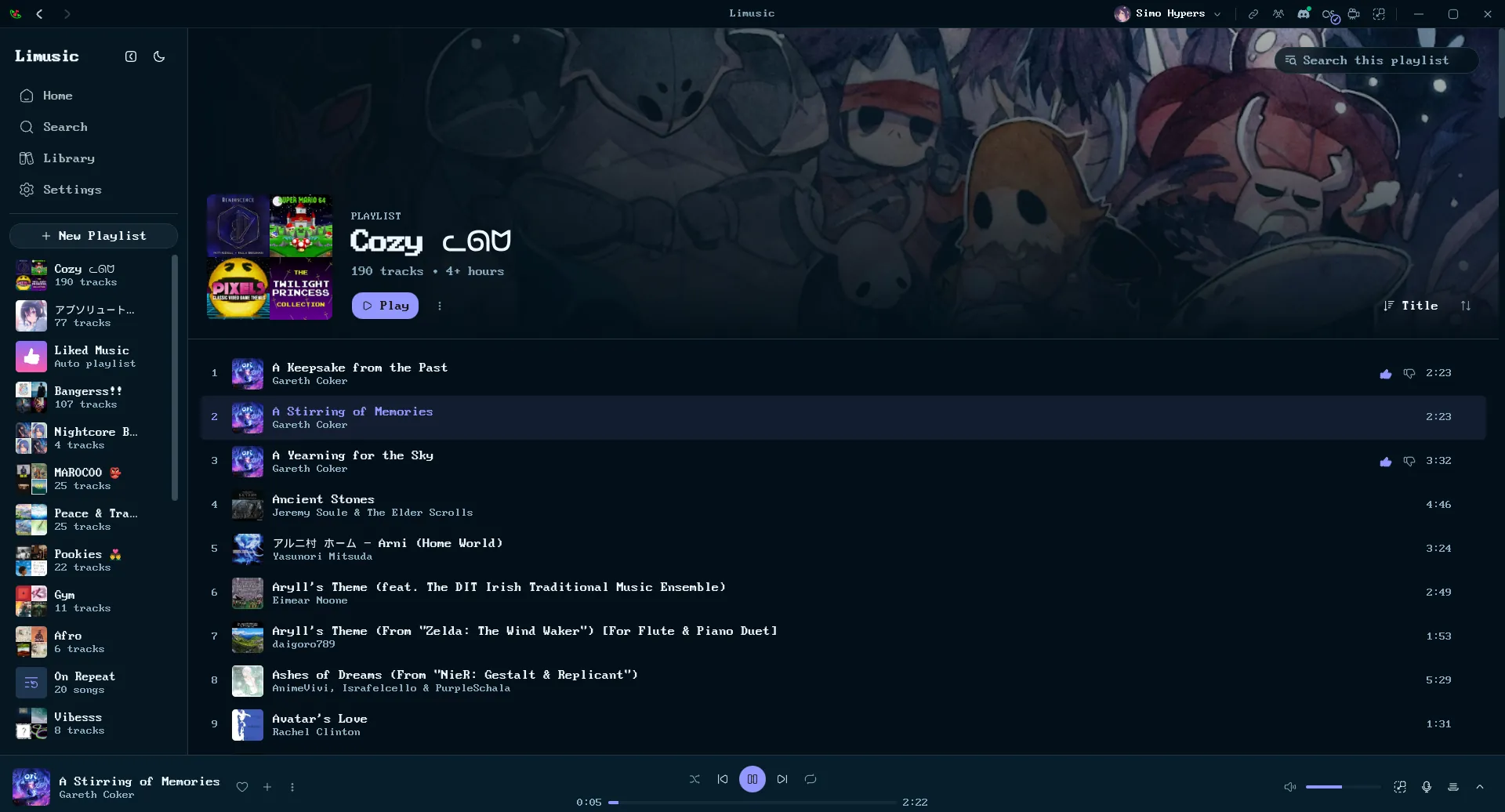
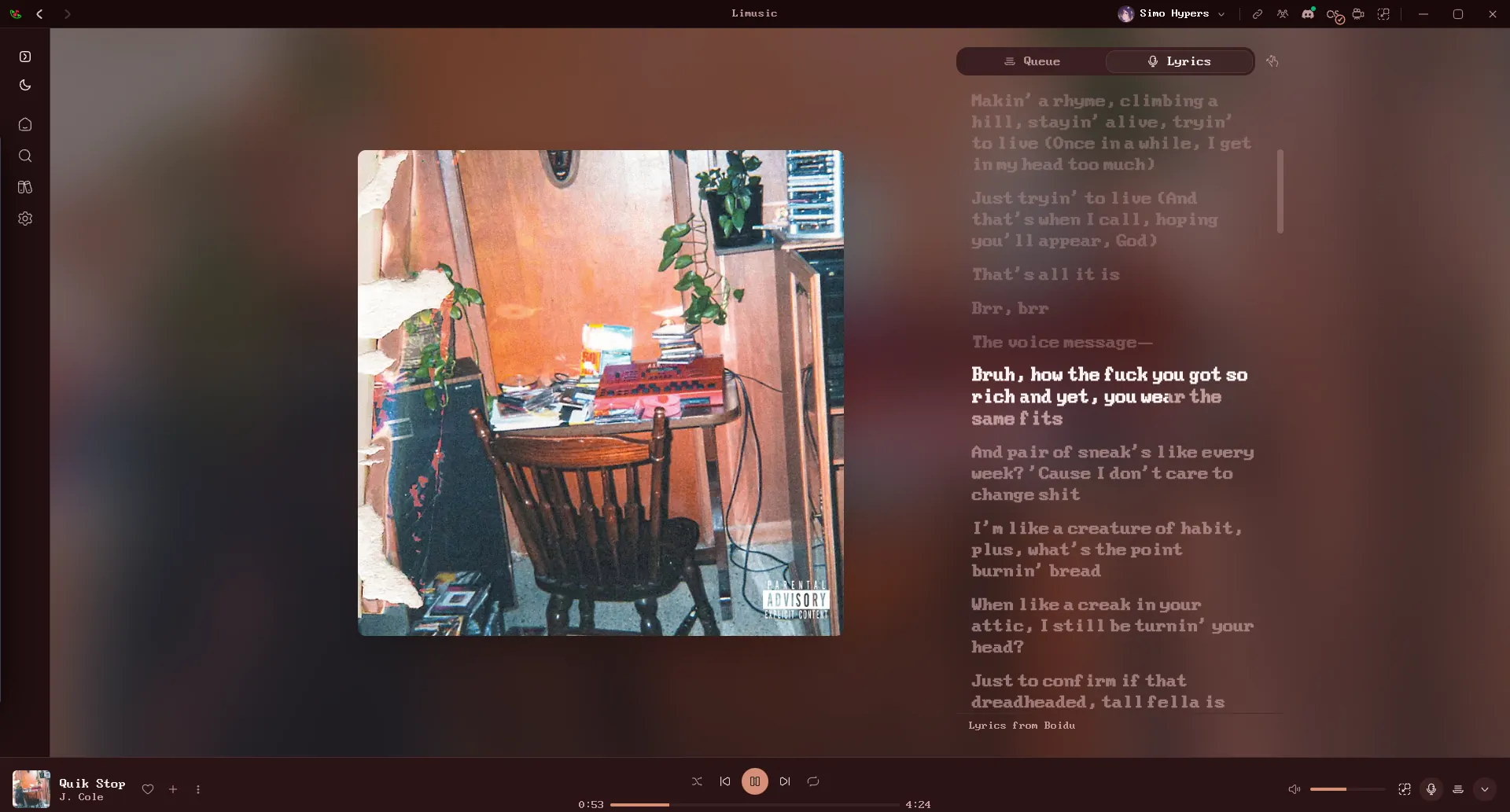
A playlist in Limusic Word-by-word synced lyrics
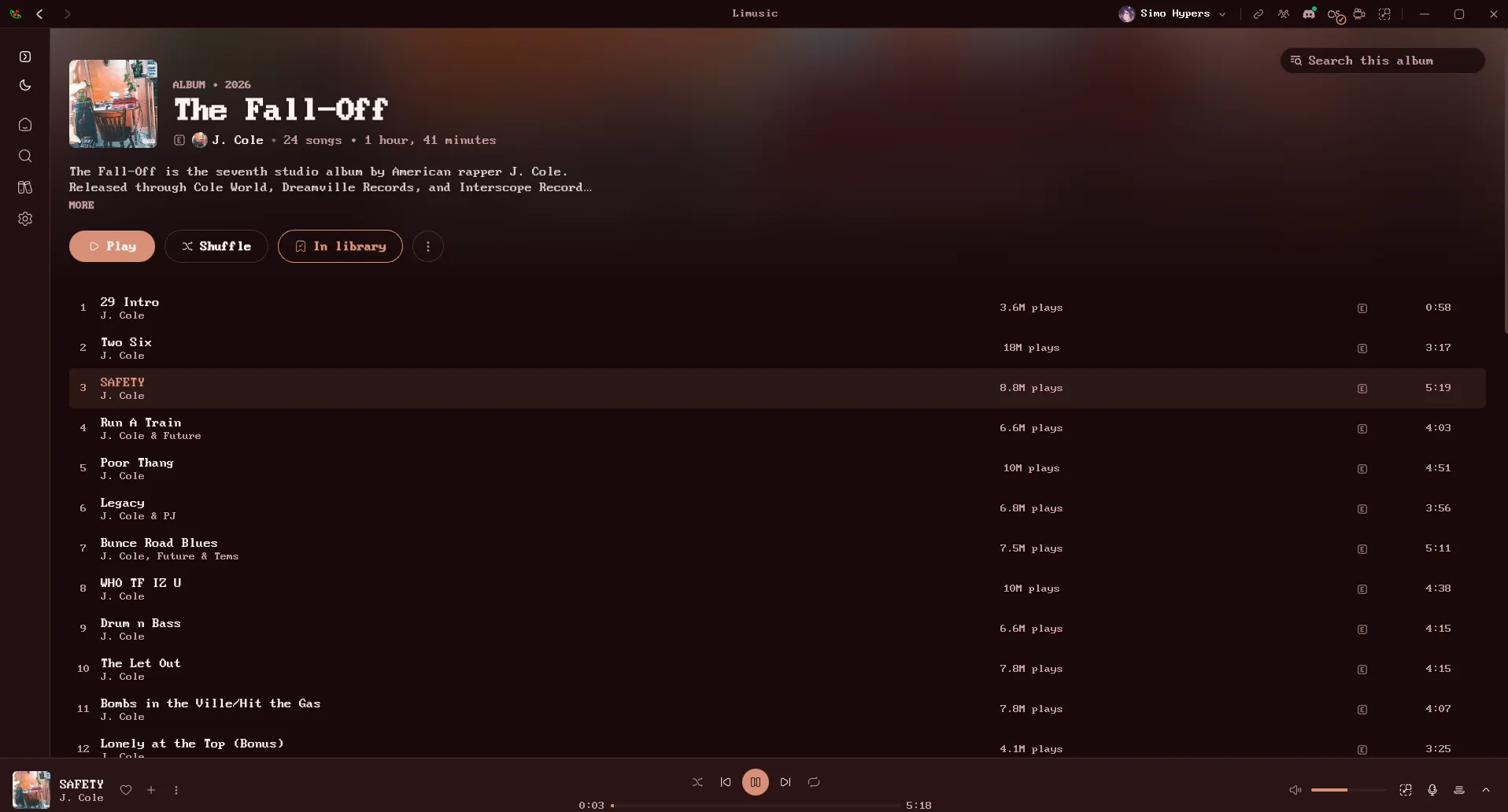
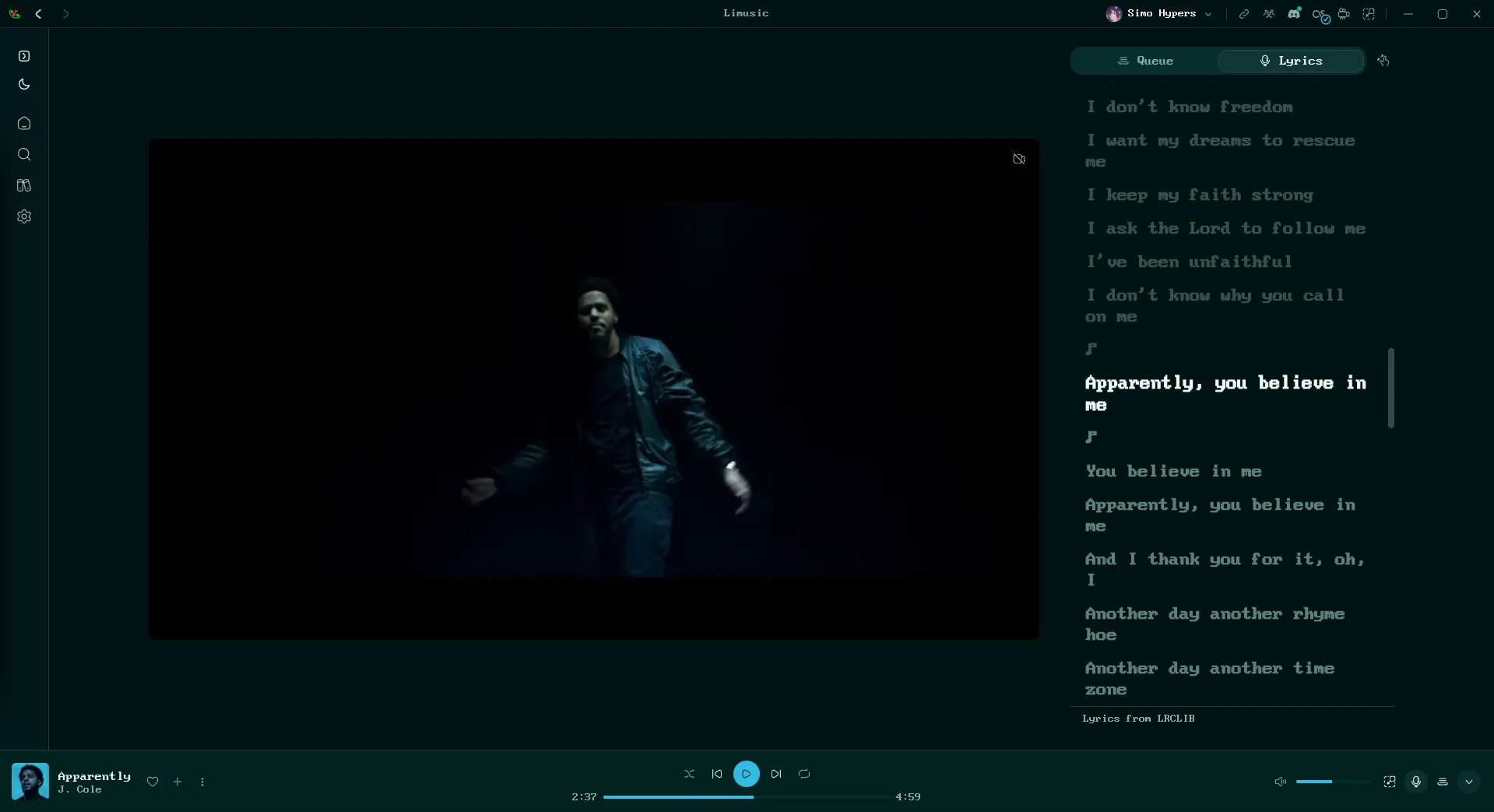
An album page, colors adapted to the cover A music video playing with lyrics alongside
---

Download & Install

| Platform | File | Notes | |---|---|---| | Windows | `-setup.exe` | Self-updating | | Windows | `.msi` | Plain installer, no auto-update | | Linux | `.AppImage` | Self-updating, libmpv bundled. Needs glibc 2.39+ (Ubuntu 24.04+, Debian 13+, Fedora 40+) | | Linux (Ubuntu/Debian) | `.deb` | No self-update. Needs Ubuntu 24.04+ / Debian 13+; apt pulls libmpv and webkit2gtk in for you | | Linux (Fedora/RHEL) | `.rpm` | Needs `mpv-libs` installed (`sudo dnf install mpv-libs`). No updates, redownload each release | | macOS (Apple Silicon) | `.dmg` | Self-updating. Unsigned, so the first launch needs `xattr -dr com.apple.quarantine /Applications/limusic.app` | | macOS (Intel) | none | Build from source, see [docs/BUILD-PLATFORMS.md](docs/BUILD-PLATFORMS.md) | Community-maintained repositories, packaged and updated by their maintainers rather than by this project: | Platform | Source | Notes | |---|---|---| | Linux (Arch) | [AUR](https://aur.archlinux.org/packages/limusic-bin) | `yay -S limusic-bin`. Maintained by [@xiryuudev](https://github.com/xiryuudev), updates through pacman | | Linux (Fedora COPR) | [COPR](https://copr.fedorainfracloud.org/coprs/oguzkarayemis/limusic/) | `sudo dnf copr enable oguzkarayemis/limusic` then `sudo dnf install limusic`. Maintained by [@oguzkarayemis](https://github.com/oguzkarayemis), updates through dnf | | Linux (openSUSE Tumbleweed) | [OBS](https://build.opensuse.org/package/show/home:itachi_re/limusic) | `sudo zypper ar -p 100 https://download.opensuse.org/repositories/home:/itachi_re/openSUSE_Tumbleweed/home:itachi_re.repo` then `sudo zypper install limusic`. Maintained by [@itachi-re](https://github.com/itachi-re), updates through zypper. The repo carries the maintainer's other packages too, so `-p 100` keeps it below the distro repos | --- ## Scrobbling & Discord Last.fm lives in the title bar, next to the window controls, and ListenBrainz connects from Settings ▸ Scrobbling. Both get the same cleaned-up track (the tab's preview shows what each play counts as). - **Last.fm**: click the Last.fm mark, approve Limusic in the browser tab that opens, and you're connected for good. Tracks scrobble at the halfway point (or four minutes, whichever comes first), which is Last.fm's own rule. Click again to see the account or disconnect. - **ListenBrainz**: open the Scrobbling settings, paste the user token from [listenbrainz.org/settings](https://listenbrainz.org/settings/) and connect. Plays submit as `playing_now` on start and one `single` listen at the same halfway-or-four-minutes point. A new MetaBrainz account has to verify its email first, or ListenBrainz turns every listen away (the Scrobbling tab says so). - **Discord**: click the Discord mark to toggle Rich Presence. Green dot means it's live. The card shows the track, artist, album art, and a progress bar, and it disappears when you pause. Building from source? Last.fm needs your own API credentials, and they are not in the repo. Get a key at [last.fm/api/account/create](https://www.last.fm/api/account/create) and put it in `src-tauri/lastfm.keys`: ``` LIMUSIC_LASTFM_API_KEY=your_key LIMUSIC_LASTFM_API_SECRET=your_secret ``` Without that file everything else still builds and runs; the Last.fm button just reports that it isn't configured. --- ## Lyrics Open the panel with the microphone button in the player bar, next to the queue button. It takes the same side of the window as the queue, so opening one closes the other. Lyrics come from [Boidu](https://boidu.dev) first, then [LRCLIB](https://lrclib.net), then YouTube Music's own timed lyrics, then Netease, QQ Music and Kugou, falling back to plain un-timed text when nobody has a synced version. Matching is keyed on the track's exact length, because popular songs exist as several cuts and the wrong one drifts a few seconds out. Results are cached locally, so replaying a track is instant. Boidu is the only source with per-word timings, which is what lets a line highlight word by word as it's sung. It goes first for that reason, which also means it is asked about every track you play. Turn it off in **Settings -> Playback -> Word-by-word lyrics** and the other sources still provide line-by-line lyrics. Netease additionally supplies translations, shown under each line where it has them. Note that YouTube Music's lyrics are licensed per region and are missing entirely in some countries. Where that's the case, LRCLIB does all the work. --- ## Listen Together Synced listening with friends. Everyone streams their own audio from YouTube; the room only relays play/pause, seeks, track changes and the queue. One person hosts the relay: ```bash cargo run -p sync-server # plain WebSocket on 0.0.0.0:8080 ``` Front it with something that terminates TLS (Tailscale Funnel, Cloudflare Tunnel), then paste the `wss://` URL into the Listen Together panel in the app. Rooms have join codes and the host approves every join and every track suggestion. --- ## Translations Limusic is translated on [Weblate](https://hosted.weblate.org/engage/limusic/), who host it free for libre projects. Translation status English, Spanish, French, Turkish, Brazilian Portuguese and Indonesian ship in the app today. The badge above shows everything else in flight. **Translate on Weblate, not in a pull request.** Weblate keeps its own copy of the catalogs, so a hand-edited `fr.json` merged here puts the two out of sync and the next batch of real translations arrives as a merge conflict. Weblate also shows you the English original beside each string, flags translations that went stale when the English changed, checks that placeholders like `{count}` survived, and opens the pull request for you. Anything untranslated falls back to English in the app, so partial work is safe to submit. `en.json` is the exception: it changes by hand, in whichever pull request changes the UI. Switching a finished language on in the picker takes a small code change too, see [CONTRIBUTING.md](CONTRIBUTING.md#translations). --- ## Building from Source Fedora: ```bash sudo dnf install mpv-libs mpv-libs-devel webkit2gtk4.1-devel \ gcc gcc-c++ make openssl-devel librsvg2-devel cd ui && pnpm install && cd .. cargo tauri build ``` Windows and macOS instructions live in [docs/BUILD-PLATFORMS.md](docs/BUILD-PLATFORMS.md). --- ## How It Works, Briefly - A pure Rust crate speaks YouTube's InnerTube API, impersonating several official client identities and falling back between them when one fails. - YouTube's stream URLs are protected by obfuscated JavaScript (the signature cipher and the `n` parameter) and by BotGuard attestation. Limusic runs that JavaScript where it expects to run, in a real webview, hidden, and never lets any of it touch the UI process. - Audio goes through libmpv: gapless transitions, an on-disk cache, and loudness normalization from YouTube's own metadata. - The UI is a SvelteKit SPA that only ever talks to the Rust core. It never contacts YouTube itself. --- ## Star History Star History Chart --- ## Support Limusic is free and stays free. If it earned a coffee, [ko-fi.com/simohypers](https://ko-fi.com/simohypers) is where to leave one. --- ## Disclaimer This project is not affiliated with, funded, authorized, endorsed by, or in any way associated with YouTube, Google LLC, or any of their affiliates and subsidiaries. All trademarks, service marks, and intellectual property rights referenced in this project belong to their respective owners. --- ## License [GPL-3.0](LICENSE)