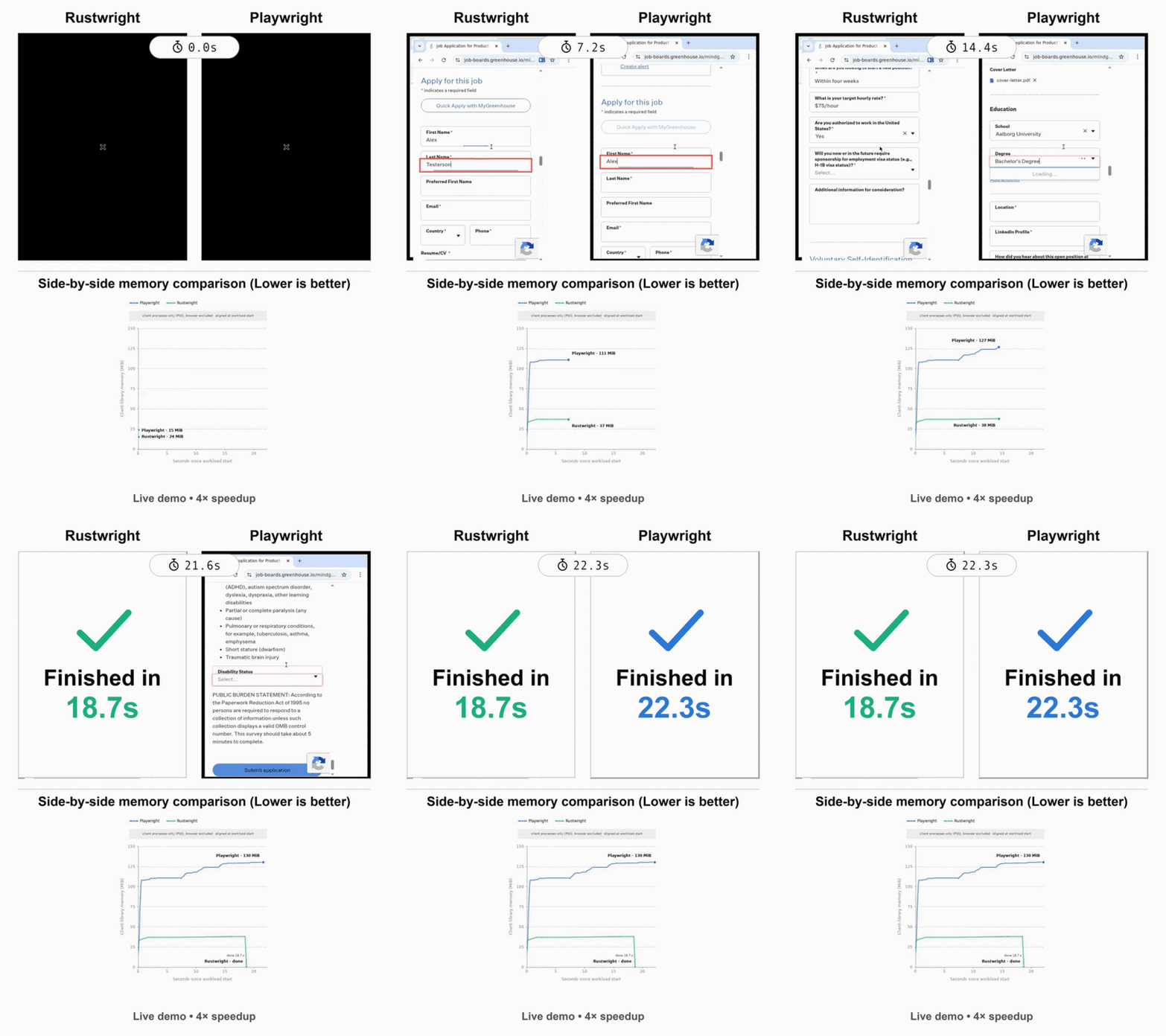
**A Rust rewrite of Playwright**, a popular browser automation library. Rustwright is interoperable with Playwright but runs on an in-process Rust CDP engine — **[2.55× faster](#benchmarks)** and **[70% less memory](BENCHMARK.md#client-memory-form-fill-diagnostic)** (no Node driver), with no Playwright automation fingerprint. Alpha; Chromium-only.
[](#project-status)
[](https://github.com/Skyvern-AI/rustwright/actions/workflows/test.yml)
[](LICENSE)
[](pyproject.toml)
[](https://www.npmjs.com/package/rustwright)
[](#limitations)
[](https://discord.gg/fG2XXEuQX3)
[](https://pypi.org/project/rustwright/)
[](https://www.npmjs.com/package/rustwright)
[](https://crates.io/crates/rustwright)
[](https://crates.io/crates/rustwright-core)
---
## What is Rustwright?
Rustwright is a browser automation library for Python and Node.js that keeps the Playwright API you already know but drives Chromium from a **native Rust engine** speaking raw [Chrome DevTools Protocol](https://chromedevtools.github.io/devtools-protocol/) — no driver subprocess in the path.
```text
playwright-python: your code ──pipe──► Node driver ──CDP──► Chromium
rustwright: your code ────────── raw CDP ──────────► Chromium
```
## Quickstart
Rustwright is interoperable with Playwright — install it, change one import, and your existing code runs on the Rust engine.
**Python**
```bash
pip install rustwright
python -m rustwright install chromium
```
```diff
- from playwright.sync_api import sync_playwright
+ from rustwright.sync_api import sync_playwright
with sync_playwright() as p:
browser = p.chromium.launch(headless=True)
page = browser.new_page()
page.goto("https://example.com")
print(page.title())
browser.close()
```
**Node.js** (experimental)
Install from npm:
```bash
npm install rustwright
```
The Node binding drives an existing Chromium/Chrome — point Rustwright at it with `RUSTWRIGHT_CHROMIUM`, `CHROME`, or `CHROMIUM`. Prefer to build from source? `git clone` the repo and run `npm install && npm run build` in `node/`.
```diff
- import { chromium } from 'playwright';
+ import { chromium } from 'rustwright';
const browser = await chromium.launch();
const page = await browser.newPage();
await page.goto('https://example.com');
console.log(await page.title());
await browser.close();
```
See the network-independent [`examples/quickstart.js`](examples/quickstart.js) example. After building the Node binding from source, run it from the repository root with `node examples/quickstart.js`.
Only a subset of the API surface is bridged — see [Limitations](#limitations).
**CLI** (agent-focused)
Install the native `rustwright-cli` with one command:
```bash
curl -fsSL https://raw.githubusercontent.com/Skyvern-AI/rustwright/main/install.sh | sh
```
Then drive a persistent Chromium session from your shell or an agent loop:
```bash
rustwright-cli open https://example.com
rustwright-cli snapshot # compact page tree with @eN refs
rustwright-cli click @e1
rustwright-cli close
```
See [`cli/README.md`](cli/README.md) for the full command surface. For a Model Context Protocol
server, use the standalone [`rustwright-mcp`](mcp/) package.
## Why Rustwright?