**Overview of JS Inheritance**
-------
Inheritance in JavaScript is achieved via the **prototype chain**. Each object may have a prototype from which it inherits some additional behavior (in the form of additional properties). An object's prototype is just another object which, in turn, has its own prototype. Even though **an object can only have *one* prototype**, because of this chaining effect, objects not only inherit behavior from their own prototype, but every prototype in the prototype chain until eventually you hit an object with no prototype (usually, Object.prototype).
JavaScript prototypal inheritance is...
- **Single Inheritance**
- **Multi-level Inheritance**
- **Live Inheritance**
The 1st bullet makes composition impossible and can force a programmer into logical inconsistencies to achieve a desired behavior. These restrictions do not exist in systems that allow multiple inheritance.
As an example, consider Beary Potter who is both a Bear and a Wizard. With single inheritance, if you want Beary Potter to inherit from both Bear AND Wizard, either Bear must inherit from Wizard or Wizard must inherit from Bear. Obviously, this is ridiculus. Multiple inheritance allows you to compose Bear and Wizard in order to create Beary Potter who is both.
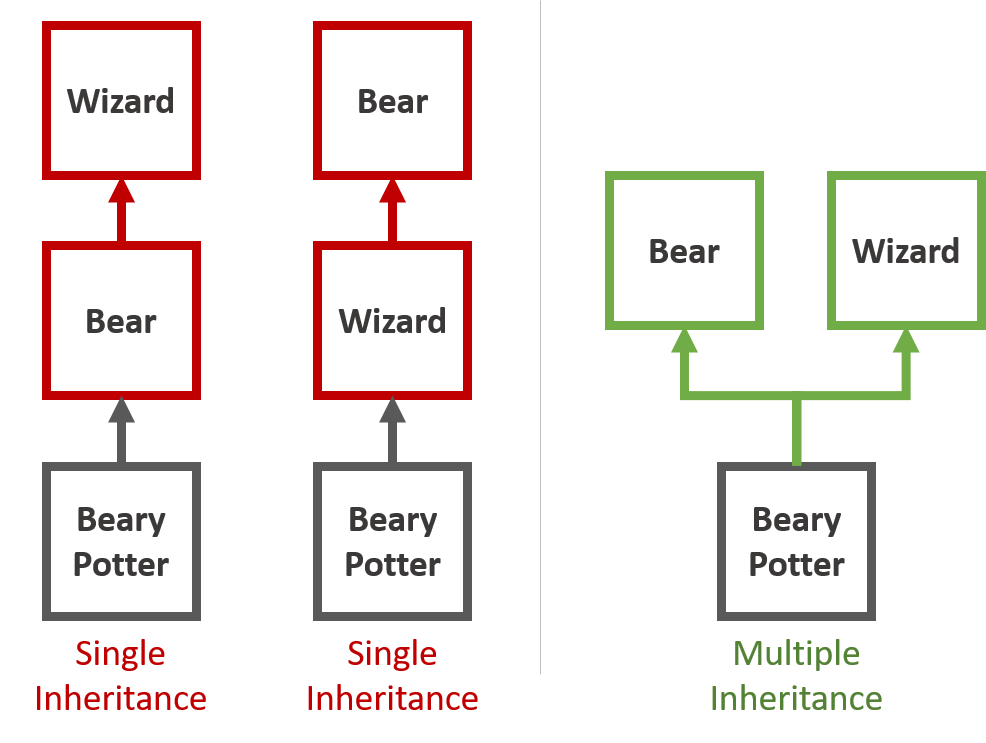
Not all bears are wizards. Not all wizards are bears. Beary Potter is both.
The 3rd bullet item, "Live Inheritance", is simultaneously awesome and awful. Any changes to a prototype property is "automagically" changed in all objects which contain that prototype in its prototype chain. This is awesome because you can have a whole bunch of objects share the same behavior. Changing the prototype behavior changes the behavior of all of the other objects. Yet, this is awful in that prototypes provide no way to simply stamp out instances of the prototype. To stamp out instances, you have to use the **new keyword** and a **Constructor** function (which then lets you keep some live properties by matching the constructor's prototype property with an instance's internal prototype). Personally, I don't like the *feel* of new keyword and constructors (and by extension, ES6 classes). To me it seems like a square peg forced into the round hole that is the rest of JS for the purpose of trying to replicate the instancing functionality that exists in OOP classes.
> ######***QUICK NOTE |*** **The term "property" is overloaded.**
> ###### Officially, per ES6, a property is a key-value pair on an object. That value can be function! Often key-value pairs of an object are referred to as either "properties" or "methods" which may lead to confusion.
> ###### In this documentation, I use these definitions which are in keeping with ES6 definitions:
> ###### - **Property:** A key-value pair on an object (either functional, or non-functional) [[ES6 "Property" definition](http://www.ecma-international.org/ecma-262/6.0/#sec-property)]
> ###### - **Data-Property**: A key-value pair whose value IS NOT a function [Has no corresponding ES6 defintion]
> ###### - **Method**: A key-value pair whose value IS a function [[ES6 "Method" definition](http://www.ecma-international.org/ecma-262/6.0/#sec-method)]
**What does mxObject do differently?**
--------------------------------------
A mxObject *(pronounced mix object)* has two ways to inherit functionality (ie. properties) from another mxObject, object, or array: mixins and extensions. A mxObject can inherit from multiple mixins, multiple extensions, or any combination of mixins and extensions.
####**Mixins**
A mxObject maintains a list of mixed-in, "mixin" objects in an internal array [ `.__mixins__` ]. Accessing properties from mixed-in objects is virtually identical to accessing properties from objects in the prototype chain. The mxObject looks for a property on itself. If it doesn't find it, it checks each element in its mixin array. If the property is found on a mixin, it is returned. This process does NOT rely on JavaScript prototypes, so successive elements in the mixin array do NOT inherit from one another.
- Mixins provide **single-level, multiple inheritance**
- Mixin inheritance is "live" in the same way that prototypical inheritance is "live"
Beary Potter inherits from Bear, then Wizard, then Student, etc.., but does not inherit *deeply*. Beary does not inherit objects that are mixed into Bear or Wizard, or Student, etc....
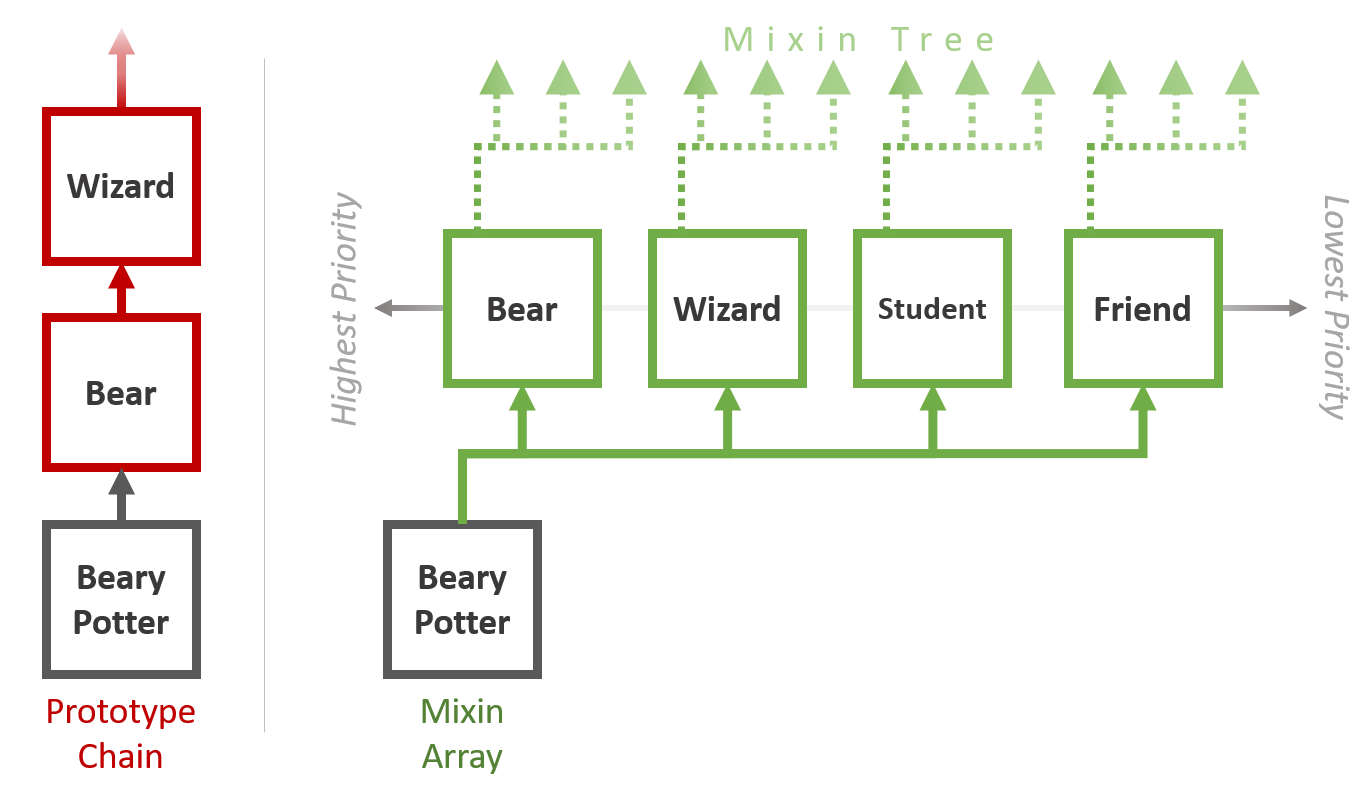
The mixin array is like the prototype chain knocked on its side. Jenga.
**Mixin priority**
Mixin collisions (properties keys that are the same on two or more mixins) are resolved in a very similar way that collisions are resolved on the prototype chain. The value for the first key that matches is returned. In this way, the mixin array is ordered by priority with the 0th element being the highest priority. In the above example, Beary Potter is a bear first, then a wizard, then a student, then a friend. If you're screaming at your screen right now, "BEARY POTTER IS, FIRST AND FOREMOST, A FRIEND!!", I completely agree with you...
// pop Friend off the end of the mixin array and make it Beary's 1st priority
BearyPotter.insertMixin(0, BearyPotter.__mixins__.pop())
While reordering the prototype chain is possible (but strongly not recommended), reordering the mixin array is like reordering any other array.
**Mixin Tree (and implications of single-level inheritance)**
Because an mxObject can mix-in another mxObject (which has it's own mixins), a tree like structure (a mixin tree) is formed. While the tree is a multi-level structure, it is important to remember that mixin inheritance is single-level inheritance. An mxObject only searches for properties on itself and the objects immediately mixed into it. It DOES NOT traverse the mixin tree to search for properties.
With multi-level inheritance (like the prototype chain), all parent-child, sub-class, "is a" relationships are maintained implicitly. When you are trying to implement this logical sub-typing, multi-level inheritance implicitly enforces these relationships. For example, if Bear is an Animal, we mean to strictly require that all Bears be Animals -- making Animal a prototype of Bear accomplishes this.
With mixins (single-level inheritance), relationships are shallow:
- Mix Animal into Bear -- *Bear is an Animal, Bear has all properties of Animal*
- Mix Bear into Beary Potter -- *Beary Potter is a Bear, Beary has all properties of Bear*
- Beary Potter **IS NOT** an animal -- *Beary Potter won't have access to Animal properties*
Beary Potter IS NOT an animal just because Bear is an Animal. Because inheritance relationships are single level, "is a" relationships are not implicitly passed down the chain. If you want Bear Potter to be an Animal, you must do so **explicitly**; that is, Animal must be contained in Beary Potter's mixin array.
**Flattening the Mixin Tree (to mimic multi-level inheritance)**
Replacing an mxObject's mixin array with the flattened mixin tree effectively mimics multi-level inheritance. mxObject provides two methods for traversing the mixin tree and flattening it into a single array:
- **getMixinsDeep( )** Depth-first style flattening
// Example of depth first flattening
const Animal = mxObject( )
const Bear = mxObject( ).mixin(Animal)
const Wizard = mxObject( )
const BearyPotter.mixin(Bear, Wizard)
// With depth-first flattening Animal is a higher priority than Wizard
BearyPotter.getMixinsDeep() // [ Bear, Animal, Wizard ]
// Beary is now a Bear, then an Animal, then a Wizard
BearyPotter.__mixins__ = BearyPotter.getMixinsDeep() //[ Bear, Animal, Wizard ]
- **getMixinsBroad( )** Breadth-first style flattening
// Example of depth first flattening
const Animal = mxObject( )
const Bear = mxObject( ).mixin(Animal)
const Wizard = mxObject( )
const BearyPotter.mixin(Bear, Wizard)
// With breadth-first flattening Wizard is a higher priority than Animal
BearyPotter.getMixinsBroad() // [ Bear, Wizard, Animal ]
// Beary is now a Bear, then a Wizard, then an Animal
BearyPotter.__mixins__ = BearyPotter.getMixinsBroad() //[Bear, Wizard, Animal]
**Sibling Inheritance (two types)**
An interesting byproduct of mixin inheritance is that it allows you to easily clone inheritance from objects you might logically consider an instance. While Beary Potter inherits from Bear and Wizard (parent-child style), a Beary Potter clone can copy the original Beary Potter and inherit from whatever Beary inherits (sibling style). With mxObject, you can does this in two ways **(1)** **loosely couple** a clone to its sibling, **(2)** **tightly couple** a clone to its sibling.
Continuing with the Beary Potter example, let's say Dumbleboar and Severus Snake decide Beary Potter will need to clone himself a bunch in order to defeat Moledermort. Each provides Beary with a potion...
*Severus Snake's potion for **loosely coupled clones**...*
const BearyPotter = mxObject().mixin(Bear, Wizard)
// Loosely coupled clones mixin all objects in the original's mixin array
const BearyClone = mxObject().mixin(...[BearyPotter.__mixins__])
// When Beary casts a spell to sprout wings and fly...
BearyPotter.mixin(Wings)
BearyPotter.fly()
// The clones are not in sync with the original and do not also gain wings
BearyClone.fly() // ERROR - clone doesn't have access to a fly property
*Dumbleboar's potion for **tightly coupled clones**...*
const BearyPotter = mxObject().mixin(Bear, Wizard)
// Originals and tightly coupled clones reference the same mixin array
const BearyClone = mxObject()
BearyClone.__mixins__ = BearyPotter.__mixins__
// When Beary casts a spell to sprout wings and fly...
BearyPotter.mixin(Wings)
BearyPotter.fly()
// The clone also sprouts wings and can now fly...
BearyClone.fly() // No error
####**Extensions**
Extending a mxObject with another mxObject, object, or array simply **copies all properties** of the extension onto the mxObject. In fact, the mxObject.extend( ) is virtually identical to Object.assign( ) (and uses Object.assign( ) in it's implementation). The primary difference between Object.assign( ) and mxObject.extend( ) is that mxObjects maintain an internal array of extensions [ .\__extensions__ ]. This allows you to check if a mxObject has been extended from another object with mxObject.isExtensionOf( ) -- this is not possible using plain Object.assign( ).
- Extensions provide **instance-like, stamping/copying of properties**
- mxObjects maintain a history of extensions
- Extensions can be overwritten
- Extensions can be re-extended
**Extension vs. new Constructor( )**
Both extensions and the `new Constructor()` pattern allow you to add a predefined set of properties to an object. For the sake of this comparison, I'm going to ignore the that constructors provide static/live properties via `Constructor.prototype` because with mxObject, that is provided with mixins not extensions. So barring the automatic setting of a prototype, constructor functions...
- Can set predefined properties with default values
`Constructor(){ this.prop = 'default' }`
- Allow you to override default values for a particular instance
`Constructor(default = 'default'){ this.prop = default }`
With extensions, the object's properties are the default values and changes to defaults can be immediately overwritten...
// set defaults
const Extension = {prop: 'default'}
const instance = mxObject().extend(Extension)
vs.
// set 'custom' defaults by immediately overriding
const Extension = {prop: 'default'}
const instance = mxObject().extend(Extension, {prop: 'new value'})
Of course, if you want to keep the benefits that Constructor has by way of being a function, you can always extend an object that is returned from a function...
function makeExtension(someArg1 = 'value', someArg2 = 'another value'){
let closureVariable = 'some value'
// ** put some logic here **
// return some extension created from function's logic
return SomeExt
}
// Call the function when extending into an instance
const instance = mxObject().extend( makeExtension() )