# DSH Quick Model Selector
 A DSH plugin by 一只橘 oranji.
English · [中文](README.md)
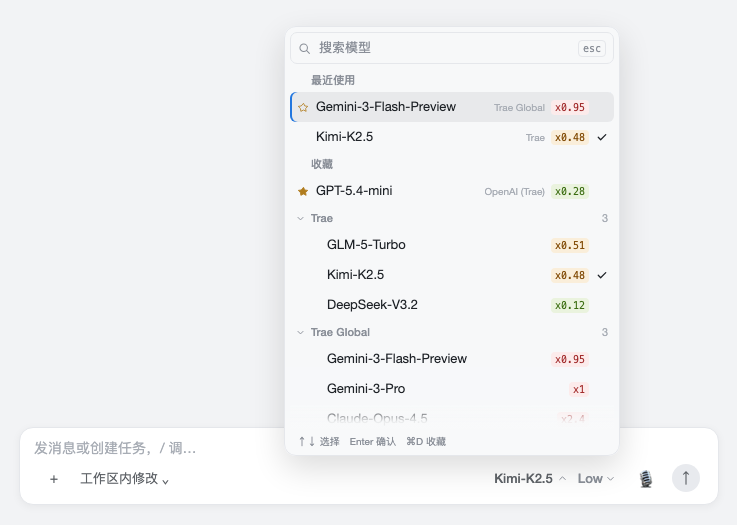
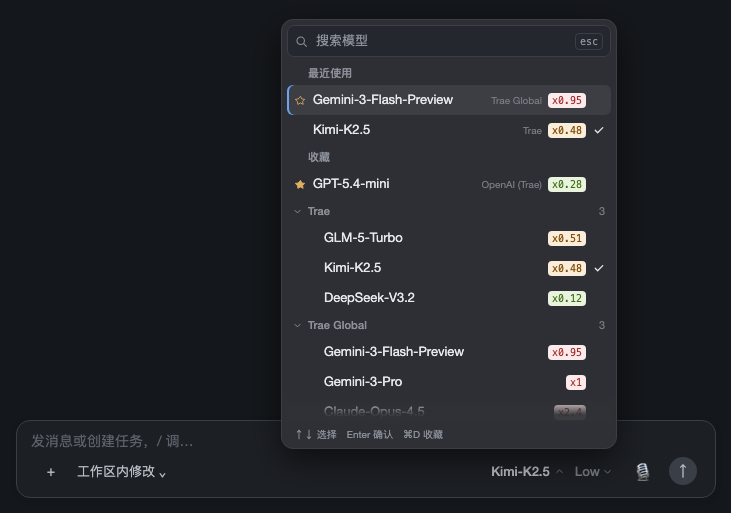
Takes over the model seat at the bottom right of the DSH composer: instead of one long flat list of every provider, you get a search-first panel with favorites and recents pinned on top, collapsed provider groups, and reasoning effort as a separate second control. Built for setups with dozens or hundreds of models.
## Features
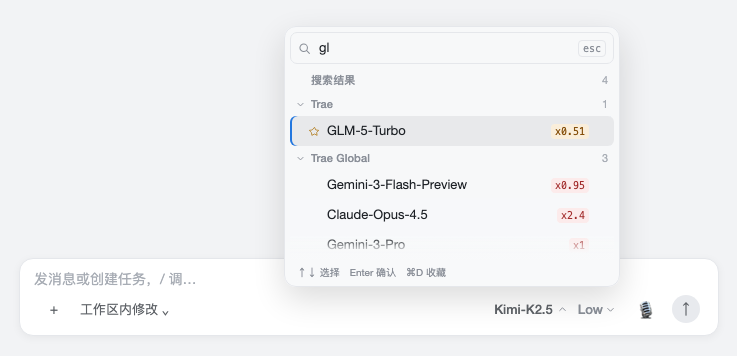
- **Search first** — the panel opens with the cursor in the search box. Matching covers model name, provider name and model id; space-separated terms are ANDed.
- **Recents, then favorites** — what you just used sits at the very top, favorites right below it.
- **Collapsible groups** — providers with more than six models start collapsed; the group holding the current model or a favorite stays open, and manual folding is remembered.
- **Multiplier badges** — an `x0.28` token in the model name becomes a row-end badge, colored ≤0.3 green, ≤0.8 amber, >0.8 red.
- **Separate reasoning effort** — its own button, popover and focus; hidden entirely when the current model has no reasoning support.
- **Keyboard** — `⌘1–⌘9` quick pick, `⌘D` favorite, `Tab` fold, arrows plus Enter.
- **Narrow rows stay orderly** — the model button has a fixed 150px width with an ellipsis and its full name on hover. It shrinks further when necessary to leave room for the microphone and send button; reasoning effort moves into the model menu and returns beside it when space permits.
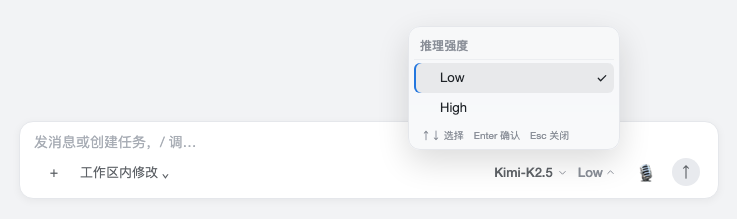
Narrow rows keep the model name and fold effort into the menu:

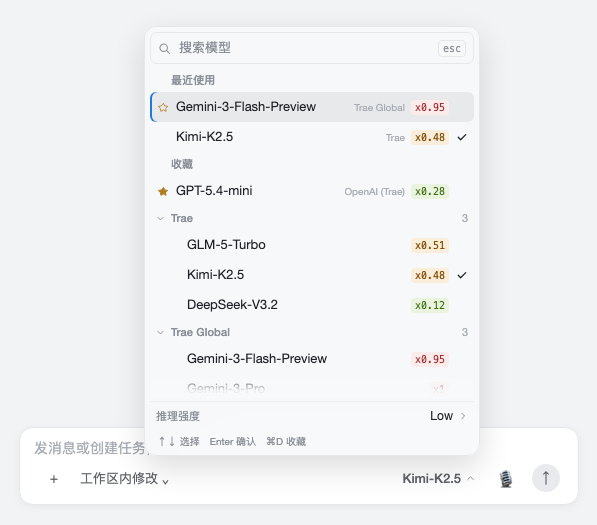
Same layout in dark theme:
## Install
**Plugin page (recommended)** — Settings → Plugins → Add plugin, and put this in "package name or address":
```
https://github.com/SnailMann/dsh-quick-model-selector
```
Then restart DSH Desktop once as prompted. The plugin appears as `dsh-quick-model-selector` under installed plugins and can be toggled or removed at any time.
**Command line** — same thing, where `web` is the profile DSH Desktop uses:
```sh
dsh plugin --profile web add github:SnailMann/dsh-quick-model-selector
```
`dist/` is committed, so installing needs no build step and triggers no pnpm build-script approval.
**From source** — when you want to change the code:
```sh
git clone https://github.com/SnailMann/dsh-quick-model-selector.git
cd dsh-quick-model-selector
dsh plugin --profile web add .
```
After editing `src/`, run `npm run build` and restart DSH.
Verified on DSH Desktop 0.12.1 / Harness 0.2.1-rc.2: visible and toggleable in the plugin list, one composed plugin row when enabled and none when disabled.
## Usage
Click the model button at the bottom right of the composer; the rest is in this table:
| Key | Action |
| --- | --- |
| Typing | Filters the list |
| ↑ / ↓ | Move the highlight (focus stays in the search box) |
| Enter | Select the highlighted row |
| Esc | Clears the search term first, closes on the second press; closes directly inside the effort popover |
| Tab | With no search query, fold / unfold the current group; press again to restore it (Shift+Tab moves to the previous control) |
| ⌘1 – ⌘9 (or Ctrl+1–9) | Pick the Nth visible row |
| ⌘D (or Ctrl+D) | Favorite / unfavorite the highlighted row |
The mouse works too: click a row to select, click the star to favorite, click a group header to fold.
Preferences live in `localStorage` under `dsh-quick-model-selector:prefs:v1`, shared across sessions; upgrading from the old package name `dsh-model-palette` migrates the old key automatically, keeping favorites and folded state.
## Uninstall
```sh
dsh plugin --profile web remove dsh-quick-model-selector
```
Only its own registration is removed — sessions, model config and preferences stay, and the built-in model picker returns after a restart.
## Development
After editing `src/`, run `npm run build` then `npm test`; `node scripts/preview.mjs ` renders the real components into static pages for layout work.
Browser interaction tests use React from the local DSH profile and Playwright. They cover keyboard input, toolbar widths from 320–800px, model-name truncation, changing peer labels, and menu boundaries. Provide Playwright through `NODE_PATH` before running `npm test`; set `QMS_BROWSER_CHANNEL=chrome` to use system Chrome. Missing dependencies explicitly skip browser checks; these checks do not replace verification in DSH. Static previews do not run layout observers; verify responsive behavior in the browser and the real host.
## License
MIT