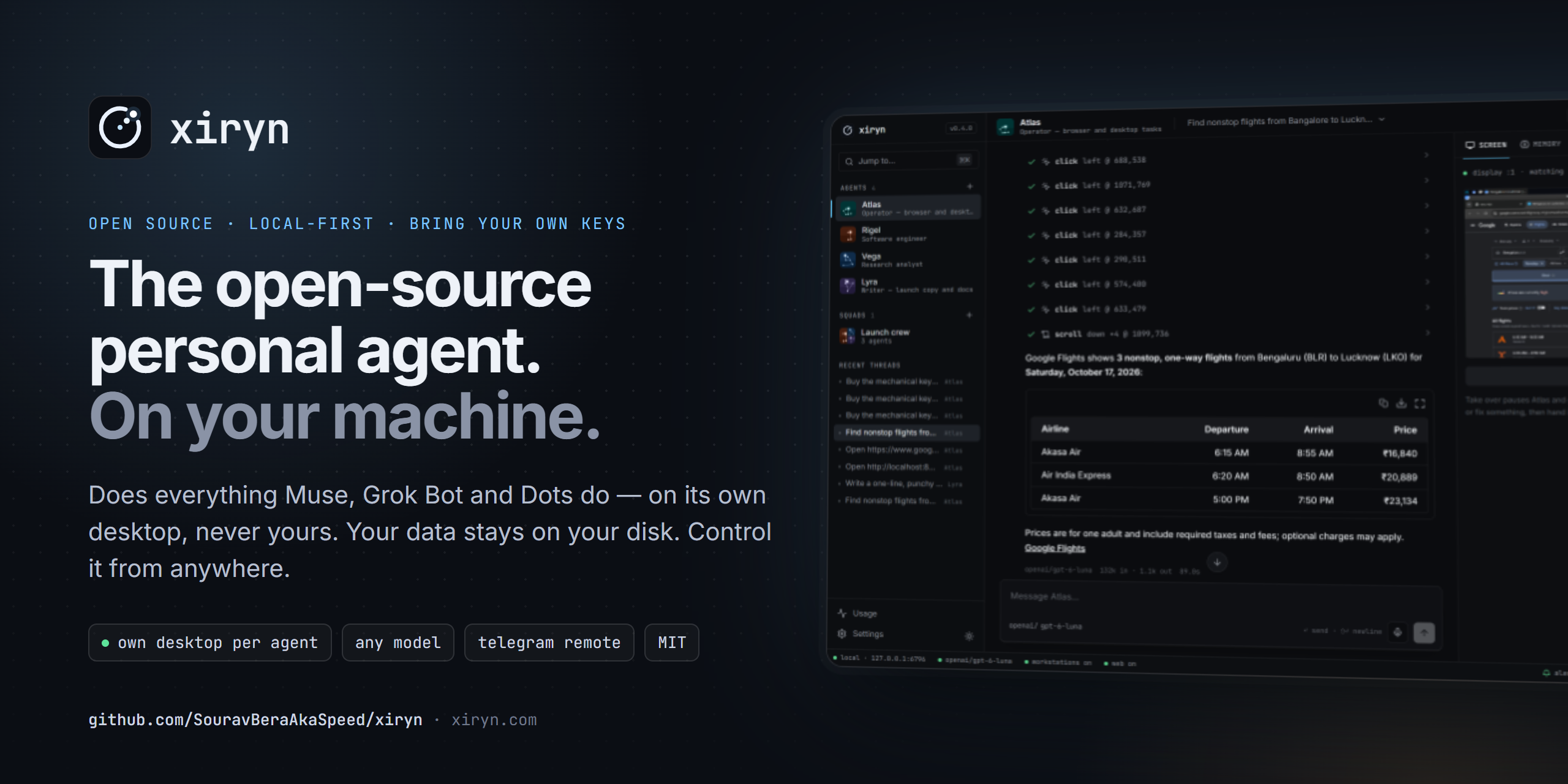
The open-source personal agent. It does everything Muse, Grok Bot and Dots do — on your own computer.
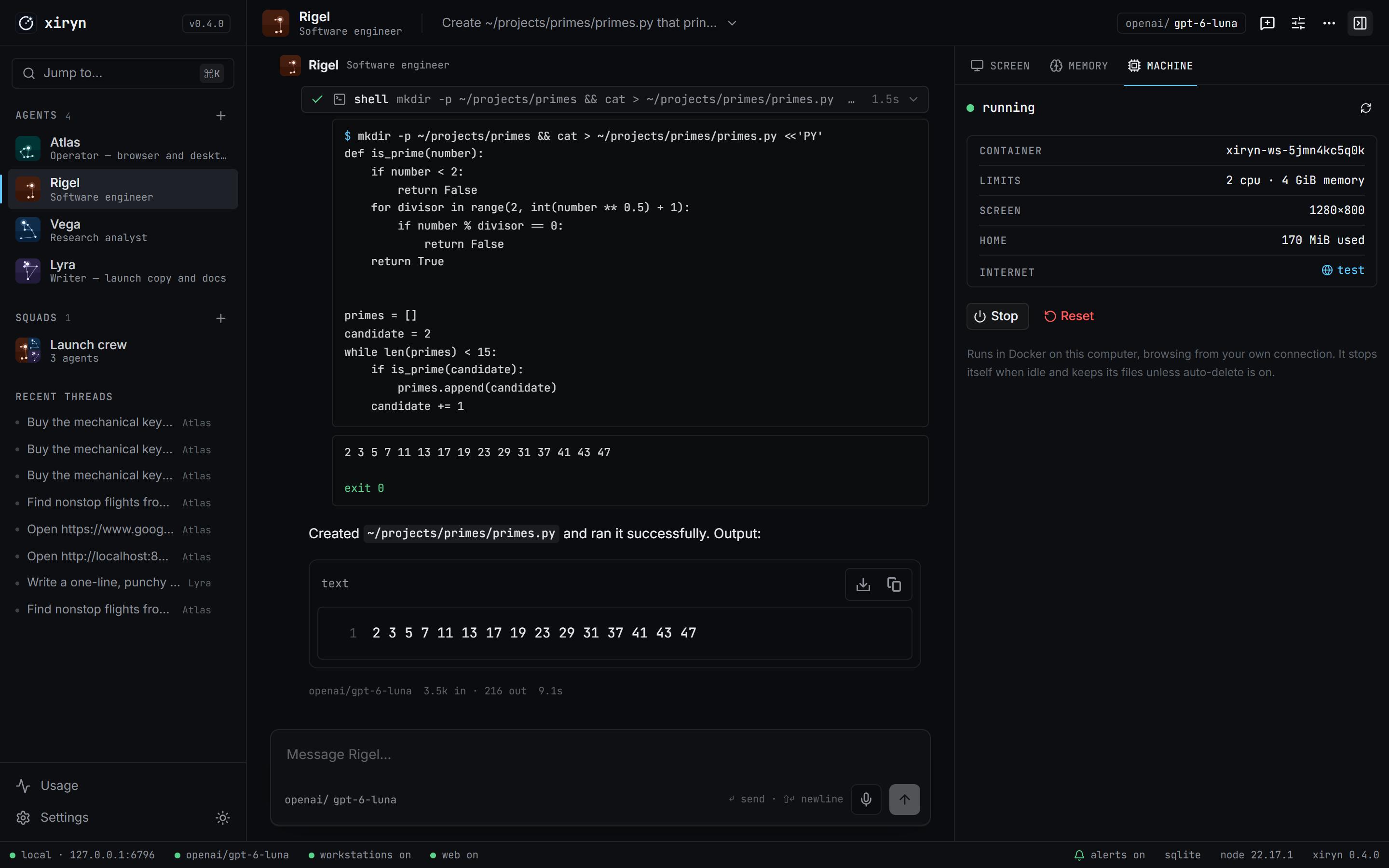
Each agent gets its own Linux desktop in Docker, so it works in the background and never interrupts what you're doing on your laptop.
Your data stays on your disk. Bring any model. Control it from anywhere through Telegram.


xiryn.com · Quick start · Why Xiryn · Compare · Telegram · Architecture · Contribute

|
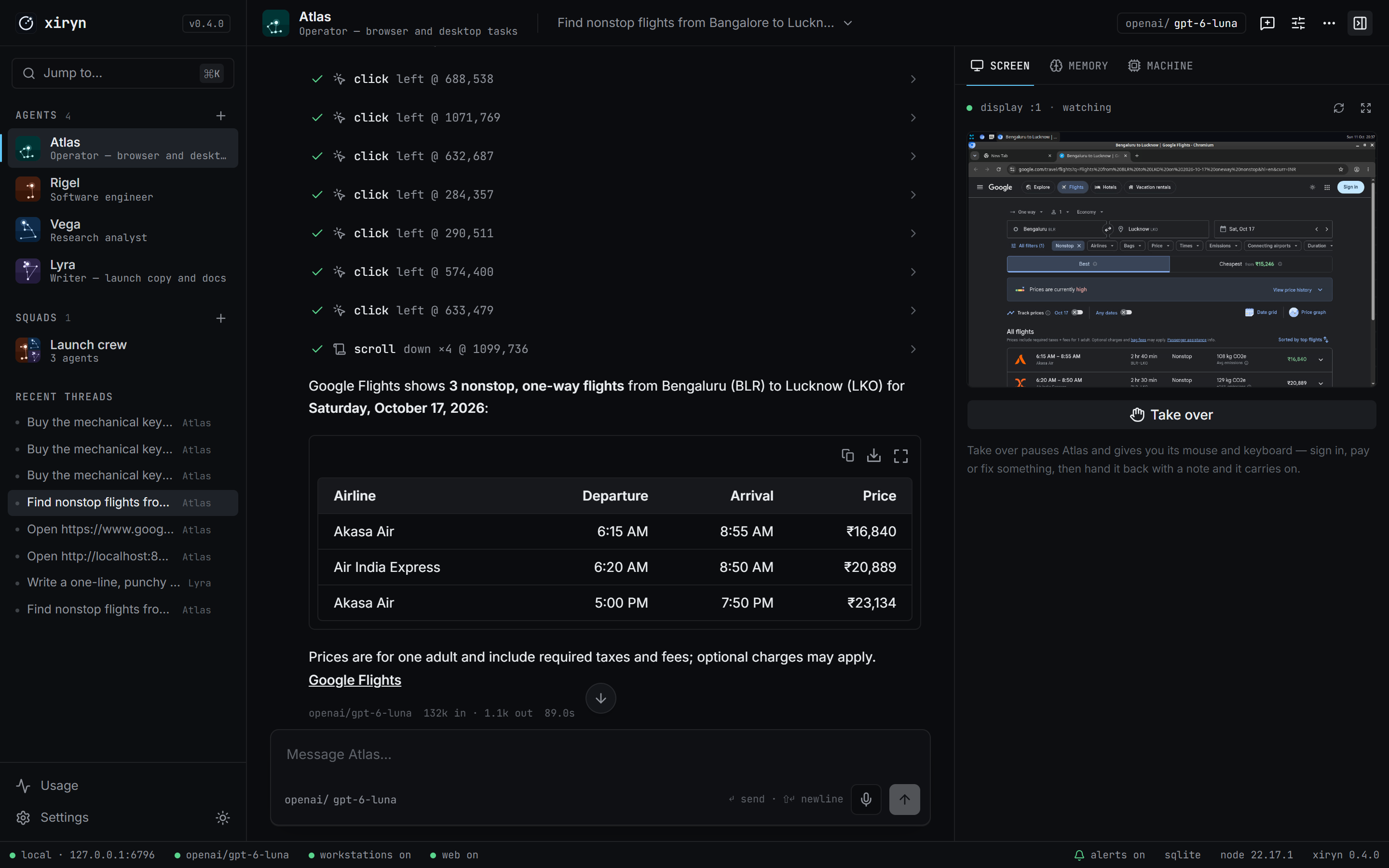
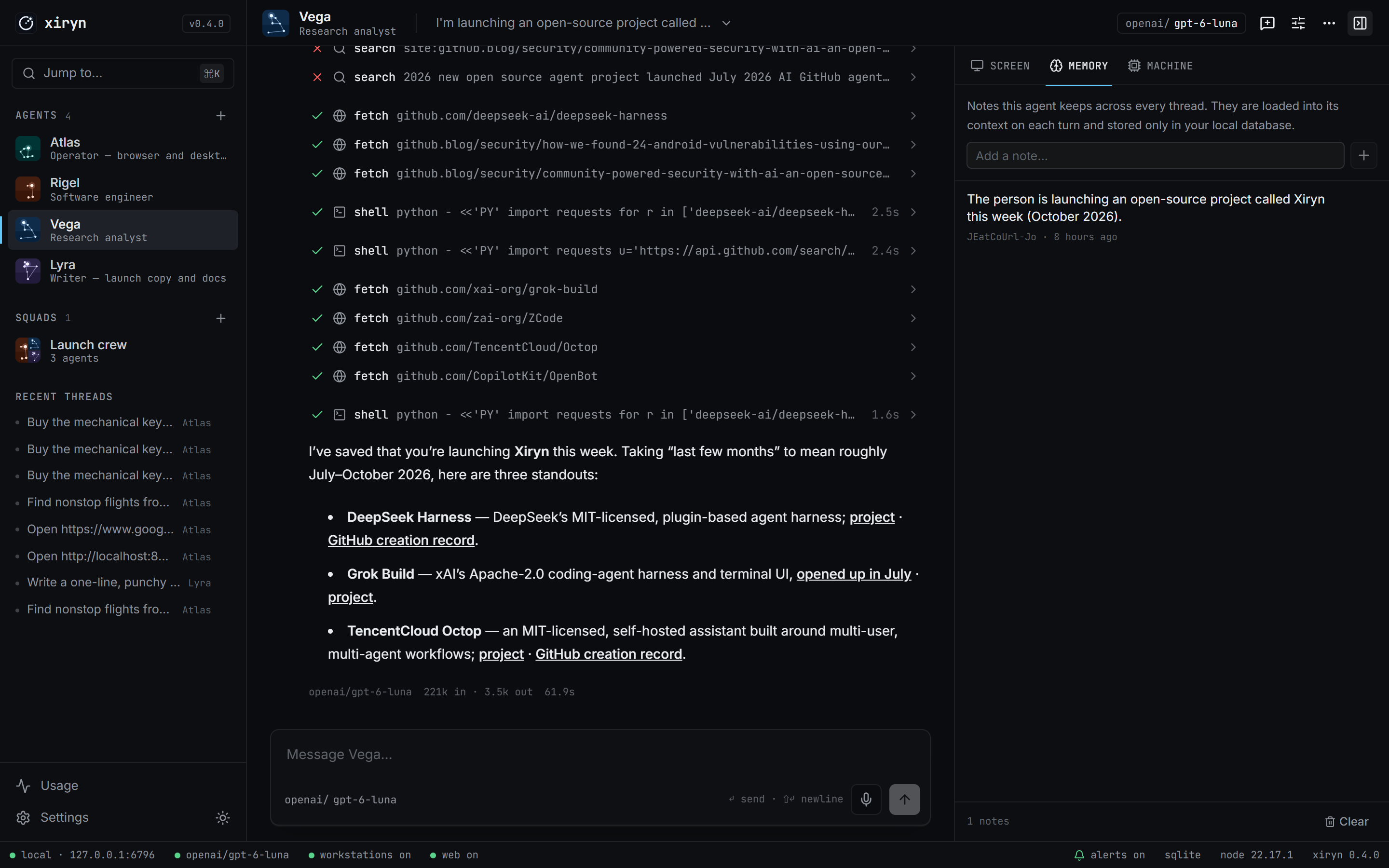
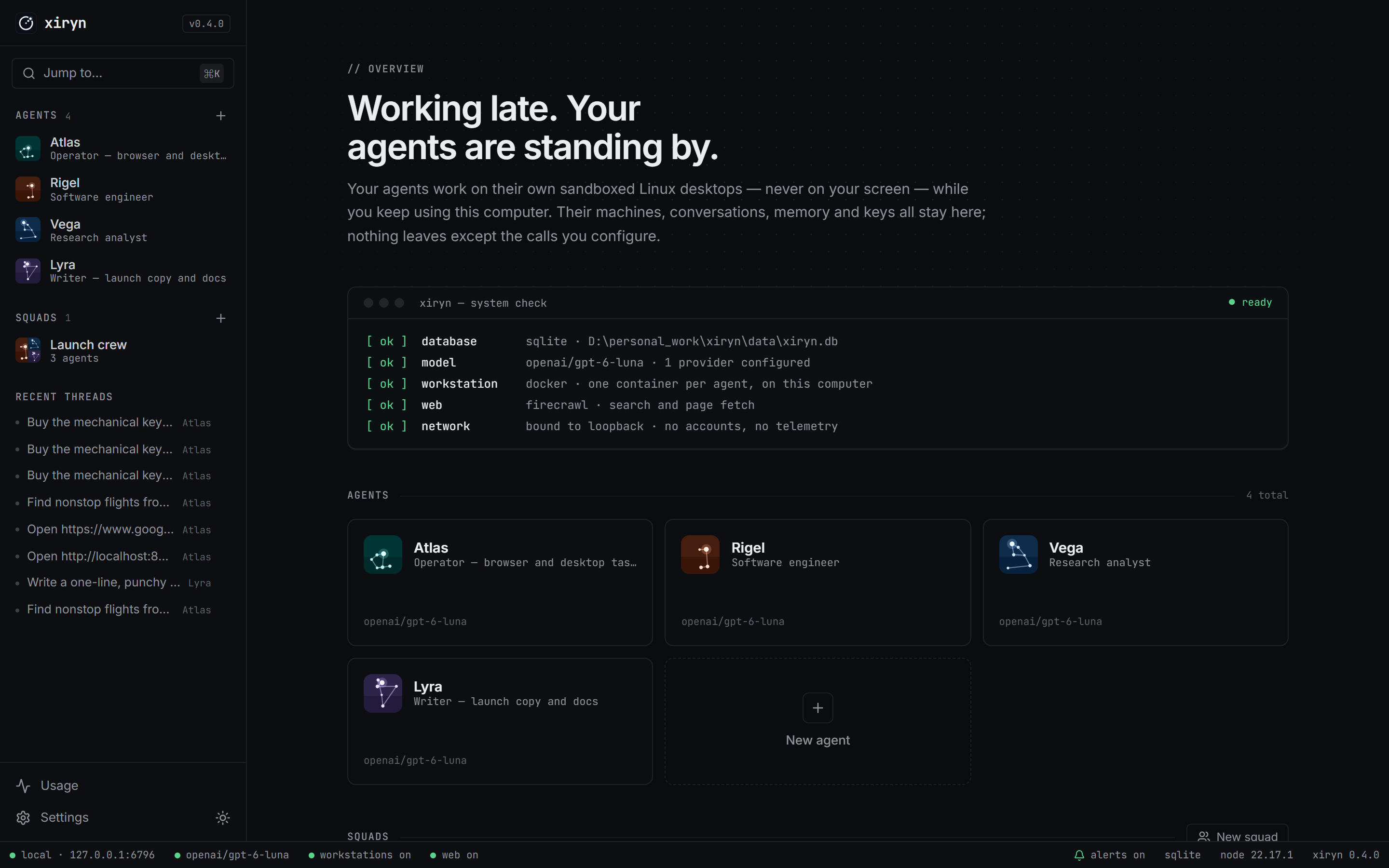
**Agents with a job** Name, role, standing orders, and a model of their own. Start from [16 ready-made agents and 4 squads](#ready-made-agents) or write your own. **Routines — tasks on a schedule** "Every morning at 8, brief me on…" — say it in the chat or set it up on the Routines page. Daily, weekdays, weekly, every few hours, or once. It runs on its own, even with the browser closed, and tells you when it's done. **A workstation per agent** A Docker container with a shell, a persistent home folder and a 1280×800 desktop with Chromium — created on first use, stopped when idle, never touching your own files. **Live desktop, take over any time** Watch the agent click and type in real time. Hit **Take over** and it pauses; hand it back with a note and it picks up from what you did. |
**Long-term memory** Agents save what matters about you and your work; every thread sees it. Inspect, add or delete notes any time. **Web research** Search and clean page reading through Firecrawl, with cited sources. **Durable turns** Close the tab mid-task — the agent keeps going. Reopen and you're re-attached to the live stream. Stop it any time. **It tells you when it's done** A chime and a desktop notification when an agent finishes, fails or needs you — and a Telegram message when you're away from the computer. **Talk instead of typing** Hit the mic and speak your request. It uses your browser's speech recognition — on the device itself where the browser supports it, so your voice never leaves your computer. **Free local models in one click** Settings → Local models shows Ollama, downloads models with a progress bar and makes one the default. Replies on local models are marked *free*. **Know what every reply costs** Each reply shows its price; the Usage page adds it up by day, model and agent. Set a monthly budget and paid models pause when it's reached. |
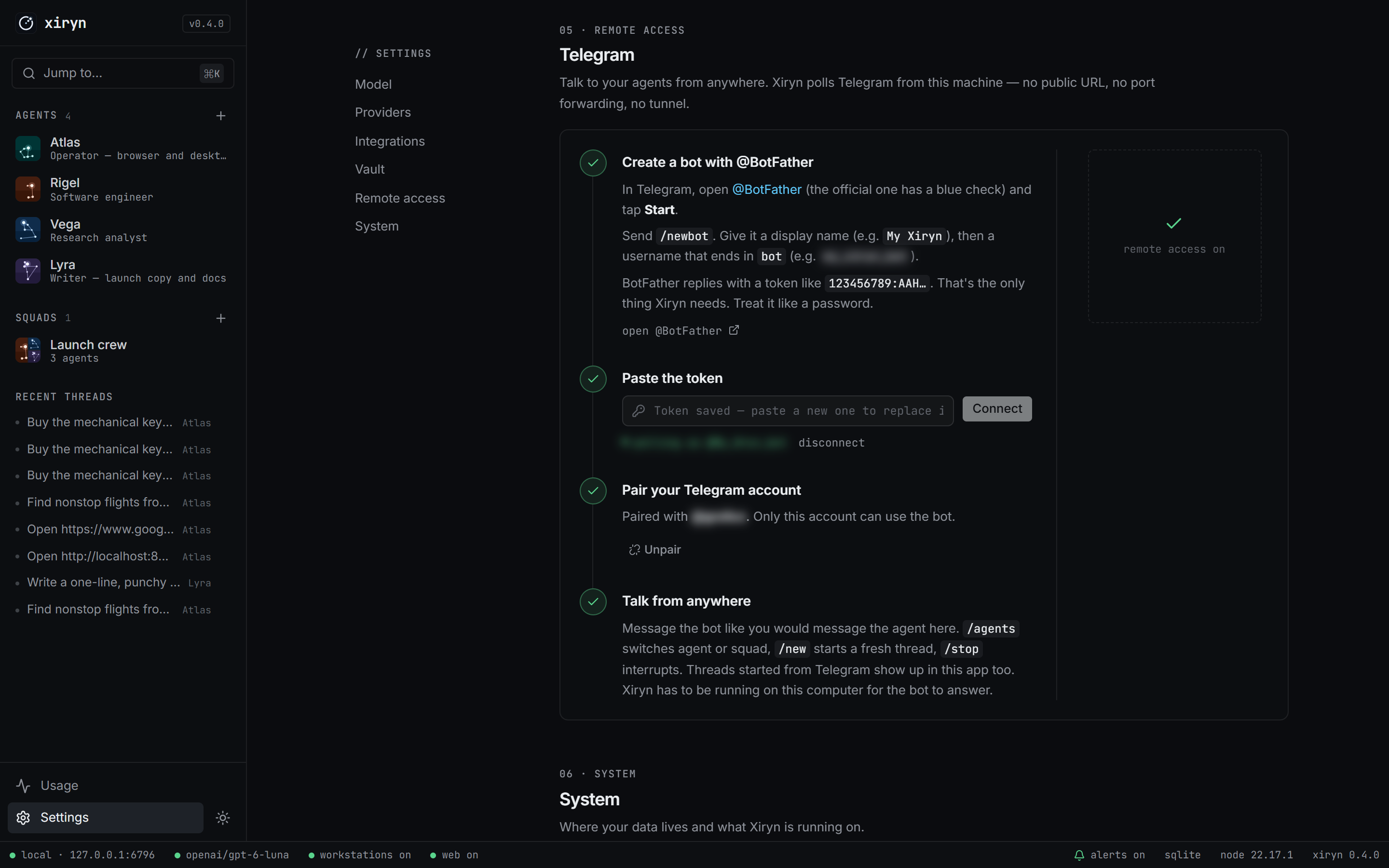 1. In Telegram, message **@BotFather** → `/newbot` → copy the token.
2. Paste it in **Settings → Remote access**.
3. Scan the QR code with your phone and tap **Start**.
Done — only your account can use the bot.
```
/agents pick an agent or squad /new start a fresh thread
/stop interrupt the agent /status what's running
```
When an agent needs you — a payment, a login, a code — the bot pings you with a live link to the agent's desktop. Finish the step from your phone, reply "done", and the agent carries on. Longer tasks you started at your computer report back here too when they finish, so you can walk away.
Full walkthrough: **[docs/telegram.md](docs/telegram.md)**.
## Routines
Tasks your agents do on their own, on a schedule — while you sleep, with the browser closed.
- **Just ask.** Tell any agent *"every weekday at 9, check for new jobs that fit me"* or *"tomorrow at 7, remind me to call the bank"* — it schedules the routine itself. Ask it to list or cancel them the same way.
- **Or set it up** on the **Routines** page: who does it, what to do each time, and when — every day, weekdays, one day a week, every few hours, or just once. Start from ideas like a morning news brief, job alerts, a price watch, a weekly research digest or a plan for the week.
- **Results come to you.** Each routine has its own thread. When a run finishes you get an in-app notification, a desktop notification when no tab is open, and a Telegram message if it's paired — reply there to follow up.
- **See how each run went.** A routine's **History** lists every run: when, how long, what it cost, and why one failed or was skipped.
- **Runs on your computer.** Times are your computer's local time, and Xiryn has to be running: `npm run background -- login` keeps it that way. A run missed while the computer slept still happens if it's back within a few hours.
## Ready-made agents
Open **Templates** in the sidebar, pick one, and change anything before it goes online. Each gets its own desktop and memory.
| | Agents |
| --- | --- |
| **Everyday** | **Atlas** — operator for anything that needs a real browser · **Altair** — shopping scout that compares prices and buys with your OK · **Polaris** — travel planner for flights, stays and day-by-day plans · **Mira** — personal assistant for forms, bookings and errands |
| **Work** | **Capella** — job hunter that finds roles and tailors applications · **Sirius** — writer for posts, emails and docs in your voice · **Antares** — social media manager · **Castor** — lead researcher that builds outreach lists |
| **Research** | **Vega** — research analyst with sources · **Deneb** — news briefer for the topics you follow · **Spica** — tutor that explains step by step |
| **Build** | **Rigel** — software engineer · **Arcturus** — code reviewer · **Electra** — website builder · **Lyra** — data analyst · **Pollux** — budget keeper for bank CSVs |
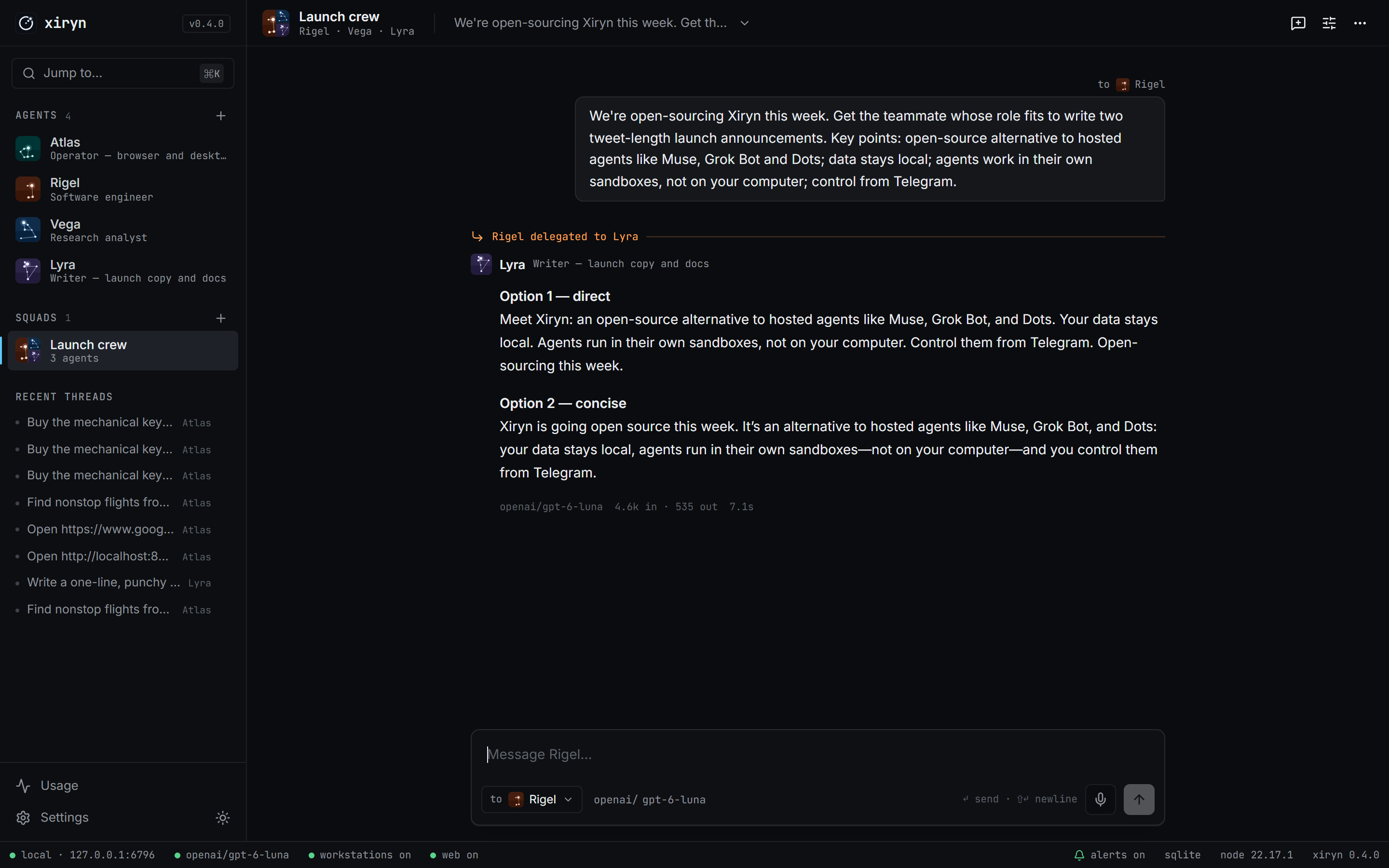
**Squads in one click:** *Crew* (Atlas, Vega, Rigel, Lyra), *Launch crew* (Vega, Sirius, Antares), *Trip team* (Polaris, Altair, Mira) and *Dev team* (Rigel, Arcturus, Electra).
## Feedback
After a few finished tasks Xiryn asks, once, how it's going. Your answer opens a draft in **your own email app** to [souravberaofficial@gmail.com](mailto:souravberaofficial@gmail.com) — nothing is sent by Xiryn itself. You can also write any time from the mail icon in the sidebar, or [open an issue](https://github.com/SouravBeraAkaSpeed/xiryn/issues/new/choose).
## Architecture
```mermaid
graph LR
you([You · browser]) -->|localhost| app
phone([You · Telegram]) -.->|Bot API| tg[Telegram]
tg -.->|long-poll from your machine| app
subgraph machine [Your computer]
app[Xiryn · Next.js server]
app --> runtime[Agent runtime]
app --> db[(SQLite · data/xiryn.db)]
runtime --> db
runtime -->|docker| ws[Workstations · one container per agent]
end
runtime -->|your key| llm[Model provider]
runtime -.->|your key, optional| firecrawl[Firecrawl]
you -->|live desktop · noVNC on 127.0.0.1| ws
```
One process, one file. The Next.js server serves the UI, runs agent turns in-process through the [AI SDK](https://ai-sdk.dev), and owns the SQLite database — no queue, no worker, no backend of ours. Details in **[docs/architecture.md](docs/architecture.md)**.
| Path | What lives there |
| --- | --- |
| `lib/agent/` | Runtime, tool belt, instruction builder |
| `lib/providers/` | Provider catalog, model factory, live model discovery |
| `lib/telegram/` | Bot API client, formatter and the bridge |
| `lib/workstation.ts`, `lib/docker.ts`, `workstation/` | Agents' machines: containers, desktop control and the image they run |
| `lib/web.ts` | Firecrawl |
| `db/` | Drizzle schema and migrations |
| `app/`, `components/` | The interface |
## Configuration
Every setting can come from `.env` **or** from **Settings** in the app. Values saved in the app win, are stored only in `data/xiryn.db`, and are shown back to the browser masked. The annotated list is in [`.env.example`](.env.example); providers are covered in [docs/providers.md](docs/providers.md).
| Variable | Purpose |
| --- | --- |
| `OPENAI_API_KEY`, `ANTHROPIC_API_KEY`, `GOOGLE_GENERATIVE_AI_API_KEY`, `XAI_API_KEY`, `GROQ_API_KEY`, `MISTRAL_API_KEY`, `DEEPSEEK_API_KEY`, `OPENROUTER_API_KEY` | Hosted model providers |
| `OLLAMA_BASE_URL`, `LMSTUDIO_BASE_URL`, `CUSTOM_BASE_URL` | Local runtimes and any OpenAI-compatible API |
| `XIRYN_DEFAULT_MODEL`, `XIRYN_MAX_STEPS` | Default `provider/model`, max tool calls per turn |
| `XIRYN_MONTHLY_BUDGET` | Dollars a month for paid models; once spent they wait for the 1st (local models keep working) |
| `XIRYN_WORKSTATION_CPUS`, `XIRYN_WORKSTATION_MEMORY_GB` | Limits for each agent's machine (default 2 CPUs, 4 GB) |
| `XIRYN_WORKSTATION_AUTO_STOP_MINUTES`, `XIRYN_WORKSTATION_AUTO_DELETE_MINUTES` | Idle stop; disposable machines |
| `XIRYN_PHONE_TAKEOVER` | `off` leaves the phone link out of Telegram hand-offs |
| `FIRECRAWL_API_KEY` | Web search and reading |
| `TELEGRAM_BOT_TOKEN`, `TELEGRAM_OWNER_ID` | Remote access |
| `XIRYN_TELEGRAM_NOTIFY` | Telegram notice when a task finishes: `long` (a minute or more, default), `all` or `off` |
| `XIRYN_DATA_DIR`, `XIRYN_ALLOWED_HOSTS` | Data location; extra hostnames behind your own proxy |
| `XIRYN_URL` | Where you open Xiryn, for links in Telegram hand-offs |
| `XIRYN_UPDATE_CHECK` | `off` stops the update check and star count |
| `XIRYN_DESKTOP_NOTIFY` | `off` stops operating-system notifications when no Xiryn tab is open |
## Security & privacy
Xiryn has no user accounts, so it's built never to be reachable by anyone but you:
- Binds to **127.0.0.1** only, and refuses any request whose `Host` or `Origin` isn't loopback — which also blocks DNS-rebinding attacks from web pages you visit.
- API keys never reach the browser; the UI only sees masked values, and keys are kept out of logs.
- Telegram answers exactly **one** paired account; pairing codes are single-use and rotate after wrong guesses.
- Agents execute only inside their own containers — never on your desktop or in your files. Their browsers have password saving and card autofill switched off.
- Saved logins, cards and personal details are encrypted (AES-256-GCM) with a key your operating system's keychain holds. Agents get masked hints only; Xiryn types values into pages itself, logins only on their own site, payment details only after you approve that payment.
- Each live desktop is published on 127.0.0.1 only and asks for its own random password.
- No telemetry. No analytics. The only request Xiryn makes on its own is an update check against GitHub's public API when you open Xiryn, sending nothing about you. Switch it off in **Settings → System** or with `XIRYN_UPDATE_CHECK=off`.
See [SECURITY.md](SECURITY.md) for the full model and how to report a vulnerability.
## FAQ
**Does an agent control my computer?**
No. Everything an agent does — commands, files, mouse, keyboard, browser — happens inside its own Docker container: a separate Linux system with its own desktop and files. It can't see your screen, files or apps, so you keep using your computer normally. It does share your CPU and memory while it works; the limits are in Settings.
**Can it book a flight or order something?**
It can do the legwork on real websites — search, compare, fill in the details — and it will ask before anything irreversible. Payments always need your approval: the agent shows you the merchant, the amount and the site, and you either let it pay with a card or UPI ID from your vault, or take over its screen and pay yourself — in the app or from your phone through Telegram. Logins work the same way: a saved login is filled for it, or you sign in on its screen once and the session stays.
**How do I delete a thread?**
Hover it under **Recent threads** in the sidebar and click the trash icon, or open the thread menu (⋯) in its header → **Delete thread**. The agent, its memory and its workstation stay.
**Where is my data?**
In `data/xiryn.db` on your disk. Back it up by copying the file; erase everything by deleting it.
**Does it work without Docker or Firecrawl?**
Without Docker, agents chat, remember and (with Firecrawl) research, but can't run code or use a desktop. Without Firecrawl, they search and read the web with their own browser. The app tells you what's missing.
**Can I use only local models?**
Yes — `npm run setup:local` sets up Ollama and a model in one go, or use **Settings → Local models**. LM Studio works too: point `LMSTUDIO_BASE_URL` at it and pick a model with tool calling.
**Does it keep working when I close the browser?**
Yes. Agents run in the Xiryn server, not the page: close the tab mid-task and it carries on. Run `npm run background` and you can close the terminal too; routines run on time and you're notified when they finish.
**What does it cost?**
Xiryn is free and MIT-licensed. Agents' machines run on your own computer, so they cost nothing, and so do local models. Your model provider (and Firecrawl, if you use it) bill you directly: every reply shows what it cost, the **Usage** page adds it up per day, model and agent, and an optional monthly budget pauses paid models when it's reached.
## Roadmap
Ideas we're exploring — not shipped yet. Have opinions? [Open an issue](https://github.com/SouravBeraAkaSpeed/xiryn/issues/new/choose).
- [x] Scheduled and recurring tasks — [routines](#routines)
- [ ] More remote channels: WhatsApp, Discord, Slack
- [ ] MCP connectors for email, calendar and docs
- [ ] Voice in and out
- [ ] Shareable agent templates (16 built in today)
## Contributing
Contributions are welcome — from typo fixes to new providers. Start with **[CONTRIBUTING.md](CONTRIBUTING.md)**, and please follow the [Code of Conduct](CODE_OF_CONDUCT.md).
```bash
npm run check # typecheck + lint + format
npm run build
```
## Star history
1. In Telegram, message **@BotFather** → `/newbot` → copy the token.
2. Paste it in **Settings → Remote access**.
3. Scan the QR code with your phone and tap **Start**.
Done — only your account can use the bot.
```
/agents pick an agent or squad /new start a fresh thread
/stop interrupt the agent /status what's running
```
When an agent needs you — a payment, a login, a code — the bot pings you with a live link to the agent's desktop. Finish the step from your phone, reply "done", and the agent carries on. Longer tasks you started at your computer report back here too when they finish, so you can walk away.
Full walkthrough: **[docs/telegram.md](docs/telegram.md)**.
## Routines
Tasks your agents do on their own, on a schedule — while you sleep, with the browser closed.
- **Just ask.** Tell any agent *"every weekday at 9, check for new jobs that fit me"* or *"tomorrow at 7, remind me to call the bank"* — it schedules the routine itself. Ask it to list or cancel them the same way.
- **Or set it up** on the **Routines** page: who does it, what to do each time, and when — every day, weekdays, one day a week, every few hours, or just once. Start from ideas like a morning news brief, job alerts, a price watch, a weekly research digest or a plan for the week.
- **Results come to you.** Each routine has its own thread. When a run finishes you get an in-app notification, a desktop notification when no tab is open, and a Telegram message if it's paired — reply there to follow up.
- **See how each run went.** A routine's **History** lists every run: when, how long, what it cost, and why one failed or was skipped.
- **Runs on your computer.** Times are your computer's local time, and Xiryn has to be running: `npm run background -- login` keeps it that way. A run missed while the computer slept still happens if it's back within a few hours.
## Ready-made agents
Open **Templates** in the sidebar, pick one, and change anything before it goes online. Each gets its own desktop and memory.
| | Agents |
| --- | --- |
| **Everyday** | **Atlas** — operator for anything that needs a real browser · **Altair** — shopping scout that compares prices and buys with your OK · **Polaris** — travel planner for flights, stays and day-by-day plans · **Mira** — personal assistant for forms, bookings and errands |
| **Work** | **Capella** — job hunter that finds roles and tailors applications · **Sirius** — writer for posts, emails and docs in your voice · **Antares** — social media manager · **Castor** — lead researcher that builds outreach lists |
| **Research** | **Vega** — research analyst with sources · **Deneb** — news briefer for the topics you follow · **Spica** — tutor that explains step by step |
| **Build** | **Rigel** — software engineer · **Arcturus** — code reviewer · **Electra** — website builder · **Lyra** — data analyst · **Pollux** — budget keeper for bank CSVs |
**Squads in one click:** *Crew* (Atlas, Vega, Rigel, Lyra), *Launch crew* (Vega, Sirius, Antares), *Trip team* (Polaris, Altair, Mira) and *Dev team* (Rigel, Arcturus, Electra).
## Feedback
After a few finished tasks Xiryn asks, once, how it's going. Your answer opens a draft in **your own email app** to [souravberaofficial@gmail.com](mailto:souravberaofficial@gmail.com) — nothing is sent by Xiryn itself. You can also write any time from the mail icon in the sidebar, or [open an issue](https://github.com/SouravBeraAkaSpeed/xiryn/issues/new/choose).
## Architecture
```mermaid
graph LR
you([You · browser]) -->|localhost| app
phone([You · Telegram]) -.->|Bot API| tg[Telegram]
tg -.->|long-poll from your machine| app
subgraph machine [Your computer]
app[Xiryn · Next.js server]
app --> runtime[Agent runtime]
app --> db[(SQLite · data/xiryn.db)]
runtime --> db
runtime -->|docker| ws[Workstations · one container per agent]
end
runtime -->|your key| llm[Model provider]
runtime -.->|your key, optional| firecrawl[Firecrawl]
you -->|live desktop · noVNC on 127.0.0.1| ws
```
One process, one file. The Next.js server serves the UI, runs agent turns in-process through the [AI SDK](https://ai-sdk.dev), and owns the SQLite database — no queue, no worker, no backend of ours. Details in **[docs/architecture.md](docs/architecture.md)**.
| Path | What lives there |
| --- | --- |
| `lib/agent/` | Runtime, tool belt, instruction builder |
| `lib/providers/` | Provider catalog, model factory, live model discovery |
| `lib/telegram/` | Bot API client, formatter and the bridge |
| `lib/workstation.ts`, `lib/docker.ts`, `workstation/` | Agents' machines: containers, desktop control and the image they run |
| `lib/web.ts` | Firecrawl |
| `db/` | Drizzle schema and migrations |
| `app/`, `components/` | The interface |
## Configuration
Every setting can come from `.env` **or** from **Settings** in the app. Values saved in the app win, are stored only in `data/xiryn.db`, and are shown back to the browser masked. The annotated list is in [`.env.example`](.env.example); providers are covered in [docs/providers.md](docs/providers.md).
| Variable | Purpose |
| --- | --- |
| `OPENAI_API_KEY`, `ANTHROPIC_API_KEY`, `GOOGLE_GENERATIVE_AI_API_KEY`, `XAI_API_KEY`, `GROQ_API_KEY`, `MISTRAL_API_KEY`, `DEEPSEEK_API_KEY`, `OPENROUTER_API_KEY` | Hosted model providers |
| `OLLAMA_BASE_URL`, `LMSTUDIO_BASE_URL`, `CUSTOM_BASE_URL` | Local runtimes and any OpenAI-compatible API |
| `XIRYN_DEFAULT_MODEL`, `XIRYN_MAX_STEPS` | Default `provider/model`, max tool calls per turn |
| `XIRYN_MONTHLY_BUDGET` | Dollars a month for paid models; once spent they wait for the 1st (local models keep working) |
| `XIRYN_WORKSTATION_CPUS`, `XIRYN_WORKSTATION_MEMORY_GB` | Limits for each agent's machine (default 2 CPUs, 4 GB) |
| `XIRYN_WORKSTATION_AUTO_STOP_MINUTES`, `XIRYN_WORKSTATION_AUTO_DELETE_MINUTES` | Idle stop; disposable machines |
| `XIRYN_PHONE_TAKEOVER` | `off` leaves the phone link out of Telegram hand-offs |
| `FIRECRAWL_API_KEY` | Web search and reading |
| `TELEGRAM_BOT_TOKEN`, `TELEGRAM_OWNER_ID` | Remote access |
| `XIRYN_TELEGRAM_NOTIFY` | Telegram notice when a task finishes: `long` (a minute or more, default), `all` or `off` |
| `XIRYN_DATA_DIR`, `XIRYN_ALLOWED_HOSTS` | Data location; extra hostnames behind your own proxy |
| `XIRYN_URL` | Where you open Xiryn, for links in Telegram hand-offs |
| `XIRYN_UPDATE_CHECK` | `off` stops the update check and star count |
| `XIRYN_DESKTOP_NOTIFY` | `off` stops operating-system notifications when no Xiryn tab is open |
## Security & privacy
Xiryn has no user accounts, so it's built never to be reachable by anyone but you:
- Binds to **127.0.0.1** only, and refuses any request whose `Host` or `Origin` isn't loopback — which also blocks DNS-rebinding attacks from web pages you visit.
- API keys never reach the browser; the UI only sees masked values, and keys are kept out of logs.
- Telegram answers exactly **one** paired account; pairing codes are single-use and rotate after wrong guesses.
- Agents execute only inside their own containers — never on your desktop or in your files. Their browsers have password saving and card autofill switched off.
- Saved logins, cards and personal details are encrypted (AES-256-GCM) with a key your operating system's keychain holds. Agents get masked hints only; Xiryn types values into pages itself, logins only on their own site, payment details only after you approve that payment.
- Each live desktop is published on 127.0.0.1 only and asks for its own random password.
- No telemetry. No analytics. The only request Xiryn makes on its own is an update check against GitHub's public API when you open Xiryn, sending nothing about you. Switch it off in **Settings → System** or with `XIRYN_UPDATE_CHECK=off`.
See [SECURITY.md](SECURITY.md) for the full model and how to report a vulnerability.
## FAQ
**Does an agent control my computer?**
No. Everything an agent does — commands, files, mouse, keyboard, browser — happens inside its own Docker container: a separate Linux system with its own desktop and files. It can't see your screen, files or apps, so you keep using your computer normally. It does share your CPU and memory while it works; the limits are in Settings.
**Can it book a flight or order something?**
It can do the legwork on real websites — search, compare, fill in the details — and it will ask before anything irreversible. Payments always need your approval: the agent shows you the merchant, the amount and the site, and you either let it pay with a card or UPI ID from your vault, or take over its screen and pay yourself — in the app or from your phone through Telegram. Logins work the same way: a saved login is filled for it, or you sign in on its screen once and the session stays.
**How do I delete a thread?**
Hover it under **Recent threads** in the sidebar and click the trash icon, or open the thread menu (⋯) in its header → **Delete thread**. The agent, its memory and its workstation stay.
**Where is my data?**
In `data/xiryn.db` on your disk. Back it up by copying the file; erase everything by deleting it.
**Does it work without Docker or Firecrawl?**
Without Docker, agents chat, remember and (with Firecrawl) research, but can't run code or use a desktop. Without Firecrawl, they search and read the web with their own browser. The app tells you what's missing.
**Can I use only local models?**
Yes — `npm run setup:local` sets up Ollama and a model in one go, or use **Settings → Local models**. LM Studio works too: point `LMSTUDIO_BASE_URL` at it and pick a model with tool calling.
**Does it keep working when I close the browser?**
Yes. Agents run in the Xiryn server, not the page: close the tab mid-task and it carries on. Run `npm run background` and you can close the terminal too; routines run on time and you're notified when they finish.
**What does it cost?**
Xiryn is free and MIT-licensed. Agents' machines run on your own computer, so they cost nothing, and so do local models. Your model provider (and Firecrawl, if you use it) bill you directly: every reply shows what it cost, the **Usage** page adds it up per day, model and agent, and an optional monthly budget pauses paid models when it's reached.
## Roadmap
Ideas we're exploring — not shipped yet. Have opinions? [Open an issue](https://github.com/SouravBeraAkaSpeed/xiryn/issues/new/choose).
- [x] Scheduled and recurring tasks — [routines](#routines)
- [ ] More remote channels: WhatsApp, Discord, Slack
- [ ] MCP connectors for email, calendar and docs
- [ ] Voice in and out
- [ ] Shareable agent templates (16 built in today)
## Contributing
Contributions are welcome — from typo fixes to new providers. Start with **[CONTRIBUTING.md](CONTRIBUTING.md)**, and please follow the [Code of Conduct](CODE_OF_CONDUCT.md).
```bash
npm run check # typecheck + lint + format
npm run build
```
## Star history