# Portal

a command-line file transfer utility for sending files from any computer to another


## Installation
On macOS/Linux, if you are using [Homebrew](https://brew.sh/)
```bash
brew install portal
```
On Windows, if you are using [Scoop](https://scoop.sh)
```bash
scoop install portal
```
On Windows, if you are using [WinGet](https://github.com/microsoft/winget-cli)
```bash
winget install SpatiumPortae.portal
```
On Arch Linux (AUR)
```bash
yay -S portal-bin
```
On any platform, you can get the [latest release manually](https://github.com/SpatiumPortae/portal/releases/latest), or simply run
```bash
curl -sL portal.spatiumportae.com | bash
```
or
```bash
wget -qO - portal.spatiumportae.com | bash
```
## How it works
### Sending files and folders
To send files:
```bash
portal send ...
```
The application will output a temporary password on the format `1-inertia-elliptical-celestial`.
The sender will communicate this password to the receiver over some secure channel.
### Receiving files and folders
To receive those files:
```bash
portal receive 1-intertia-elliptical-celestial
```
The two clients will establish a connection through a relay server. The file transfer will then commence with a direct or relayed connection, depending on what's possible.
## What it looks like ✨
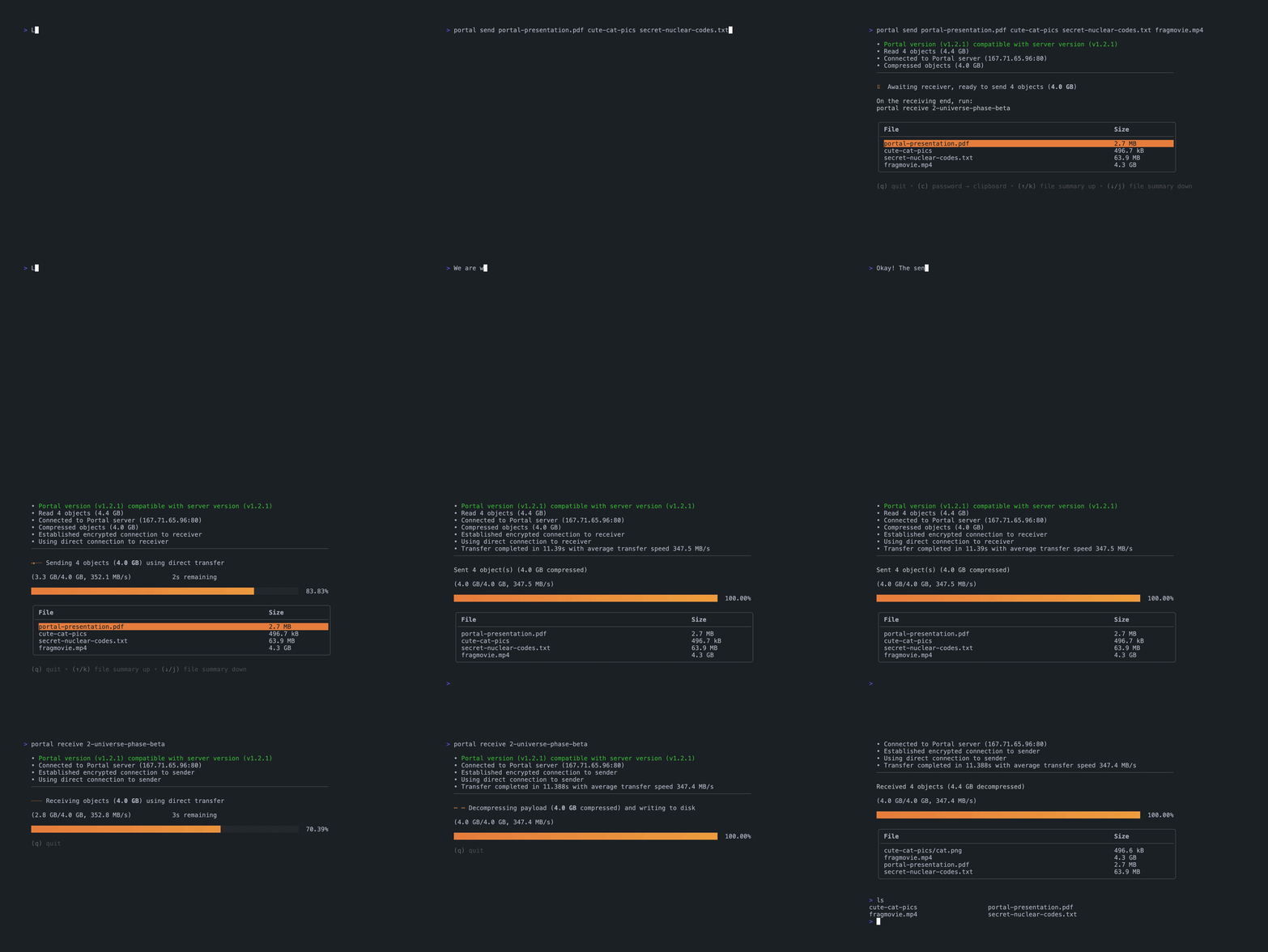
The sender **(top)** sends a folder and three files to the receiver **(bottom)**.
In this case, as you can see in the event log, the transfer is made using **direct transfer**. That means
that the files are sent **directly** from one client to the other, _no middlemen involved_.
As it happens, these computers are in the same local network, and `portal` recognizes this.
## Features
`portal` provides:
- End-to-end encryption using [PAKE2](https://en.wikipedia.org/wiki/Password-authenticated_key_agreement)
- Direct transfer of files if possible (e.g. sender and receiver are in the same local network)
- Fallback to relay server if sender and receiver cannot connect directly
- Parallel gzip compression of files for faster and more efficient transfers
- Hosting your own relay (we'd appreciate it if you plan to send a lot of data!)
- Configurability and shell completions
- A shiny UI ⭐✨ to gaze your eyes upon while you wait for your files
### Completions
`portal` provides extensive TAB completions for the following shells:
- `bash`
- `zsh`
- `fish`
- `powershell`
To see installation instructions for your shell and platform, run:
```bash
portal completion [bash|zsh|fish|powershell] --help
```
#### Tip!
You probably didn't _quite_ catch the password Bob was screaming across the room.
You can use TAB completions to auto-complete passwords on the receiving end.
Press TAB when entering parts of your password...
```bash
portal receive 42-relative-parsec-s...
```
...and `portal` will suggest the possible words
```bash
$ portal receive 42-relative-parsec-s...
42-relative-parsec-supernova 42-relative-parsec-scatter 42-relative-parsec-solar 42-relative-parsec-spin 42-relative-parsec-static
42-relative-parsec-sigma 42-relative-parsec-solid 42-relative-parsec-star 42-relative-parsec-storm 42-relative-parsec-system
```
__boom__. _supernova_.
```bash
portal receive 42-relative-parsec-supernova
```
### Flags
#### `Receiver`
- `-y/--yes`: overwrite existing files without `[Y/n]` prompts
#### `Relay`
- `-p/--port`: port to host the relay server on
#### `Sender` and `Receiver`
- `-r/--relay`: address of the relay server (`:8080`, `myrelay.io:1234`, ...)
- `-s/--tui-style`: the style of the tui (`rich` | `raw`)
#### `Sender`, `Receiver` and `Relay`
- `-h/--help`: output help messages for any command
- `-v/--verbose`: log debug info to file
### Configuration
`portal` places its configuration file in `$HOME/.config/portal/config.yml`.
As evident by the file extension, the config is a simple [YAML](https://yaml.org/) file with descriptive field names.
#### Default configuration
```yaml
# The URL of the relay server.
relay: portal.spatiumportae.com
# Log debug output to file.
verbose: false
# Prompt for overwriting duplicates when receiving files.
prompt_overwrite_files: true
# The port used when serving the relay using "portal serve".
relay_serve_port: 8080
# The style of the TUI.
tui_style: rich
```
### Hosting your own relay
The `portal` binary comes with a built-in relay server.
Spinning up your own relay is as easy as...
```bash
portal serve --port 1337
```
The server log output is `JSON`. Super-recommended to run it through [jq](https://github.com/stedolan/jq)!
```bash
portal serve --port 1337 2>&1 | jq .
```
...
```json
{
"level": "info",
"ts": "2023-02-28T02:57:45.310134+01:00",
"caller": "rendezvous/server.go:77",
"msg": "serving rendezvous server",
"version": "v1.2.1",
"address": ":1337"
}
```
### More details about the connection process
Technical details
### Technical details
The connection between the sender and the server is negotiated using a intermediary server (relay).
The relay server is used to negotiate a secure encrypted channel while never seeing the contents of files nor the temporary password.
The communication works as follows:
- `sender` connects to `relay`
- `relay` allocates a numerical ID to the sender and sends it to the `sender`
- `sender` generates and outputs the password (starting with the ID) to the terminal, hashes the password and sends it to the `relay`
- `receiver` hashes the password (which has been communicated over some secure channel) and sends it to the `relay`
- When both the `sender` and the `receiver` have sent the hashed password to the `relay`, the cryptographic exchange starts
- During the cryptographic exchange, the `relay`, well, relays messages from the `sender` to the `receiver` and vice-versa
- Once the cryptographic exchange is done, every message sent by the `sender` and `receiver` is encrypted, and the `relay` cannot see their contents
- The file transfer is about to begin, and can commence in two ways:
1. The `sender` and `receiver` are in the same local network or can be reached directly by IP in some other way
- In this case, the `sender` and `receiver` will happily send the files to each other directly. The `relay` will close down for this connection.
2. The `sender` and `receiver` are not on the same local network, or cannot reach each other directly. The transfer will go through the `relay`, which will continue to relay encrypted messages until the file transfer is completed
## Building from source
The [`Makefile`](Makefile) has everything you need.
To build a binary containing all commands, run:
```bash
PORTAL_VERSION=v1.x.x make build
```
It's important to include `PORTAL_VERSION`, which is a [semantic version](https://semver.org/) string. This is needed
in order to validate senders and receivers against the relay, so transfers are disallowed
when on different major versions, for instance.
## Maintainers
- [Arvid Gotthard](https://github.com/mellonnen)
- [Zino Kader](https://github.com/ZinoKader)
## Acknowledgements
a big thank you to [magic-wormhole](https://github.com/magic-wormhole/magic-wormhole) for greatly inspiring the concept of Portal.
[nhooyr/websocket](https://github.com/nhooyr/websocket), [shollz/pake](https://github.com/schollz/pake), [charmbracelet/bubbles](https://github.com/charmbracelet/bubbles), [charmbracelet/bubbletea](https://github.com/charmbracelet/bubbletea), [charmbracelet/lipgloss](https://github.com/charmbracelet/lipgloss), [muesli/reflow](https://github.com/muesli/reflow), [klauspost/pgzip](https://github.com/klauspost/pgzip) and many, many more.
### DigitalOcean <3
A **special thanks** to our sponsors [DigitalOcean](https://m.do.co/c/73a491fda077).
The public relay available for everyone to use is...
[](https://www.digitalocean.com/?refcode=73a491fda077&utm_campaign=Referral_Invite&utm_medium=Referral_Program&utm_source=badge)