# Full Gibson Environment Dataset
Full Gibson Environment Dataset consists of 572 models and 1440 floors. We cover a diverse set of models including households, offices, hotels, venues, museums, hospitals, construction sites, etc. A diverse set of visualization of all spaces in Gibson can be seen [here](http://gibsonenv.stanford.edu/database/).
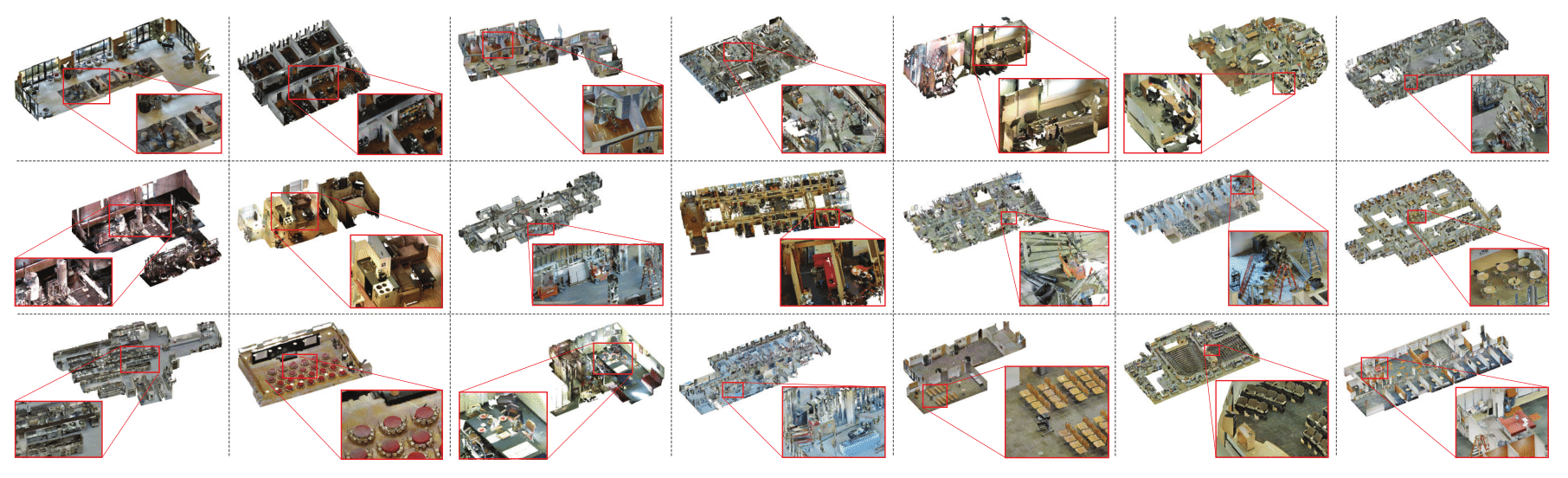 Table of contents
=================
* [Download](#download)
* [Dataset Metadata](#dataset-metadata)
* [Dataset Modalities](#dataset-modalities)
* [Dataset Splits](#dataset-splits)
* [Navigation Benchmark Scenarios](#navigation-benchmark-scenarios)
* [Dataset Metrics](#dataset-metrics)
* [Navigation Waypoints](#navigation-waypoints)
# Download Gibson Database of Spaces
The link will first take you to the license agreement and then to the data.
### [[ Download the full Gibson Database of Spaces ]](https://forms.gle/36TW9uVpjrE1Mkf9A) [[ Download Gibson Database for Habitat-sim ]](https://forms.gle/36TW9uVpjrE1Mkf9A) [[ checksums ]](https://github.com/StanfordVL/GibsonEnv/wiki/Checksum-Values-for-Data.md)
License Note: The dataset license is included in the above link. The license in this repository covers only the provided software.
**Stanford 2D-3D-Semantics Dataset:** the download link of 2D-3D-Semantics as Gibson asset files is included in the [same link ](https://goo.gl/forms/OxAQHbl1v97BJ3Sg1) as above.
**Matterport3D Dataset:** Please fill and sign the corresponding [Terms of Use agreement](http://dovahkiin.stanford.edu/matterport/public/MP_TOS.pdf) form and send it to [matterport3d@googlegroups.com](matterport3d@googlegroups.com). Please put "use with GIBSON simulator" in your email. You'll then recieve a python script via email in response. Use the invocation `python download_mp.py --task_data gibson -o .` with the received script to download the data (39.09GB). Matterport3D webpage: [link](https://niessner.github.io/Matterport/).
### Citation
If you use Gibson's database or software please cite:
```
@inproceedings{xiazamirhe2018gibsonenv,
title={Gibson {Env}: real-world perception for embodied agents},
author={Xia, Fei and R. Zamir, Amir and He, Zhiyang and Sax, Alexander and Malik, Jitendra and Savarese, Silvio},
booktitle={Computer Vision and Pattern Recognition (CVPR), 2018 IEEE Conference on},
year={2018},
organization={IEEE}
}
```
## Dataset Metadata
Each space in the database has some metadata with the following attributes associated with it. The metadata is available in this [JSON file](https://raw.githubusercontent.com/StanfordVL/GibsonEnv/master/gibson/data/data.json).
```
id # the name of the space, e.g. ""Albertville""
area # total metric area of the building, e.g. "266.125" sq. meters
floor # number of floors in the space, e.g. "4"
navigation_complexity # navigation complexity metric, e.g. "3.737" (see the paper for definition)
room # number of rooms, e.g. "16"
ssa # Specific Surface Area (A measure of clutter), e.g. "1.297" (see the paper for definition)
split_full # if the space is in train/val/test/none split of Full partition
split_full+ # if the space is in train/val/test/none split of Full+ partition
split_medium # if the space is in train/val/test/none split of Medium partition
split_tiny # if the space is in train/val/test/none split of Tiny partition
```
## Dataset Modalities
Each space in the database has its own folder. All the modalities and metadata for each space are contained in that folder.
```
/pano
/points # camera metadata
/rgb # rgb images
/mist # depth images
mesh.obj # 3d mesh
mesh_z_up.obj # 3d mesh for physics engine
camera_poses.csv # camera locations
semantic.obj (optional) # 3d mesh with semantic annotation
```
## Dataset Splits
Due to the sheer size of the database, We provide four different standard partitions which are subsets of the full Gibson database of 572 models. We recommend starting with tiny partition and progressively adding more models if you wish. Each partition is divided into `training/validation/testing` splits. [You can download the standard split files here](https://storage.googleapis.com/gibson_scenes/splits.tar.gz).
| Split Name | Train | Val | Test | Hole Filled | Total Size |
|----------|:-------------:|-------------:|------:| ------:| -------------:|
| Tiny | 25 | 5 | 5 | 100% | 8 GiB |
| Medium | 100 | 20 | 20 | 100% | 21 GiB |
| Full | 360 | 70 | 70 | 100% | 65 GiB |
| Full+ | 412 | 80 | 80 | 90.9% | 89 GiB |
**Hole Filling**: We applied combination of automatic and manual hole-filling techniques on `tiny`, `medium` and `full` sets, to ensure that the models do not have severe reconstruction artifacts. `full+` contains the rest of the models that we are incapable of hole-filling, based on current techniques.
**Split Criteria**: In every split, we sort all 572 models by the linear combination of `loor number`, `area`, `ssa` and `navigation complexity`. We select a `tiny` as the set of models with the highest combination scores. We also set `medium` to be inclusive of `tiny`, and `full` to be inclusive of `mediuim`.
# Navigation Benchmark Scenarios
We provide standard point-to-point navigation episodes in [Gibson Standard Navigation Benchmark](https://storage.googleapis.com/gibson_scenes/navigation_scenarios.tar.gz). See the figure below for visualization of a sample episode. Each space includes 100 episodes along with their ground truth near-optimal path and waypoints. You can see random standard episodes visualized for each space in the [database webpage](http://gibsonenv.stanford.edu/database/). See [this paper](https://arxiv.org/abs/1807.06757) for a discussion on the navigation episodes and their application. The following column values are provided for each episode:
- `split`: `train`, `val`, or `test` indicating split for the episode.
- `task`: string id for task type, currently restricted to `p` for `point_goal`.
- `sceneId`: id of model within which episode takes place.
- `level`: integer id of level (typically floor) within scene, starting from `0`.
- `startX`, `startY`, `startZ`: coordinates of agent starting position in scene space.
- `startAngle`, : azimuth angle (counter-clockwise from scene space +X axis) of agent starting state.
- `goalRoomId`, `goalRoomType`: currently not available.
- `goalObjectId`, `goalObjectType`: currently not available.
- `goalX`, `goalY`, `goalZ`: coordinates of goal point in scene space. Required for all task types. Position of goal for `point_goal`.
- `dist`, `pathDist`: Euclidean and geodesic (along shortest path) distance from agent start position to goal position
- `pathNumDoors`, `pathDoorIds`: currently not available.
- `pathNumRooms`, `pathRoomIndices`: currently not available.
## Dataset Metrics
**Floor Number** Total number of floors in each model.
We calculate floor numbers using distinctive camera locations. We use `sklearn.cluster.DBSCAN` to cluster these locations by height and set minimum cluster size to `5`. This means areas with at least `5` sweeps are treated as one single floor. This helps us capture small building spaces such as backyard, attics, basements.
**Area** Total floor area of each model.
We calculate total floor area by summing up area of each floor. This is done by sampling point cloud locations based on floor height, and fitting a `scipy.spatial.ConvexHull` on sample locations.
**SSA** Specific surface area.
The ratio of inner mesh surface and volume of convex hull of the mesh. This is a measure of clutter in the models: if the inner space is placed with large number of furnitures, objects, etc, the model will have high SSA.
**Navigation Complexity** The highest complexity of navigating between arbitrary points within the model.
We sample arbitrary point pairs inside the model, and calculate `A∗` navigation distance between them. `Navigation Complexity` is equal to `A*` distance divide by `straight line distance` between the two points. We compute the highest navigation complexity for every model. Note that all point pairs are sample within the *same floor*.
**Subjective Attributes**
We examine each model manually, and note the subjective attributes of them. This includes their furnishing style, house shapes, whether they have long stairs, etc.
## Navigation Waypoints
For every navigation scenario, we provide navigation waypoints as an optional choice to assist users with training navigation agents. The waypoints of each model is stored as a json file named with the id of that model.
### Visualization
We provide code for visualizing waypoints. In order to use it, you need to install the latest [Blender](https://www.blender.org/).
```bash
## Make sure that you can start blender in terminal
blender
## Configure your blender python path
echo `python -c "import sys; print(':'.join(x for x in sys.path if x))"` > path.txt
### Running visualization
blender -b --python visualize_path.py --filepath path_to_scenario_json_dir \
--datapath path_to_dataset_root_dir \
--renderpath . \
--model Allensville \
--idx 1 \
```
Should give you:
Table of contents
=================
* [Download](#download)
* [Dataset Metadata](#dataset-metadata)
* [Dataset Modalities](#dataset-modalities)
* [Dataset Splits](#dataset-splits)
* [Navigation Benchmark Scenarios](#navigation-benchmark-scenarios)
* [Dataset Metrics](#dataset-metrics)
* [Navigation Waypoints](#navigation-waypoints)
# Download Gibson Database of Spaces
The link will first take you to the license agreement and then to the data.
### [[ Download the full Gibson Database of Spaces ]](https://forms.gle/36TW9uVpjrE1Mkf9A) [[ Download Gibson Database for Habitat-sim ]](https://forms.gle/36TW9uVpjrE1Mkf9A) [[ checksums ]](https://github.com/StanfordVL/GibsonEnv/wiki/Checksum-Values-for-Data.md)
License Note: The dataset license is included in the above link. The license in this repository covers only the provided software.
**Stanford 2D-3D-Semantics Dataset:** the download link of 2D-3D-Semantics as Gibson asset files is included in the [same link ](https://goo.gl/forms/OxAQHbl1v97BJ3Sg1) as above.
**Matterport3D Dataset:** Please fill and sign the corresponding [Terms of Use agreement](http://dovahkiin.stanford.edu/matterport/public/MP_TOS.pdf) form and send it to [matterport3d@googlegroups.com](matterport3d@googlegroups.com). Please put "use with GIBSON simulator" in your email. You'll then recieve a python script via email in response. Use the invocation `python download_mp.py --task_data gibson -o .` with the received script to download the data (39.09GB). Matterport3D webpage: [link](https://niessner.github.io/Matterport/).
### Citation
If you use Gibson's database or software please cite:
```
@inproceedings{xiazamirhe2018gibsonenv,
title={Gibson {Env}: real-world perception for embodied agents},
author={Xia, Fei and R. Zamir, Amir and He, Zhiyang and Sax, Alexander and Malik, Jitendra and Savarese, Silvio},
booktitle={Computer Vision and Pattern Recognition (CVPR), 2018 IEEE Conference on},
year={2018},
organization={IEEE}
}
```
## Dataset Metadata
Each space in the database has some metadata with the following attributes associated with it. The metadata is available in this [JSON file](https://raw.githubusercontent.com/StanfordVL/GibsonEnv/master/gibson/data/data.json).
```
id # the name of the space, e.g. ""Albertville""
area # total metric area of the building, e.g. "266.125" sq. meters
floor # number of floors in the space, e.g. "4"
navigation_complexity # navigation complexity metric, e.g. "3.737" (see the paper for definition)
room # number of rooms, e.g. "16"
ssa # Specific Surface Area (A measure of clutter), e.g. "1.297" (see the paper for definition)
split_full # if the space is in train/val/test/none split of Full partition
split_full+ # if the space is in train/val/test/none split of Full+ partition
split_medium # if the space is in train/val/test/none split of Medium partition
split_tiny # if the space is in train/val/test/none split of Tiny partition
```
## Dataset Modalities
Each space in the database has its own folder. All the modalities and metadata for each space are contained in that folder.
```
/pano
/points # camera metadata
/rgb # rgb images
/mist # depth images
mesh.obj # 3d mesh
mesh_z_up.obj # 3d mesh for physics engine
camera_poses.csv # camera locations
semantic.obj (optional) # 3d mesh with semantic annotation
```
## Dataset Splits
Due to the sheer size of the database, We provide four different standard partitions which are subsets of the full Gibson database of 572 models. We recommend starting with tiny partition and progressively adding more models if you wish. Each partition is divided into `training/validation/testing` splits. [You can download the standard split files here](https://storage.googleapis.com/gibson_scenes/splits.tar.gz).
| Split Name | Train | Val | Test | Hole Filled | Total Size |
|----------|:-------------:|-------------:|------:| ------:| -------------:|
| Tiny | 25 | 5 | 5 | 100% | 8 GiB |
| Medium | 100 | 20 | 20 | 100% | 21 GiB |
| Full | 360 | 70 | 70 | 100% | 65 GiB |
| Full+ | 412 | 80 | 80 | 90.9% | 89 GiB |
**Hole Filling**: We applied combination of automatic and manual hole-filling techniques on `tiny`, `medium` and `full` sets, to ensure that the models do not have severe reconstruction artifacts. `full+` contains the rest of the models that we are incapable of hole-filling, based on current techniques.
**Split Criteria**: In every split, we sort all 572 models by the linear combination of `loor number`, `area`, `ssa` and `navigation complexity`. We select a `tiny` as the set of models with the highest combination scores. We also set `medium` to be inclusive of `tiny`, and `full` to be inclusive of `mediuim`.
# Navigation Benchmark Scenarios
We provide standard point-to-point navigation episodes in [Gibson Standard Navigation Benchmark](https://storage.googleapis.com/gibson_scenes/navigation_scenarios.tar.gz). See the figure below for visualization of a sample episode. Each space includes 100 episodes along with their ground truth near-optimal path and waypoints. You can see random standard episodes visualized for each space in the [database webpage](http://gibsonenv.stanford.edu/database/). See [this paper](https://arxiv.org/abs/1807.06757) for a discussion on the navigation episodes and their application. The following column values are provided for each episode:
- `split`: `train`, `val`, or `test` indicating split for the episode.
- `task`: string id for task type, currently restricted to `p` for `point_goal`.
- `sceneId`: id of model within which episode takes place.
- `level`: integer id of level (typically floor) within scene, starting from `0`.
- `startX`, `startY`, `startZ`: coordinates of agent starting position in scene space.
- `startAngle`, : azimuth angle (counter-clockwise from scene space +X axis) of agent starting state.
- `goalRoomId`, `goalRoomType`: currently not available.
- `goalObjectId`, `goalObjectType`: currently not available.
- `goalX`, `goalY`, `goalZ`: coordinates of goal point in scene space. Required for all task types. Position of goal for `point_goal`.
- `dist`, `pathDist`: Euclidean and geodesic (along shortest path) distance from agent start position to goal position
- `pathNumDoors`, `pathDoorIds`: currently not available.
- `pathNumRooms`, `pathRoomIndices`: currently not available.
## Dataset Metrics
**Floor Number** Total number of floors in each model.
We calculate floor numbers using distinctive camera locations. We use `sklearn.cluster.DBSCAN` to cluster these locations by height and set minimum cluster size to `5`. This means areas with at least `5` sweeps are treated as one single floor. This helps us capture small building spaces such as backyard, attics, basements.
**Area** Total floor area of each model.
We calculate total floor area by summing up area of each floor. This is done by sampling point cloud locations based on floor height, and fitting a `scipy.spatial.ConvexHull` on sample locations.
**SSA** Specific surface area.
The ratio of inner mesh surface and volume of convex hull of the mesh. This is a measure of clutter in the models: if the inner space is placed with large number of furnitures, objects, etc, the model will have high SSA.
**Navigation Complexity** The highest complexity of navigating between arbitrary points within the model.
We sample arbitrary point pairs inside the model, and calculate `A∗` navigation distance between them. `Navigation Complexity` is equal to `A*` distance divide by `straight line distance` between the two points. We compute the highest navigation complexity for every model. Note that all point pairs are sample within the *same floor*.
**Subjective Attributes**
We examine each model manually, and note the subjective attributes of them. This includes their furnishing style, house shapes, whether they have long stairs, etc.
## Navigation Waypoints
For every navigation scenario, we provide navigation waypoints as an optional choice to assist users with training navigation agents. The waypoints of each model is stored as a json file named with the id of that model.
### Visualization
We provide code for visualizing waypoints. In order to use it, you need to install the latest [Blender](https://www.blender.org/).
```bash
## Make sure that you can start blender in terminal
blender
## Configure your blender python path
echo `python -c "import sys; print(':'.join(x for x in sys.path if x))"` > path.txt
### Running visualization
blender -b --python visualize_path.py --filepath path_to_scenario_json_dir \
--datapath path_to_dataset_root_dir \
--renderpath . \
--model Allensville \
--idx 1 \
```
Should give you:
