









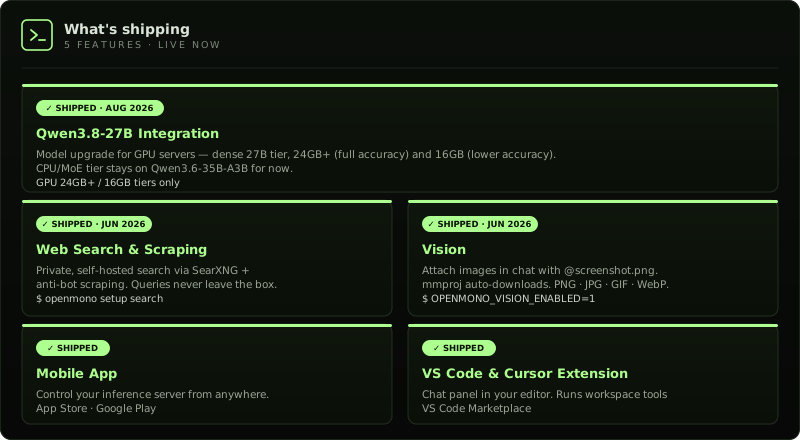
openmono setup search · OPENMONO_VISION_ENABLED=1 · App Store · Google Play · VS Code Marketplace
---
## How it compares
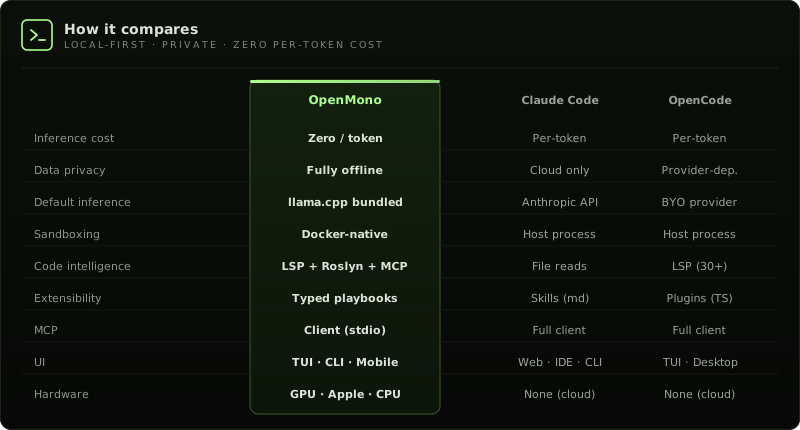
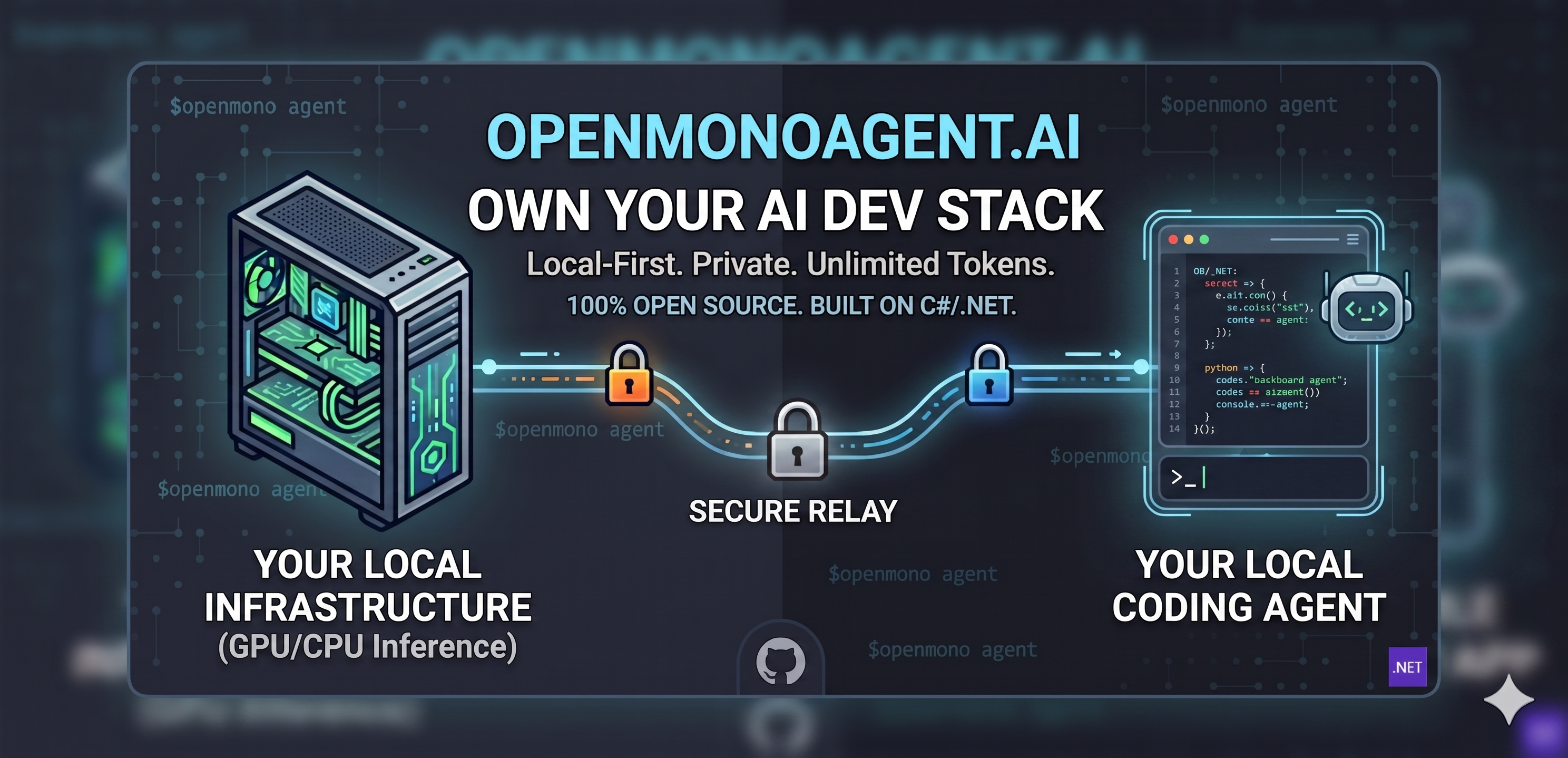
Most coding agents are cloud products wearing an open-source label. Your prompts, your code, and your context hit someone else's servers on every keystroke. OpenMono runs the model on your hardware — after the one-time setup, **inference costs nothing**. Your code never leaves the machine. No account. No usage dashboard. No API key.
| 01 · **Bundled inference — zero config, zero cost** llama.cpp ships inside Docker. Installer detects your hardware and picks the right model. After setup, every token is free. `GPU` Qwen3.8-27B dense · ~60 tok/s `iGPU` Qwen3.6-35B-A3B MoE · APU unified memory · ~20 tok/s `Mac` Qwen3.6-35B-A3B MoE · Metal · ~45 to 48 tok/s → [Models & reasoning mode](docs/MODELS.md) | 02 · **Agentic loop that earns its name** Up to 1,000 iterations per turn. Doom-loop detection nudges on repeated tool batches, escalates the nudge at 3 consecutive detections, and ends the turn at 5. Checkpoints at 65% context fill, compacts at 80%. Runs until done — then stops. |
| 03 · **[21 tools](docs/ARCHITECTURE.md), guarded pipeline** Every call: parse → schema validate → path sanity → plan-mode gate → host-mode gate → permission check → cache → pre-hook → execute → post-hook → artifact store → cache write → invalidate. Read-only tools run in parallel. Nothing bypasses the pipeline. | 04 · **5 specialist sub-agents** Isolated sessions with locked tool sets and turn budgets: `Explore` · read-only discovery · 100 turns `Plan` · architecture, no writes · 100 turns `Coder` · full file access · 300 turns `Verify` · adversarial + Roslyn · 150 turns `general-purpose` · everything · 200 turns |
| 05 · **Docker sandbox** In sandbox mode the project mounts as `/workspace`. The agent reads and writes your real files. That mount is the blast radius; nothing outside it is visible. [Agent Host](#agent-host-whole-machine-mode) is the explicit exception: machine-level actions run only through approved `HostExec` calls. | 06 · **Deep code intelligence** Roslyn: type hierarchy, blast-radius, cross-file symbol search, callers, diagnostics — 5-min compilation cache. LSP for TypeScript, Python, Go, Rust, lazy-started on first use. Auto-detects [graphify](docs/graphify.md) (semantic concept graph, 25+ languages) and [code-review-graph](docs/code-review-graph.md) (structural call graph via MCP, ~22 tools) if installed — no config needed. |
| 07 · **[Playbooks](docs/PLAYBOOKS.md)** YAML workflows with typed parameters, conditional gates, and checkpoint/resume. | 08 · **[5 provider backends](docs/MODELS.md)** Local llama.cpp is the default; Strata is the supported Linux high-end backend. OpenAI, Anthropic, and Ollama are available but WIP — see [Models](docs/MODELS.md) for details. Providers are selected in `settings.json` at startup; `/model` switches the model on the active provider. |
| 09 · **Distributed inference** Agent on your laptop, inference on a separate GPU machine. No port forwarding — tunnel is established outbound from the inference box. Free relay at [app.openmonoagent.ai](https://app.openmonoagent.ai). → [Dual-box setup guide](docs/SETUP.md#dual-box-setup) | 10 · **Vision** Attach images in chat with `@screenshot.png` or ask the agent to read any image file. The multimodal projector (mmproj) is downloaded automatically at setup. Supported formats: PNG, JPG, GIF, WebP. Large images are auto-resized to fit within the image budget. Enable vision in `settings.json` (`inference.vision_enabled`) or set `OPENMONO_VISION_ENABLED=1`. → [Vision setup & usage](docs/SETUP.md#vision) |
| 11 · **Private web search & scraping** Self-hosted search via SearXNG — your queries never leave the machine. Anti-bot scraping via Scrapling + Camoufox (real browser, Cloudflare bypass). Single Caddy gateway, auto-detected. Falls back to DuckDuckGo / direct fetch when the gateway is absent. `openmono setup search` · `openmono setup scraper` → [Web services architecture](docs/ARCHITECTURE.md#inference-side-web-services-caddy-gateway) | 12 · **VS Code extension** The full agent loop in your editor sidebar — streaming responses, live Markdown, file edits, bash, and permission prompts without leaving VS Code. Connects to the local agent over ACP on port `7475`. Also works in Cursor. `code --install-extension StartupHakk.openmono-agent` → [Extension docs](docs/SETUP.md#vs-code--cursor-extension) · [Marketplace](https://marketplace.visualstudio.com/items?itemName=StartupHakk.openmono-agent) |
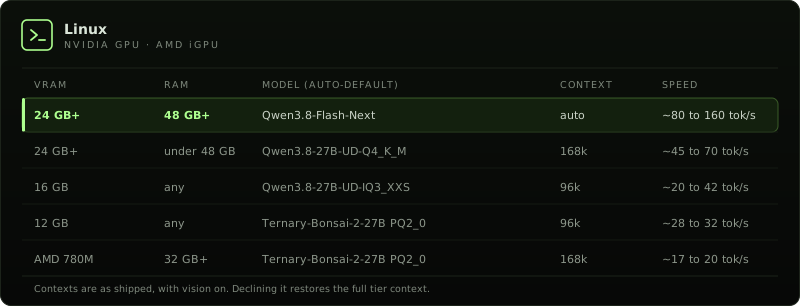
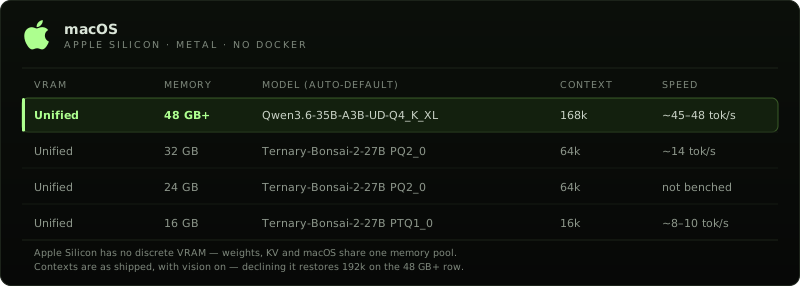
--options to choose the model, vision, and parallel slots yourself, or --model=<name> to pin one. See Pick your model for the menu, flags, and Linux context presets. The pick depends on VRAM and system RAM: on Linux a 24 GB+ card gets Qwen3.8-Flash-Next (Strata) on a 48 GB-class box and Qwen3.8-27B below that, a 16 GB card keeps Qwen3.8-27B, and a 12 GB card and AMD 780M iGPUs (Ryzen 9 7940HS, 32 GB+ RAM) get Ternary-Bonsai-2-27B via Prism. CPU mode runs Qwen on stock llama.cpp (about 20 GB RAM). Linux setup is for Ubuntu and Ubuntu derivatives, tested on Ubuntu 24.04 LTS. On macOS, the full and inference roles require Apple Silicon (M1+); 48 GB+ unified memory is the recommended, tested configuration. 24 to 47 GB and 16 to 23 GB Macs run Ternary-Bonsai (PQ2_0 / PTQ1_0) with a tighter context window. Intel Macs: agent-only mode. macOS 14+ (Sonoma/Sequoia) recommended.
### Pick your model
By default, setup picks a model for the hardware and does not ask. On a terminal, `openmono setup --options` shows a menu of what this machine can run. The default answer is 1, Qwen on stock llama.cpp (always available, the safe default). Pin one with `--model=qwen|bonsai-pq2|bonsai-ptq1|flash-next`. Shorthands: `--qwen`, `--bonsai`, `--bonsai-ptq1`, `--flash-next`.
**Qwen** is stock llama.cpp, including CPU mode (about 20 GB RAM). **Bonsai 2 27B** is a ternary build on the PrismML llama.cpp fork (PQ2_0 about 7.2 GB, PTQ1_0 about 5.9 GB). On Linux it runs on an NVIDIA GPU, or on the AMD Ryzen 9 7940HS iGPU (Radeon 780M) through the Prism Vulkan image. There is no CPU image. It keeps a real 27B on 12 GB NVIDIA cards, where Qwen drops to a 9B, and it is the auto-pick on that iGPU. **Qwen3.8-Flash-Next** runs on Strata: Linux, an NVIDIA GPU, and a 48 GB-class box (about 44 GiB or more of system RAM), with weights streamed from disk. Setup auto-picks it on those boxes when the card has 24 GB or more of VRAM. Otherwise it appears only in the `--options` menu, and only when the machine can run it.
Linux context presets, before the vision trim: Bonsai 196,608 on 24 GB, 131,072 on 16 GB, 98,304 on 12 GB, 32,768 on 8 GB. Qwen 196,608 on 24 GB and 180,224 on 16 GB. On a 24 GB card the two match. Bonsai's benefit is fitting a 27B model in less VRAM, not a longer window. Vision is on by default and trims the 24 GB preset to 172,032 for both (a 16 GB card goes to 98,304 for both).
---
## Need Help?
Stuck on setup, or want OpenMono on your own servers? We install and support private OpenMono deployments — contact us, book a call, and we'll walk you through getting it running on your hardware. Pick your hardware. We handle the rest.

Roadmap |
What's next |
Setup & commands |
Daily commands, TUI vs classic, flags |
Deployment modes |
Single-box vs split-box, server-ops runbook |
Architecture |
.NET CLI + llama.cpp + Docker, full diagram |
Models & reasoning |
Model tiers, reasoning mode, provider config |
Configuration |
settings.json, providers, permissions, MCP servers |
Host bridge |
Whole-machine mode: consent, daemon, host-bridge.json |
Playbooks |
YAML workflows, typed params, checkpoint/resume |
graphify |
Semantic code graph, 25+ languages |
code-review-graph |
Structural call graph via MCP |
VS Code extension |
Chat panel for VS Code 1.85+ · also works in Cursor · Marketplace |
Contributing |
How to contribute |
| PUBLIC BETA Early access is open — we're shipping updates fast. Try it out and tell us what you'd like to see next. |
| OpenMono is early and moving fast. Contributions are welcome — new tools, providers, LSP servers, playbooks, bug fixes, or docs. |
→ Read the contributing guide before opening a PR
|