# Steam ROM Manager
[](https://github.com/SteamGridDB/steam-rom-manager/actions/workflows/main.yml)
[](https://github.com/SteamGridDB/steam-rom-manager/commits/master)
[](https://github.com/SteamGridDB/steam-rom-manager/releases)
[](https://discord.gg/bnSVJrz)
[](https://community.chocolatey.org/packages/steam-rom-manager)
[](https://crowdin.com/project/steam-rom-manager)
# Overview
Steam ROM Manager (SRM) is a super flexible tool for adding non-Steam games to Steam in bulk and managing their artwork assets and controller templates. Added games could be ROMs for emulators, games from other stores such as Epic or GOG, or even not games at all. Have you always wanted your notes from junior year as a category in steam? If so that's pretty weird! But now it's possible.
For an overview of how SRM works see [here](https://steamgriddb.github.io/steam-rom-manager/). There is plenty of documentation available in the app's built in FAQ and documentation, and if you need further help there are expert users to be found on the [SGDB discord](https://discord.gg/bnSVJrz) under the Steam ROM Manager category and the [SRM subreddit](https://www.reddit.com/r/SteamRomManager/).
Check out the [releases page](https://github.com/SteamGridDB/steam-rom-manager/releases) for compiled downloads for Windows (exe, msi), macOS (dmg), and Linux (AppImage, deb).
The Windows version is also available as a [Chocolatey package](https://community.chocolatey.org/packages/steam-rom-manager).
The Linux version is also available as a [Flatpak](https://flatpak.org) at [Flathub/steam-rom-manager](https://flathub.org/apps/details/com.steamgriddb.steam-rom-manager). Linux caveats:
- On some distributions Flatpak must be [pre-configured manually](https://flatpak.org/setup).
- The AppImage needs to be [made executable](http://discourse.appimage.org/t/how-to-make-an-appimage-executable/80) after download.
If you're on a Steam Deck we recommend setting everything up through [EmuDeck](https://www.emudeck.com/), as it will install and automatically configure Steam ROM Manager and whatever emulators you want.
# Support SteamGridDB
If you enjoy Steam ROM Manager and want it to continue to be useful consider supporting [SteamGridDB](https://www.steamgriddb.com/)'s Patreon. [SteamGridDB](https://www.steamgriddb.com/) hosts all of the artwork Steam ROM Manager uses to make your Steam library the envy of the town, so we should probably help them keep their lights on.
 # Parsers
Parsers are the heart and soul of SRM. If Steam is the octopus, then these are its tentacles — reaching into your ROM directories and the databases and manifest files of other game stores and pulling out the games you want.
## ROM Parsers
ROM parsers allow one to import shortcuts using search strings, e.g. `games/${title}.@(iso|rvz)`, or in the case of the manual parser by specifying ROM locations directly.
|Parsers|Windows|Mac OS|Linux|Description|
|---|---|---|---|---|
|Glob|✅|✅|✅|Parsing using simple `glob` style search strings|
|Glob-regex|✅|✅|✅|Parsing using `reg-ex` style search strings|
|Manual|✅|✅|✅|Parsing using a JSON file specifying locations|
## Platform Parsers
In addition to flexible importing of ROMS, SRM now has several _platform parsers_ for importing from popular game stores:
| Parser | Windows | Mac OS | Linux | Launch Modes |
| ------------------------------------------------------------------ | ------- | ------ | ----- | --------------------------------------------------------------------- |
| [Amazon Games](https://gaming.amazon.com/amazon-games-app) | ✅ | 🟦 | 🟦 |
# Parsers
Parsers are the heart and soul of SRM. If Steam is the octopus, then these are its tentacles — reaching into your ROM directories and the databases and manifest files of other game stores and pulling out the games you want.
## ROM Parsers
ROM parsers allow one to import shortcuts using search strings, e.g. `games/${title}.@(iso|rvz)`, or in the case of the manual parser by specifying ROM locations directly.
|Parsers|Windows|Mac OS|Linux|Description|
|---|---|---|---|---|
|Glob|✅|✅|✅|Parsing using simple `glob` style search strings|
|Glob-regex|✅|✅|✅|Parsing using `reg-ex` style search strings|
|Manual|✅|✅|✅|Parsing using a JSON file specifying locations|
## Platform Parsers
In addition to flexible importing of ROMS, SRM now has several _platform parsers_ for importing from popular game stores:
| Parser | Windows | Mac OS | Linux | Launch Modes |
| ------------------------------------------------------------------ | ------- | ------ | ----- | --------------------------------------------------------------------- |
| [Amazon Games](https://gaming.amazon.com/amazon-games-app) | ✅ | 🟦 | 🟦 | - Launch via Amazon Games
- Launch via executable
|
| [EA Desktop](https://www.ea.com/ea-app) | ✅ | 🟦 | 🟦 | - Launch via EA Desktop
- Launch via executable
|
| [Epic](https://store.epicgames.com/en-US/) | ✅ | ✅ | 🟦 | - Launch via Epic
- Launch via executable
|
| [GOG Galaxy](https://www.gog.com/galaxy) | ✅ | ✅ | 🟦 | - Launch via GOG Galaxy
- Launch via executable
|
| [Itch.io](https://itch.io/app) | ✅ | ✅ | ✅ | |
| [Legendary](https://github.com/derrod/legendary) | ✅ | ✅ | ✅ | - Launch via Legendary
- Launch via executable
|
| [Ubisoft Connect](https://ubisoftconnect.com/en-US/) | ✅ | ❌ | 🟦 | - Launch via Ubisoft Connect
- Launch via executable
|
| [UWP/XBox](https://www.xbox.com/en-US/xbox-game-pass/pc-game-pass) | ✅ | 🟦 | 🟦 | - Launch via UWP
- Launch via executable
|
| [Battle.net](https://battle.net) | ✅ | ❌ | 🟦 | |
✅ Implemented
❌ Planned
🟦 Store not present
We are open to suggestions and pull requests if you would like a platform parser added!
## Artwork Only Parsers
Artwork only parsers allow you to change the artwork for existing non-SRM games. Put it simply they just change artwork, they don't add shortcuts.
|Parser|Windows|Mac OS|Linux|Description|
|---|---|---|---|---|
|Steam|✅|✅|✅|Manages artwork for Steam Games|
|Non-SRM Shortcuts|✅|✅|✅|Manages artwork for Steam Shortcuts not added via SRM|
# For developers
## Command Line Interface
SRM has a fully featured command line interface, documented in the [wiki](https://github.com/SteamGridDB/steam-rom-manager/wiki/Command-Line-Interface).
## Building SRM
To compile this app, you'll need the latest `Node.js` and `yarn`. Every script will need to be run from the project directory.
Before running any scripts, dependencies must be installed using:
```
yarn install
```
Unfortunately, because of an issue with `better-sqlite3` you will most likely also have to run `yarn install` after building for windows if you want `yarn run start` to work. Otherwise, you will likely see the runtime error `better-sqlite3 is not a valid win32 application`.
## Scripts
All script must be run using `yarn run` command. For example, `yarn run watch:renderer`.
| Script | Function |
| ---------------- | ------------------------------------------------------------------- |
| `postinstall` | Recompiles native apps to match Electron's NodeJS version if needed |
| `start` | Launches compiled app |
| `watch:main` | Compiles Electron app and watches for changes |
| `watch:renderer` | Compiles a renderer for an Electron app and watches for changes |
| `build:main` | Compiles Electron app in production mode |
| `build:renderer` | Compiles a renderer for an Electron app in production mode |
| `build:dist` | Runs `build:main` and `build:renderer` |
| `build:win` | Compiles an executable installer for Windows |
| `build:linux` | Compiles a `deb` package and `AppImage` for linux |
| `build:linuxdir` | Builds an unpacked linux x64 version for use with flatpak |
| `build:flatpak` | Builds a flatpak from the unpacked linux version |
| `build:docker` | `build:win` and `build:linux` joined together |
| `build:mac` | Compiles a `dmg` package for MacOS |
## Debugging an app
Run `watch:main` (usually once since one rarely changes anything in the main Electron process) and `watch:renderer`.
Each command creates separate `webpack` instance which will watch referenced files for changes and will recompile app.
App can be run using `start` script or `npx electron .` (if you want to test the CLI use `npx electron . [command] [flags]`). After every recompile by `watch:renderer`, app can be refreshed using `Ctrl + R`, however `watch:main` requires need a restart.
`Ctrl + Shift + I` can be used to launch Chrome inspector once the app is running. This works even in the release version.
### For Windows
Scripts must be run in this order:
```
yarn run build:dist
yarn run build:win
```
### For MacOS
Scripts must be run in this order:
```
yarn run build:dist
yarn run build:mac
```
### For linux
Scripts must be run in this order:
```
yarn run build:dist
yarn run build:linux
```
### For linux flatpak
Unfortunately electron-builder does not yet competently build flatpaks, and the older approach using electron-packager and electron-installer-flatpak can't handle native modules. A work-around is to use electron-builder for the packaging step and electron-installer-flatpak for the actual flatpak creation.
First you need to run `yarn install -g @malept/electron-installer-flatpak` (this can't be added as dev-dependency since it is not cross-platform and yarn doesn't allow optional dev-dependencies).
Then
```
yarn run build:dist
yarn run build:linuxdir
yarn run build:flatpak
```
In order for this to work you must have already installed `flatpak-builder` using your favorite package manager (e.g. `sudo pamac install flatpak-builder`) and run:
```
flatpak install flathub org.freedesktop.Platform//19.08;
flatpak install org.freedesktop.Sdk//19.08;
flatpak install org.electronjs.Electron2.BaseApp/x86_64/stable
```
## Updating dependencies
Use `npx ncu` to list available dependency updates, and `npx ncu -u target [target]` to update, where `[target]` is either `patch`, `minor`, `latest`, `greatest`, or `newest`.
## Related Projects
Some other projects in the emulation-adjacent space we think you might be interested in!
### Front ends
- [ES-DE](https://gitlab.com/es-de/emulationstation-de) - A top tier emulation front end.
- [Playnite](https://github.com/JosefNemec/Playnite) - A general purpose front end with lots of importers.
- [Firelight](https://github.com/firelight-emulator/firelight) - An upcoming front end specifically for emulation with built in achievements.
### Configurators
- [EmuDeck](https://github.com/dragoonDorise/EmuDeck) - A collection of scripts for downloading and managing emulators and front ends alike.
- [RetroDeck](https://retrodeck.net/) - Configurator for downloading and managing emulators and front ends alike, focused on the Steam Deck and Linux Desktop.
### ROM Managers
- [Romm](https://github.com/rommapp/romm?tab=readme-ov-file) - A rom manager with a web UI.
- [Oxyromon](https://github.com/alucryd/oxyromon) - A CLI based rom manager.
- [JRomManager](https://github.com/optyfr/JRomManager) - A java based rom manager.
### Steam Artwork Tools
- [Steam Art Manager](https://github.com/Tormak9970/Steam-Art-Manager) - An artwork manager for Steam games.
- [SGDBoop](https://github.com/SteamGridDB/SGDBoop) - Tool to enable choosing artwork for in Steam directly from steamgriddb's website.
## Our Competition
[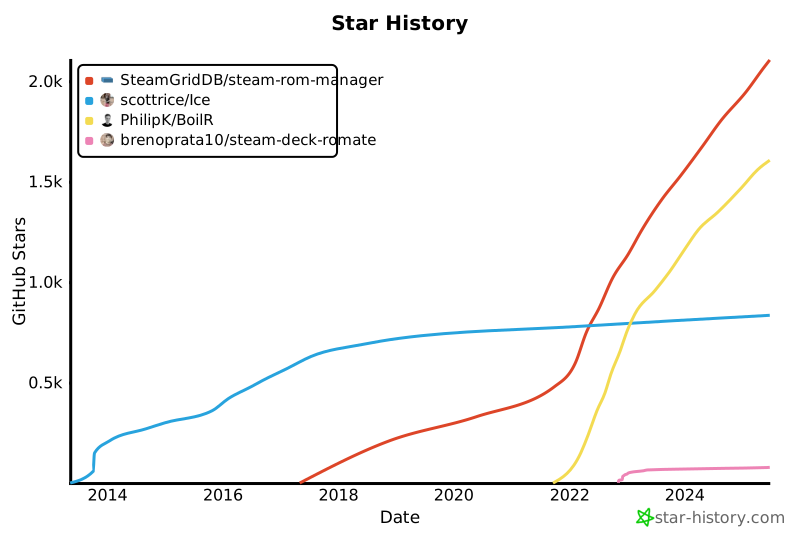](https://star-history.com/#SteamGridDB/steam-rom-manager&scottrice/Ice&PhilipK/BoilR&brenoprata10/steam-deck-romate&Date)
These tools are the closest to SRM in function, that is importing games/ROMs into Steam.
- [Steam Rom Mate](https://github.com/brenoprata10/steam-deck-romate) - An alternative to SRM made with the Steam Deck in mind.
- [BoilR](https://github.com/PhilipK/BoilR) - An alternative to SRM focused on importing from other game libraries.
- [Ice](https://github.com/scottrice/Ice) - The steam importer that started it all, now defunct.