# dsh-composer-predictions
[English](./README.md) · [中文](./README.zh-CN.md)
[](https://www.npmjs.com/package/dsh-composer-predictions)
[](LICENSE)
[](https://github.com/topics/dsh-plugin)
AI autocomplete and ghost-text suggestions for the composer in **DeepSeek
Harness desktop and the Web GUI**.
**Current release: [latest on npm](https://www.npmjs.com/package/dsh-composer-predictions)** · [Install or update](#install) · [中文说明](#中文说明)
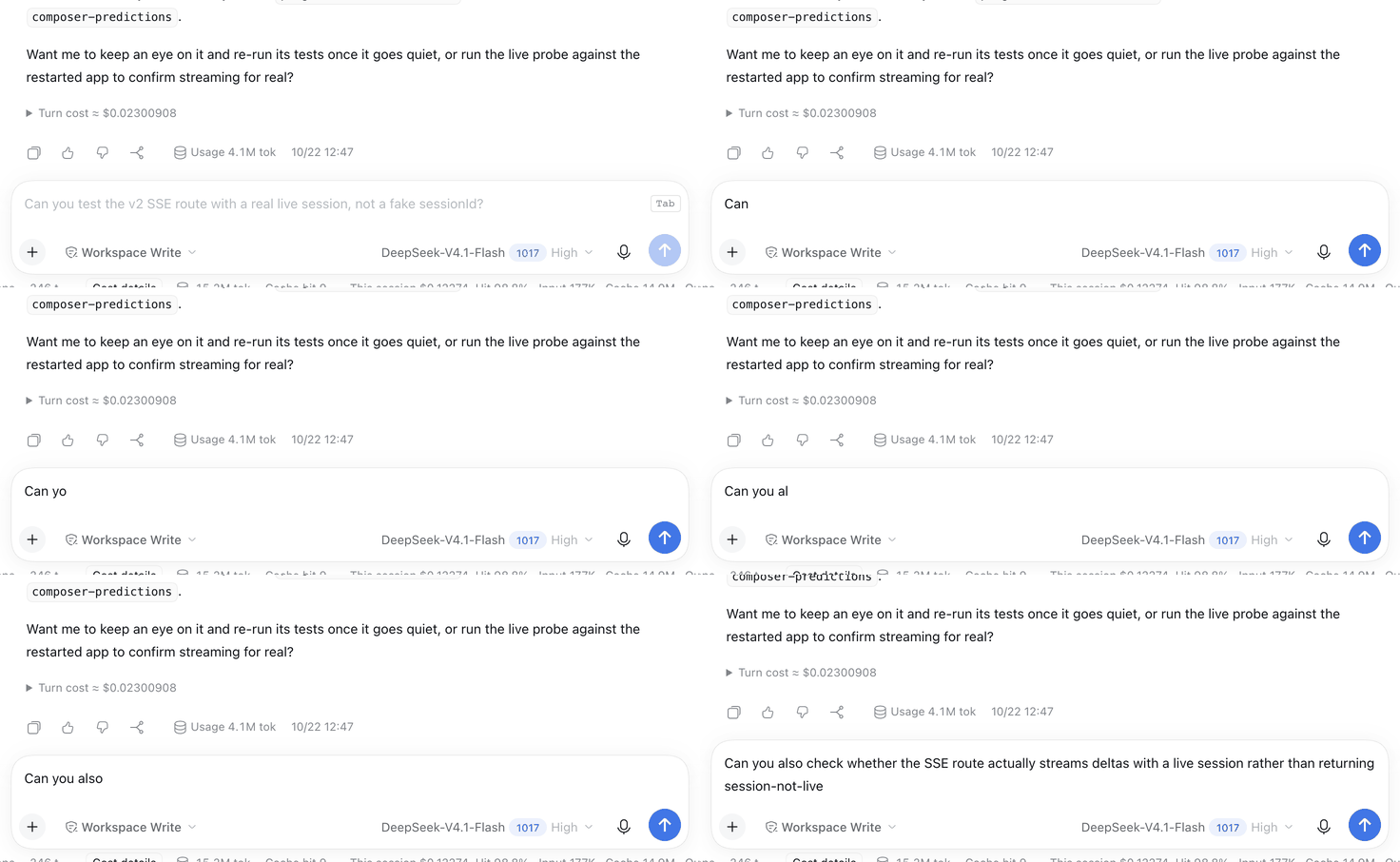
- **Next message** — after the agent replies, the empty composer shows a
streamed suggestion for your likely next message. **Tab** accepts it as an
editable draft.
- **Inline continuation** — while you pause mid-draft with the caret at the end,
the composer completes that sentence where the caret is. **Tab** accepts the
completion without sending anything.
Up to three candidates are requested per call. **Alt+Down / Alt+Up** cycle them,
**Escape** dismisses the suggestions, and typing aborts any in-flight request
and hides the ghost. Streaming text is a preview: `Tab` becomes available when
the final candidates are ready.
## Demo
The recording below shows draft continuation. To try both modes after installation, follow [Use](#use). Suggestions call your configured model and consume tokens; accepting a suggestion only edits the draft.
[Install and compatibility](#install) · [Usage](#use) · [How it works](#how-it-works) · [Changelog](CHANGELOG.md)
## Quick start
```sh
dsh plugin --profile web add dsh-composer-predictions
```
Restart the Harness (or refresh the Web UI). Ghost-text suggestions start appearing in the composer.
More from this suite: [Moodboard](https://github.com/Stijnus/dsh-moodboard) · [Composer Predictions](https://github.com/Stijnus/dsh-composer-predictions) · [Move to Workspace](https://github.com/Stijnus/dsh-move-to-workspace) · [Workspace Status](https://github.com/Stijnus/dsh-workspace-status) · [Prompt Rewrite](https://github.com/Stijnus/dsh-prompt-optimizer)
⭐ If this saves you a step, a star helps the next DSH user find it.
## How this differs from the other prediction plugins
This plugin combines next-message suggestions and draft continuation with
multiple ghost-text candidates and keyboard cycling: `Tab` accepts into
an editable draft, `Alt+Down`/`Alt+Up` cycle candidates, and nothing is ever sent
for you.
| | this plugin | [dsh-composer-prediction](https://www.npmjs.com/package/dsh-composer-prediction) | [dsh-input-prediction](https://www.npmjs.com/package/dsh-input-prediction) | [dsh-ghost-prompt](https://www.npmjs.com/package/dsh-ghost-prompt) |
|---|---|---|---|---|
| Suggests the next message after a reply | ✅ | ✅ | ✅ | ✅ |
| Completes the draft while you type, at the caret | ✅ | — | ✅ | — |
| Several candidates per request | ✅ 3, inline | — | ✅ 1–3 chips | — |
| Cycle candidates without leaving the keyboard | ✅ `Alt+↓` / `Alt+↑` | — | — (click a chip) | — |
| Accepts as an editable draft, never sends | ✅ | ✅ | Tab edits the draft; recommendation chips send on click | ✅ |
| Streamed rendering | ✅ SSE (`/v2`) | not documented | ✅ | ✅ |
| Recent tool calls and outcomes in the prompt | ✅ | — | — | — |
| Cache | ✅ per turn + per draft | ✅ | ✅ | not documented |
| Switch off in Settings, no uninstall | ✅ Settings → General | ✅ Settings section | not documented | not documented |
"—" means the feature is not mentioned in that package's README as of
2026-10-25, not that it is impossible. If all you want is an after-turn
suggestion, `dsh-composer-prediction` is a perfectly good, more established
choice — this plugin is for people who also want the caret continuation and
keyboard-only candidate switching.
**Settings → General → Composer predictions** switches both modes on or off.
The choice is saved in the current browser or desktop window's local storage
on this device. Other browser origins and devices keep their own preference.
## Install
Requires Harness `>=0.2.1-rc.3 <0.3.0-0`; desktop and web are tested on
`0.2.1-rc.3`. Predictions use the same authenticated owner access as the app.
In the **DeepSeek Harness desktop app or Web GUI**: **Plugins → Install**, then enter
```
dsh-composer-predictions
```
Or from a terminal with a DSH profile:
```bash
dsh plugin --profile add dsh-composer-predictions
```
Then restart the Harness (a profile addition is applied at boot). A linked
source checkout is picked up again when the profile recomposes.
Or add the plugin market index to Discover (**Plugins → Discover → Index
sources**):
```
https://raw.githubusercontent.com/Stijnus/dsh-composer-predictions/main/market-index.json
```
## Use
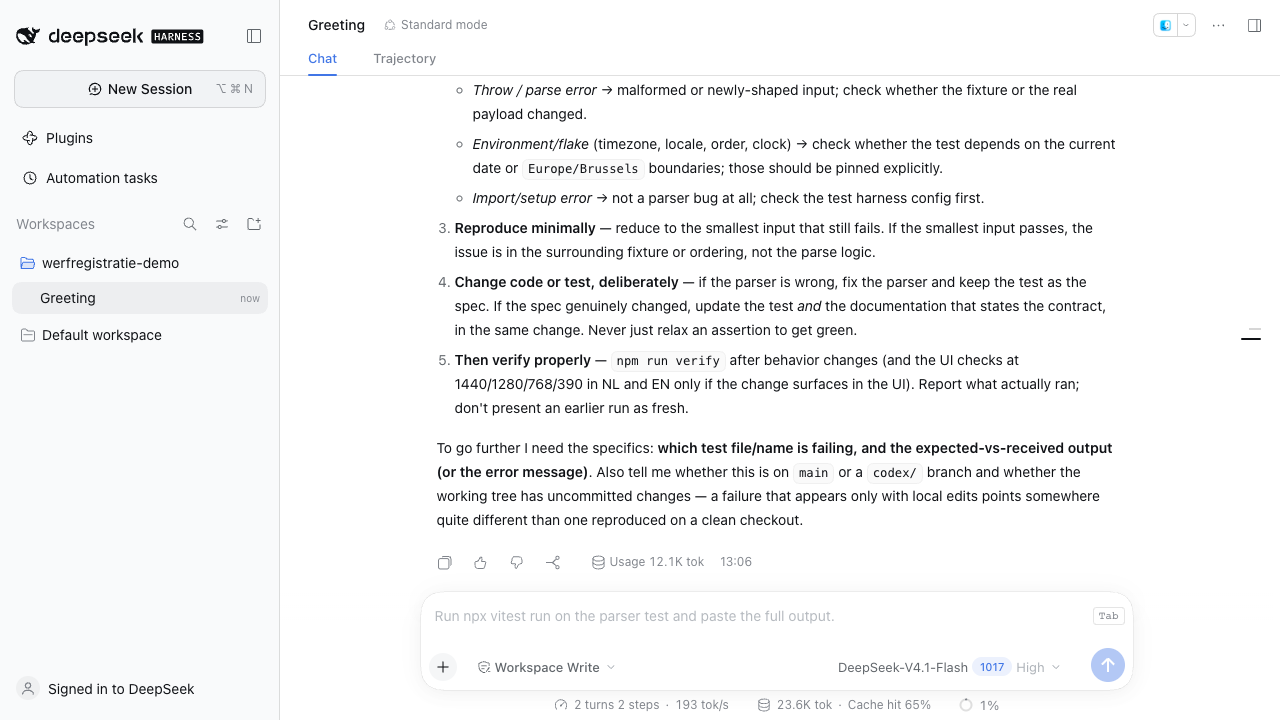
1. Send a message and let the agent finish — a dimmed next-message suggestion
streams in with a `Tab` keycap.
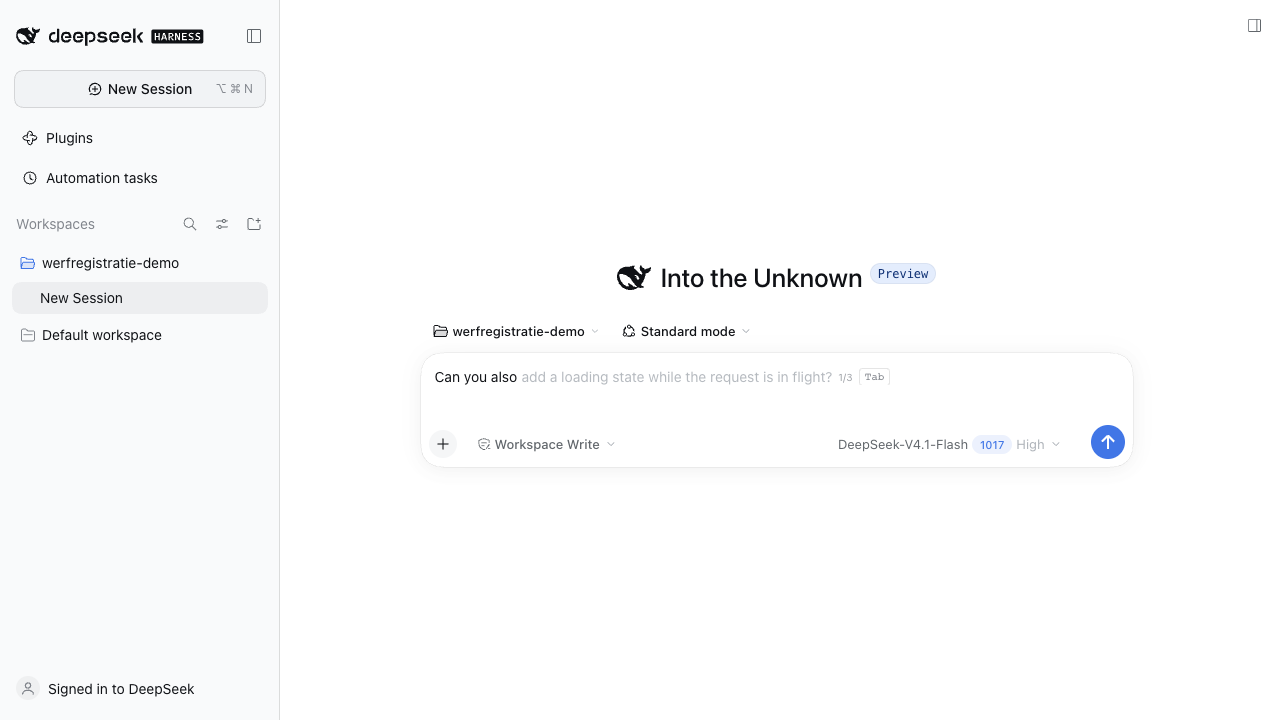
2. Or type anything and pause with the caret at the end of the draft — a
continuation ghost appears right after the caret.
3. When the `Tab` hint appears, **Tab** turns the current candidate into an editable draft.
**Alt+Down** shows the next candidate, **Alt+Up** the previous one.
**Escape** dismisses, and typing hides the ghost without sending anything.
4. Accepting never submits the message; edit it or press Enter yourself.
## 中文说明
**DeepSeek Harness 桌面端 / Web 的 Tab 自动补全与输入预测。** 回复结束后,
空输入框显示下一条消息的灰字建议;输入停顿时,续写光标末尾的草稿。
`Tab` 采纳已完成的候选为可编辑草稿,不会自动发送;`Alt+↓/↑` 切换最多三个候选,
`Esc` 关闭。设置 → 通用 → 输入预测可开关,设置保存在当前设备的浏览器中。
安装或更新:**插件 → 安装 → `dsh-composer-predictions`**,然后重启 Harness。
CLI 用户可运行 `dsh plugin --profile web add dsh-composer-predictions`,
把 `web` 换成自己的 profile。预测会调用会话模型并消耗 token,虽然不会出现在会话日志和 token 统计中。
也可以把上方 [Install](#install) 中的市场索引添加到「插件 → 发现」。
演示、完整配置与限制见本页;[最新发布说明](https://github.com/Stijnus/dsh-composer-predictions/releases/latest)。
## How it works
- The **Host half** registers two routes on the Harness web server:
- `POST /composer-prediction` — JSON (`suggestion` plus `suggestions`), kept
for compatibility with older clients.
- `POST /composer-prediction/v2` — Server-Sent Events: `meta`, `delta`
(streamed text), then `done` with the final candidate list.
- A request carries `{ sessionId, mode, draft }`, where `mode` is `next` or
`continue`. The Host reads the Session tail (`deriveMessages()`), adds a short
list of recent tool calls and their outcomes, and renders one bounded prompt.
`next` declines when the agent has not produced a reply; `continue` includes
the draft text that ends at the caret.
- One small auxiliary model call runs through `ctx.llm` over that prompt. The
suggestion uses the Session's own provider/model at the model's lowest
reasoning effort unless `provider`/`model` are configured. Model output is
split into up to `maxSuggestions` clean one-line candidates: numbering,
bullets and quotes are stripped, `NONE` produces no suggestion, and drafts the
model restated are trimmed. A continuation keeps the model's leading
separator space; the Client adds one only when a non-CJK draft and
continuation would otherwise glue two words together.
- Completed results are cached per Session sequence (and per draft for
continuations), so a repeated request reuses the cached result. Simultaneous
requests from different views have independent cancellation and may each call the model.
- The **Client half** registers into `conversation.input.overlay`, debounces
requests (600 ms after a turn settles, 500 ms after a typing pause), aborts
superseded requests, and renders the ghost over the empty composer or at the
caret. It measures the resident editor, so the ghost follows its padding,
line height, and scroll position.
- Nothing is written to the Session log, and predictions are not counted as
conversation turns.
## Configuration
Override the row in your profile's `cordis.patch.yml`:
```yaml
- id: composer-predictions
name: dsh-composer-predictions
config:
maxOutputTokens: 220 # 16..4096
timeoutMs: 20000 # 1000..120000
maxMessages: 10 # 2..40 messages of transcript
maxChars: 8000 # 500..40000 characters of transcript
maxSuggestions: 3 # 1..5 candidates per request
maxToolNotes: 6 # 0..20 recent tool calls in the prompt
provider: deepseek-account # optional fixed route; both keys or neither
model: deepseek-flash
reasoningEffort: off # off | low | high | max; omitted = model's lowest
```
A route override is a pair: half a pair is ignored and the Session route wins.
A suggestion longer than 240 characters is cut at a word boundary.
## Privacy and limits
- The conversation tail, recent tool activity and (in continuation mode) the
draft are sent to the configured model route, just like a normal turn.
Nothing else leaves the machine.
- Predictions are suggestions only; they never run tools or change the Session.
- Accepting a suggestion and then editing it is a normal draft: it is only sent
when you submit it.
- Prediction calls consume model tokens and may incur provider charges even
though they do not appear in the Session log or its token meter.
- Only final candidates can be accepted. A disconnected stream is discarded.
- A continuation is hidden when there is too little room after the caret; it
never shifts left over your draft.
- Final suggestions are announced through an accessible status message.
- Requires a compatible Harness build with `conversation.input.overlay`,
`settings.general.item`, `connection.admit()`, `ctx.llm` and `session.deriveMessages()`.
## Test
```bash
node --test
```
Probe a running GUI to watch the stream and cache timing. First set `DSH_COOKIE`
to an authenticated Harness cookie in your environment; treat it as a secret
and never commit or include it in logs.
```bash
DSH_URL='http://127.0.0.1:' node tools/live-probe.mjs continue "Can you also"
```
The 36 cases drive both Host endpoints against a fake Session and LLM service:
prompt contents (including tool activity), candidate normalization and spacing,
streaming events, per-turn and per-draft caching, route and effort selection,
failure reporting, HTTP authentication/owner checks, cancellation and request validation. Client helpers (continuation
joining, SSE parsing, streaming candidates) are unit-tested through the bundle's
internal `__testing` export. Component regression tests cover streaming acceptance,
refused insertions, right-edge placement, truncated streams and accessible copy.
## Uninstall
Switch **Settings → General → Composer predictions** off to pause suggestions.
To uninstall, remove the bundle with
`dsh plugin --profile remove dsh-composer-predictions`.
## Changelog
See [CHANGELOG.md](https://github.com/Stijnus/dsh-composer-predictions/blob/main/CHANGELOG.md).
## Contributing
Issues and pull requests are welcome. If this saves you time in the composer, a
star is a welcome way to show support. For bug reports, include your Harness
version, plugin version, and steps to reproduce; omit API keys and private conversation content.
## License
MIT