Whale-girl logo # dsh-whale-musume · Whale Girl **A desktop-pet mascot for DeepSeek Harness: quiet company while you code — the moment work starts, she picks up a laptop and stops talking.** version tests-en license platform-en desktop-en legacy-web-en [![dshbase tested](https://dshbase.com/badges/dsh-whale-musume.svg)](https://dshbase.com/zh/plugins/dsh-whale-musume/) downloads discussions [**Quick start**](#quick-start) · [**Screenshots**](#screenshots) · [**Features**](#features) · [**FAQ**](#faq) · [中文](README.md) The whale girl idling in the corner with a coffee
--- ## Why this one Most desktop pets are either just an animated picture, or they steal your attention while you work. Three hard rules here: | Principle | How it is implemented | |---|---| | **Never interrupt** | While tools are running the mascot **never speaks and never switches poses randomly**; all chatter, care prompts and announcements only happen when idle | | **Never steal focus** | Decorative by default: `aria-hidden`, no keyboard capture, no writes to business DOM, no modifications to bundled packages. Even keyboard focus requires you to opt into accessibility mode | | **No privacy tax** | No telemetry, no uploads, zero external requests by default. Everything that reads conversation content or account amounts (TTS playback, keyword reactions, balance, accessibility) is **off by default** | And she actually knows what you are doing: instead of switching artwork on a timer, she reads the host's structural markers (tool-card state, session-running marker, terminal blocks) to decide which pose to hold and when to stay quiet. --- ## Table of Contents - [Quick start](#quick-start) - [Screenshots](#screenshots) - [Features](#features) - [Compatibility](#compatibility) - [First run](#first-run) - [Usage](#usage) - [Settings panel](#settings-panel) - [Update / Rollback / Uninstall](#update--rollback--uninstall) - [Version History](#version-history) - [Data & Privacy](#data--privacy) - [FAQ](#faq) - [Troubleshooting](#troubleshooting) - [Roadmap](#roadmap) - [Project Structure](#project-structure) - [Development & Testing](#development--testing) - [Contributing](#contributing) - [Credits](#credits) - [License](#license) --- ## Quick start ```powershell # DeepSeek Harness Desktop (Electron shell) — point the path at your install $Desktop = "D:\DeepseekHarnessDesktop" $Cli = "$Desktop\resources\app.asar\dsh\node_modules\@deepseek-ai\dsh-desktop-host\lib\cli.js" $env:ELECTRON_RUN_AS_NODE = "1" & "$Desktop\DeepSeek Harness.exe" --expose-internals $Cli plugin --profile desktop add github:Sutera-Diffusus/dsh-whale-musume ``` ```powershell # Legacy web profile dsh plugin --profile web add github:Sutera-Diffusus/dsh-whale-musume ``` Then **restart the host** (restart the desktop app, or restart `dsh web` and hit `Ctrl+F5`). She shows up in the bottom-right corner. > If the plugin store or `dsh plugin add` fails to install it, see [When the plugin store cannot install it](#when-the-plugin-store--dsh-plugin-add-cannot-install-it). A log that only shows `[exit 1]`, the expected miss on npm and fallback to git, and the `allowBuilds` note are all covered there.
How do I verify the install actually worked? Open the host's DevTools console (`F12`) and run: ```js window.__dshWhaleMusumeBooted // true document.querySelectorAll('[data-dsh-whale-root]').length // 1 getComputedStyle(document.querySelector('[data-dsh-whale-root]')).display // "block" on the home view window.__dshWhaleMoeDebug // state is not "hidden" ``` If all four look right, you are done. Otherwise see [Troubleshooting](#troubleshooting).
> There is also a **script install** (injects frontend assets, ships its own backup/rollback) for theme-integration or legacy environments: see [`scripts/apply-theme.mjs`](scripts/apply-theme.mjs). Pick **one** method, do not mix them. --- ## Screenshots
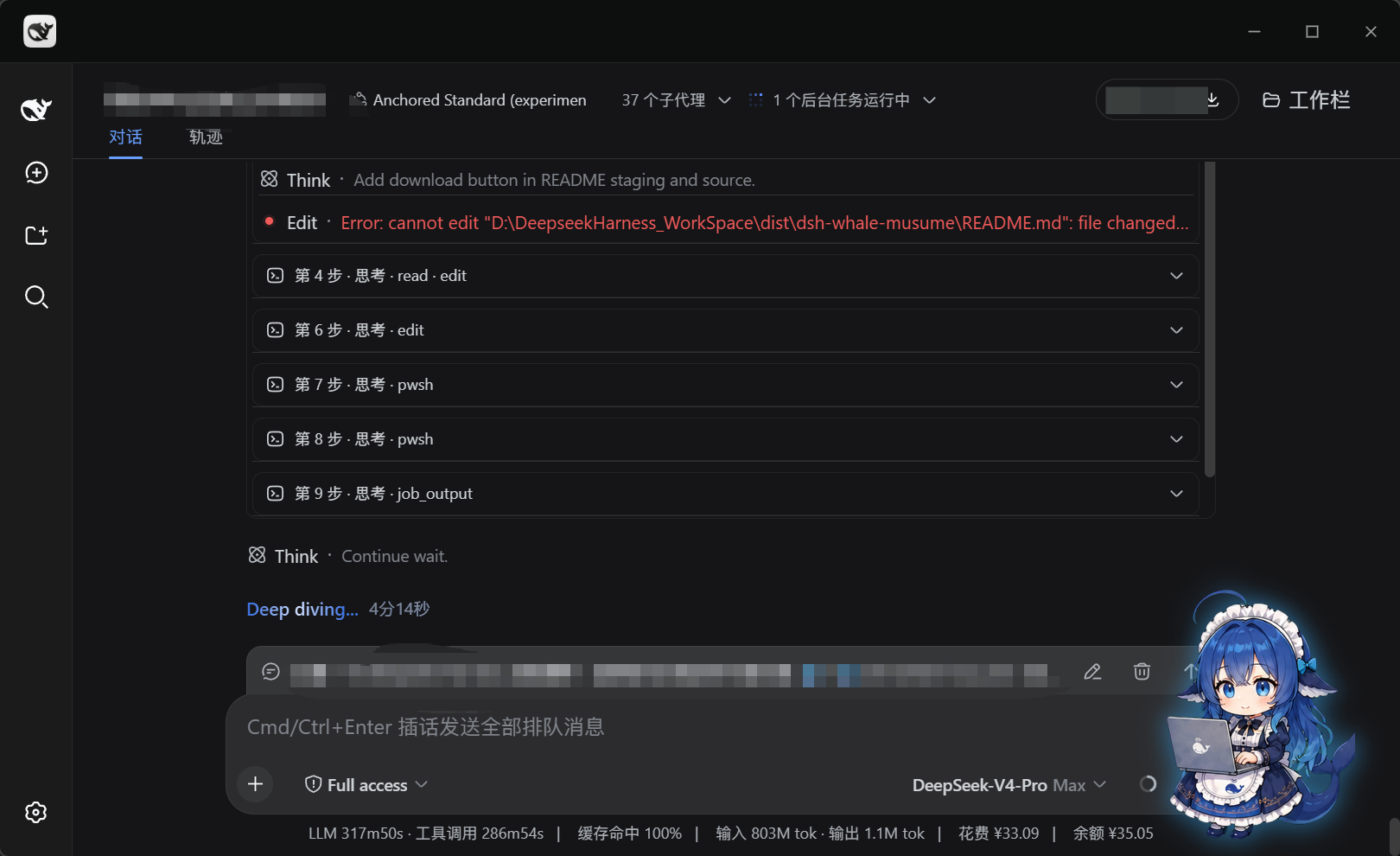
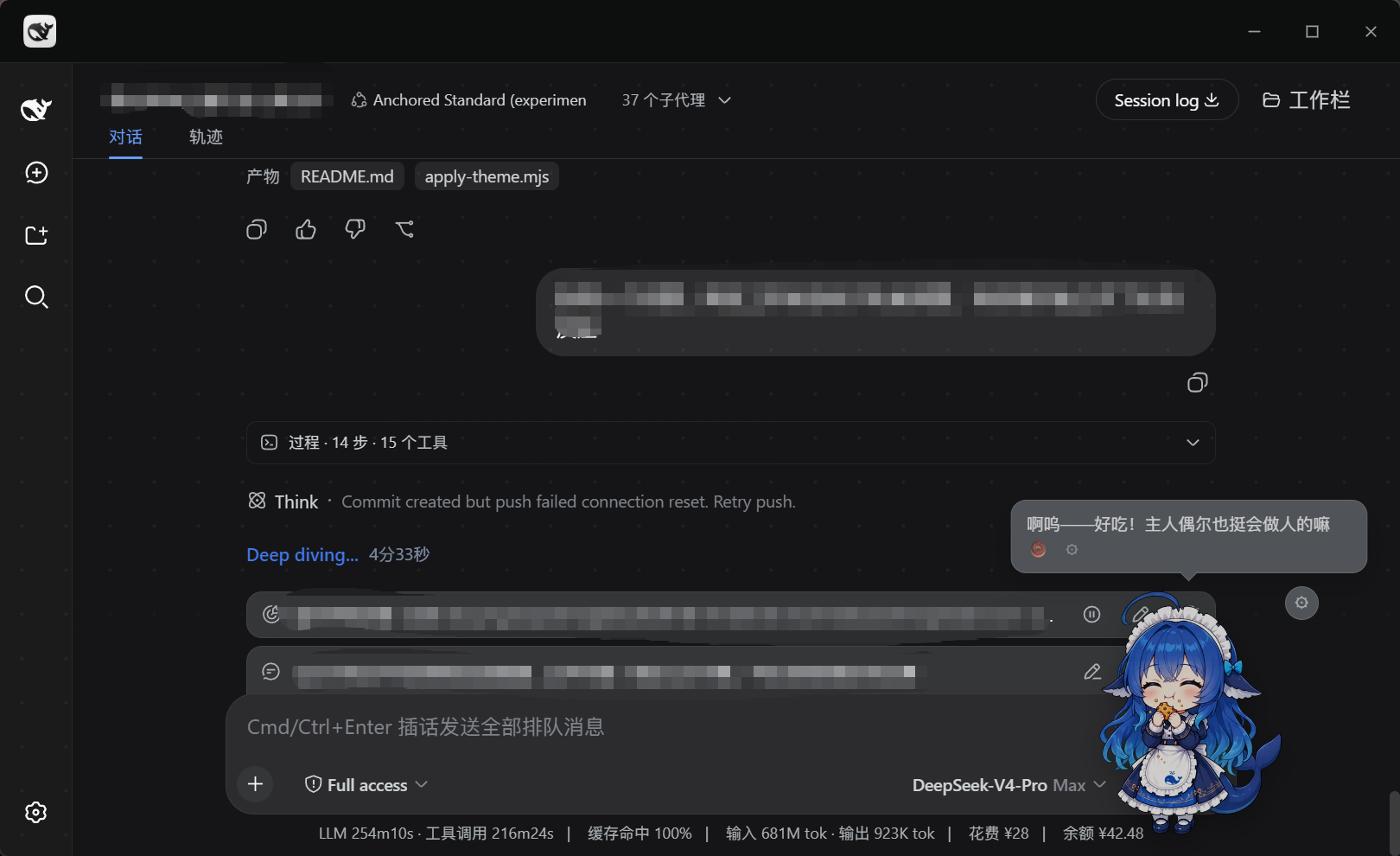
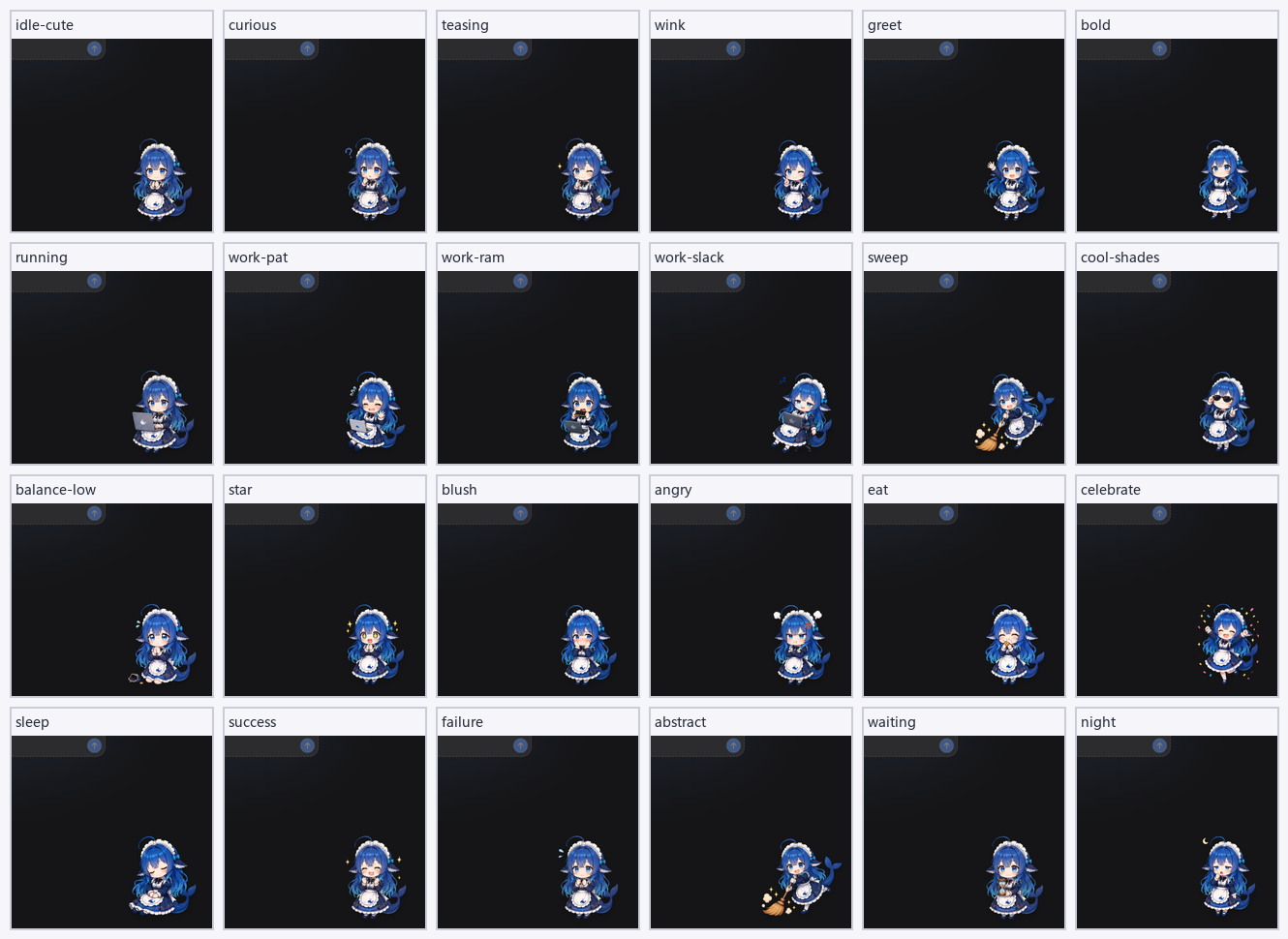
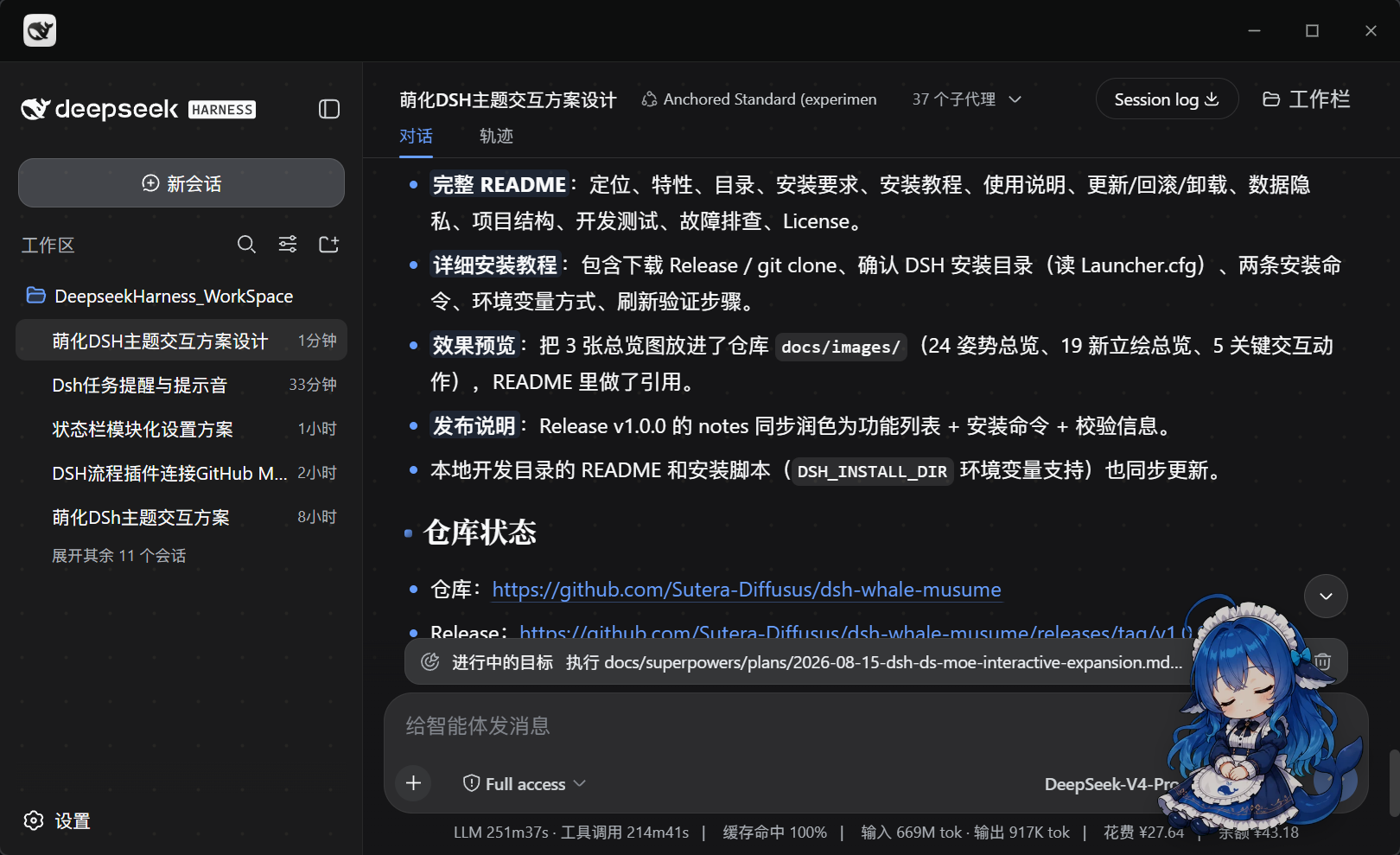
| Idle companion | Work-state integration | |---|---| | Idling with coffee | Picking up a laptop while tools run | | Floats bottom-right; random sips of coffee, stretches | Detects running tools, picks up a laptop with a soft blue glow | | Head-pat reaction | Feeding | |---|---| | Head pat with a speech bubble | Feeding a snack | | Click her head: blush artwork + hearts and stars | Right-click → feed: satiety and affection go up | | Floating form (draggable) | Artwork overview (90+) | |---|---| | 200px floating form | 24-pose overview | | 200px by default; drag her wherever you like | States / interactions / growth / minigames / weather / festivals / meme faces |
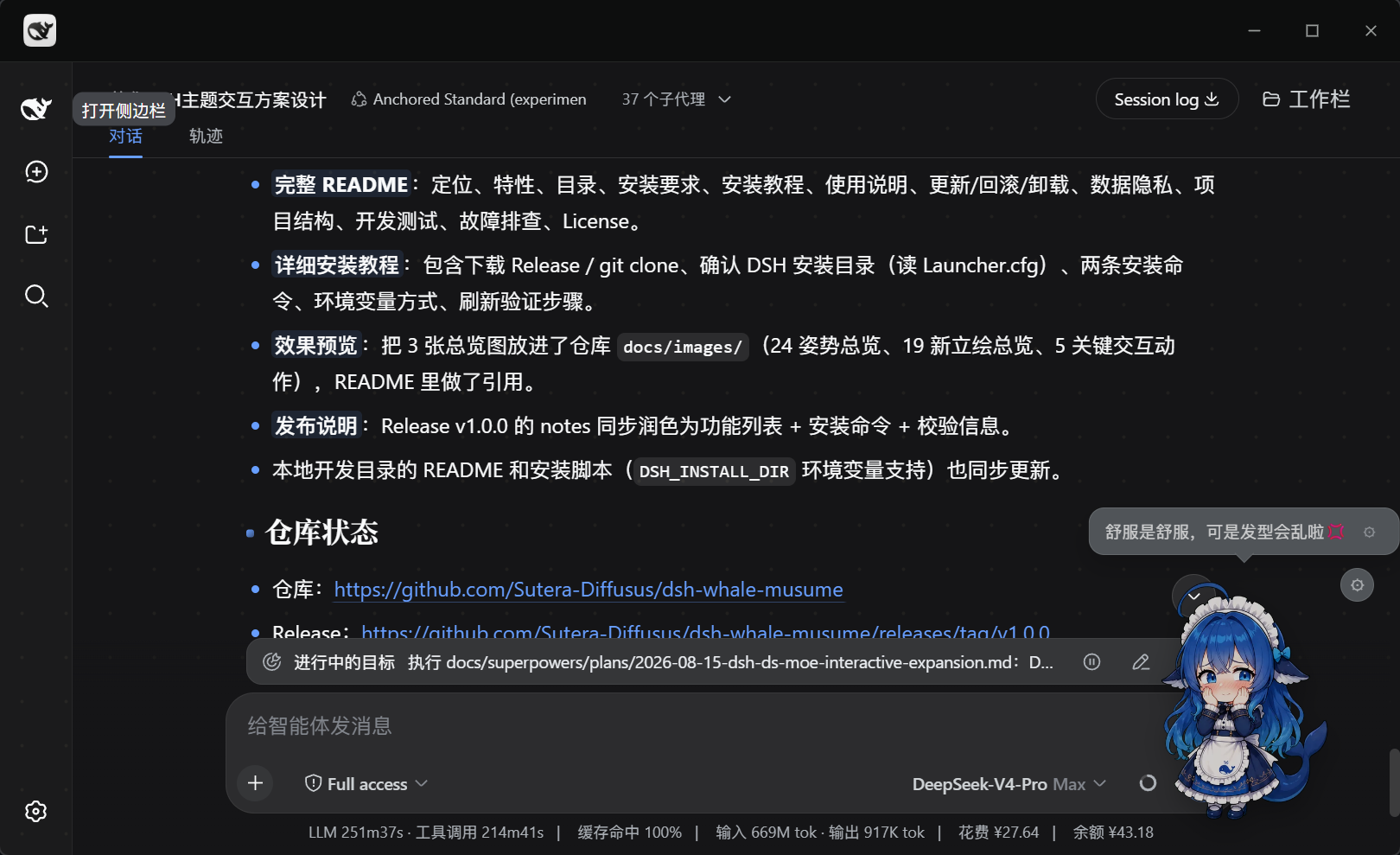
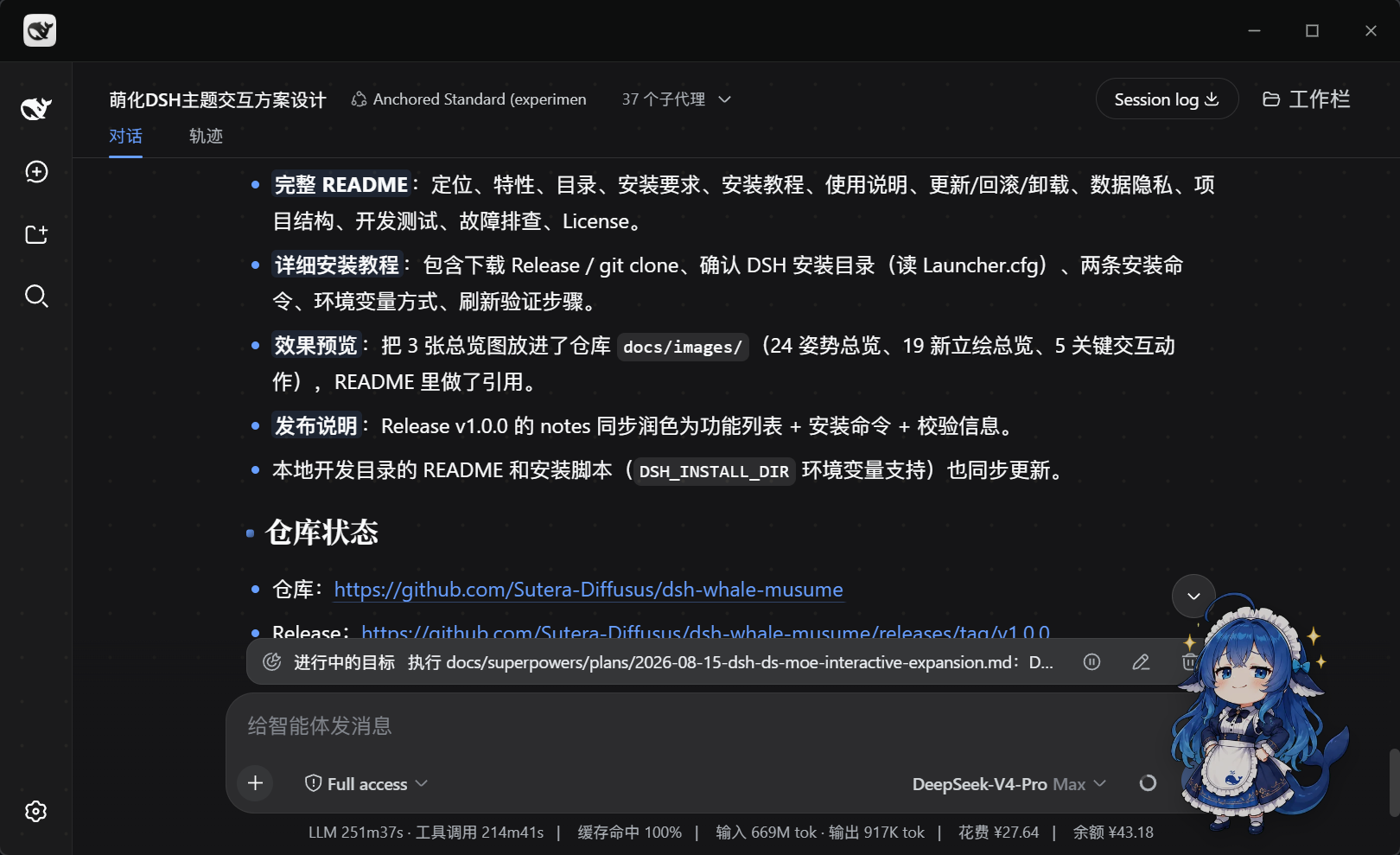

More: [interaction board](docs/images/actions-board.png) · [new artwork board](docs/images/new-poses-board.png) · posters [v1](docs/images/promo-poster-v1.png) / [v2](docs/images/promo-poster-v2.png) / [v3](docs/images/promo-poster-v3.png) / [v4](docs/images/promo-poster-v4.png) --- ## Features ### 🐋 Body & behaviour | Feature | Detail | |---|---| | Five forms | Floating / side / bar / mini / auto; switches with the current view, 200px floating by default | | Drag with inertia | Dragging switches to a "picked up" artwork that sways with the cursor; on release she slides a short distance and rotates upright, and grips the screen edge instead of spinning further. A gentle release only bounces once; the position is saved after the slide ends | | Momentum-masked transitions | Idle ↔ work uses a "press down → swap artwork → pop up" transition with no ghosting and no black flash; a 1.6 s timeout covers browsers that pause image transitions in background tabs | | Summon button | After you switch her off, a 🐋 button stays in the bottom-left corner so she can always be called back | ### 💼 Work-state integration | Feature | Detail | |---|---| | Busy/idle reaction | Detects running tools and switches to "hugging a laptop", with a soft blue glow and a "working" label | | Per-tool poses | Shell / file edits / search / tests / review / deploy / debug each map to a pose; anything unrecognised falls back to the generic working pose rather than guessing | | Stable while working | No idle skits, no chatter during work; when a signal briefly disappears the pose holds (8 s on the workbench view, 4 s elsewhere) instead of twitching | | Click reactions | While working, clicking her randomly shows "shy with laptop" or "snacking on a RAM stick" without interrupting the work state | ### 📈 Growth & achievements - **Stats**: mood, affection, satiety, level, sign-in streak, companionship time - **Daily quests**: three slots refreshed each day, each granting affection - **Weekly sign-in**: seven-slot board with 1 / 3 / 7-day milestone rewards - **Bond levels**: Lv3 unlocks a new idle action, Lv5 the title "Guardian of Whale Tide", Lv7 a hidden easter egg - **45 achievements + achievement wall**: interaction / companionship / DSH usage / minigames / quests; unlocked ones highlighted, locked ones dimmed; new "Hundred-Day Pact", "One-Year Pact" and four memory-game achievements - **Growth journal**: records bond level-ups and achievement unlocks, newest 12 shown first ### 💬 Dialogue & companionship - **530+ lines** covering every scene, cute by default with safe meme flavours (office life, slacking off, deadlines, "drawing pies", unhinged-literature style lines) - **13 meme keywords** (kyun, OMG, doge, sike, worship, peace, existential doubt, waku waku, …) turn her into the matching sticker face - **Idle chatter every 5–8 minutes**, locally classified by what your current task looks like; never speaks during work, never greets between 23:00 and 05:59 - **Mood tiers**: gentle lines when mood is low, energetic ones when it is high; bond levels unlock their own lines - **Weather companion**: leave the city empty for zero networking; otherwise uses Open-Meteo (free, no key) plus full-screen ambience (rain / snow / lightning / wind / fog / heat haze / frost), automatically toned down while working - **Proactive care**: sitting reminder (25 min busily working) / late-night rest nudge / stuck-companion check (same state for 8 min) / welcome-back greeting (away over 3 min); at least 15 minutes between prompts - **Two work-speech modes** (issue #24): thinking / tool / success / failure lines share one random cooldown window — **Chatty** 15–40 s, **Quiet** 90–240 s — so at most one line per window; thinking and tool lines are picked from the current task topic (same local classifier as idle chatter), while success / failure keep their own lines. Idle greetings and weather are unaffected; Chatty is the default - **Optional TTS playback**: the "line playback" toggle only appears when the host provides a `dsh-xiaomi-tts` service; **off by default**, and a missing service, missing configuration or failed playback never affects normal interaction ### 🎀 Interactions & visuals - **Zone clicks**: head / belly / tail are separate hit zones, each with its own artwork, effects and lines - **Click effects**: hearts and stars fly out; three quick clicks trigger a starry-eyed celebration with particles and a spin - **90+ artworks**: idle, working, thinking, away, four growth states, four minigame states, three weather states, five festival sets (Christmas / Halloween / Mid-Autumn / Lunar New Year / Valentine's, switched automatically on the day) - **Three mini-games**: **Bubble Pop Party** (4×4 grid, normal / star / bomb, combo scoring, 30-second rounds), **Snack Catch** (catch falling snacks with keyboard or mouse, avoid bombs), and **Whale Memory** (4×4 memory match reusing 16 existing artworks; 60 seconds, combo bonus, zero-mistake clear); all three share the three reward-bearing rounds per day and are playable by mouse and keyboard ### 🧩 Engineering - **Non-invasive**: pure frontend injection plus one read-only static asset route; no bundled package is modified - **No build step**: the `assets/` directory in this repo *is* the runtime artifact - **Artwork preloading**: the first screen loads only 5 common poses, the remaining 90+ are fetched one at a time every 120 ms while idle, so cold pose switches never stall; failures are silent - **Accessibility mode** (off by default): Tab focus, Enter/Space to pat, arrow keys to nudge position (Shift to speed up), state changes announced through `aria-live` - **Theme following**: follows the host's light/dark theme for bubbles and menus only — **artwork is never filtered**, so the art style is preserved - **Testable**: the state machine and the presentation layer are separate; unit tests run with plain `node --test` --- ## Compatibility | Host | Support | Notes | |---|:---:|---| | **DeepSeek Harness Desktop** `0.2.0-rc.2` | ✅ tested | That build's GUI defaulted to `127.0.0.1:19387`. Install and rollback: [0.2.0 deploy guide](docs/desktop-0.2.0-rc.2-deploy.md) | | **DeepSeek Harness Desktop / Web** `0.2.1-rc.1`, `0.2.1-rc.2` | ✅ static contract | Checked against tag `dsh-v0.2.1-rc.2` and the unit tests. **Not** re-run inside the Electron app. Desktop 0.2.1 binds with `--port 0` (OS-assigned); do not assume `19387`. See the [0.2.1 contract](docs/desktop-0.2.1-rc.2-contract.md) and [deploy delta](docs/desktop-0.2.1-rc.2-deploy.md) | | **Legacy web profile** (DSH `0.1.x`) | ✅ tested | `0.1.0-rc.6` and newer; the settings panel is verified on `0.1.1-rc.2` | | Other profiles (headless / acp, …) | ➖ no UI | There is no browser surface, so there is nowhere to show a pet | | Requirement | Value | |---|---| | OS | Windows 10 / 11 (the current desktop app's support range) | | Node.js | 18+ (script install only; the bundle install needs nothing) | | Browser | Recent Edge / Chrome | > **Data does not carry over**: the desktop app's window origin is `dsh-app://app` while the legacy web UI is `http://127.0.0.1:`. Their `localStorage` (`whale-moe:*`) is separate and is not migrated automatically. See [Data & Privacy](#data--privacy).
Which DSH 0.2.0-rc.2 contracts had to change? (for plugin authors) When porting to the desktop app we audited every contract against the real `0.2.0-rc.2` runtime, with file:line evidence in [`docs/desktop-0.2.0-rc.2-contract.md`](docs/desktop-0.2.0-rc.2-contract.md): | Contract | Change in 0.2.0-rc.2 | What we do now | |---|---|---| | Tool cards | `[data-role="tool"]` and friends match nothing | Use `[data-tool]` (value = tool name) + same-element `data-state` | | Busy detection | Finished tool cards **stay in the DOM** (`ok`/`stopped`) | Only `running` / `preparing` count as "working" | | Session running | New `[data-chat-running]` (mounted only while running) | Used as the cleanest live signal | | Terminal | `[data-slot="terminal"]` no longer exists | Use `[data-terminal]` | | Composer | Now contenteditable | Use `[data-composer-input]` | | Theme | Written to `body[data-ds-dark-theme]` (**empty string = dark**) | Recognised; legacy `data-theme`/class kept as fallback | | Settings panel | The always-present onboarding modal is also `role="dialog"` | Detection narrowed to `[data-shortcut-modal="settings"]` | | Client modules | Lazy CJS: side effects belong to factory materialization | `boot()` moved from `apply()` into the factory | | Onboarding modal | Present on every fresh load | No longer mistaken for the settings page (which used to hide the mascot) | All of these have regression assertions in `test/desktop-client.test.mjs` (34 of them). v2.4.0 re-checked tag `dsh-v0.2.1-rc.2` ([`docs/desktop-0.2.1-rc.2-contract.md`](docs/desktop-0.2.1-rc.2-contract.md)). Those markers are still there, so no selector changed. The install gate did: since DSH `0.2.1-alpha.4`, top-level `engines.dsh` wins. This package declares `>=0.1.0-rc.6 <0.2.0-rc.1 || 0.2.0-rc.2 || 0.2.1-rc.1 || 0.2.1-rc.2`. Marking `0.2.1-rc.1` / `0.2.1-rc.2` compatible means that static check plus unit tests, not a live desktop run.
--- ## First run Seven things worth trying in the first minute: 1. **Click her once** — blush artwork and a heart effect; 2. **Click three times quickly** — starry-eyed celebration, particles, spin; 3. **Drag her around** — "picked up" artwork, swaying with the cursor, then a short slide and a saved position; 4. **Right-click her** — feed / poke / praise / three mini-games / back to home / open settings; 5. **Run a tool call** — she picks up the laptop with a soft blue glow; 6. **Open Settings → Mascot** — 15 toggles plus the work-speech two-mode switch, growth stats, achievement wall and growth journal live there; 7. **Before switching machines** — Settings → Mascot → Cross-device migration: export a save or copy a migration code. --- ## Usage ### Dragging - Hold and move; the position is saved on release. Dragging only starts after 4px of movement, so a single click never turns into a drag - Right-click → **back to home** restores the default bottom-right position ### Right-click menu | Item | Effect | |---|---| | Feed a snack | Satiety and affection up, eating artwork | | Poke | Mood down, angry artwork | | Praise her | Mood and affection up, starry eyes | | Minigame: bubble pop | Opens the 30-second bubble party | | Minigame: snack catch | Catch snacks with keyboard or mouse, avoid bombs | | Minigame: whale memory | 4×4 memory match, 60 seconds, combo and zero-mistake bonuses | | Back to home | Clears the saved floating position | | Open settings | Jumps to DSH Settings → Mascot | --- ## Settings panel Path: **DSH Settings → Mascot** — 15 pill toggles, a Chatty / Quiet work-speech switch, and eight collapsible groups. | Group | Contents | |---|---| | Companion behaviour | What to call you, **her self-name** (empty falls back to the default), mascot on/off, speech bubbles, work speech (Chatty / Quiet), TTS playback (optional), particles, keyword reactions, slacking reminders, night mode, per-tool poses, drag inertia, proactive care, accessibility | | Weather | City, optional API key, weather effects toggle | | Balance | Balance care toggle, show-number toggle, current balance and tier | | Daily & growth | Today's quests / weekly sign-in / titles (tabbed) | | Achievement wall | 45 achievements, unlocked highlighted, locked dimmed | | Growth journal | Bond level-ups and achievement unlocks, newest 12 first | | Cross-device migration | Export / import a save (JSON), or copy / paste a migration code; carries affection, level, achievements, quests, game records and journal | | Data & reset | Reset floating position, reset growth data | **Off by default** (these read conversation content or account amounts): keyword reactions, balance care, show-balance-number, TTS playback, accessibility. ### Cross-device migration (desktop ↔ legacy web) Growth data lives in the host origin's `localStorage`, so it does not follow you to the desktop app, another machine or another profile. Entry: **Settings → Mascot → Cross-device migration**. - **Export save**: downloads a JSON file containing mood / affection / satiety / level / sign-in / achievements / quests / game records / growth journal / names. It **excludes** the floating position, weather city and coordinates. - **Copy migration code**: carries the core progress only (stats / achievements / journal / names) — handy for pasting into a chat window. - **Import**: pick the JSON file or paste a `WM1-…` code, confirm, and same-named data is overwritten; the mascot reloads immediately without a page refresh. - The code has a checksum: a truncated copy fails with a clear error and **never touches your existing save**. --- ## Update / Rollback / Uninstall ### Update ```powershell # Desktop app (then restart the app) & "$Desktop\DeepSeek Harness.exe" --expose-internals $Cli plugin --profile desktop add github:Sutera-Diffusus/dsh-whale-musume # Legacy web (then restart dsh web and Ctrl+F5) dsh plugin --profile web add github:Sutera-Diffusus/dsh-whale-musume ``` Updating never touches your growth data (`whale-moe:*` stays in the host origin's `localStorage`). ### Uninstall ```powershell # Desktop app & "$Desktop\DeepSeek Harness.exe" --expose-internals $Cli plugin --profile desktop remove dsh-whale-musume # Legacy web dsh plugin --profile web remove dsh-whale-musume ``` The bundle install rewrites **no files at all**, so uninstalling removes it cleanly; growth data stays and is still there if you reinstall. To just hide her temporarily, switch off "Mascot" in the settings panel. ### Script install The script writes a backup into `DSH_WHALE_BACKUP` (system temp by default); roll back with: ```powershell node scripts/apply-theme.mjs --rollback "" ``` --- ## Version History | Version | Date | Theme | Highlights | Links | |---|---|---|---|---| | **v2.5.0** | 2026-10-21 | Memory game + migration | Third mini-game "Whale Memory" (16 existing artworks, 60 s, combo / zero-mistake); new "Cross-device migration" settings group (JSON export/import + migration code, hot reload); six new achievements (four memory + hundred-day / one-year), 45 total | [Release](https://github.com/Sutera-Diffusus/dsh-whale-musume/releases/tag/v2.5.0) · [Notes](docs/release-notes-v2.5.0.md) | | **v2.4.0** | 2026-10-19 | DSH 0.2.1-rc.2 support | Declares `engines.dsh`; `0.2.1-rc.1` / `0.2.1-rc.2` marked compatible from a static contract (not a live Electron run); `0.2.0-rc.2` and legacy Web stay allowed; no selector changes | [Release](https://github.com/Sutera-Diffusus/dsh-whale-musume/releases/tag/v2.4.0) · [Notes](docs/release-notes-v2.4.0.md) | | **v2.3.0** | 2026-10-14 | Two work-speech modes + menu placement fix | See highlights below | [Release](https://github.com/Sutera-Diffusus/dsh-whale-musume/releases/tag/v2.3.0) · [Notes](docs/release-notes-v2.3.0.md) | | **v2.2.1** | 2026-10-01 | Popups stay on screen at screen edges | See highlights below | [Release](https://github.com/Sutera-Diffusus/dsh-whale-musume/releases/tag/v2.2.1) · [Notes](docs/release-notes-v2.2.1.md) | | **v2.2.0** | 2026-09-29 | DeepSeek Harness Desktop support | Desktop (Electron shell, bundled DSH `0.2.0-rc.2`): lazy-CJS boot timing, DOM contract (`[data-tool]` / `[data-chat-running]` / `[data-terminal]` / contenteditable composer), theme attribute (`body[data-ds-dark-theme]`), settings-panel detection; fixes a false "working" state on first paint | [Release](https://github.com/Sutera-Diffusus/dsh-whale-musume/releases/tag/v2.2.0) · [Notes](docs/release-notes-v2.2.0.md) | | v2.1.0 | 2026-09-14 | She talks, and no longer vanishes | Optional MiMo TTS line playback; fix for the mascot disappearing behind dialogs (now a bottom-right mini); fix for settings-panel registration timing; prefer CNY balance account; GitHub Actions CI | [Release](https://github.com/Sutera-Diffusus/dsh-whale-musume/releases/tag/v2.1.0) | | v2.0.1 | 2026-09-05 | Store compatibility declaration | `dsh.compatibility.dshReleases` matrix; restored lineage to the store's pinned commit | [CHANGELOG](CHANGELOG.md) | | v2.0.0 | 2026-08-28 | Balance · Tools · Journal | Balance readout, artwork preloading, per-tool poses, drag inertia, proactive care, accessibility mode, growth journal, theme adaptation | [Release](https://github.com/Sutera-Diffusus/dsh-whale-musume/releases/tag/v2.0.0) | | v1.5.0 | 2026-08-28 | Custom self-name + summon button | Custom mascot self-name; a 🐋 summon button appears when she is switched off | [Release](https://github.com/Sutera-Diffusus/dsh-whale-musume/releases/tag/v1.5.0) | | v1.4.2 | 2026-08-28 | DSH 0.1.1-rc.2 support | Fix for a stuck "flipped over" artwork after errors; fix for an unresponsive settings entry; settings panel shipped with the bundle | [Release](https://github.com/Sutera-Diffusus/dsh-whale-musume/releases/tag/v1.4.2) | - Full per-release changes: [CHANGELOG.md](CHANGELOG.md) - All releases: [Releases](https://github.com/Sutera-Diffusus/dsh-whale-musume/releases) (a few versions ship as CHANGELOG entries only, e.g. v2.0.1) --- ## Data & Privacy | Item | Fact | |---|---| | Storage | The host window's `localStorage`, keys prefixed `whale-moe:` (desktop origin is `dsh-app://app`) | | Cross-host migration | **Manual, local-only**: Settings → Mascot → Cross-device migration exports a JSON save or a `WM1-…` code (core progress). Nothing is uploaded; you move the file or string yourself | | Telemetry | **None.** No uploads, no analytics | | External requests | **Zero by default.** Weather only after you enter a city (Open-Meteo, free, no key); an empty city means no networking at all | | Balance feature | **Off by default.** When enabled it only talks to the **local** balance proxy `127.0.0.1:3020` (the upstream call happens on the proxy side); with "show number" off, the UI only shows tier wording so screenshots never leak amounts | | Credentials | No API keys are bundled; an optional weather key stays in local `localStorage` | | Host impact | Pure frontend injection: no bundled package and no business DOM is modified; uninstalling removes it cleanly | --- ## FAQ
She is not visible after a refresh — what is the most likely cause? 1. Check the plugin is enabled: you should see a "Mascot" section in settings, and `window.__dshWhaleMusumeBooted === true`; 2. Check the "Mascot" toggle is on (Settings → Mascot → companion behaviour); 3. If the settings panel is open — she is hidden **by design** there (a decoration should not cover the UI); close it and she is back; 4. On the desktop app you **must restart the app** after installing; refreshing the page is not always enough.
My desktop data is empty — where did my affection and achievements go? Expected: the desktop origin is `dsh-app://app`, which is not the same storage domain as the legacy web UI's `http://127.0.0.1:`, so `whale-moe:*` does not carry over automatically. Since v2.5.0 you can migrate it yourself: **Settings → Mascot → Cross-device migration** — export a save on the old host, then import it on the new one (or copy/paste the `WM1-…` code).
Does she read my chat content? Not by default. Only if **you** turn on "keyword reactions" does she match 13 meme keywords locally to switch into a sticker face — matching happens inside the browser and nothing is sent out. The balance features work the same way and are off by default.
Will she get in the way of copying code or clicking buttons? She occupies a small corner and only ever touches her own nodes: no keyboard capture, no writes to business DOM, no edits to bundled files. She is `aria-hidden` by default, so screen readers are not disturbed. Drag her anywhere you like.
Can I swap in another character, or use her as a theme? This repo is "character + presentation layer" and does not provide theme packaging (since v1.1.5 `apply` no longer registers a theme option). For a different character, reuse this project's structure in your own fork: the state machine (`assets/whale-moe-core.js`) is separate from the presentation layer (`assets/dsh-whale-moe.js`), so replacing the latter is enough.
What is left behind after uninstalling? The bundle install leaves no files behind (no bundled package edits, no config writes); only your growth data stays in `localStorage`. To wipe that too, use Settings → Mascot → Data & reset, or clear the site data for that origin.
--- ## Troubleshooting | Symptom | Fix | |---|---| | Not visible after a refresh | Confirm the install command succeeded and the plugin is enabled; hard-refresh (`Ctrl+F5`); check the "Mascot" toggle | | No "Mascot" section in settings | Check that your DSH version matches the install method; if the `slots` service is unavailable the panel is skipped but the mascot itself still works (look for `[dsh-whale-musume]` warnings in the console) | | Desktop app shows no change | **Restart the desktop app** (not just a page refresh) | | Artwork not updating / misaligned | Hard-refresh; asset URLs are versioned, so clear site cache if it is stale | | Switched her off and cannot find her | A 🐋 summon button sits in the bottom-left corner | | Drag triggers accidentally | Dragging needs 4px of movement; a click alone never starts one | | Want the default position back | Right-click → back to home | | No TTS sound | "Line playback" needs `dsh-xiaomi-tts` installed in the host and the toggle switched on; the toggle is hidden otherwise | | Mixed both install methods | Fully uninstall/roll back one method first, then reinstall with the other | ### When the plugin store / `dsh plugin add` cannot install it Short version: this is a **pure front-end plugin bundle** — no `prepare` script, zero `dependencies`, and the build output is committed to the repo, so **installing needs no build step at all**. Failures therefore come from the two external conditions of the git install path: **can you reach GitHub**, and **can your profile's registry resolve the market package**. Neither is a defect in this plugin. Also note the plugin is **not published to npm**, so the store will always fail to find it and fall back to a git install — that is expected behaviour, not a fault. | Key line in the log | What it means | What to do | |---|---|---| | `git ls-remote ... failed` / `failedAt: 'spec-host'` | your machine cannot reach GitHub | pre-check below | | `ERR_PNPM_NO_MATCHING_VERSION` / `404 ... not found` | registry mirror has not synced that version yet | switch to the official registry and retry; mirrors usually catch up within hours | | `Ignored build scripts: ` | pnpm blocked a build script (never happens for this plugin) | only then touch `allowBuilds` | | `[exit 1]` with no key line | truncated log | attach `\profiles\\hub.log` and `.plugin-manager\logs\operation-*\pnpm.log` to an issue | ```powershell # no output within 10s = GitHub is unreachable or too slow from this machine git -c credential.helper= ls-remote -- https://github.com/Sutera-Diffusus/dsh-whale-musume.git HEAD # behind a proxy (use your own port) git config --global http.https://github.com.proxy http://127.0.0.1:7890 ``` DSH runs that `git ls-remote` as a connectivity pre-check with a **5-second default timeout** (`githubConnectionTimeoutMs`), so a slow link fails the whole install before pnpm even starts. The `allowBuilds` hint DSH appends on git-form failures only checks whether the install argument looks like a git URL — **it does not check whether the package needs building**, so for this plugin it is a false positive: never edit `pnpm-workspace.yaml` unless pnpm itself printed `Ignored build scripts: `. **Most reliable route — bypass git and the registry:** download `dsh-whale-musume-plugin-v.zip` plus `SHA256SUMS-v.txt` from [Releases](https://github.com/Sutera-Diffusus/dsh-whale-musume/releases), unpack it, and install by local path (`$Desktop` / `$Cli` as defined in the [desktop deploy doc](docs/desktop-0.2.0-rc.2-deploy.md)): ```powershell $env:ELECTRON_RUN_AS_NODE = "1" & "$Desktop\DeepSeek Harness.exe" --expose-internals $Cli plugin --profile desktop add "\dsh-whale-musume" # legacy web dsh plugin --profile web add "\dsh-whale-musume" ``` Then **restart the desktop app** (a page refresh is not enough). Sanity checks: `window.__dshWhaleMusumeBooted === true` and `document.querySelectorAll('[data-dsh-whale-root]').length === 1`. `add` does not overwrite an installed version, so `remove` + `add` is the reliable way to move to a newer build; your growth data (`whale-moe:*`) lives in the host origin's `localStorage` and survives reinstalls. --- ## Roadmap No dates promised, but the direction is clear. Vote or add ideas in [Discussions](https://github.com/Sutera-Diffusus/dsh-whale-musume/discussions) or [Issues](https://github.com/Sutera-Diffusus/dsh-whale-musume/issues). - **Incremental merge for exported saves**: import currently overwrites same-named data; a "top up progress, never downgrade" merge mode is planned - **Desktop acceptance scripts**: `npm run qa` still assumes the legacy web host and needs a desktop-oriented version - **English docs parity**: bring the docs up to the same level as the Chinese ones - **Optional character packs**: extract a presentation-layer interface so other people can swap in their own character **Known limitations** (boundaries, not backlog): - The desktop app is verified on Windows 10 / 11 only; macOS / Linux desktop builds are unverified - Not published to npm (install runs from the GitHub source): `dsh plugin add github:Sutera-Diffusus/dsh-whale-musume` - `npm run qa` / `qa:soak` target the legacy web host; use `tools/cdp-verify-whale.mjs` and `tools/cdp-contract-whale.mjs` for the desktop app --- ## Project Structure ```text dsh-whale-musume/ ├─ assets/ # runtime artifact (the repo *is* the artifact, no build step) │ ├─ dsh-whale-moe.css # mascot styles and animations │ ├─ dsh-whale-moe.js # DOM presentation layer, state scheduling, interactions │ ├─ whale-moe-core.js # pure-function state machine (unit-testable) │ ├─ peek-calibration.json # peek artwork calibration │ └─ generated/ # 92 artworks (states/interactions/growth/minigames/weather/festivals/memes) ├─ lib/ │ ├─ index.js # host plugin: read-only asset route /api/dsh-whale-musume/assets │ └─ client.js # client plugin: injects style/state machine/presentation + settings panel ├─ scripts/ │ ├─ apply-theme.mjs # script install / rollback / settings injection │ ├─ gen-assets.py # artwork generation pipeline (third-party image API, key via env) │ ├─ build-assets.py # artwork asset build │ ├─ build-review.py # artwork review page │ └─ slice-batch.py # poster slicing ├─ test/ │ ├─ *.test.mjs # unit and contract tests │ ├─ desktop-client.test.mjs # desktop (0.2.0-rc.2) contract and regression assertions │ ├─ dsh-engines.test.mjs # engines.dsh range and the 0.2.1 matrix │ ├─ cdp-whale-moe.mjs # full CDP acceptance for the legacy web host │ ├─ motion-qa.mjs / soak-work.mjs # motion quality and 60s soak │ └─ showcase-*.mjs # artwork/action board generators ├─ tools/ │ ├─ dom-stub.mjs # browser-free DOM stub (contract assertion base) │ ├─ cdp-verify-whale.mjs # one-shot headless verification │ ├─ cdp-contract-whale.mjs # one-shot headless contract checks │ └─ asar.mjs # read-only asar tool (desktop recon) ├─ docs/ │ ├─ desktop-0.2.0-rc.2-contract.md # 0.2.0-rc.2 contract audit (live) │ ├─ desktop-0.2.0-rc.2-deploy.md # desktop deploy/rollback/uninstall guide │ ├─ desktop-0.2.0-rc.2-acceptance.md # 0.2.0-rc.2 acceptance report │ ├─ desktop-0.2.1-rc.2-contract.md # 0.2.1-rc.2 contract delta (static, no Electron run) │ ├─ desktop-0.2.1-rc.2-deploy.md # 0.2.1 deploy delta against the 0.2.0 guide │ ├─ release-notes-v2.5.0.md # v2.5.0 release notes │ ├─ release-notes-v2.4.0.md # v2.4.0 release notes │ └─ images/ # logo, screenshots, artwork boards ├─ .github/ │ ├─ workflows/test.yml # CI: npm test on Node 18 / 22 │ ├─ release.yml # release-note categorisation rules │ └─ ISSUE_TEMPLATE/ # issue and PR templates ├─ LICENSE · README.md · README.en.md · CHANGELOG.md · SECURITY.md · CONTRIBUTING.md └─ CODE_OF_CONDUCT.md ``` --- ## Development & Testing ```powershell # unit and contract tests (no browser or server needed) npm test # equivalent explicit form node --test test/*test.mjs # motion quality check (needs a legacy-web test copy on port 3181) node test/motion-qa.mjs # full CDP acceptance for the legacy web host (needs a copy + Edge/Chrome CDP on 9223) node test/cdp-whale-moe.mjs ``` Conventions live in [CONTRIBUTING.md](CONTRIBUTING.md): after touching the presentation layer in `assets/`, run `npm test`; for desktop selector/signal changes, cross-check [`docs/desktop-0.2.0-rc.2-contract.md`](docs/desktop-0.2.0-rc.2-contract.md) and [`docs/desktop-0.2.1-rc.2-contract.md`](docs/desktop-0.2.1-rc.2-contract.md). --- ## Contributing - 🐛 **Found a bug** → [open an issue](https://github.com/Sutera-Diffusus/dsh-whale-musume/issues/new/choose) (templates ask for version and repro steps) - 💡 **Feature ideas** → [Discussions](https://github.com/Sutera-Diffusus/dsh-whale-musume/discussions) - 🔧 **Send a PR** → read [CONTRIBUTING.md](CONTRIBUTING.md) first; one commit per concern, `fix:` / `feat:` / `chore:` prefixes - 🔒 **Security issues** → do not open a public issue, see [SECURITY.md](SECURITY.md) - 🤝 **Code of conduct** → participating in discussions or PRs means you agree to [CODE_OF_CONDUCT.md](CODE_OF_CONDUCT.md) - ⭐ **If she is useful** → a star is the most concrete support and helps other DSH users find her --- ## Credits - **[@SuteraWu](https://github.com/SuteraWu)** — project author; most of the artwork and the presentation layer - **[@ppy-web](https://github.com/ppy-web)** — MiMo TTS line playback integration (v2.1.0) - **[@icemaple77](https://github.com/icemaple77)** — fix for the mascot vanishing behind dialogs, and CNY-preferred balance accounts (v2.1.0) - **[@Lurantis](https://github.com/Lurantis)** — early contributions - **[@ClutchBear](https://github.com/ClutchBear)** — unofficial native Windows port, [workbuddy-whale-musume](https://github.com/ClutchBear/workbuddy-whale-musume) (Rust; no affiliation with this project, and not an official Windows build). MIT attribution was confirmed in [#17](https://github.com/Sutera-Diffusus/dsh-whale-musume/issues/17) - Thanks also to [DeepSeek Harness](https://github.com/deepseek-ai/deepseek-harness) for the plugin system, and to the directories that list and test community plugins: [awesome-deepseek-harness](https://github.com/0xsline/awesome-deepseek-harness), [awesome-dsh-plugins](https://github.com/kejixiaoliang/awesome-dsh-plugins), [WhaleHub](https://github.com/vvlife/whalehub-dsh), [dshbase](https://dshbase.com/zh/plugins/dsh-whale-musume/), [dsh-meme-hub](https://github.com/the-beating-light-of-the-nail/dsh-meme-hub) ## License [MIT](LICENSE) © Sutera-Diffusus
**She codes with you, and slacks off with you.** 🐳 [Back to top](#dsh-whale-musume--whale-girl) · [Latest release](https://github.com/Sutera-Diffusus/dsh-whale-musume/releases/latest) · [中文](README.md)