English | 中文



# dsh-ops
OPS adds bounded file and document tools to DSH. Native mode returns compact, line-numbered text;
PTC code receives typed Outcome values from the same one-shot Rust worker. Host integration is
strict TypeScript, compiled to the existing JavaScript package paths.
> [!IMPORTANT]
> This branch is the **0.4.0 release candidate**, not a published release. Approved acceptance requires
> at least 40% less BM-01 output than OPS 0.3.x; the official reader is a separate comparison.
> BM-03 limits file/discovery schemas to 400 tokens while keeping Bash at startup and reporting the
> full total separately. Final measured evidence and functional CI are both required.
> See [release status and limitations](docs/release-0.4.0.md). Commands using `@latest` below select
> the published package; build and pack this checkout to evaluate the candidate.
- Native starts with `ops_read_files` and `ops_discover_tools`; the default profile enables the shell row
and publishes `ops_bash` on every platform. Advanced tools activate in the owning agent's next
provider request.
- The PTC SDK catalogue has 18 APIs: 15 file/document tools, batch, result references and its loader.
Only the configured resident or selected APIs are exposed. Native and PTC use separate outputs.
- Discover bounded CSV/TSV, DOCX main-body paragraphs and a restricted PDF text layer. Binary DOC,
OCR, general PDF rendering, web search and HTML crawling are not implemented. Read the
[document-format limits](docs/native-kernel.md) before choosing a reader.
- Seven independently toggled rows preserve saved profile IDs and settings. Per-tool official
replacements are off by default. [Settings](docs/configuration-reference.md) include validated
built-in forms and optional browser pages with an explicit offline carrier migration.
- The shell row is on by default on all three platforms: Windows uses the pinned Bash payload
declared by the main package — `@dsh-ops/bash-win32-x64@0.2.1` in `optionalDependencies`, so npm
installs the independent **bash 5.3.15** (PortableGit `v2.56.0.windows.2`) that ships with ops,
and `bashPath` can point `ops_bash` at Git Bash instead; Linux/macOS use the distribution's own
Bash, overridable with `config.bashPath`. `dsh-ops bash-runtime install` remains the path for
installing, repairing and selecting a managed copy. PowerShell stays host-managed; its upgrade
command previews the standard installation and requires `--yes` to execute.
OPS publishes its own scoped tools and optional routing guidance; it does not rewrite the shared
tool registry. Permissions and cancellation are checked per call. Windows restricted Bash retains
its documented partial enforcement and runtime-compatibility limits.
Historical token-saving claims are not evidence that this candidate meets its release gates.
The name “ops” means general operations, not an operations/SRE product.
## Install, update and uninstall
### Official plugin marketplace
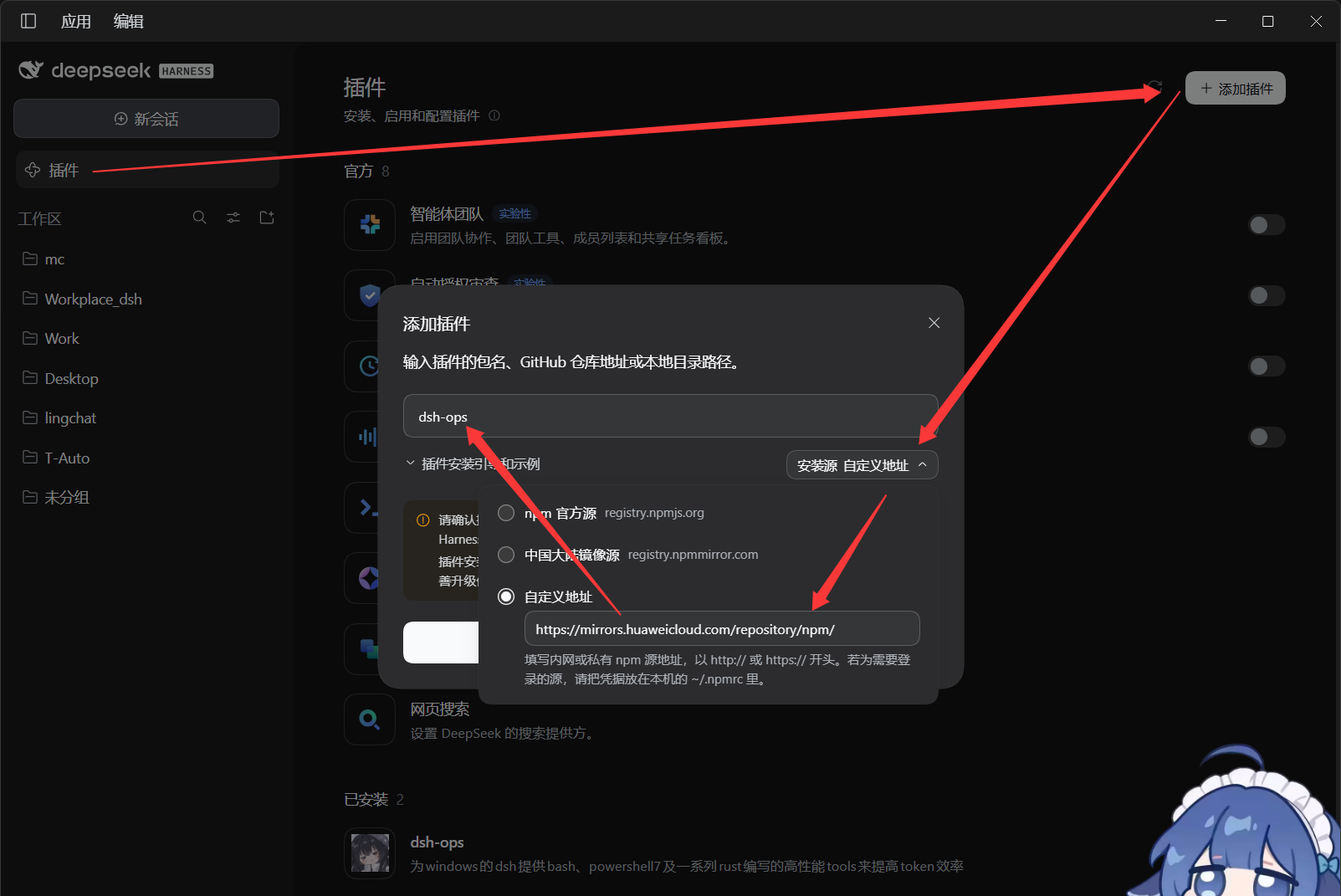
In the target DSH application's plugin marketplace, enter the npm package name **`dsh-ops`**, choose a custom registry and enter `https://mirrors.huaweicloud.com/repository/npm/`, install, then enable it. Installing through npmmirror is currently not recommended — it has bugs.
Of course, if you are sure you can reach the official npm registry, pick the official registry; if you are not sure, follow the steps above.
### One-command npm installation
#### Installation
```console
npx --yes dsh-ops@latest install --profile desktop
npx --yes dsh-ops@latest install --profile web
npx --yes dsh-ops@latest install --profile tui
```
An explicit target profile is required. `tui` maps to the **dsh-TUI product's `dsh-tui` profile**, not the old `tui` directory. Initialize the target application first. This entry point delegates installation to the official DSH CLI rather than implementing a separate profile lock and rollback logic.
Desktop must use the CLI bundled with the desktop application; the default auto-detected path is `%LOCALAPPDATA%\Programs\DeepSeek Harness\resources\runtime\cli\bin\dsh.cmd`. For another installation location, add `--dsh-cli "\resources\runtime\cli\bin\dsh.cmd"`. Web/TUI require an available DSH CLI, which can also be specified explicitly.
Add `--dry-run` to an install or uninstall command to preview it. The preview resolves the CLI from its path or `PATH` (`PATHEXT` on Windows), checks the file, POSIX execute permission and any Node CLI entry point, and applies the same Windows command-script path checks as execution. A failed check returns a nonzero exit code. The preview prints the plan without starting the CLI or changing the profile. Success covers these static checks; it does not establish the program's identity, version, profile compatibility or eventual installation result.
You can also use the official commands directly:
```console
dsh plugin --profile web add dsh-ops
dsh plugin --profile dsh-tui add dsh-ops
"\resources\runtime\cli\bin\dsh.cmd" plugin --profile desktop add dsh-ops
```
A regular DSH CLI cannot manage the reserved `desktop` profile; do not confuse it with the desktop app's own entry point.
#### Update
Re-run the same `npx --yes dsh-ops@latest install --profile ...`, or use the official CLI `add dsh-ops@latest`. Reload when the app asks; restart the app when replacing code that is already loaded.
#### Uninstall and status
```console
npx --yes dsh-ops@latest status --profile desktop
npx --yes dsh-ops@latest uninstall --profile desktop
```
Replace `desktop` with `web` or `tui` as needed. You can also uninstall from the marketplace, or run the official `dsh plugin --profile ... remove dsh-ops`. Profile uninstall removes plugin dependency references, including the optional Windows Bash payload. Remove separately provisioned Bash with `dsh-ops bash-runtime remove --yes`; this does not delete the system shell, copies in other profiles, or the package manager's shared cache.
Old files explicitly provisioned by earlier versions under `/dsh-ops/` (provisioned shells, and the FastCtx runtime earlier versions could provision) need separate cleanup: `npx --yes dsh-ops@latest uninstall --yes`. The `~/.fastctx/` state left by the removed background component is not deleted by default; add `--purge-fastctx` when needed.
The former `dsh-ops/background` component (FastCtx background jobs) has been removed. A profile that still has its row keeps loading: the row publishes nothing and logs one warning, and can be deleted.
## Optional read-only OPS sidebar
Enable the `dsh-ops/tui` row in dsh-TUI and restart to add the OPS sidebar without stealing focus or executing tools. Without `tuiPanels`, only that optional row stays pending. See [Sidebar guide](docs/tui-panel.md). While focused, use `f` to filter, `n`/`p` for local pages and `a` to acknowledge all-session alerts; only bounded retained metadata is browsed, never fetched result pages.
## Documentation
- [Usage](docs/usage.md) · [Troubleshooting](docs/troubleshooting.md) · [Component reference](docs/component-reference.md) · [Configuration reference](docs/configuration-reference.md)
- [Native PTC](docs/native-ptc.md) · [Manual validation](docs/manual-validation.md)
- [Contributing](docs/CONTRIBUTING.md) · [Roadmap](docs/roadmap.md) · [Changelog](docs/CHANGELOG.md) · [Provenance](docs/PROVENANCE.md)
## License
Plugin source is distributed under **`MIT AND Apache-2.0`**: everything outside `licenses/fastctx/` is MIT; FastCtx is Apache-2.0. See [NOTICE](NOTICE), `licenses/fastctx/LICENSE-APACHE`, and `licenses/fastctx/NOTICE`.
The separate Windows Bash payload package (the npm optional dependency `@dsh-ops/bash-win32-x64`) is distributed under its upstream components' licenses: Git for Windows includes GPL-2.0 and other licensed components, whose original licenses, notices and provenance records are kept with the payload. PowerShell stays host-managed and is distributed under Microsoft's MIT and third-party component licenses. The plugin's MIT license does not replace those licenses. See [PROVENANCE.md](docs/PROVENANCE.md).
## Acknowledgements
The Rust tools are based on [yc-duan](https://github.com/yc-duan)'s Codex plugin FastCtx and use its source code. Vendor marking and deletion-only distribution changes were recorded in `vendor/fastctx/FORK.md` and `vendor/fastctx/UPSTREAM.md`, which remain in the repository history and in earlier published versions; the vendored source itself was removed with the background component. The FastCtx notice that must be reproduced follows:
> This product includes FastCtx
> (https://github.com/yc-duan/fastctx), Copyright (c) 2026 yc-duan,
> used under the Apache License 2.0.
>
> FastCtx is redistributed and/or modified here by the maintainer of
> this distribution. Any such change is that maintainer's own work
> and their sole responsibility. It is not endorsed by, not
> supported by, and not attributable to the author of FastCtx, who
> accepts no liability of any kind arising from this distribution or
> from anything built on top of it.
## Maintainers
*In no particular order*
---
## Contributors
[](https://github.com/T-Auto/dsh-ops)
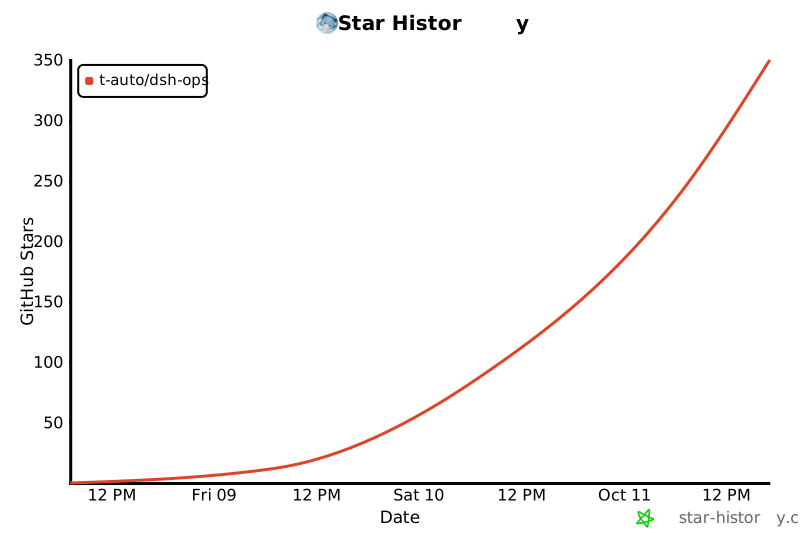
## Star trend
[](https://star-history.com/#T-Auto/dsh-ops&Date)


