# The harbor and telemetry
## Preview
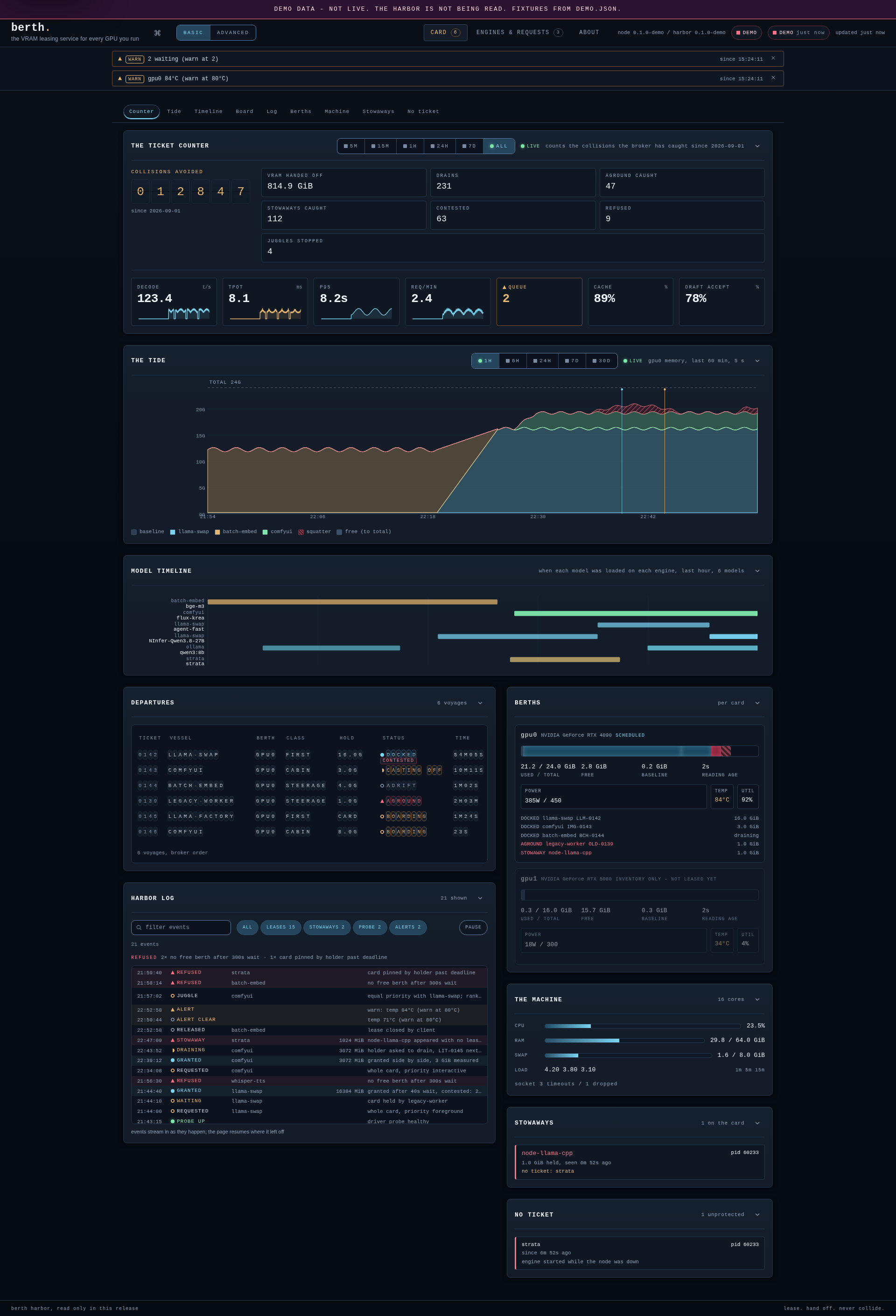
The harbor UI (basic mode, served from the built-in demo fixture - every number on the screen
comes from `demo.json`). The tide shows the card's memory by holder over six hours; the
hatched stretch is a stowaway the fixture replays: a model that ran without a lease after a
daemon restart, reported and left alone.
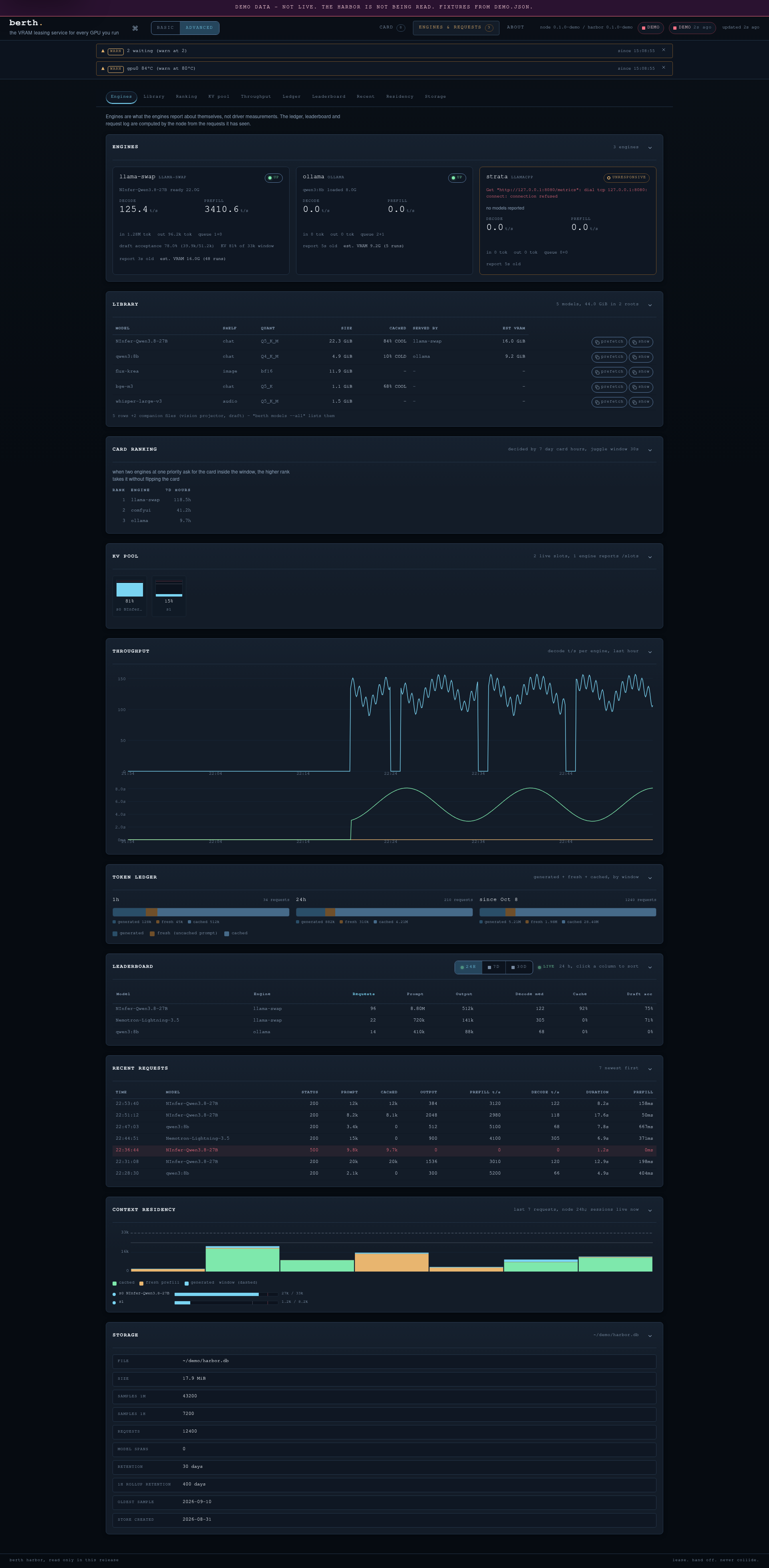
The Engines tab (advanced mode): the engine cards with their learned footprints as
EST. VRAM, the library (shelf, quant, size, the cached tier, the serving engine),
decode throughput, the token ledger, the per-model leaderboard, storage and residency.
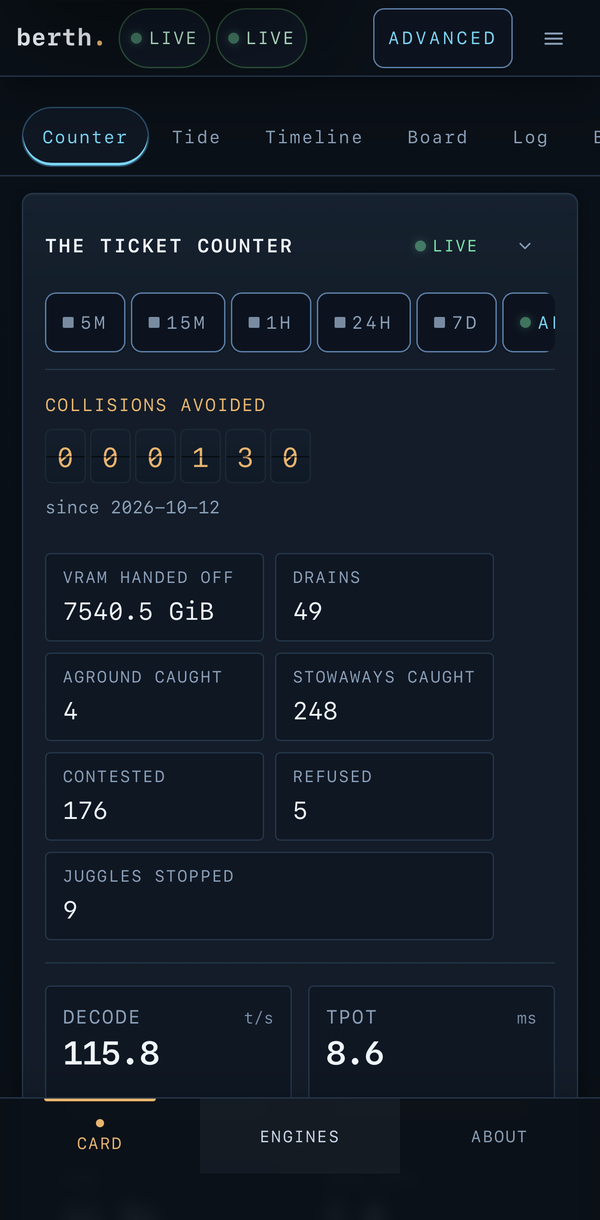
On a phone, the harbor fits the screen: the tabs move to a bar at the bottom and the panels
stack. This is the CARD tab on an iPhone, read from a live node on the reference workstation.
### The harbor on your iPhone's Home Screen
The harbor listens on loopback, so first give your phone a way to reach it. On a tailnet,
publish it from the Berth machine and pass the name it serves under to the harbor:
```sh
tailscale serve --bg --https=443 http://127.0.0.1:9798
berth harbor --allow-host ..ts.net
```
Then, on the iPhone:
1. Open `https://..ts.net/` in Safari.
2. Tap Share, then **Add to Home Screen**.
3. Name it (`berth` works) and tap **Add**.
The Home Screen icon is Pilot, the harbor master llama, and the name under it is `berth`.
Reading the harbor needs no login, so publish it only on a tailnet or a home network you trust.
### Pair a device
Switching and stopping engines from the harbor will need a paired device. Pair one from the
Berth machine:
```sh
berth pair --url https://..ts.net
```
It prints a link and the same link as a QR code. Scan it with the phone, or open the link,
and tap **Pair this device**. The browser keeps a device cookie for a year: `HttpOnly`,
`SameSite=Lax`, and `Secure` over https. The code works once, for 15 minutes, and
opening the link alone (a chat app's preview, say) does not use it. berthd keeps only hashes
of codes and device tokens, in `~/.local/state/berth/harbor-devices.json`.
- `berth pair --list` shows the paired devices.
- `berth pair --revoke ID` unpairs one; `--revoke-all` unpairs every device.
Anyone who opens a link first pairs their browser, so send it only to yourself. Over plain
http on a LAN, the cookie crosses the network in the clear; use `tailscale serve` (https)
for a phone.
## Visibility
- **Stowaways:** every process holding VRAM without a lease, with memory, identity and
first-seen time; optional desktop notification and webhook. Report-only by design.
- **Contested grants:** a grant made while stowaways hold memory is flagged, not hidden.
- **Event log:** every request, wait, drain, release, free, stuck lease, stowaway and
probe change, with gap-free sequence numbers; `berth events -f` follows it live.
- **The collisions board:** collisions avoided, VRAM handed off, drains, stuck releases
caught, stowaways caught, contested grants, refusals. Each count links back to a
recorded event. berthd keeps the board in `~/.local/state/berth/counters.json`
(`--counters`), so a restart or a reboot carries the counts on. The harbor stores a
reading a minute and its ticket counter shows the last 5 min, 15 min, hour, 24 h or
7 days next to the all-time board (`GET /v1/counters?range=5m|15m|1h|24h|7d`).
- **The engines' estimated VRAM:** a run measures how much VRAM its leases held at their
peak, and the broker keeps the last figure per engine in `~/.local/state/berth/footprint.json`
(`--footprint`), across restarts. `berth status` shows it as EST. VRAM beside the
engine's own figures, and the JSON names it `estimated_vram_bytes`. It is an estimate
of what a run needs, never a reservation: a run that holds far more than the learned
figure (1.5x, once the engine has three runs) logs an `engine.footprint` event, so a
grown engine is seen instead of mis-sized.
- **The queue in every wait reason:** every reason a waiter is sent starts with its place
in the queue, "next in line" or "2nd in line (behind interactive comfyui)", so a client
behind the head of the queue hears where it stands instead of silence. The waiting table
of `berth status` shows the same place beside a start estimate, in seconds after the card
frees: the measured starts in the waiter's chain, one per seat ahead plus its own. An
unmeasured start says unmeasured and adds no number, and the holder's drain is never in
the figure, because a request runs as long as it runs.
- **A card passed through to a VM (experimental).** When the governed card is bound to `vfio-pci`,
`berth status` shows "passed through to a VM (vfio-pci)" in place of its memory figures, and the JSON
has a `passthrough` object with the state and the bound driver. The state reads `detaching` while a
switch is under way. `card.passthrough` and `card.returned` mark each change once in the event log.
While a VFIO hold is granted ([`berth vfio run`](vfio.md)), berthd does not open the card, because
its own probe would block the driver switch; it reads the driver from sysfs instead. Nothing new is
granted while the card is away, and each waiter's reason says so ("gpu0 is passed through to a VM
(vfio-pci); it comes back when the VM's hold ends"). A card switched by hand, with no hold, shows the
same state instead of a probe-failed warning. In the harbor, a GPU IN VM tag sits beside the state pill
on every tab. The card's panel shows the passthrough state in place of its memory figures, with the last
reading greyed and labelled with its age. The departures board marks the hold IN VM, the log names each
change in plain words, and the tide leaves the session as a gap. Engines stopped for the session do not
turn the state DEGRADED.
- **Alerts:** one threshold table in `berth.toml` (`[alerts]`): warn and crit per key
(`queue`, `ttft`, `tpot`, `p95`, `cache`, `reingest`, `vram`, `temp`, `power`, `kv`).
The node evaluates it on its 5 s sample cycle, fires a desktop notification and webhook
on entering a level, and logs `alert.raised` / `alert.cleared` events (`berth events
-f`, the harbor log); a level stays until the value stays clear for `clear_polls`
samples (default 3). GPU probe failure and aground leases are built-in danger alerts,
always on. Default posture: no `[alerts]` table means no KPI alerts, and the
notification channels are separately opt-in (`--notify`, `--webhook`). The harbor
colors the same state the node notifies on: KPI tiles and GPU cells, a strip of the
currently-breaching keys, and an overall LIVE / DEGRADED / OFFLINE state beside the
connection pill.
- **Desktop notifications:** `berth notify` follows the node's events and shows the ones
worth a look on your desktop, without the harbor open. The default level, `error`, shows
refused requests, memory that never came back, stowaways, an engine that exited under its
lease, a refused park and a parked engine loaded behind Berth's back. `level = "info"`
adds every switch, drain, park, resume and VM handoff. A burst of one event shows once.
Set it in `berth.toml` (`[notify] enabled = false` turns it off) or with `--level`.
`berth service install --notify` runs it as a user unit. It is Linux only for now and
uses `notify-send`, so any desktop or notification daemon shows it.
## The harbor's views
Everything the node collects shows in one of three tabs, and every panel answers a
question an operator actually asks.
**The CARD tab.**
- **The ticket counter** answers "has anything collided?" with the collisions-avoided
odometer, the seven collision tiles and the request KPIs, over the all-time board or
a stored window.
- **The tide** answers "who holds the card, and when?" with card memory by holder and
the lease events overlaid, over a 1H / 6H / 24H / 7D / 30D picker.
- **The model timeline** answers "when was each model loaded on each engine?"
- **The departures board** answers "what is on the card right now?" with one row per
lease: the ticket number, the engine, the class, the hold (measured once docked,
asked-for while boarding, the parked engine's RAM copy while WARM), the state word,
and the age. A WARM flag marks a parked engine; PARKING is the transitional state
while the weights move to RAM. A boarding row carries a Q flag with its queue
position and the node's completion estimate when the node sends them. Clicking a
row opens the lease's ticket: the tier the weights live in (HOT on the card, WARM
in RAM), the queue rows, the container a run is in, and the exact terminal order
for the lease beside it as a copy button (`berth stop ENGINE`, `berth resume
ENGINE`, `berth reclaim LEASE`).
- **The berths, the machine, stowaways and no ticket** answer "what else is on the
card and the host, and who holds memory without a ticket?"
**The ENGINES tab.**
- **The engine cards** answer "is this engine up and serving?" with the state the
engine reports, its loaded models, decode and prefill rates, and its learned
footprint as EST. VRAM: what its past runs measured, never "reserved".
- **The library** answers "is this model warm?" with every model in the configured
roots, each row showing shelf, quant, size, the CACHED share with its tier
(COOL or COLD), the engine serving it when one reports it resident, that engine's
EST. VRAM, and copy buttons for `berth prefetch NAME` and `berth models show NAME`.
A row matches a llama-swap model by the file its `cmd` loads, so a model ID
that differs from the file's stem still finds its row. Other engines match by
name. The listing is read-only here; the terminal does the acting.
- **Card ranking, the KV pool, throughput, the token ledger, the leaderboard, the
recent requests and context residency** answer the questions behind the request
log, and the storage panel (advanced) says what the harbor's own store keeps.
**The ABOUT tab** is this page's own documentation: the modes, the shortcut keys,
and what every state word and figure means.
## Telemetry (built in, no other tool needed)
- **GPU:** memory, utilisation, temperature, power against its limit, fan, SM and memory
clocks, PCIe link, for **every card** in the machine with its real limits.
- **Host:** CPU, RAM, swap, load.
- **Engines:** every engine in the table above, found on its default port or configured on
any other. Loaded models, decode and prefill tok/s, token totals,
queue, draft acceptance, the context window per model (llama.cpp/NInfer `/props`, Strata
`/health`, llama-swap per model proxy), and the live KV slot pool (`/slots`: per-slot
context tokens against the window). An engine without those endpoints degrades to
"no window / no slot data", never an error. An engine that was up and stops
answering is shown as **unresponsive** (latched), distinct from one that never ran.
- **Requests:** a 24-hour request log from llama-swap; requests per minute, p50 and p95
latency, prefill time, time per output token, cache and re-ingest share, a token ledger
(1 h, 24 h, since start), a per-model leaderboard, and the most recent requests.
- **History:** the node keeps the last hour at 5-second resolution in memory. The harbor
stores it on disk (SQLite, no C toolchain needed): 1-minute rows for 30 days, per engine
the KV pressure (peak slot fill against the window) and the resident models' windows,
hourly rows for 400 days, and the request log for 30 days, de-duplicated by request id.
Databases written before the KV column is added are migrated in place on the first
open; nothing is ever rewritten.
- **Model timeline:** when each model was loaded and unloaded on each engine, kept across
restarts. A gap in the readings over 3 minutes is never drawn as loaded.
- The UI labels engine-reported figures as the engine's own, apart from what the driver
measures.