# ComputerRL: Scaling End-to-End Online Reinforcement Learning for Computer Use Agents
📃 Paper
|
📊 OfficeWorld Leaderboard
_Read this in [中文](README_zh.md)._
This repository is the code repository for ComputerRL, which is based on modifications and simplifications of the OSWorld repository. ComputerRL focuses on end-to-end online reinforcement learning methods for training computer use agents. This project has been optimized and simplified based on the OSWorld benchmark environment, providing a more focused and efficient experimental platform for computer use research.
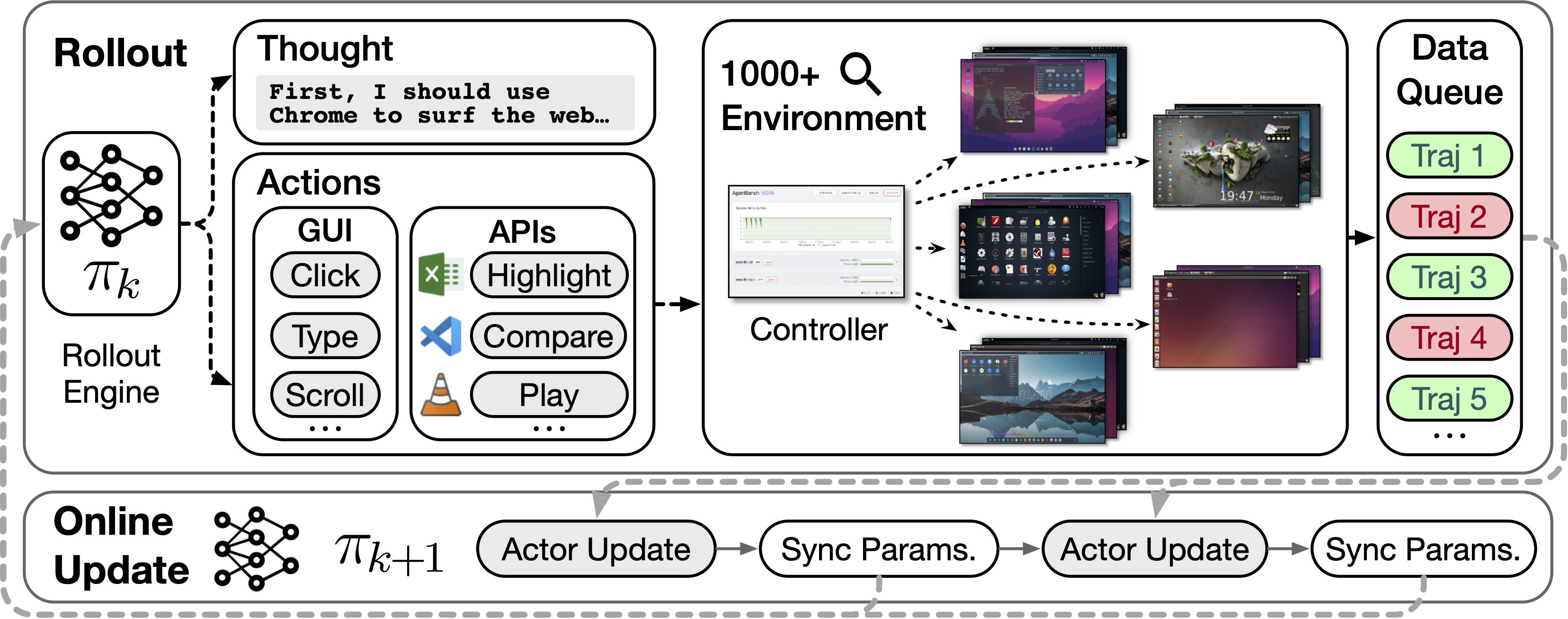
We introduce an API-GUI action paradigm that seamlessly integrates automatically constructed APIs with GUI actions to improve agent efficiency and effectiveness. A large-scale parallel desktop environment with 1,000+ real-world instances, combined with an asynchronous RL framework, enables efficient sampling and robust agent training.
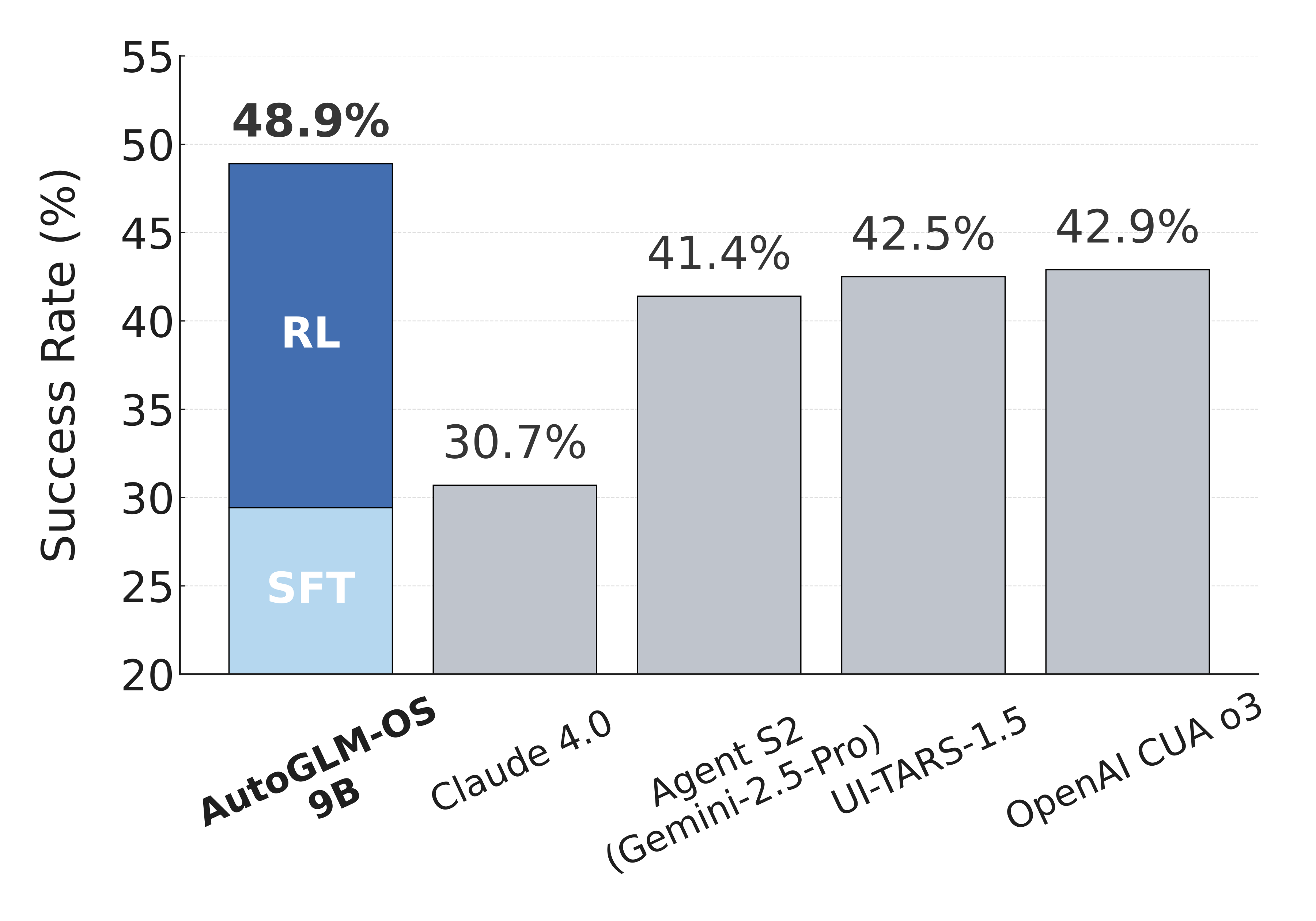
The success rates of agents on OSWorld.
## 🌱 Environment
### 🖥️ Check for KVM Support
We recommend running the VM with KVM support for better performance. To check if your system supports KVM, run the following command:
```bash
egrep -c '(vmx|svm)' /proc/cpuinfo
```
If the output is greater than 0, your system supports KVM. ✅
### 🐳 Install Docker
Please refer to the [Docker Installation Guide](https://docs.docker.com/desktop/setup/install) to install Docker on your machine.
### 📥 Download the Image
Download the official image from [ubuntu_osworld](https://huggingface.co/datasets/xlangai/ubuntu_osworld).
---
## 🧪 Experiments
### 📦 Install Dependencies
```bash
pip install -r requirements.txt
```
### 📂 Download Experiment Files
All experiment files will be cached under `./cache`. Obtain experiment files through the following methods:
- **OSWorld:** You can refer to the [OSWorld Official](https://github.com/xlang-ai/OSWorld) to download all the cached files.
- **OfficeWorld:** Download the experiment files from [ModelScope/OfficeWorld-Cache](https://www.modelscope.cn/datasets/shawliu9/OfficeWorld) and extract them into the `./cache` directory.
### 🤖 Deploy the Model
Two types of models are now available for open-source use. You can download the models and use them by setting the parameter `--model`:
- **Text-Only:** [ModelScope/ComputerRL](https://www.modelscope.cn/models/shawliu9/computerrl-glm4-9b)
- **Multimodal:** [ModelScope/ComputerRL-V](https://www.modelscope.cn/models/shawliu9/computerrl-glm4_1v-9b)
```bash
pip install "sglang[all]" # if not installed
python -m sglang.launch_server \
--model zai-org/autoglm-os-9b \
--host 0.0.0.0 --port 30000 --served-model-name autoglm-os
```
### 🚀 Run Experiments
Reproduce the results on OSWorld by running the following scripts.
#### 🔐 Environment Variables
```bash
# Set up your API
export OPENAI_BASE_URL="https://api-gateway.glm.ai/v1"
export OPENAI_API_KEY="API-KEY"
```
#### 🔄 Single-Process Test
```bash
# If using a multimodal model, please use run_autoglm_v.py
python run_autoglm.py \
--provider_name docker \
--path_to_vm Ubuntu/Ubuntu.vmx \
--headless \
--max_steps 15 \
--test_all_meta_path ./evaluation_examples/test_nogdrive.json
```
#### ⚡ Parallel Test
```bash
# If using a multimodal model, please use run_multienv_autoglm_v.py
python run_multienv_autoglm.py \
--provider_name docker \
--path_to_vm Ubuntu/Ubuntu.vmx \
--headless \
--num_workers 20 \
--max_steps 15 \
--test_all_meta_path ./evaluation_examples/test_nogdrive.json
```
### 📊 View Experiment Results
Result files are cached under `./results`. Run the following script to view the scores:
```bash
python show_result.py
```
### 🧹 Clean Up Docker Images
After finishing your experiments, you may have leftover Docker images. Clean them up with:
```bash
docker stop $(docker ps -q) && docker rm $(docker ps -a -q)
```
---
## 🏢 OfficeWorld Benchmark
The OfficeWorld benchmark is built upon [SpreadsheetBench](https://github.com/RUCKBReasoning/SpreadsheetBench), [PPTC](https://github.com/gydpku/PPTC), and in-house developed Writer domain tasks.
Tasks are adapted as needed to fit into the OSWorld framework, enabling systematic evaluation of agent capabilities in office-oriented scenarios.
### ▶️ Running the OfficeWorld Benchmark
Run the following command to evaluate your agent on the OfficeWorld benchmark:
```bash
python run_multienv_autoglm.py \
--provider_name docker \
--path_to_vm Ubuntu/Ubuntu.vmx \
--headless \
--num_workers 20 \
--max_steps 15 \
--test_all_meta_path ./evaluation_examples/test_office.json
```
### 🏆 Leaderboard
Check out the leaderboard [here](https://docs.google.com/spreadsheets/d/1wFHvf3mb42j74JtAww4CTOc7tdF8KIfGZyRQyLhh5pc/edit?usp=sharing)! 🚀
If you would like to add your results to the leaderboard, please email [`hanyullai@outlook.com`](mailto:hanyullai@outlook.com).
## 📄 Citation
```
@misc{lai2025computerrl,
title={ComputerRL: Scaling End-to-End Online Reinforcement Learning for Computer Use Agents},
author={Hanyu Lai and Xiao Liu and Yanxiao Zhao and Han Xu and Hanchen Zhang and Bohao Jing and Yanyu Ren and Shuntian Yao and Yuxiao Dong and Jie Tang},
year={2025},
eprint={2508.14040},
archivePrefix={arXiv},
primaryClass={cs.AI},
url={https://arxiv.org/abs/2508.14040},
}
```