# NL2Bash [![License: GPL v3](https://img.shields.io/badge/License-GPLv3-blue.svg)](https://www.gnu.org/licenses/gpl-3.0) ## Overview This repository contains the data and source code release of the paper: [NL2Bash: A Corpus and Semantic Parser for Natural Language Interface to the Linux Operating System](http://victorialin.net/pubs/nl2bash.pdf). Specifically, it contains the following components: 1. A set of ~10,000 bash one-liners collected from websites such as StackOverflow paired with their English descriptions written by Bash programmers. 2. Tensorflow implementations of the following translation models: - the standard [Seq2Seq](https://arxiv.org/abs/1409.0473) and [CopyNet](https://arxiv.org/abs/1603.06393) models - a stage-wise NL⟶Bash model using argument filling heuristics (Lin et. al. 2017). 3. A Bash command parser which parses a Bash command into an abstractive syntax tree, developed on top of [bashlex](https://github.com/idank/bashlex). 4. A set of domain-specific natural language processing tools, including a regex-based sentence tokenizer and a domain specific named entity recognizer. You may visit http://tellina.rocks to interact with our pretrained model. **🆕 Apr 24, 2020** The dataset `data/bash` is separately licensed under MIT license. ## Data Statistics Our corpus contains a diverse set of Bash utilities and flags: 102 unique utilities, 206 unique flags and 15 reserved tokens. (Browse the raw data collection [here](https://github.com/TellinaTool/nl2bash/tree/master/data/bash).) In our experiments, the set of ~10,000 NL-bash command pairs are splitted into train, dev and test sets such that *neither a natural language description nor a Bash command appears in more than one split*. The statistics of the data split is tabulated below. (A command template is defined as a Bash command with all of its arguments replaced by their semantic types.)
Split Train Dev Test
# pairs 8,090 609 606
# unique NL 7,340 549 547
# unique command 6,400 599 XX
# unique command template 4,002 509 XX
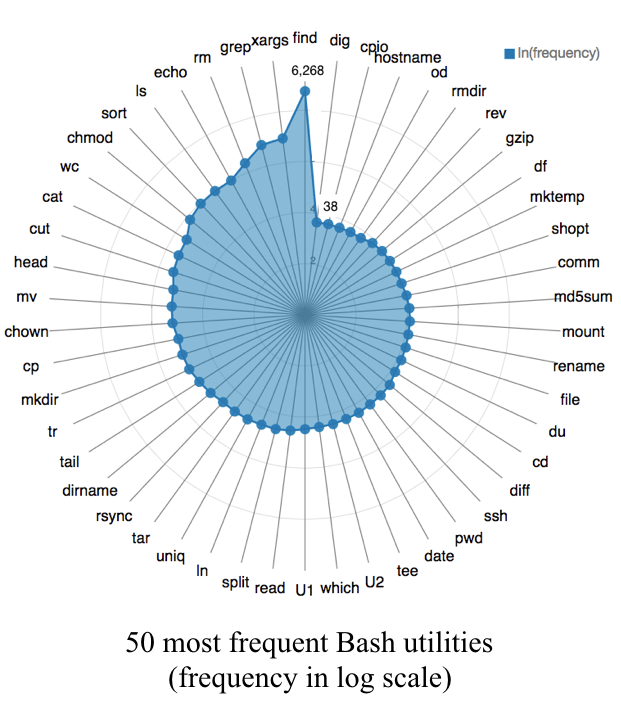
The frequency of the top 50 most frequent Bash utilities in the corpus is illustrated in the following diagram.

## Leaderboard ### Manually Evaluated Translation Accuracy Top-k full command accuracy and top-k command template accuracy judged by human experts. Please refer to section 4 of the paper for the exact procedures we took to run manual evaluation.
Model F-Acc-Top1 F-Acc-Top3 T-Acc-Top1 T-Acc-Top3
Sub-token CopyNet (this work) 0.36 0.45 0.49 0.61
Tellina (Lin et. al. 2017) 0.27 0.32 0.53 0.62
⚠️ If you plan to run manual evaluation yourself, please refer to ["Notes on Manual Evaluation"](#notes-on-manual-evaluation) for issues you should pay attention to. ### Automatic Evaluation Metrics In addition, we also report [*character-based* BLEU](https://github.com/TellinaTool/nl2bash/blob/master/eval/eval_tools.py#L343) and a self-defined template matching score as the automatic evaluation metrics used to approximate the true translation accuracy. Please refer to appendix C of the paper for the metrics definitions.
Model BLEU-Top1 BLEU-Top3 TM-Top1 TM-Top3
Sub-token CopyNet (this work) 50.9 58.2 0.574 0.634
Tellina (Lin et. al. 2017) 48.6 53.8 0.625 0.698
## Run Experiments ### Install TensorFlow To reproduce our experiments, please install TensorFlow 2.0. The experiments can be reproduced on machines with or without GPUs. However, training with CPU only is extremely slow and we do not recommend it. Inference with CPU only is slow but tolerable. We suggest following the [official instructions](https://www.tensorflow.org/install/) to install the library. The code has been tested on Ubuntu 16.04 + CUDA 10.0 + CUDNN 7.6.3. ### Environment Variables & Dependencies Once TensorFlow is installed, use the following commands to set up the Python path and main experiment dependencies. ``` export PYTHONPATH=`pwd` (sudo) make ``` ### Change Directory Then enter the [scripts](/scripts) directory. ``` cd scripts ``` ### Data filtering, split and pre-processing Run the following command. This will clean the raw NL2Bash corpus and apply filtering, create the train/dev/test splits and preprocess the data into the formats taken by the Tensorflow models. ``` make data ``` To change the data-processing workflow, go to [data](/data) and modify the utility scripts. ### Train models ``` make train ``` ### Evaluate models We provide evaluation scripts to evaluate the performance of any new model. To do so please save your model output to a file ([example](https://github.com/TellinaTool/nl2bash/blob/master/model/seq2seq/bash--partial-4-birnn-gru-standard-attention-0.6-0.6-0.0-copy-1.0-128-200-1-0.0001-1e-08-0.6-0.6-0.6-0.6/predictions.beam_search.100.dev.latest)). We assume the file is of the following format: ``` 1. The i-th line of the file contains predictions for example i in the dataset. 2. Each line contains top-k predictions separated by "|||". ``` Then get the evaluation results using the following script #### Manual Dev set evaluation ``` ./bash-run.sh --data bash --prediction_file --manual_eval ``` Test set evaluation ``` ./bash-run.sh --data bash --prediction_file --manual_eval --test ``` #### Automatic Dev set evaluation ``` ./bash-run.sh --data bash --prediction_file --eval ``` Test set evaluation ``` ./bash-run.sh --data bash --prediction_file --eval --test ``` ### Generate evaluation table using pre-trained models Decode the pre-trained models and print the evaluation summary table. ``` make decode ``` Skip the decoding step and print the evaluation summary table from the predictions saved on disk. ``` make gen_manual_evaluation_table ``` By default, the decoding and evaluation steps will print sanity checking messages. You may set `verbose` to `False` in the following source files to suppress those messages. ``` encoder_decoder/decode_tools.py eval/eval_tools.py ``` ### Notes on Manual Evaluation In our experiment, we conduct manual evaluation as the correctness of a Bash translation cannot simply be determined by mapping it to a set of ground truth. We suggest the following practices for future work to generate comparable results and to accelerate the development cycle. 1. If you plan to run your own manual evaluation, please annotate the output of both your system(s) and the baseline systems you compared to. This is to ensure that the newly proposed system(s) and the baselines are judged by the same group of annotators. 2. If you run manual evaluation, please release [the examples annotated with their annotations](https://github.com/TellinaTool/nl2bash/tree/master/data/bash/manual_judgements). This helps others to replicate the results and reuse these annotations. 3. During model development you could annotate a small subset of the dev examples (50-100 is likely enough) to estimate the true dev set accuracy. We released a script which saves any previous annotations and opens a commandline interface for judging any unseen predictions ([manual_eval.md](https://github.com/TellinaTool/nl2bash/blob/master/manual_eval.md)). The motivation for the practices above is detailed in issue [#6](https://github.com/TellinaTool/nl2bash/issues/6). ## Citation If you use the data or source code in your work, please cite ``` @inproceedings{LinWZE2018:NL2Bash, author = {Xi Victoria Lin and Chenglong Wang and Luke Zettlemoyer and Michael D. Ernst}, title = {NL2Bash: A Corpus and Semantic Parser for Natural Language Interface to the Linux Operating System}, booktitle = {Proceedings of the Eleventh International Conference on Language Resources and Evaluation {LREC} 2018, Miyazaki (Japan), 7-12 May, 2018.}, year = {2018} } ``` Related paper: [Lin et. al. 2017. Program Synthesis from Natural Language Using Recurrent Neural Networks](http://victorialin.net/pubs/tellina_tr170510.pdf). ## Changelog * **Apr 24, 2020** The dataset `data/bash` is separately licensed under the terms of the MIT license. * **Oct 20, 2019** release standard evaluation scripts * **Oct 20, 2019** update to Tensorflow 2.0