WeMM-Ecom
面向电商场景与通用视觉语言理解的多模态基础模型系列
🤗 Hugging Face ·
📑 arXiv ·
📄 技术报告 ·
🚀 部署指南 ·
⚖️ Apache-2.0
模型概览 ·
评测结果 ·
模型权重 ·
开始使用 ·
引用
|
English · 简体中文
## 模型概览
**WeMM-Ecom** 是微信视觉团队研发的中英双语多模态基础模型系列,包含 0.8B、2B、4B、9B 四款稠密模型和 35B-A3B 混合专家模型(激活参数 3B),已应用于微信电商的商品理解、多模态搜索、合规审核与直播电商等业务。
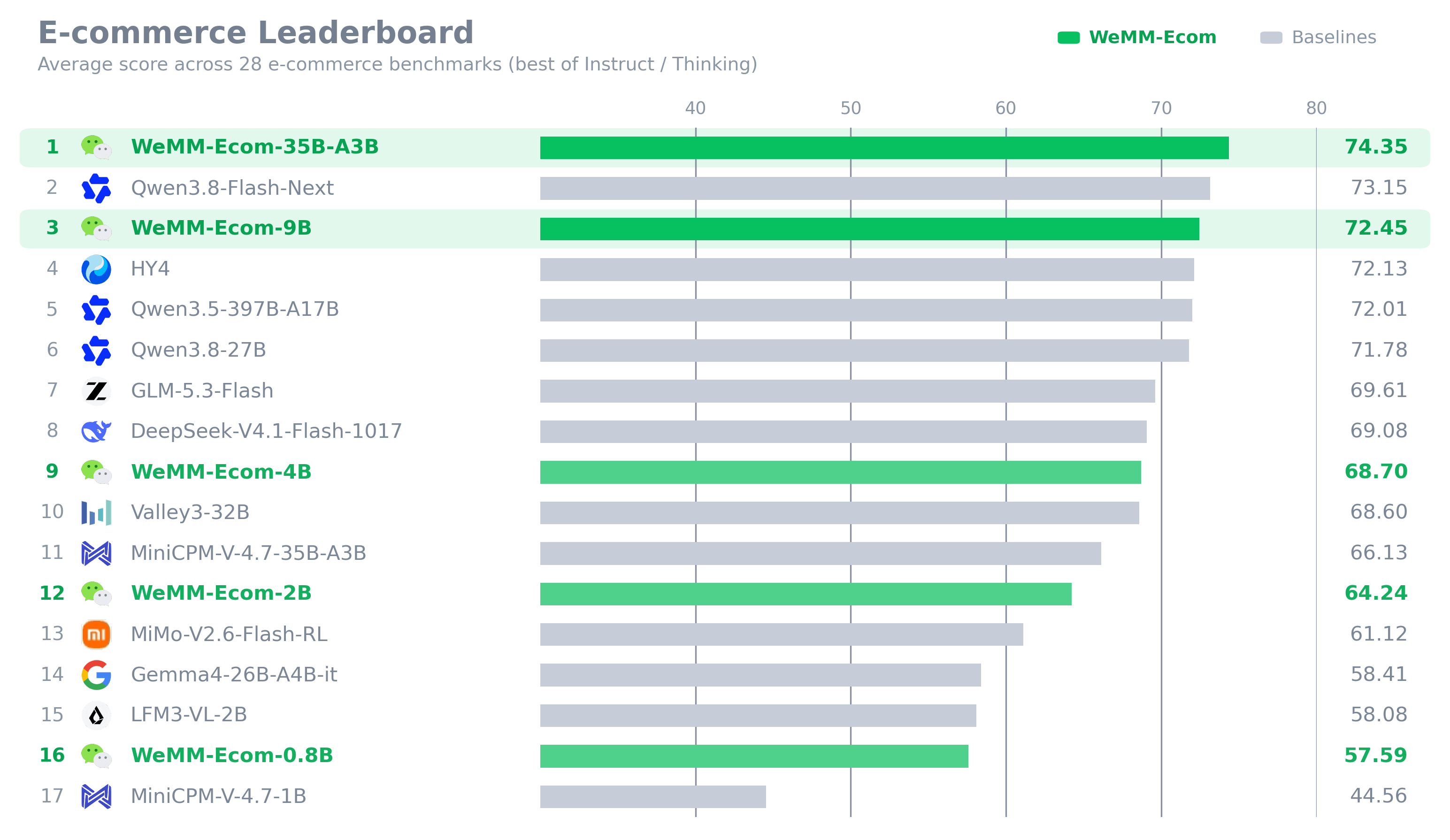
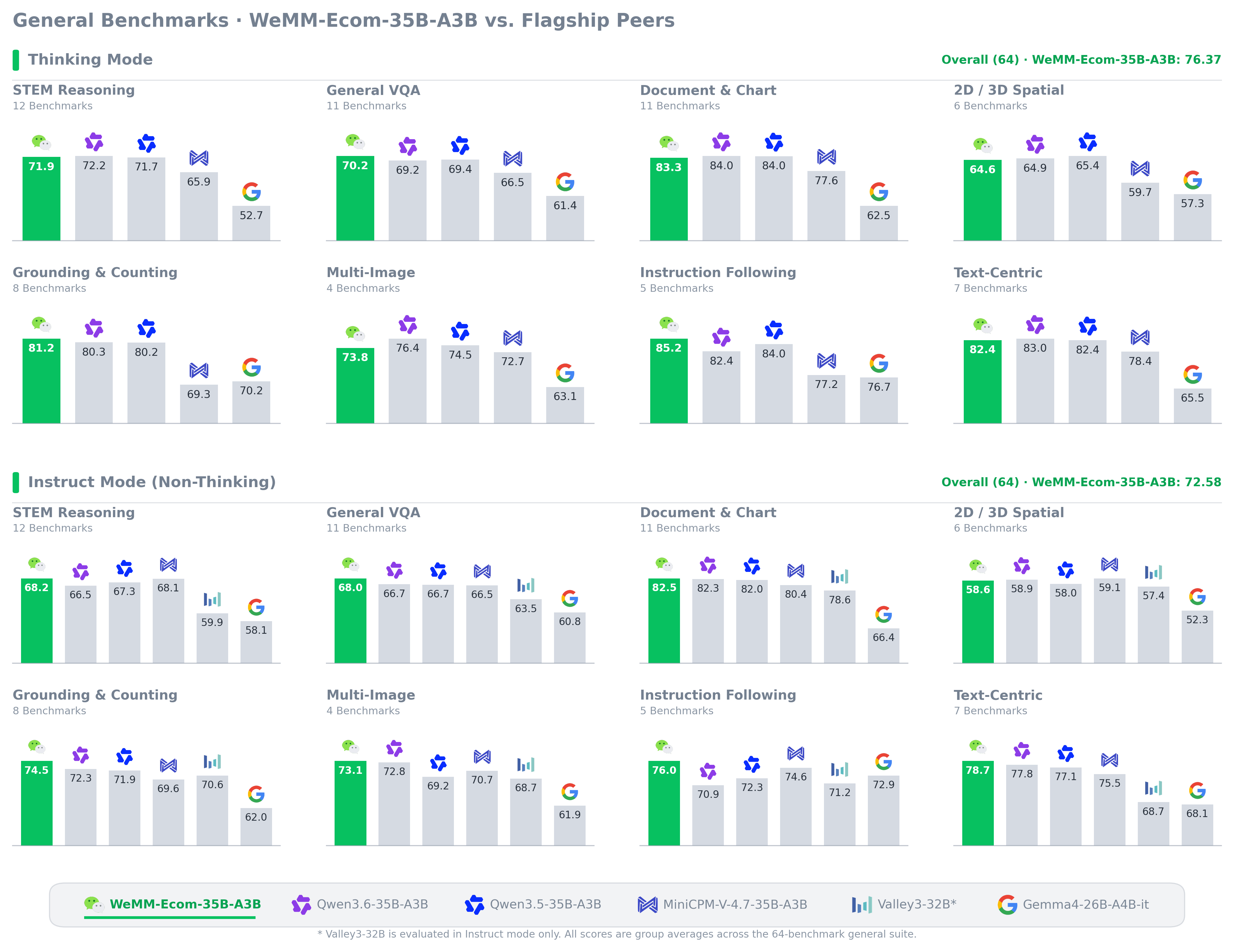
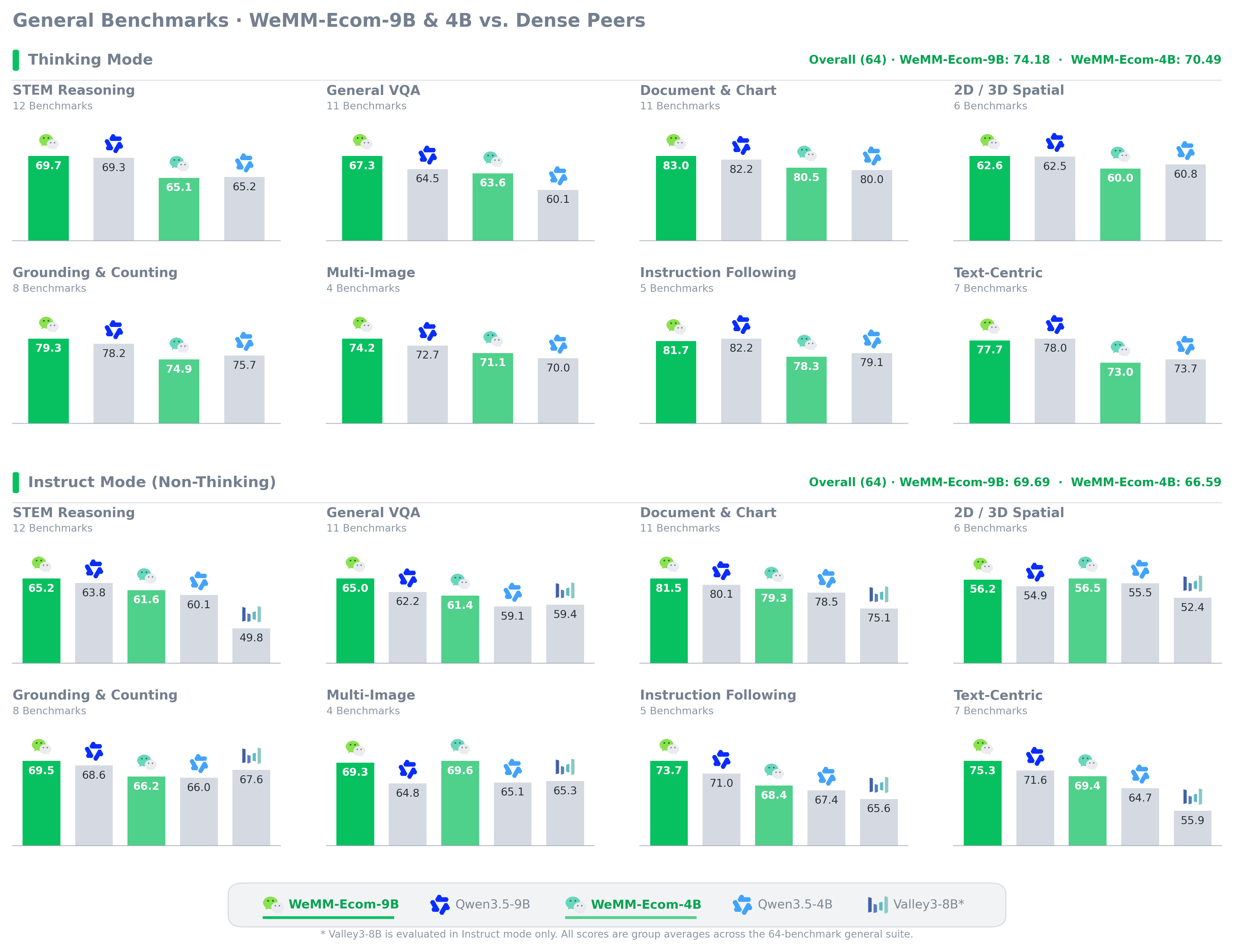
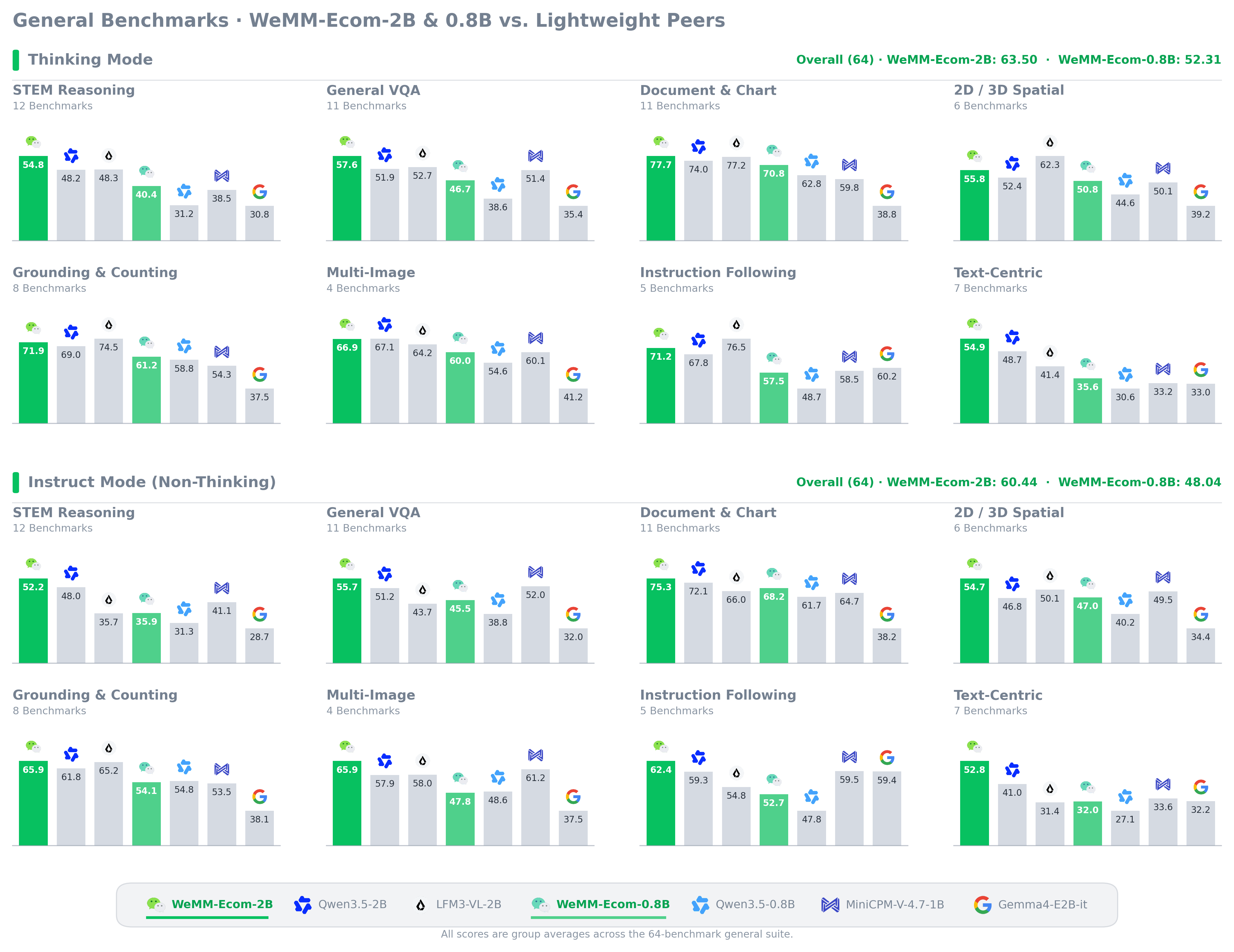
- **🏆 电商与通用表现**:WeMM-Ecom-35B-A3B 在 28 个电商评测集上均分为 **74.35**,高于 Qwen3.8-Flash-Next(73.15)、HY4(72.13)和 Qwen3.5-397B-A17B(72.01)。在 64 个通用基准(8 个能力分组)上,各尺寸在 Thinking 与 Instruct 模式下均优于同规模 Qwen3.5(35B-A3B 为 **76.37**,9B 为 **74.18**),WeMM-Ecom-2B 在轻量级模型中排名第一(Thinking **63.50** / Instruct **60.44**)。
- **⚡ 单权重混合思考**:全系列在单一权重内同时支持快速直答的 Instruct(非思考)模式与多步推理的 Thinking(思考)模式。
- **🛠️ 原生架构与多格式量化**:直接兼容上游 `transformers>=5.3.0`(`Qwen3_5ForConditionalGeneration` / `Qwen3_5MoeForConditionalGeneration`),无需额外代码修改;同步提供 BF16、FP8、GPTQ 与 GGUF 权重,支持 Transformers、vLLM、SGLang 与 llama.cpp。
## 评测结果
### 电商榜单(E-commerce Leaderboard)
### 通用能力分组(Thinking & Instruct)
64 个通用基准按 8 大能力分组的均分对比,上半部分为 **Thinking 模式**,下半部分为 **Instruct(非思考)模式**:
WeMM-Ecom-9B & 4B 稠密模型对比 — 9B:74.18(Thinking)/ 69.69(Instruct)· 4B:70.49(Thinking)/ 66.59(Instruct)
WeMM-Ecom-2B & 0.8B 轻量级模型对比 — 2B:63.50(Thinking)/ 60.44(Instruct)· 0.8B:52.31(Thinking)/ 48.04(Instruct)
## 模型权重
| 模型 | 架构 | 模型权重 |
| :--- | :--- | :--- |
| **WeMM-Ecom-35B-A3B** | MoE(3B 激活) | [🤗 **BF16**](https://huggingface.co/tencent/WeMM-Ecom-35B-A3B) · [🤗 **FP8**](https://huggingface.co/tencent/WeMM-Ecom-35B-A3B-FP8) · [🤗 **GPTQ**](https://huggingface.co/tencent/WeMM-Ecom-35B-A3B-GPTQ) · [🤗 **GGUF**](https://huggingface.co/tencent/WeMM-Ecom-35B-A3B-GGUF) |
| **WeMM-Ecom-9B** | 稠密 | [🤗 **BF16**](https://huggingface.co/tencent/WeMM-Ecom-9B) · [🤗 **FP8**](https://huggingface.co/tencent/WeMM-Ecom-9B-FP8) · [🤗 **GPTQ**](https://huggingface.co/tencent/WeMM-Ecom-9B-GPTQ) · [🤗 **GGUF**](https://huggingface.co/tencent/WeMM-Ecom-9B-GGUF) |
| **WeMM-Ecom-4B** | 稠密 | [🤗 **BF16**](https://huggingface.co/tencent/WeMM-Ecom-4B) · [🤗 **FP8**](https://huggingface.co/tencent/WeMM-Ecom-4B-FP8) · [🤗 **GPTQ**](https://huggingface.co/tencent/WeMM-Ecom-4B-GPTQ) · [🤗 **GGUF**](https://huggingface.co/tencent/WeMM-Ecom-4B-GGUF) |
| **WeMM-Ecom-2B** | 稠密 | [🤗 **BF16**](https://huggingface.co/tencent/WeMM-Ecom-2B) · [🤗 **FP8**](https://huggingface.co/tencent/WeMM-Ecom-2B-FP8) · [🤗 **GPTQ**](https://huggingface.co/tencent/WeMM-Ecom-2B-GPTQ) · [🤗 **GGUF**](https://huggingface.co/tencent/WeMM-Ecom-2B-GGUF) |
| **WeMM-Ecom-0.8B** | 稠密 | [🤗 **BF16**](https://huggingface.co/tencent/WeMM-Ecom-0.8B) · [🤗 **FP8**](https://huggingface.co/tencent/WeMM-Ecom-0.8B-FP8) · [🤗 **GPTQ**](https://huggingface.co/tencent/WeMM-Ecom-0.8B-GPTQ) · [🤗 **GGUF**](https://huggingface.co/tencent/WeMM-Ecom-0.8B-GGUF) |
量化规格与推理部署参数见 [docs/serving.md](docs/serving.md)。
## 开始使用
### Transformers
```bash
pip install -r requirements.txt
python examples/transformers_inference.py \
--model tencent/WeMM-Ecom-2B \
--image assets/examples/product_0.jpg \
--image assets/examples/product_1.jpg \
--prompt "请简要描述该商品的品类、包装材质以及图中茶碗的数量。"
```
添加 `--no-thinking` 即可切换为 Instruct(非思考)模式。
Python 调用示例
```python
import torch
from transformers import AutoModelForImageTextToText, AutoProcessor
model_id = "tencent/WeMM-Ecom-2B"
processor = AutoProcessor.from_pretrained(model_id)
model = AutoModelForImageTextToText.from_pretrained(
model_id, dtype=torch.bfloat16, device_map="auto"
)
messages = [
{
"role": "user",
"content": [
{"type": "image", "image": "assets/examples/product_0.jpg"},
{"type": "image", "image": "assets/examples/product_1.jpg"},
{"type": "text", "text": "请简要描述该商品。"},
],
}
]
inputs = processor.apply_chat_template(
messages, tokenize=True, return_dict=True, return_tensors="pt",
add_generation_prompt=True, enable_thinking=False,
).to(model.device)
with torch.inference_mode():
output = model.generate(**inputs, max_new_tokens=4096, do_sample=True, temperature=0.7, top_p=0.8, top_k=20)
print(processor.decode(output[0, inputs.input_ids.shape[1]:], skip_special_tokens=True))
```
### vLLM / SGLang / llama.cpp
```bash
vllm serve tencent/WeMM-Ecom-9B-FP8 \
--served-model-name WeMM-Ecom \
--reasoning-parser qwen3 \
--max-model-len 32768
```
完整的 vLLM、SGLang、llama.cpp 启动命令、客户端调用示例及推荐采样参数请见 [docs/serving.md](docs/serving.md) 与 [examples/README.md](examples/README.md)。
## 许可证
本仓库源码采用 [Apache License 2.0](LICENSE) 协议,各模型权重遵守对应 Hugging Face 仓库中的 `LICENSE` 协议。
## 引用
如果本仓库对您有帮助,欢迎点亮 Star ⭐ 并引用:
```bibtex
@article{wemm-ecom,
title={WeMM-Ecom: Advancing Multimodal Content Understanding for WeChat E-Commerce},
author={Binhui Xie and Jinmin Li and Haomiao Tang and Guangting Wang and Song Jin and Jianwei Zhu and Fengyun Rao and Jing LYU},
year={2026},
eprint={2611.30662},
archivePrefix={arXiv},
primaryClass={cs.AI},
url={https://arxiv.org/abs/2611.30662},
}
```