[TOC]
# Unreal Engine 4
## Frame Pointer 优化
**此优化需要使用高版本的NDK,并且只支持 arm64-v8a 架构**
**建议使用骁龙855或更强的CPU来调试大型手游项目**
**虚幻引擎建议打Test包,去修改FMallocBinned来达到最佳性能**
测试环境:
1. Unreal Engine 4.25 / 4.26,Android NDK r21c
2. Unreal Engine 4.24.3,Android NDK r14b
### 修改MallocBinned2
Unreal Engine 4.25 使用 FMallocBinned2 作为安卓平台默认的内存分配器。
建议修改此分配器,而不是直接切换到使用系统malloc的FMallocAnsi,此分配器性能远超系统malloc。
```c++
--- a/Engine/Source/Runtime/Core/Public/HAL/MallocBinned2.h
+++ b/Engine/Source/Runtime/Core/Public/HAL/MallocBinned2.h
@@ -89,6 +89,21 @@ extern int32 RecursionCounter;
#endif
+#ifdef USE_LOLI_PROFILER
+#ifdef __cplusplus
+extern "C" {
+#endif // __cplusplus
+
+ extern void (*loli_alloc_ptr)(void*, size_t);
+ extern void (*loli_free_ptr)(void*);
+
+#ifdef __cplusplus
+}
+#endif // __cplusplus
+#endif // USE_LOLI_PROFILER
@@ -444,6 +459,13 @@ public:
--RecursionCounter;
return Result;
#else
+#ifdef USE_LOLI_PROFILER
+ void* Ptr = MallocInline(Size, Alignment);
+ loli_alloc_ptr(Ptr, Size);
+ return Ptr;
+#endif
return MallocInline(Size, Alignment);
#endif
}
@@ -529,6 +551,14 @@ public:
--RecursionCounter;
return Result;
#else
+#ifdef USE_LOLI_PROFILER
+ loli_free_ptr(Ptr);
+ void* NewPtr = ReallocInline(Ptr, NewSize, Alignment);
+ loli_alloc_ptr(NewPtr, NewSize);
+ return NewPtr;
+#endif
return ReallocInline(Ptr, NewSize, Alignment);
#endif
}
@@ -613,6 +643,11 @@ public:
}
--RecursionCounter;
#else
+#ifdef USE_LOLI_PROFILER
+ loli_free_ptr(Ptr);
+#endif
FreeInline(Ptr);
#endif
}
```
```c++
--- a/Engine/Source/Runtime/Core/Private/HAL/MallocBinned2.cpp
+++ b/Engine/Source/Runtime/Core/Private/HAL/MallocBinned2.cpp
@@ -11,6 +11,34 @@
#include "HAL/PlatformMisc.h"
#include "Misc/App.h"
+#ifdef USE_LOLI_PROFILER
+#ifdef __cplusplus
+extern "C" {
+#endif // __cplusplus
+
+ __attribute__((noinline, optnone)) void loli_alloc(void* ptr, size_t size) {
+ (void)ptr;
+ (void)size;
+ }
+ __attribute__((noinline, optnone)) void loli_free(void* ptr) {
+ (void)ptr;
+ }
+
+ void (*loli_alloc_ptr)(void*, size_t) = &loli_alloc;
+ void (*loli_free_ptr)(void*) = &loli_free;
+
+ __attribute__((visibility("default"), noinline, optnone)) void loli_set_allocandfree(void (*alloc_ptr)(void*, size_t), void (*free_ptr)(void*)) {
+ loli_alloc_ptr = alloc_ptr;
+ loli_free_ptr = free_ptr;
+ }
+
+#ifdef __cplusplus
+}
+#endif // __cplusplus
+#endif // USE_LOLI_PROFILER
+
PRAGMA_DISABLE_UNSAFE_TYPECAST_WARNINGS
```
### 修改 MallocBinned
Unreal Engine 4.24 使用 FMallocBinned 作为安卓平台默认内存分配器。
```c++
#ifdef __cplusplus
extern "C" {
#endif // __cplusplus
__attribute__((noinline, optnone)) void loli_alloc(void* ptr, size_t size) {
(void)ptr;
(void)size;
}
__attribute__((noinline, optnone)) void loli_free(void* ptr) {
(void)ptr;
}
void (*loli_alloc_ptr)(void*, size_t) = &loli_alloc;
void (*loli_free_ptr)(void*) = &loli_free;
__attribute__((visibility("default"), noinline, optnone)) void loli_set_allocandfree(void (*alloc_ptr)(void*, size_t), void (*free_ptr)(void*)) {
loli_alloc_ptr = alloc_ptr;
loli_free_ptr = free_ptr;
}
#ifdef __cplusplus
}
#endif // __cplusplus
```
**loli_alloc_ptr** 是分配内存时的记录接口,**loli_free_ptr** 则是释放内存时的接口。
如果你们的引擎、框架使用类似虚幻的这种内存池结构,也建议使用这些记录接口来记录数据。这种模式获取的数据更有参考价值也更精准。
```c++
void* FMallocBinned::Malloc(SIZE_T Size, uint32 Alignment) {
// ....
#ifdef USE_LOLI_PROFILER
loli_alloc_ptr(Free, Size); // <-- record allocation
#endif
MEM_TIME(MemTime += FPlatformTime::Seconds());
return Free;
}
void* FMallocBinned::Realloc(void* Ptr, SIZE_T NewSize, uint32 Alignment) {
// ...
#ifdef USE_LOLI_PROFILER
loli_free_ptr(Ptr); // <-- free old allocation
loli_alloc_ptr(NewPtr, NewSize); // <-- record new allocation
#endif
MEM_TIME(MemTime += FPlatformTime::Seconds());
return NewPtr;
}
void FMallocBinned::Free(void* Ptr) {
#ifdef USE_LOLI_PROFILER
loli_free_ptr(Ptr); // <-- record free allocation
#endif
Private::PushFreeLockless(*this, Ptr);
}
```
### 使用 FMallocAnsi
除非你的 Unreal Engine 版本较低,否则不建议使用 FMallocAnsi。
它直接使用系统的malloc(),有性能上的问题。
```c++
--- a/Engine/Source/Runtime/Core/Private/Android/AndroidPlatformMemory.cpp
+++ b/Engine/Source/Runtime/Core/Private/Android/AndroidPlatformMemory.cpp
@@ -293,7 +293,11 @@ FMalloc* FAndroidPlatformMemory::BaseAllocator()
FLowLevelMemTracker::Get().SetProgramSize(Stats.UsedPhysical);
#endif
-#if USE_MALLOC_BINNED3 && PLATFORM_ANDROID_ARM64
+#ifdef USE_LOLI_PROFILER
+ return new FMallocAnsi();
+#elif USE_MALLOC_BINNED3 && PLATFORM_ANDROID_ARM64
return new FMallocBinned3();
#elif USE_MALLOC_BINNED2
return new FMallocBinned2();
```
### 添加编译器选项
我们需要添加[这个](http://www.keil.com/support/man/docs/armclang_ref/armclang_ref_vvi1466179578564.htm)编译器选项: **-fno-omit-frame-pointer**
此选项会将堆栈函数指针存储到一个寄存器中,从而大大提升堆栈回溯性能,此方案是目前性能最优的方案。
```c++
--- a/Engine/Source/Programs/UnrealBuildTool/Configuration/TargetRules.cs
+++ b/Engine/Source/Programs/UnrealBuildTool/Configuration/TargetRules.cs
@@ -1043,6 +1043,12 @@ namespace UnrealBuildTool
[XmlConfigFile(Category = "BuildConfiguration")]
public bool bUseMallocProfiler = false;
+ ///
+ /// If true, then enable loli memory profiling in the build (defines USE_LOLI_PROFILER=1).
+ ///
+ [XmlConfigFile(Category = "BuildConfiguration")]
+ public bool bUseLoliProfiler = false;
@@ -2373,6 +2379,11 @@ namespace UnrealBuildTool
get { return Inner.bUseMallocProfiler; }
}
+ public bool bUseLoliProfiler
+ {
+ get { return Inner.bUseLoliProfiler; }
+ }
+
public bool bUseSharedPCHs
{
+++ b/Engine/Source/Programs/UnrealBuildTool/System/RulesAssembly.cs
@@ -572,6 +572,13 @@ namespace UnrealBuildTool
UEBuildPlatform Platform = UEBuildPlatform.GetBuildPlatform(Rules.Platform);
Platform.ValidateTarget(Rules);
+ // Setup the loli profiler
+ if (Platform.Platform == UnrealTargetPlatform.Android && Rules.bUseLoliProfiler)
+ {
+ Rules.GlobalDefinitions.Add("USE_LOLI_PROFILER=1");
+ Rules.AdditionalCompilerArguments += " -fno-omit-frame-pointer";
+ }
```
当你合入这些修改后,可打开构建系统的开关来构建一个LoliProfiler专用版APK。
打开[BuildConfiguration.xml](https://docs.unrealengine.com/en-US/Programming/BuildTools/UnrealBuildTool/BuildConfiguration/index.html)中的bUseLoliProfiler选项:
```xml
true
```
此配置可放置在以下任意文件夹中:
```bash
# create if not exist
Engine/Saved/UnrealBuildTool/BuildConfiguration.xml
User Folder/AppData/Roaming/Unreal Engine/UnrealBuildTool/BuildConfiguration.xml
My Documents/Unreal Engine/UnrealBuildTool/BuildConfiguration.xml
```
可使用 readelf 工具检测你打的包是否正确:
```bash
$ readelf -S file.so | grep "gnu_debugdata\|eh_frame\|debug_frame"
[12] .eh_frame_hdr PROGBITS 000000000000c2b0 0000c2b0
[13] .eh_frame PROGBITS 0000000000011000 00011000
[24] .gnu_debugdata PROGBITS 0000000000000000 000f7292
```
如果包含如下section,证明此编译选项已生效:
```
.gnu_debugdata
.eh_frame (+ preferably .eh_frame_hdr)
.debug_frame.
```
## Instrument Functions 优化
当你的编译器比较老,或使用32位架构时,可使用此函数插桩优化方案。
此编译器选项会在编译期为所有函数的头和尾插入一个函数调用,因此我们可以利用此接口实现自己的堆栈回溯方案,此方案比默认的 libunwind.so 要快很多。
第一步与上一章一样,先修改 FMallocBinned:
### 添加编译器选项
打开编译器选项 **-finstrument-functions-after-inlining**。编译器会在 inline 优化后,为所有函数插入我们自定义的函数调用。
```c++
--- a/Engine/Source/Programs/UnrealBuildTool/Configuration/TargetRules.cs
+++ b/Engine/Source/Programs/UnrealBuildTool/Configuration/TargetRules.cs
@@ -1043,6 +1043,12 @@ namespace UnrealBuildTool
[XmlConfigFile(Category = "BuildConfiguration")]
public bool bUseMallocProfiler = false;
+ ///
+ /// If true, then enable loli memory profiling in the build (defines USE_LOLI_PROFILER=1).
+ ///
+ [XmlConfigFile(Category = "BuildConfiguration")]
+ public bool bUseLoliProfiler = false;
@@ -2373,6 +2379,11 @@ namespace UnrealBuildTool
get { return Inner.bUseMallocProfiler; }
}
+ public bool bUseLoliProfiler
+ {
+ get { return Inner.bUseLoliProfiler; }
+ }
+
public bool bUseSharedPCHs
{
+++ b/Engine/Source/Programs/UnrealBuildTool/System/RulesAssembly.cs
@@ -572,6 +572,13 @@ namespace UnrealBuildTool
UEBuildPlatform Platform = UEBuildPlatform.GetBuildPlatform(Rules.Platform);
Platform.ValidateTarget(Rules);
+ // Setup the loli profiler
+ if (Platform.Platform == UnrealTargetPlatform.Android && Rules.bUseLoliProfiler)
+ {
+ Rules.GlobalDefinitions.Add("USE_LOLI_PROFILER=1");
+ Rules.AdditionalCompilerArguments += " -finstrument-functions-after-inlining";
+ }
```
当你使用的clang是7.0.0以下版本,或你使用的是gcc时,可尝试 **-finstrument-functions**选项。
*此选项会导致比 after-inline 模式高很多的代码膨胀的副作用*
接下来我们实现自己的堆栈回溯函数:
新建 AndroidFunctionStub.cpp 在 Engine\Source\Runtime\Core\Private\Android 文件夹中:
```c++
#include
#include
#ifdef __cplusplus
extern "C" {
#endif // __cplusplus
#define MAX_TRACE_DEEP 128
typedef struct {
void* stack[MAX_TRACE_DEEP];
int current = MAX_TRACE_DEEP - 1;
} thread_stack_t;
static pthread_once_t sBackTraceOnce = PTHREAD_ONCE_INIT;
static pthread_key_t sBackTraceKey;
void (*loli_ignore)(bool) = nullptr;
void __attribute__((no_instrument_function)) destructor(void* ptr) {
if (ptr) {
free(ptr);
ptr = nullptr;
}
}
void __attribute__((no_instrument_function)) init_once(void) {
pthread_key_create(&sBackTraceKey, destructor);
}
thread_stack_t* __attribute__((no_instrument_function)) get_backtrace_info() {
thread_stack_t* ptr = (thread_stack_t*)pthread_getspecific(sBackTraceKey);
if (ptr) {
return ptr;
}
ptr = (thread_stack_t*)malloc(sizeof(thread_stack_t));
ptr->current = MAX_TRACE_DEEP - 1;
pthread_setspecific(sBackTraceKey, ptr);
return ptr;
}
void __attribute__((no_instrument_function)) __cyg_profile_func_enter(void* this_func, void* call_site) {
(void)call_site;
if (loli_ignore)
loli_ignore(true);
pthread_once(&sBackTraceOnce, init_once);
thread_stack_t* ptr = get_backtrace_info();
if (ptr->current > 0) {
ptr->stack[ptr->current--] = this_func;
}
if (loli_ignore)
loli_ignore(false);
//__android_log_print(ANDROID_LOG_INFO, "TEMP", "__cyg_profile_func_enter call");
}
void __attribute__((no_instrument_function)) __cyg_profile_func_exit(void* this_func, void* call_site) {
(void)this_func;
(void)call_site;
if (loli_ignore)
loli_ignore(true);
pthread_once(&sBackTraceOnce, init_once);
thread_stack_t* ptr = get_backtrace_info();
if (++ptr->current >= MAX_TRACE_DEEP) {
ptr->current = MAX_TRACE_DEEP - 1;
}
if (loli_ignore)
loli_ignore(false);
//__android_log_print(ANDROID_LOG_INFO, "TEMP", "__cyg_profile_func_exit call");
}
__attribute__((visibility("default"))) __attribute__((no_instrument_function)) int get_stack_backtrace(void** backtrace, int max)
{
if (loli_ignore)
loli_ignore(true);
pthread_once(&sBackTraceOnce, init_once);
thread_stack_t* ptr = get_backtrace_info();
int count = max;
if (MAX_TRACE_DEEP - 1 - ptr->current < count)
{
count = MAX_TRACE_DEEP - 1 - ptr->current;
}
if (count > 0)
{
memcpy(backtrace, &ptr->stack[ptr->current + 1], sizeof(void*) * (count));
}
if (loli_ignore)
loli_ignore(false);
return count;
}
__attribute__((visibility("default"))) __attribute__((no_instrument_function)) void set_loli_ignore_func(void (*funcPtr)(bool)) {
loli_ignore = funcPtr;
}
#ifdef __cplusplus
}
#endif // __cplusplus
```
# Unity Engine
测试版本: Unity5.6.6f2、Unity2017.4.35f1、Unity2018.4.5f1
## 强制Unity使用系统malloc
需要在UnityPlayerActivity.java中添加一个启动参数:
```java
protected String updateUnityCommandLineArguments(String cmdLine) {
return "-systemallocator";
}
```
## Unity 2018
此版本的Unity使用新的Bee构建系统,当你的目标架构是arm64-v8a时,可尝试按下面的代码修改:
```c#
// Tools/Bee/Bee.Toolchain.Android/AndroidNdkCompiler.cs
// if (Optimization != OptimizationLevel.None)
// {
// // important for performance. Frame pointer is only useful for profiling, but
// // introduces additional instructions into the prologue and epilogue of each function
// // and leaves one less usable register.
// yield return "-fomit-frame-pointer";
// }
yield return "-fno-omit-frame-pointer"; // <- 打开Framepointer选项
```
对于 armeabi-v7a 架构,你只能使用 **-finstrument-functions** 模式。
## Unity 2017 & 5
可使用 **-finstrument-functions** 模式来加速堆栈回溯。
此方案单线程下比 libunwind 快 10倍,多线程下快 50倍。
缺点是其会导致包体膨胀,并增加编译时间。
### Android_NDK.jam.cs
PlatformDependent/AndroidPlayer/Jam/Android_NDK.jam.cs
```c#
// 2017
Vars.Android_CFLAGS_debug.Assign(
"-O0",
"-D_DEBUG",
"-fno-omit-frame-pointer",
"-finstrument-functions", // <-- add
"-fno-strict-aliasing");
Vars.Android_CFLAGS_release.Assign(
"-Os",
"-DNDEBUG",
"-fomit-frame-pointer",
"-finstrument-functions", // <-- add
"-fstrict-aliasing");
// 5.6
// ######## Common flags for all toolchains ########
Android.CFLAGS.release = ... -finstrument-functions ;
Android.CFLAGS.debug = ... -finstrument-functions ;
```
Unity 2017 使用 NDK r13b,不支持 **-finstrument-functions-after-inline**。如果你的NDK是clang 7.0.0及以上则可使用 after-inline 优化。此选项比不inline更快,包体膨胀也小很多。
### 定义桩函数
我们需要把桩函数的定义放到一个所有代码都能看到的地方。
这对于虚幻引擎来说不是问题,因为它使用了Unity Build系统。
在此文件夹下选择正确的架构:
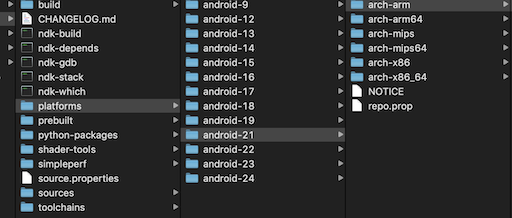
然后把这些代码放到架构文件夹下的 /usr/include 目录下的 jni.h 文件中:
```c++
#ifndef JNI_H_
#define JNI_H_
#include
#include
extern void __attribute__((no_instrument_function)) __cyg_profile_func_enter(void* this_func, void* call_site);
extern void __attribute__((no_instrument_function)) __cyg_profile_func_exit(void* this_func, void* call_site);
```
接下来我们就可以实现此函数:
```c++
#include
#include
#ifdef __cplusplus
extern "C" {
#endif // __cplusplus
#define MAX_TRACE_DEEP 128
typedef struct {
void* stack[MAX_TRACE_DEEP];
int current = MAX_TRACE_DEEP - 1;
} thread_stack_t;
static pthread_once_t sBackTraceOnce = PTHREAD_ONCE_INIT;
static pthread_key_t sBackTraceKey;
void (*loli_ignore)(bool) = nullptr;
void __attribute__((no_instrument_function)) destructor(void* ptr) {
if (ptr) {
free(ptr);
ptr = nullptr;
}
}
void __attribute__((no_instrument_function)) init_once(void) {
pthread_key_create(&sBackTraceKey, destructor);
}
thread_stack_t* __attribute__((no_instrument_function)) get_backtrace_info() {
thread_stack_t* ptr = (thread_stack_t*)pthread_getspecific(sBackTraceKey);
if (ptr) {
return ptr;
}
ptr = (thread_stack_t*)malloc(sizeof(thread_stack_t));
ptr->current = MAX_TRACE_DEEP - 1;
pthread_setspecific(sBackTraceKey, ptr);
return ptr;
}
void __attribute__((no_instrument_function)) __cyg_profile_func_enter(void* this_func, void* call_site) {
(void)call_site;
if (loli_ignore)
loli_ignore(true);
pthread_once(&sBackTraceOnce, init_once);
thread_stack_t* ptr = get_backtrace_info();
if (ptr->current > 0) {
ptr->stack[ptr->current--] = this_func;
}
if (loli_ignore)
loli_ignore(false);
//__android_log_print(ANDROID_LOG_INFO, "TEMP", "__cyg_profile_func_enter call");
}
void __attribute__((no_instrument_function)) __cyg_profile_func_exit(void* this_func, void* call_site) {
(void)this_func;
(void)call_site;
if (loli_ignore)
loli_ignore(true);
pthread_once(&sBackTraceOnce, init_once);
thread_stack_t* ptr = get_backtrace_info();
if (++ptr->current >= MAX_TRACE_DEEP) {
ptr->current = MAX_TRACE_DEEP - 1;
}
if (loli_ignore)
loli_ignore(false);
//__android_log_print(ANDROID_LOG_INFO, "TEMP", "__cyg_profile_func_exit call");
}
__attribute__((visibility("default"))) __attribute__((no_instrument_function)) int get_stack_backtrace(void** backtrace, int max)
{
if (loli_ignore)
loli_ignore(true);
pthread_once(&sBackTraceOnce, init_once);
thread_stack_t* ptr = get_backtrace_info();
int count = max;
if (MAX_TRACE_DEEP - 1 - ptr->current < count)
{
count = MAX_TRACE_DEEP - 1 - ptr->current;
}
if (count > 0)
{
memcpy(backtrace, &ptr->stack[ptr->current + 1], sizeof(void*) * (count));
}
if (loli_ignore)
loli_ignore(false);
return count;
}
__attribute__((visibility("default"))) __attribute__((no_instrument_function)) void set_loli_ignore_func(void (*funcPtr)(bool)) {
loli_ignore = funcPtr;
}
#ifdef __cplusplus
}
#endif // __cplusplus
```
将函数实现代码重命名并放在下面的文件夹中:
```bash
PlatformDependent/AndroidPlayer/Source/main/AndroidLoli.cpp
PlatformDependent/AndroidPlayer/Source/AndroidLoli.cpp
```
至此你的 libunity&libmain 代码库就会包含我们的插桩优化了。
### 打包
使用 perl build.pl 打出正确的 libunity.so。
记得把Engine code stripping选项关掉:
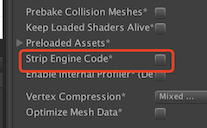
可使用 IDA 或 NDK中的工具来检查我们的函数是否正确导出:
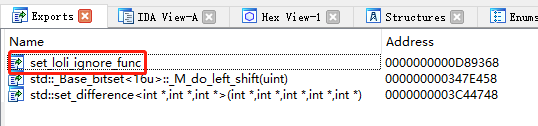
使用 **adb logcat -s Loli** 在运行时检查桩函数是否被正确使用:
```
set_loli_ignore_func found at 0xc4c8a368
get_stack_backtrace found at 0xc4c8a238
```