# [v-selectpage](https://terryz.github.io/vue/#/selectpage)
 [](https://dl.circleci.com/status-badge/redirect/gh/TerryZ/v-selectpage/tree/master) [](https://codecov.io/gh/TerryZ/v-selectpage) [](https://www.npmjs.com/package/v-selectpage)
SelectPage for Vue3, a select items components provides the list of items with pagination
[](https://opencollective.com/v-selectpage)
[](https://standardjs.com)
[](https://www.npmjs.com/package/v-selectpage)
If you are using vue `2.x` version, please use [v-selectpage 2.x](https://github.com/TerryZ/v-selectpage/tree/dev-vue-2) version instead
[](https://dl.circleci.com/status-badge/redirect/gh/TerryZ/v-selectpage/tree/master) [](https://codecov.io/gh/TerryZ/v-selectpage) [](https://www.npmjs.com/package/v-selectpage)
SelectPage for Vue3, a select items components provides the list of items with pagination
[](https://opencollective.com/v-selectpage)
[](https://standardjs.com)
[](https://www.npmjs.com/package/v-selectpage)
If you are using vue `2.x` version, please use [v-selectpage 2.x](https://github.com/TerryZ/v-selectpage/tree/dev-vue-2) version instead
## Examples and Documentation
Documentation and examples please visit below sites
- [github-pages](https://terryz.github.io/docs-vue3/select-page/)
The jQuery version: [SelectPage](https://github.com/TerryZ/SelectPage)
## Features
- Display contents with pagination
- I18n support
- Select single / multiple options
- Tags form for multiple selection
- Keyboard navigation
- Searchable
- Provide display forms such as list view and table view
- Customization of row / cell content rendering
- Core module that can be used independently
I18n support languages
- Chinese Simplified
- English
- Japanese
- Arabic
- Spanish
- German
- Romanian
- French
- Portuguese-Brazil
- Polish
- Dutch
- Chinese Traditional
- Russian
- Turkish
## Installation
[](https://www.npmjs.com/package/v-selectpage)
Install `v-selectpage` to your project
``` bash
# npm
npm i v-selectpage
# yarn
yarn add v-selectpage
# pnpm
pnpm add v-selectpage
```
## Usage
Quick start example
```vue
```
Set default selected items
```vue
```
## Plugin preview
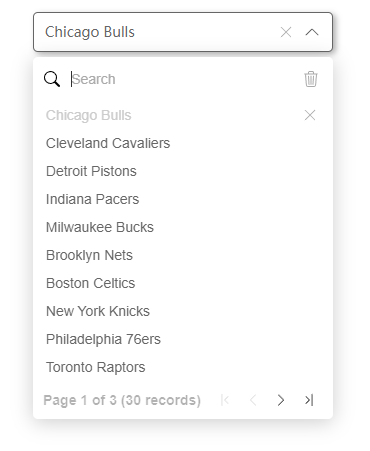
List view for Single selection
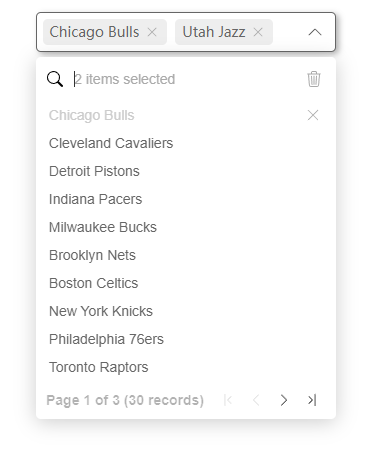
List view for multiple selection with tags form

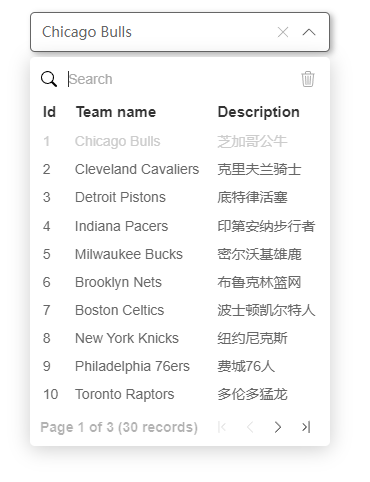
Table view for single selection
## Dependencies
- [v-dropdown](https://github.com/TerryZ/v-dropdown) - The dropdown container
## License
[](https://mit-license.org/)