{messages.map((message, index) => (
{message.role}: {message.content}
))} # Durable Actors
> _an open-source alternative to Cloudflare Durable Objects... with no vendor lock-in, memory limits, and observability built in._
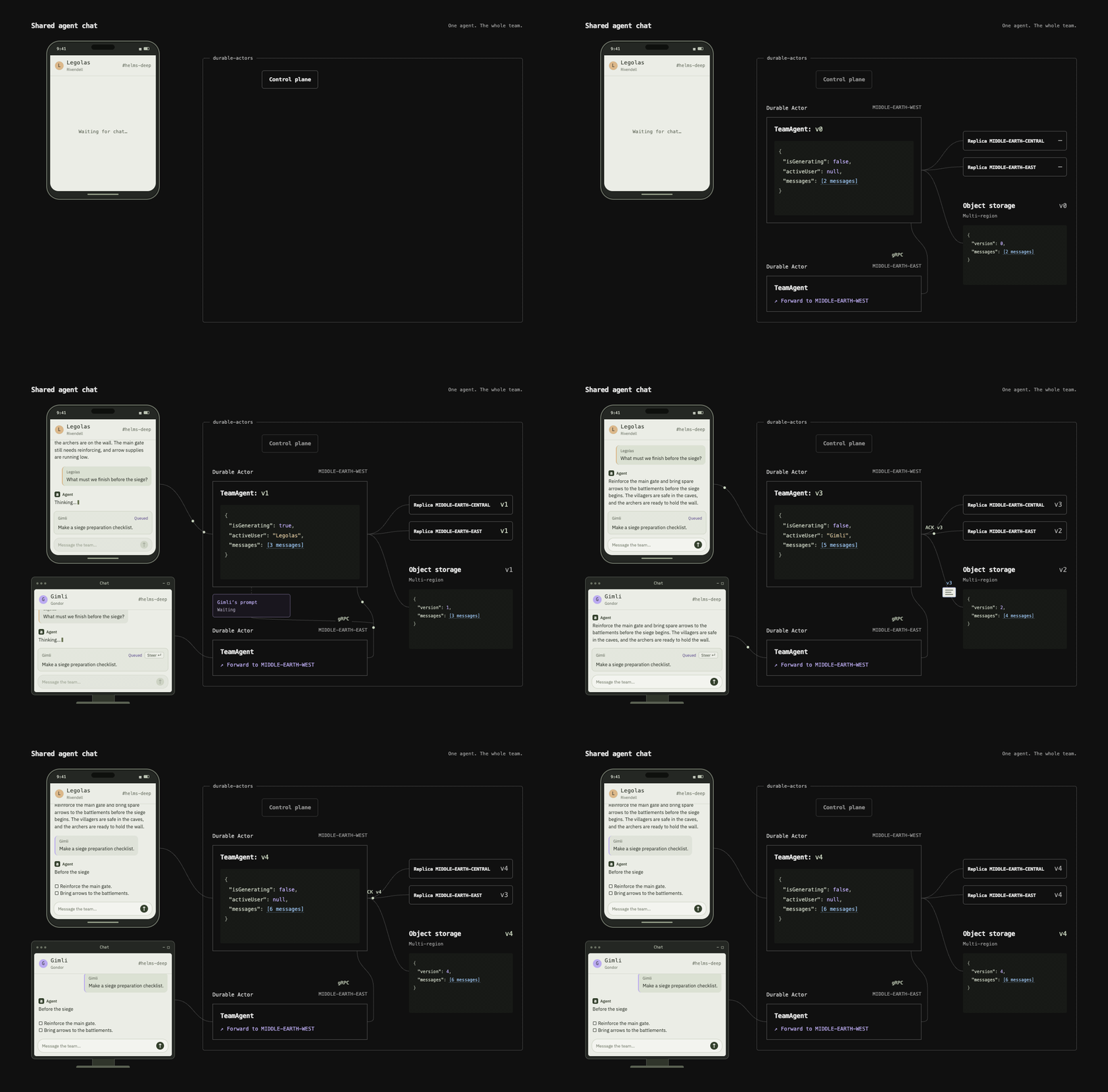
Durable Actors help you **build real-time applications** like chat systems (e.g. ChatGPT, Codex), collaboration tools (e.g. Notion), and agent swarms (e.g. Devin).
They provide _stateful serverless functions_, a foundational building block that abstracts away persistence, coordination, and infrastructure challenges in distributed systems.
[Live demo](https://demo.useterse.ai) · [TypeScript documentation](docs/reference/typescript-guide.md) · [Python documentation](docs/reference/python-guide.md)
## How it works
1. Define an _actor_, a class with _durable state_ (i.e. data survives interruptions, errors, and restarts) and _serialized execution_ (i.e. concurrent callers can update it safely).
For example:
- **If you were building ChatGPT...** a chat actor can store conversations that survive LLM flakiness and server crashes (durable state)
- **If you were building Notion...** a document actor can coordinate concurrent edits from several people and agents (serialized execution)
2. Generate type-safe clients automatically with the Durable Actors SDK. For now, it supports Python and TypeScript.
3. Develop locally with one command and later [self-host the Durable Actors runtime on GCP](docs/self-hosting.md).
## Quickstart: Multiplayer AI Chat
### 1. Create your project
Install Bun 1.4.2+.
```sh
bunx durable-actors init my-actors
cd my-actors
bun install
bunx durable-actors dev # Run the server locally on your machine
```
### 2. Define an _actor_
Define and export actors in your actor project’s `src/actors.ts`, the default entrypoint loaded by `durable-actors dev`. The runtime loads actors on demand and persists fields marked `@Persisted`.
For example, a chat history actor:
```ts
import { openai } from "@ai-sdk/openai"
import { streamText } from "ai"
import { Actor, type ActorSocket, Interleave, Persisted } from "durable-actors"
type Message = { role: "user" | "assistant"; content: string }
export class ChatHistory extends Actor
# Durable Actors
> _an open-source alternative to Cloudflare Durable Objects... with no vendor lock-in, memory limits, and observability built in._
Durable Actors help you **build real-time applications** like chat systems (e.g. ChatGPT, Codex), collaboration tools (e.g. Notion), and agent swarms (e.g. Devin).
They provide _stateful serverless functions_, a foundational building block that abstracts away persistence, coordination, and infrastructure challenges in distributed systems.
[Live demo](https://demo.useterse.ai) · [TypeScript documentation](docs/reference/typescript-guide.md) · [Python documentation](docs/reference/python-guide.md)
## How it works
1. Define an _actor_, a class with _durable state_ (i.e. data survives interruptions, errors, and restarts) and _serialized execution_ (i.e. concurrent callers can update it safely).
For example:
- **If you were building ChatGPT...** a chat actor can store conversations that survive LLM flakiness and server crashes (durable state)
- **If you were building Notion...** a document actor can coordinate concurrent edits from several people and agents (serialized execution)
2. Generate type-safe clients automatically with the Durable Actors SDK. For now, it supports Python and TypeScript.
3. Develop locally with one command and later [self-host the Durable Actors runtime on GCP](docs/self-hosting.md).
## Quickstart: Multiplayer AI Chat

### 1. Create your project
Install Bun 1.4.2+.
```sh
bunx durable-actors init my-actors
cd my-actors
bun install
bunx durable-actors dev # Run the server locally on your machine
```
### 2. Define an _actor_
Define and export actors in your actor project’s `src/actors.ts`, the default entrypoint loaded by `durable-actors dev`. The runtime loads actors on demand and persists fields marked `@Persisted`.
For example, a chat history actor:
```ts
import { openai } from "@ai-sdk/openai"
import { streamText } from "ai"
import { Actor, type ActorSocket, Interleave, Persisted } from "durable-actors"
type Message = { role: "user" | "assistant"; content: string }
export class ChatHistory extends Actor{message.role}: {message.content}
))}