Allow to manage cities and domains with a sidebar tab and custom city view.
## :coffee: Supporting The Module
## :game_die: FoundryVTT
Page : https://foundryvtt.com/packages/cities-managment
## :package: Installation Instructions
To install Cities-Managment, find Cities-Managment in the module browser, or paste the following URL into the Install Module dialog in
the Setup menu of Foundry Virtual Tabletop:
```
https://github.com/ThorkhArokh/cities-managment/releases/latest/download/module.json
```
## :globe_with_meridians: Supported languages
- English (en)
- French (fr)
- Deutsch (de)
- Español (es)
## :sparkles: Features
1. [Manage cities with new tab](#manage-cities-with-new-tab)
2. [Manage city's informations](#manage-citys-informations)
3. [Manage city's stats](#manage-city-stats)
4. [Manage city's finances](#manage-citys-finances)
5. [Manage city's armies](#manage-citys-armies)
6. [Manage city's population](#manage-citys-population)
7. [Manage city's buildings](#manage-citys-buildings)
8. [Manage city's chests](#manage-citys-chests)
9. [Module's settings](#modules-settings)
### Manage cities with new tab
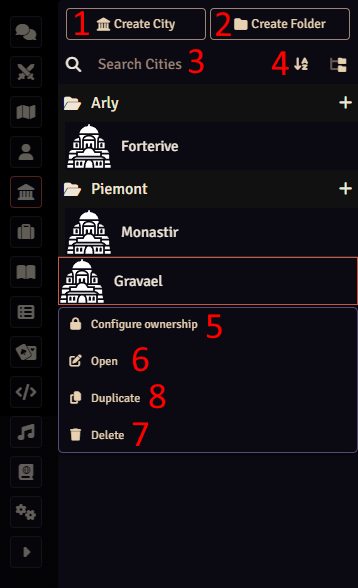
This module add a new tab "Cities" to the sidebar.
With this new view you can (cf. [Fig. Cities tab](doc/assets/cities_tab.png)) :
1. Create new cities
2. Create folders
3. Search city by name
4. Sort cities
5. Configure ownership on cities
6. Open city's informations panel
7. Delete cities
8. Duplicate cities
Fig. Cities tab
### Manage city's informations
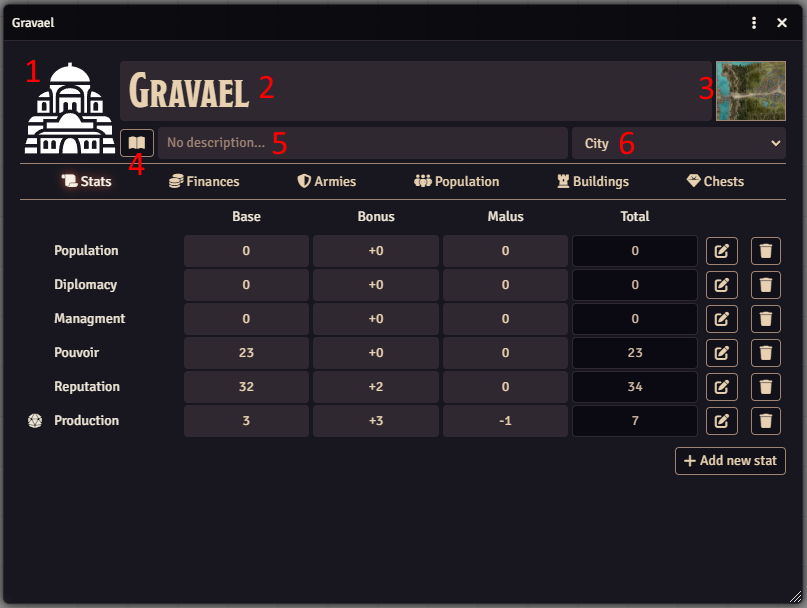
The panel header let you manage main informations of your city.
Here you can (cf. [Fig. City's informations panel](doc/assets/city_panel_header.png)) :
1. Set the image
2. Set the name
3. Set a link to a map
4. Access to a journal entry
5. Set a short description
6. Set the size of the city
Fig. City's informations panel
### Manage city stats
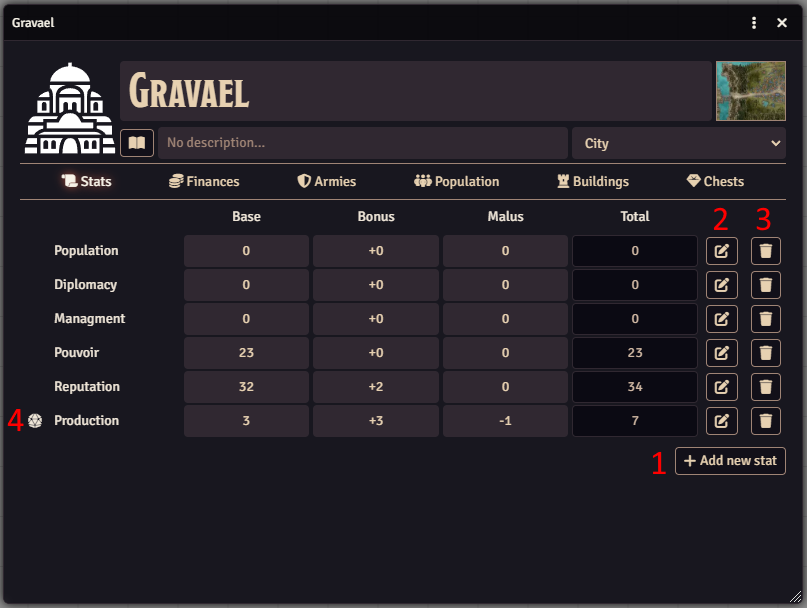
You can add, edit, delete city's stats to feet with your needs.
Features (cf. [Fig. City's stats panel](doc/assets/city_panel_stats.png)) :
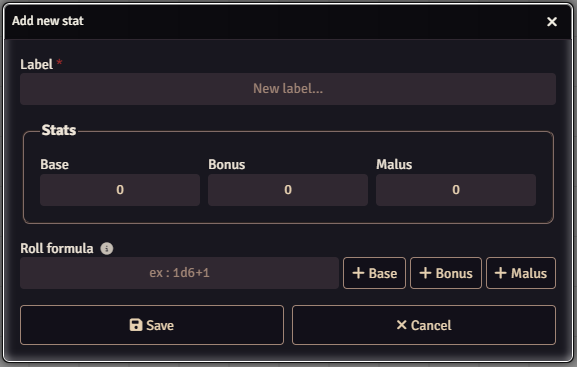
1. Add a new stat (cf. [Fig. Add / update stat dialog](doc/assets/add_stat_dialog.png))
2. Edit a stat (cf. [Fig. Add / update stat dialog](doc/assets/add_stat_dialog.png))
3. Delete a stat
4. Roll dice if a formula is set for the stat
Fig. City's stats panelFig. Add / update stat dialog
### Manage city's finances
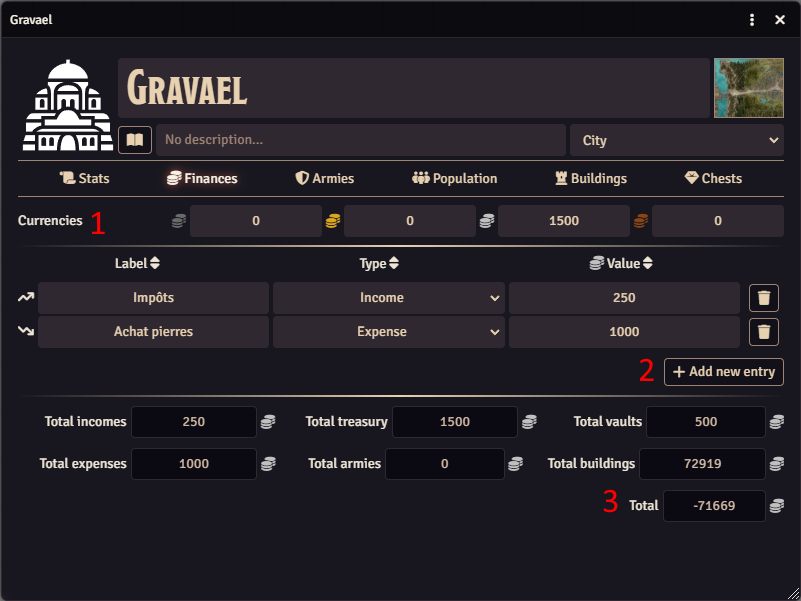
With this panel you can manage and have an overview of all city's finances.
Features (cf. [Fig. City's finances panel](doc/assets/city_panel_finances.png)):
1. Currencies : represents city's current money
2. Entries : represents city's financial movements
3. Overview of all costs and revenues for the different sectors of the city
Fig. City's finances panel
### Manage city's armies
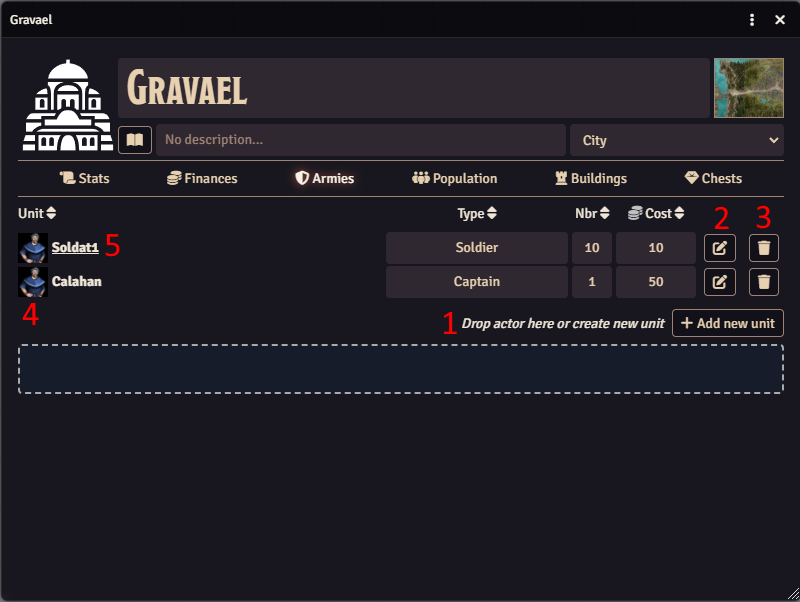
With this panel you can manage city's armies.
Features (cf. [Fig. City's armies panel](doc/assets/city_panel_armies.png)):
1. Add (by drag and drop foundry actor) or create units who make up the army (image, type, nbr, cost)
2. Edit units (only module fields. The module doesn't edit linked actor)
3. Delete units (only module's object. The module doesn't delete linked actor)
4. Update unit's image
5. If unit is linked to an actor, show his/her sheet
> Note : Nbr and cost are used by Finances panel
Fig. City's armies panel
### Manage city's population
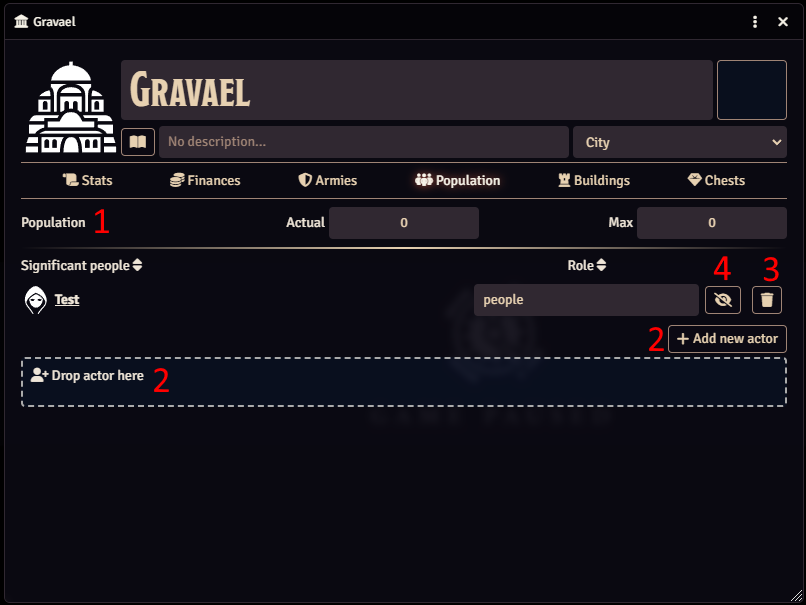
With this panel you can manage city's population.
Features (cf. [Fig. City's population panel](doc/assets/city_panel_population.png)):
1. Set actual et maximum population of the city
2. Add (by drag and drop foundry actor or by button) habitant and define his/her role (link to game actor)
3. Delete habitant (only module's object. The module doesn't delete linked actor)
4. Show / hide people to players (GM only feature)
Fig. City's population panel
### Manage city's buildings
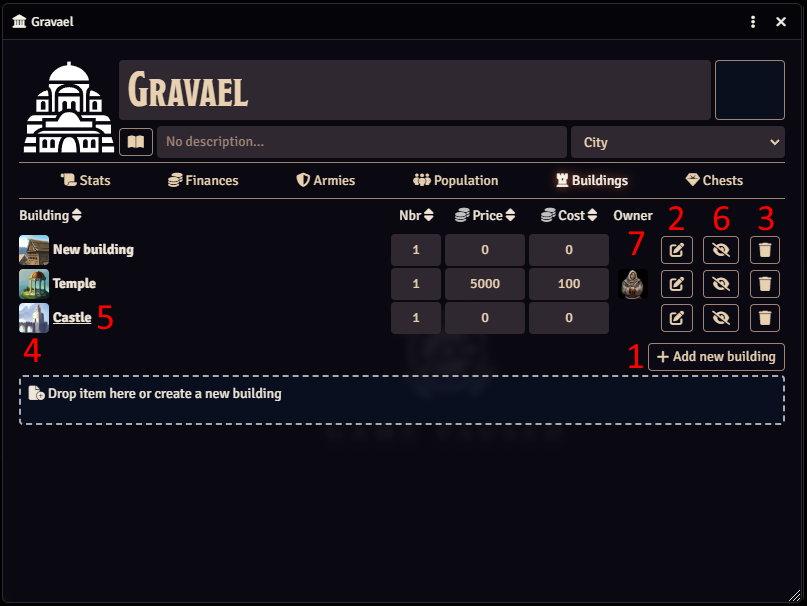
With this panel you can manage city's buildings.
Features (cf. [Fig. City's buildings panel](doc/assets/city_panel_buildings.png)):
1. Add (by drag and drop foundry item) or create buildings (nbr, cost, price)
2. Edit buildings (only module fields. The module doesn't edit linked item)
3. Delete buildings (only module's object. The module doesn't delete linked item)
4. Update building's image
5. If building is linked to an item, show his sheet
6. Show / hide building to players (GM only feature)
7. Add owner for building (link to game actor)
> Note : Price, nbr and cost are used by Finances panel
Fig. City's buildings panel
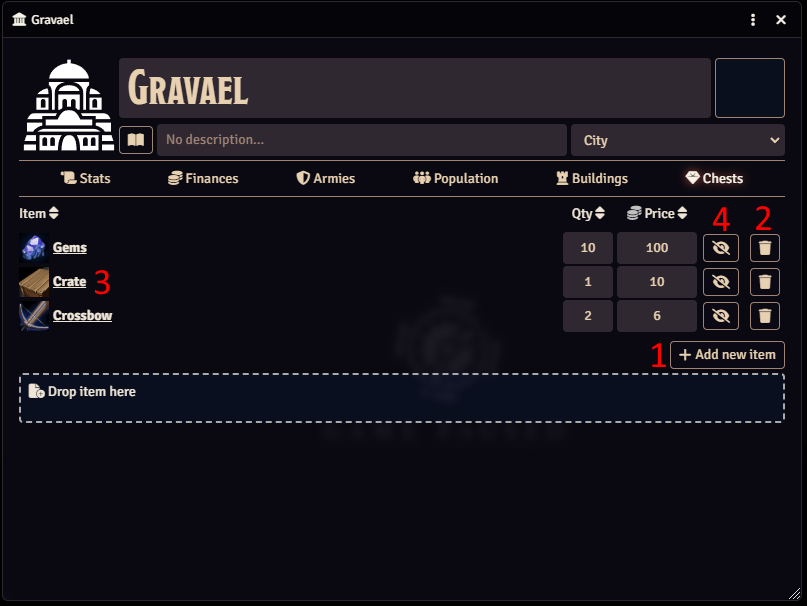
### Manage city's chests
With this panel you can add items to city's chests.
Features (cf. [Fig. City's chests panel](doc/assets/city_panel_chests.png)):
1. Add (by drag and drop foundry item or by button) item (qty, price)
2. Delete item (only module's object. The module doesn't delete linked item)
3. Show item sheet
4. Show / hide item to players (GM only feature)
> Note : Qty and price are used by Finances panel
Fig. City's chests panel
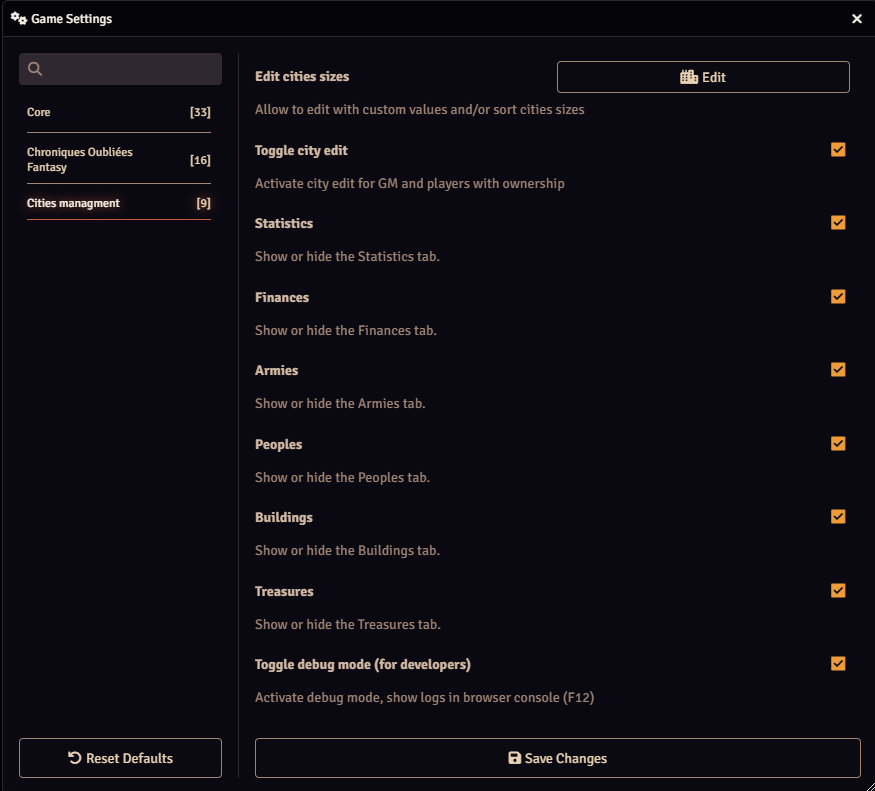
### Module's Settings
Module's settings allow to :
- Edit and sort cities sizes
- Toggle edition mode for cities
- Show/hide city's tabs (stats, finances, armies, buildings, chests)
- Toggle debug mode (for developers)
Fig. General settings panel
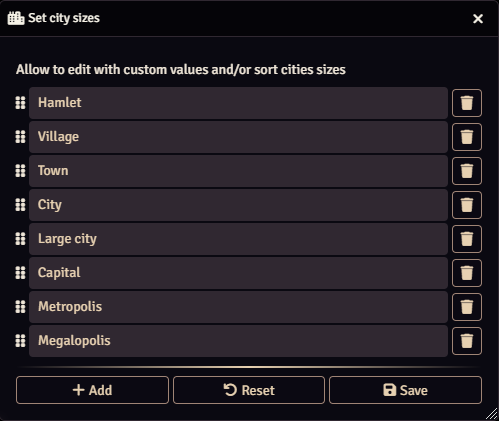
#### Edit and sort cities sizes
Allow to edit with custom values and/or sort cities sizes.
Fig. Cities sizes settings panel
## :books: Documentation
- https://foundryvtt.com/article/module-development/
- https://foundryvtt.com/article/module-sub-types/
- https://www.foundryvtt-hub.com/technical-guide/





 ## :game_die: FoundryVTT
Page : https://foundryvtt.com/packages/cities-managment
## :package: Installation Instructions
To install Cities-Managment, find Cities-Managment in the module browser, or paste the following URL into the Install Module dialog in
the Setup menu of Foundry Virtual Tabletop:
```
https://github.com/ThorkhArokh/cities-managment/releases/latest/download/module.json
```
## :globe_with_meridians: Supported languages
- English (en)
- French (fr)
- Deutsch (de)
- Español (es)
## :sparkles: Features
1. [Manage cities with new tab](#manage-cities-with-new-tab)
2. [Manage city's informations](#manage-citys-informations)
3. [Manage city's stats](#manage-city-stats)
4. [Manage city's finances](#manage-citys-finances)
5. [Manage city's armies](#manage-citys-armies)
6. [Manage city's population](#manage-citys-population)
7. [Manage city's buildings](#manage-citys-buildings)
8. [Manage city's chests](#manage-citys-chests)
9. [Module's settings](#modules-settings)
### Manage cities with new tab
This module add a new tab "Cities" to the sidebar.
With this new view you can (cf. [Fig. Cities tab](doc/assets/cities_tab.png)) :
1. Create new cities
2. Create folders
3. Search city by name
4. Sort cities
5. Configure ownership on cities
6. Open city's informations panel
7. Delete cities
8. Duplicate cities
## :game_die: FoundryVTT
Page : https://foundryvtt.com/packages/cities-managment
## :package: Installation Instructions
To install Cities-Managment, find Cities-Managment in the module browser, or paste the following URL into the Install Module dialog in
the Setup menu of Foundry Virtual Tabletop:
```
https://github.com/ThorkhArokh/cities-managment/releases/latest/download/module.json
```
## :globe_with_meridians: Supported languages
- English (en)
- French (fr)
- Deutsch (de)
- Español (es)
## :sparkles: Features
1. [Manage cities with new tab](#manage-cities-with-new-tab)
2. [Manage city's informations](#manage-citys-informations)
3. [Manage city's stats](#manage-city-stats)
4. [Manage city's finances](#manage-citys-finances)
5. [Manage city's armies](#manage-citys-armies)
6. [Manage city's population](#manage-citys-population)
7. [Manage city's buildings](#manage-citys-buildings)
8. [Manage city's chests](#manage-citys-chests)
9. [Module's settings](#modules-settings)
### Manage cities with new tab
This module add a new tab "Cities" to the sidebar.
With this new view you can (cf. [Fig. Cities tab](doc/assets/cities_tab.png)) :
1. Create new cities
2. Create folders
3. Search city by name
4. Sort cities
5. Configure ownership on cities
6. Open city's informations panel
7. Delete cities
8. Duplicate cities