# Mouser — Logitech Mouse Remapper

English | [中文文档](README_CN.md)
A lightweight, open-source, fully local alternative to **Logitech Options+** for
remapping Logitech HID++ mice. The current best experience is on the **MX Master**
and **MX Anywhere** families, with detection and fallback UI support for additional
Logitech models.
**No telemetry. No cloud. No Logitech account required.**
---
## Contents
- [Download & Run](#download--run)
- [Screenshots](#screenshots)
- [Features](#features)
- [Device coverage](#device-coverage)
- [Default mappings](#default-mappings)
- [Available actions](#available-actions)
- [Build from source](#build-from-source)
- [Limitations](#limitations)
- [Roadmap](#roadmap)
- [Contributing](#contributing)
- [Acknowledgments](#acknowledgments)
- [License](#license)
---
## Download & Run
> **No install required.** Just download, extract, and double-click.


)
1. Open the [**latest release page**](https://github.com/TomBadash/Mouser/releases/latest).
2. Download the zip for your platform:
- **Windows** — `Mouser-Windows.zip`
- **macOS (Apple Silicon)** — `Mouser-macOS.zip`
- **macOS (Intel)** — `Mouser-macOS-intel.zip`
- **Linux** — `Mouser-Linux.zip`
3. Extract it anywhere (Desktop, Documents, `/Applications`, wherever).
4. Run the executable: `Mouser.exe`, `Mouser.app`, or `./Mouser`.
That's it. The app opens, drops a tray / menu-bar icon, and starts remapping immediately.
### What to expect on first launch
- The settings window opens to the device-aware **Mouse & Profiles** page.
- A tray icon appears (next to the clock on Windows / Linux, in the menu bar on macOS).
- Closing the window keeps Mouser running in the tray. Right-click the tray icon → **Quit Mouser** to fully exit.
- Mouser remembers language and startup behavior between runs.
### First-time notes
- **Windows SmartScreen** may warn the first time — click **More info** → **Run anyway**.
- **Logitech Options+ must not be running.** Both apps fight over HID++ access; quit Options+ before launching Mouser.
- **macOS** asks for **Accessibility** permission so the event tap can intercept mouse events. See [readme_mac_osx.md](readme_mac_osx.md) for the full setup walkthrough.
- **Linux** needs read access to `/dev/hidraw*`, `/dev/input/event*`, and write access to `/dev/uinput`. Run the bundled helper once after extracting:
```bash
cd /path/to/extracted/Mouser
./install-linux-permissions.sh
```
Reconnect the mouse, then relaunch.
- Config is saved automatically to:
- `%APPDATA%\Mouser\config.json` (Windows)
- `~/Library/Application Support/Mouser/config.json` (macOS)
- `~/.config/Mouser/config.json` (Linux)
- Logs rotate automatically (5 × 5 MB) under `%APPDATA%\Mouser\logs`, `~/Library/Logs/Mouser`, or `$XDG_STATE_HOME/Mouser/logs`.
---
## Screenshots
| Mouse & Profiles | Point & Scroll |
|---|---|
| 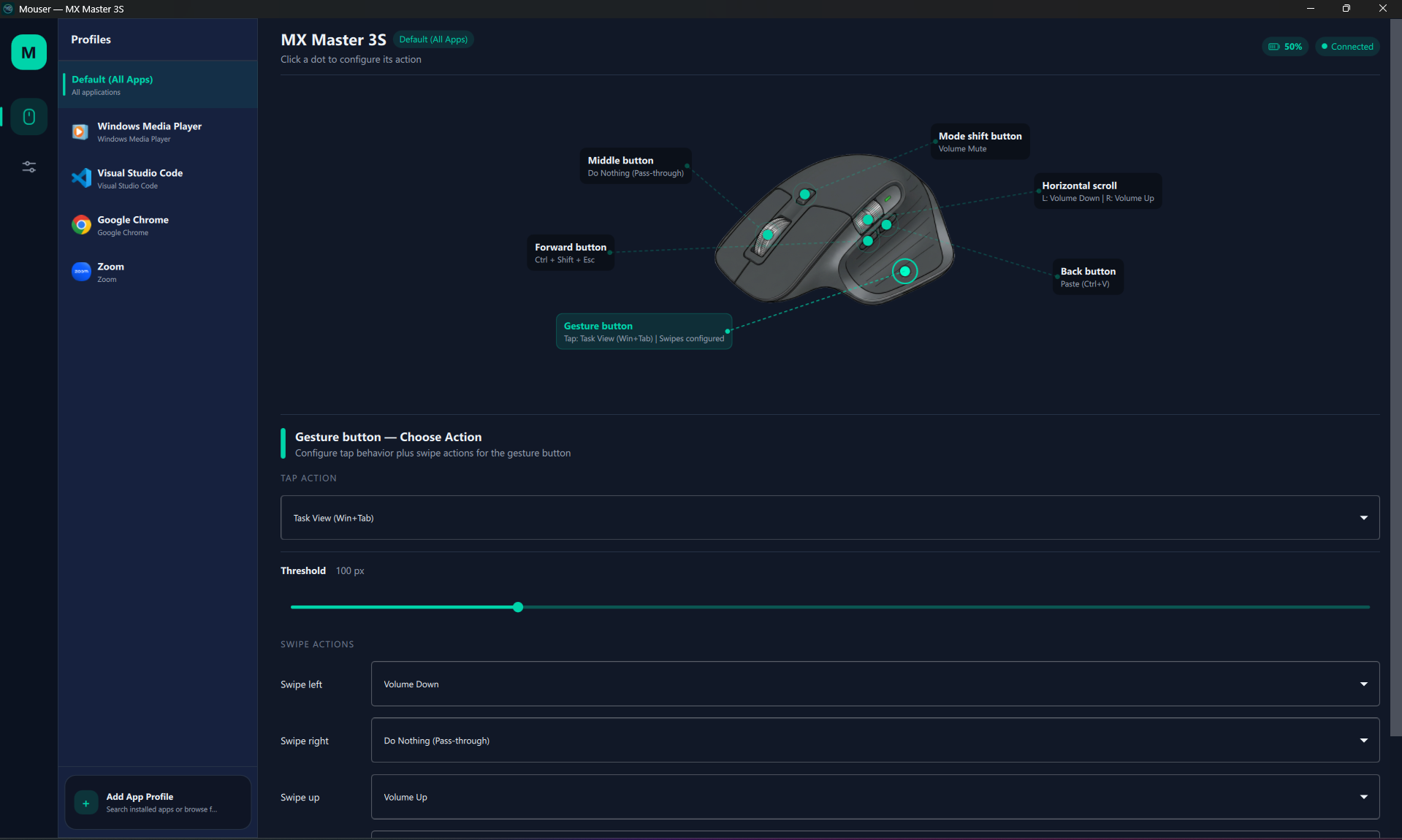 |
| 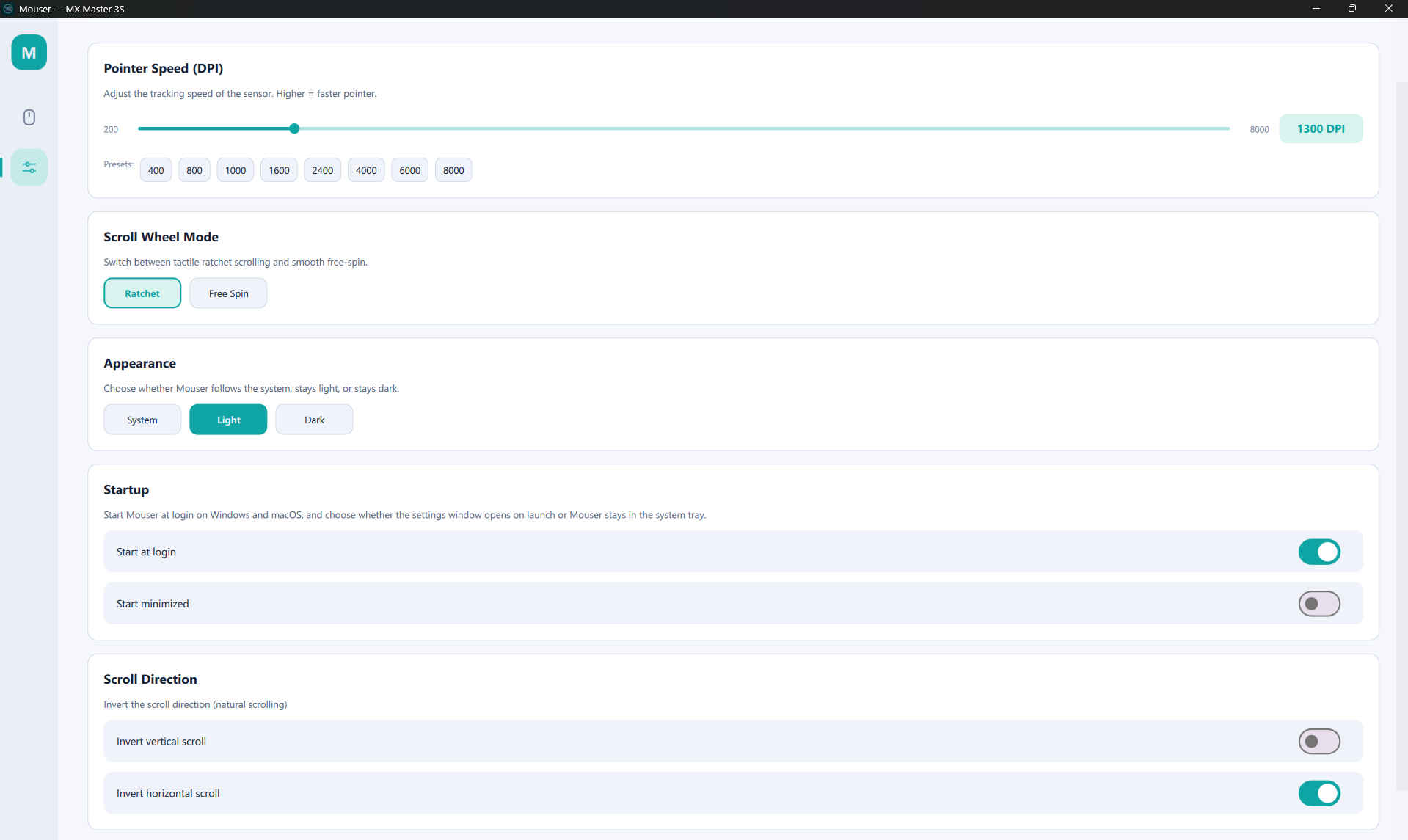 |
---
## Features
### Button remapping
- **Remap any programmable button** — middle click, gesture button, back, forward, mode shift, DPI switch (MX Vertical), and horizontal scroll.
- **Mouse-to-mouse remap** — bind any button to act as left, right, middle, back, or forward click.
- **Per-application profiles** — Mouser auto-switches mappings when the foreground app changes (e.g. Chrome vs. VS Code).
- **Custom keyboard shortcuts** — record any key combination (e.g. `Ctrl+Shift+P`) directly in the UI.
- **40+ built-in actions** — navigation, browser, editing, media, scroll-mode, and DPI shortcuts that adapt per platform.
### Device control
- **DPI / pointer speed** — slider from 200 to the device max (8000 on MX Master) with quick presets, plus a `Cycle DPI Presets` action you can map to a button.
- **Smart Shift** — toggle Logitech's ratchet ↔ free-spin scroll mode (HID++ `0x2111`), with a sensitivity threshold and a mappable `Toggle SmartShift` action.
- **Switch scroll mode** — bind a button to flip ratchet / free-spin without opening the UI; defaults to mode-shift.
- **Scroll direction inversion** — independent toggles for vertical and horizontal scroll.
- **Gesture button + swipe actions** — tap for one action, swipe up/down/left/right for four others.
### Cross-platform
- **Windows, macOS, and Linux** — native hooks per platform (`WH_MOUSE_LL`, `CGEventTap`, `evdev` + `uinput`).
- **Native Intel and Apple Silicon macOS builds** — separate `Mouser-macOS-intel.zip` and `Mouser-macOS.zip` artifacts; the menu-bar app runs as `LSUIElement` (no Dock icon).
- **Resizable UI** — main window starts at 1060 × 700 with a 920 × 620 minimum; the mouse diagram and controls reflow as you resize.
- **Start at login** — Windows registry key, macOS LaunchAgent, and Linux XDG autostart, with an independent **Start minimized** option that boots straight into the tray. Linux autostart intentionally waits about 15 seconds after login so Bluetooth / HID devices are usually ready before Mouser restores device settings.
- **Single-instance guard** — launching a second copy brings the existing window to the front instead of starting a duplicate.
### Smart connectivity
- **Bluetooth and Logi Bolt** — both transports are supported on all three platforms; the UI labels the live connection (`Logi Bolt` only when the receiver PID is positively identified).
- **Auto-reconnection** — Mouser watches for power-off / on cycles and rebinds HID++ + the OS mouse hook without a restart; SmartShift settings are replayed on every reconnect (including wake-from-sleep).
- **Live connection status** — real-time Connected / Not Connected badge, model name, and active layout in the UI.
- **Device-aware UI** — interactive MX Master and MX Anywhere diagrams with clickable hotspots; generic fallback card for other models, with an experimental layout-override picker.
### Multi-language UI
- **English / Simplified Chinese / Traditional Chinese** — switch instantly, no restart required.
- Language preference is saved to `config.json` and restored on next launch.
- Covers nav, mouse page, settings page, dialogs, system tray / menu bar, and permission prompts.
### Privacy first
- **Fully local** — config is a plain JSON file, all processing happens on your machine.
- **System tray / menu bar** — runs quietly in the background.
- **Zero telemetry, zero cloud, zero account required.**
---
## Device coverage
| Family / model | Detection + HID++ probing | UI support |
|---|---|---|
| MX Master 4 / 3S / 3 / 2S / MX Master | Yes | Dedicated interactive per-model layouts |
| MX Anywhere 3S / 3 / 2S | Yes | Dedicated interactive per-model layouts |
| MX Vertical | Yes | Generic fallback card (with DPI switch button support) |
| Unknown Logitech HID++ mice | Best effort by PID/name | Generic fallback card |
> MX Master and MX Anywhere devices have dedicated visual overlays. Other devices are still detected, show their model name, and can opt into an experimental layout override — button positions just may not line up until a real overlay lands. See [CONTRIBUTING_DEVICES.md](CONTRIBUTING_DEVICES.md) to add yours.
---
## Default mappings
| Button | Default action |
|---|---|
| Back button (XButton1) | Alt + Tab (Switch Windows) |
| Forward button (XButton2) | Alt + Tab (Switch Windows) |
| Middle click | Pass-through |
| Gesture button | Pass-through |
| Gesture swipes (up / down / left / right) | Pass-through |
| Mode shift (scroll click) | Switch Scroll Mode (Ratchet / Free Spin) |
| Horizontal scroll left | Browser Back |
| Horizontal scroll right | Browser Forward |
| DPI switch (MX Vertical) | Pass-through |
---
## Available actions
Action labels adapt per platform. Windows exposes `Win+D` and `Task View`; macOS exposes `Mission Control`, `Show Desktop`, `App Exposé`, and `Launchpad`; Linux falls back to compositor-native equivalents.
| Category | Actions |
|---|---|
| **Navigation** | Alt+Tab, Alt+Shift+Tab, Show Desktop, Previous Desktop, Next Desktop, Task View (Windows), Mission Control / App Exposé / Launchpad (macOS), Page Up / Page Down / Home / End |
| **Browser** | Back, Forward, Close Tab (Ctrl+W), New Tab (Ctrl+T), Next Tab (Ctrl+Tab), Previous Tab (Ctrl+Shift+Tab) |
| **Editing** | Copy, Paste, Cut, Undo, Select All, Save, Find |
| **Media** | Volume Up, Volume Down, Volume Mute, Play / Pause, Next Track, Previous Track |
| **Scroll** | Switch Scroll Mode (Ratchet / Free Spin), Toggle SmartShift, Cycle DPI Presets |
| **Mouse** | Left Click, Right Click, Middle Click, Back (Mouse Button 4), Forward (Mouse Button 5) |
| **Custom** | User-defined keyboard shortcuts (any key combination, captured in the UI) |
| **Other** | Do Nothing (pass-through) |
---
## Build from source
You only need this if you want to hack on Mouser or run a development build. Most users should grab a release zip — see [Download & Run](#download--run).
### Common prerequisites
- **Windows 10/11**, **macOS 12+ (Monterey)**, or **Linux** (X11; KDE Wayland for app detection)
- **Python 3.10+** (tested up to 3.14)
- A supported Logitech HID++ mouse paired via Bluetooth or a USB receiver
- **Logitech Options+ must NOT be running** — it conflicts with HID++ access
- `git` and a working build toolchain
```bash
git clone https://github.com/TomBadash/Mouser.git
cd Mouser
python -m venv .venv
```
|
---
## Features
### Button remapping
- **Remap any programmable button** — middle click, gesture button, back, forward, mode shift, DPI switch (MX Vertical), and horizontal scroll.
- **Mouse-to-mouse remap** — bind any button to act as left, right, middle, back, or forward click.
- **Per-application profiles** — Mouser auto-switches mappings when the foreground app changes (e.g. Chrome vs. VS Code).
- **Custom keyboard shortcuts** — record any key combination (e.g. `Ctrl+Shift+P`) directly in the UI.
- **40+ built-in actions** — navigation, browser, editing, media, scroll-mode, and DPI shortcuts that adapt per platform.
### Device control
- **DPI / pointer speed** — slider from 200 to the device max (8000 on MX Master) with quick presets, plus a `Cycle DPI Presets` action you can map to a button.
- **Smart Shift** — toggle Logitech's ratchet ↔ free-spin scroll mode (HID++ `0x2111`), with a sensitivity threshold and a mappable `Toggle SmartShift` action.
- **Switch scroll mode** — bind a button to flip ratchet / free-spin without opening the UI; defaults to mode-shift.
- **Scroll direction inversion** — independent toggles for vertical and horizontal scroll.
- **Gesture button + swipe actions** — tap for one action, swipe up/down/left/right for four others.
### Cross-platform
- **Windows, macOS, and Linux** — native hooks per platform (`WH_MOUSE_LL`, `CGEventTap`, `evdev` + `uinput`).
- **Native Intel and Apple Silicon macOS builds** — separate `Mouser-macOS-intel.zip` and `Mouser-macOS.zip` artifacts; the menu-bar app runs as `LSUIElement` (no Dock icon).
- **Resizable UI** — main window starts at 1060 × 700 with a 920 × 620 minimum; the mouse diagram and controls reflow as you resize.
- **Start at login** — Windows registry key, macOS LaunchAgent, and Linux XDG autostart, with an independent **Start minimized** option that boots straight into the tray. Linux autostart intentionally waits about 15 seconds after login so Bluetooth / HID devices are usually ready before Mouser restores device settings.
- **Single-instance guard** — launching a second copy brings the existing window to the front instead of starting a duplicate.
### Smart connectivity
- **Bluetooth and Logi Bolt** — both transports are supported on all three platforms; the UI labels the live connection (`Logi Bolt` only when the receiver PID is positively identified).
- **Auto-reconnection** — Mouser watches for power-off / on cycles and rebinds HID++ + the OS mouse hook without a restart; SmartShift settings are replayed on every reconnect (including wake-from-sleep).
- **Live connection status** — real-time Connected / Not Connected badge, model name, and active layout in the UI.
- **Device-aware UI** — interactive MX Master and MX Anywhere diagrams with clickable hotspots; generic fallback card for other models, with an experimental layout-override picker.
### Multi-language UI
- **English / Simplified Chinese / Traditional Chinese** — switch instantly, no restart required.
- Language preference is saved to `config.json` and restored on next launch.
- Covers nav, mouse page, settings page, dialogs, system tray / menu bar, and permission prompts.
### Privacy first
- **Fully local** — config is a plain JSON file, all processing happens on your machine.
- **System tray / menu bar** — runs quietly in the background.
- **Zero telemetry, zero cloud, zero account required.**
---
## Device coverage
| Family / model | Detection + HID++ probing | UI support |
|---|---|---|
| MX Master 4 / 3S / 3 / 2S / MX Master | Yes | Dedicated interactive per-model layouts |
| MX Anywhere 3S / 3 / 2S | Yes | Dedicated interactive per-model layouts |
| MX Vertical | Yes | Generic fallback card (with DPI switch button support) |
| Unknown Logitech HID++ mice | Best effort by PID/name | Generic fallback card |
> MX Master and MX Anywhere devices have dedicated visual overlays. Other devices are still detected, show their model name, and can opt into an experimental layout override — button positions just may not line up until a real overlay lands. See [CONTRIBUTING_DEVICES.md](CONTRIBUTING_DEVICES.md) to add yours.
---
## Default mappings
| Button | Default action |
|---|---|
| Back button (XButton1) | Alt + Tab (Switch Windows) |
| Forward button (XButton2) | Alt + Tab (Switch Windows) |
| Middle click | Pass-through |
| Gesture button | Pass-through |
| Gesture swipes (up / down / left / right) | Pass-through |
| Mode shift (scroll click) | Switch Scroll Mode (Ratchet / Free Spin) |
| Horizontal scroll left | Browser Back |
| Horizontal scroll right | Browser Forward |
| DPI switch (MX Vertical) | Pass-through |
---
## Available actions
Action labels adapt per platform. Windows exposes `Win+D` and `Task View`; macOS exposes `Mission Control`, `Show Desktop`, `App Exposé`, and `Launchpad`; Linux falls back to compositor-native equivalents.
| Category | Actions |
|---|---|
| **Navigation** | Alt+Tab, Alt+Shift+Tab, Show Desktop, Previous Desktop, Next Desktop, Task View (Windows), Mission Control / App Exposé / Launchpad (macOS), Page Up / Page Down / Home / End |
| **Browser** | Back, Forward, Close Tab (Ctrl+W), New Tab (Ctrl+T), Next Tab (Ctrl+Tab), Previous Tab (Ctrl+Shift+Tab) |
| **Editing** | Copy, Paste, Cut, Undo, Select All, Save, Find |
| **Media** | Volume Up, Volume Down, Volume Mute, Play / Pause, Next Track, Previous Track |
| **Scroll** | Switch Scroll Mode (Ratchet / Free Spin), Toggle SmartShift, Cycle DPI Presets |
| **Mouse** | Left Click, Right Click, Middle Click, Back (Mouse Button 4), Forward (Mouse Button 5) |
| **Custom** | User-defined keyboard shortcuts (any key combination, captured in the UI) |
| **Other** | Do Nothing (pass-through) |
---
## Build from source
You only need this if you want to hack on Mouser or run a development build. Most users should grab a release zip — see [Download & Run](#download--run).
### Common prerequisites
- **Windows 10/11**, **macOS 12+ (Monterey)**, or **Linux** (X11; KDE Wayland for app detection)
- **Python 3.10+** (tested up to 3.14)
- A supported Logitech HID++ mouse paired via Bluetooth or a USB receiver
- **Logitech Options+ must NOT be running** — it conflicts with HID++ access
- `git` and a working build toolchain
```bash
git clone https://github.com/TomBadash/Mouser.git
cd Mouser
python -m venv .venv
```
Windows
```powershell
.\.venv\Scripts\activate
pip install -r requirements.txt
# Run from source
python main_qml.py
# Or start straight into the tray
python main_qml.py --start-hidden
# Build a portable zip
build.bat # standard
build.bat --clean # force clean rebuild
```
`build.bat` installs requirements, verifies that `hidapi` is importable, and packages with PyInstaller. The output lives in `dist\Mouser\` — zip the folder and ship it.
To launch a source checkout without a console window, create a shortcut that uses `pythonw.exe`; see [DEVELOPMENT.md](DEVELOPMENT.md#desktop-shortcut-windows).
macOS
```bash
source .venv/bin/activate
pip install -r requirements.txt
# Run from source
python main_qml.py
python main_qml.py --start-hidden # launch directly to menu bar
# Build the native menu-bar bundle
pip install pyinstaller
./build_macos_app.sh
```
The output is `dist/Mouser.app`. The script reuses `images/AppIcon.icns` when present, otherwise generates one from `images/logo_icon.png`. Signing depends on whether `MOUSER_SIGN_IDENTITY` is set in the environment:
- **Unset (default)**: ad-hoc signs with `codesign --sign -`. Convenient for one-off builds, but the bundle's code identity can change on rebuild, so macOS may ask for Accessibility permission again.
- **Set to a codesigning identity** (`security find-identity -v -p codesigning` to list them — SHA-1 form preferred): signs every nested `.dylib` / `.so` / `.framework` with hardened runtime options, then signs the outer app with the hardened-runtime exceptions at `build_resources/Mouser.entitlements`. This is a local developer signing path for repeated builds; stable macOS permission behavior depends on keeping the same source, resolved Python interpreter, dependency versions, architecture, signing identity, entitlements, and timestamp policy. A failing `codesign --verify --deep --strict` check aborts the build.
```sh
MOUSER_SIGN_IDENTITY="ABCD1234..." ./build_macos_app.sh # local signed build
```
- This is **not** a notarized release-signing flow. Public macOS release zips remain ad-hoc signed until a separate Developer ID signing, secure timestamp, notarization, stapling, and Gatekeeper validation workflow exists.
- Build on the architecture you want to ship: an `arm64` Python produces an Apple Silicon bundle, an `x86_64` Python produces an Intel bundle. Set `PYINSTALLER_TARGET_ARCH=arm64|x86_64|universal2` to override.
- Release CI publishes both `Mouser-macOS.zip` (Apple Silicon) and `Mouser-macOS-intel.zip` (Intel) automatically on tag pushes.
- Accessibility permission is required. See [readme_mac_osx.md](readme_mac_osx.md) for the full grant flow and platform-specific notes.
Linux
```bash
source .venv/bin/activate
pip install -r requirements.txt
# Run from source
python main_qml.py
# Install device permissions (only needed once, then reconnect the mouse)
./packaging/linux/install-linux-permissions.sh
# Build a portable bundle
sudo apt-get install libhidapi-dev
pip install pyinstaller
pyinstaller Mouser-linux.spec --noconfirm
```
The helper installs `69-mouser-logitech.rules`, reloads `udev`, and tries to `modprobe uinput`. After a successful run, reconnect the mouse, fully quit Mouser, and launch normally — no `sudo`. On systems without logind / `uaccess`, adding the user to the `input` group is the distro-specific fallback.
The first normal Linux launch creates or refreshes:
```text
~/.local/share/applications/io.github.tombadash.mouser.desktop
```
The generated launcher uses absolute paths for the current portable app or source checkout, and syncs Mouser's app icon into the per-user hicolor icon theme when possible. If you move the checkout, launch Mouser once from the new path to refresh the app-menu entry. Enabling **Start at login** also manages:
```text
~/.config/autostart/io.github.tombadash.mouser.desktop
```
That Linux autostart entry includes a short GNOME startup delay so Mouser does not race Bluetooth / HID initialization immediately after login.
`xdotool` enables per-app profile switching on X11; `kdotool` adds KDE Wayland support. Other Wayland compositors fall back to the default profile.
> **Automated releases:** pushing a `v*` tag triggers [`.github/workflows/release.yml`](.github/workflows/release.yml), which builds Windows, macOS (Apple Silicon + Intel), and Linux artifacts in CI and uploads them to the GitHub Release.
For project layout, the architecture diagram, the HID++ gesture detector, the Engine + reconnection flow, debug CLI flags (`--hid-backend=iokit|hidapi|auto`), and how to run the test suite, see [DEVELOPMENT.md](DEVELOPMENT.md). To add a new device, see [CONTRIBUTING_DEVICES.md](CONTRIBUTING_DEVICES.md).
---
## Limitations
- **Initial Logi Bolt pairing** — Mouser does not pair a mouse with a receiver. If your MX Master 3S is not yet paired with its Logi Bolt receiver, use [Logi Web Connect](https://logiwebconnect.com/) to complete pairing first, then use Mouser to configure the mouse. Already-paired devices do not need to be paired again.
- **Per-device mappings aren't fully separated yet** — layout overrides are stored per detected device, but profile mappings are still global.
- **Conflicts with Logitech Options+** — both apps fight over HID++ access. Quit Options+ before running Mouser.
- **Scroll inversion** uses coalesced post-injection on Windows to avoid LL-hook deadlocks; it's stable in mainstream apps but may misbehave in some games or low-level drivers.
- **Admin not required** — but injected keystrokes may not reach elevated windows or some games. Run Mouser elevated if you need that path.
- **Linux app detection is partial** — X11 works via `xdotool`, KDE Wayland works via `kdotool`, GNOME / other Wayland compositors still fall back to the default profile.
- **Linux device permissions** — Mouser needs access to `/dev/hidraw*`, `/dev/input/event*`, and `/dev/uinput`. Use [`install-linux-permissions.sh`](packaging/linux/install-linux-permissions.sh) once instead of running as root.
---
## Roadmap
- [ ] **Dedicated overlays for more devices** — real hotspot maps and artwork for MX Vertical and other Logitech families
- [ ] **True per-device config** — separate mappings cleanly when multiple Logitech mice are used on the same machine
- [ ] **Dynamic button inventory** — build button lists from discovered `REPROG_CONTROLS_V4` controls instead of the current fixed sets
- [ ] **Improved scroll inversion** — explore driver-level or interception-driver approaches
- [ ] **Gesture swipe tuning** — improve swipe reliability and defaults across more devices
- [ ] **Per-app profile auto-creation** — detect new apps and prompt to create a profile
- [ ] **Export / import config** — share configurations between machines
- [ ] **Tray icon badge** — show the active profile name in the tray tooltip
- [ ] **Broader Wayland support** — extend app detection beyond X11 / KDE and validate across more distros
- [ ] **Plugin system** — allow third-party action providers
---
## Contributing
Contributions are welcome.
- **Code, fixes, and features:** fork → branch → PR. The dev setup, architecture overview, debug flags, and test instructions live in [DEVELOPMENT.md](DEVELOPMENT.md).
- **Adding a new Logitech mouse:** follow the discovery-dump walkthrough in [CONTRIBUTING_DEVICES.md](CONTRIBUTING_DEVICES.md). Even a partial dump helps.
- **Help wanted:**
- Testing with other Logitech HID++ devices
- Scroll inversion improvements
- Broader Linux / Wayland validation
- UI/UX polish, accessibility, and translations
## Support the project
If Mouser saves you from installing Logitech Options+, consider supporting development:

Every bit helps keep the project going — thank you.
---
## Acknowledgments
- **[@andrew-sz](https://github.com/andrew-sz)** — macOS port: CGEventTap mouse hooking, Quartz key simulation, NSWorkspace app detection, and NSEvent media key support.
- **[@thisislvca](https://github.com/thisislvca)** — significant expansion of the project including macOS compatibility improvements, multi-device support, new UI features, and active triage of open issues.
- **[@awkure](https://github.com/awkure)** — cross-platform login startup (Windows registry + macOS LaunchAgent), single-instance guard, start-minimized option, and MX Master 4 detection.
- **[@hieshima](https://github.com/hieshima)** — Linux support (evdev + HID++ + uinput), mode-shift mapping, Smart Shift toggle, custom keyboard shortcut support, Linux connection-state stabilization, and macOS CGEventTap reliability fixes (auto re-enable on timeout, trackpad scroll filtering).
- **[@pavelzaichyk](https://github.com/pavelzaichyk)** — Next Tab / Previous Tab browser actions, persistent rotating log file storage, Smart Shift enhanced support (HID++ `0x2111`) with sensitivity control and scroll-mode sync.
- **[@nellwhoami](https://github.com/nellwhoami)** — Multi-language UI system (English, Simplified Chinese, Traditional Chinese) and Page Up / Page Down / Home / End navigation actions.
- **[@guilamu](https://github.com/guilamu)** — Mouse-to-mouse button remapping (left, right, middle, back, forward click) and HID++ stability fixes (stuck-button auto-release, auto-reconnect after consecutive timeouts, async dispatch queue for the Windows hook).
- **[@vcanuel](https://github.com/vcanuel)** — Logi Bolt receiver support on macOS via the `hidapi` fallback path.
- **[@farfromrefug](https://github.com/farfromrefug)** — smaller macOS bundle (Qt Quick Controls trim, QtDBus, Qt asset filtering).
- **[@MysticalMike60t](https://github.com/MysticalMike60t)** — README structure ideas (collapsible per-OS build sections).
- **[@davidnoyes](https://github.com/davidnoyes)** - Full Logitech MX Master 4 support: Actions Ring radial menu, per-slot haptics, stroke-aware gestures, dual-CID HID++ routing, and force-sensitivity control, integrating and adapting a range of community contributions; plus a charging-state indicator on the battery badge.
- **[@hughesyadaddy](https://github.com/hughesyadaddy)** - MX Master 4 firmware-first HID++ runtime, hardware-reported DPI persistence, Backend list-property memoization, and OS mouse-event passthrough when no Logitech device is connected.
- **[@laziukdavid](https://github.com/laziukdavid)** - Reworked swipe-gesture recognition and faster HID++ device detection.
- **[@FunJim](https://github.com/FunJim)** - Shift+wheel horizontal scroll on macOS/Windows/Linux, and preserving a symlinked config.json on atomic save.
- **[@chenqianhe](https://github.com/chenqianhe)** - macOS nested app-identity matching for per-app profiles.
- **[@liuxuAP369](https://github.com/liuxuAP369)** - Fractional macOS horizontal scroll delta handling.
- **[@winniesi](https://github.com/winniesi)** - Ping-pong desktop cycling action (macOS).
- **[@Archetipo95](https://github.com/Archetipo95)** - Physical scroll-wheel tilt support and reduced remapping latency on macOS.
- **[@zeward-lee](https://github.com/zeward-lee)** - Scan-code injection on remapped keystrokes so side-button copy/paste reaches UWP / Store apps.
- **[@ArtisticZhao](https://github.com/ArtisticZhao)** - Background HID polling no longer resets the system idle timer, so the display can sleep and the system can idle while Mouser runs (visibility-gated polling with an idle-grace period).
- **[@mizi](https://github.com/mizi)** - Scroll Force control: adjustable ratchet firmness for enhanced SmartShift (HID++ `0x2111`) devices, with a per-device Scroll page slider.
- **[@kevin-nous](https://github.com/kevin-nous)** - Original per-button slide-gesture concept (event-tap arming, dual-mode tap/gesture), which inspired the cross-platform "Gesture Swipe" action: any device-advertised button becomes a hold-and-slide gesture pad on Windows, macOS, and Linux.
- **[@unijiang](https://github.com/unijiang)** - Logitech M585/M590 Multi-Device Mouse support: device catalog entry (name/alias matched to avoid over-claiming the shared receiver PID), interactive hotspot layout, and wheel-tilt exposure as configurable left/right controls.
---
## License
This project is licensed under the [MIT License](LICENSE).
**Mouser** is not affiliated with or endorsed by Logitech. "Logitech", "MX Master", and "Options+" are trademarks of Logitech International S.A.