# opencode-kanban
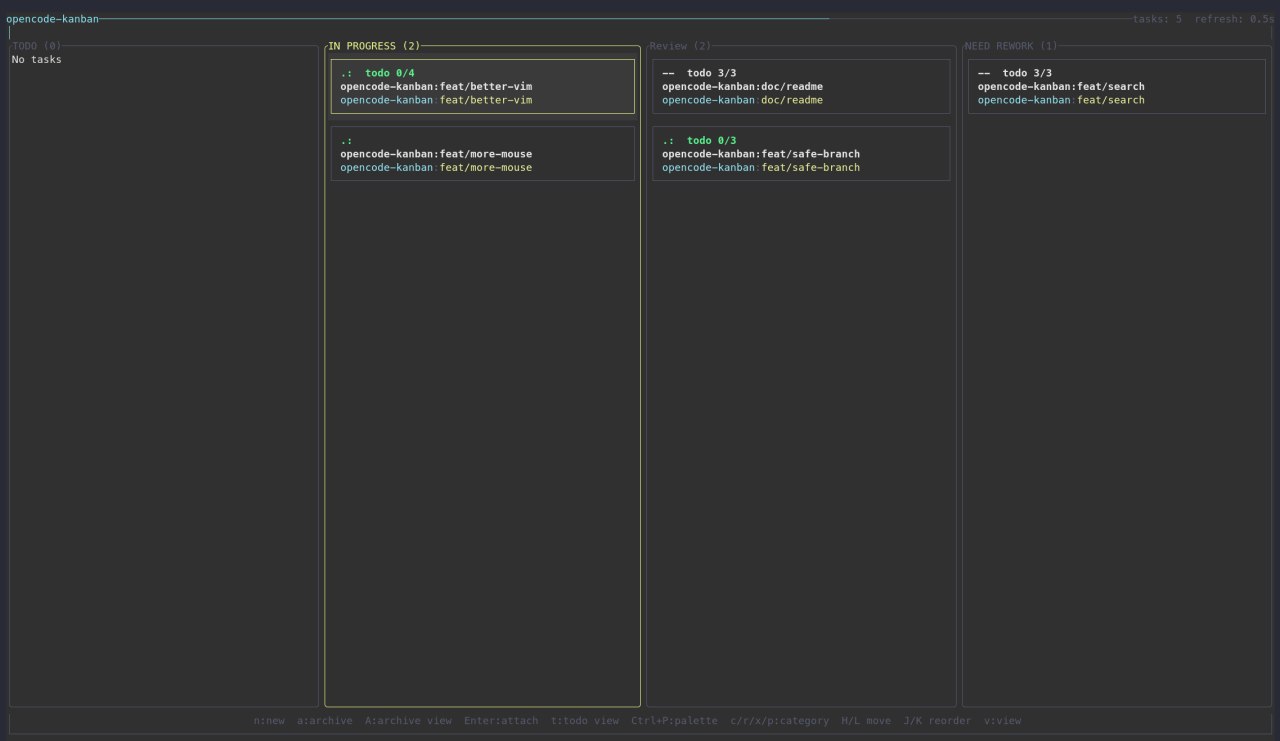
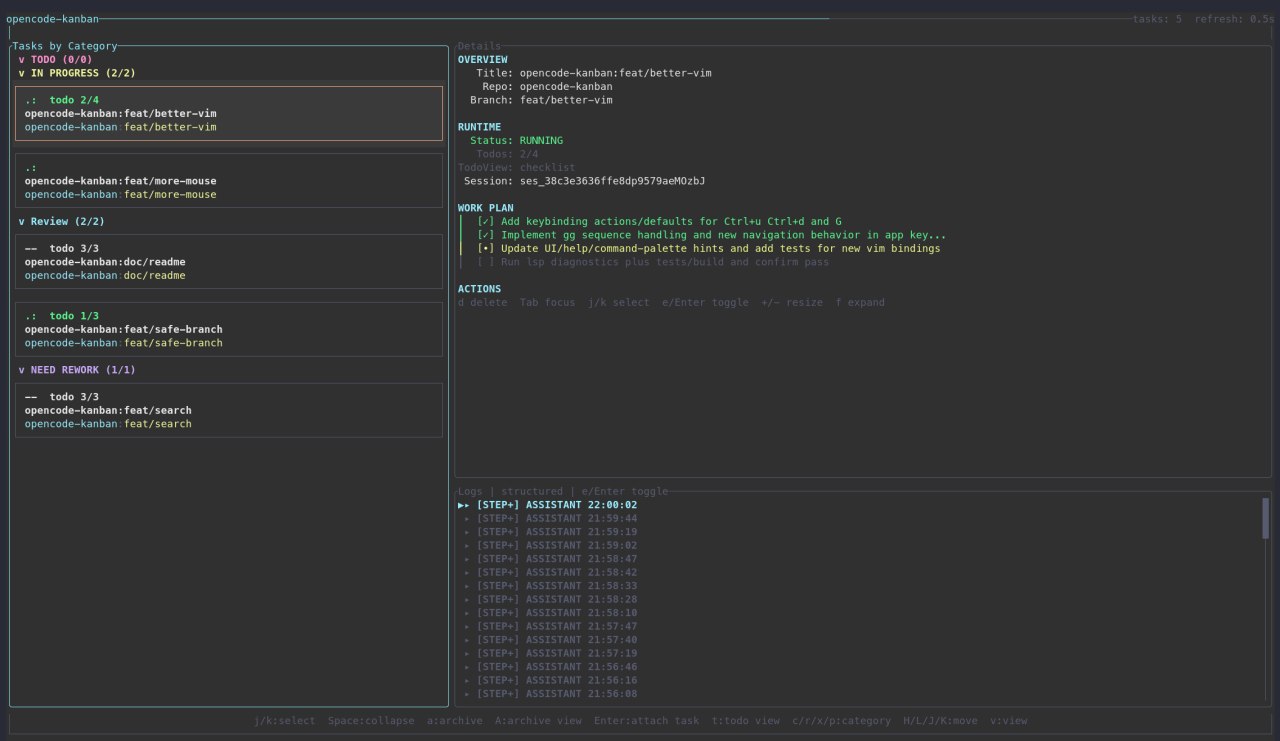
A Rust terminal kanban board for managing Git worktrees and OpenCode tmux sessions.
## Why this exists
Before creating this tool, I used [Agent of Empires](https://www.agent-of-empires.com/) — which is also a cool project with a similar purpose. However, I found its session management quite barebone as projects grew more complex. I was also inspired by [VibeKanban](https://www.vibekanban.com/). So you can think of this tool as a combination of both - managing your tasks in a kanban without leaving your favorate terminal environment.
What makes this different: I'm building this exclusively for opencode users. This lets me integrate deeply with opencode's API and offer unique features:
1. Stable session running state detection
2. Session TODO list with progress tracking
3. Running subagents and their TODO summaries (when applicable)
4. And more to come 🚀
## Prerequisites
- Unix shell
- `tmux` installed and available on `PATH` (required)
- `opencode` installed and available on `PATH` (recommended for attach/resume workflows)
## Quickstart (2 minutes)
1. Verify runtime tools:
```bash
tmux -V
opencode --version
```
2. Start the app:
```bash
npx @qrafty-ai/opencode-kanban
```
3. In the UI:
- Press `n` to create a task
- Press `Enter` on a task to attach
- Press `?` for built-in help
- Press `q` to quit
4. In the attached tmux session:
- Press `+O` for help overlay
- Press `+K` to return to kanban session
If you start outside tmux, `opencode-kanban` auto-creates or auto-attaches to a tmux session named `opencode-kanban`.
## Installation
### npm
```bash
npm install -g @qrafty-ai/opencode-kanban
```
### AUR (Arch Linux)
```bash
yay -S opencode-kanban
# or
paru -S opencode-kanban
```
### Build from source
```bash
cargo build --release
./target/release/opencode-kanban
```
## First run
- Launch default project:
```bash
opencode-kanban
```
- Launch a named project:
```bash
opencode-kanban --project my-project
```
- Start with a theme preset:
```bash
opencode-kanban --theme default
opencode-kanban --theme light
opencode-kanban --theme high-contrast
opencode-kanban --theme mono
opencode-kanban --theme custom
```
Each project uses its own SQLite file and board state.
## Core workflows
### Start a new task
1. Press `n` to open the new-task dialog.
2. Pick a repository and enter task details.
3. Press `Enter` to create.
4. Press `Enter` on the task card to attach to its tmux/OpenCode session.
### Organize work on the board
- Move focus with `h`/`l` and select with `j`/`k`.
- Reorder/move task with `H`/`J`/`K`/`L`.
- Archive selected task with `a`.
- Open archive view with `A`.
### Track Task Progress
- Press `v` to toggle between detail/kanban view
- Check detail view for session running state in depth
## Keybindings cheat sheet
- `Ctrl-p`: switch project
- `n`: new task
- `Enter`: attach selected task
- `h`/`j`/`k`/`l`: navigate board
- `H`/`J`/`K`/`L`: move task
- `a`: archive selected task
- `A`: open archive view
- `?`: help overlay
- `q`: quit
For full, current bindings, use the in-app help overlay (`?`).
## Configuration
- Settings file: `~/.config/opencode-kanban/settings.toml`
- Project databases (Linux default): `~/.local/share/opencode-kanban/*.sqlite`
The app creates config/data files on demand.
Additional top-level notification settings:
- `notification_backend`: `tmux` | `system` | `both` | `none`
- `notification_display_duration_ms`: `500..=30000`
- `completion_sound`: `none` | `beep` (defaults to `none`)
- `completion_sound_volume_percent`: `0..=100` (defaults to `100`; `0` skips audio init and playback)
Example:
```toml
notification_backend = "both"
notification_display_duration_ms = 3000
completion_sound = "beep"
completion_sound_volume_percent = 40
```
### Theme configuration options
Theme values live in `~/.config/opencode-kanban/settings.toml`.
Top-level option:
- `theme`: `default` | `light` | `high-contrast` | `mono` | `custom`
When `theme = "custom"`, configure semantic tokens with these sections:
- `[custom_theme]`
- `inherit`: `default` | `light` | `high-contrast` | `mono`
- `[custom_theme.base]`
- `canvas`, `surface`, `text`, `text_muted`, `header`, `accent`, `danger`
- `[custom_theme.interactive]`
- `focus`, `selected_bg`, `selected_border`, `border`
- `[custom_theme.status]`
- `running`, `waiting`, `idle`, `dead`, `broken`, `unavailable`
- `[custom_theme.tile]`
- `repo`, `branch`, `todo`
- `[custom_theme.category]`
- `primary`, `secondary`, `tertiary`, `success`, `warning`, `danger`
- `[custom_theme.dialog]`
- `surface`, `input_bg`, `button_bg`, `button_fg`
Example:
```toml
theme = "custom"
[custom_theme]
inherit = "light"
[custom_theme.base]
canvas = "#E2E7EE"
surface = "#ECF1F7"
text = "#222A3A"
text_muted = "#4E596D"
header = "#2F66BF"
accent = "#0E7490"
danger = "#B02E24"
[custom_theme.interactive]
focus = "#2F66BF"
selected_bg = "#D6DFED"
selected_border = "#477ACD"
border = "#A5B2C6"
[custom_theme.status]
running = "#278449"
waiting = "#AB781A"
idle = "#5D687A"
dead = "#B02E24"
broken = "#B02E24"
unavailable = "#B02E24"
[custom_theme.tile]
repo = "#086678"
branch = "#926614"
todo = "#4E596D"
[custom_theme.category]
primary = "#2F66BF"
secondary = "#AB501F"
tertiary = "#6949AB"
success = "#278449"
warning = "#AB781A"
danger = "#B02E24"
[custom_theme.dialog]
surface = "#ECF1F7"
input_bg = "#E0E6EF"
button_bg = "#CDD8E7"
button_fg = "#FFFFFF"
```
- Accepted color format: `#RRGGBB` (hex only).
## Troubleshooting
- `tmux is required but not available`:
- Install tmux and confirm `tmux -V` works in the same shell.
- `OpenCode binary not found`:
- Install OpenCode and confirm `opencode --version` works.
- Mouse scroll/click not working well in tmux:
- Run `tmux set -g mouse on`.
## Local development
```bash
cargo test
cargo clippy -- -D warnings
cargo build --release
```
## Maintainers
Release and publisher setup docs are in `docs/releasing.md`.
## License
MIT