> [!WARNING]
> Parts of this README refers to the `v2.0.0-beta1` release.
> Some features such as the plugin system may differ from the upcoming stable release.
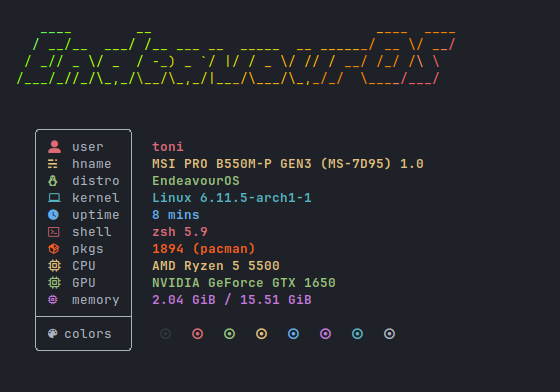
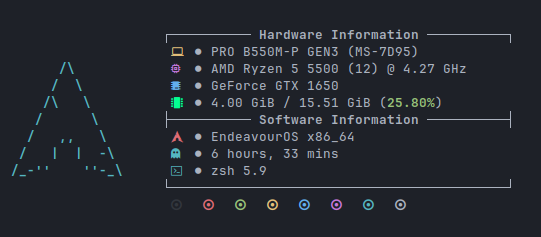
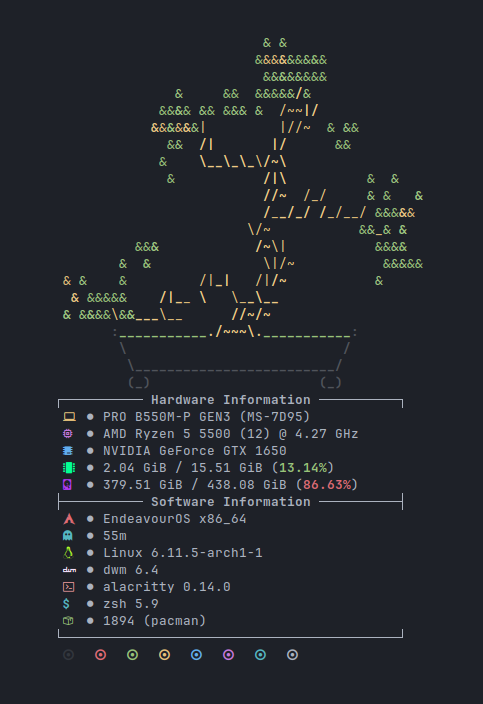
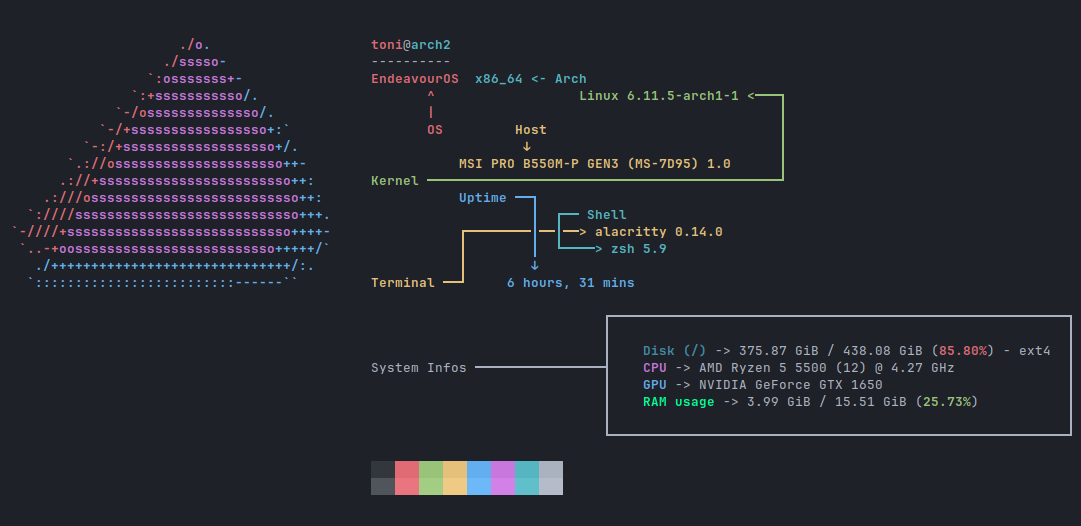
A modular information fetching tool (neofetch-like), focused on performance and customizability




 ## Key Features
- Works as a **terminal program**, **GTK3 GUI app**, or **native Android widget**
- Modular design - fetch anything through `$<>` tags and plugins
- Super lightweight with no required dependencies
- Easy to configure with auto-generated, well-commented config files
- Plugin system for extending beyond system info (weather, GitHub, APIs, etc.)
- Live mode for continuous updates
## Quick Start
After [installing](#installation) customfetch, simply run:
```bash
customfetch
```
On first run, customfetch automatically creates a config file `~/.config/customfetch/config.toml` (or `$XDG_CONFIG_HOME/customfetch/config.toml` if set) with helpful comments explaining every option.
**Useful commands to get started:**
| Command | Description |
|---------|-------------|
| `customfetch` | Run with default/current config |
| `customfetch -w` | Show comprehensive guide on tags, colors, and syntax |
| `customfetch -l` | List all available modules (including from plugins) |
| `customfetch --gen-config ` | Regenerate the default config file (if to a path) |
| `customfetch -h` | Show all CLI arguments |
| `customfetch -C /path/to/config.toml` | Use a custom config file |
| `customfetch -n` | Disable logo display |
| `customfetch -N` | Disable all colors |
| `customfetch -d NAME` | Use a specific distro logo |
| `customfetch -s PATH` | Path to custom ASCII art or image (must specify `--image-backend` `-i`) |
| `customfetch -N -m "\$" -m "\$"` | Display only CPU and GPU info, no logo, no colors |
| `customfetch -m "\${cyan}Kernel: \$" -m "\${green}Uptime: \$"` | Quick system check with custom formatting in the terminal |
| `customfetch --loop-ms 1000` | Update display every second |
## Dependencies
Customfetch has **no required dependencies** unless you build the GUI app version.
For compiling from source, all you need is a **C++20** compiler (C++17 might still work).
**GUI app packages:**
* `gtk3`
* `gtkmm3`
**Optional packages** (for faster system queries):
* `dconf` - Alternative to the slow `gsettings` command
* `libxfce4util` - Query XFCE4 version faster
* `wayland-client` - Get Wayland compositor info faster
## Installation
### Debian / Ubuntu
Grab the latest `.deb` file from the [releases page](https://github.com/Toni500github/customfetch/releases/latest).
### Arch (AUR)
```bash
# Binary (stable)
yay -S customfetch-bin # Terminal only
yay -S customfetch-gui-bin # GUI version
# Compile from source (stable)
yay -S customfetch # Terminal only
yay -S customfetch-gui # GUI version
# Unstable / git versions
yay -S customfetch-git # Terminal only
yay -S customfetch-gui-git # GUI version
```
### Manual installation (for other distros)
Download the `.tar.gz` from [releases](https://github.com/Toni500github/customfetch/releases/latest).
It includes a `/usr` folder so you can install it manually or through your package manager.
### Android widget
Moved to its own repo:
https://github.com/Toni500github/customfetch-android-app
### Build from source
```bash
git clone --depth=1 https://github.com/Toni500github/customfetch
cd customfetch
# DEBUG=0 for release build
# GUI_APP=0 or 1 for terminal or GUI app
make install DEBUG=0 GUI_APP=0
```
## Configuration
### Example config
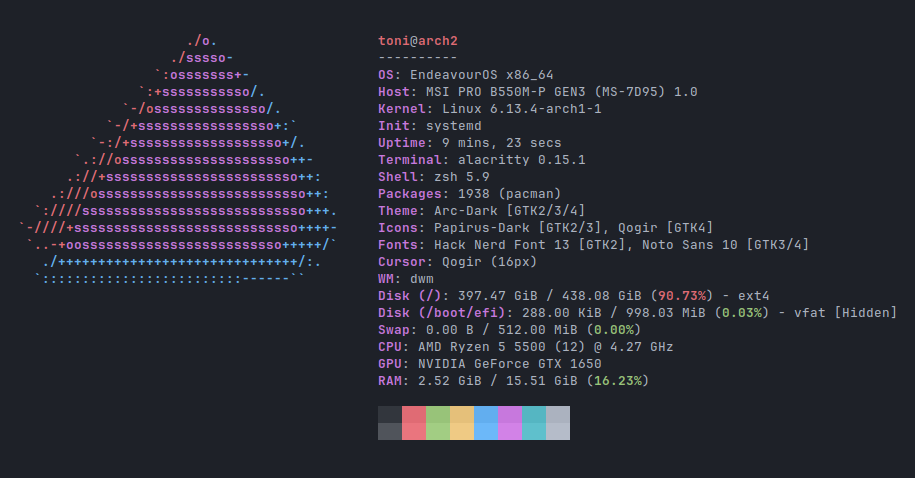
Here's an example config and its output:
```toml
[config]
# The array for displaying the system/fetched infos
layout = [
"$",
"$<title.sep>",
"${auto}OS: $<os.name> $<system.arch>",
"${auto}Host: $<system.host>",
"${auto}Kernel: $<os.kernel>",
"${auto}Uptime: $<os.uptime>",
"${auto}Terminal: $<user.terminal>",
"${auto}Shell: $<user.shell>",
"${auto}Packages: $<os.pkgs>",
"${auto}Theme: $<theme.gtk.all.name>",
"${auto}Icons: $<theme.gtk.all.icons>",
"${auto}Font: $<theme.gtk.all.font>",
"${auto}Cursor: $<theme.cursor>",
"${auto}WM: $<user.wm.name> $<user.wm.version>",
"${auto}DE: $<user.de.name> $<user.de.version>",
"$<auto.disk>",
"${auto}Swap: $<swap>",
"${auto}CPU: $<cpu>",
"${auto}GPU: $<gpu>",
"${auto}RAM: $<ram>",
"",
"$<colors>", # normal colors palette
"$<colors.light>" # light colors palette
]
```
### Tag Syntax
Customfetch uses a tag system in both the layout and ASCII art. Here's a quick reference:
| Tag | Description | Example |
|-----|-------------|---------|
| `$<module.member>` | Print info from a module | `$<cpu>`, `$<ram.used>`, `$<os.kernel.version>` |
| `${color}` | Set text color | `${red}`, `${#ff5500}` |
| `$(command)` | Run a shell command | `$(date +%H:%M)`, `$(!cbonsai)` |
| `$[x,y,eq,neq]` | Conditional output | `$[$<os.name>,Arch,btw,]` |
| `$%n1,n2%` | Colored percentage | `$%$<ram.used>,$<ram.total>%` |
> [!NOTE]
> - Use `$(!command)` (with `!`) in ASCII art to prevent color leaking
> - Use `!` in the begin of the `$%%` for inverting red and green
> - Escape `<` as `\<` and `&` as `\&` when needed (especially for GUI app)
> - Run `customfetch -w` for the complete syntax reference with all color modifiers and advanced examples
### Colors and formatting
Colors can be specified as:
- **Named colors**: `${red}`, `${green}`, `${cyan}`, `${auto}` (matches logo colors), `${auto2}`, `${auto3}`...
- **Hex colors**: `${#ff5500}`, `${#f50}` (shorthand)
- **ANSI escapes**: `${\e[1;33m}` (e.g., bold yellow)
- **Reset**: `${0}` (normal reset), `${1}` (bold reset)
**Text modifiers** (prefix before hex color):
| Modifier | Effect | Example |
|----------|--------|---------|
| `!` | Bold | `${!#ff0000}` |
| `u` | Underline | `${u#00ff00}` |
| `i` | Italic | `${i#0000ff}` |
| `s` | Strikethrough | `${s#888888}` |
| `l` | Blink (terminal only) | `${l#ff00ff}` |
| `b` | Background color | `${b#222222}` |
**Combining modifiers:** `${!u#ff0000}` (bold + underlined red)
<details>
<summary><b>GUI-only modifiers</b></summary>
| Modifier | Effect |
|----------|--------|
| `o` | Overline |
| `a(value)` | Foreground alpha (0%-100% or 1-65536) |
| `A(value)` | Background alpha |
| `L(value)` | Underline style (none/single/double/low/error) |
| `U(color)` | Underline color (hex) |
| `B(color)` | Background color (hex) |
| `S(color)` | Strikethrough color (hex) |
| `O(color)` | Overline color (hex) |
| `w(value)` | Font weight (light/normal/bold/ultrabold or 100-1000) |
Example: `${oU(#ff0000)L(double)#ffffff}Error` — white text with double red underline and overline
</details>
## Plugins
Plugins extend customfetch beyond system information — fetch weather, GitHub stats, API data, and more.
### Installing plugins
Use `cufetchpm` to install plugins from repositories:
```bash
cufetchpm install https://github.com/Toni500github/customfetch-plugins-github
```
After installing, run `customfetch -l` to see newly available modules from the plugin.
### Managing plugins
```bash
cufetchpm list # List installed plugins
cufetchpm enable <plugin> # Enable a plugin
cufetchpm disable <plugin> # Disable a plugin
cufetchpm remove <plugin> # Remove a plugin
```
See `cufetchpm --help` for all options.
### Writing your own plugins
Plugins are shared libraries (`.so` files) that register custom modules.
See the [plugin development guide](https://github.com/Toni500github/customfetch/blob/main/docs/build-plugin.md) to create your own.
## Star History
<a href="https://www.star-history.com/#Toni500github/customfetch&Date">
<picture>
<source media="(prefers-color-scheme: dark)" srcset="https://api.star-history.com/svg?repos=Toni500github/customfetch&type=Date&theme=dark" />
<source media="(prefers-color-scheme: light)" srcset="https://api.star-history.com/svg?repos=Toni500github/customfetch&type=Date" />
<img alt="Star History Chart" src="https://api.star-history.com/svg?repos=Toni500github/customfetch&type=Date" />
</picture>
</a>
# TODOs
* release v2.0.0
* work on the android app (later)
# Thanks
I would like to thanks:
* my best-friend [BurntRanch](https://github.com/BurntRanch/),\
For helping me initialize this project and motivate me to keep going\
And also for making my customizability idea come true with the first prototype of the parser.
* [saberr26](https://github.com/saberr26), \
For making the project logos
* the Better C++ [discord server](https://discord.gg/uSzTjkXtAM), \
For helping me improving the codebase and helping me with any issues I got,\
And also for being patient with me XD
* [fastfetch](https://github.com/fastfetch-cli/fastfetch/) and [neofetch](https://github.com/dylanaraps/neofetch),\
For inspiring this project
* [{fmt}](https://github.com/fmtlib/fmt) and [toml++](https://github.com/marzer/tomlplusplus) libraries\
Our favorite libraries that me and BurntRanch uses
* this string switch-case [library](https://github.com/xroche/stringswitch), \
Really amazing, thanks for making this
I hope you'll like customfetch, and also checkout [TabAUR](https://github.com/BurntRanch/TabAUR/tree/dev), our other project that was made before customfetch.\
Don't forgot [sdl_engine](https://github.com/BurntRanch/sdl_engine) too ;)

## Key Features
- Works as a **terminal program**, **GTK3 GUI app**, or **native Android widget**
- Modular design - fetch anything through `$<>` tags and plugins
- Super lightweight with no required dependencies
- Easy to configure with auto-generated, well-commented config files
- Plugin system for extending beyond system info (weather, GitHub, APIs, etc.)
- Live mode for continuous updates
## Quick Start
After [installing](#installation) customfetch, simply run:
```bash
customfetch
```
On first run, customfetch automatically creates a config file `~/.config/customfetch/config.toml` (or `$XDG_CONFIG_HOME/customfetch/config.toml` if set) with helpful comments explaining every option.
**Useful commands to get started:**
| Command | Description |
|---------|-------------|
| `customfetch` | Run with default/current config |
| `customfetch -w` | Show comprehensive guide on tags, colors, and syntax |
| `customfetch -l` | List all available modules (including from plugins) |
| `customfetch --gen-config ` | Regenerate the default config file (if to a path) |
| `customfetch -h` | Show all CLI arguments |
| `customfetch -C /path/to/config.toml` | Use a custom config file |
| `customfetch -n` | Disable logo display |
| `customfetch -N` | Disable all colors |
| `customfetch -d NAME` | Use a specific distro logo |
| `customfetch -s PATH` | Path to custom ASCII art or image (must specify `--image-backend` `-i`) |
| `customfetch -N -m "\$" -m "\$"` | Display only CPU and GPU info, no logo, no colors |
| `customfetch -m "\${cyan}Kernel: \$" -m "\${green}Uptime: \$"` | Quick system check with custom formatting in the terminal |
| `customfetch --loop-ms 1000` | Update display every second |
## Dependencies
Customfetch has **no required dependencies** unless you build the GUI app version.
For compiling from source, all you need is a **C++20** compiler (C++17 might still work).
**GUI app packages:**
* `gtk3`
* `gtkmm3`
**Optional packages** (for faster system queries):
* `dconf` - Alternative to the slow `gsettings` command
* `libxfce4util` - Query XFCE4 version faster
* `wayland-client` - Get Wayland compositor info faster
## Installation
### Debian / Ubuntu
Grab the latest `.deb` file from the [releases page](https://github.com/Toni500github/customfetch/releases/latest).
### Arch (AUR)
```bash
# Binary (stable)
yay -S customfetch-bin # Terminal only
yay -S customfetch-gui-bin # GUI version
# Compile from source (stable)
yay -S customfetch # Terminal only
yay -S customfetch-gui # GUI version
# Unstable / git versions
yay -S customfetch-git # Terminal only
yay -S customfetch-gui-git # GUI version
```
### Manual installation (for other distros)
Download the `.tar.gz` from [releases](https://github.com/Toni500github/customfetch/releases/latest).
It includes a `/usr` folder so you can install it manually or through your package manager.
### Android widget
Moved to its own repo:
https://github.com/Toni500github/customfetch-android-app
### Build from source
```bash
git clone --depth=1 https://github.com/Toni500github/customfetch
cd customfetch
# DEBUG=0 for release build
# GUI_APP=0 or 1 for terminal or GUI app
make install DEBUG=0 GUI_APP=0
```
## Configuration
### Example config
Here's an example config and its output:

```toml
[config]
# The array for displaying the system/fetched infos
layout = [
"$",
"$<title.sep>",
"${auto}OS: $<os.name> $<system.arch>",
"${auto}Host: $<system.host>",
"${auto}Kernel: $<os.kernel>",
"${auto}Uptime: $<os.uptime>",
"${auto}Terminal: $<user.terminal>",
"${auto}Shell: $<user.shell>",
"${auto}Packages: $<os.pkgs>",
"${auto}Theme: $<theme.gtk.all.name>",
"${auto}Icons: $<theme.gtk.all.icons>",
"${auto}Font: $<theme.gtk.all.font>",
"${auto}Cursor: $<theme.cursor>",
"${auto}WM: $<user.wm.name> $<user.wm.version>",
"${auto}DE: $<user.de.name> $<user.de.version>",
"$<auto.disk>",
"${auto}Swap: $<swap>",
"${auto}CPU: $<cpu>",
"${auto}GPU: $<gpu>",
"${auto}RAM: $<ram>",
"",
"$<colors>", # normal colors palette
"$<colors.light>" # light colors palette
]
```
### Tag Syntax
Customfetch uses a tag system in both the layout and ASCII art. Here's a quick reference:
| Tag | Description | Example |
|-----|-------------|---------|
| `$<module.member>` | Print info from a module | `$<cpu>`, `$<ram.used>`, `$<os.kernel.version>` |
| `${color}` | Set text color | `${red}`, `${#ff5500}` |
| `$(command)` | Run a shell command | `$(date +%H:%M)`, `$(!cbonsai)` |
| `$[x,y,eq,neq]` | Conditional output | `$[$<os.name>,Arch,btw,]` |
| `$%n1,n2%` | Colored percentage | `$%$<ram.used>,$<ram.total>%` |
> [!NOTE]
> - Use `$(!command)` (with `!`) in ASCII art to prevent color leaking
> - Use `!` in the begin of the `$%%` for inverting red and green
> - Escape `<` as `\<` and `&` as `\&` when needed (especially for GUI app)
> - Run `customfetch -w` for the complete syntax reference with all color modifiers and advanced examples
### Colors and formatting
Colors can be specified as:
- **Named colors**: `${red}`, `${green}`, `${cyan}`, `${auto}` (matches logo colors), `${auto2}`, `${auto3}`...
- **Hex colors**: `${#ff5500}`, `${#f50}` (shorthand)
- **ANSI escapes**: `${\e[1;33m}` (e.g., bold yellow)
- **Reset**: `${0}` (normal reset), `${1}` (bold reset)
**Text modifiers** (prefix before hex color):
| Modifier | Effect | Example |
|----------|--------|---------|
| `!` | Bold | `${!#ff0000}` |
| `u` | Underline | `${u#00ff00}` |
| `i` | Italic | `${i#0000ff}` |
| `s` | Strikethrough | `${s#888888}` |
| `l` | Blink (terminal only) | `${l#ff00ff}` |
| `b` | Background color | `${b#222222}` |
**Combining modifiers:** `${!u#ff0000}` (bold + underlined red)
<details>
<summary><b>GUI-only modifiers</b></summary>
| Modifier | Effect |
|----------|--------|
| `o` | Overline |
| `a(value)` | Foreground alpha (0%-100% or 1-65536) |
| `A(value)` | Background alpha |
| `L(value)` | Underline style (none/single/double/low/error) |
| `U(color)` | Underline color (hex) |
| `B(color)` | Background color (hex) |
| `S(color)` | Strikethrough color (hex) |
| `O(color)` | Overline color (hex) |
| `w(value)` | Font weight (light/normal/bold/ultrabold or 100-1000) |
Example: `${oU(#ff0000)L(double)#ffffff}Error` — white text with double red underline and overline
</details>
## Plugins
Plugins extend customfetch beyond system information — fetch weather, GitHub stats, API data, and more.
### Installing plugins
Use `cufetchpm` to install plugins from repositories:
```bash
cufetchpm install https://github.com/Toni500github/customfetch-plugins-github
```
After installing, run `customfetch -l` to see newly available modules from the plugin.
### Managing plugins
```bash
cufetchpm list # List installed plugins
cufetchpm enable <plugin> # Enable a plugin
cufetchpm disable <plugin> # Disable a plugin
cufetchpm remove <plugin> # Remove a plugin
```
See `cufetchpm --help` for all options.
### Writing your own plugins
Plugins are shared libraries (`.so` files) that register custom modules.
See the [plugin development guide](https://github.com/Toni500github/customfetch/blob/main/docs/build-plugin.md) to create your own.
## Star History
<a href="https://www.star-history.com/#Toni500github/customfetch&Date">
<picture>
<source media="(prefers-color-scheme: dark)" srcset="https://api.star-history.com/svg?repos=Toni500github/customfetch&type=Date&theme=dark" />
<source media="(prefers-color-scheme: light)" srcset="https://api.star-history.com/svg?repos=Toni500github/customfetch&type=Date" />
<img alt="Star History Chart" src="https://api.star-history.com/svg?repos=Toni500github/customfetch&type=Date" />
</picture>
</a>
# TODOs
* release v2.0.0
* work on the android app (later)
# Thanks
I would like to thanks:
* my best-friend [BurntRanch](https://github.com/BurntRanch/),\
For helping me initialize this project and motivate me to keep going\
And also for making my customizability idea come true with the first prototype of the parser.
* [saberr26](https://github.com/saberr26), \
For making the project logos
* the Better C++ [discord server](https://discord.gg/uSzTjkXtAM), \
For helping me improving the codebase and helping me with any issues I got,\
And also for being patient with me XD
* [fastfetch](https://github.com/fastfetch-cli/fastfetch/) and [neofetch](https://github.com/dylanaraps/neofetch),\
For inspiring this project
* [{fmt}](https://github.com/fmtlib/fmt) and [toml++](https://github.com/marzer/tomlplusplus) libraries\
Our favorite libraries that me and BurntRanch uses
* this string switch-case [library](https://github.com/xroche/stringswitch), \
Really amazing, thanks for making this
I hope you'll like customfetch, and also checkout [TabAUR](https://github.com/BurntRanch/TabAUR/tree/dev), our other project that was made before customfetch.\
Don't forgot [sdl_engine](https://github.com/BurntRanch/sdl_engine) too ;)
