
Jot
A notebook beside your conversation.
Take notes while you chat in DeepSeek Harness, and let AI write down what you decided.
Install · Guide · Changelog · 简体中文
## What it does
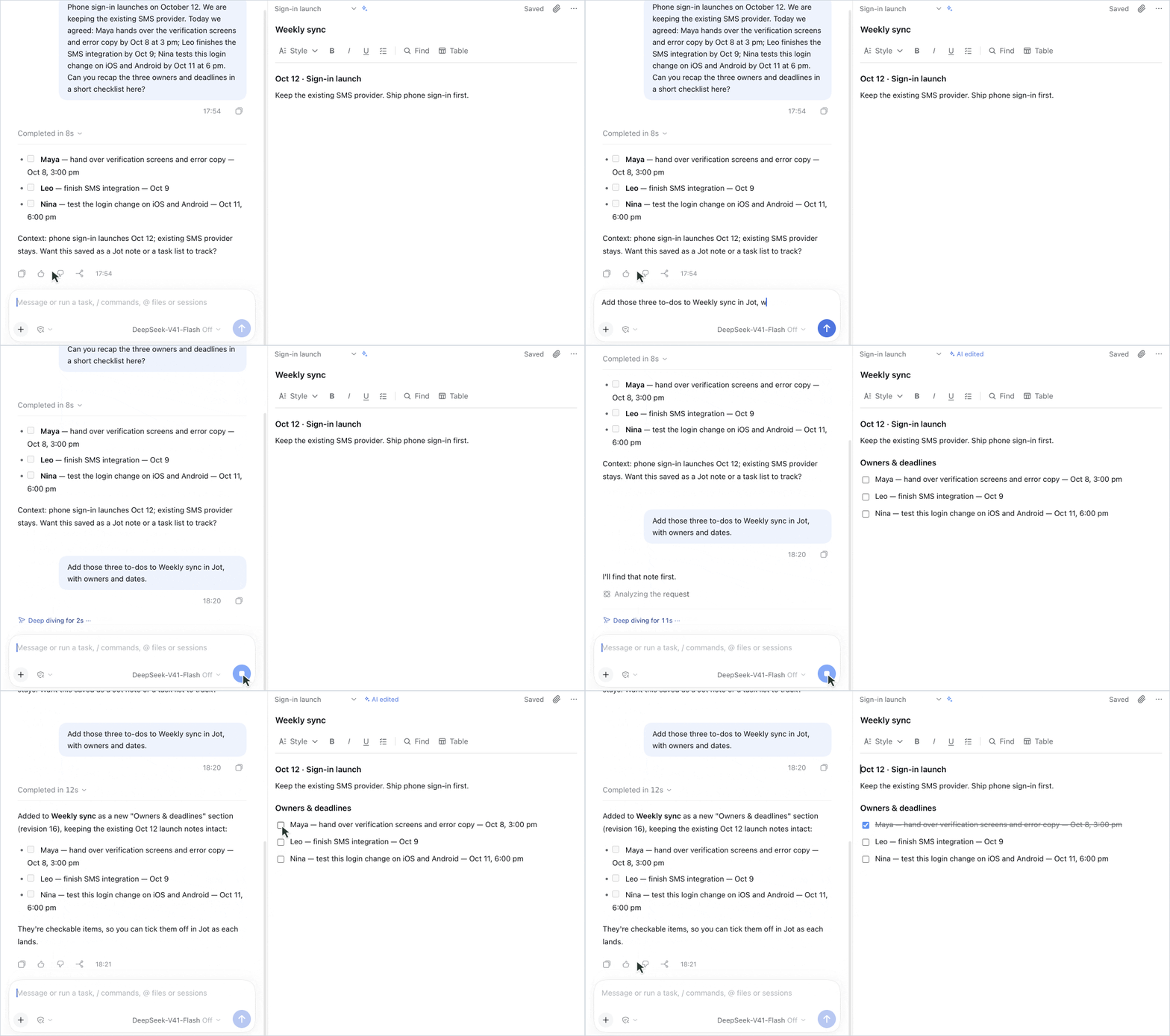
- **Notes beside the chat**: Jot opens to the right of the conversation. Type `/jot` to open, create or find a note, or open the full page from the left navigation for longer writing.
- **Write like a document**: headings, checklists, tables, links, images and attachments, with no Markdown required. Type `/` on an empty line to insert anything, and press `?` for every shortcut.
- **Help from AI**: once you turn on AI collaboration, AI can find, create and edit notes. Its changes are marked, and you can take them back.
- **Easy to find**: search titles and text, pin what you use often, sort notes into folders, and see checklist progress right in the list.
- **Import and export**: bring in Markdown notes from Obsidian and similar apps. Export your whole library to Word, PDF or Markdown, and import the ZIP back exactly as it was.
- **Stays on your computer**: notes live in DSH's data folder, never in the cloud, and uninstalling Jot keeps them.
## Working with AI
AI collaboration is off until you turn it on at the bottom of the note list. Then just ask in the conversation:
> Add those three to-dos to Weekly sync in Jot, with owners and dates.
>
> Check off the first to-do in Weekly sync.
AI changes only what it needs to: change a few words and only those words change, while your headings, lists and colors stay as they were. When AI changes an existing note, the note is marked **AI edited**; select the mark to undo that round of changes.
While collaboration is off, Jot's tools are not offered to the conversation at all. When it is on, AI reads notes only when you ask.
## Install
```sh
# Desktop app
dsh plugin --profile desktop add dsh-jot
# DSH Web
dsh plugin --profile web add dsh-jot
```
Restart DSH and **Jot** appears in the left navigation. Desktop and Web are installed separately. If you don't have the `dsh` command yet, install it from **Manage dsh commands…** in the official desktop app's menu; it needs Node.js `^22.19.0 || >=24`.
For DSH 0.2.1-alpha.3 Web, remove Jot before reinstalling to upgrade; notes and attachments are retained. Stop the corresponding Host before using the CLI. The verified official macOS Desktop remains 0.2.0-rc.2 and uses its own profile and bundled CLI. Upgrade, removal and backup instructions are in the [guide](./docs/GUIDE.en.md#install-upgrade-and-remove).
## FAQ
**Where are my notes?** In `~/.dsh/jot`, or in `$DSH_HOME/jot` when `DSH_HOME` is set. Desktop and Web share notes when they point to the same folder.
**Will uninstalling or upgrading lose notes?** No. Notes are stored separately from the plugin.
**Can I move in from Obsidian?** Yes. Choose **Import notes** under **Sort and options** in the list and pick your vault folder; images and attachments come along.
## Compatibility
Jot **0.2.13** supports official DSH 0.2.1-alpha.3 Web. Its Host/Client bundles are byte-identical to the 0.2.12 development candidate that passed editing, search, task, table, attachment and export checks together with Bridge. Disable/re-enable, removal/reinstallation of identical business bundles, and a normal Host restart retained notes and attachments. See the [validation record](./docs/VALIDATION.md#0213--dsh-021-alpha3-web-compatibility) for the exact tested package and scope.
Earlier acceptance covers DSH 0.2.0-rc.2 (official macOS desktop app) and 0.2.1-alpha.1 / alpha.2 (Web). This pass adds no acceptance for native alpha.3 Desktop, Desktop font-size shortcuts, physical Windows/Linux systems, arbitrary other plugin combinations, or hot replacement with changed business code.
---
[Guide](./docs/GUIDE.en.md) · [Changelog](./CHANGELOG.md) · [Report an issue](https://github.com/Totoro-qaq/dsh-jot/issues) · [npm](https://www.npmjs.com/package/dsh-jot)
[MIT](./LICENSE) · Third-party code bundled in the client is listed in [THIRD_PARTY_NOTICES.md](./THIRD_PARTY_NOTICES.md) · Fonts embedded in PDF exports use the [SIL Open Font License](./assets/fonts/OFL.txt)