# Sticker Lab
Turn a one-line character idea into **18 animated stickers** for Telegram, WhatsApp and the web.
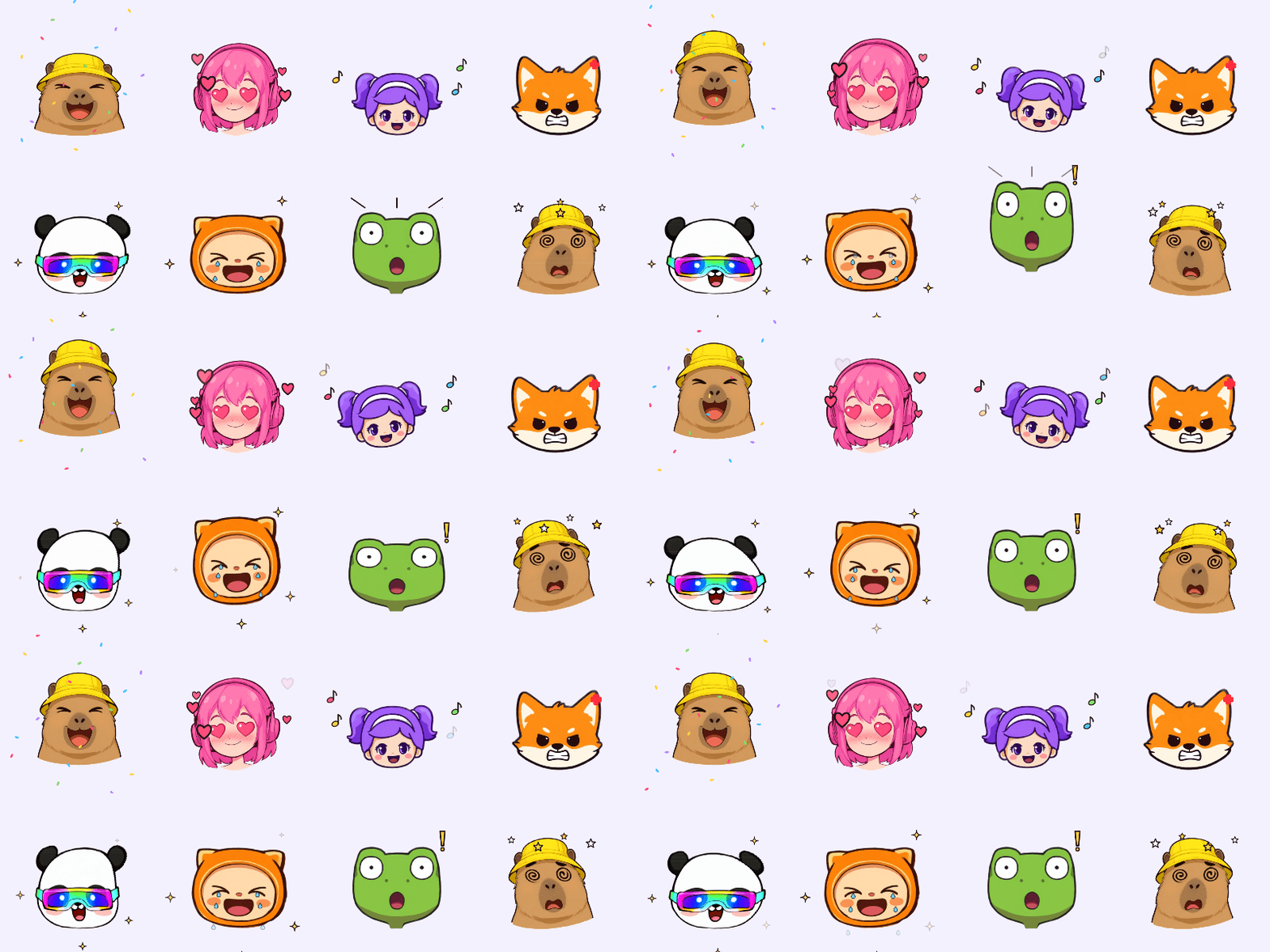
An image model draws your character's head with 12 expressions in a single image. A small animation engine
cuts the heads out and brings them to life: bouncing, winking, melting, with hearts, tears and confetti.
Every sticker loops seamlessly and exports to the format your messenger expects.
## Features
- **One prompt, 18 stickers.** Hello, laugh, love, sad, angry, shocked, sleepy, dance, wink, kiss, thinking,
dizzy, jelly, yes, no, party, scared and melting.
- **Cheap.** One image and one short text request per character. New animations never need a new image.
- **Any provider.** OpenAI, OpenRouter, polza.ai or any other OpenAI-compatible API. Image models without
transparent backgrounds work too: the background is removed automatically.
- **Consistent.** All expressions come from one sheet, so the character looks the same in every sticker.
- **Six export formats.** WebM, WebP, GIF, APNG, MP4 and PNG, one by one or the whole pack as a ZIP. WebM fits
Telegram's video sticker rules and WebP fits WhatsApp's size limit.
- **Local-first.** Characters and stickers are plain files in `./data`. No database, no account.
## How it works
1. A text model turns your idea (in any language) into a short visual description.
2. The image model draws a 4 × 3 sheet of heads on a transparent or plain white background (a white one is
removed automatically):
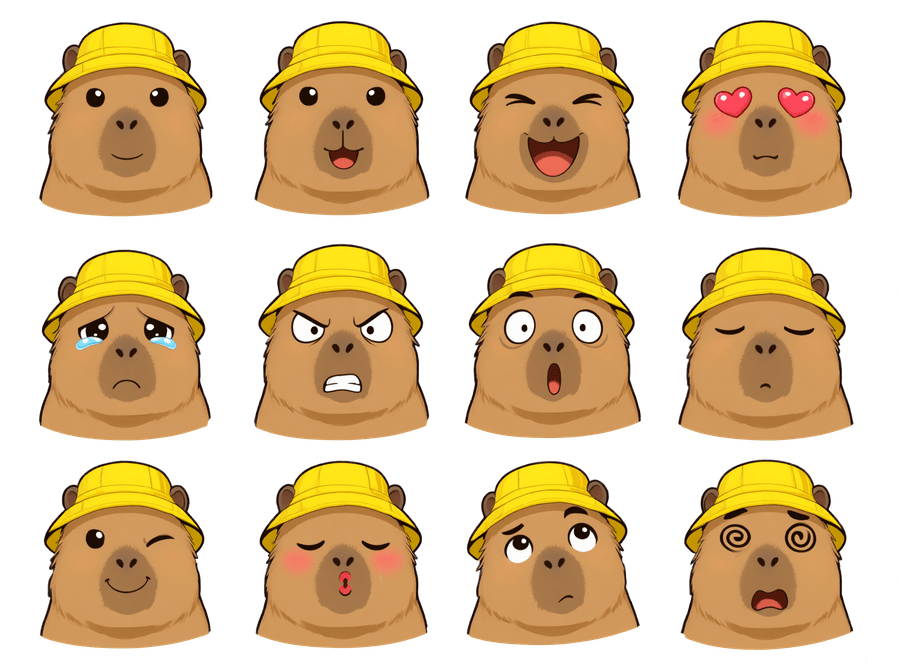 3. The sheet is cut into 12 heads by finding connected regions in the alpha channel.
4. Each animation is a function of time that moves, squashes and warps a head and draws vector effects on top.
The same code renders the live previews in the browser and the exported files on the server.
## Requirements
- Node.js 20.9 or newer and [pnpm](https://pnpm.io/installation)
- [ffmpeg](https://ffmpeg.org/download.html) with `libvpx-vp9` and `libx264` (the standard builds include both)
- macOS: `brew install ffmpeg`
- Ubuntu/Debian: `sudo apt install ffmpeg`
- Windows: `winget install Gyan.FFmpeg`
- An API key from any OpenAI-compatible provider that offers an image model, for example
[OpenAI](https://platform.openai.com/api-keys), [OpenRouter](https://openrouter.ai/keys) or
[polza.ai](https://polza.ai)
## Getting started
```bash
git clone https://github.com//sticker-lab.git
cd sticker-lab
pnpm install
cp .env.example .env.local
```
Open `.env.local`, uncomment the preset for your provider and paste your key. For example, with OpenAI:
```bash
API_BASE_URL=https://api.openai.com/v1
API_KEY=sk-...
TEXT_MODEL=gpt-4o-mini
IMAGE_MODEL=gpt-image-1
IMAGE_API=images
```
Start the app:
```bash
pnpm dev
```
Open [http://localhost:3000](http://localhost:3000), describe a character and click **Create character**.
The first result usually appears in about a minute; slower providers can take a few minutes.
## Configuration
All settings are environment variables in `.env.local`.
| Variable | Required | Description |
|---|---|---|
| `API_BASE_URL` | yes | Base URL of an OpenAI-compatible API, for example `https://api.openai.com/v1` |
| `API_KEY` | yes | API key for that provider |
| `TEXT_MODEL` | yes | Any chat model. It only turns the idea into a short description |
| `IMAGE_MODEL` | yes | Image model that draws the expression sheet |
| `IMAGE_API` | no | How to call the image model: `images` (default), `chat` or `polza`, see below |
| `IMAGE_API_BASE_URL`, `IMAGE_API_KEY` | no | Use a different provider for images than for text |
| `IMAGE_BACKGROUND` | no | `transparent` or `white`. Defaults to `white` for `chat` and `transparent` otherwise |
| `IMAGE_SIZE` | no | `1536x1024` by default for `images`; `1K` or `2K` (default) for `polza` |
| `IMAGE_QUALITY` | no | Passed to the images API as is, for example `low`, `medium` or `high` |
| `STICKER_LAB_PASSWORD` | no | Protects the whole app with a password (HTTP Basic Auth, any username) |
| `MAX_CONCURRENT_GENERATIONS` | no | How many characters can be generated at the same time. Default `2` |
`IMAGE_API` picks the request format:
| Value | Request | Works with |
|---|---|---|
| `images` | `POST /images/generations`, the OpenAI Images API | OpenAI (`gpt-image-1`), polza.ai at `https://polza.ai/api/v2`, many aggregators |
| `chat` | image returned by `POST /chat/completions` | OpenRouter with Gemini image models and similar |
| `polza` | `POST /media`, the polza.ai media API | polza.ai, including `qwen/image-2.1` |
If a model cannot draw a transparent background, set `IMAGE_BACKGROUND=white`: the sheet is drawn on white and
the background is cut out by the app. Near-white parts of a character that touch the background without an
outline may be cut out with it, so a native transparent background gives the most reliable result.
## Export formats
| Format | Best for | Transparency | Typical size |
|---|---|---|---|
| WebM | Telegram video stickers (VP9, up to 3 s) | yes | ≤ 256 KB |
| WebP | WhatsApp stickers, websites | yes | ≤ 500 KB |
| GIF | Anywhere | on/off only, no soft edges | 1–3 MB |
| APNG | Best quality with transparency | yes | 2–9 MB |
| MP4 | Social media, stories | no, white background | 50–200 KB |
| PNG | Static sticker or avatar (512 × 512) | yes | ~100 KB |
Download stickers one by one or all 18 at once as a ZIP. Files are rendered on the first download and cached
next to the character, so later downloads are instant.
## Deployment
Sticker Lab runs anywhere Node.js and ffmpeg are available:
```bash
pnpm build
pnpm start
```
Set the same variables as in `.env.local` on the server. **Every generation spends money from your API key**,
so if anyone else can reach the app, set `STICKER_LAB_PASSWORD`. Generated files live in `./data`, so give that
folder persistent storage.
Serverless platforms with a read-only or temporary file system (such as Vercel) are not supported.
## Development
```bash
pnpm lint # ESLint
pnpm typecheck # TypeScript
pnpm test # unit tests (Vitest)
pnpm check:stickers # render every sticker of the saved characters and validate each file
```
Project layout:
```
src/
app/ Next.js pages and API routes
components/ UI
lib/engine/ animations, effects and the renderer shared by browser and server
lib/server/ image generation, sheet cutting, export encoders, file storage
lib/prompts.ts expressions and prompts
scripts/ maintenance scripts
```
## Limitations
- Sometimes the image model merges two heads or draws fewer than 12. The app reports it, and
**Redraw expressions** usually fixes it with one more image.
- Generation jobs are tracked in memory. A server restart interrupts a running job; click **Rebuild** to
continue from the cached sheet.
- Image models differ in how well they follow the 4 × 3 grid. Models that draw heads touching each other
fail more often. `gpt-image-1` and `qwen/image-2.1` follow the grid reliably.
## Contributing
Issues and pull requests are welcome. Please run `pnpm lint`, `pnpm typecheck` and `pnpm test` before
opening a pull request. To add an animation, add an entry to `src/lib/engine/animations.ts`: a pose function
and an effect function. It will appear in the UI and in every export format automatically.
## License
[MIT](LICENSE)