# Grok (xAI Subscription) for DeepSeek Harness
English | [简体中文](README.md)



[](https://github.com/TuDouPn/dsh-grok-xai/actions/workflows/check.yml)
Use **SuperGrok / X Premium** to sign in to xAI from DeepSeek Harness (DSH), call Grok models, and see subscription usage, live models, context windows, and prices.
> **Unofficial project.** Not affiliated with xAI, SpaceXAI, DeepSeek, or Anysphere. The subscription billing/settings endpoints are undocumented Grok CLI proxy endpoints and may change. Use at your own risk and follow xAI's terms.
## Screenshot
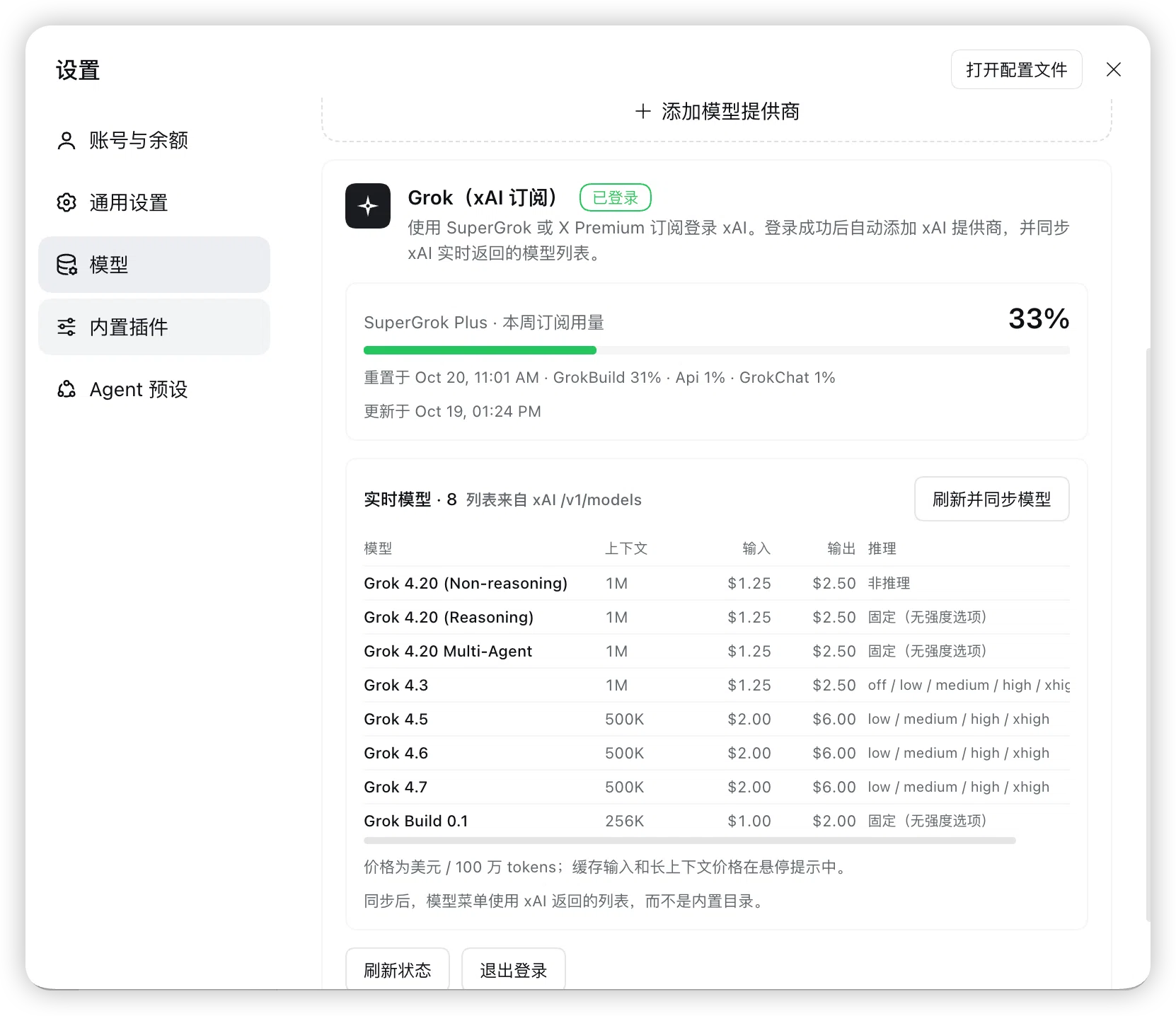
> Plan, weekly usage, live models, context, price, and reasoning efforts.
## Features
- **Subscription sign-in, no API key**: xAI device-code OAuth; the credential is stored by DSH as `llm-pi-ai/xai`.
- **Automatic provider setup**: after sign-in, the plugin adds the `xai` provider to `llm-pi-ai`; Grok models appear in the composer model menu.
- **Usage dashboard**: plan (e.g. SuperGrok Plus), weekly/monthly percentage, product breakdown, reset time, and prepaid balance.
- **Live model list**: read from `api.x.ai/v1/models` and synced into the DSH profile instead of relying on the installed catalog.
- **Context and price table**: context window, input/output price per 1M tokens; hover for cached-input and long-context prices.
- **Capability-accurate reasoning efforts**: reads `/v1/models/{id}` and maps only the efforts xAI declares; unsupported models get no fake levels.
- **Zero runtime dependencies**: plain JavaScript Host/Client halves, no build step, no npm packages.
## Requirements
- DeepSeek Harness with a Web UI profile (Desktop or `dsh web`).
- The profile must enable `llm-pi-ai`, `authorization`, `credentials`, `configEditor`, and `webServer` (the base Web profile does).
- An active **SuperGrok** or **X Premium** subscription.
- Tested on DSH `0.2.1-rc.2` Desktop; other versions may need adaptation.
## Install
There are two paths. **The recommended one is to give the Git URL to DSH**; no local clone is needed.
### Option 1: Install directly from DSH (recommended)
Copy the repository URL:
```text
https://github.com/TuDouPn/dsh-grok-xai.git
```
In a session on the target DSH profile, send this to the agent:
```text
Install this Git repository as a DeepSeek Harness plugin in the current profile and enable it:
https://github.com/TuDouPn/dsh-grok-xai.git
Check that it is a DSH bundle before installing; after installation, confirm the bundle is enabled and tell me where to open the Grok card.
```
DSH will:
1. Read the repository's `package.json` and confirm it declares `dsh.bundle.patch`;
2. install it from Git into the current profile through `plugin_manager`'s `install_bundle`;
3. add the bundle to `dsh.profile.bundles` and enable it;
4. show `@local/dsh-grok-xai` on the **Plugins** page.
The installation may require one approval (`danger-full-access` or an approval prompt). Then:
1. Open **Settings → Models**;
2. scroll to the **Grok (xAI Subscription)** card at the bottom;
3. sign in with SuperGrok / X Premium.
> This installs a Git snapshot. To update, ask DSH to reinstall the same URL or use the **Plugins** page update action. It does not follow a local `git pull`.
>
> If your DSH version's installer does not accept Git URLs, it will report that it cannot resolve the spec; use Option 2 (clone and install locally) instead.
### Option 2: Clone and install a local bundle
Use this when you want to modify the code or track `main` locally.
```bash
git clone https://github.com/TuDouPn/dsh-grok-xai.git
cd dsh-grok-xai
```
**Install from the DSH Web UI**
1. Open **Plugins** in the DSH sidebar.
2. Choose **Install** and enter the **absolute path** to the cloned directory, for example `/Users/you/code/dsh-grok-xai`. If the dialog only accepts a package name or URL, use the agent option below.
3. Approve the operation if prompted, then enable the bundle.
**Ask the DSH agent**
```text
Install the local bundle at /absolute/path/dsh-grok-xai into the current profile and enable it.
```
The agent calls `plugin_manager`'s `install_bundle` with the directory as the target.
> A local install is linked, not copied. Do not move or delete the checkout while it is installed. Installation modifies the current profile and affects every session on it.
### Open the card
Open **Settings → Models** and scroll to the **Grok (xAI Subscription)** card at the bottom.
### Verify the installation
- The **Plugins** page shows `@local/dsh-grok-xai` and it is enabled;
- **Settings → Models** shows the **Grok (xAI Subscription)** card;
- If not, refresh the page; Host code changes may require a DSH restart.
### Upgrade
- **Git URL install**: ask DSH to reinstall the same URL, or use the **Plugins** page update action.
- **Local clone install**:
```bash
git pull
```
Then re-enable the bundle in **Plugins**, or restart DSH. Host-side JavaScript changes may need a reload/restart.
### Uninstall
1. Sign out from the card (optional, deletes the local OAuth record).
2. Remove the bundle in **Plugins**.
Removing the bundle does not remove the `xai` provider from `llm-pi-ai`; delete it in **Settings → Models** or remove `providers.xai` from the profile patch if you no longer want it.
## Usage
1. Open **Settings → Models**.
2. In the **Grok (xAI Subscription)** card, click **Sign in with SuperGrok / X Premium**.
3. Open the verification link and enter the one-time code.
4. DSH shows **Signed in** and syncs the live model list.
5. Choose a Grok model in the composer model menu.
### Card actions
| Action | Effect |
|---|---|
| Sign in / Cancel | Start or cancel the device-code flow |
| Refresh | Re-read subscription usage and the live model list |
| Refresh and sync models | Read `/v1/models` plus per-model capabilities and write them into `llm-pi-ai` |
| Sign out | Delete the local `llm-pi-ai/xai` record; the xAI account is untouched |
## Usage, models, and prices
- **Plan**: `subscription_tier_display` from `cli-chat-proxy.grok.com/v1/settings`.
- **Usage**: `cli-chat-proxy.grok.com/v1/billing?format=credits` — the same source the Grok CLI uses.
- **Models**: `api.x.ai/v1/models` for IDs, context, prices, and long-context thresholds; `api.x.ai/v1/models/{id}` for capabilities.
- **Prices** are USD per 1M tokens. The card shows live values; the README snapshot may age.
- Usage is cached for 60 seconds. The plugin refreshes the OAuth token through DSH's credential store when it is near expiry.
Current snapshot (live values are in the card):
| Model | Context | Input | Output | Cached input | Long context (>200K) |
|---|---:|---:|---:|---:|---:|
| Grok 4.20 Reasoning / Non-reasoning / Multi-Agent | 1M | $1.25 | $2.50 | $0.20 | $2.50 / $5.00 |
| Grok 4.3 | 1M | $1.25 | $2.50 | $0.20 | $2.50 / $5.00 |
| Grok 4.5 | 500K | $2.00 | $6.00 | $0.30 | $4.00 / $12.00 |
| Grok 4.6 | 500K | $2.00 | $6.00 | $0.50 | $4.00 / $12.00 |
| Grok 4.7 | 500K | $2.00 | $6.00 | $0.50 | $4.00 / $12.00 |
| Grok Build 0.1 | 256K | $1.00 | $2.00 | $0.20 | $2.00 / $4.00 |
> xAI does not expose a maximum output-token field in these endpoints. Known models inherit pi-ai catalog metadata; unknown models use the route defaults.
## Reasoning efforts
| Model | Selectable efforts | Notes |
|---|---|---|
| Grok 4.3 | `off / low / medium / high / xhigh` | `off` maps to API `none` |
| Grok 4.5 / 4.6 / 4.7 | `low / medium / high / xhigh` | `none` is rejected |
| Grok 4.20 Reasoning | Fixed, no effort options | API rejects `reasoningEffort` |
| Grok 4.20 Non-reasoning | Non-reasoning | No effort options |
| Grok 4.20 Multi-Agent | Fixed, no effort options | xAI declares no switchable efforts |
| Grok Build 0.1 | Fixed, no effort options | API rejects `reasoningEffort` |
“Fixed” does not mean reasoning is disabled. Grok 4.20 Reasoning / Multi-Agent still reason with the model default; forcing a guessed effort can produce HTTP 400.
## How it works
```mermaid
flowchart LR
U[User] --> UI[DSH Web UI
Settings → Models]
UI --> C[client.js
Grok card]
C -->|same-origin JSON
/grok-auth/*| H[index.js
Host half]
H -->|ctx.authorization| A[DSH authorization
llm-pi-ai/xai]
A --> S[(DSH credential store)]
H -->|ctx.configEditor| P[llm-pi-ai config
providers.xai]
H -->|Bearer access token| X[xAI
/v1/models
/v1/models/{id}]
H -->|Bearer access token| B[Grok CLI proxy
/v1/billing
/v1/settings]
P --> M[Model menu]
```
The plugin does not depend on Grok Bot or any Anysphere runtime; it uses DSH's own pi-ai xAI adapter and xAI OAuth.
## Security and privacy
- Tokens are stored by DSH `authorization`/`credentials` as `llm-pi-ai/xai`; the plugin never logs or returns them.
- `/grok-auth/*` routes require a same-origin `Origin`/`Host` match.
- No telemetry.
- Does not read Grok Bot/Cursor data directories, browser cookies, or the keychain.
- Billing/settings endpoints are undocumented and may change; use them only within your subscription terms.
Report security issues privately via [SECURITY.md](SECURITY.md).
## Limitations
- Requires an active SuperGrok / X Premium subscription.
- Undocumented billing/settings endpoints may change.
- No maximum output-token metadata from xAI.
- Grok 4.20 Reasoning / Multi-Agent / Build 0.1 have no switchable reasoning effort.
- Prices, models, and context windows change over time.
- Local linked bundle: moving/deleting the checkout breaks the profile dependency.
- Primarily verified on DSH Desktop `0.2.1-rc.2`.
## Troubleshooting
| Symptom | Fix |
|---|---|
| `Provider is not configured: xai` | Complete subscription sign-in; verify the `llm-pi-ai/xai` record |
| Signed in but model unavailable | Ensure the `xAI (Grok)` provider exists in Settings → Models |
| `UNSUPPORTED_REASONING_EFFORT` | Refresh and sync models; choose a supported level |
| Credential expired | Sign out and sign in again |
| New model missing | Refresh and sync models |
| Card does not appear | Enable the bundle, refresh the page, restart DSH if needed |
## Development
```bash
node --check index.js
node --check client.js
```
No build, no dependencies. See [README.md](README.md) for the full Chinese documentation, endpoint list, and development notes.
## Grok Bot
Grok Bot is a separate desktop agent with no public local API/CLI. The research note on its hooks, deep links, MCP connectors, and portable capabilities is in [docs/grok-bot-capabilities.md](docs/grok-bot-capabilities.md). It is a roadmap/exploration document, not part of this plugin's runtime.
## Roadmap
- [x] Subscription sign-in
- [x] Usage, plan, reset time
- [x] Live models, context, price
- [x] Capability-accurate reasoning efforts
- [ ] RPM/TPM rate-window probe
- [ ] Image/video/voice tools
- [ ] Grok Bot hook bridge
- [ ] MCP connector presets
- [ ] Tests and CI
## Contributing
Read [CONTRIBUTING.md](CONTRIBUTING.md). Never paste tokens, `~/.dsh/.credentials.yaml`, or personal data into issues or pull requests.
## License
[MIT](LICENSE) © 2026 dsh-grok-xai contributors
## Acknowledgements
- [DeepSeek Harness](https://github.com/deepseek-ai/deepseek-harness)
- [pi-supergrok-usage](https://github.com/MatheusBBarni/pi-supergrok-usage) and [openusage](https://github.com/openusage-community/openusage)
- [xAI Models REST API](https://docs.x.ai/developers/rest-api-reference/inference/models) and [xAI Reasoning](https://docs.x.ai/developers/model-capabilities/text/reasoning)